
Unload Model Buttons
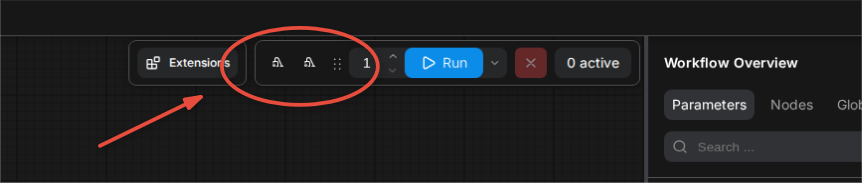
Adds 'Unload Models' and 'Unload Models & Execution Cache' buttons back to the ComfyUI top bar.
Nodes (1)
ComfyUI Memory Tools
(formerly comfyui-unload-buttons)
Free VRAM/RAM in ComfyUI without restarting:
- Unload Models button — frees loaded models (VRAM/RAM)
- Unload Models & Execution Cache button — frees models + clears the execution cache
- Unload Models node (
utils/memory) — same thing, but as a node you put at the end of a workflow so memory is freed automatically after every generation
Icon-only buttons in the top bar, with tooltips. No text clutter.
Why this exists
This was vibe coded — a personal itch, not a big project.
I run other things on my server alongside ComfyUI, and when I'm done generating I want to free up memory without restarting ComfyUI. ComfyUI-Manager used to have "Unload Models" and "Unload Models and Execution Cache" buttons in its top bar, then they got removed. I want them back.
Yes, you can bind shortcuts for these instead. But that's bad UX in my book — I will forget what a shortcut does. I won't forget what a button does when it has a tooltip.
Install
- ComfyUI-Manager: Custom Nodes Manager → search "Memory Tools"
- comfy-cli:
comfy node install comfyui-memory-tools - Manual:
git clone https://github.com/rghvdberg/comfyui-memory-toolsintocustom_nodes/, restart ComfyUI.
The node
Unload Models lives in the utils/memory category. It runs at the end of
every generation (it's an output node) and has:
- a
modewidget:unload modelsorunload models + execution cache - an optional
any_inputpassthrough, so you can chain it after e.g. a VAE Decode and forward the image to other nodes
Note: unloading models means the next generation pays a model-reload cost. That's the tradeoff for having free memory between runs.
License
MIT