
Reference Chain Conditioning
Chain multiple images as reference conditionings for Flux Klein, Kontext etc. with one node
Nodes (2)
ComfyUI-ReferenceChain
A ComfyUI custom node that simplifies working with edit models (like Flux-2-klein) that accept multiple reference images. Instead of chaining multiple "Reference Latent" nodes together, this node lets you add any number of images through a single, easy-to-use interface.
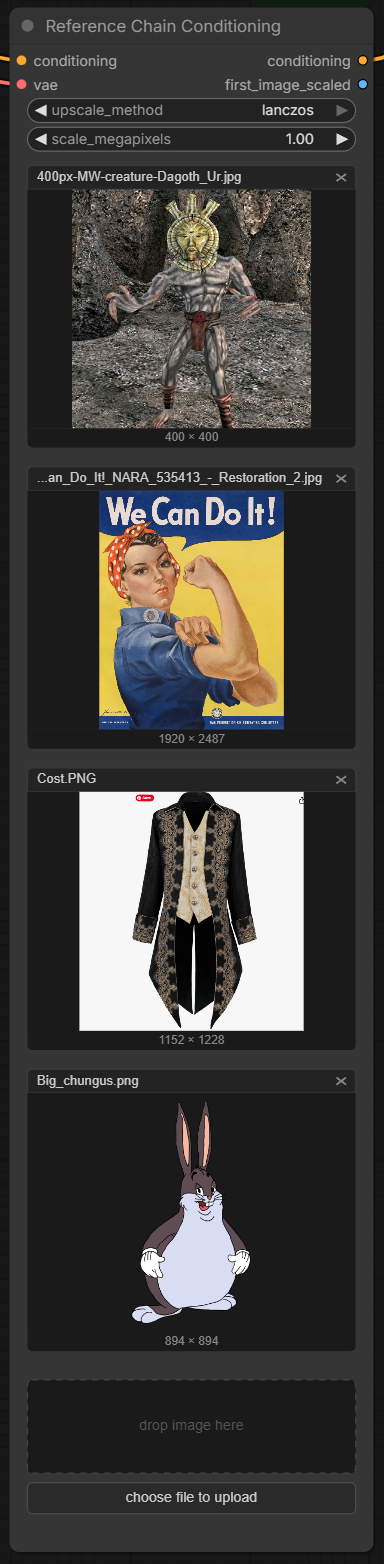
Features
- Multiple image input - Add as many reference images as you need through a visual list interface
- Drag and drop - Drop images directly onto the node
- Built-in scaling - Automatically scales images to target megapixels before encoding
- API-friendly - Includes a Base64 variant for programmatic usage
- Native styling - Matches ComfyUI's look and feel
Nodes
Reference Chain Conditioning
The main node for interactive use. Add images through the UI, and they'll be automatically processed and chained into a single conditioning output.
Inputs:
conditioning- Input conditioning to append reference latents tovae- VAE model for encoding images to latentsupscale_method- Scaling algorithm (nearest-exact, bilinear, area, bicubic, lanczos)scale_megapixels- Target size for images before encoding (default: 1.0 MP)
Outputs:
conditioning- Modified conditioning with all reference latentsfirst_image_scaled- The first image after scaling (useful for preview)
Reference Chain Conditioning (Base64)
Same functionality but accepts base64-encoded images. Ideal for API workflows.
Input format:
["data:image/png;base64,iVBORw0KGgo...", "iVBORw0KGgo..."]
Or a single base64 string without JSON array wrapper.
Installation
Via ComfyUI Manager
Search for "ReferenceChain" in the ComfyUI Manager and click Install.
Manual Installation
cd ComfyUI/custom_nodes
git clone https://github.com/remingtonspaz/ComfyUI-ReferenceChain.git
Restart ComfyUI after installation.
Usage
- Add the Reference Chain Conditioning node to your workflow
- Connect your conditioning and VAE inputs
- Click "choose file to upload" or drag images onto the node
- Connect the output conditioning to your sampler
The node processes images in order, scaling each to the target megapixels, encoding through the VAE, and appending to the conditioning - equivalent to manually chaining multiple Reference Latent nodes.
Requirements
No additional dependencies - uses only libraries already included with ComfyUI (numpy, torch, Pillow).
License
MIT