
ComfyUI-FileHub
A unified file loader and saver for ComfyUI that fixes three long-standing pain points: cross-source navigation in one node, persistent uploads, and saving to input directory.
Nodes (2)
ComfyUI-FileHub
A unified file loader and saver for ComfyUI that fixes three long-standing pain points:
- Cross-source navigation in one node. Browse
input/,output/, andtemp/directories through the same node. No more separate "load from input" / "load from output" / "load from temp" nodes. - Persistent uploads. Drag a file onto the loader and it's uploaded to
input/(where it survives), nottemp/(where the stock LoadImage upload widget puts it and you lose it on the next swap). - Save to
input/, not justoutput/. Promote any image to the input directory in one click — no download / re-upload round-trip needed when working on a remote ComfyUI instance.
Nodes
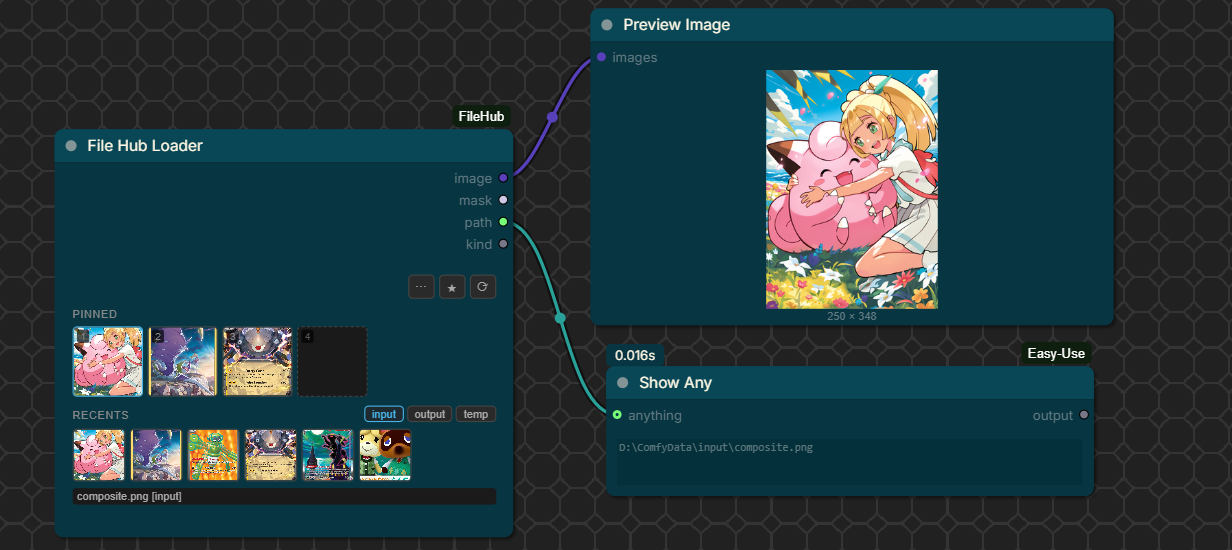
File Hub Loader
A single loader node with:
-
Pin slots (4 by default) for files you want to flip between quickly. Each pin is sourceable from
input/,output/, ortemp/. Click to activate; the active pin is what gets loaded. -
Recents row (6 by default) showing the most recent files in the active source directory. Auto-refreshes after every generate via
execution_success. -
Source tabs (
input·output·temp) on the recents header, controlling which directory the recents row shows and which the browse modal opens to by default. -
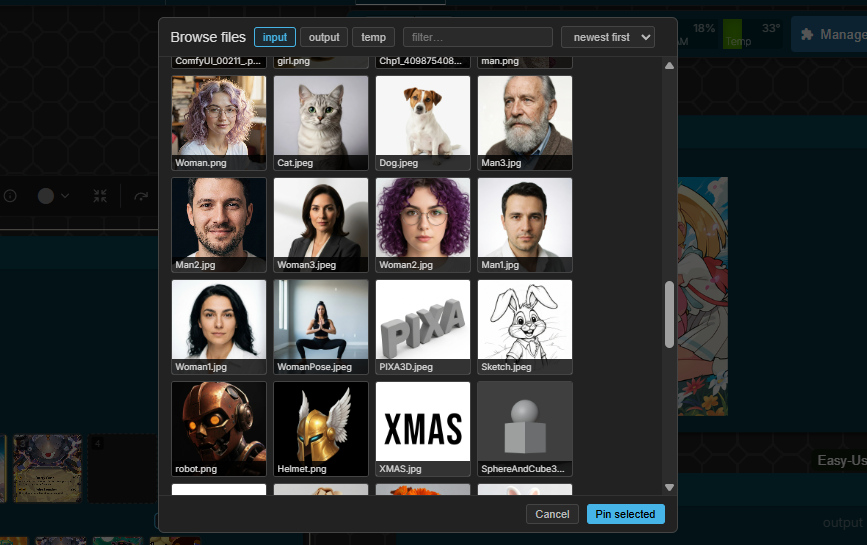
Browse modal with thumbnail grid, mtime / name sort, search filter, subfolder navigation, and pagination (handles dirs with thousands of files without choking).
-
Drag-drop file from your desktop onto a pin slot — uploads to
input/and pins it. -
Right-click a pin for a context menu: replace from filesystem, browse, promote to input/, soft-delete, unpin.
Outputs:
IMAGE— the loaded image (empty 64×64 placeholder if no selection)MASK— alpha channel as maskpath(STRING) — absolute path of the loaded file (useful for downstream video / audio nodes)kind(STRING) —image/video/audio/other
File Hub Saver
A drop-in for SaveImage with extra destinations:
destination—output(default),input, orbothtarget loader id+slot— optionally pushes the saved file straight into aFile Hub Loader's pin slot via the existing ComfyUI websocket. Lets you wire a "save → next-run pinned input" feedback loop without manual download / upload.
Pin sets (global, named)
Click the ★ button in the loader to open the pin-set modal. Save the current pin layout under a name; load it back into any other loader. Stored as JSON at <user_dir>/default/filehub_pinsets.json.
REST endpoints
The node ships a small set of HTTP routes under /filehub/:
| Route | Method | Purpose |
|---|---|---|
| /filehub/list | GET | List files in input / output / temp, paginated. Params: type, subfolder, kinds=image,video,audio, sort=mtime|name, limit, offset. |
| /filehub/promote | POST | Copy a file from output/ or temp/ into input/. JSON body: {from_type, from_subfolder, from_filename, to_subfolder?, new_name?, overwrite?}. |
| /filehub/move | POST | Rename / relocate a file within one source dir. |
| /filehub/delete | POST | Soft-delete (moves into <source>/.filehub_trash/). Accidentally deleted? It's still there. |
| /filehub/poster | GET | Video first-frame webp poster (uses ffmpeg if available, cached on disk). |
| /filehub/pinsets, /filehub/pinsets/{name} | GET / PUT / DELETE | Named pin-set CRUD. |
All routes use the same path-traversal guards as ComfyUI core's /upload/image.
Install
Clone into your ComfyUI custom_nodes/:
cd ComfyUI/custom_nodes
git clone https://github.com/redswoop/ComfyUI-FileHub.git
No extra Python dependencies. ffmpeg on PATH is optional — without it, video files fall back to an icon thumbnail.
Restart ComfyUI. Search the node menu for "File Hub Loader" or "File Hub Saver".
Notes
- Tested on ComfyUI 0.19.x with frontend 1.42.x.
- Pin state lives in the loader node's hidden
selectionwidget and serializes with the workflow JSON, so save/load works. - The package raises PIL's
MAX_TEXT_MEMORYto 512 MB at import to prevent ComfyUI-saved PNGs (which embed full prompt+workflow JSON in tEXt chunks) from blowing up/viewthumbnails. - The loader UI is fully canvas-rendered (pin tiles, recents row, hamburger action menu, source label) via
onDrawForegroundandonMouseDownhit-testing — no DOM widgets. This is why it z-orders correctly with neighboring nodes and matches the active ComfyUI theme. The trade-off is that thumbnails are loaded via JSImageobjects and drawn into the canvas (still cached, still served by/view?preview=webp;90).
License
MIT