
ComfyUI-DGXSparkFastSafetensorsLoaders
Fast safetensors loaders for DGX Spark that use GPUDirect for zero-copy transfers, supporting model and checkpoint loading with VRAM management.
Nodes (5)
The DGX Spark checkpoint loader that stops double-buffering your RAM
Get the type dropdown right or watch it silently break
The Load Diffusion Model that doesn't spike to 2x RAM on a DGX Spark
The DGX Spark unloader nobody realizes they need
The small-file loader that still matters
ComfyUI-DGXSparkFastSafetensorsLoaders
Use at your own risk. No stability guarantee
An extended version of ComfyUI-DGXSparkSafetensorsLoader by Phaserblast. This repo adds more nodes to support drop-in alternatives for Checkpoint Loader, CLIP Loader and VAE Loader, as well as a Model Unloader to free VRAM without the need to restart the server.
This custom node collection loads .safetensors model files into ComfyUI using the fastsafetensors library, which performs fast, zero-copy transfers from storage directly to VRAM via NVIDIA GPUDirect. It is optimized for the NVIDIA DGX Spark's unified memory architecture, where the standard Hugging Face safetensors library can be slow and may transiently use up to 2× the model's size in RAM during loading.
In my workflows with Qwen Image Edit, it reduces loading time to ~5s total.
Nodes
| Node | Description |
|---|---|
| DGX Spark Safetensors Loader | Loads a diffusion model (UNet / DiT) from diffusion_models/ |
| DGX Spark Checkpoint Loader | Loads a full checkpoint (model + CLIP + VAE) from checkpoints/ |
| DGX Spark CLIP Loader | Loads a CLIP / text encoder from text_encoders/ |
| DGX Spark VAE Loader | Loads a VAE from vae/ |
| DGX Spark Model Unloader | Explicitly frees fastsafetensors GPU memory for a loaded model |
All loader nodes cache loaded models in a global registry so re-running a workflow does not reload the file from disk. The DGX Spark Model Unloader node allows explicit VRAM reclamation without restarting ComfyUI. This addresses the memory-management limitation present in the original implementation.
Usage
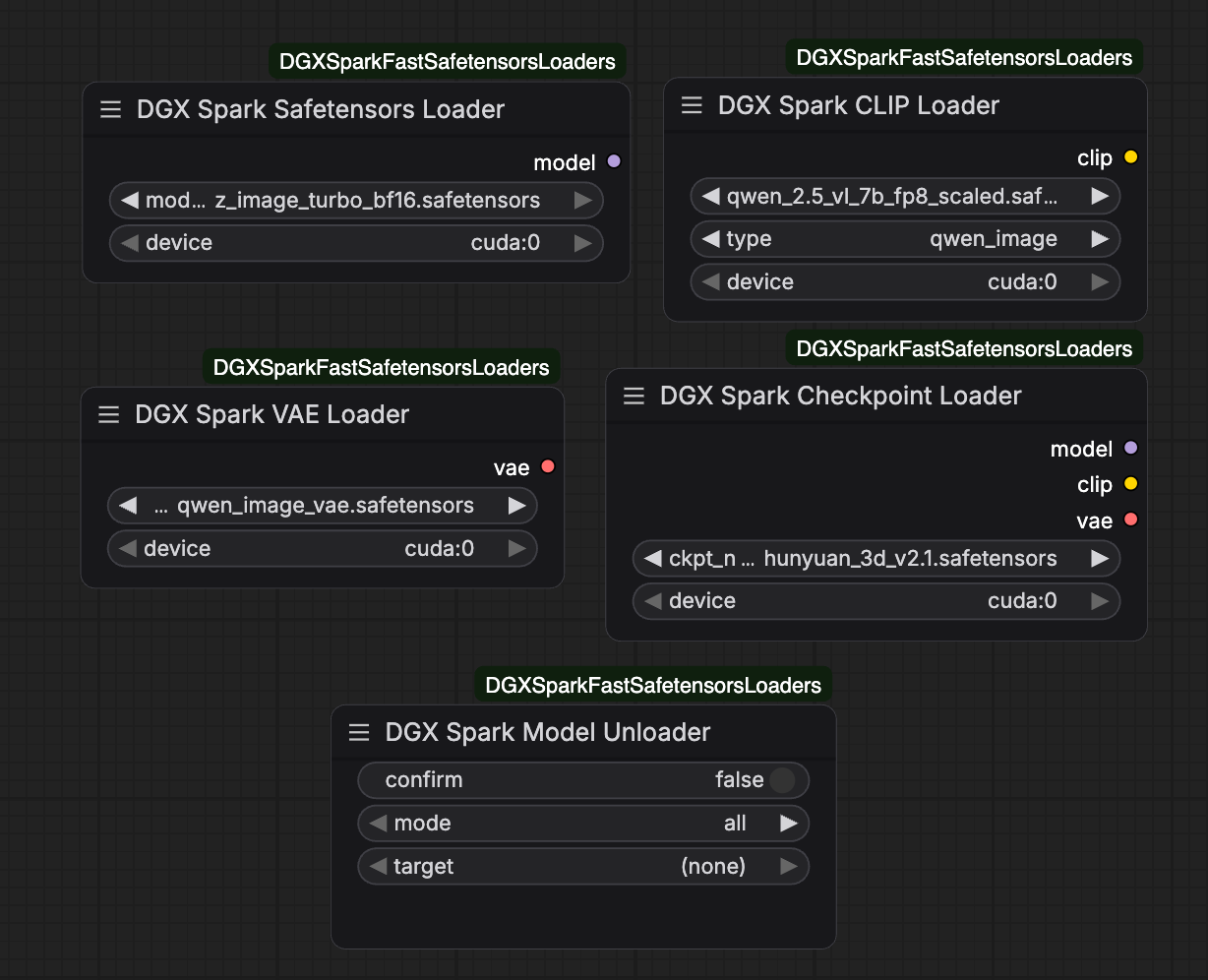
Safetensors Loader, Checkpoints Loader, CLIP Loader and VAE Loader behave similarly to their official counterparts, except that their memory are not managed by ComfyUI. Thus, you can directly replace the original loader(s) in your workflow with them as needed.
If you want to unload models loaded by these fastsafetensors loaders, add a Model Unloader to your workflow, enable confirm and run the unloader node. To unload certain model, you should change mode to selected and choose your target model in target. You may need to refresh your page for loaded models to appear in the drop-down menu.
Installation
cd ComfyUI/custom_nodes
git clone https://github.com/redstonewhite/ComfyUI-DGXSparkFastSafetensorsLoaders.git
Install the dependency (activate your venv first if applicable):
pip install fastsafetensors
Restart ComfyUI. The nodes appear in the loaders category.
Notes
- Tested with
--disable-mmapand--gpu-onlyflags, though they might be unnecessary and irrelevant. - Should support quantized model compared to Phaserblast's implementation. If you encounter any problem, please raise an issue.
Known Issues
- ~~All loaders except Safetensor Loader will double the memory usage. But they do significantly reduce the model loading time.~~ Fixed.
Acknowledgements
Original DGXSparkSafetensorsLoader node and idea by Phaserblast — ComfyUI-DGXSparkSafetensorsLoader, licensed under the Apache License 2.0.
Custom Loader in Workflow?
If your workflow contains custom nodes that does not support an external loader, you may try the following to integrate fastsafetensors to your ComfyUI.
- Go to
/path/to/your/ComfyUI, findutils.pyundercomfy. Open it, and make the following edit as noted:
def load_torch_file(ckpt, safe_load=False, device=None, return_metadata=False):
    if device is None:
        device = torch.device("cpu")
    metadata = None
    if ckpt.lower().endswith(".safetensors") or ckpt.lower().endswith(".sft"):
        try:
            if comfy.memory_management.aimdo_enabled:
                sd, metadata = load_safetensors(ckpt)
                if not return_metadata:
                    metadata = None
            else:
                # =========== Begin Insertion ===========
                with fastsafe_open(filenames=[ckpt], nogds=False, device=device) as f:
                    sd = {}
                    for k in f.keys():
                        tensor = f.get_tensor(k).clone().detach()
                        sd[k] = tensor
                    if return_metadata:
                        metadata = f.metadata()
                # ============ End Insertion ============

                # ======= Comment Out Followings =======
                # with safetensors.safe_open(ckpt, framework="pt", device=device.type) as f:
                #     sd = {}
                #     for k in f.keys():
                #         tensor = f.get_tensor(k)
                #         if DISABLE_MMAP:  # TODO: Not sure if this is the best way to bypass the mmap issues
                #             tensor = tensor.to(device=device, copy=True)
                #         sd[k] = tensor
                #     if return_metadata:
                #         metadata = f.metadata()
                # ======= Comment Out Above =======

        # ========== Rest Untouched ===========
        except Exception as e:
            if len(e.args) > 0:
                message = e.args[0]
                if "HeaderTooLarge" in message:
                    raise ValueError("{}\n\nFile path: {}\n\nThe safetensors file is corrupt or invalid. Make sure this is actually a safetensors file and not a ckpt or pt or other filetype.".format(message, ckpt))
                if "MetadataIncompleteBuffer" in message:
                    raise ValueError("{}\n\nFile path: {}\n\nThe safetensors file is corrupt/incomplete. Check the file size and make sure you have copied/downloaded it correctly.".format(message, ckpt))
            raise e
        # And more ...
The above code is not fully tested, but works fine on my machine. USE THEM AT YOUR OWN RISK