
ComfyUI_SmartModelLoader_Nova
A ComfyUI extension with 14 custom nodes.
Nodes (14)
Finally a text encoder loader that doesn't cap you at two rows
Turning prompt strength into twelve numbers
The version where the prompt box is gone
The negative prompt that says nothing, on purpose
The escape hatch when a PIPE is too clever for the node you need
The sampler with no MODEL input — and why that's the point
The half of the LoRA stack that actually touches your model
Sixty rows, three modes, and no more chain of LoraLoader nodes
The sigmas your resolution actually needs
One node for the model, the latent and the sampler — and one wire out
Your prompt is JSON, and the format is not negotiable
Prompts, reference images, and the latent that has to match
Right codec, wrong image — the 15 seconds that saves you a wasted batch
One node for the pair that video models quietly need
ComfyUI Smart Model Loader Nova
This independent repository provides a pipe-based diffusion workflow with compact controls and collapsible option bars in classic canvas and Nodes 2.0. The design is adapted from DaSiWa, using dynamic controls to reduce widget and layout overhead.
Choose Settings → SML2 → Appearance → Node design for Neutral (default), Jade,
Ocean, Amethyst, Amber or a custom JSON theme. Jade, Ocean, Amethyst and Amber
share a dark background with different control colors; Neutral keeps its lighter
gray background. Neutral Jade, Neutral Ocean, Neutral Amethyst and Neutral
Amber combine that lighter background and title with colored controls. The selection covers
shared panels and Download Manager, saves in config.json and loads on startup.
See Node designs for theme creation, reload and background precedence.
Bundled themes are extracted once from .defaults/themes/ into the user-owned
themes/ folder. Updates preserve edits and deletions.
Find this pack's nodes under 🌒 Smart Model Loader Nova in ComfyUI's Add Node menu, separate from the original 🌒 Smart Model Loader category.
The main nodes are Smart Model Loader [SML2], CLIP Loader [SML2], LoRA Stack [SML2], LoRA Stack Apply [SML2], and KSampler Pipe [SML2]. Smart Model Loader can be configured for model-only loading.


-76b900)

Visual tours
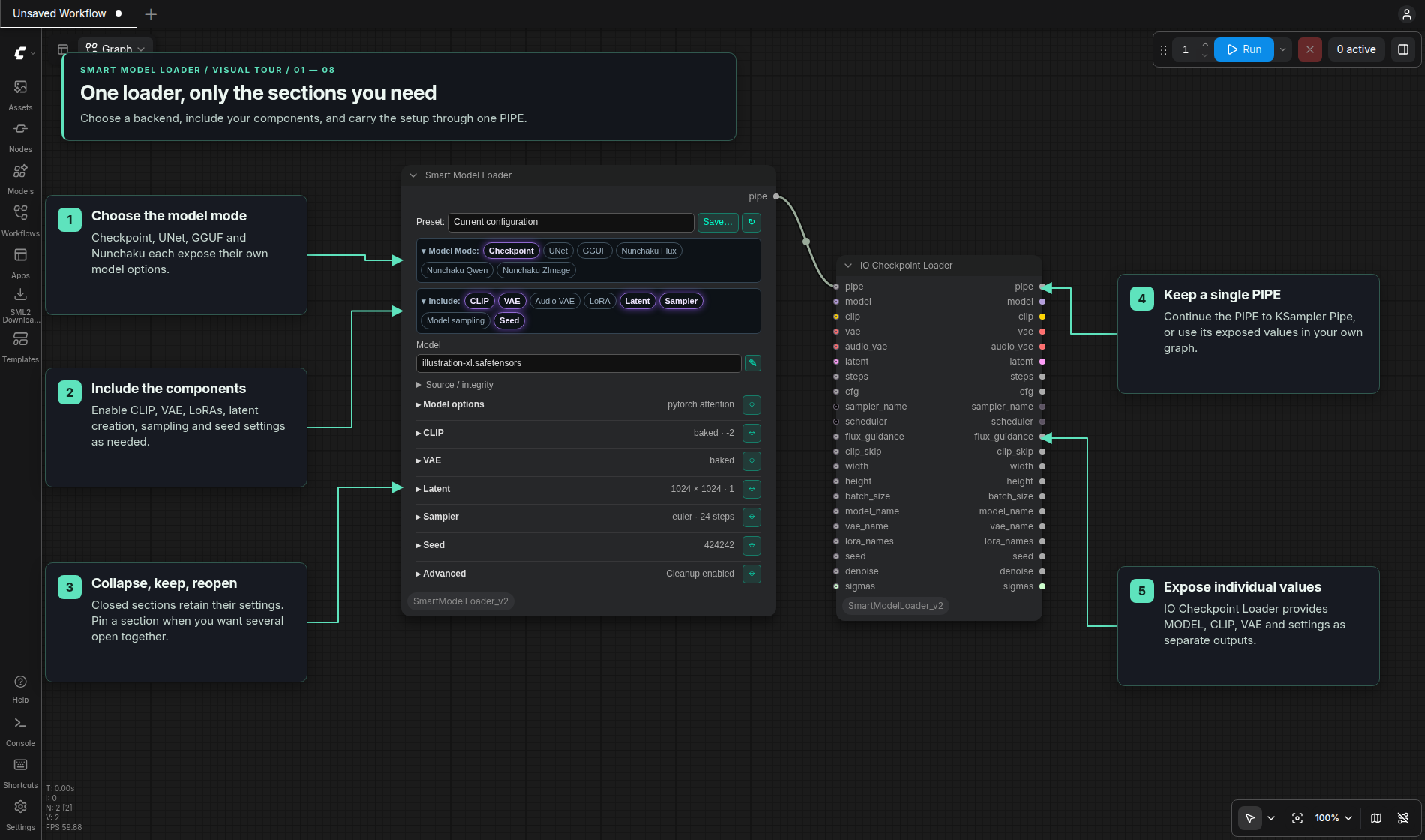
The annotated screenshots use current Nodes 2.0 controls, with Jade callouts in the Eclipse tour style. The same controls are available in classic canvas.
| Tour | What it shows | | --- | --- | | Smart Model Loader | Model modes, local files, encoders, latent sizing, sampler/seed controls and presets | | Source / integrity → Download Manager | Start with only an AIR, choose and start a download, then receive the filename and verified hash automatically | | LoRA Stack | Compact rows, Apply wiring, Model/CLIP/Audio strengths and downloading into an AIR-only row |
Loading and sampling
- Smart Model Loader supports checkpoint, UNet, GGUF and Nunchaku models, with optional encoders, VAEs, LoRAs, latent creation, sampler settings, model sampling and seeds. Include selects the sections; collapsed sections retain their settings. IO Checkpoint Loader exposes values from its PIPE as direct outputs.
- CLIP Loader has ordered dynamic encoder rows,
architecture selection, local integrity and a comma-separated
clip_namesoutput. It has no presets or fixed row-count cap. - LoRA Stack and Apply provide up to 60 compact rows, Model / CLIP split / Audio (LTX) strengths, saved setups, and existing Nunchaku support. Empty slots are ignored.
- KSampler Pipe keeps sampler and seed controls visible with independent Use pipe settings, Tiled decode, Alpha and Preview buttons. Alpha defaults off for RGB output; enable it to preserve decoded transparency. MODEL/VAE come from the PIPE. The final decoded image replaces live previews when execution finishes.
Presets and missing files
Smart Loader and LoRA presets apply only when selected. Their panels support
search, a remembered save name, overwrite and deletion. Workflows retain their
own settings. Smart Loader presets exclude denoise, Latent, Advanced settings and seeds.
Smart Loader presets use templates/; LoRA presets use templates/lora-stack/.
The pack includes 22 model presets. First setup copies missing presets into
templates/ and records completion in .eclipse_loader_data_migrated. Existing
user presets are preserved. Later restarts and updates do not repeat extraction
or restore deleted presets. To add or restore a bundled preset manually, copy its
.defaults/templates/NAME.json.example file to templates/NAME.json.
Copy old Smart Loader template JSON files into templates/ and select them to
import their settings. A reminder prompts you to save and explicitly overwrite
the file in the new format; loading alone preserves the original.
Missing filenames remain visible. Source / integrity stores CivitAI AIR or Hugging Face references and expected hashes for each model, encoder, VAE or LoRA. You can leave the filename and hash empty and enter only the AIR or HF repo ID. Click Open in Download Manager, select the file, Add Selected to Queue, then Start Selected. Verified completion fills the initiating field with the actual filename, source and SHA-256. No preset is required, and closing the manager does not prevent the return while the browser session remains open.
Selecting a local file also reads its existing source/hash sidecars. Other rows and loaders keep their selections. Save or overwrite a preset explicitly when you want to retain an updated setup. Loading a workflow or preset does not start downloads. Follow the Source / integrity tour.
Included nodes
| Group | Node | Purpose |
| --- | --- | --- |
| Loader | Smart Model Loader [SML2] | Model-only or complete PIPE configuration |
| Loader | CLIP Loader [SML2] | Ordered external encoders and filenames |
| Loader | VAE Loader [SML2] | External image/video VAE |
| Loader | VAE Loader Video+Audio [SML2] | Separate video and audio VAEs |
| Conditioning | CLIP Text Encode [SML2] | Scheduled conditioning |
| Conditioning | CLIP Text Encode (Advanced) [SML2] | Multipliers and Krea2 layer rebalancing |
| Conditioning | Text Encode Qwen Image 2.1 [SML2] | Qwen prompts and image references |
| Conditioning | Text Encode MiniMax Music 3 [SML2] | Caption/lyrics JSON and native Music 3 controls |
| Conditioning | Conditioning Zero Out [SML2] | Clear or truncate conditioning |
| Pipe | IO Checkpoint Loader [SML2] | Merge and expose PIPE values |
| Sampler | KSampler Pipe [SML2] | Sample, decode, preview and update PIPE |
| Sampler | Qwen Image 2.1 Scheduler [SML2] | Resolution-dependent SIGMAS |
| Tools | LoRA Stack [SML2] | Ordered LoRA setups and presets |
| Tools | LoRA Stack Apply [SML2] | Apply Model/CLIP or LTX strengths |
| Loader | Nunchaku PuLID Loader [SML2] | Load a Nunchaku Flux PuLID pipeline |
| Tools | Nunchaku PuLID Apply [SML2] | Apply PuLID identity guidance |
Every node in this pack uses a unique [SML2] ID, so both loader packs can be
installed together with separate menus. Existing workflow nodes with original-pack
IDs continue to belong to the original pack; add their [SML2] counterparts from
the Nova menu when switching a workflow. PuLID requires its compatible optional
dependencies. LTX text projections are supported through
Smart Model Loader's External + Model File CLIP source.
Installation
From your ComfyUI installation:
cd custom_nodes
git clone https://github.com/r-vage/ComfyUI_SmartModelLoader_Nova.git
cd ComfyUI_SmartModelLoader_Nova
python -m pip install -r requirements.txt
Restart ComfyUI, then open Add Node → Smart Model Loader Nova. Settings appear
under SML2 → General and SML2 → Appearance, using SML2.* IDs.
Run the install command with ComfyUI's own Python environment. The requirements
include gguf>=0.13.0,<0.20 for the bundled GGUF loader, packaging for its
PyTorch version checks, and transformers, sentencepiece and protobuf for
GGUF tokenizer conversion. The shared runtime dependencies also come from
ComfyUI; use ComfyUI's existing PyTorch/CUDA build. GGUF's ComfyUI integration
ships in extern/gguf and uses the separate gguf Python package to read files.
Nunchaku is optional; install a build compatible with your PyTorch and CUDA versions separately. PuLID additionally needs InsightFace, facexlib, timm, OpenCV and exactly one compatible ONNX Runtime distribution. These optional dependencies are kept out of the standard installation. See the CUDA troubleshooting guide for ONNX Runtime setup. Standard checkpoint and UNet workflows do not need Nunchaku.
Compatibility and ownership
- The Nova folder/repository name keeps existing
[SML2]workflows, settings and API names intact. If you rename an existing checkout, restart ComfyUI and reload the browser so its extension URLs use the new folder. - Smart Model Loader, CLIP Loader, LoRA Stack and KSampler Pipe use the shared DOM design and structured configuration saved with the workflow.
- Importing a v1 template converts its settings, not the nodes in an old
workflow. Use the registered
[SML2]nodes when rebuilding those workflows. - The pack owns
/smart-model-loader-v2/...routes, its privateconfig.json, and its Download Manager queue. Structured editor routes are under/smart-model-loader-v2/v2/...; progress and notification events also use thesmart-model-loader-v2prefix. - First-start migration can copy missing templates from Eclipse or
models/smart_loader_templates, relevant Eclipse settings, and an absent Download Manager queue. Originals are not moved or deleted. Templates from the original Smart Model Loader repository should be copied intotemplates/manually and selected as described above. - Optional Eclipse nodes—Context Image, Generation Data, generic channel pipes, Concat Pipe Multi, Smart Sampler Settings, Save Images, Kargim, and Conditioning Passer—can consume the same PIPE contract.
Guides
- CLIP Loader
- LoRA Stack and visual tour
- KSampler Pipe
- Smart Model Loader reference
- Component loaders
- Pipeline nodes
- Nunchaku PuLID CUDA troubleshooting
- Source / integrity and Download Manager
- Security model
For bugs and feature requests, use the GitHub issue tracker.