
ComfyUI Smart Model Loader
Complete ComfyUI diffusion pipeline with secure model loading, text conditioning, pipe sampling, and verified downloads.
Nodes (16)
Stack 1–4 text encoders without the tangle
Krea2 tap balancing, actually explained
The standard encoder with one deliberate quirk
The quiet node behind 'true darks'
Sample, decode, and update the pipe in one go
Unpack, override, and merge the pipe
The other half of the Lora Stack — where the LoRAs actually get applied
One node to manage all your LoRAs, with per-LoRA toggles
The anti-spaghetti way to load a UNet
The same loader, one wire instead of five
The sigma curve BasicScheduler won't build for you
Smart Model Loader [Eclipse]
MiniMax Music 3 Text Encode
Text Encode Qwen Image 2.1 has no prompt box, and that's the point
The small node that fixes washed-out colors
Both LTX2 decoders in one node
ComfyUI Smart Model Loader
A complete, pipe-first diffusion workflow for ComfyUI: load models, build text conditioning, sample, decode, and acquire verified model files without turning your canvas into a wall of connections.
Smart Model Loader includes Nodes 2.0-ready nodes, including the workflow-compatible LoRA Stack and Nunchaku PuLID tools. ComfyUI Eclipse is optional.
Older workflows and generated images using Smart Model Loader v2 [Eclipse] or
IO Checkpoint Loader v2 [Eclipse] import automatically into the current nodes,
including inside subgraphs. Saved values and connections are retained, and the
original file stays unchanged. Save the loaded workflow to keep the updated IDs.
Why use it?
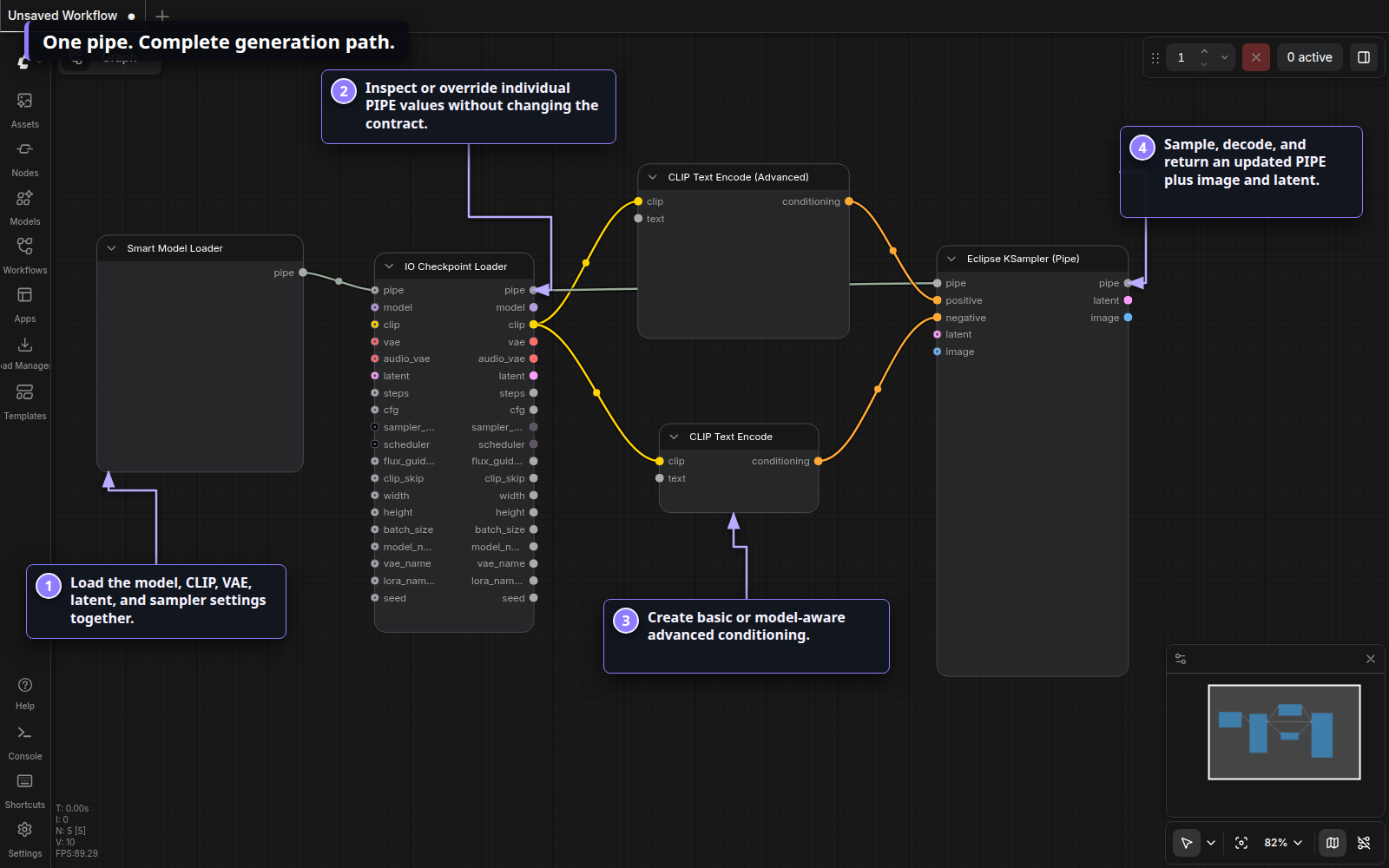
- One stable PIPE connection carries the model, CLIP, VAE, latent, dimensions, sampler settings, seed, and names.
- One adaptive loader supports checkpoints, UNets, Nunchaku, and GGUF while showing only the controls you enable.
- Matched Nunchaku tools keep LoRA and PuLID operations on the same vendored wrapper implementation used by the loader.
- A complete generation path includes basic and advanced CLIP encoding, model-aware conditioning cleanup, pipe inspection, sampling, and VAE decode.
- Verified acquisition inspects exact CivitAI or Hugging Face files before adding them to a persistent download queue.
- Workflow compatibility preserves the historical
[Eclipse]node IDs, so existing workflows load without node replacement.
Visual tour
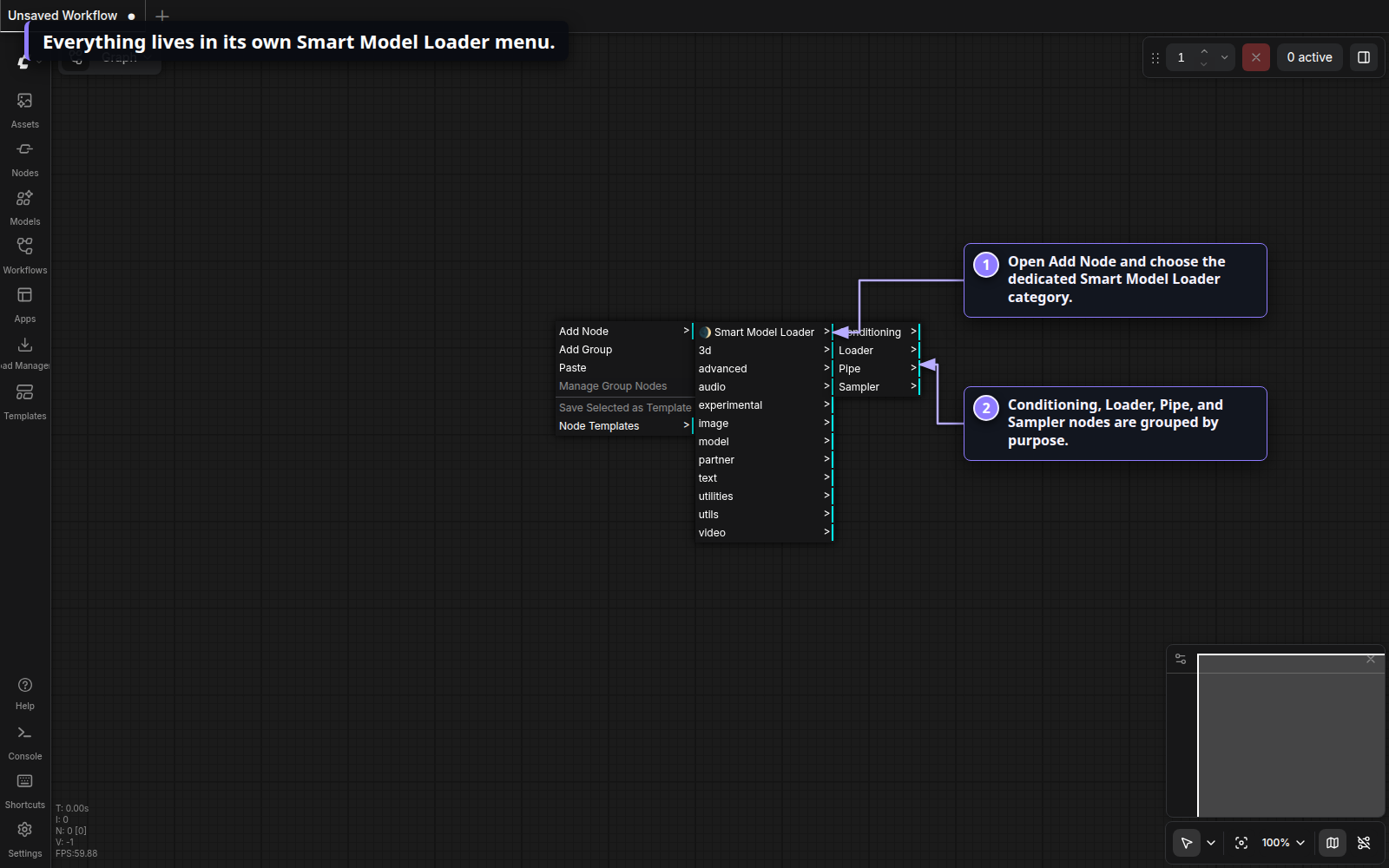
Find every node in one menu
The pack has its own top-level Smart Model Loader category. Nodes are grouped into Conditioning, Loader, Pipe, Sampler, and Tools submenus.
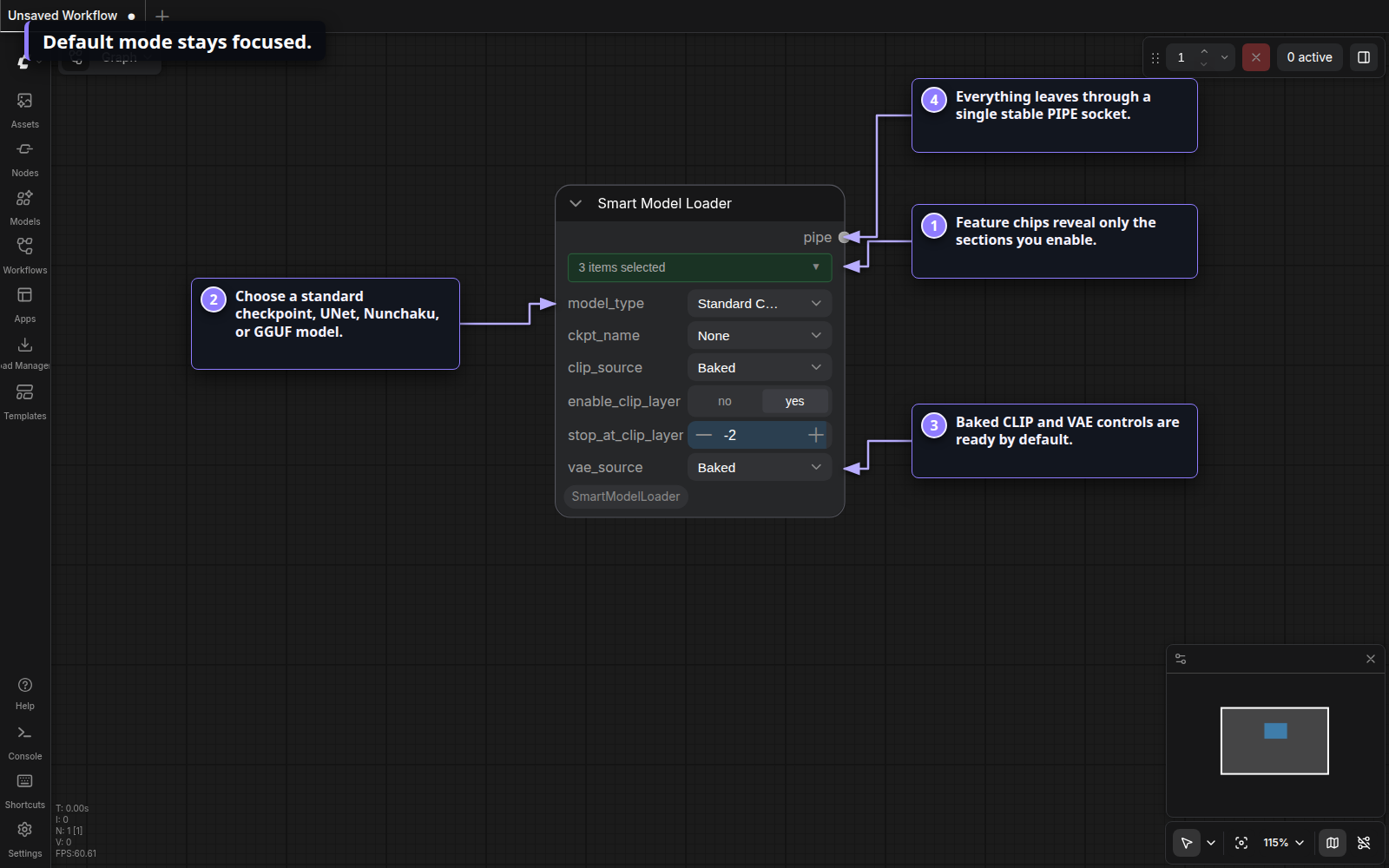
Start compact
The default Smart Model Loader exposes the common checkpoint path: model type, baked CLIP, baked VAE, memory cleanup, and one PIPE output.
Open the chip bar
The feature bar controls the node's optional sections. Selected chips reveal their widgets immediately; inactive sections stay out of the way.
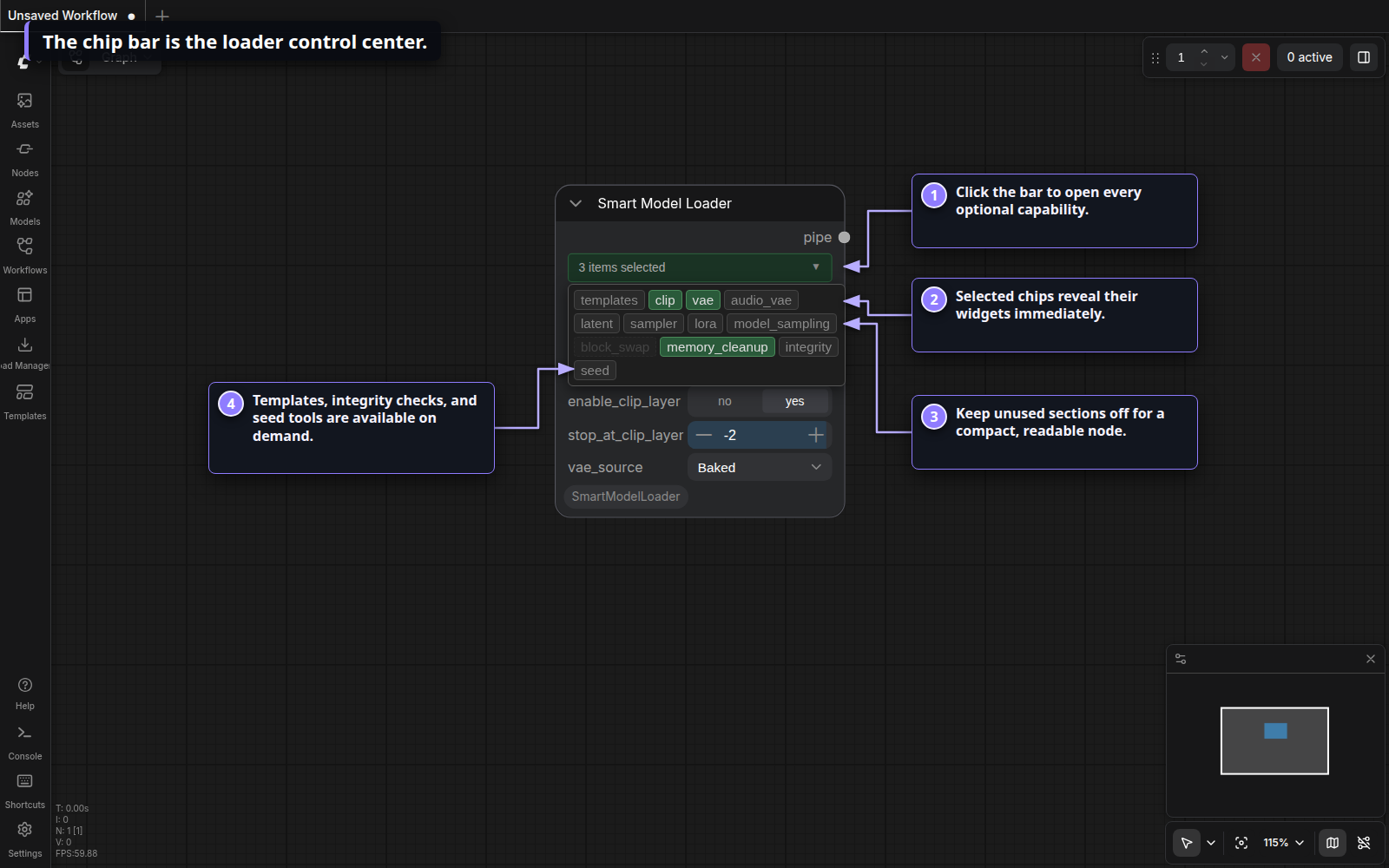
Available chips are templates, clip, vae, audio_vae, latent,
sampler, lora, model_sampling, block_swap, memory_cleanup, integrity,
and seed. Block swap is disabled when ComfyUI's native dynamic VRAM management
already owns that job.
Build the loader you need
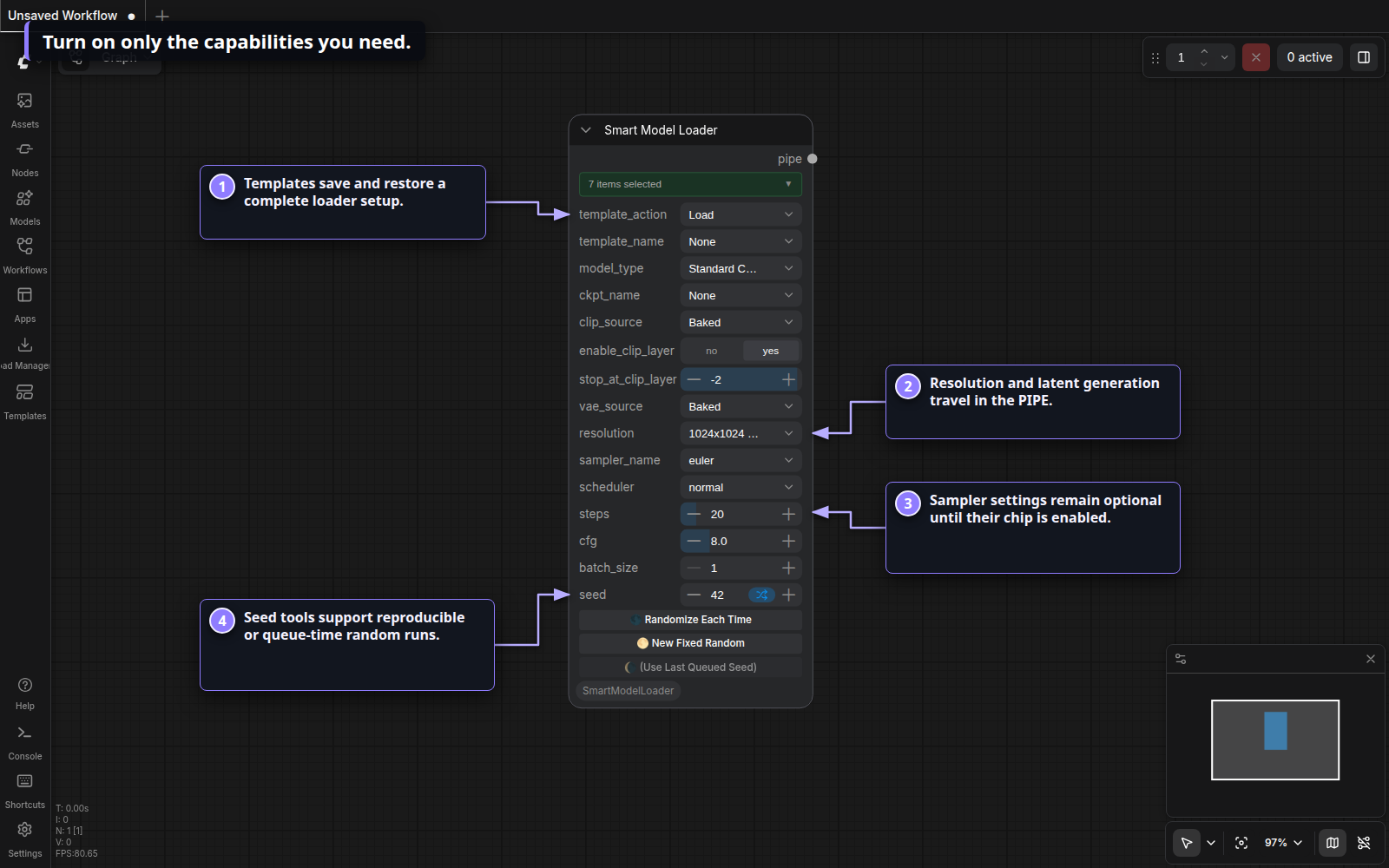
Enable latent, sampler, seed, LoRA, integrity, or architecture-specific sampling only when the workflow needs them. The serialized workflow retains the selected feature state.
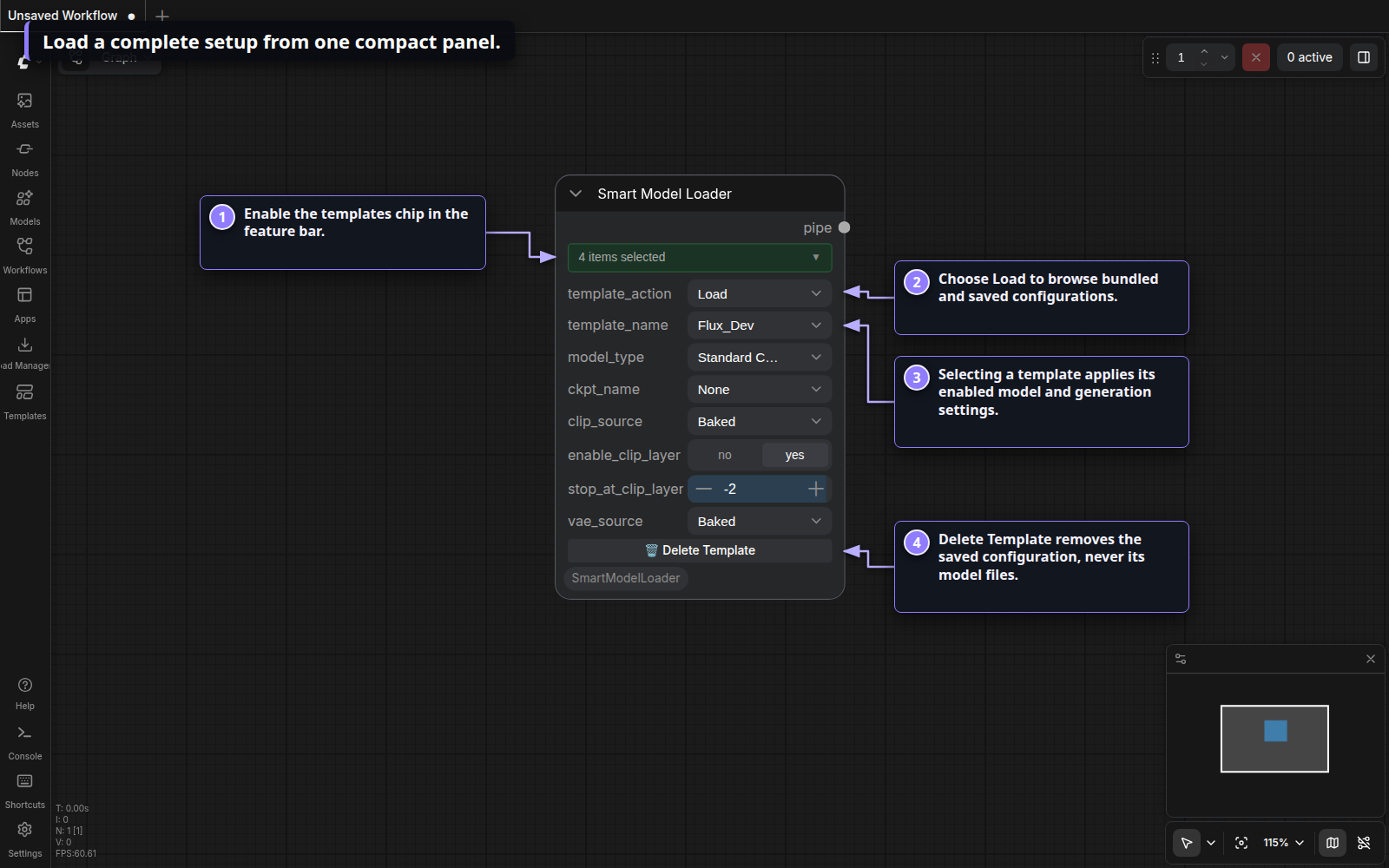
Load a template
Enable templates, choose Load, then select a bundled or saved template.
The selection applies the template's enabled loader and generation settings.
Delete Template removes only that saved configuration—not any model files.
Templates live in
ComfyUI/custom_nodes/ComfyUI_SmartModelLoader/templates/.
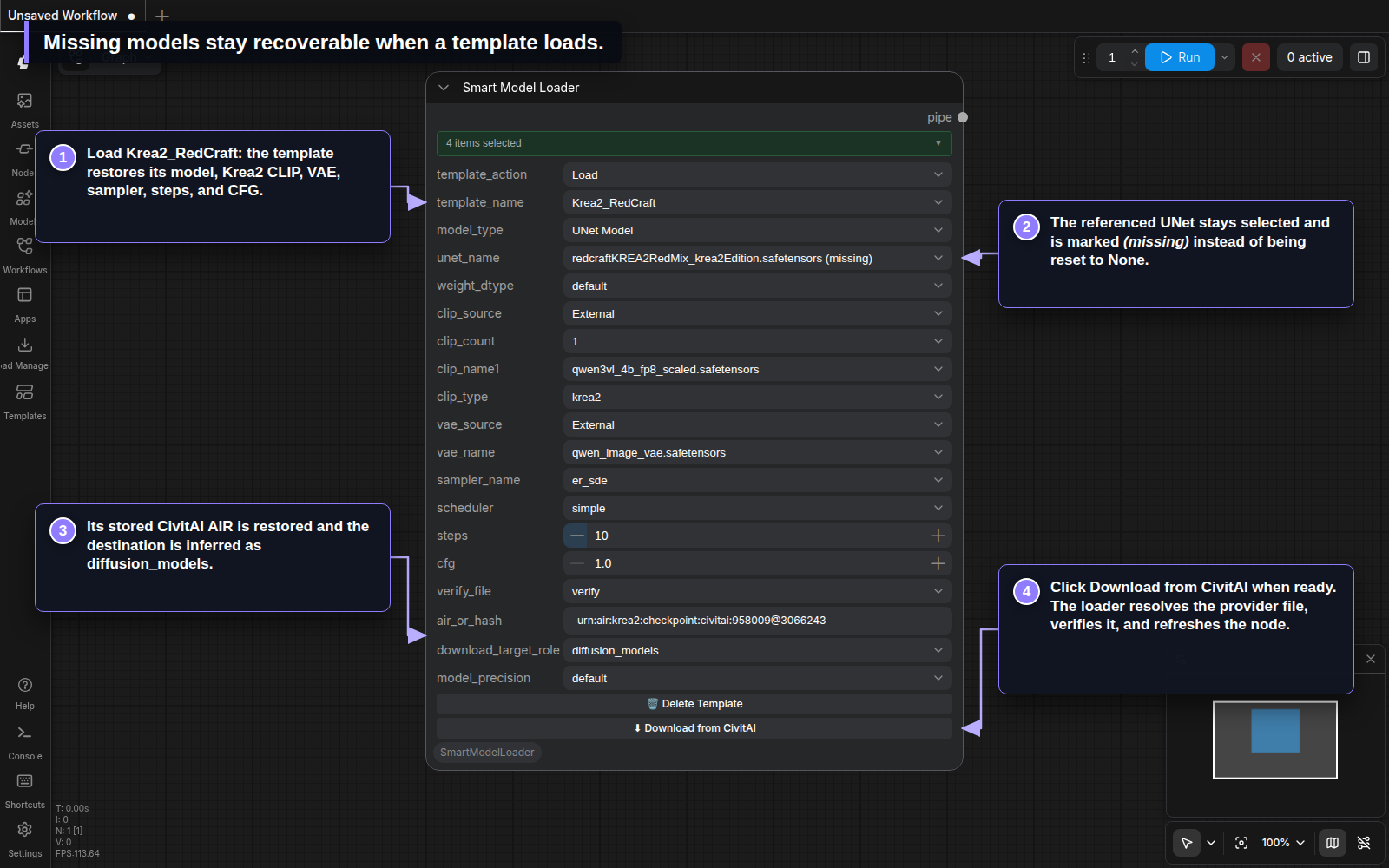
Recover a model referenced by a template
Loading a template never downloads files automatically. If its primary model is
not installed, the loader keeps the referenced filename selected with a
(missing) marker, restores the saved CivitAI AIR or SHA-256 identity, infers the
registered destination, and reveals Download from CivitAI.
The bundled Krea2_RedCraft template below restores its Krea2 CLIP, external VAE,
sampler settings, and missing UNet reference. Pressing the download action resolves
the provider file for the selected precision, verifies it, saves it under the shown
model role, and refreshes the node. Until that button is pressed, no transfer starts.
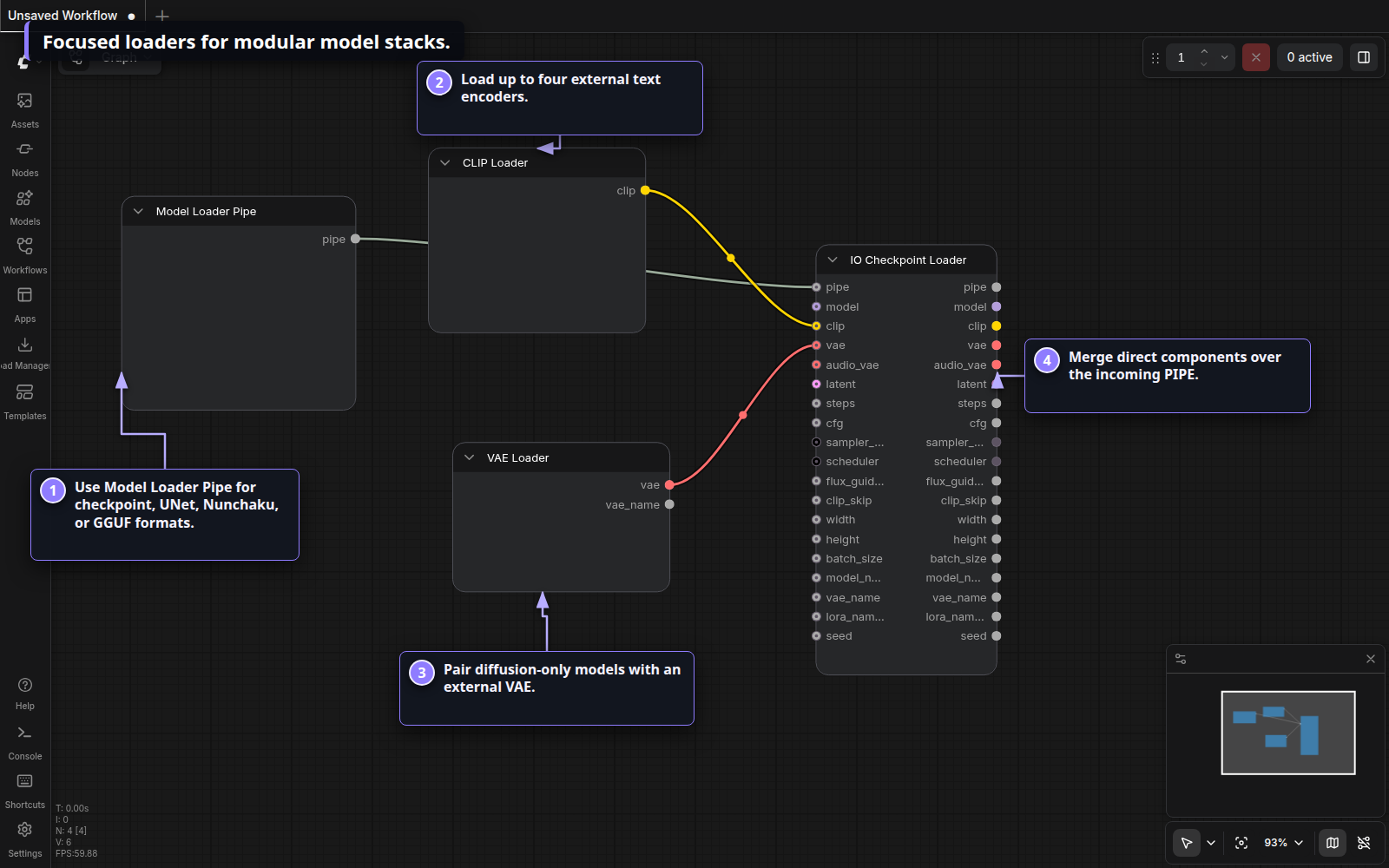
Use focused loaders when you want direct control
The standalone Model, CLIP, and VAE loaders are useful for modular UNet,
Nunchaku, GGUF, video, and audio setups. IO Checkpoint Loader merges direct
components over an incoming PIPE and exposes the result on individual sockets.
Shape conditioning
Use the basic encoder for ordinary scheduled conditioning. The Advanced encoder adds a multiplier and Krea2 layer-rebalancing presets, while Conditioning Zero Out clears tensors and can choose a known model's base token length.
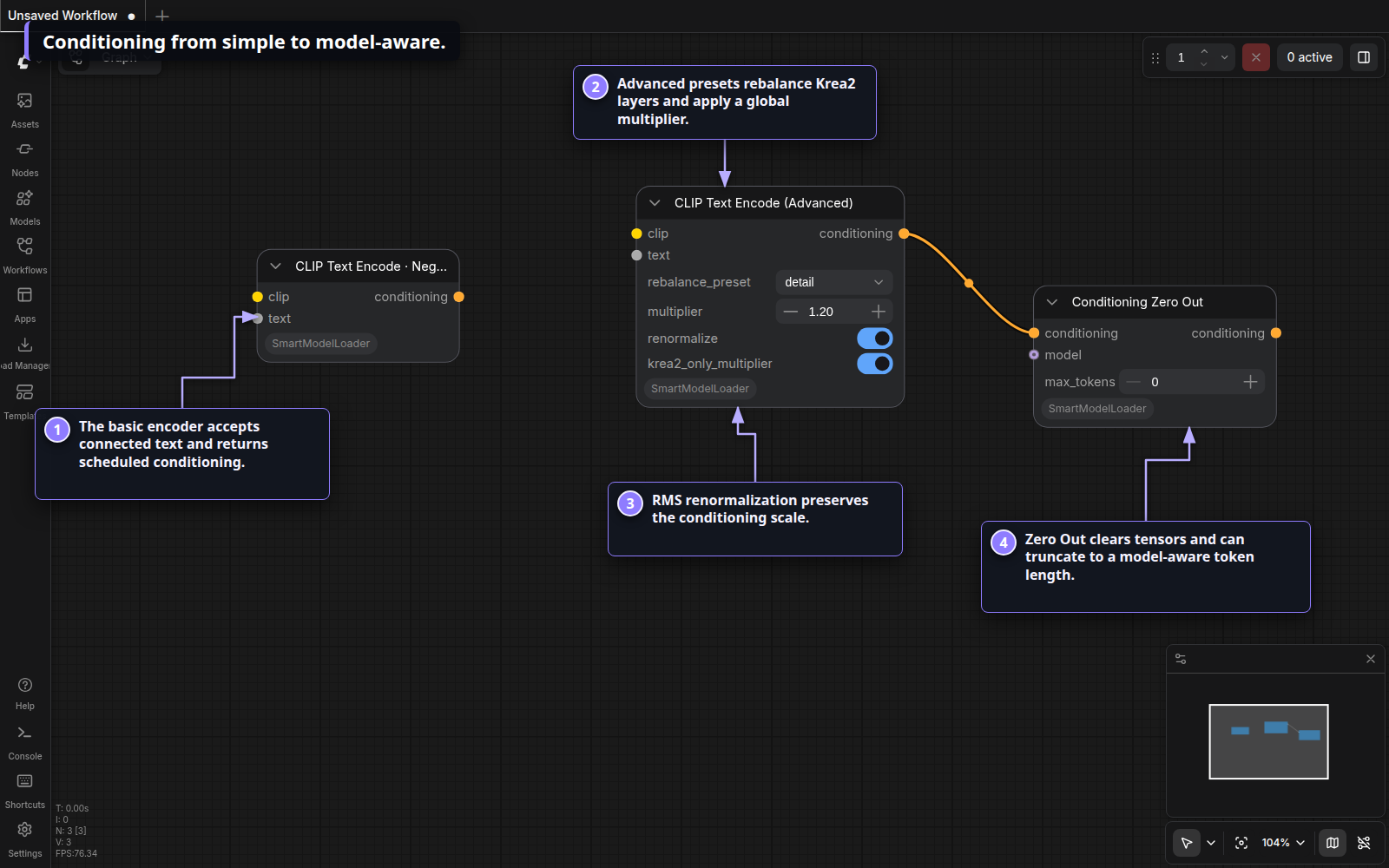
Sample from the PIPE
Eclipse KSampler (Pipe) reads its model and VAE from the PIPE, accepts positive
and negative conditioning, supports image or latent input, and returns a copied
PIPE containing the sampled latent and decoded image. It also provides pipe/widget
precedence, tiled VAE decode, preview modes, and queue-time seed controls.
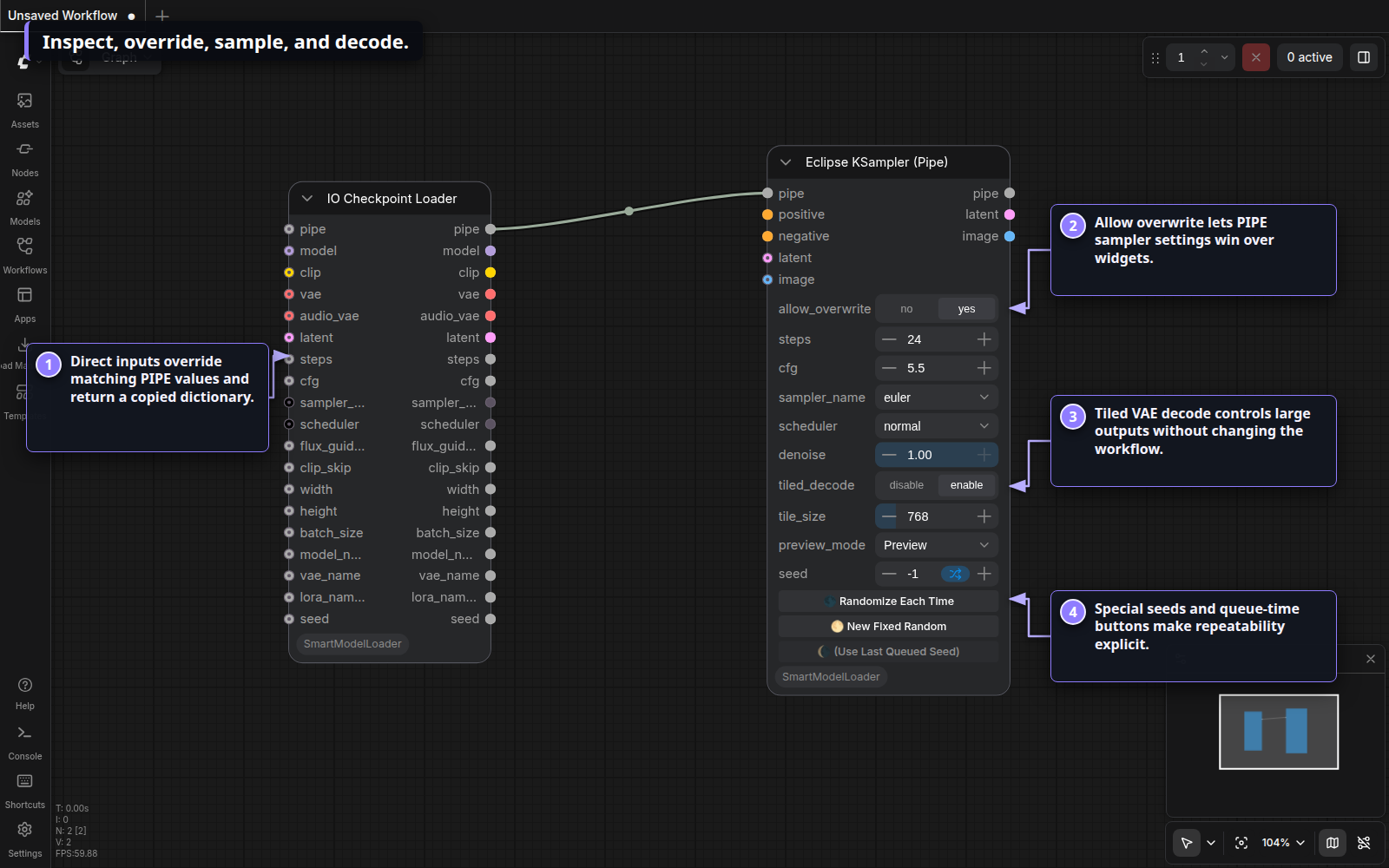
Schedule Qwen Image 2.1
Find Qwen Image 2.1 Scheduler under Smart Model Loader → Sampler.
Use it in place of BasicScheduler when you want the Qwen shift anchors and
terminal stretch. It generates SIGMAS for a custom sampler; the connected
target latent supplies the image size, so no model input is needed here.
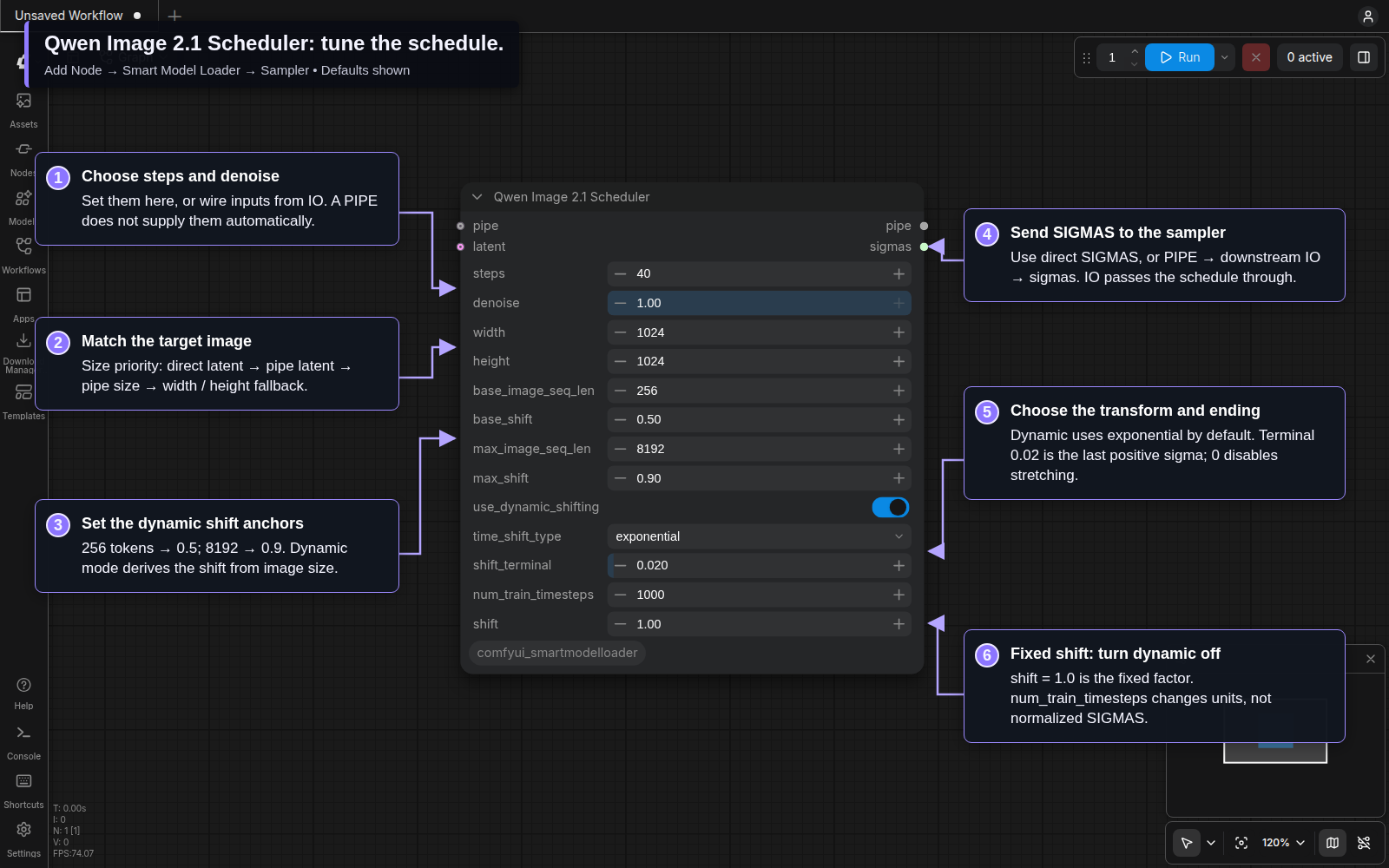
Set steps and denoise here, or connect those inputs from IO Checkpoint Loader. They are not inherited automatically from the input PIPE. Dynamic mode uses the image size and the 256 / 0.5 and 8192 / 0.9 anchors; the default transform is exponential. shift_terminal = 0.02 sets the last positive sigma before the final zero. Turn off dynamic shifting to use the separate shift control. See the complete controls and defaults.
Connect the custom sampler
The example below starts at your configured loader's IO Checkpoint Loader. Prompt strings feed Text Encode Qwen Image 2.1; its positive and negative outputs go to CFGGuider, together with the IO node's model. RandomNoise supplies the seed, and KSamplerSelect chooses the sampling algorithm.
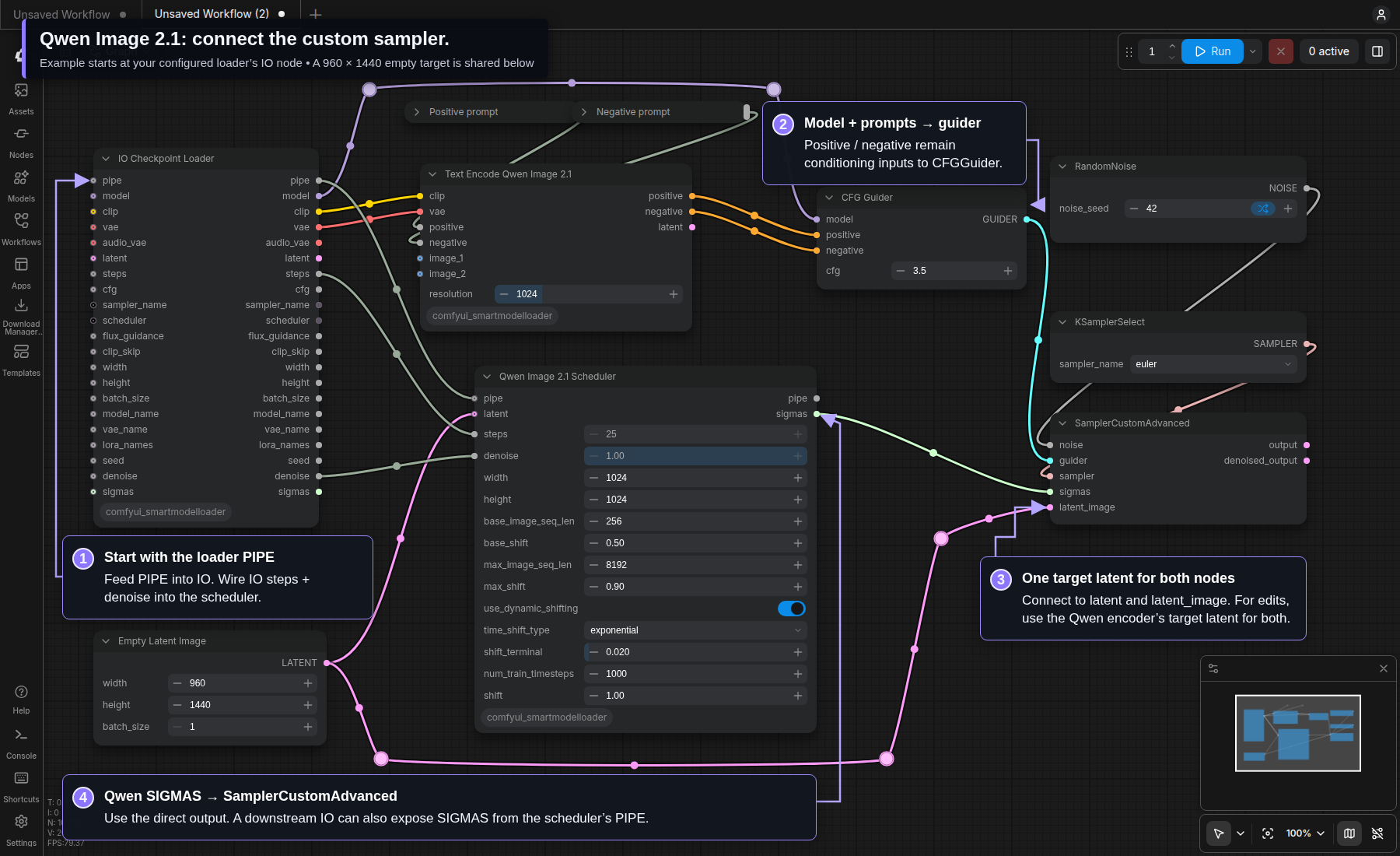
- Connect the scheduler's sigmas output to SamplerCustomAdvanced → sigmas.
- Send the same target latent to the scheduler's latent and the sampler's latent_image. The pictured EmptyLatentImage is supported. For image edits, use the Qwen encoder's target latent in both places instead.
- The pictured IO steps and denoise outputs drive the scheduler inputs. With those links removed, the scheduler's own widgets control the schedule.
- To carry the result through a PIPE, connect Qwen Scheduler → PIPE → a downstream IO Checkpoint Loader, then use that IO node's final sigmas output. IO only passes an existing schedule; it does not create one.
The loader's latent and model_sampling chips can stay off in this setup. The loader's scheduler dropdown does not control these explicit SIGMAS.
Acquire exact model files
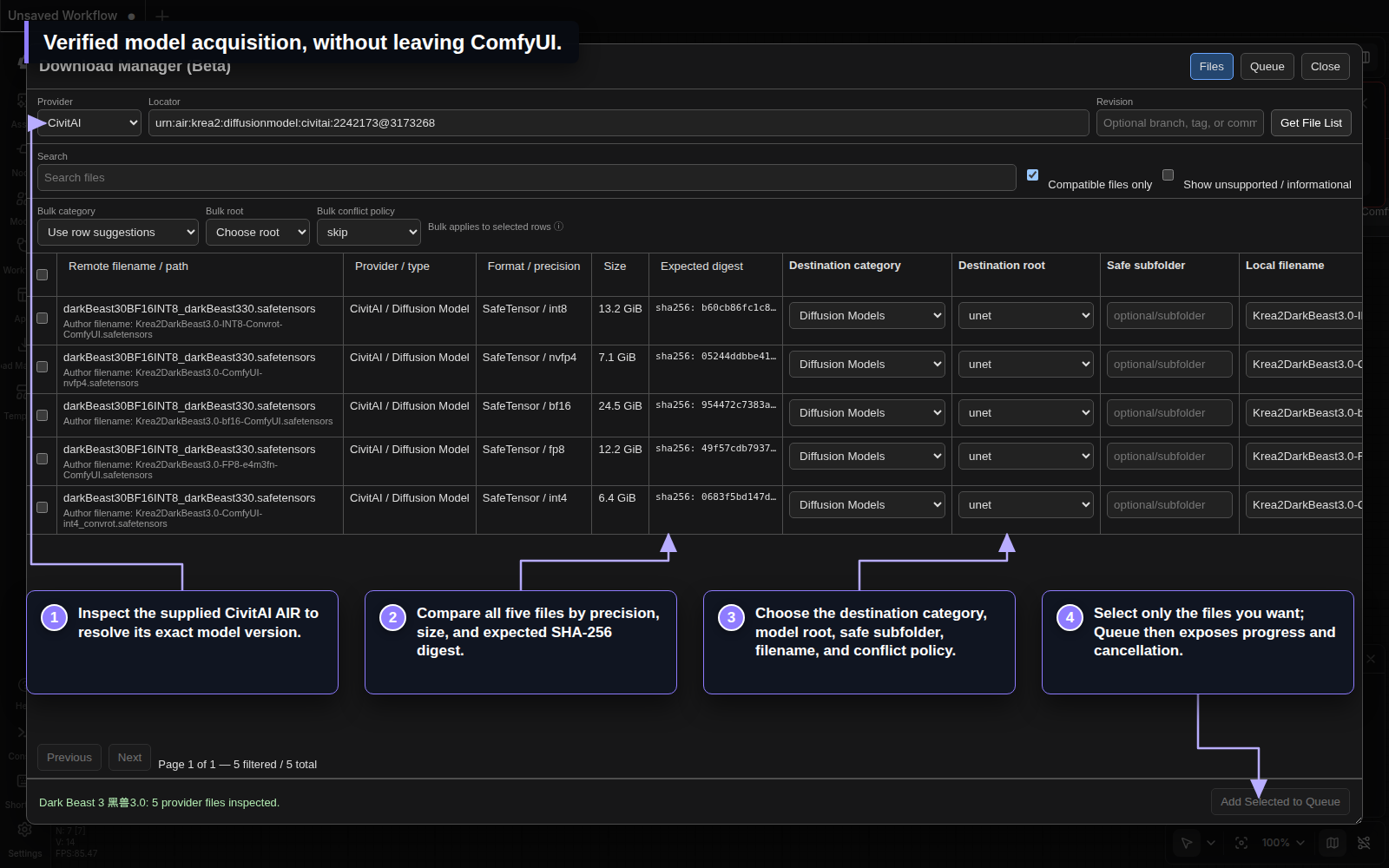
Open Download Manager (Beta) from the Smart Model Loader menu. Inspect a CivitAI AIR/hash/URL or Hugging Face repository, select exact compatible files, choose their registered model destinations, and monitor the persistent queue.
Included nodes
| Group | Node | Purpose |
| --- | --- | --- |
| Loader | Smart Model Loader [Eclipse] | Adaptive all-in-one loader with templates and optional generation settings |
| Loader | Model Loader [Eclipse] | Load model components on direct sockets |
| Loader | Model Loader Pipe [Eclipse] | Load model components into one PIPE |
| Loader | CLIP Loader [Eclipse] | Load one to four external text encoders |
| Loader | VAE Loader [Eclipse] | Load an external image/video VAE |
| Loader | VAE Loader Video+Audio [Eclipse] | Load separate video and audio VAEs |
| Conditioning | CLIP Text Encode [Eclipse] | Build scheduled conditioning from connected text |
| Conditioning | CLIP Text Encode (Advanced) [Eclipse] | Apply multipliers and Krea2 layer rebalancing |
| Conditioning | Text Encode Qwen Image 2.1 [Smart Model Loader] | Encode Qwen Image 2.1 prompts and up to sixteen image references |
| Conditioning | Text Encode MiniMax Music 3 [Smart Model Loader] | Encode caption/lyrics JSON with native Music 3 controls and duration |
| Conditioning | Conditioning Zero Out [Eclipse] | Clear and optionally truncate conditioning |
| Pipe | IO Checkpoint Loader [Eclipse] | Merge, override, and expose checkpoint PIPE values |
| Sampler | Eclipse KSampler (Pipe) [Eclipse] | Sample, VAE-decode, preview, and update the PIPE |
| Sampler | Qwen Image 2.1 Scheduler [Smart Model Loader] | Build shifted, terminal-stretched SIGMAS and optionally add them to a PIPE |
| Tools | Lora Stack [Eclipse] | Build a reusable stack of up to ten LoRAs |
| Tools | Lora Stack apply [Eclipse] | Apply a stack to standard or Nunchaku Flux, Qwen, and ZImage models |
| Loader | Nunchaku PuLID Loader [Eclipse] | Load a PuLID pipeline for a Nunchaku Flux model |
| Tools | Nunchaku PuLID Apply [Eclipse] | Apply PuLID identity guidance to a Nunchaku Flux model |
The [Eclipse] suffixes are compatibility identifiers. Smart Model Loader owns
these implementations and does not require Eclipse at runtime. The two
PuLID nodes are available when the compatible nunchaku Python package and its
PuLID dependencies are installed.
Installation
ComfyUI Manager
Search for ComfyUI Smart Model Loader, install it, and restart ComfyUI.
Manual
From your ComfyUI installation:
cd custom_nodes
git clone https://github.com/r-vage/ComfyUI_SmartModelLoader.git
cd ComfyUI_SmartModelLoader
python -m pip install -r requirements.txt
Restart ComfyUI, then open Add Node → Smart Model Loader. Settings appear
under Smart Model Loader → General and use SmartModelLoader.* IDs.
Nunchaku and GGUF model types require their compatible Python packages. Without them, the standard checkpoint, UNet, conditioning, pipe, sampler, LoRA Stack, and Download Manager features remain available.
Compatibility and ownership
- Saved workflows keep the same node IDs, schemas, socket order, PIPE keys, and template format.
- The pack owns
/smart-model-loader/...routes, its privateconfig.json, and its Download Manager queue. - On first startup, missing loader templates and relevant legacy Eclipse loader data can be copied into this pack. Originals are not moved or deleted.
- Optional Eclipse nodes—Context Image, Generation Data, generic channel pipes, Concat Pipe Multi, Smart Sampler Settings, Save Images, Kargim, and Conditioning Passer—can consume the same PIPE contract.
Guides
- Smart Model Loader reference
- Standalone loaders
- Pipeline nodes
- Nunchaku PuLID CUDA troubleshooting
- Download Manager
- Security model
For bugs and feature requests, use the GitHub issue tracker.