
ComfyUI SmartLLM Nova
Compact configurable LLM, vision, tagging and detection panels for classic ComfyUI and Nodes 2.0, with registry-managed models and native or Docker backends.
ComfyUI SmartLLM Nova
The Nova editors use compact themed panels in classic ComfyUI and Nodes 2.0. Find the five nodes under 🌒 SmartLLM Nova. See Nova panels for sections, connection overrides and seed handling. The design is inspired by DaSiWa and adapted from the Eclipse Nova panel approach.
Nova uses separate node IDs, /smartllm-nova/ routes and SmartLLMNova.*
settings, so it can be installed alongside the original SmartLLM pack. Models
and inference backends retain their existing loading and verification behavior.
Choose Settings → SmartLLM Nova → Appearance → Node design for Neutral (default), the other built-in palettes or custom JSON themes. The setting and reload action belong only to this repo.
Bundled themes are extracted once from .defaults/themes/ into the user-owned
themes/ folder. Updates preserve edits and deletions.
One adaptive interface for vision-language models, text models, WD14 taggers, Florence grounding, and YOLO detection—plus a registry manager that keeps model identity, acquisition, and trust decisions explicit.
Version 1.0.0 is the initial Nova release. It includes five panel editors and runs independently of Eclipse.
Visual tour
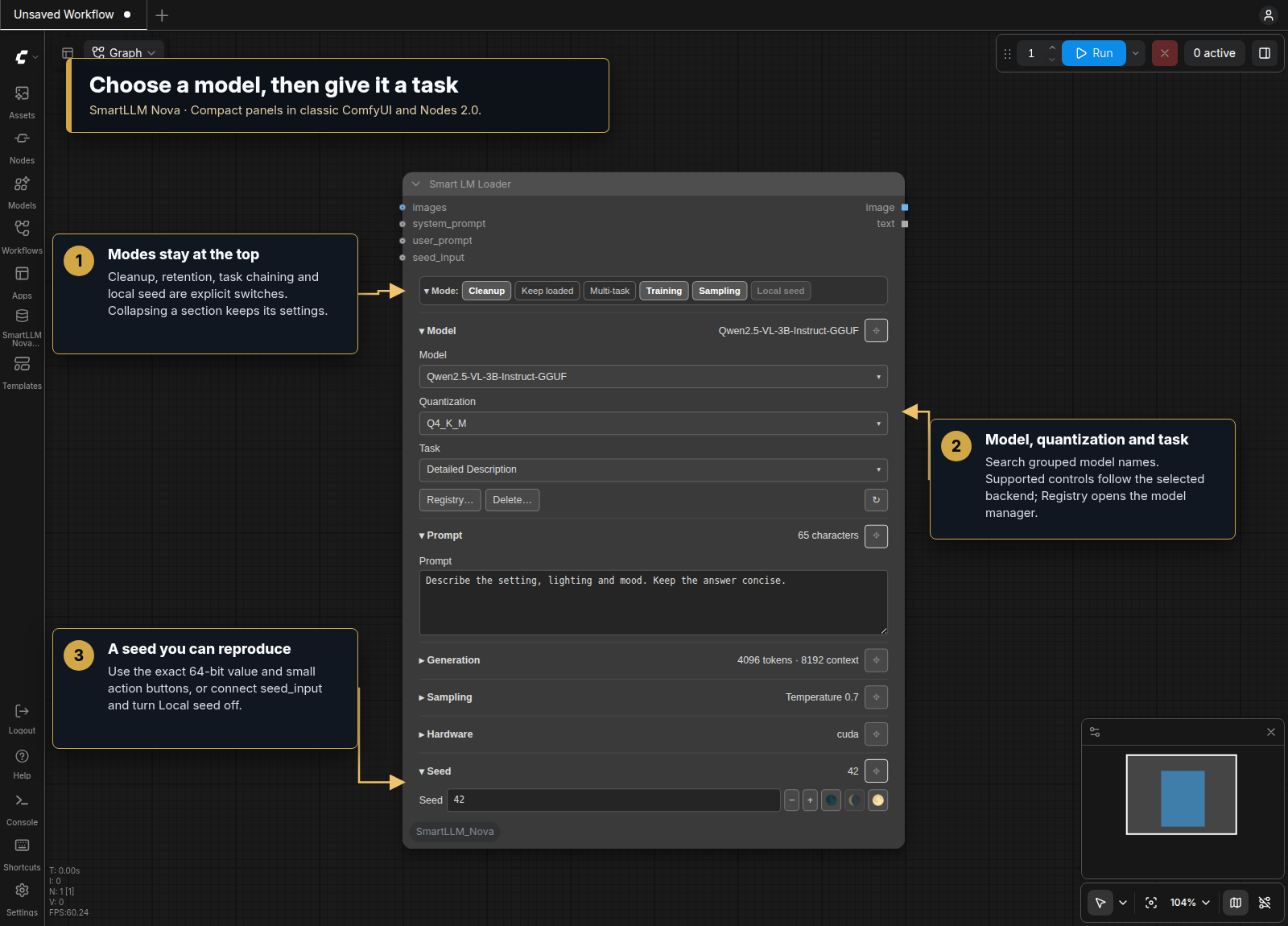
Start with the visual tour for the model/task panel, chained tasks, detection, converters and Registry Manager, including its Docker Images walkthrough.
Why use it?
- One language-model node adapts to vision, text, and tagger families instead of exposing every backend control at once.
- One detection node covers Florence and Qwen grounding tasks alongside YOLO bounding-box and segmentation models.
- A matching postprocessor converts structured detections into selectable masks and SAM2-compatible bounding boxes without requiring Eclipse.
- Several execution backends share one registry-driven model selector, including Transformers, GGUF, Ollama, vLLM, SGLang, and llama.cpp.
- Verified acquisition records model source, immutable revision, integrity, and provenance before committing local files.
- Less canvas work keeps each node's settings in one panel. Editing and lifecycle events update the relevant controls; the editors do not use repeated graph scans or native-widget visibility helpers.
- Separate identity keeps the Nova node catalog and settings apart from the original pack. Replace original nodes explicitly when adopting the new editors.
Using the nodes
Start with Smart LM Loader
Search for Smart LM Loader [SmartLLM Nova] in Add Node. Choose a registered
model, then select the task it should perform. The interface responds to the
model family: a vision model exposes image-aware tasks, while text-only and
tagger models show their relevant inputs.
The selected task loads its task-specific system prompt automatically, so
user_prompt is normally empty for tasks such as Detailed Description. Use it
only for additional information, a question, or constraints that are not already
expressed by the task. Connecting system_prompt is an explicit override: it
switches the node to Direct Chat and bypasses the default task prompt templates.
The connected text becomes the complete system instruction, so it must contain
every important role, objective, constraint, and output-format requirement.
user_prompt then supplies the user message or source material for that custom
instruction.
The image input is optional for text-only tasks. Output sockets return generated text plus an image when the selected task supports one.
Some generative tasks intentionally use user_prompt as their source material:
- For a Wan or LTX image-to-video task, connect the starting image and describe
the intended motion, action, dialogue, style, or camera behavior in
user_prompt. - For MiniMax H3, choose the T2VA, I2VA, FL2VA, or L2VA timeline task matching
zero, one first-frame, one first-frame plus an optional last-frame reference,
or one last-frame image. The explicit FL2VA task accepts the first frame alone
because the downstream H3 encoder can enforce its separately connected last
frame; attaching both frames also lets the VLM reason about endpoint differences.
The compact, duration-neutral MiniMax H3 Scene task infers T2VA/I2VA/FL2VA
from zero/one/two images. Leave
user_promptempty to have SmartLLM create an original one-shot story, grounding it in one image or connecting two endpoint images when supplied. This automatic story mode adds suitable sound and music, and uses dialogue only when the scene supports it. You can instead provide a short description of what should happen and SmartLLM generates the required H3 format. You can request a shot count and views in natural language—for example, “tell this in 3 shots: side, POV, then overhead”—or ask for a Tracking Shot by naming the person or object to follow. For image-based H3 modes, the VLM uses the actual reference image as visual ground truth. A one-image FL2VA response briefly grounds the visible source state and then continues into the complete requested shot timeline; it does not stop at a caption or add exhaustive clothing, lighting, or scenery details. The image controls the subjects and available scene; a nonemptyuser_promptcontrols what happens and prevents unrelated invention. Every H3 task returns the same three generator-ready fields. If you request no background music, no score, or no soundtrack,non_diegetic_musicis set toN/Awhile dialogue, ambience, and action sounds remain inoverall_soundscapeunless you also request silence. Timeline task labels are duration-neutral; their prompt writer uses H3's 15-second maximum as its shot-planning range unlessuser_promptasks for a shorter duration. - For Song Lyrics, enter a short story, theme, mood, or song concept in
user_prompt. Genre, language, tempo, or structural preferences can be added when they matter. The result is a structured lyric sheet that can be copied into Suno, Mureka, or another music-generation tool. - For MiniMax Music 3, use a text-capable LLM with a song concept or existing
lyrics in
user_prompt. You can also chain Song Lyrics → MiniMax Music 3. Concepts compose a complete song; structured lyrics and Song Lyrics output convert with sung words retained in code and only the caption generated. The result is one JSON string withcaptionandlyrics. Connect it to Split MiniMax Music 3 [SmartLLM Nova] →song_json, then connect its two STRING outputs to the native Music 3 encoder'scaptionandlyricsinputs. Alternatively, connect the JSON directly to Text Encode MiniMax Music 3 [Smart Model Loader] →song_json. Music 3 usage and output format. - For YuE2 Music, enter a song concept or chain Song Lyrics → YuE2 Music. Concepts
compose style and complete lyrics; structured sheets and supplied song JSON
retain lyrics in code. Connect the result to Split YuE2 [SmartLLM Nova], then
connect
styleandlyricsto both native YuE2 generators. ABC planning stays native and optional. YuE2 usage, preservation and wiring.
These cases do not require a custom system_prompt; selecting the task still
loads the appropriate instructions automatically.
H3 images connected here are visual references for the VLM that writes the prompt. They do not configure the downstream MiniMax H3 encoder. Connect the actual first/last keyframes to that encoder separately, in the order its workflow requires; the FL2VA prompt-writing task does not require its optional last-frame reference when the encoder already receives that frame.
Use the mode bar and sections
The top mode bar controls Cleanup, Keep loaded, Multi-task, Training, Standard/NSFW,
Sampling and Local seed. Open Model for model/quantization/task selection,
Registry, Delete and Refresh actions. Deletion requires confirmation.
Open Prompt, Generation, Sampling, Hardware, Tagging or Seed
to edit the relevant settings. Pin sections to keep several open. Collapsing a
section preserves its values and does not disable processing. Sampling controls
whether custom sampling parameters are applied. Local seed can be turned off
when seed_input is connected; the upstream value then takes priority.
Chain tasks in one execution
Enable Multi-Task to expose Task 2 through Task 4. Each active stage receives
the previous stage's text and passes its result forward. This is useful for a
visual description → prose conversion → prompt refinement sequence without
adding several model nodes.
Set unused stages to None. The final active stage becomes the node's text
output, while the image output remains available for compatible workflows.
Switch to WD14 tagging
Selecting a WD14 registry entry replaces language-generation widgets with the tagger's general threshold, character threshold, and underscore-formatting controls.
Connect an image and consume the generated tags from the text socket. The image socket passes the source image through for downstream routing.
Run YOLO detection
Search for Smart Detection [SmartLLM Nova], select a YOLO registry model, and
optionally filter among the classes that specific detector knows. For example,
the face-specific face_yolov8m model can use face; other registered models
specialize in regions such as eyes, faces, hands, or people. Detector-specific
confidence, NMS, filtering, and region-selection controls appear automatically.
The node returns an annotated image, a combined mask, Impact-compatible SEGS,
and structured detection data.
Ground phrases and adjust regions
Florence and compatible Qwen models expose language-directed tasks such as
Caption to Phrase Grounding. Enter focused parts such as eye;face;mouth; the
semicolon-separated phrases are run as individual targets and their regions are
merged. Enable Preview boxes to annotate the result and open Adjustments for
drop-size, crop-factor, and dilation controls.
Smart Detection modes are Cleanup, Keep loaded, Preview boxes and
Local seed. Detection, Adjustments, Sampling, Hardware and Seed have their own
sections. Registry and Delete are in Model. The selected model and task determine
which controls are meaningful.
Convert detection data to masks and boxes
Connect Smart Detection's image and data outputs to
Detection to Bboxes [SmartLLM Nova]. The converter accepts regular boxes, OCR quad
boxes, and polygons; it can combine them into one mask or return selected regions
separately, with optional inversion, grow/shrink, and blur processing. Its bbox
output uses the established BBOXES structure for downstream tools such as SAM2
Ultra.
The converter also has an independent image-analysis mode. Enable From image to detect bright or color-channel regions directly with threshold and minimum-area controls instead of consuming JSON data.
Inspect and acquire models
Open Registry… in the Model section or use the SmartLLM Nova left-toolbar launcher. The Models tab groups fields into Model, Source, Files & runtime, Integrity and Notes. Both tabs follow this pack's selected theme, including custom palettes, with matching buttons, mode bars and dialog styling.
A registry entry can define its display name, backend, model family, repository or model ID, source, immutable revision, vision capability, local-only policy, expected SHA-256 digests, and description.
Use Inspect to validate the form, then Save Entry before Download. Download and verification use the saved entry; save edited fields first. Verify Local Files does not download anything. Delete Local Files and Remove Registry Entry are separate confirmed operations: removing an entry does not delete its local model files.
The Docker Images tab reports Docker Engine, daemon-access, user-group, and GPU runtime readiness, then lists the managed backend images for the selected platform. Expand System & GPU details for diagnostics and each image reference for its immutable digest. The linked installation guide covers terminal setup. Managed images can be installed, updated, removed, or have their SmartLLM-managed containers stopped from this tab. Stop and removal are refused while a SmartLLM model execution is active, so a running prompt is never interrupted; image removal is also refused while any container still references the selected image. Image operations report start, completion, and failure milestones in the ComfyUI console; select debug under SmartLLM's Log Level setting to also see filtered Docker pull progress and command output. Update / Repair pulls the configured immutable image; it does not automatically switch to the latest upstream release. The Ollama card also offers the supported recommended and legacy runtime versions. Install & Select changes the global Ollama runtime, not an individual registry entry. The existing managed container is recreated on its next start while the persistent Ollama model store is preserved.
Included nodes
| Node | Inputs | Outputs | Purpose |
| --- | --- | --- | --- |
| Smart LM Loader [SmartLLM Nova] | optional images, user/system prompt and seed overrides; panel configuration | image, text | Run registered vision-language, text, or WD14 models |
| Smart Detection [SmartLLM Nova] | image; prompt, confidence, NMS, area and seed overrides; panel configuration | image, mask, SEGS, data | Run Florence/Qwen grounding or YOLO detection |
| Detection to Bboxes [SmartLLM Nova] | image, optional detection data, mask controls | mask, BBOXES | Convert Smart Detection data or image regions into masks and boxes |
| Split MiniMax Music 3 [SmartLLM Nova] | optional song_json override; panel text | caption, lyrics (STRING) | Validate and split song JSON for the native Music 3 encoder |
| Split YuE2 [SmartLLM Nova] | optional song_json override; panel text | style, lyrics (STRING) | Validate and split song JSON for both native YuE2 generators |
Nova owns all five implementations and does not require Eclipse at runtime. Model nodes appear under 🌒 SmartLLM Nova → Loader, and converters under 🌒 SmartLLM Nova → Conversion. Nova uses its own node IDs; workflows made with the original pack need explicit node replacement to use Nova.
Supported backends and model families
| Path | Typical use | | --- | --- | | Transformers | Local Hugging Face vision-language and text models, including Qwen, Florence, Mistral, and LLaVA-family models | | GGUF / llama.cpp | Quantized local language and vision-language execution | | Ollama | Models served by an Ollama runtime | | vLLM / native vLLM | High-throughput model serving, locally or through the managed Docker path | | SGLang | Structured high-throughput model serving | | WD14 | Image tagging with independent general and character thresholds | | YOLO | Bounding-box and segmentation detection |
Backend availability depends on the optional packages or services installed in your ComfyUI environment. The base installation does not force every compiled runtime onto the user.
Installation
Clone into ComfyUI's custom_nodes directory, then install dependencies using
ComfyUI's Python environment:
git clone https://github.com/r-vage/ComfyUI_SmartLLM_Nova.git custom_nodes/ComfyUI_SmartLLM_Nova
cd custom_nodes/ComfyUI_SmartLLM_Nova
python -m pip install -r requirements.txt
Restart ComfyUI and refresh the browser. Settings appear under
SmartLLM Nova → Configuration and Appearance, using SmartLLMNova.* IDs.
Install compiled or backend-specific integrations only when needed:
python -m pip install -e ".[sml]"
Docker backends require Docker separately. See the general Docker guide or Linux Docker guide.
Compatibility and ownership
- SmartLLM registers exactly the five nodes listed above and owns the
/smartllm-nova/...API namespace, registries, Registry Manager, model-acquisition state, Docker configuration, and privateconfig.json. - Its model path, retry policy, log level, Hugging Face and ModelScope
credentials, and
SmartLLMNova.*settings belong to this repository. - Startup materializes bundled defaults while preserving local data. It does not import another pack's configuration or credentials.
- Duplicate Nova providers or already registered Nova routes block registration. The original SmartLLM and Eclipse packs can remain installed independently.
- Optional Eclipse utilities consume the image, text, mask, SEGS and data outputs.
Security defaults
Mutation routes are POST-only, same-origin protected, limited to bounded JSON objects, and loopback-only in ComfyUI multi-user mode. Credentials are write-only and stored with private permissions. Remote model acquisition resolves immutable revisions, verifies integrity, commits atomically, and writes provenance records. YOLO uses restricted loading, while managed Docker reuse is tied to immutable image and container-spec identity.
Repository-supplied Python model code is unsupported. Transformers Auto-class loads explicitly deny remote code, vLLM is never launched with its remote-code flag, and Florence uses SmartLLM's local vendored implementation. Read Security and model integrity before adding an untrusted model source.
Guides
- Smart LM Loader guide
- Smart Detection guide
- Registry Manager
- Model repository reference
- Copy-paste model registry reference
- Security and model integrity
- User data and bundled defaults
- Third-party notices
For bugs and feature requests, use the GitHub issue tracker.
Licensed under Apache-2.0. See LICENSE and THIRD_PARTY_NOTICES.md.