
ComfyUI Eclipse Nova
ComfyUI prompt, pipe and media tools redesigned from Eclipse with compact panels and a focus on canvas performance in classic canvas and Nodes 2.0.
ComfyUI Eclipse Nova
Eclipse Nova provides prompt editors, image/video/audio tools, sampling settings, character workflows and routing utilities for ComfyUI. Its redesigned nodes use compact panels with collapsible sections, searchable choices and resizable previews in classic canvas and Nodes 2.0.
1.0.0 is Nova’s initial release. Nodes use [Eclipse Nova] IDs and the
🌒 Eclipse Nova menu, separate from the original Eclipse pack. Original
Eclipse workflows need their nodes replaced explicitly; Nova does not include
legacy aliases or workflow migration tools.


-76b900)

Explore the nodes
Start with the visual tour for annotated screenshots, or use the documentation index to find a specific node. The screenshots show the Amber theme; Neutral is the default.
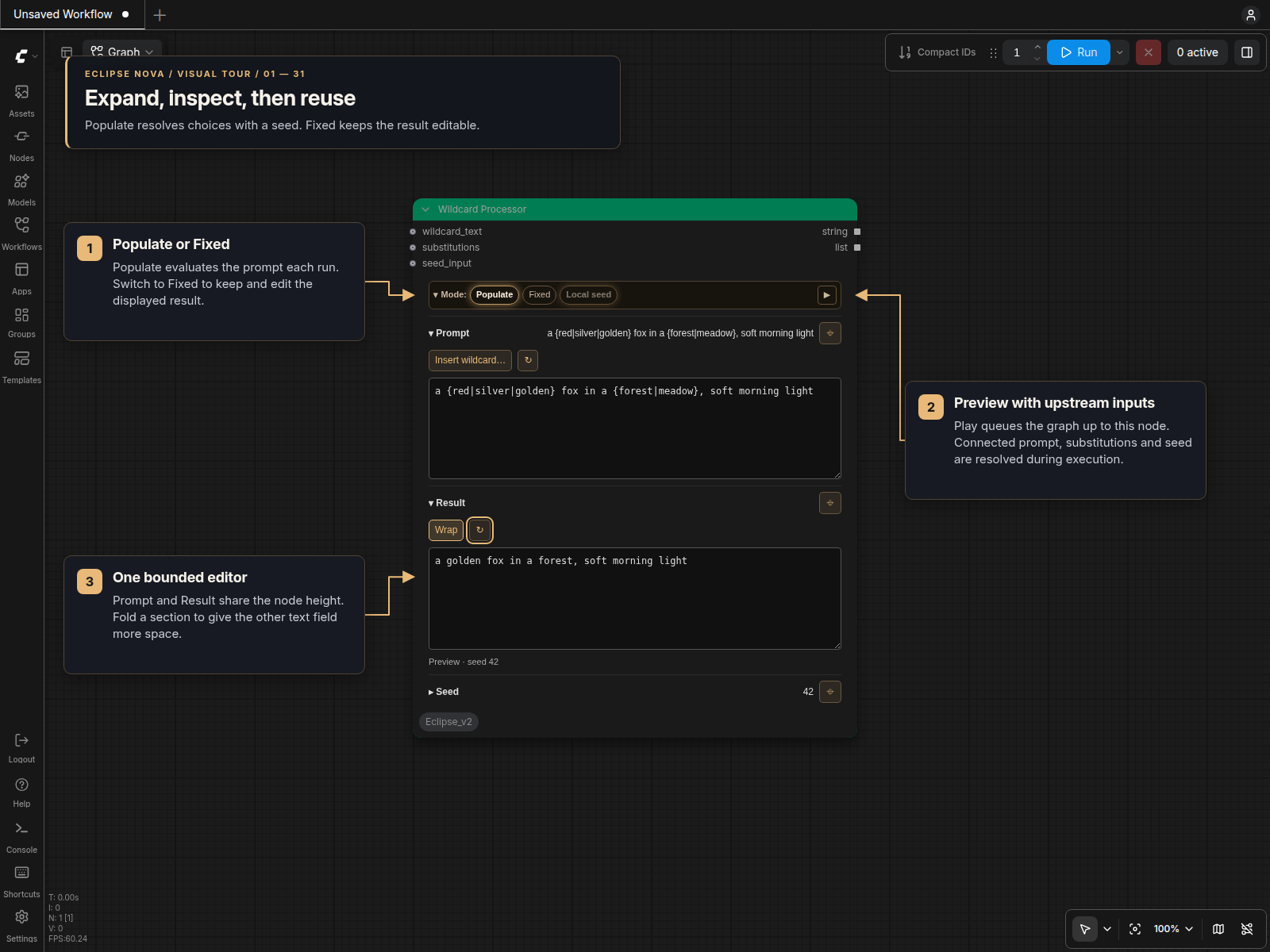
| Work with… | Guides | | --- | --- | | Prompts and text | Smart Prompt, Wildcard Processor, String Multiline, Prompt Styler, Prompt Forge | | Sampling and dimensions | Sampler panels, Smart Folder, Resolution Pipe | | Images | Loaders, Resize, Adjustments, Text/Image FX, Selection and comparison | | Saving and metadata | Save Images, Save Video, Read Prompt Files, Save Prompt | | Audio and video | Load Audio, Recorder, Load/Preview Video, Upscale Video, Lyric Captions | | Character and timeline workflows | Character references, Shot Planner, MiniMax planning, Frame timelines | | Routing and review | Set/Get and Bridge, Get First / Get All Active, Previews and Stop, Utilities |
Why the new panels?
Canvas performance was a major reason for the redesign. A panel stores its configuration together and renders the controls it needs locally. Nova no longer uses the old widget-visibility manager, global resize/performance helpers or recurring canvas scans for these panels. Changes are driven by editing, loading and execution events. Routing, pipes and dynamic-input utilities retain their specialized controls.
The design and panel approach are inspired by the DaSiWa node set. Mode bars select features; section headers show concise summaries; pins keep selected sections open. Folding a section changes the layout, not the stored settings. Text and preview panels fit within the node size chosen by the user.
Choose Settings → Eclipse Nova → Appearance → Node design for Jade,
Neutral, Ocean, Amethyst or Amber. Themes are editable JSON files; add your own
under themes/custom/ and reload them from settings. Bundled themes are extracted
once from .defaults/themes/; edits and deletions in themes/ survive updates.
The selected design applies to Nova backgrounds and automatic titles, including
saved workflows, and preserves custom title colors. Theme regular nodes and
Theme groups are separate Appearance options, both off by default. Turning
either off restores the previous colors. Preferences are stored in this pack’s
config.json. The optional Link Nova themes button keeps installed SmartLLM
Nova and Smart Model Loader Nova packs on Eclipse's theme, so future selections
apply to all three. See Node designs for details and colors.
Enable Settings → Eclipse Nova → General → Use Sliders to add sliders to bounded numeric fields in the redesigned panels. The setting applies immediately to existing and new nodes in both renderers. You can still type exact numbers; seed fields retain their exact integer text controls.
Install
From your ComfyUI directory:
git clone https://github.com/r-vage/ComfyUI_Eclipse_Nova.git custom_nodes/ComfyUI_Eclipse_Nova
python -m pip install -r custom_nodes/ComfyUI_Eclipse_Nova/requirements.txt
Use the same Python environment that runs ComfyUI. For Windows portable, run this from the portable installation’s root instead:
python_embeded\python.exe -m pip install -r ComfyUI\custom_nodes\ComfyUI_Eclipse_Nova\requirements.txt
Restart ComfyUI and reload the browser. Search for [Eclipse Nova] or open the
🌒 Eclipse Nova menu. Character and MiniMax tools have their own submenus.
Some features need additional runtimes: the Detailer uses Impact Pack, and video, audio and caption tools have their own requirements. Check the relevant guide before using those features. Wildcard Processor uses Nova’s own engine and does not require Impact Pack.
Optional companion packs
Smart Model Loader Nova provides diffusion-model loading, CLIP/LoRA tools, model presets and the Download Manager. Model source/integrity fields and download-to-loader integration belong to that pack, not Eclipse Nova.
SmartLLM Nova provides language-model and detection tooling. Follow its setup guide. Companion packs own their node IDs, settings, model registries and credentials; Eclipse does not install or configure them.
Pipes and connected overrides
Nova’s PIPE is a dictionary of related values. Smart Sampler Settings
contributes only enabled settings; Smart Folder supplies paths and dimensions;
Generation Data carries information for metadata and saving. Context and
pipe tools combine or extract those values.
A PIPE is not interchangeable with every other pack’s tuple-based
BASIC_PIPE or custom context type. Follow the input labels and each node’s
guide. The Detailer, for example, takes its model/conditioning from basic_pipe
and optional sampling overrides from pipe_opt.
Where a panel has explicit input sockets, its guide explains their priority. For example, Image Resize can use connected width/height values, and the samplers have a Use pipe settings switch. Loading a file or metadata does not implicitly replace every downstream setting: use the relevant Include controls or pipe inputs to choose what travels through the workflow.
Your files and settings
User-editable data lives inside this repository:
| Location | Purpose |
| --- | --- |
| prompts/ | Smart Prompt folders and Prompt Forge tag lists |
| styles/ | Prompt Styler CSV/JSON/TXT libraries |
| wildcards/ | Packaged wildcard examples; the engine also reads ComfyUI wildcard folders |
| patterns/ | Save Prompt content-rating terms |
| themes/ | Editable JSON themes and custom/ overrides; extracted once |
| config.json | Private Eclipse Nova configuration |
| .defaults/ | Distributed .example sources and their manifest |
Startup extracts new defaults. An updated default replaces its extracted copy
only if that copy still matches the previously shipped hash. Edited files and
intentionally deleted known files stay untouched. Edit the extracted files in
prompts/, styles/ and the other data folders, rather than .defaults/.
The models/wildcards/smart_prompt_nova link exposes Nova’s prompt files to
wildcard expansion without duplicating them. Startup preserves a real directory
at that location and leaves the original Eclipse smart_prompt link untouched.
Nova reads a working original prompt link while that checkout is available;
links to removed or disabled checkouts, or an old link pointing back into Nova,
are ignored. Use __smart_prompt_nova/...__ for Nova’s prompt library. Back up
your custom data and workflows before reinstalling or removing a checkout.
Help and contributing
If nodes are missing, check the ComfyUI startup log and install dependencies into the environment actually running it. After updating Python code, restart ComfyUI; after updating frontend code, reload the browser as well.
For a bug report, include the ComfyUI/frontend versions, renderer (classic or Nodes 2.0), traceback and a small reproducible workflow. Remove private paths, prompts and credentials before sharing it.
Contributions to the nodes and documentation are welcome. Licensed under Apache 2.0.