
comfyui-ideogram4-bbox-editor
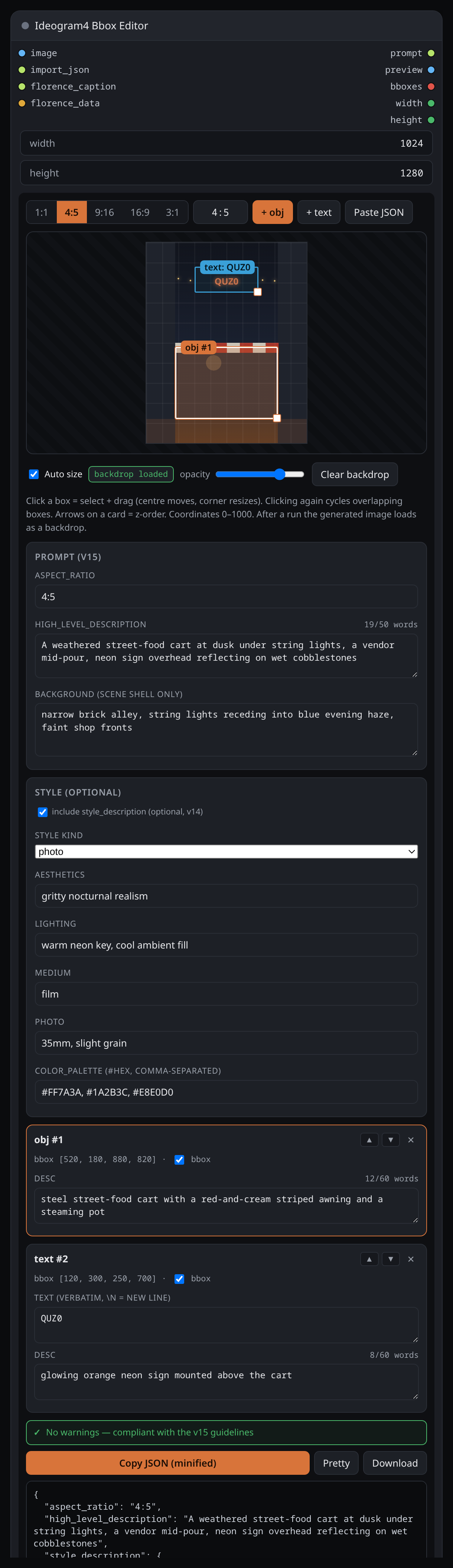
A ComfyUI custom node that renders a visual bounding-box / caption editor on the node itself and outputs the assembled Ideogram-4 caption (v15 format) as a JSON string.
ComfyUI — Ideogram4 Bbox Editor
A ComfyUI custom node that renders a visual bounding-box / caption editor on the node itself and outputs the assembled Ideogram-4 caption (v15 format) as a JSON string.
Features
- On-node visual editor — draw, move and resize regions directly on the node (corner handle resizes, centre drags; click cycles through overlapping boxes).
- Aspect-ratio presets —
1:1 / 4:5 / 9:16 / 16:9 / 3:1plus a free customW:Hfield. The ratio drives default bbox shapes. - 0–1000 grid — bboxes as
[ymin, xmin, ymax, xmax], independent of pixels. - Per-element controls —
obj/texttype, optional bbox (toggle per element), literal multi-linetextfor text regions,desc, and z-order (▲/▼ choose what sits on top). - Caption-level fields —
aspect_ratio,high_level_description,background(scene shell only). - Optional
style_description(v14) — off by default (v15 has nostyle_description). Toggle it on to add a style block with aphoto/art_stylekind,aesthetics/lighting/medium, and acolor_palette(comma-separated#hex). Emitted with the canonical key order; validation stays silent about it. Importing a caption that hasstyle_descriptionloads it back into these fields. - Live validation panel — flags v15 guideline issues as you type: word caps
(HLD ≤ 50, desc ≤ 60), camera/shadow language in
desc, floor/ground as an element,"warm"grading, post-processing inbackground, furniture/people smuggled intobackground, missingtextin built environments, bad bbox, etc. - Word counters on HLD and each
desc. - Smart import — paste any caption JSON, or wire one into the
import_jsoninput; it unwrapscaption/data/resultwrappers, doubly-encoded JSON, derives the ratio fromsize, and loadsstyle_descriptioninto the style fields. The output always reflects the editor, never the raw input. - Persistent prompt — the caption is saved with the workflow and reloaded
into the editor on reopen / page reload, and it also appears when you drop a
saved image whose embedded workflow contains it (e.g. one written by
Save Image (Rich Metadata) with
embed_workflowon). - Copy minified / Pretty / Download.
- Optional
width/heightinputs — set the actual target size. When both are > 0 the editor canvas and the output'saspect_ratiofollowW:H(e.g. right-click → convert to input and wire a resolution node).0= use the aspect ratio chosen in the editor. - Generated-image backdrop — after each run the latest generated image is
captured from the frontend and shown, scaled to fit, behind the boxes so you
can see where to nudge them before regenerating (no wiring — a real
IMAGEinput would create a graph loop). Controls: Auto size (grid/aspect ratio follow the image, else the connectedwidth/height), a backdrop opacity slider, and Clear backdrop. Picking a preset / customW:Hswitches Auto off. - Optional
imageinput — a reference image (e.g.LoadImage): dimmed behind thepreviewoutput and shown as the editor backdrop (loads on run). - Florence-2 auto-fill — seed the editor from an image without embedding the
model: wire
comfyui-florence2'sFlorence2Runoutputs intoflorence_caption(→high_level_description) andflorence_data(→ region/OCR boxes as elements; needsimageconnected so the pixel boxes can be normalized). Auto-fill re-applies only when the Florence output changes, so re-runs don't clobber your edits.- For labeled boxes + a prose HLD, wire a caption task
(
detailed_caption—more_detailed_captionruns ~150 words and trips the 50-word HLD warning) →florence_caption, and a region task's rawcaption(dense_region_caption) →florence_regions(parsed into elements withdesc = label). Seeexamples/florence2_autofill.json. florence_regionsrecovers the per-region labels that kijai'sdatadrops forOD/dense_region_caption(<loc_>is normalized, so noimageneeded).florence_data(JSON) is still accepted for boxes without labels and for OCR; it needsimageconnected (pixel-space).
- For labeled boxes + a prose HLD, wire a caption task
(
- Outputs:
prompt(STRING) — the live caption JSON.preview(IMAGE) — boxes + numbered tags +desc/textrendered over the canvas (or the dimmed reference image).bboxes(BOUNDING_BOX) — pixel-space, nested[[{x,y,width,height}]], ready for SAM3 / crop / mask nodes.width/height(INT) — the resolved canvas size (passthrough).
v15 output format
{
  "aspect_ratio": "4:5",
  "high_level_description": "…",
  "compositional_deconstruction": {
    "background": "…",
    "elements": [
      { "type": "obj",  "bbox": [40, 240, 1000, 760], "desc": "…" },
      { "type": "text", "bbox": [110, 300, 250, 700], "text": "QUZ0", "desc": "…" }
    ]
  }
}
bbox is [ymin, xmin, ymax, xmax] on a 0–1000 grid and is optional per
element. v15 has no style_description and no color_palette — describe
style as prose inside high_level_description / background.
Example workflow
examples/florence2_autofill.json — LoadImage → Florence2Run ×2 (a
detailed_caption for the HLD and a dense_region_caption's raw caption for the
labeled boxes) → Ideogram4 Bbox Editor → PreviewImage. Drag it onto the ComfyUI canvas,
point LoadImage at an image, run once to auto-fill the editor, then tweak and
generate. Requires comfyui-florence2.
Install
Clone into ComfyUI/custom_nodes/ and restart ComfyUI:
git clone https://github.com/quzopl/comfyui-ideogram4-bbox-editor.git
Usage
Add Ideogram4 Bbox Editor (category Ideogram4). Pick a ratio, add obj /
text regions, fill desc / text, write high_level_description and
background, and watch the validation panel. Wire the prompt output into a
text encoder (e.g. CLIPTextEncode) or any string consumer. Pairs naturally with
the AI Gallery metadata stack.
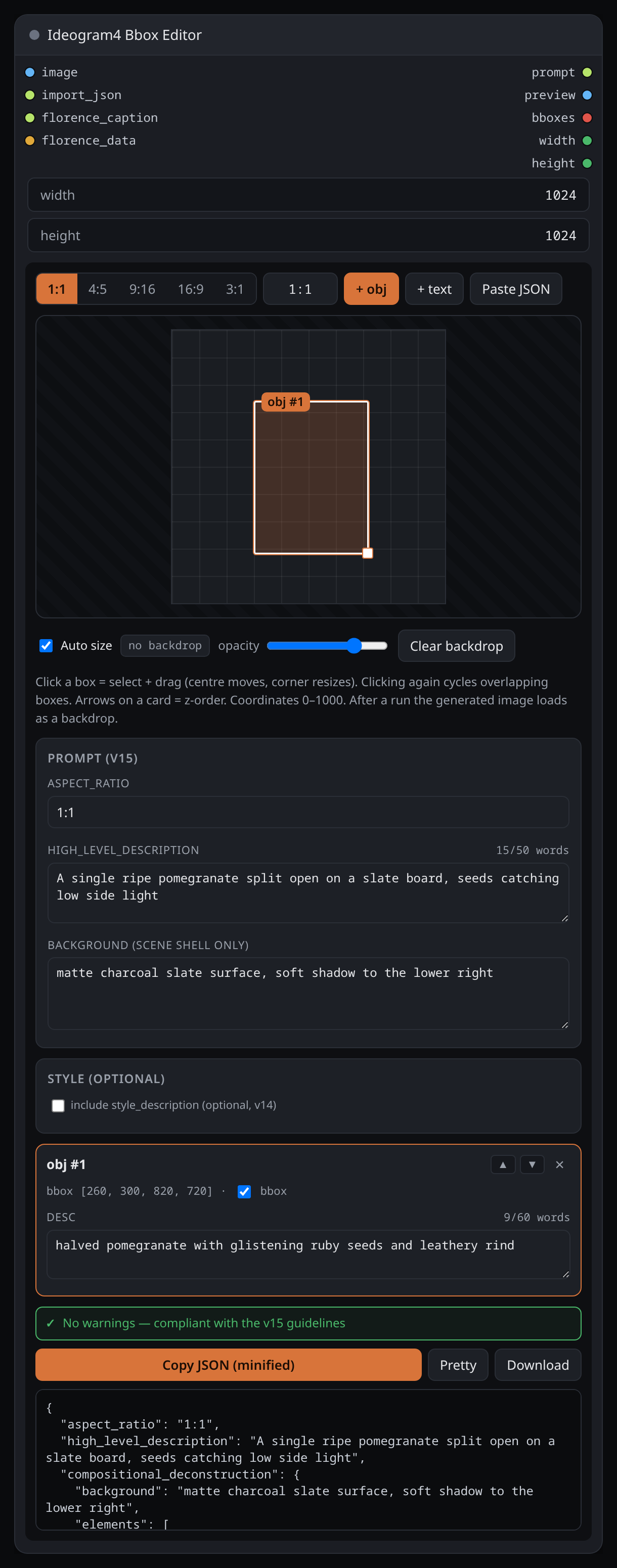
After you run the graph, the latest generated image appears as a backdrop and the grid snaps to its proportions, so you can see exactly where to nudge the boxes before the next run.
Development
python -m pytest tests/ -v
License
MIT