
ComfyUI-QFX-PBRGenerator
Generates PBR textures
Nodes (3)
ComfyUI-QFX-PBRGenerator
A custom node suite for ComfyUI that allows you to generate a full suite of PBR (Physically Based Rendering) texture maps from a single source image.
🚀 Features
- One-Click PBR: Convert any 2D image (AI-generated or photographed) into a full material suite.
- AI-Powered Delighting (Advanced): Utilize Marigold appearance and lighting models to strip baked-in shadows and highlights, resulting in clean, professional-grade Albedo maps.
- Automated Map Extraction: Generates BaseColor, Normal, Roughness, Metallic, Ambient Occlusion, and Height maps in one pass.
- Seamless Tiling: Built-in support for generating seamless textures using various tiling modes (Mirror, Replicate, Seamless).
🛠 Installation
Manual Installation
-
Navigate to your ComfyUI
custom_nodesfolder:cd ComfyUI/custom_nodes -
Clone this repository:
git clone https://github.com/qornflex/ComfyUI-QFX-PBRGenerator -
Install dependencies:
Using your ComfyUI venv:
cd ComfyUI
.venv\Scripts\activate
pip install -r .\custom_nodes\ComfyUI-QFX-PBRGenerator\requirements.txt
Using Windows Portable Version:
cd ComfyUI .\python_embeded\python.exe -m pip install -r .\ComfyUI\custom_nodes\ComfyUI-QFX-PBRGenerator\requirements.txt -
Restart ComfyUI.
📦 Nodes
PBR Generator
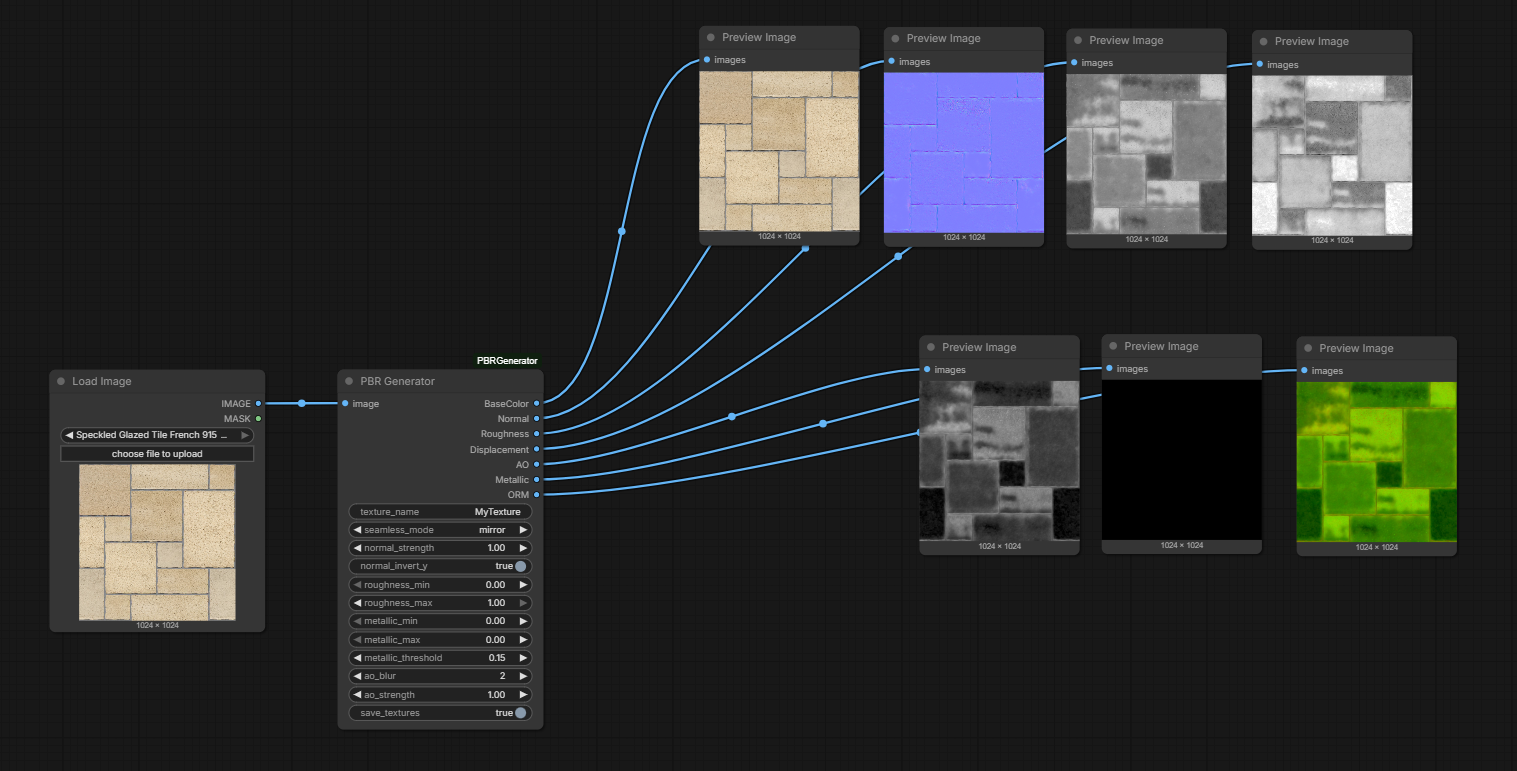
The standard node for one-click texture processing. It uses AI to analyze your image and generate a full PBR Texture set.
| Input | Description |
| :--- | :--- |
| image | The source texture or photo to be converted. |
| texture_name | Prefix for the saved filenames (e.g., "Stone_Wall"). |
| seamless_mode | Tiling options: off, seamless, mirror, or replicate. |
| normal_strength | Multiplier for the depth intensity of the Normal map. |
| normal_invert_y | Toggles Y-channel direction (DirectX vs. OpenGL). |
| roughness_min/max | Remaps the grayscale range to define surface glossiness. |
| metallic_threshold | Sensitivity for auto-detecting metal vs. dielectric areas. |
| ao_blur/strength | Controls the shadow depth and softness in crevices. |
PBR Generator (Advanced)
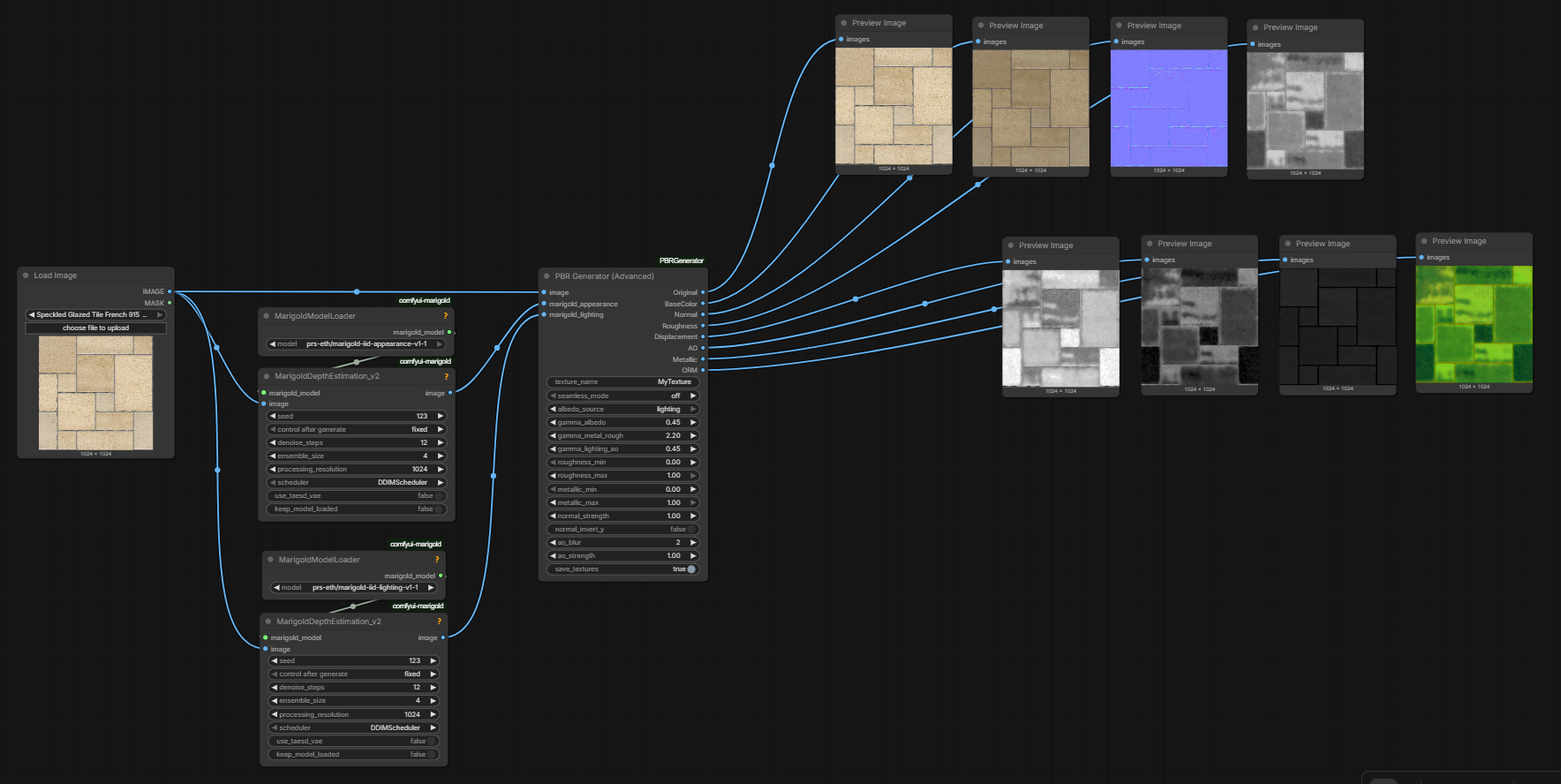
An enhanced version of the generator designed to work alongside Marigold appearance/lighting estimators. It provides granular control over gamma correction to output a delighted albedo map.
| Input | Description |
| :--- | :--- |
| image | Your primary source texture. |
| marigold_appearance | Connect the "appearance" output from a Marigold node. |
| marigold_lighting | Connect the "lighting" estimation from a Marigold node. |
| albedo_source | Choose to derive Base Color from appearance or lighting. |
| gamma_albedo | Brightness curve adjustment for the Base Color map. |
| gamma_metal_rough | Gamma correction specifically for Metallic and Roughness maps. |
| gamma_lighting_ao | Gamma correction for the Ambient Occlusion and Lighting-based maps. |
| roughness_min/max | Precision remapping for surface micro-detail and "wetness" levels. |
| metallic_min/max | Precision remapping for the intensity of metallic reflections. |
| save_textures | Toggle automatic export of all maps to the ComfyUI output folder. |
⚖️ Credits & Acknowledgments
This node is a port of the Material-Map-Generator repository.
- Original Logic & Algorithm: Joey Ballentine
- ComfyUI Implementation: qornflex
📄 License
This project follows the licensing of the original Material-Map-Generator where applicable. Please refer to the original repository for core logic licensing details.