
comfyui-darkil-nodes
Various custom nodes for improved usability.
Nodes (25)
Multiline templates with real logic
Stop re-wiring your workflow every time you want to A/B test something
A CLIP loader that waits until you tell it to load
One node that outputs any constant type — and converts whatever you feed it
A combo box you actually get to populate yourself
Defer the UNet load until the chain actually needs it
Load two text encoders on demand — the Flux/SD3 workflow version
Erase Metadata can't clean the thing you think it can — read this before wiring it up
List a folder's files inside a workflow — sorted, filtered, and as a count
The 12-fader EQ for Krea 2's conditioning — and the alignment fix nobody advertises
Pin keyframes anywhere on the timeline, not just the first and last frame
Several toggles, one node, and a join string that knows how to say 'and'
A prompt builder that grows its own widgets from your text
A stock save node that stops leaking your prompt into every PNG
One preview node that renders whatever you throw at it — and keeps its history across a page reload
Join several text inputs into one string — and actually understand the joiner
Use a reference image without permanently squatting in ComfyUI/input
The boolean gate that knows whitespace-only text is still empty
Count the lines in a text block — the loop-counter you didn't know you needed
True when your text actually has content
A text variable with a switch, a name, and real placeholder logic
A VAE loader that waits for the trigger, for when the VAE is the last thing you want in VRAM
Password-protected reference images that live in one locked file
Paste your LoRA list, get Wan low/high lists — no more per-node edits
Wan I2V encoding with a middle frame
Custom ComfyUI Nodes
Languages: English · Русский
This repository contains custom nodes for ComfyUI that extend functionality for workflows.
Available Nodes
Text Processing Nodes
1. Variable builder [darkilNodes]
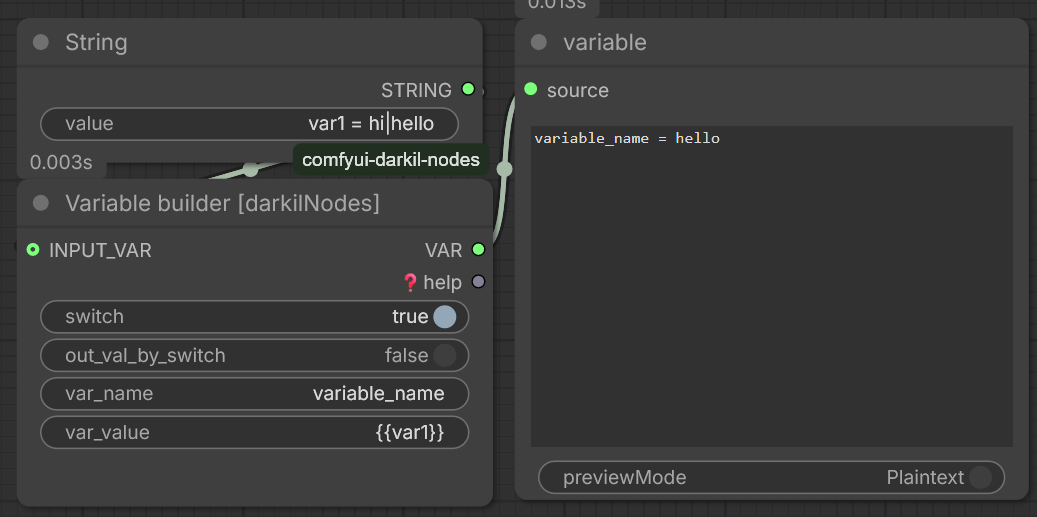
- Category: darkilNodes/text
- Description: Builds text variables from multiple inputs with configurable formatting.
- Features:
- Supports multiple input types (text, integers, floats)
- Configurable separators and prefixes/suffixes
- Conditional output based on input presence
- Inputs:
switch(BOOL): node active toggleout_val_by_switch(BOOL): return if activevar_name(STRING): variable namevar_value(STRING): variable valueINPUT_VAR(STRING): other variables input
2. Advanced variable builder [darkilNodes]
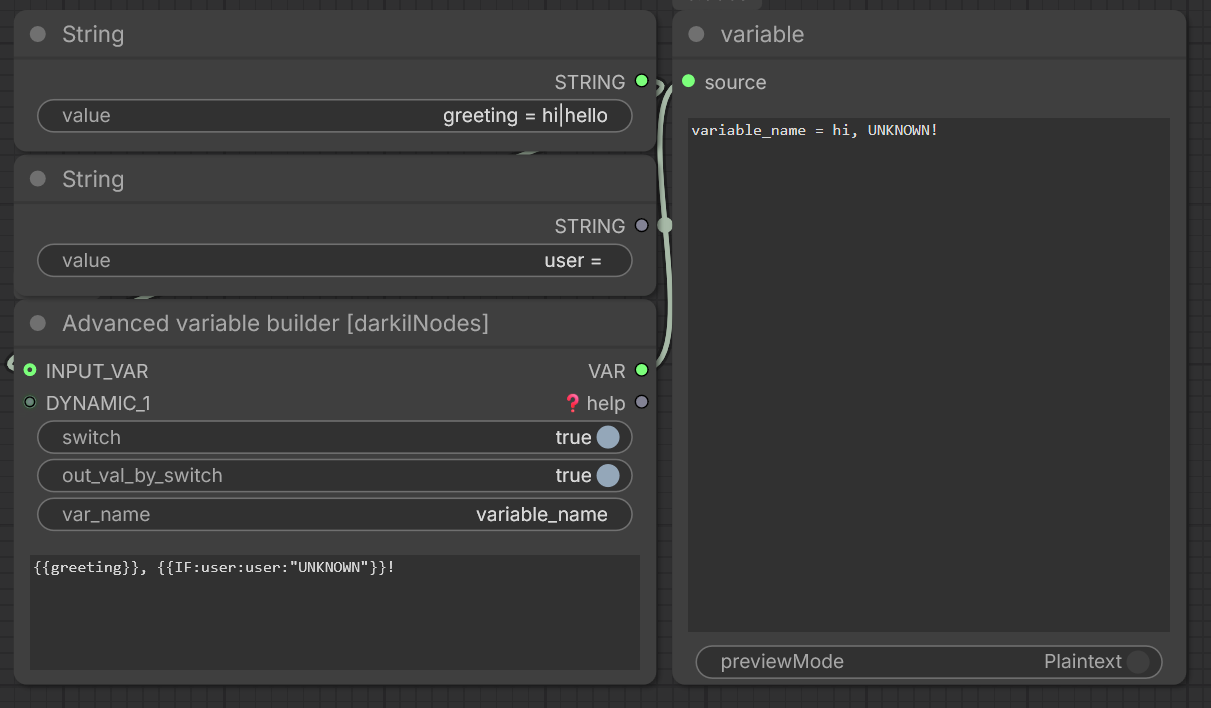
- Category: darkilNodes/text
- Description: Advanced text variable builder with complex formatting options.
- Features:
- Supports multiple input types with custom formatting
- Configurable separators and prefixes/suffixes
- Conditional output based on input presence
- Customizable number formatting for integers and floats
- Inputs:
switch(BOOL): node active toggleout_val_by_switch(BOOL): return if activevar_name(STRING): variable namevar_text(STRING): variable valueINPUT_VAR(STRING): other variables inputDYNAMIC_*(STRING): dynamic inputscondition(BOOLEAN): When True, outputs only if inputs are presentint_format(STRING): Format string for integersfloat_format(STRING): Format string for floats
3. Dynamic prompt builder [darkilNodes]
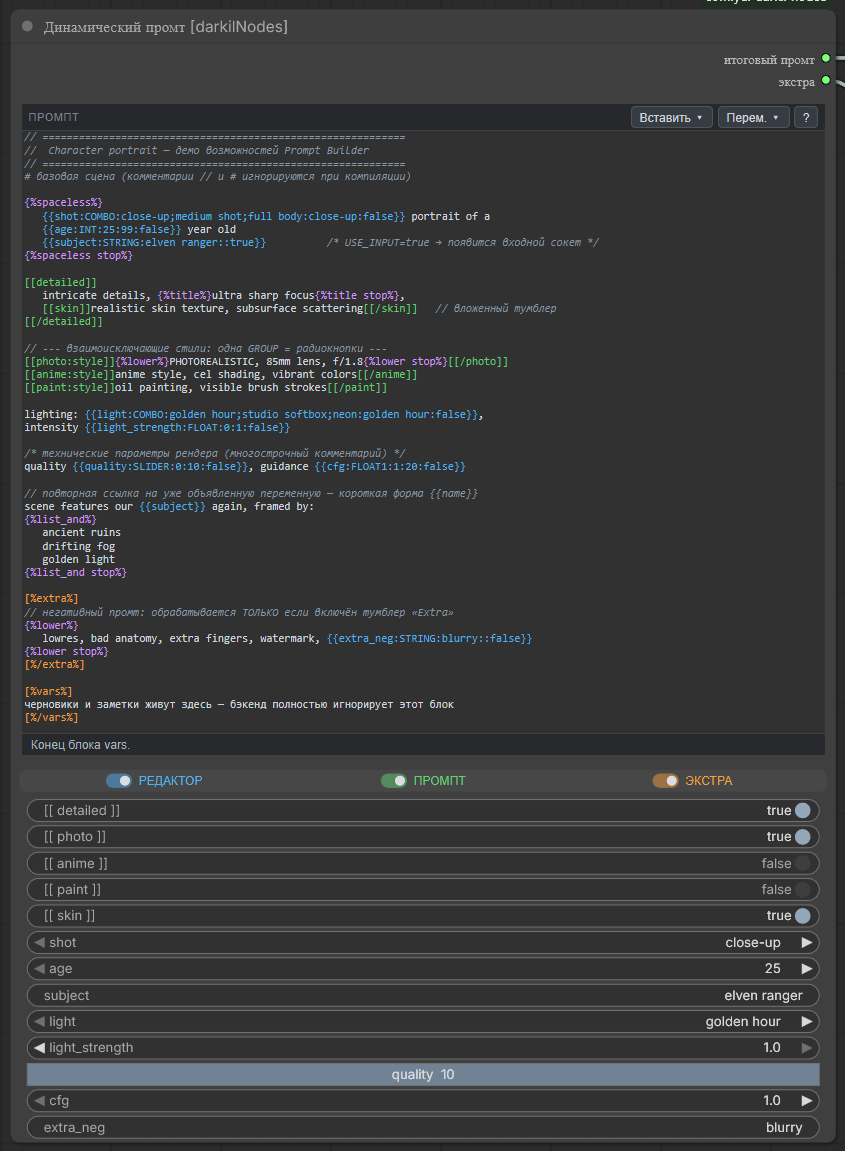
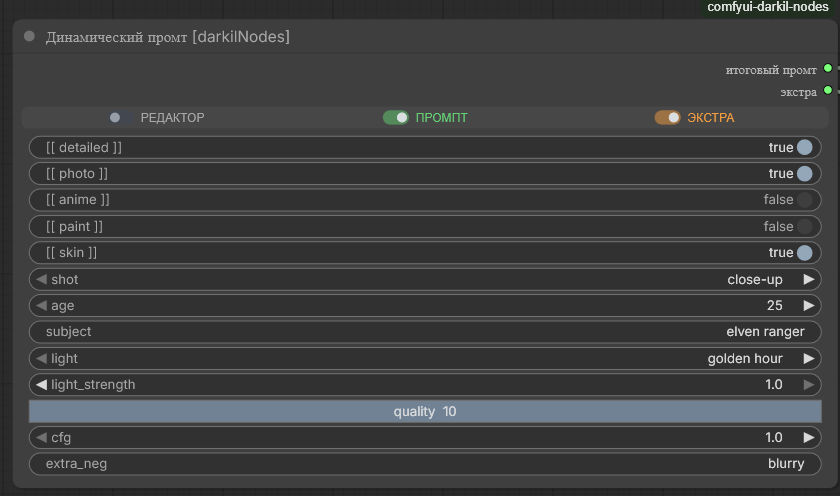
- Category: darkilNodes/text
- Description: Builds prompts from a small template language. Placeholders and toggle tags written in the prompt text spawn matching widgets on the node, so one prompt can be reconfigured live without editing the text.
- Features:
- Placeholders
{{NAME:TYPE:VALUE:DEFAULT:USE_INPUT}}create dynamic widgets.TYPE= STRING, INT, FLOAT, COMBO, SLIDER, KNOB;USE_INPUT(true) exposes an input socket for the value. - Toggle tags
[[TAG]]…[[/TAG]]keep or drop the wrapped block via a per-tag switch.[[TAG:GROUP]]makes tags sharing aGROUPmutually exclusive (radio behavior). Tags can be nested. - Extra block
[%extra%]…[%/extra%]is compiled to a second output; Vars block[%vars%]…[%/vars%]is ignored by the backend (a notes/scratch area). - Comments removed before processing:
// …,# …,/* … */. - Spaceless blocks
{%spaceless%}…{%spaceless stop%}collapse whitespace, and formatting directives (lower,upper,title,sentence,trim,dedent,list,list_and, …) transform the wrapped text and can be nested. - Syntax-highlighting editor: color highlighting, an Insert / Vars menu, caret-context hints, validation underlines, and keyboard autocomplete (EN/RU localized).
- Compact switch bar: three inline switches on one row — EDITOR (show/hide the editor), PROMPT (process the main prompt), EXTRA (process the extra block).
- Placeholders
- Inputs:
prompt(STRING, multiline): the prompt template with placeholders, tags, blocks and directives
- UI switches (client-side, one compact row):
- EDITOR: show/hide the prompt editor widget
- PROMPT: enable/disable processing of the main prompt (
compiled_prompt) - EXTRA: enable/disable processing of the extra block (
extra_compiled)
- Outputs:
compiled_prompt(STRING): the processed main prompt (empty when PROMPT is off)extra_compiled(STRING): the processed extra block (empty when absent or EXTRA is off)
4. Text is empty [darkilNodes]
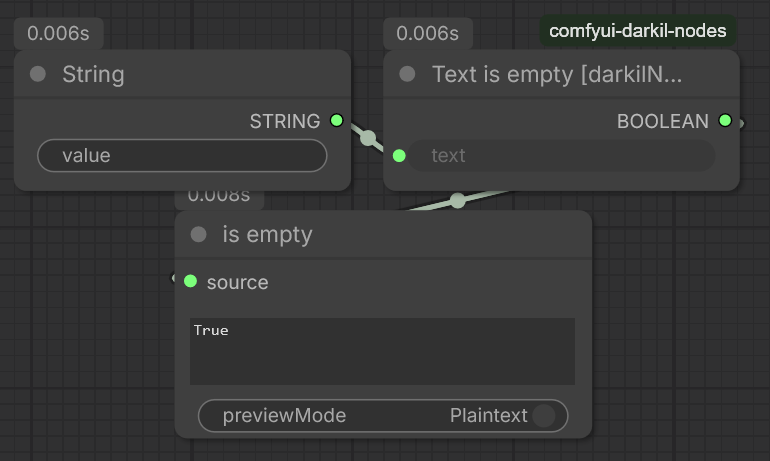
- Category: darkilNodes/text
- Description: Checks if a text string is empty or contains only whitespace.
- Inputs:
text(STRING): The text to check
- Outputs:
BOOLEAN: True if the text is empty, False otherwise
5. Text not empty [darkilNodes]
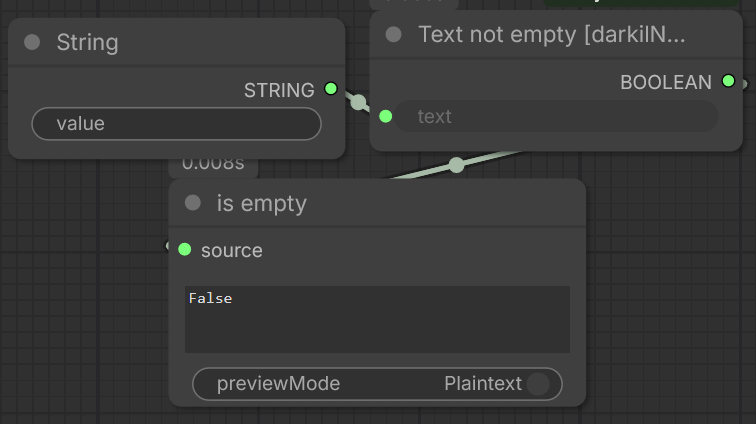
- Category: darkilNodes/text
- Description: Checks if a text string contains content.
- Inputs:
text(STRING): The text to check
- Outputs:
BOOLEAN: True if the text is not empty, False otherwise
6. Text lines count [darkilNodes]
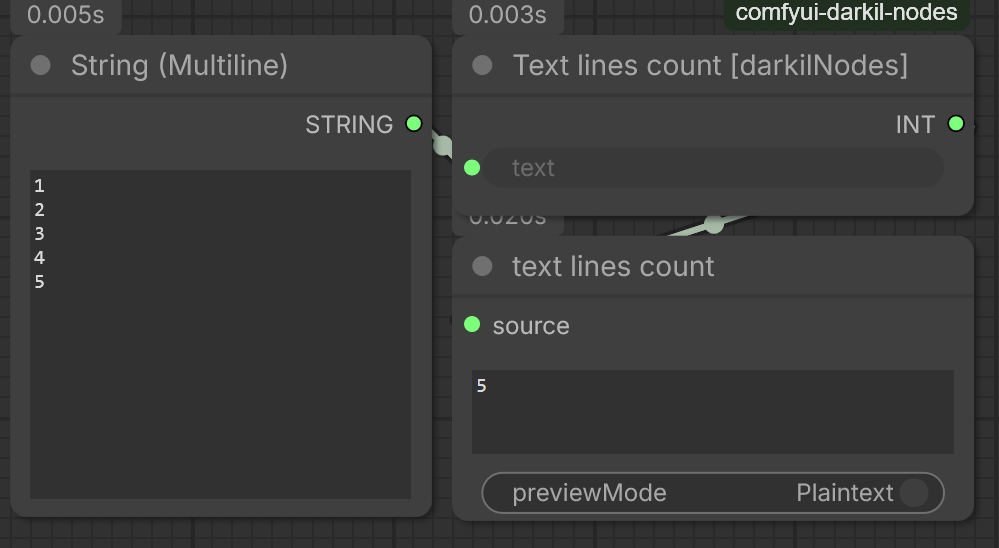
- Category: darkilNodes/text
- Description: Counts the number of lines in a text string.
- Inputs:
text(STRING): The text to count lines for
- Outputs:
INT: Number of lines in the text
7. Strings Joiner [darkilNodes]
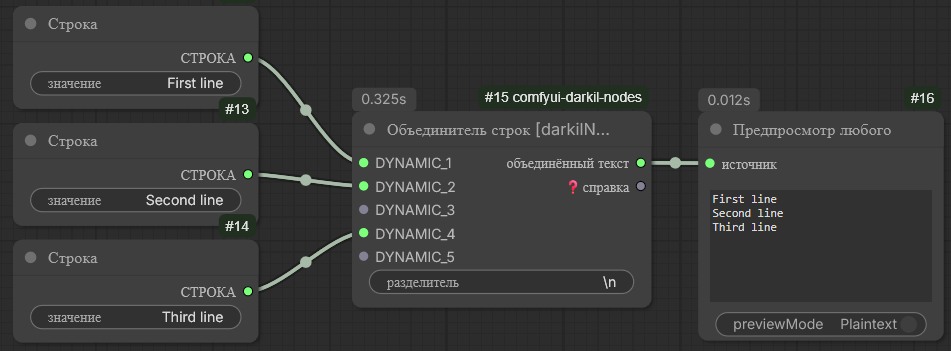
- Category: darkilNodes/text
- Description: Joins multiple text inputs with a specified separator.
- Features:
- Supports dynamic number of text inputs via DYNAMIC_* slots
- Escape sequence support (\n for newline, \t for tab)
- Filters empty/None values before joining
- Inputs:
joiner: Separator string used to join texts (supports escape sequences)DYNAMIC_*: Dynamic text inputs to join
- Outputs:
joined_text: Combined text with joiner as separator
Logic Nodes
1. Multi toggles [darkilNodes]
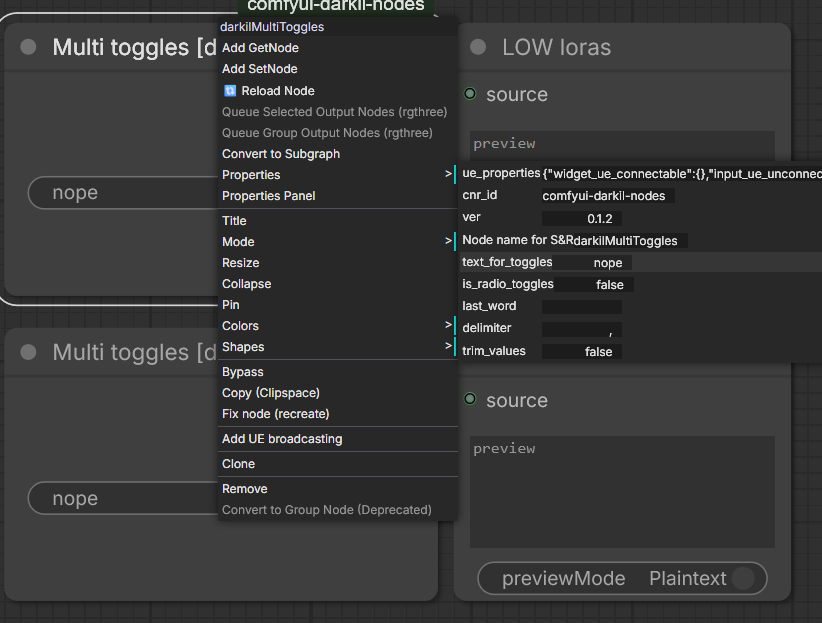
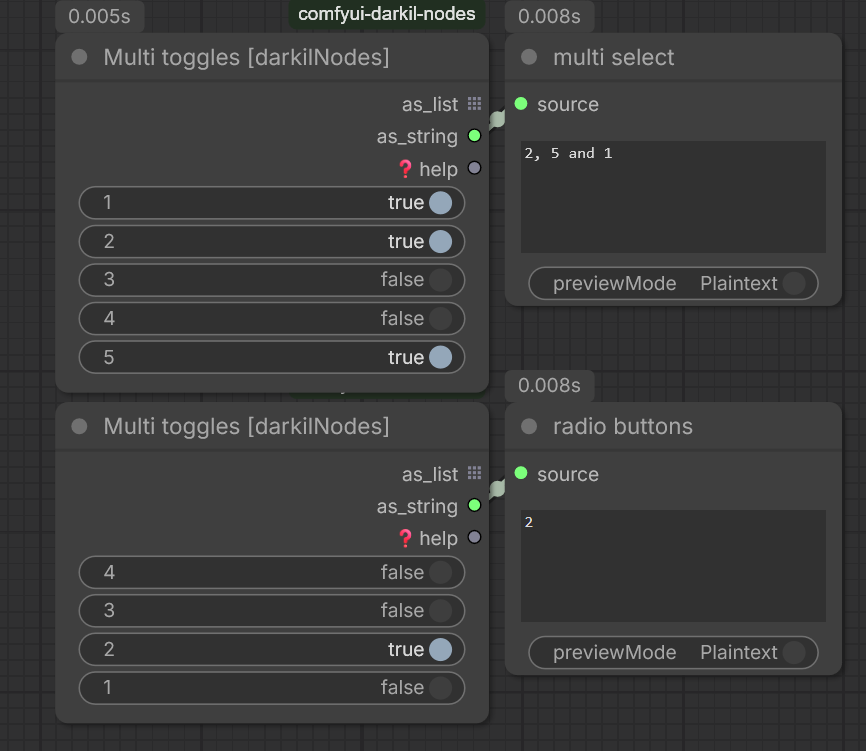
- Category: darkilNodes/logic
- Description: Provides multiple toggle switches for selecting options.
- Features:
- Configurable via node properties
- Supports radio button behavior
- Customizable delimiter and last word for string joining
- UI Configuration Properties:
text_for_toggles: Defines toggle options (semicolon or pipe separated)is_radio_toggles: Enables radio button behaviortrim_values: Trims whitespace from valueslast_word: Custom word before final item in joined stringdelimiter: String used to join items
2. Custom combo box [darkilNodes]
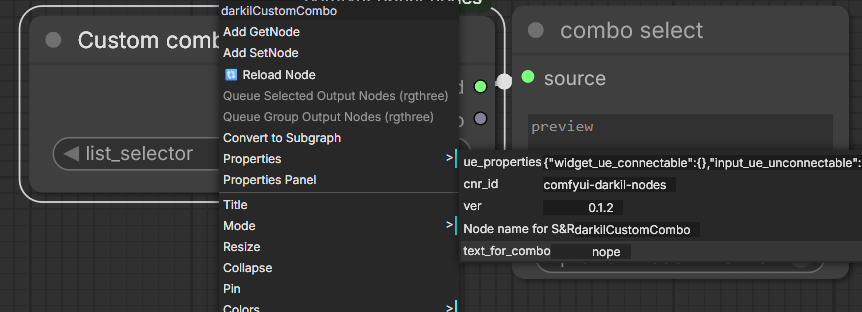
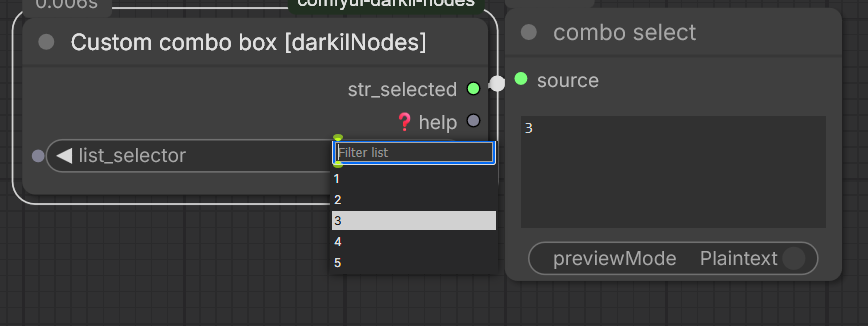
- Category: darkilNodes/logic
- Description: Allows selection from a custom combo list.
- Features:
- Configurable via node properties
- Supports semicolon or pipe separated items
- Outputs selected value and help text
- UI Configuration Properties:
text_for_combo: List of items (semicolon or pipe separated)
3. Diffusion Model Load Later [darkilNodes]
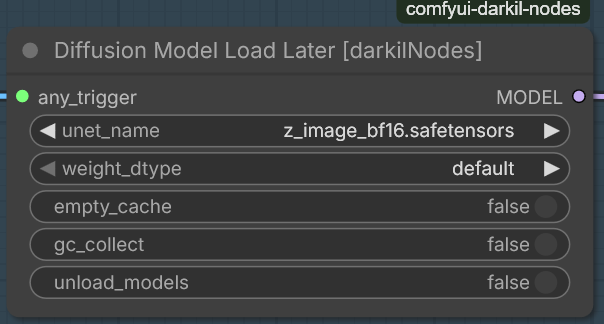
- Category: darkilNodes/logic
- Description: Loads the diffusion model into memory later in the workflow chain.
- Features:
- Allows connecting the loader of the model along the chain
- Allows clearing the model cache
- Allows unloading models from memory
- Inputs:
any_trigger: Any type as a trigger for loading the diffusion modelunet_name: Name of the diffusion model to loadweight_dtype: Weight data type (default, fp8_e4m3fn, fp8_e4m3fn_fast, fp8_e5m2)empty_cache: Clears the ComfyUI cache if enabledgc_collect: Python gc.collect()unload_models: Unloads previously loaded models from memory
4. CLIP Load Later [darkilNodes]
- Category: darkilNodes/logic
- Description: Loads the CLIP model into memory later in the workflow chain.
- Features:
- Allows connecting the CLIP loader along the execution chain
- Supports memory cleanup options
- Inputs:
any_trigger: Any type as a trigger for loading the CLIP model- Standard CLIP loader inputs (
clip_name,type) empty_cache: Clears the ComfyUI cache if enabledgc_collect: Python gc.collect()unload_models: Unloads previously loaded models from memory
5. DualCLIP Load Later [darkilNodes]
- Category: darkilNodes/logic
- Description: Loads the DualCLIP model into memory later in the workflow chain.
- Features:
- Allows connecting the DualCLIP loader along the execution chain
- Supports memory cleanup options
- Inputs:
any_trigger: Any type as a trigger for loading the DualCLIP model- Standard DualCLIP loader inputs (
clip_name1,clip_name2,type) empty_cache: Clears the ComfyUI cache if enabledgc_collect: Python gc.collect()unload_models: Unloads previously loaded models from memory
6. VAE Load Later [darkilNodes]
- Category: darkilNodes/logic
- Description: Loads the VAE model into memory later in the workflow chain.
- Features:
- Allows connecting the VAE loader along the execution chain
- Supports memory cleanup options
- Inputs:
any_trigger: Any type as a trigger for loading the VAE model- Standard VAE loader input (
vae_name) empty_cache: Clears the ComfyUI cache if enabledgc_collect: Python gc.collect()unload_models: Unloads previously loaded models from memory
7. Multi Set [darkilNodes]
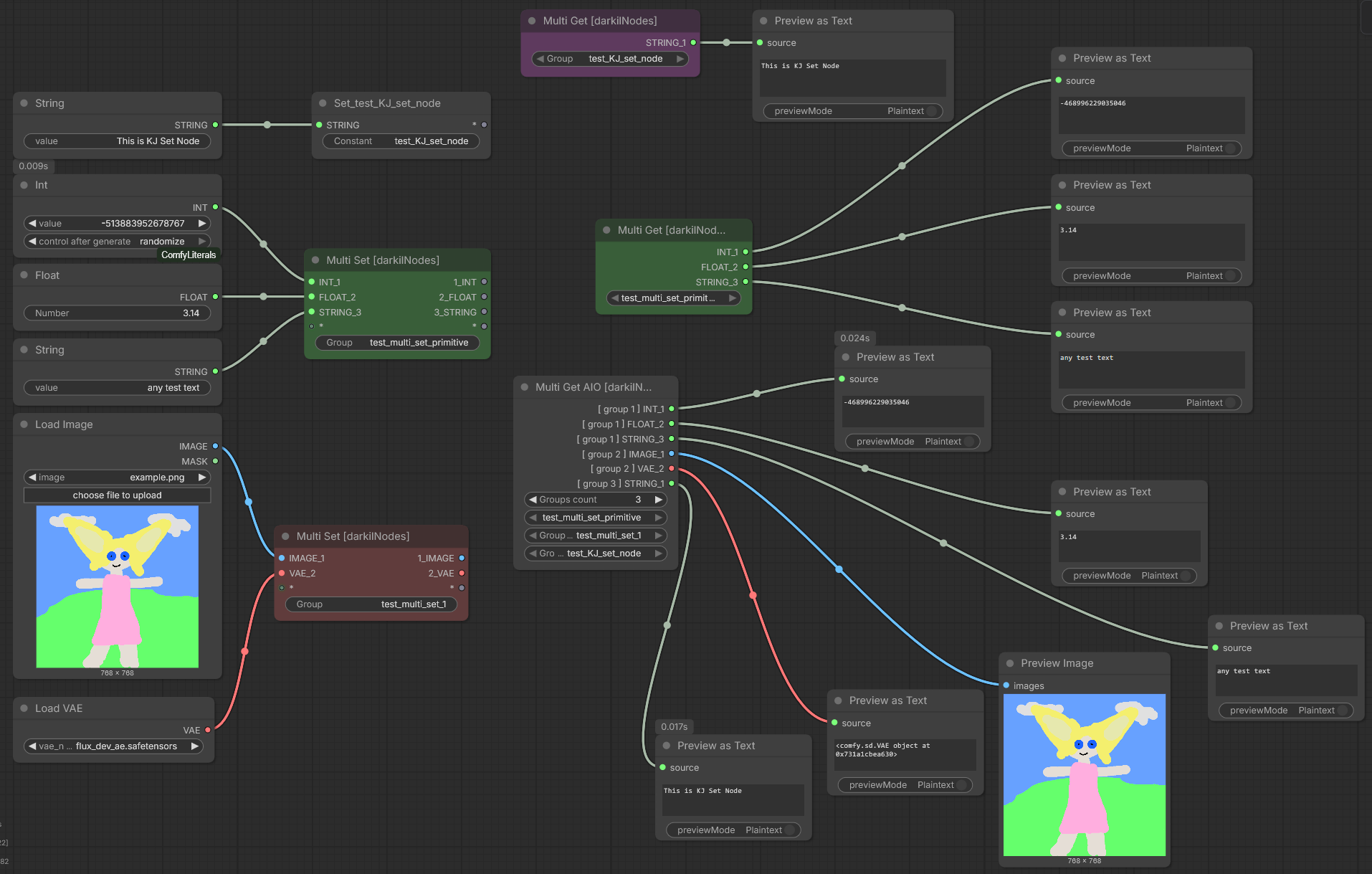
- Category: darkilNodes/logic
- Description: Creates a named group that dynamically generates matching input and output slots.
- Features:
- Define a group name via widget; the name is kept unique across the graph.
- When an input slot is connected, the node automatically creates a corresponding output slot with matching type and a generated name (
<type>_<index>). - Supports a wildcard placeholder pair that is always kept free for further connections; extra placeholders are removed automatically.
- Works with both native Multi Set nodes and KJNodes
SetNode(compatibility mode). - Propagates color changes to linked Get nodes.
- Virtual node – does not affect prompt serialization.
8. Multi Get [darkilNodes]
- Category: darkilNodes/logic
- Description: Reads a group created by a Multi Set node and generates matching output slots dynamically.
- Features:
- Group selector combo box populated with all existing Multi Set groups in the current graph.
- Automatically rebuilds its outputs to mirror the inputs of the associated Multi Set node (type, order, naming).
- Preserves existing connections when the group changes or when slots are added/removed.
- Validates links to avoid type mismatches.
- Synchronizes node colour with its corresponding Multi Set node.
9. Multi Get AIO [darkilNodes]
- Category: darkilNodes/logic
- Description: An "All-In-One" version of Multi Get that can pull data from multiple groups at once.
- Features:
- Widget to set the number of groups (1–100) and a combo box for each group to select an existing Multi Set group.
- Generates output slots for every input of every selected group, naming them as
<type>_<index> [ <group_index> ]. - Maintains connections across re-configuration by mapping old outputs to new ones based on group name and original input index.
- Supports colour inheritance from each source Multi Set node.
- Validates and cleans up broken links automatically.
- Virtual node – does not affect prompt serialization.
Multi Set / Multi Get / Multi Get AIO (
web/js/multi_set_get.js) are derived from ComfyUI-KJNodes (© kijai and contributors) and, unlike the rest of this MIT-licensed package, are licensed under GPL-3.0. Seeweb/js/LICENSE.GPL-3.0.txt.
10. Constant setter [darkilNodes]
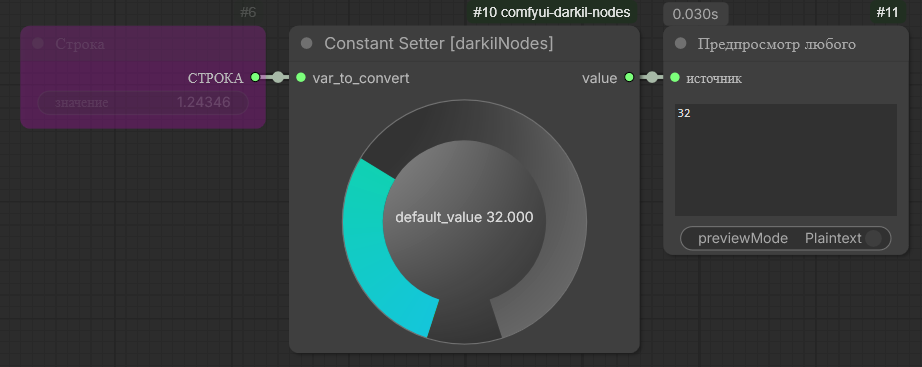
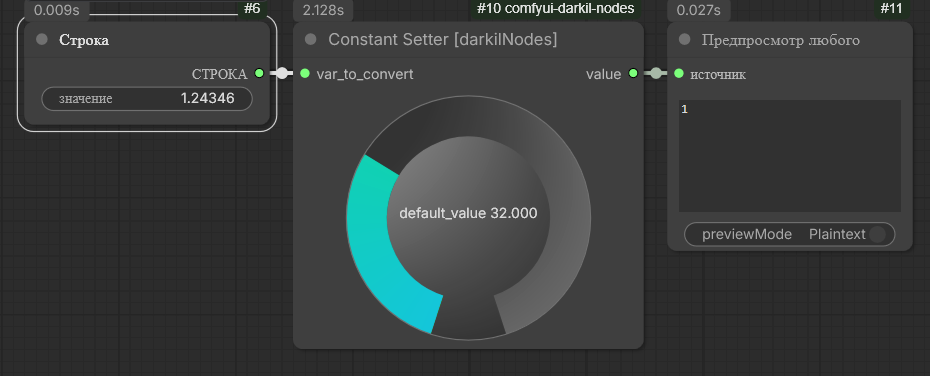
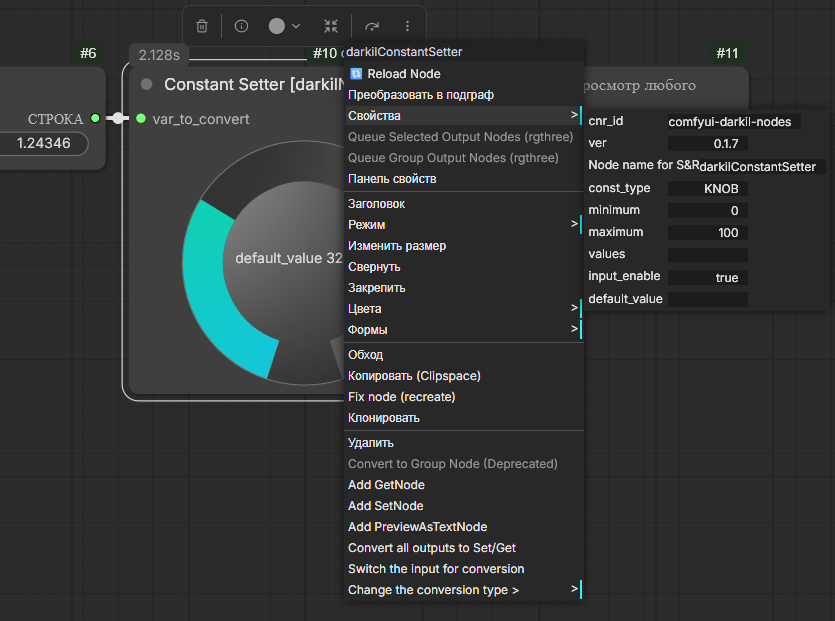
- Category: darkilNodes/logic
- Description: Sets a constant value of various types for use in workflows.
- Features:
- Supports multiple data types: STRING, INT, FLOAT, BOOLEAN, COMBO
- Slider/Knob controls with configurable min/max ranges
- Type conversion from input values
- Virtual node – does not affect prompt serialization
- UI Configuration Properties:
const_type: Data type (STRING, INT, FLOAT (FLOAT2-FLOAT5), BOOLEAN, COMBO, SLIDER (SLIDER2-SLIDER5), KNOB (KNOB2-KNOB5))default_value: Default constant valueminimum,maximum: Range bounds for numeric typesvalues: Semicolon-separated list for COMBO typeinput_enable: Enable input slot for value conversion
11. Any Switch [darkilNodes]
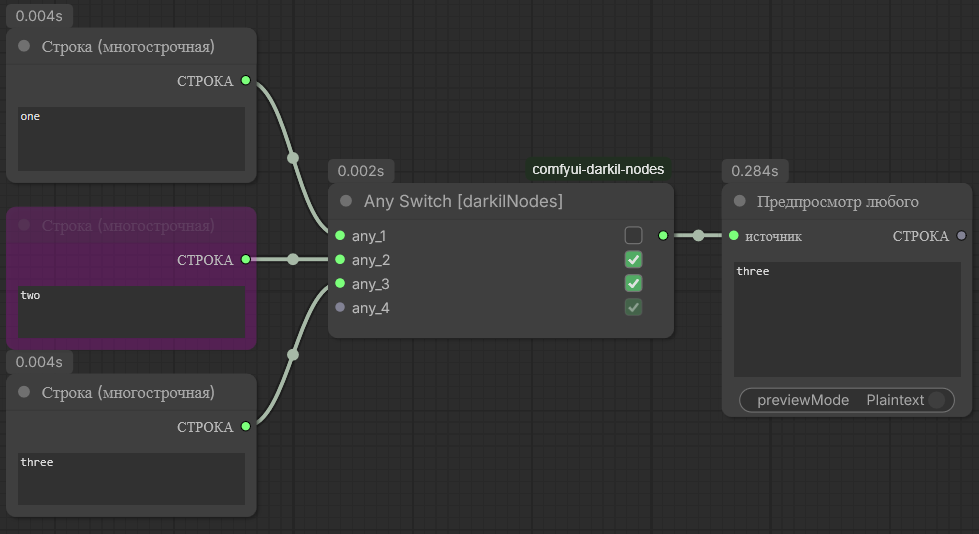
- Category: darkilNodes/logic
- Description: Passes through the first input that is both connected and enabled. Tolerant like rgthree's Any Switch — it never errors when nothing is connected.
- Features:
- Dynamic
any_*inputs — a new slot appears once the last one is filled; extra empty slots are trimmed automatically. - A per-input checkbox in the right column: uncheck it to skip that input without disconnecting the upstream node.
- Inputs are scanned top to bottom; the first enabled + connected one is returned. Falsy-but-valid values (
0, empty string) still pass through. - If nothing qualifies, the node outputs
Noneinstead of raising. - Any-type input and output (
*) — accepts and forwards any data type.
- Dynamic
- Inputs:
any_1,any_2, … (ANY): the values to switch between (added dynamically)
- Outputs:
value(ANY): the first enabled + connected input (orNone)
12. Show Any [darkilNodes]
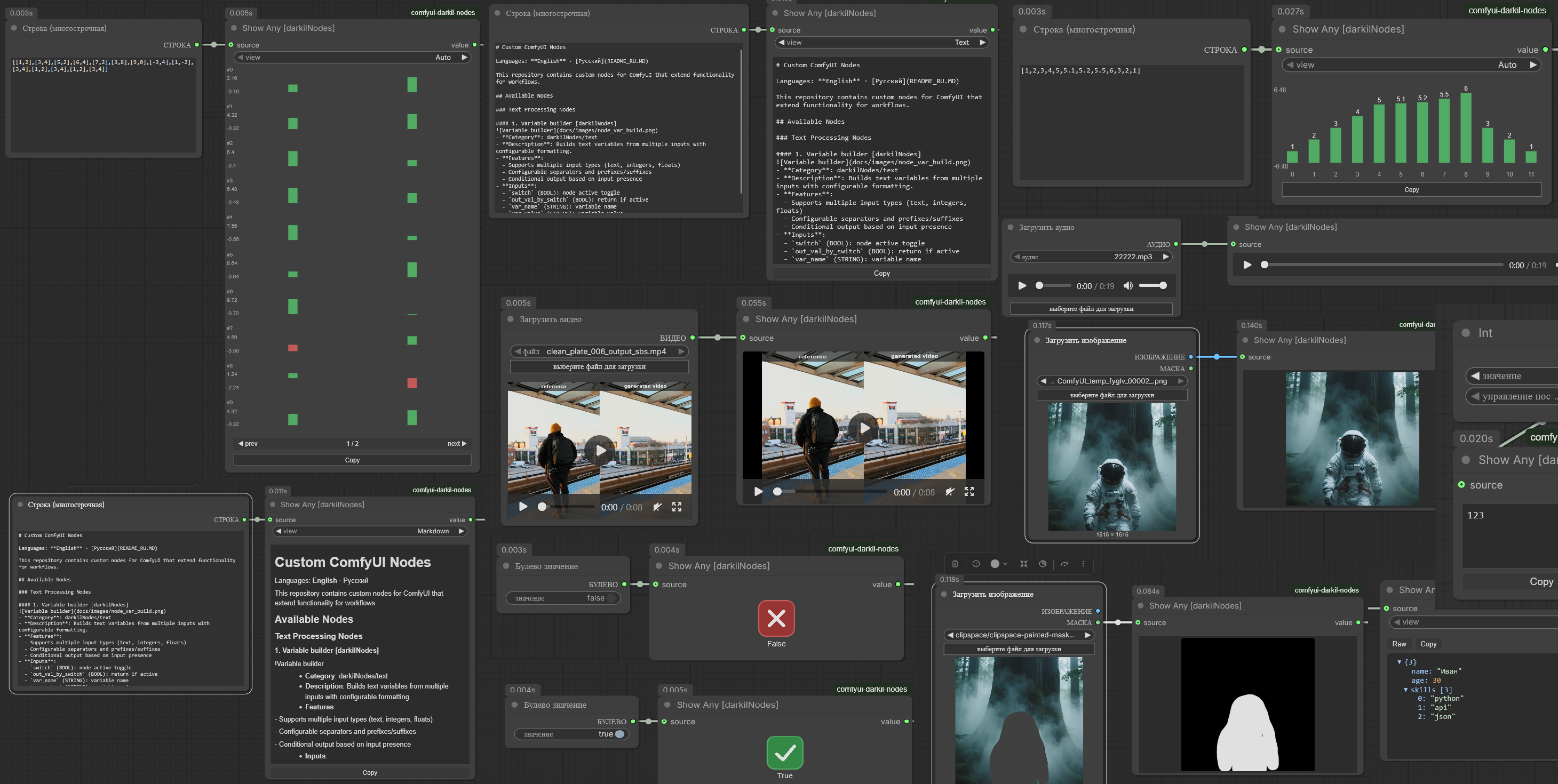
- Category: darkilNodes/logic
- Description: A universal preview node that renders whatever is connected, chosen by the value's runtime type, and passes the value through unchanged on
value. - Features — renders by detected type:
- Text / number — selectable, copyable text.
- JSON (a dict, or a string that parses as JSON) — a collapsible tree with a Tree / Raw toggle.
- Boolean — a large green check / red cross.
- Number list (
[1, 2, 3], or a numeric-array string) — a read-only equalizer chart with value labels and auto-range. - Matrix / list of lists (
[[...], [...]]) — stacked mini-equalizers, 10 per page with prev/next pagination. - Image(s) / mask — inline image preview(s); masks are shown as grayscale.
- Video — an HTML
<video>player. - Audio — an HTML
<audio>player. - Markdown — rendered markdown (choose Markdown in the
viewcombo). - Text / JSON / markdown / image / video panels fill the node as it is resized.
- History - the last 20 values are kept per node, whatever their type.
- The value survives a redraw. Coming back to the browser tab, switching workflows, or anything else that makes the frontend rebuild the graph no longer blanks the node: the history is held outside the node, and the last value is written into the node itself, so it comes back after a page reload too. A value restored that way is labeled
restoreduntil the node runs again. - A new value never steals the view while an older one is on screen: the counter turns orange and
>|goes back to the newest. - Nothing has to leave with the workflow.
xin the bar forgets the saved copy along with the older entries, and the right-click menu has forget the value saved in the workflow, forget it on every Show Any node for the whole graph at once, and stop keeping the value in the workflow, after which the node saves nothing at all and its bar saysnot saved. That last one is the node propertyshowany_keep, so the properties panel flips it too. The value on screen is left alone by all of them - that copy goes nowhere.
- UI:
- History bar above the panel:
<>step one value,>|jumps to the newest,xforgets everything except the value on screen, the copy stored in the workflow included. The middle of the bar shows the position and the time of the run. view(COMBO, shown for strings): Auto / Text / Markdown / JSON. Auto shows a JSON tree, or an equalizer for numeric arrays, otherwise plain text.
- History bar above the panel:
- Inputs:
source(ANY, optional): the value to display
- Outputs:
value(ANY): the input passed through unchanged
WAN Nodes
1. I2V Encode with Middle Frame [darkilNodes]
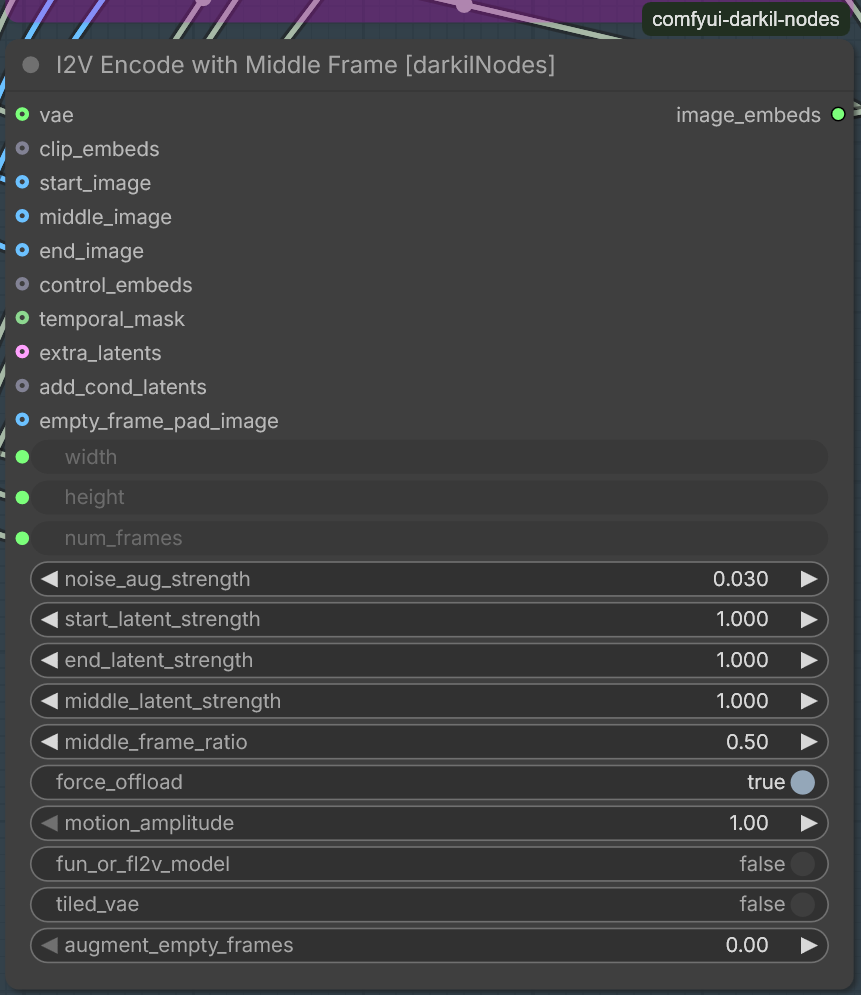
- Category: darkilNodes/wan
- Description: Clone of WanVideoWrapper's 'WanVideo ImageToVideo Encode' with added middle frame support. Built from code of other custom node projects.
- Features:
- Accepts start_image, middle_image (optional), and end_image (optional)
- middle_frame_ratio controls the position of the middle frame (0.0 = start, 1.0 = end)
- middle_latent_strength controls the conditioning strength of the middle frame in latent space
- motion_amplitude (>1.0) enhances inter-frame motion
- Supports noise augmentation, tiled VAE encoding, and empty frame padding
- Based on:
- Inputs:
width,height,num_framesnoise_aug_strength,start_latent_strength,end_latent_strength,middle_latent_strengthmiddle_frame_ratio,motion_amplitude,force_offloadvae(WANVAE)start_image,middle_image,end_imageclip_embeds,control_embeds,temporal_mask,extra_latentstiled_vae,fun_or_fl2v_model,augment_empty_frames,empty_frame_pad_image
- Outputs:
image_embeds(WANVIDIMAGE_EMBEDS)
2. LoRA list for WanVideoWrapper by Kijai [darkilNodes]
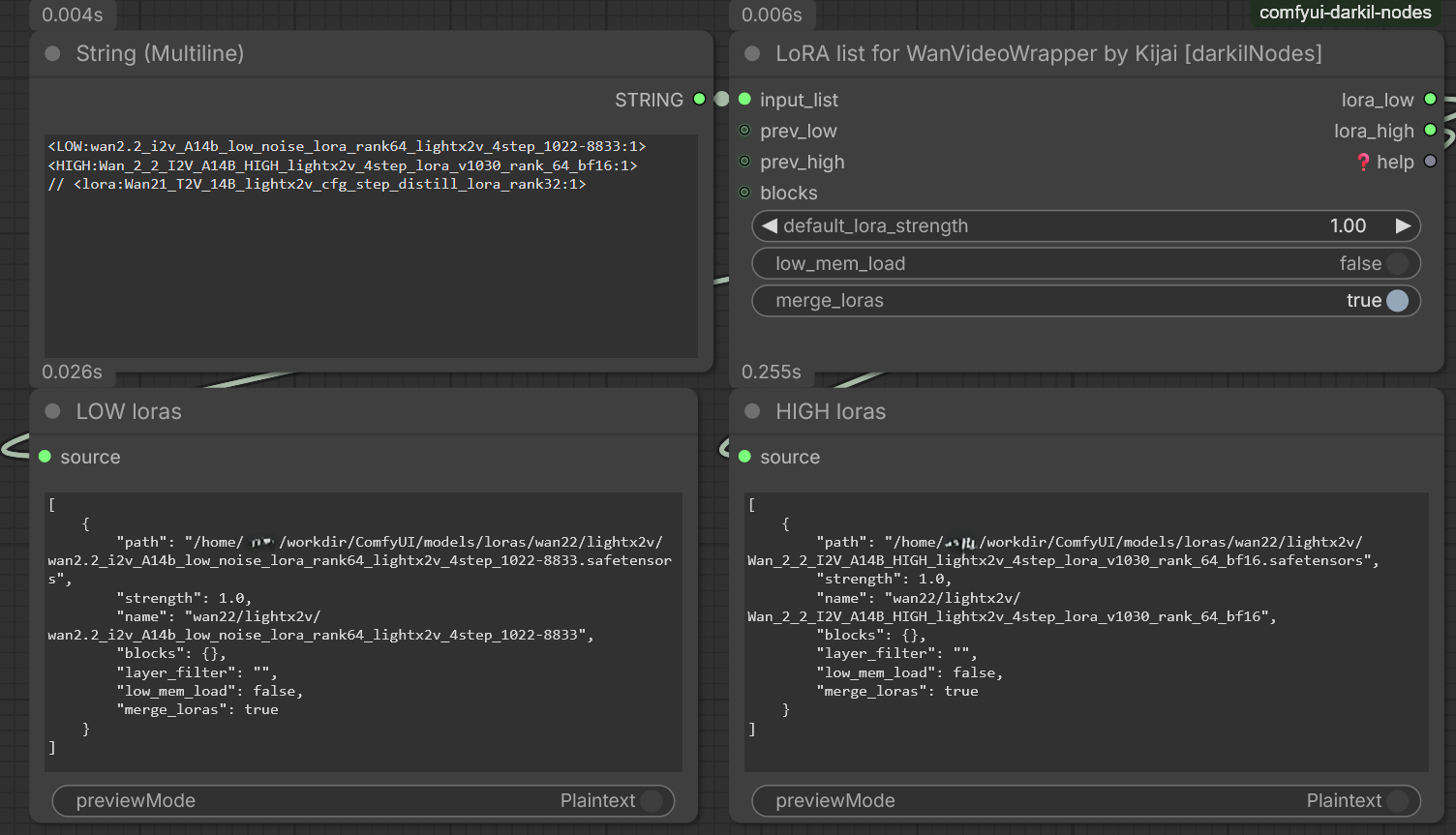
- Category: darkilNodes/wan
- Description: Parses textual lists of LoRA definitions for WanVideoWrapper nodes by Kijai.
- Features:
- Supports multiple input formats (newlines, semicolons, pipes)
- Handles comments (both line and block style)
- Low/high noise model targeting with prefixes
- Block selection support
- Merging of LoRAs for efficiency
- Previous list merging capability
- Input Format:
<LoRA name>[:<strength>]- Prefixes:
l<<,l<,<low:,low:for low-noise model,h<<,h<,<high:,high:for high-noise model
- Special Features:
- Supports block comments
/* ... */and line comments// ... - Optional merging of multiple LoRAs into a single tensor
- Low-memory loading option
- Automatic handling of missing files with error logging
- Supports block comments
MiniMax H3 Nodes
1. MiniMax H3 Multi Keyframe [darkilNodes]
- Category: darkilNodes/minimax
- Description: Replacement for the core 'MiniMax H3 Image to Video' node that anchors keyframes anywhere on the timeline instead of only at the first and the last frame. Returns the conditioning and the AV latent as the core node does, plus the model that carries the layout patch.
- Requires: a ComfyUI build with MiniMax H3 support (
comfy_extras/nodes_minimax_h3.py,comfy/ldm/minimax/model.py). - Features:
middle_framestakes a batch of images, one anchor per imagemiddle_positionsholds one value per image, written as a 0.0-1.0 ratio or as an absolute frame index, or left empty to spread the anchors evenly- anchors are clamped to the interior of the clip, and the length is snapped up to the model's 17k+5 frame grid first
- anchors reach the text encoder as
<Picture N>in temporal order, so the first picture is the earliest frame keyframe_noise_augsets the condition strength of every anchor; 0.999 is the core value, lower blends noise into the anchors- the first and the last anchor are laid out exactly where the core node puts them
- How it works: the core path already carries a list of keyframes of any length - one condition segment per entry, one condition latent per entry - and only
PackedLayoutrefuses an anchor other than frame 0 and the last frame. The temporal RoPE coordinate of a condition row is linear in the pixel frame index (origin + 5/3 * index, the 40 Hz RoPE over 24 fps video), and that single expression reproduces both core anchors exactly. The node builds the keyframe list with real indices and returns a model carrying an OUTER_SAMPLE wrapper, which installs a marker-gatedPackedLayoutpatch for the duration of one sampling run and removes it in afinallyblock. Nothing is patched process wide, and keyframes without the marker - including those from other packs - are handed to the core code untouched. - Wiring:
clip,vaeandmodelcome from the same places as for the core node, and themodeloutput has to reach the sampler (the guider). Without it the run stops with the core erroronly first/last keyframe anchors are supportedrather than quietly stacking every anchor on frame 0. - Inputs:
model(MODEL),clip(CLIP),vae(VAE)prompt,width,height,lengthmiddle_positions,position_units(ratio / frames),middle_fit(cover / stretch),keyframe_noise_augfirst_frame,last_frame,middle_frames(IMAGE, all optional)
- Outputs:
positive(CONDITIONING),latent(LATENT),model(MODEL)
- Notes:
- H3 was trained with first and last anchors (fl2va), so a middle anchor is outside that distribution. It does hold in practice - a marker drawn on the middle image shows up in the middle of the clip, with the motion around it staying consistent - but the further past three anchors it goes, the less trodden the ground.
- Each extra anchor adds one condition segment to the packed sequence, about 1000 rows at 1344x768.
keyframe_noise_augbelow 0.999 is the first knob to reach for when the model fights an anchor.
Conditioning Nodes
1. Krea2 Rebalance Equalizer [darkilNodes]
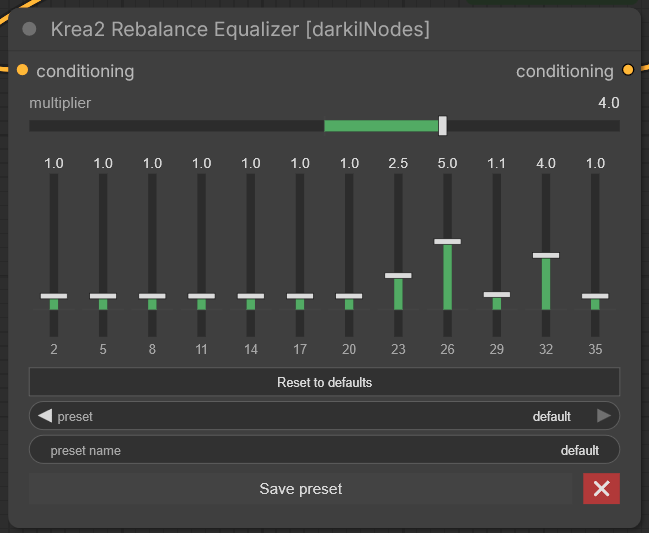
- Category: darkilNodes/conditioning
- Description: Per-layer conditioning scaler for the Krea 2 (Qwen3-VL-4B, 12-layer tap) layout. Adjust the gain of each model tap layer with a built-in equalizer, then scale the whole conditioning by a multiplier.
- Features:
- Horizontal equalizer with 12 vertical faders, one per Krea 2 tap layer (labeled 2, 5, 8, … 35), range −2.0 … 10.0
multiplierrendered as a matching horizontal slider (−10.0 … 10.0)- "Reset to defaults" button
- Presets: save the current profile (multiplier + 12 weights) under a name, load it from a combo box, delete with the red ✖. Presets are stored server-side in
nodes/conditioning/krea2_eq_presets.json(shared across browsers/workflows on the machine; no extra port — served by the existing ComfyUI server) - Fully custom-drawn UI with no external JS dependencies
- Inputs:
conditioning(CONDITIONING): the conditioning to rescalemultiplier(FLOAT): global scale applied to the whole conditioning
- Outputs:
conditioning(CONDITIONING): the rescaled conditioning
- Based on:
- ComfyUI-Conditioning-Rebalance (Apache-2.0) — vendored scaling helpers, see
nodes/conditioning/THIRD_PARTY_LICENSES.txt
- ComfyUI-Conditioning-Rebalance (Apache-2.0) — vendored scaling helpers, see
File Handling Nodes
1. Files list from dir [darkilNodes]
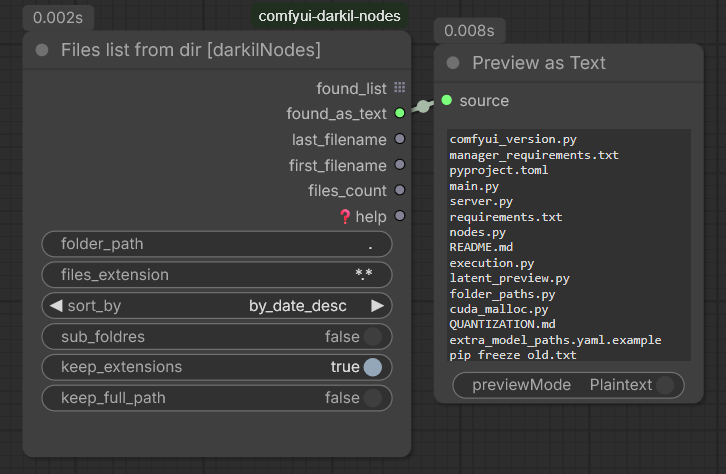
- Category: darkilNodes/files
- Description: Lists files in a directory based on extension and sorting criteria.
- Features:
- Supports glob patterns for file filtering
- Multiple sorting options (by date, name, size)
- Recursive subdirectory search capability
- Configurable output format (with/without extensions, full paths)
- Inputs:
folder_path(STRING): Path to the directory to scanfiles_extension(STRING): Extension filter; can be a simple extension (e.g., "png") or any glob pattern (e.g., "*.txt")sort_by(COMBO): Sorting method – by date, name, size and their descending variantssub_foldres(BOOLEAN): If true, search recursively in sub-folderskeep_extensions(BOOLEAN): Keep file extensions in the output nameskeep_full_path(BOOLEAN): Return full absolute paths instead of just filenames
- Outputs:
found_list(STRING): List of file names/pathsfound_as_text(STRING): Newline-separated string of all fileslast_filename(STRING): Name/path of the last file after sortingfirst_filename(STRING): Name/path of the first file after sortingfiles_count(INT): Total number of files found
2. Erase Metadata [darkilNodes]
- Category: darkilNodes/files
- Description: Takes the workflow, and every other tag, out of media that passes through it. One input, one output, and anything it does not recognise comes out exactly as it went in.
- Read this part first, it decides whether the node is any use to you: ComfyUI
does not carry metadata along the links. An
IMAGEor aMASKis a plain tensor,AUDIOis a waveform and a sample rate,LATENTis a tensor as well; none of them has anywhere to keep a workflow. The workflow is stamped on at save time, by the save node, out of hidden inputs the engine hands it straight from the request. Nothing standing upstream of a save node can prevent that. Put this node in front ofSave Imageand it will report in the console that there was nothing to remove, because there was not. If that is what you wanted, start ComfyUI with--disable-metadata: it switches the workflow off for every save node at once and costs nothing. For the same thing per workflow rather than per server, useSave Image (no metadata)below. - What it does work on:
VIDEO- a video object is a wrapper around a real file, tags and all. Worse, saving one copies the tags of the source container into the new file, so a video that has been through ComfyUI once drags its old workflow along every time it is saved again. The node hands on a copy with the container and stream tags gone and leaves the file it was given alone.- File names - any
STRINGnaming an existing media file, and any list or tuple of them, is cleaned where it lies; the path itself comes back unchanged. This is the case that covers images and audio, because the only moment their metadata exists is after the file has been written. Packs that hand you their output paths, VideoHelperSuite among them, plug straight in. A relative name is looked for in the folders ComfyUI writes to, and nowhere else. - Bytes - an encoded file passed around as
bytesis cleaned in memory.
- Formats it takes apart itself, copying the pixels through byte for byte:
- PNG -
tEXt,zTXt,iTXt,eXIf,tIME, and anything parked afterIEND - JPEG - EXIF, XMP, IPTC and comments; JFIF, the ICC profile and the Adobe marker stay, because dropping those changes the colours
- WEBP - EXIF and XMP, still and animated, with the
VP8Xflags corrected - GIF - comment and application blocks, keeping the loop count so animations still loop
- PNG -
- Formats it rewrites through a stream copy, which is lossless but rebuilds the file: MP4, MOV, MKV, WEBM, AVI, FLV, TS, MP3, FLAC, WAV, OGG, OPUS, M4A, AAC
- What it does not touch: EXR, TIFF, and any container not on that list. A file it cannot parse, or one that is truncated, is left alone rather than guessed at.
- Inputs:
value(*): anything at all
- Outputs:
value(*): the same thing, cleaned wherever that was possible
- Notes:
- Files are rewritten into a temporary copy and moved into place, so an interrupted run cannot leave you with half a file.
- Running it twice costs nothing: the second pass finds no tags and does not rewrite.
- What came out of each file is reported in the ComfyUI console, one line per file.
Image Nodes
1. Load Image (Temp) [darkilNodes]
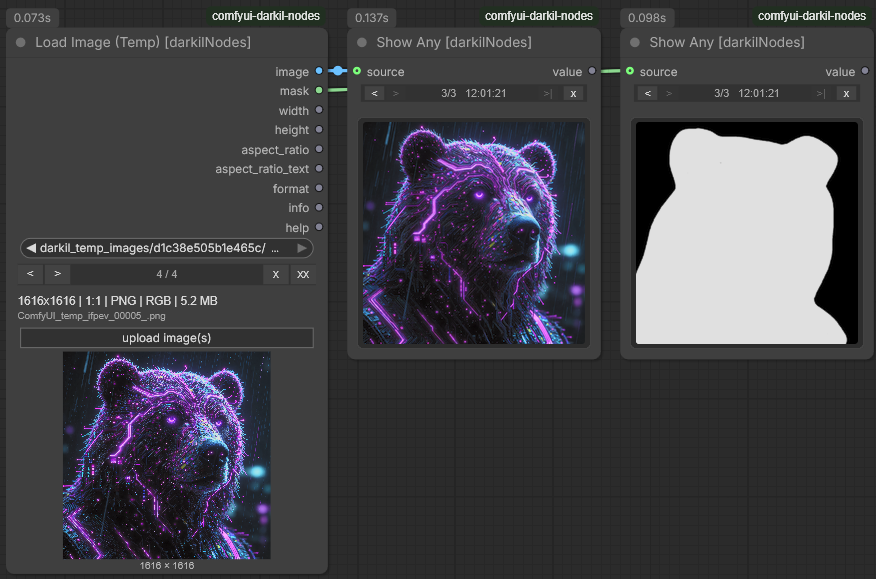
- Category: darkilNodes/images
- Description: A Load Image whose uploads never reach
ComfyUI/input. Files are stored inComfyUI/temp/darkil_temp_images/<bucket>/, and ComfyUI wipes its whole temp folder both when the server starts and when it stops, so the images live exactly as long as the session does. - Features:
- Upload with a button, by dropping files on the node, or by pasting with ctrl+v
or
Paste Imagein the node menu, several at a time - Prev / next arrows with a counter to step through the images of this node
- Remove the selected image, or clear the node's whole set
- Short image info right on the node: size, aspect ratio, format, colour mode, file size
- Every node instance owns its bucket; a copy of the node shares the same one
- Upload with a button, by dropping files on the node, or by pasting with ctrl+v
or
- Inputs:
image(COMBO): The selected file, written the way ComfyUI writes image widget values:darkil_temp_images/<bucket>/<name> [temp]
- Outputs:
image(IMAGE): The decoded image, same conventions as the stock loadermask(MASK): Inverted alpha channel, zeros when the image has nonewidth(INT),height(INT): Pixel sizeaspect_ratio(FLOAT): Width divided by heightaspect_ratio_text(STRING): The readable form, for example16:9or1.85:1format(STRING): PNG, JPEG, WEBP and so oninfo(STRING): The one line summary shown on the nodehelp(STRING): The node help text
- Note: After a server restart the temporary files are gone. The node reports the missing file and you upload it again.
- Mask editor: works on this node. It saves what you paint into
ComfyUI/input- its own behaviour, not something the node controls - and points the node at that copy, so the one image you masked does outlive the session. The node saysedited copy, from the input folderwhile that is what it is pointing at.
2. Load Image (Encrypted Vault) [darkilNodes]
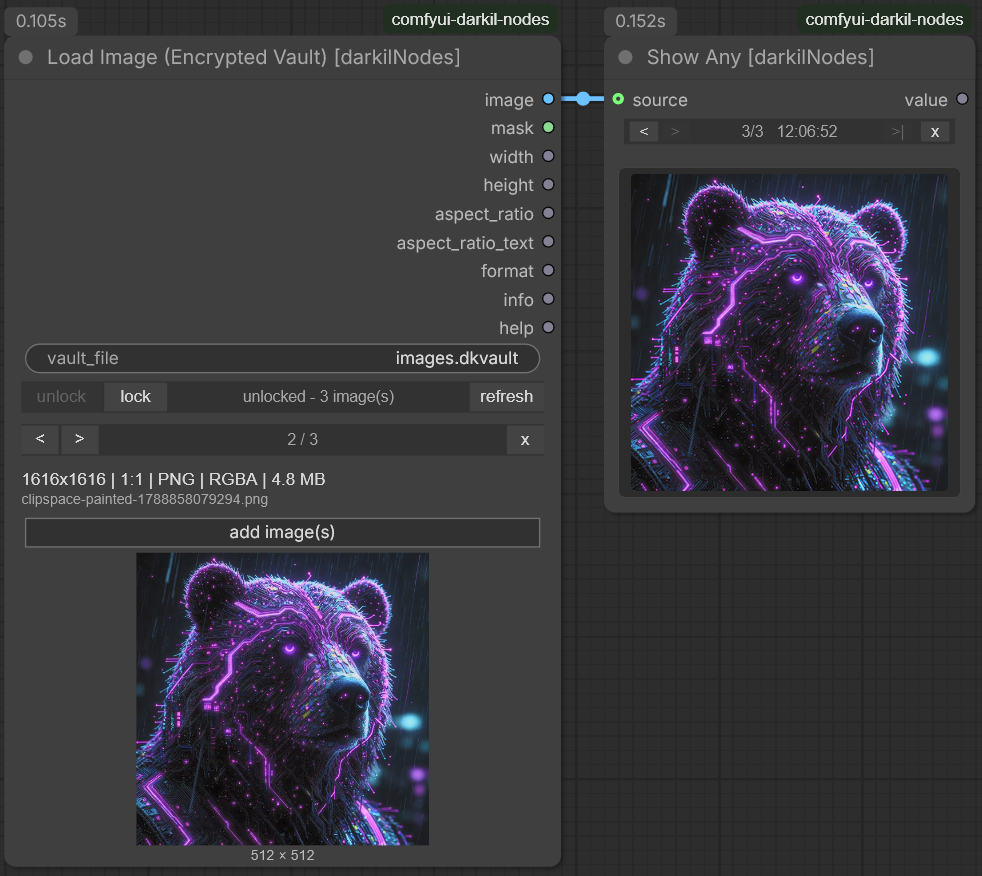
-
Category: darkilNodes/images
-
Description: Reads images out of a password protected container kept in
ComfyUI/input. One file holds many images, and without the password nothing in it is readable: not the pixels, not the file names, not the catalogue itself. -
Features:
- AES-256-CTR with an HMAC-SHA256 tag on every block; the key comes from the password through PBKDF2-HMAC-SHA256 with 200000 iterations
- The password is typed in a dialog and turned into a key that lives only in the running ComfyUI process. It is never written to the workflow, to a file, or to the log
- A lock button forgets the key straight away; restarting ComfyUI forgets it too
- Add images with a button, by dropping them on the node, or by pasting with ctrl+v
or
Paste Imagein the node menu; pasting into a locked vault asks for the password first - Encrypted thumbnails are stored alongside each image, so browsing does not decrypt full images
- Short image info right on the node: size, aspect ratio, format, colour mode, file size
- Adding an image never rewrites what is already in the file; deleting one leaves a gap that is reclaimed automatically once gaps pass a quarter of the file
-
Inputs:
vault_file(STRING): Name of the container insideComfyUI/inputentry_id(STRING): Which image is selected, set by the node UI and hidden on the node
-
Outputs: the same set as Load Image (Temp) above
-
Dependencies: none required. It uses
cryptographyorpycryptodomewhen either is installed, and falls back to a built-in pure Python AES otherwise, which is correct but roughly a megabyte a second. All three write the same file format, so a vault moves between machines either way. -
Mask editor: works, and the round trip stays inside the vault. The editor reads the URL the node is showing, which is this pack's own and decrypts the entry on the way out - the pixels exist in memory and in the browser, never as a file on disk. What the editor then saves as a plain PNG in
ComfyUI/inputis ComfyUI's own doing and cannot be switched off, so the node takes it right back: the file is read, stored as a new encrypted entry<original>_masked.png, and its four scratch files are deleted. The original entry is left alone. -
Note on the password in transit: it travels from the browser to ComfyUI over the same connection every other request uses. On a local ComfyUI that is fine. A ComfyUI published on a network without TLS sends it in the clear. There is also no password recovery: lose it and the images are gone.
Naming a container that is not there yet is how you make one - unlock offers to create it:
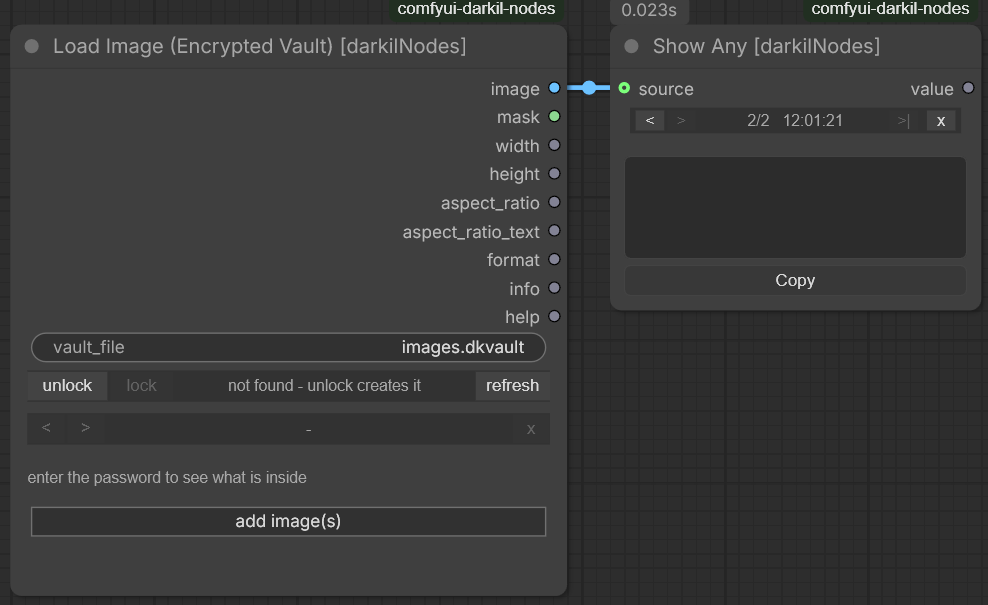
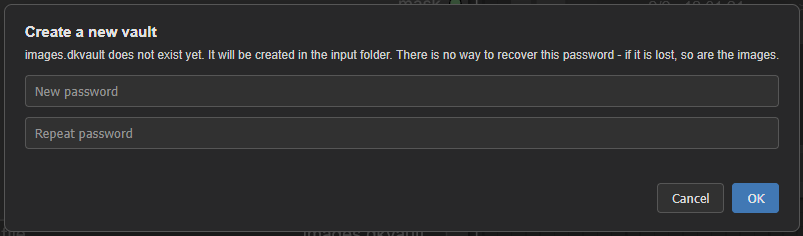
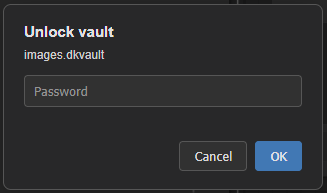
After that, and after every restart, the node asks for the password once:
3. Save Image (no metadata) [darkilNodes]
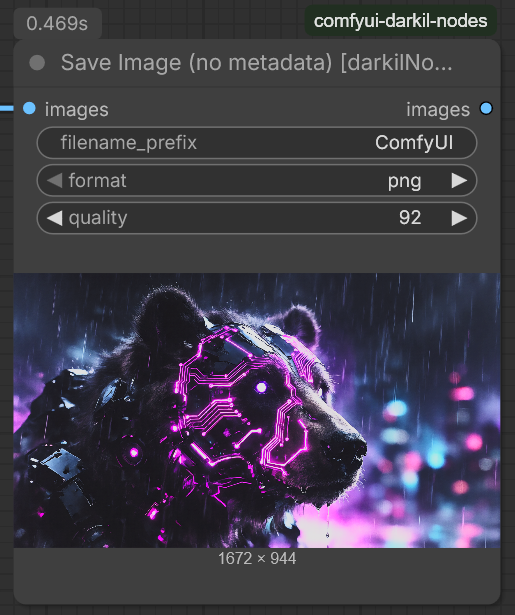
- Category: darkilNodes/images
- Description: Saves images to the output folder with nothing in them but the picture: no prompt, no workflow, no EXIF.
- How it manages that: the stock save node asks the engine for the hidden
PROMPTandEXTRA_PNGINFOinputs and writes them into the file. This one never asks for them, so there is nothing to write even by accident. The encoded bytes then go through the same stripperErase Metadatauses, so anything the encoder added on its own is taken out as well; when that happens it is reported in the console, because it means the encoder did something the node did not expect. - Everything else works like the stock node: the same
filename_prefixformatting including%date:yyyy-MM-dd%andsubfolder/name, the same counter, the same%batch_num%, and the images come out of the node again so it can sit in the middle of a chain rather than only at the end. - Inputs:
images(IMAGE): the images to savefilename_prefix(STRING): prefix for the file name, subfolders allowedformat(COMBO):png,jpegorwebp. PNG and WEBP keep an alpha channel, JPEG drops itquality(INT, 1-100): JPEG and WEBP only, ignored for PNG. 100 makes WEBP lossless, which keeps alpha exactly and still beats PNG on size
- Outputs:
images(IMAGE): the same images, so the node can be chained
- Note: JPEG keeps its
APP0/JFIF segment, which carries the pixel density and is not metadata about the picture's origin. Nothing else survives.
Installation
-
Clone or download this repository into your ComfyUI custom_nodes folder:
cd ComfyUI/custom_nodes git clone https://github.com/pytraveler/comfyui-darkil-nodes.git -
Restart ComfyUI to load the new nodes.
Usage Examples
LoRA Management Example
Wan22VideoLoraListBuilder → WanVideoSetLoRAs (Kijai)
License
MIT License for the package as a whole — see the LICENSE file for details.
Component exceptions (derivative works under their upstream licenses):
web/js/multi_set_get.js(Multi Set / Multi Get / Multi Get AIO) is licensed under GPL-3.0, derived from ComfyUI-KJNodes (© kijai and contributors). Full text:web/js/LICENSE.GPL-3.0.txt.nodes/conditioning/rebalance_core.py— Apache-2.0, seenodes/conditioning/THIRD_PARTY_LICENSES.txt.nodes/wan/i2v_encode_middle.py— adapts Apache-2.0 code from WanVideoWrapper and related projects (see the node's "Based on" list above).
See the "Component licenses" section of the LICENSE file for the full list.