
YuE2 Music
ComfyUI nodes for YuE2-3B: a style description and lyrics become a readable score and then a complete 48 kHz stereo song, generated locally.
Nodes (13)
Hear one performance through both decoders
Re-sing four bars without re-rendering the whole song
Lyrics in, a 48 kHz stereo song out (eventually)
Got a MIDI File? YuE2 Will Sing It, and It Takes 17 Milliseconds to Read
YuE2 LoRA Doesn't Load a LoRA — It Writes a Guest List
The four knobs worth touching, and the two to leave alone
Skip the singing and just write the score
Four takes on the same words, for the price of one listen
The checkbox that quietly ignores your edits
Pick a take without re-writing the whole batch
Point it at an MP3, get sheet music (then check it by hand)
Because Asking Nicely for an A Cappella Doesn't Work
You don't have to learn the prompt format to get a song
YuE2 for ComfyUI
ComfyUI nodes for YuE2-3B. A style description and lyrics go in; a readable score and a complete 48 kHz stereo song come out, generated entirely on your own machine.
Russian version | Chinese version | Changelog
<p align="center"> <a href="https://github.com/pytraveler/YuE2-ComfyUI/releases/latest"><img alt="Latest release" src="https://img.shields.io/github/v/release/pytraveler/YuE2-ComfyUI?display_name=tag"></a> <a href="LICENSE"><img alt="License: Apache-2.0" src="https://img.shields.io/badge/License-Apache--2.0-blue"></a> <img alt="Python 3.10+" src="https://img.shields.io/badge/Python-3.10%2B-3776AB?logo=python&logoColor=white"> <a href="https://huggingface.co/m-a-p/YuE2-3B"><img alt="YuE2-3B" src="https://img.shields.io/badge/%F0%9F%A4%97-YuE2--3B-yellow"></a> <a href="https://huggingface.co/m-a-p/YuE2-Vae"><img alt="YuE2-Vae" src="https://img.shields.io/badge/%F0%9F%A4%97-YuE2--Vae-yellow"></a> <a href="NOTICE.md"><img alt="Weights: CC BY-NC 4.0" src="https://img.shields.io/badge/Weights-CC%20BY--NC%204.0-lightgrey"></a> </p>![YuE2 Generate Song in ComfyUI: on the left a text node with Russian lyrics tagged [Verse], [Chorus] and [Outro], wired into the lyrics input; in the middle the node with its seed, the Edit song... button and the song summary -- Russian, 76 BPM, male rap vocal and breathy female voice, then rap, heavy bass, hip hop beat, rhythmic punchy melody, staccato flow, and lyrics from manual song style -- above the caption 75 seconds of audio; on the right Save Audio with the finished 1:15 track](https://raw.githubusercontent.com/pytraveler/YuE2-ComfyUI/HEAD/docs/node_song_gen.png)
The style is set on the node and the lyrics arrive through a wire from a plain text node; the summary shows both. 75 seconds of song, and the node ran for 40.2 s on an RTX 5090.
  style:  "warm piano pop, expressive female voice, 88 BPM"
  lyrics: "[Verse] Neon fades along the lane ..."
                            |
                            v
              ABC score  (the model plans the tune)
                            |
                            v
              semantic codec tokens  (the performance)
                            |
                            v
              acoustic latents  (flow matching, 32 steps)
                            |
                            v
              VAE decode -> 48 kHz stereo AUDIO
[YuE2 Generate Song]
  style   (multiline)
  lyrics  (multiline)
  seed    (int)
  -> AUDIO
  -> score_abc (STRING)
That is the whole node. There is no model picker and no path to fill in: the
weights are found wherever this machine already keeps them. Everything else
lives in an optional YuE2 Options node that you do not have to place.
If you would rather not write the style line and the lyrics yourself, there is a second node that writes both from one sentence:
[YuE2 Write Song]
  idea  "a sad song about winter, female vocal"
  -> style   -> [YuE2 Generate Song]
  -> lyrics  ->
See YuE2 Write Song.
A third node covers a song you already have. It writes down the recording's tune as a score, and the first node sings that tune in whatever style its style line describes:
[YuE2 Transcribe]
  audio  (a recording)
  -> score_abc  -> [YuE2 Generate Song]  with cot at full
  -> lyrics     ->
See YuE2 Transcribe.
A fourth node sings a tune you already have as a MIDI file, a karaoke file's words included:
[YuE2 Load MIDI]
  midi  (a .mid, .midi, .kar or .rmi file)
  -> score_abc  -> [YuE2 Generate Song]  with cot at melody
  -> lyrics     ->
See YuE2 Load MIDI.
A fifth node takes the voice out of any recording, and the same step is a
switch on the song nodes, vocals_only in YuE2 Options:
[YuE2 Vocals Only]
  audio  (a song, or any recording)
  -> vocals
See YuE2 Vocals Only.
A sixth node changes part of a song the pack has sung and keeps the rest of it: a stretch sung again, cut out, given new words or notes, sung in another style or moved, and the song carried on past its end or given an instrumental break:
[YuE2 Generate Song] -> [YuE2 Edit Track] -> [Save Audio]
                          Edit track...  (the song as a track)
See YuE2 Edit Track.
If this pack is useful to you, a star on GitHub helps other people find it. Bug reports are just as welcome, and so are songs that came out wrong: they go in Issues.
Contents
- What you need before installing
- Install
- Example workflows
- Nodes - YuE2 Generate Song - YuE2 Write Song - YuE2 Transcribe - YuE2 Load MIDI - YuE2 Vocals Only - YuE2 Edit Track - YuE2 LoRA - YuE2 Options - Staged nodes
- Song length
- Writing lyrics - Stress, and what capital letters really do
- Reproducibility
- Where the weights go - The INT8 build - Using files you already have - Environment variables
- Notes
- Licence
What you need before installing
| Resource | Requirement |
|---|---|
| GPU | An NVIDIA RTX 30 series (Ampere) or newer. RTX 20 and GTX 16 cards have no BF16 in hardware, so the last stage runs in FP16 on them, which renders as exactly as BF16 or more so; how fast it is there is not measured yet, and fast and flash do not run on them. CPU works and is roughly an hour per song |
| VRAM | ~4.4 GiB for a 40-second song and ~4.5 GiB for a four-minute one, with only the half of the model each stage needs on the card, or ~3.1 GiB for either with low_vram on. A card with room to spare keeps the whole model on it and uses about 10 GiB for either. See offload in YuE2 Options. YuE2 Transcribe peaks at 1.9 GiB, and at 5.5 GiB while it recognises the words of a four-minute song, 3.5 with low_vram; Whisper, which hears them a second time, at 1.7 GiB. Separating the voice, with vocals_only or YuE2 Vocals Only, peaks at 2.5 GiB. An edit in YuE2 Edit Track peaks no higher than singing the song did |
| Disk | 7.26 GB, as one file or as three. The INT8 build is 3.69 GB. YuE2 Write Song adds 2.55 GB unless you already have a GGUF, plus 32 MB of llama.cpp binaries if llama-cpp-python is not installed. YuE2 Transcribe adds 1.29 GB, 3.80 GB more once it recognises words, and 1.62 GB for a second hearing. vocals_only, YuE2 Vocals Only and YuE2 Edit Track add 0.85 GB, and new words in YuE2 Edit Track 1.84 GB for the word aligner and the 3.80 GB speech model. Songs the pack remembers take up to 4 GiB in ComfyUI's user folder, 8 with their sounds kept |
| Packages | tiktoken, which ComfyUI does not ship. It is the only thing this pack adds; requests, which the downloader uses, is already in every ComfyUI install. llama-cpp-python is optional -- YuE2 Write Song uses it when it is there and official llama.cpp binaries when it is not |
If tiktoken is missing the node says so, with the right pip line for the
interpreter ComfyUI is actually running on -- which is not the one a bare
pip install would reach in a portable build.
Install
Clone into ComfyUI/custom_nodes/ and install the requirement into the same
Python environment ComfyUI runs on:
cd ComfyUI/custom_nodes
git clone https://github.com/pytraveler/YuE2-ComfyUI
Then restart ComfyUI. Python caches imports, so an edit to this pack is never live until the server restarts.
Example workflows
Twelve workflows ship with the pack and appear in ComfyUI's template browser (Workflow -> Browse Templates) under this node pack's name once it is installed. Each is a card of its own and each runs on its own: nothing is bypassed on open, and there is no second branch to mute before pressing Run.
| | Template | What it needs |
|---|---|---|
| 1 | A song from one line -- one sentence about the song in, a finished song out | a 2.55 GB writer and the 7.26 GB YuE2 weights |
| 2 | A song from style and lyrics -- describe the sound, write the words, press Run | the YuE2 weights |
| 3 | A longer song -- YuE2 Options in front of the same node | the YuE2 weights |
| 4 | The score first -- write the score, read it, edit it, then sing it | the YuE2 weights |
| 5 | Four scores, one song -- four takes on the same words, chosen by ear | the YuE2 weights |
| 6 | One take, both decoders -- one performance decoded twice | the YuE2 weights and the 0.53 GB legacy decoder |
| 7 | Sing a MIDI file -- a tune you have as MIDI, sung in the style you describe | the YuE2 weights |
| 8 | Cover a song -- a recording's tune and words, sung again in another style | the YuE2 weights, SheetSage2 (1.29 GB), and for the words Qwen3-ASR (3.8 GB), Whisper (1.62 GB) and a 2.55 GB writer |
| 9 | An a cappella song -- a song with nothing but the voice | the YuE2 weights and the 0.85 GB voice separator |
| 10 | A song with LoRA -- the same song node with adapters in front of it | the YuE2 weights and a LoRA of your own |
| 11 | Edit a song -- a song, then part of it sung again, cut, moved or carried on | the YuE2 weights and the 0.85 GB voice separator; for new words the 1.84 GB aligner and Qwen3-ASR (3.8 GB) |
| 12 | An instrumental -- music with no voice, written and played by an instrumental adapter | the YuE2 weights and Mothersuperior's 279 MB instrumental LoRA in models/loras |
Templates 1 to 3 and 7 to 12 use the YuE2 menu. Templates 4 to 6 open a run
up into its stages, which is what YuE2/Advanced is for.
Every one carries a Read me first note: what it does, what it downloads,
what to set before pressing Run, and where to go next. Every seed is left on
fixed rather than randomize, so pressing Run twice returns the same song
instead of spending the time on a different one.
Template 6's two claims were checked on a real run rather than asserted. The
same latents through standard and through legacy gave different audio, and
putting the decode node back to standard gave audio identical to the render's
own output, to the last sample.
Nodes
YuE2 Generate Song
The whole pack in one node. It finds the weights, loads them, runs the four stages, and releases the VRAM again.
Outputs
| Name | Contents |
|---|---|
| audio | 48 kHz stereo, ready for SaveAudio or anything else that takes AUDIO |
| score_abc | The ABC score the song was sung from: the one the model wrote before it played anything, or the edit kept on the node -- moved to the new key when transpose is set |
Inputs
style-- genre, instruments, vocal character, language and tempo. This is the field that decides what the record sounds like; the lyrics decide what is sung, not how.lyrics-- the words, with[Verse]and[Chorus]section tags. See Writing lyrics.seed-- the same seed with the same settings gives the same song, byte for byte. See Reproducibility.options-- an optional socket. Leave it empty and every setting takes the value the model was released with.score_abc-- an edited score for the node to sing instead of writing one, filled byEdit score...and hidden behind it. Empty, as it starts, the node works exactly as before. See The score editor. A score wired in is sung as it arrives, unless it names no section -- a bare tune, asYuE2 Load MIDIhands one on -- when the lyrics are laid along it first; see Words on a MIDI tune.
Progress is reported per stage on the node, and Cancel stops a run in under a second -- between tokens during generation, between tiles during decoding.
The song editor
YuE2 Generate Song, YuE2 Plan and YuE2 Plan Batch carry an
Edit song... button and a summary of the song instead of two bare text boxes.
The button opens a window over the canvas, the style on top and the lyrics
under it, and nothing is written to the node until Apply.
Text on node, the switch beside it, puts ComfyUI's own style and lyrics boxes
back on the node in place of the summary, for typing as on any other node: the
lyrics box takes the room and grows when the node is dragged larger, and a box
whose input is wired stays hidden. The switch is off at first and kept for each
node in its properties rather than in a widget, so saved workflows do not change.
![The song editor over the canvas, titled Song -- YuE2 Generate Song, with the line Style and lyrics for this node. Nothing is written to it until Apply. Under STYLE: Language (not named); Tempo ticked, with a slider and 80 in the box beside it; an empty voice box showing its placeholder, expressive female voice, and a + Voice button; two sound parts, acoustic piano and synth pads, each with up, down and remove buttons, and under them an empty box reading city pop, tenor saxophone, no guitars... beside an Add button; an Examples list closed on Take a style that was really run..., with the note about where its lines come from under it; and the style line the model will read, acoustic piano, synth pads, 80 BPM. Under LYRICS: 400 tokens in the lyrics, the + Section and Edit as text buttons, the note about clicking a letter to flip its case, then a blue [Verse] and an orange [Chorus] of four Russian lines each, thin marks under the letters where the tokenizer cuts, and a token count at the end of every line](https://raw.githubusercontent.com/pytraveler/YuE2-ComfyUI/HEAD/docs/song_editor.png)
A Russian song over piano and pads. The style line under the parts is the
string the model reads, and the marks under the letters are where the YuE2
tokenizer cuts the words. Language reads (not named) and the voice box is
empty because this line names neither: the editor shows what is in the line
rather than filling it in.
- Style is built from parts: a language, a tempo or none at all, the voices, and any other part in a list to add to, edit and reorder. The line underneath can be edited directly. A line the editor has not touched is not rewritten, because a different string is a different song even when it reads the same.
- Examples fills the style line with one that was really run: twenty-eight
of them, ten written by YuE2's authors for their cover and editing demos and
eighteen sent in for the genre gallery, in English, Chinese, Japanese and
Russian. They are copied word for word, so one that never named its language
leaves the
Languagebox empty; the arrow beside the list puts your own line back. The gallery's seventy genre names complete in the sound box too, beside the instruments and textures those demos use. - Voices. Naming two asks for both; it does not decide who sings where.
Tags such as
[Chorus - male rap vocal]and roles written into the style were both tried on twelve songs, and neither put a voice where it was asked for, so there is no per-section voice control. - Lyrics come section by section. A click on a section tag steps it
through Verse, Pre-Chorus, Chorus, Bridge, Outro and Intro; a right-click
lists all ten. Lines and sections are added, duplicated, moved and deleted
from the buttons on each row, a double-click types into a line, and
Edit as textshows the plain text the model reads. - A click on a letter flips its case, and the marks show where the real tokenizer cuts, with a token count on every line. A capital inside a word splits it where you clicked; it is not a stress mark, and like any change to the words it gives a different song on the same seed. See Stress, and what capital letters really do.
- A style or lyrics that arrive through a wire, from
YuE2 Write Songfor instance, are shown by the name of the node they come from and are edited there. - The right button gives the browser's own menu -- copy, paste, select all -- in the text fields and on selected lyrics, and the editor's menu on a line or a tag with nothing selected. Rows of lyrics copied from the window come out as the model reads them, with a section's tag when its chip is selected, and without the buttons and token counts drawn beside them.
- Room. The pack's editor windows -- this one, the score editor and the
track window -- are dragged larger or smaller from any edge or corner, and
the square at the top right fills the browser tab, so a larger browser means
a larger editor. The size is remembered for each kind of window.
Edit as textis remembered too: the editor opens on the text box when that is how it was left, and the box takes all the height the window has. The arrow besideSTYLEfolds the style into one line to give the lyrics more.
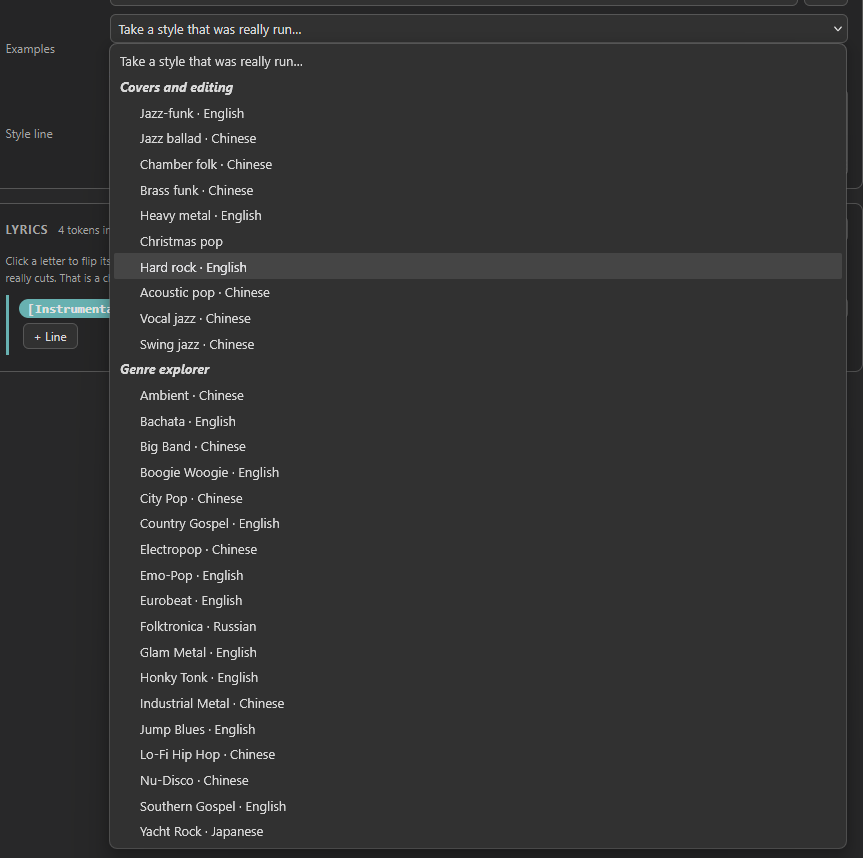
Twenty-eight lines, kept apart by where they were really run: above, the ten the
model's authors wrote for their own covers and editing demos; below, the eighteen
sent in for the genre gallery. Christmas pop shows no language because its line
never named one.
The marks need the YuE2 weights on disk, and ComfyUI needs a restart after the pack is installed or updated before they appear. The window is in English only.
The score editor
YuE2 Generate Song and YuE2 Render Plan carry an Edit score... button and
a summary of the score they will sing. The button opens a window over the
canvas with three views of one score, and nothing is written to the node until
Apply. Like the song editor's, the window is sized from its edges or fills the
tab, and it never shrinks below what its toolbars need.
The window on YuE2 Generate Song with the Voice part picked, words
ticked and the rows made taller with the up-down pair: two lines of a Russian
chorus under the voice's notes, a syllable a note, the first line starting on a
pickup in the verse's last bar. Both lines have a note for every syllable and
are white. The facts at the top right count the whole song:
23 of 33 lines fit. Beside the tempo is the key list.
On YuE2 Generate Song the score to edit is the one the node wrote on its last
run, so run it once first. The next run sings the edit instead of writing a
score, and every edit after that costs only the singing. On YuE2 Render Plan
it is the plan's score, and Write the score in the window runs only the plan
node feeding it, so there is a score to edit before anything is sung. That is
why YuE2 Plan and YuE2 Select Plan are output nodes: ComfyUI runs a node on
its own only when it is one.
- Piano roll, in the look most music software shares: green notes
with their names on them, a blue-grey grid and a keyboard down the
side: C is named in every octave, and the row the pointer is on says
what it is, black keys included.
Voice | Instrument | Chords | Bothpicks what is edited: one part, with the other drawn faintly behind; the chords as notes (see below); or both parts and the chords at once, to move a whole stretch of the song -- inBotha box, a click, the arrows and Delete take them all, and no note is drawn. The sections run along the top, and a chord lane sits under the bar numbers. A click draws a note, a drag moves it, and a right-click or Delete removes it. The right edge stretches a note, into the next one too, which then starts later and keeps its end. Shift or Ctrl with a click or a drag selects several, and selected notes turn red; the arrow keys move them by the grid or a semitone, and by an octave with Shift or Ctrl, and so do the-oct -1 +1 +octbuttons. The status line warns when the middle of the voice line leaves C4 to A#5, where the model's own scores keep it. A stretch moved up or down is sung at its new pitch withK:left alone: the first chorus of a pop song and of a Russian ballad, moved down a tone, came back a tone down, with the verse before it where it was. Alt, or the right Alt of a keyboard with AltGr, draws, moves and stretches between the grid lines, in steps of the shortest note the score is written in. A part sings one note at a time, so a note drawn on top of another is refused, and a button under the roll puts the chord the two notes suggest on the chord lane instead. A click on the chord lane types a chord: Enter sets it, Esc leaves it, and the right button drops it. The strip along the top holds the sections: drag a boundary, click a name to change it, click the strip to start a new section, and right-click it to move the play cursor, as the bar strip below it does. "Add bars" adds empty bars at the end, and an editor with no score at all offers one to start from. The toolbar has two pairs of-and+: the first zooms in time, as Ctrl+wheel does, and the second, marked with an up-down arrow, makes the rows taller, as Alt+wheel does, with the note names and the words growing with them; the browser remembers the height. Ctrl+Z undoes. Play sounds the parts on a sampled grand piano that ships with the pack -- recorded every three semitones, so no note is stretched by more than one. It is a guide to the notes, not the song, and nothing is fetched from the internet. Space starts and stops it, and so does a double click: on the bar strip it plays from the bar you clicked, and on the roll it takes back the note the first click of the pair drew. The list beside each ofvoice,instrumentandchordspicks what that part sounds like: piano, or one of a few voices the browser makes itself -- synth, bass, pluck, pad, strings, anddrumsfor the instrument part. The chords start on strings, held the way a string section holds a chord: three slightly detuned voices spread across the stereo, a slow attack and vibrato that comes in after half a second. Withdrumschosen and the instrument part in hand, the keyboard names a kit instead of the notes -- Kick, Snare, Hat and the rest, one kit to an octave -- because a drum line played on a piano tells you nothing. The choice stays in your browser and never reaches the node. The sound is for your ear here only: YuE2 is given the score and the style line and is never told an instrument, so the style line is what decides who plays. - Chords puts the chord lane on the roll as notes: each chord is the notes
it is made of, held until the next chord, laid out as
Save as MIDI...writes them -- the root between C3 and B3 and darker, named after the chord, the other notes above it, and the bass of a slash chord an octave down. A click on an empty place starts a new chord on that row, of the kind the key gives that degree: in E, a click on A givesAand one on C# givesC#m. Dragging the root moves the chord whole -- up or down for another root of the same kind, sideways to another moment between its neighbours -- and dragging a chord's right end moves where the next one starts. Dragging any other note, or Ctrl+click on a row, changes the chord note by note, and the chord takes the name of its notes: E with its third a semitone down isEm, with a D addedE7. A set of notes the score has no name for turns grey and is refused, and the status line says why. The right button removes a chord, a double click types its name, and the arrows, Delete and Ctrl+A work on the chords selected. The names are thoseYuE2 Load MIDIreads from the same notes on a Chords track -- checked on 5,340 sets of notes in 30 keys -- so a chord fixed here and one fixed in a DAW come out the same. repeats too, beside the switch, makes each chord edit in the other sections of the same name as well, where their chords are still the ones this section had; sections of other lengths are compared over the bars they share, and the ones with other chords are left alone and named. One Ctrl+Z takes the edit back everywhere. - Copy, Cut, Paste and Duplicate, after Undo and Redo, and Ctrl+C, Ctrl+X,
Ctrl+V, and Ctrl+D or Ctrl+B. A copy is measured from the bar line before its
first note. Paste puts it into the bar the playhead is in, at the same places
in the bar, and replaces the notes under it; a note running into it is cut
short. Duplicate puts a copy right after the selection, from the next bar
line, and pressing it again goes on, which is the quick way to make a tune
longer. The pasted notes stay selected, to be dragged or moved with the
arrows. What is copied follows the part: in
VoiceorInstrumentthe part's notes, pasted into the part being edited, so a voice line can become the instrument's; inBothboth parts and the chords over their bars; inChordsthe chords, as blocks. A paste that runs past the end of the song adds the bars it needs, and the undo history then starts there, as it does after "Add bars". The copy is kept for every score window on the page, so a phrase can go from one song to another. The pack's windows are modal to ComfyUI: while one is open, Ctrl+Z, Ctrl+C and Ctrl+V never reach the graph behind it. - Notes draws the score as sheet music, with the bars the edit rewrites in red.
- ABC is the text the model reads. A score pasted here loads into the other two.
Only the bars you change are written again, with any bar tied to one of them.
Every other bar stays byte for byte as the model wrote it, and a score applied
without a change leaves the box empty, so the node sings what it sang before. A
rewritten bar is spelled the way the model spells
one -- an accidental only where the key needs it, a whole bar of rest as Z --
and the result is read back with upstream's own ABC parser and compared note
for note before it reaches the node. The bars and meter are fixed, the key
moves only as a whole (below), and a bar with a key change inside it can be
edited only as text.
The tempo. A slider and a box beside the play controls set the tempo the
score is written at -- Q:1/4 in the ABC -- from 40 to 200 BPM, or from the
score's own tempo when it came in outside that. Nothing is renotated: the notes
keep their lengths in bars, and the whole song is sung faster or slower. The
length on the facts line moves as the slider does, and so does the dashed line
where the singing stops. The tempo is part of the edit like a moved note, with
its own undo, and it reaches the node on Apply. It earns its keep most on
YuE2 Transcribe, where the tempo was heard from a recording rather than
chosen.
The key. The list beside the tempo offers the twelve keys of the song's
mode, each with the semitones it lies away, and picking one moves the whole
score there -- both parts, every chord and the key itself -- the way
transpose moves it, which YuE2 sings at the new pitch. Each key is offered
in the direction that keeps the middle of the voice line within C4 to A#5
where it can, and the status line warns when it cannot. Typing another K:
into the ABC text is not the same thing: the letters are read again in the new
key, so an F-sharp in F-sharp minor turns into an F in A minor. Ctrl+Z moves the
song back, and Apply marks every bar as rewritten. The list is off in the track
window of YuE2 Edit Track, where the song is already sung in its key.
An edit belongs to its words. On Apply the editor marks the edit with the
style, lyrics and cot it was made for, in a comment line the node takes off
before anything is sung. A new seed with the same words sings the same edit as a
new take, which is the way to retry a bar that did not take; for a new tune,
Reset score on the node throws the edit away. Other words --
words that arrive through a wire from YuE2 Write Song included -- leave the
edit unsung: YuE2 Generate Song writes a new score for them, YuE2 Render Plan
sings the plan's own, and both say so. Put the words back and the edit is sung
again. A score pasted or wired into score_abc carries no mark and is sung
whatever the words.
Keep for new words, beside Apply, keeps the edit when the words change: the node sings it with whatever lyrics and style it has, and says in yellow that the words changed under it. Ticked with nothing edited, Apply keeps the model's own score, which is how a tune is held while only the words are rewritten. The box is stored with the edit, in its mark, and the window remembers the last choice for the next edit. How new words fare on an old score was measured on three of the model's songs, English and Russian, two seeds each, by the share of the lyrics Qwen3-ASR heard in order:
| The lyrics | The edit kept | A new score for the words | |---|---|---| | Two or three words changed in most lines | 0.95 (0.86 to 1.00) | 0.95 | | Every line new, about as many syllables | 0.92 (0.73 to 1.00) | 0.95 | | A fifth line added to each verse | 0.85 (0.81 to 0.90) | 0.96 |
The score's own words gave 0.97. Words changed within their lines cost nothing; a line added does, because the song keeps the edit's length -- the verse's lines move along its phrases, and the chorus after it lost its last line in every take read line by line. The Russian song was the lowest with every line new.
Words under the notes. A score has notes and no words: which syllable lands
on which note the model decides as it sings. The words box on the roll's
toolbar, on at first and remembered in the browser, draws the lyrics under the
voice's notes in order, a syllable a note: the sections of the lyrics on the
sections of the score, and a section's lines cut where the tune rests. A
syllable stands on the row under its note, or a row lower while the one before
it is still running; the first syllable of a line is bold, and a word that goes
on to another note ends in a hyphen. The words are drawn with the Voice part
and in Both, and are hidden when the roll is zoomed far out.
A line with as many notes as syllables is white. A line with more or fewer is
amber: syllables left over stand together under the line's last note, and a
note left without a syllable has a dash under it. The facts above the roll
count the lines -- words fit, or 23 of 33 lines fit, with the other lines,
their syllables and their notes in the tooltip -- and the words are laid again
after every edit, so a line that loses a note turns amber at once and fits
again when the note is back. Amber means "look here", not "wrong": in the
model's own scores a section sometimes ends a note or two past its words, and
its last line is amber then. It is where to fit new words to an old tune, or a
phrase to its line, before anything is sung.
The lyrics are the ones the node will sing: on YuE2 Generate Song and
YuE2 Render Plan those typed on the node or on the plan's node, and when they
arrive through a wire, those of the last run, so run once first; on
YuE2 Transcribe its lyrics or your edit of them; in Notes... of
YuE2 Edit Track the song's own. A score that names no section, as
YuE2 Load MIDI hands one on, is left without words and the facts say
words not shown: its lyrics are laid along the tune when it is sung, on bars
chosen then (see Words on a MIDI tune).
Measured before it was built, on 28 songs in English and Russian, with Qwen3-ForcedAligner hearing the separated voice a section at a time and a word counted only when a second hearing put it on the same note:
| The line | Sung on the note it is drawn under | Within one note | |---|---|---| | As many notes as syllables, the model's own words | 84 to 92 in 100 | 99 | | As many notes as syllables, other words | 91 | 99 | | More syllables than notes | 65 | 85 | | Fewer syllables than notes | 57 | 85 |
YuE2 writes a note for every syllable -- under its own words 154 lines of 184 had exactly as many -- and sings a line that fits where the score puts it. Where a line does not fit, the model sings its own way: syllables left over run past the phrase, and with too few the next line can start early, by 3 to 9 notes in one song. That cannot be told to the note, which is why such a line is marked rather than guessed at. Covers, rap and languages other than English and Russian were not measured.
Where the song ends. The model writes a score for the whole song, and the
singing stops at max_seconds wherever the score has got to by then; at 0 the
ceiling is worked out from the lyrics, as Song length explains.
When the score runs longer, a dashed yellow line on the piano roll marks the
point and dims the bars after it, the facts above the roll end in
sung up to 1:00, and the node's summary says how much of the score is sung.
Edited bars that fall after the line are named in both places, because they
will not be heard until the ceiling moves. Raising max_seconds keeps the edit;
like any change of max_seconds, it sings a new take.
A score the model did not finish. A score that ran out of tokens stops in the middle of a line. The editor opens it up to its last whole group of bars and says that the end was cut, and an edit is written without the unfinished tail. Such a score usually comes from lyrics too short for the style: one line under a long description of an instrumental build got no note for the voice in 8 scores of 8, and 5 of them ran out of tokens; nine lines under the same style gave the voice its notes in 4 of 4, and none ran out.
Checked on the card with one song and the edit from the window. With the box
empty, YuE2 Generate Song gave the same audio as before the box existed,
sample for sample. The same edit through YuE2 Generate Song and through
YuE2 Render Plan gave identical audio, identical also to that edit rendered
without a mark before marks existed, so the mark never reaches the model. The
same edit marked for other words left each node singing its own song, again
sample for sample.
What the model does with an edit was measured before the window was built:
- Four bars with every note changed, in three rap songs. Where the new line and the old one are two or more semitones apart, the new note was sung 16 times in 18 and 11 in 18, and the old one never; in the third song the old line won, 21 to 14. The rest of each song stayed on its score.
- The lengths inside the same bars reversed: the new rhythm was followed in all three. A phrase twice as fast with a half-bar rest was not -- the voice filled the rest with the words.
- The voice sits an octave below the written line, as it does on the model's own scores.
And one edit made in the finished window: in a short piano pop song, one note in each of three phrases raised from D to A. All three left the old D; two landed within a semitone of the new A, the third a tone short of it.
Save as MIDI... downloads the score as it stands in the window, edits
included: the voice, the instrument line and the chord symbols held as chords,
each on a track of its own, with the tempo, meters, keys and sections. Loaded
into YuE2 Load MIDI, the file gives the same notes in the same bars at the
same tempo -- checked on sixteen of the model's and SheetSage2's scores -- and,
with mode at full, the same chords at the same moments, read from the
track named Chords. So a score can go out to a DAW, have its chords set right by
ear there, and come back.
Edited chords are played. Measured before the Chords part was built, on
three songs at two seeds: eight bars of each score had every chord moved -- a
step up the scale, or to its relative -- with the notes left alone. SheetSage2
heard the new chord on 171 and 161 of the 192 changed beats and the old one on
8 and 16, where the same takes without the edit gave the new chord on 4 and 3.
The voice kept its written melody, and the rest of each song stayed on its
chords, except one take in twelve, whose second verse repeated the edit of the
first -- which is what repeats too writes down.
Every edit is a new take of the whole song, not a patch on the old recording. The window is in English only.
YuE2 Write Song
One line of intent in, a style description and tagged lyrics out, wired
straight into YuE2 Generate Song. It exists because the format is the part
that puts people off, not the idea: everybody has an idea.
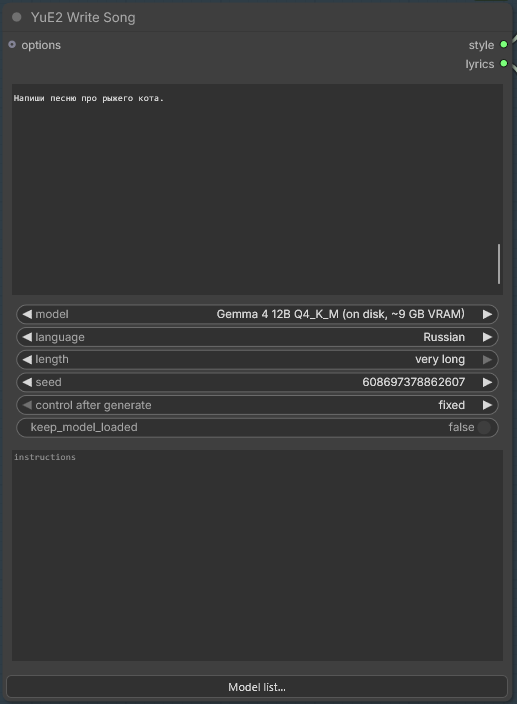
The node with a model from the pack's list that is already on disk. Model list... at the bottom opens the list to add, edit or check a model.
Outputs
| Name | Contents |
|---|---|
| style | One line: language, genre, voice, instruments, melody, phrasing, BPM |
| lyrics | Sections tagged [Verse], [Chorus], [Bridge], [Outro] |
Inputs
idea-- what the song is about, in one line, in any language. "a sad song about winter, female vocal" is enough.model--autouses a GGUF you already have and downloads a 2.55 GB one only if you have none. Next come the entries of the model list, each markedon diskor with its download size and the card it needs; then the GGUFs found in your ComfyUI model folders, in the Hugging Face cache and in Ollama's own store, each with its size, because that is the fact that decides whether it fits on your card. Files that cannot write on their own are left out. Two files of the same name are told apart by where they came from.language--autofollows whatever language your idea is written in.length-- how long the song should be, in words rather than in seconds:shortasks for 8 sung lines,normalfor 16,longfor 24 andvery longfor 32, which is about as much as YuE2 sings in one pass. It is an aim, not a promise, and the node reports how many lines it actually got.seed-- the same seed with the same idea gives the same words.keep_model_loaded-- leave it off when YuE2 generates on the same card afterwards.instructions-- optional, in your own words: "no chorus", "first person", "end on a question". It goes after the writing rules, so it wins where the two disagree.
The model list
The pack names eight models it knows to write well, so that the model list
holds more than whatever one file happens to be on the machine. Each is shown
with where it is -- on disk, or download and its size -- and the card it
needs:
| Model | Download | Card | |
|---|---|---|---|
| Qwen3.5-4B Q4_K_M | 2.55 GB | ~4 GB VRAM | the default, the one auto fetches |
| Qwen3.5-9B Q4_K_M | 5.29 GB | ~7 GB VRAM | |
| Gemma 4 12B Q4_K_M | 6.63 GB | ~9 GB VRAM | |
| Qwen3.8-27B Q4_K_M | 15.33 GB | ~17 GB VRAM | |
| Gemma 4 26B-A4B Q4_K_M | 15.78 GB | ~19 GB VRAM | mixture of experts |
| Gemma 4 31B Q4_K_M | 17.07 GB | ~20 GB VRAM | |
| Qwen3.6-27B Q5_K_M | 18.17 GB | ~19 GB VRAM | |
| Gemma 4 26B-A4B Q6_K | 21.58 GB | ~24 GB VRAM | mixture of experts |
All are unsloth's quants under Apache-2.0. The sizes are in the gigabytes the progress bar counts, 2^30 bytes. The card was measured on an RTX 5090 at the writer's 8192-token context for the 4B, the Qwen3.6-27B and the 26B-A4B Q6, and is estimated from the size for the rest. At the same context the 4B wrote 146 tokens a second, the Qwen3.6-27B 42, and the 26B-A4B Q6 215: a mixture of experts works only a few billion of its weights per token, so it answers faster than the 4B.
A model that is not on disk downloads on the first run that picks it, into the
first LLM folder ComfyUI knows -- models/LLM, or one named in
extra_model_paths.yaml -- with resume and a progress bar; with download at
off in YuE2 Options the node prints the link and the folder instead. A file
of the same name anywhere in the model folders is used as it is, and is not
listed a second time under its own name. Once the file is there the entry reads
on disk, and a workflow saved while it read download still finds it by its
name.
Model list... at the bottom of YuE2 Write Song and YuE2 Transcribe opens
the list itself:
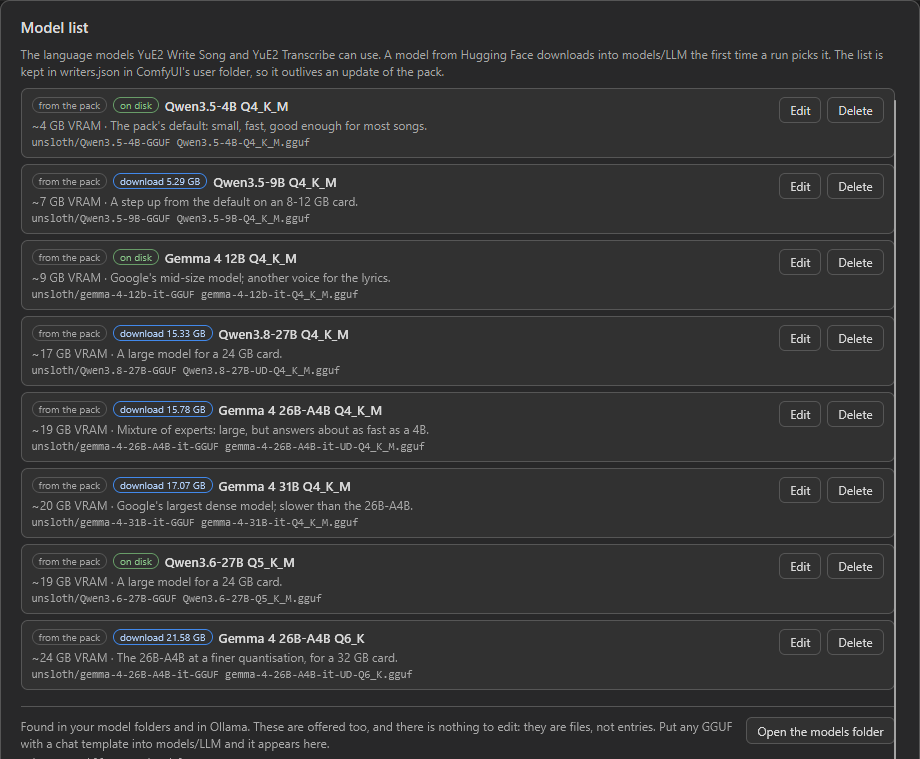
- Each entry has Edit and Delete. Under the entries, greyed, is every model found in the model folders and in Ollama; those are offered too and have nothing to edit. Open the models folder opens the folder downloads go to.
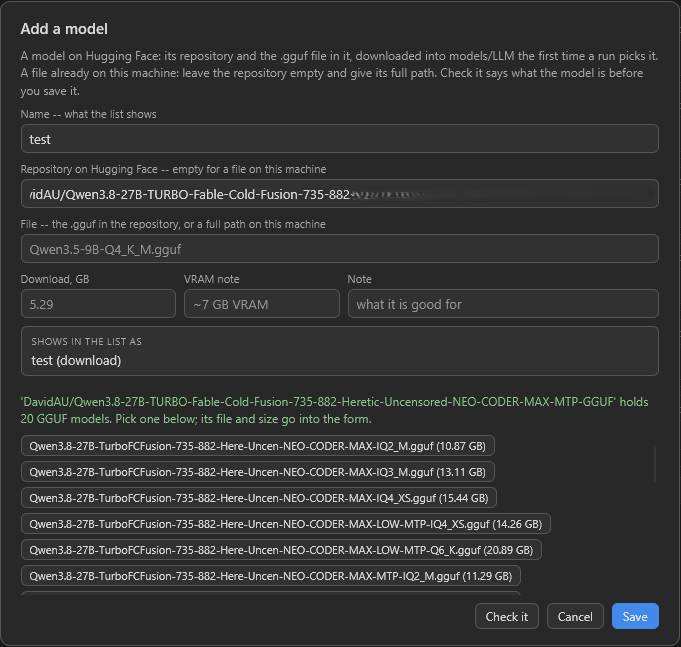
- Add a model takes a Hugging Face repository and the
.ggufin it, or the full path of a file on this machine. Check it says what the model is before it is saved. A file on this machine is read: whether it is a model that can write, and whether its chat template renders. A file on Hugging Face is looked up, and its size goes into the form. With a repository and no file yet, or a misspelt one, it lists the repository's models to pick from.
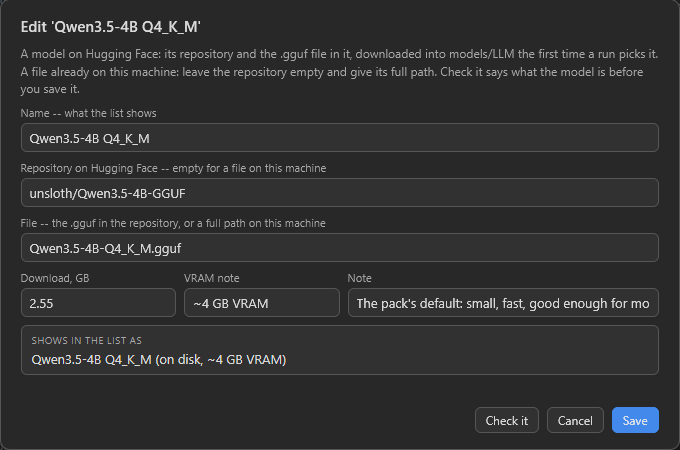
- Every
modellist in the open graph follows an edit at once. A renamed entry moves the nodes that use it to the new name; workflows saved elsewhere under the old name no longer find it, and the form says so before saving. A deleted entry whose file is on disk moves its nodes to that file under its own name. Otherwise the nodes keep it, and the next run stops and says the model is gone rather than writing with another -- or starting a download nobody asked for. - Restore the packaged entries brings back the pack's own entries you deleted.
- The list is
ComfyUI/user/yue2_comfy/writers.json, written on the first edit, so it outlives an update of the pack. An update adds the pack's new entries to it and does not bring back ones you deleted. Open writers.json opens it, for what the window does not cover. A file that does not parse is left alone: the pack's list is shown, the first line of themodellist says what is wrong, and nothing is saved over it until it parses again. - Open acts on the machine ComfyUI runs on, and says the path when it cannot.
Models you already have
Anything the writer can run is offered, wherever it already lives, so nobody downloads the same quant twice:
| Where | What is read |
|---|---|
| ComfyUI model folders | LLM, llm, text_encoders, clip, transformers, diffusion_models, unet, unet_gguf, checkpoints, two levels deep |
| Hugging Face cache | Every snapshot folder, labelled by repository rather than by commit hash |
| Ollama | Every model pulled into its store, listed as ollama: name:tag |
A GGUF copied into one of these folders while ComfyUI runs is offered on the
next refresh of the node list, without a restart. A model split into parts
(name-00001-of-00004.gguf) is offered once, by its first part, with the size
of all its parts. What cannot write on its own is left out, whatever its name:
LoRA adapters, mmproj files, embedding models, and the draft heads some
repositories ship to speed a model up, which carry the model's name and chat
template but only a handful of its tensors.
Ollama keeps its models as ordinary GGUFs under digest names, so they are read
in place -- no copy, no export, no second download. A store somewhere this
process cannot reach cheaply is not searched for: a WSL or container store is
named in YUE2_OLLAMA_MODELS instead, because reaching into \\wsl$ would
start a stopped distribution every time ComfyUI refreshes a dropdown.
How the model is run. There is nothing to install and nothing to choose. If
llama-cpp-python is already in
the Python ComfyUI runs on, the model is loaded in that process -- the fastest
path, and the only one where keep_model_loaded means anything. If it is not,
the node fetches about 32 MB of
official llama.cpp binaries
on first use and writes the song in a subprocess instead, which is a few seconds
slower per song and no worse at writing. The wheel is not a dependency because
on Windows it usually builds from source, and half an hour with a compiler is a
poor price for one optional node.
An llama.cpp you already have is used as it is, and is looked for in this order:
YUE2_LLAMA_BIN, a path written into llama_bin.txt in ComfyUI's user folder,
the runtime this pack unpacked, then PATH. The two named ones are also the way
to a CUDA llama.cpp on Linux, where upstream publishes no CUDA archive at all.
Setting download to off in YuE2 Options stops the runtime download too,
and then the node prints the archive links and the folder to unpack them into.
What to expect from a small model. Measured on Qwen3.5-4B-Q4_K_M, a song
takes one to six seconds to write and the format survives sampling: over twenty
runs across five line budgets every answer parsed. The line count is an aim
rather than a promise. On one seed at each of the four settings it came back
exact at short, normal and long, and four lines over at very long --
overshooting is the safe direction, because the length ceiling can cut a song
short and cannot extend one -- so the node reports how many lines it actually
got. A bigger model holds the count better; any instruction-following GGUF will
do.
The two ways of running it were compared on one idea across six seeds: the binaries wrote a usable song five times, the wheel six. The miss was an answer that opened with a paragraph of prose instead of the style, which the node notices and asks again for. Both read the same prompt as the same 329 tokens, so they differ in arithmetic rather than in what they are told; the same seed repeated within one of them gives the same words back, but the two do not agree with each other.
YuE2 Transcribe
A recording in; a score YuE2 can sing and its lyrics out. This is how a song is
covered: the node writes down the tune of a song you already have, and
YuE2 Generate Song sings that tune in whatever style its style line describes.
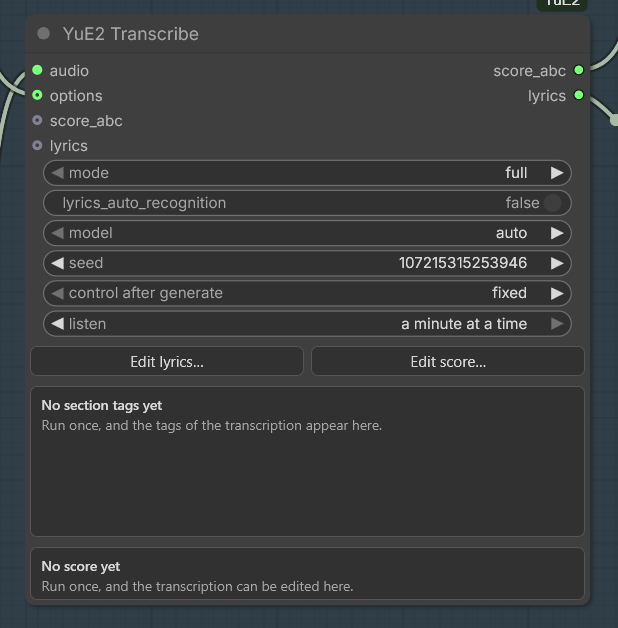
The node as it comes, with listen turned to a minute at a time. Both panels
fill in on the first run -- the section tags on one, the transcription on the
other -- and a Reset button appears beside each editor once there is
something to reset.
Outputs
| Name | Contents |
|---|---|
| score_abc | The score written from the recording -- the vocal line, the instrumental line, beats, key and sections, and the chords too when mode is full -- or the edit kept on the node |
| lyrics | The transcription's section tags in song order, with the recognised words under them when lyrics_auto_recognition is on, or the edited lyrics kept on the node |
Inputs
audio-- the recording. A song with a singer works best, and only the first recording of a batch is used.mode--full, the default, writes the two lines and the chords heard under them, which is what a cover wants: sung withcotatfull, the recording's harmony goes into the cover along with its tune.melodyleaves the chords out, forcotatmelody, and the accompaniment follows the new style instead; the node says so when it does. Switching between the two reuses the transcription, so the chords cost no listening.lyrics_auto_recognition-- off at first. Turned on, the sung words are recognised and laid out under the section tags, as described below.model-- the language model that breaks recognised words into lines, and withsecond_hearingon first chooses between the two hearings, from the same list as onYuE2 Write Song.autodownloads the writer's 2.55 GB model when the machine has none, and the node says so. It is used only with recognition on.seed-- changes only how the recognised words are broken into lines. It is left onfixed, because a new layout of the same words would make the song node downstream sing a new take.options--download,deviceandkeep_model_loadedfromYuE2 Optionsapply here as they do on the song node.score_abc,lyrics-- the edits kept on the node, filled by the editors and hidden behind their buttons. Empty, as they start, the node outputs what it hears.listen-- how much of the recording is heard at a time.the whole song, the default, is the 300 seconds the model was built for, with a longer song carried across the seams.a minute at a timehands it a minute and lets every minute hear the beat for itself; it is what to reach for when a cover does not sit in the beat, and it is not free. See The beat below.language-- the language the song is sung in, in English or as a code,Russianorru, and several with commas for a song in more than one.auto, the default, lets the speech model tell, and it can be wrong. See The language below. Used only with recognition on.second_hearing-- off at first. Turned on, Whisper hears the words again and the language model inmodeltakes each word from whichever hearing makes sense. See A second hearing below. Used only with recognition on.
A cover is three wires: score_abc into the score_abc of
YuE2 Generate Song, lyrics into its lyrics, and a YuE2 Options with
cot set to the same word as mode on the song node. The style line is yours
to write, and it decides the genre, the voice and the instruments.
mode and cot are a pair. The score reaches the model whatever cot says,
so a mismatch is an instruction that contradicts the score: a chordless score
under cot at full promises a harmony that is not written down, and a
chorded one under cot at melody tells the model to ignore what is. Either
way the song is sung and the node says which to change. Measured against one
recording, its melody-only score held 0.235 of it and the same transcription
with the chords held 0.358 -- the chords are the whole of the difference,
which is why full is the default on both.
The beat. The transcriber decides a window's beat once and writes everything else against it, so a pulse it settles on wrongly early in a 300-second window is carried to the end of that window -- and then the rhythm of the score is fiction however right its notes look, because every note is placed on that beat. The node measures the recording's own pulse as well, from its onsets and without a model, and warns when the two disagree.
listen at a minute at a time is what to do about it. Measured on eight
recordings, each against the pulse it really has:
| Recording | The whole song | A minute at a time | |---|---|---| | Five minutes of Russian pop, a steady 130.1 BPM | written at 147 BPM, 23 per cent of its sung notes on the recording's own beat | 130 BPM, 40 per cent | | Three minutes the pack sang itself, 100.0 BPM | 100 BPM, 27 per cent | 100 BPM, 47 per cent | | Five and a half minutes the pack sang itself, 140.0 BPM | 148 BPM, 28 per cent | 140 BPM, 45 per cent | | Five drum and bass instrumentals, 175 to 179 BPM counted double, one 165 | 183 to 193 BPM, and 185 for the 165 | mixed, and their bars fragmented |
Every recording with a singer came out better, and the instrumentals did not. The notes are counted against a grid at the recording's own tempo whose phase is fitted in each 30-second block, so what is being judged is the rhythm alone. The time is about the same either way: a shorter window decodes less, which pays for hearing more windows.
The cost is the seams. A window keeps a third of itself and overlaps the rest,
so a minute at a time is stitched every twenty seconds instead of every hundred,
and the bar count can slip at a seam -- a bar of an odd length, written as a
meter change. On the songs with a singer it stayed small: one went from 21
meter changes to 9, one stayed at 5, one went from 5 to 19. On the
instrumentals it did not: the drum and bass track whose whole-song score held
one time signature from beginning to end came back with 49 changes of it. Both scores are there to compare; Edit score... shows the
bars, and the tempo on its facts line is the number to check against the
recording.
The words. With lyrics_auto_recognition on, Qwen3-ASR-1.7B hears the whole
recording in one pass, which is where it recognises words best. Each sung
section is then heard once more on its own, and those rougher texts only decide
where the whole song's words are cut. A language model then breaks every section
into lines, and it is not trusted with the words: its answer is kept only when
each section comes back under its own tag with the recognised words in their
order -- some left out, none added, changed or moved, and at least 70 percent of
them still there. A section that fails is broken into lines at its punctuation
instead, and the node says how many did.
Recognised words are close, not exact. On three real Russian tracks the word
error rate against the published lyrics was 0.11 to 0.28, and the mistakes sound
like the right word, so read the lyrics through in Edit lyrics... before
singing them. Hearing the song section by section instead was worse on every
track, 0.19 to 0.34, which is why the whole song comes first. The line layout
was kept in 62 of 66 sections with the writer's 4B model and in all 66 with a
27B one.
The language. Left to name the language itself, the speech model can take a
Russian song for English and write it down translated: a duet the pack sang
came back as "Look out the window, there's a rich light...". Named in
language, it cannot. For a song in several languages it is told the first
one it knows that is not English, because told English it translated
everything else, while told Russian it left the English lines English --
measured on three songs the pack sang in Russian and English. A song sung
mostly in English with a chorus in another language may still keep that chorus
translated. A name that is no language is refused before the run. One the
speech model does not know, such as Ukrainian, is left for it to tell, with a
notice, and a second hearing is told the language named. When the language
the speech model names and the letters its words are written in disagree, the
node says so.
A second hearing. With second_hearing on, Whisper large-v3 turbo hears
the song again, told the same language, and the language model in model
writes the lyrics from both hearings, taking each word from whichever makes
sense. Its answer is checked before it is used: one more than 15 percent
longer than the longer hearing, more than 10 percent shorter than the shorter
one, or with more than 8 percent of its words in neither, is set aside, the
words stay Qwen3-ASR's, and the node says why. The node's caption says how many
words came from Whisper.
With language at auto, Whisper decides the language as well, from every
thirty seconds of the song rather than from the first: a song that opens on an
instrumental is heard right. When Qwen3-ASR's words are not in that language,
it hears the song again told it, which is what brings a song written down as a
translation back to its own words.
Measured on the node, with Qwen3.6-27B Q5 as model, as the share of words
wrong against the published or the sung lyrics, three seeds of the choice
averaged:
| Songs | Off | On |
|---|---|---|
| Four real Russian songs | 0.152 | 0.094 |
| Three Russian songs the pack sang | 0.478 | 0.040 |
| Three English songs the pack sang | 0.091 | 0.086 |
| Three songs the pack sang in Russian and English, language naming both | 0.237 | 0.237 |
The second row holds the duet above: 1.237 off, written down in English, and 0.021 on; the other two went from 0.099 to 0.049. On the songs in two languages the model took no word from Whisper, and the seed moved the numbers by a few words at most.
It costs 1.62 GB of weights once and 10 to 17 seconds a run on an RTX 5090: Whisper hears a song in one or two seconds, and the rest is the language model choosing, which then lays the words out without loading again. The model decides how much is mended. With Qwen3.6-27B the real songs came to 0.094. Gemma 4 26B-A4B, which runs only 4B of its weights for each word, took a run 11 seconds against the 27B's 28 once the recording had been heard, brought the real songs to 0.113 and the pack's Russian ones as far, 0.035, and had 4 of its 39 answers set aside where the 27B had none -- measured with a fine-tune of it at Q6_K. The writer's own 4B model mended about half as much as the 27B in an earlier measurement.
Nothing is heard twice. A recording gives the same transcription and the
same words whatever the seed or the mode, so both are kept for the last eight
recordings: switching mode, editing or changing the seed costs no listening,
and a new seed only lays the words out again. Whisper's words are kept the
same way, so with second_hearing on a new seed asks the language model to
choose again and hears nothing again. The models stay loaded only with
keep_model_loaded, and Unload Models releases them.
The editors. Edit lyrics... opens the song editor on
the lyrics alone, starting from the section tags or the recognised words, and
Edit score... opens the score editor on the
transcription, the lyrics drawn under its notes. An edit belongs to the
recording it was made on, and an edited
score to its mode as well. Given another recording, the node leaves the edit
out, outputs what it hears in the new one and says so; Reset lyrics and
Reset score throw an edit away. Lyrics or a score written before the node ever
ran carry no recording and are sent on as they are. Text on node shows the
lyrics in a box on the node, for typing without the window: what is typed is
kept exactly as Apply keeps it, for this recording, and the line over the box
says whether the node sends on its own lyrics or the edit.
Measured. The transcriber is this pack's own implementation of SheetSage2,
checked against ComfyUI master's: the same tokens and the same ABC to the byte
on six songs, 1.1 to 10.4 s a song on an RTX 5090, and a peak of 1.9 GiB where
master's reaches 16.5. Only the names of keys and chords differ, on purpose:
they follow the key, as m-a-p's own SheetSage2 has named them since
2026-09-21 -- B-flat minor with E-flat minor and G-flat in it, where the
model's vocabulary, and master, say A-sharp minor, D-sharp minor and F-sharp.
It matters to the singing: under K:A#m YuE2 sang every F and C of a song a
semitone low, because it reads the E-sharp and B-sharp of that signature as
E and B (see the 0.9.3 changelog). On songs this pack sang, the vocal line came back with a
note F1 of 0.96 to 0.99 counted in beats, and on three real tracks covered with
cot at melody, 95 to 97 percent of the melody's pitch order survived. Those
are clean mixes; on an arbitrary recording, expect the vocal F1 of 82.5 percent
that the model card reports for RWC-Pop. Recognition runs its decoding step as a
CUDA graph, and inside ComfyUI it heard a 190-second song in 5.2 s. Whisper is
the pack's own implementation too, checked against transformers 5.8: every
thirty seconds both decoded greedily from the same point gave the same tokens,
78 of 78, and fourteen songs took 8.9 s here and 41.8 s there.
YuE2 Load MIDI
A MIDI file in; a score YuE2 can sing and its lyrics out. Where
YuE2 Transcribe listens to a recording, this node reads the notes a MIDI file
already holds -- from a sequencer, a karaoke collection or a notation program --
so nothing is downloaded and no note has to be heard.
![YuE2 Load MIDI, titled The MIDI file as in template 7, after a 0.017 s run. Inputs score_abc and lyrics; the score_abc output wired on. Widgets: midi with a file chosen, mode full, vocal_track auto, instrument_track auto, without_sections true. Under them the Choose MIDI file... button and the list of tracks: 12 bars, 97 BPM, 4/4, Key Gm, 0:29, voice down an octave; 1 Track 1, Brass, 78 notes, G3-G6, voice (auto: highest line); 2 Bass, Bass, 60 notes, F1-G#2; 3 Drumkit, Drums, 48 notes, drums, not sung. Then the Edit lyrics... and Edit score... buttons. The lyrics summary: Section tags, 1 section found in the file, Edit lyrics... to write the words under them, [Verse]. The score summary: The file's score, Key Gm, 4/4, 97 BPM, 12 bars, Written from the MIDI file, the same on every run. Edit score... to change notes. Under them the caption 12 bars at 97 BPM, 30 seconds](https://raw.githubusercontent.com/pytraveler/YuE2-ComfyUI/HEAD/docs/node_midi_file.png)
A file of three tracks -- a brass line, a bass and drums -- read in 0.017 s. The list shows why the voice took track 1: it is the highest line, sung an octave lower than the file plays it; the drums are not sung. The file has no words, so the lyrics are one section tag to write them under.
Outputs
| Name | Contents |
|---|---|
| score_abc | The score written from the file -- the vocal line from one track, the instrumental line from another, bars, tempo, key and sections, and chord symbols too when mode is full -- or the edit kept on the node; its section comments are left out while without_sections is on |
| lyrics | A karaoke file's words under their section tags, or the section tags alone to write words under, or the edited lyrics kept on the node |
Inputs
midi-- a.mid,.midi,.karor.rmifile in ComfyUI'sinputfolder.Choose MIDI file...on the node uploads one there, and so does dropping the file on the node.mode--melodywrites the two lines without chords, forcotatmelody.fulladds chord symbols, forcotatfull: read chord by chord from a track named Chords, the oneSave as MIDI...writes, and otherwise guessed from what the file's tracks play together. A guess is a guess, so read it over inEdit score....vocal_track-- the track the voice sings, by its number in the list on the node.autotakes the track a karaoke file's words fall on, then a track named as the voice or the melody, then the highest line that is not a bass.instrument_track-- the track for the score's instrumental line, by number, ornone.autotakes a track named for it, then the busiest remaining track above G3 that is neither a bass nor mostly chords, or leaves the line empty.score_abc,lyrics-- the edits kept on the node, filled by the editors, as onYuE2 Transcribe.without_sections-- on, as it starts, the score goes out without section comments, as a bare tune, and the singing node lays its lyrics along it; see Words on a MIDI tune. Off, the score keeps the sections the file names -- its markers, or a karaoke file's paragraphs -- or is one verse, and is sung as it arrives: for a karaoke file sung with its own words.
The list on the node names every track that plays -- its number, name, instrument family, how many notes and their range -- and shows which track the voice takes, which the instrument takes and why, before anything runs. A choice that cannot be sung says why in the same place: drums have no tune, and a number the file does not have is answered with the numbers it has.
From notes to a score. A score keeps one tempo, so a file's changing tempo
is averaged, and the node says so. Bars come from the file's meters. The grid is
sixteenths when every note starts and ends on one and thirty-seconds when nine
in ten do; a file played in by hand is rounded to sixteenths, with a notice.
Each line of the score holds one note at a time, so of notes struck together
the top one is kept, and the node says how many it dropped. A line whose middle
pitch lies outside C4 to A#5 is moved by whole octaves, since YuE2 sings the
octave it is given and its own scores keep the voice there. The key comes from
the file's key signature when it fits the notes, and is estimated from the
notes otherwise. Markers named after sections -- Verse, Chorus 2 -- become
the score's sections.
A Chords track. A track named Chords is neither sung nor played as the
instrument line; the list marks it chords. With mode at full each chord
is read where its notes begin, named exactly from the notes that sound --
fifteen kinds and a slash bass, in the key around them -- and a note held
over counts when it sounds through at least half of the new chord. Where the
notes make no chord the score can name, the nearest chord is written or the one
before is kept, and the node names those bars. From a file with no Chords track
the chords are guessed half a bar at a time from every track but the drums, as
before. Every chord a score can hold -- 1,092 of them, fifteen kinds on twelve
roots, with and without a slash bass -- came back from a saved file as it went
in. On twelve scores saved and read back, the Chords track agreed with the score
on 6,314 beats of 6,314, where the guess agreed on 92.8 percent: 73 on a jazz
score and 45 on one of SheetSage2's.
Karaoke files. The words of a .kar file, or of any MIDI file with lyric
events, become the lyrics output, a line for each line of the file and a tag
for each paragraph; a paragraph sung twice is taken for the chorus. Russian
files in Windows-1251 are read as Russian.
The editors. As on YuE2 Transcribe: Edit lyrics... and Edit score...
open the editors on what the file gave, Text on node shows the lyrics on the
node, and an edit belongs to the file it was made for -- an edited score to its
mode and tracks as well.
Measured. Reading a file took 3 to 140 ms on the two files tried here, the
GTA San Andreas intro and the Pirates of the Caribbean theme, both instrumental
arrangements. Sung through YuE2 Generate Song and heard back by SheetSage2,
the GTA song kept all 39 notes of the voice line in order and at the pitch
written, and the Pirates songs kept 76 percent of the theme's 296 notes with
cot at melody and 87 percent at full; against another song's melody the
same measure gives 10 percent. How the words fare is below.
Words on a MIDI tune
A MIDI file has a tune and no words. YuE2 learned from songs whose words and score belong together -- a line of words on a phrase with about as many notes as the line has syllables, and a breath before the next -- and words written for something else, sung over a tune as the file has it, come out as something else. With the template's eight lines, 0 of 46 words were heard in order over the Pirates of the Caribbean theme, and over the GTA San Andreas intro the chorus fell on a riff of three notes a bar and was lost.
So when YuE2 Generate Song or YuE2 Render Plan is given a score that names
no section -- which is how YuE2 Load MIDI hands one on -- the lyrics are laid
along the tune before it is sung:
- The tune is split into phrases where a singer breathes -- at rests of an eighth note or more and after held notes -- and at its bar lines.
- Each line takes the phrase whose notes come nearest its syllables, at a pace that can be sung. A riff with no room for a line is passed over, the tune comes round again when the words outlast it, and a chorus sung twice is sung on the same bars.
- Silent bars before the first phrase stay as the intro, and the score ends one
empty bar after the last line. With
max_secondsat0the song is stopped a little past that -- the tune's length times 1.1, plus 2 seconds -- rather than at 12 seconds a line, since over a tune that does not fit the words the model runs on in words of its own.
The node says which bars each section is sung on and which bars of the tune are
not sung, and warns when the lines have half again as many notes as syllables,
or the other way round. Syllables are counted from the letters, with the common
words songs shorten, such as every, counted as sung.
Measured with Qwen3-ASR listening to template 7 as it ships, eight seeds each: laid along the GTA intro the words were heard 83 to 100 percent in order, 97 on average, with a median word error rate of 0.02 -- as clearly as over a score the model writes for the same words itself, 94 to 100 percent. Laid along the Pirates theme they were heard 22 to 98 percent, 73 on average, with a median error rate of 0.50, and every song ended with the tune, at 18 to 23 seconds, where without the ceiling five of the eight had run on to as much as 85: a theme that fast, with no breaths, is hard to sing words to, and it gets the warning.
YuE2 Vocals Only
The voice of a song, without the band. YuE2 writes a song as one stream, voice and accompaniment together, and has no voice-only output of its own, so the voice is taken out of the finished mix. That comes two ways:
-
vocals_onlyin YuE2 Options.YuE2 Generate Song,YuE2 Render PlanandYuE2 Decode Latentsmake the song as always and then hand on only its voice: the same length and rate and the same timing, so it lines up with the song it came from.score_abcis untouched, and with the switch off the same seed gives the same song with its accompaniment. -
The
YuE2 Vocals Onlynode. Any audio in -- a song from this pack, a recording from Load Audio, the output of another node -- and its voice out, at the rate and in the channels it arrived with. Placed afterYuE2 Generate Song, it gives the song and its voice from one run.[YuE2 Vocals Only] audio (a song, or any recording) options (optional: download, device, keep_model_loaded) -> vocals
For an a cappella song, write "a cappella" in the style as well. The voice comes from the song the seed gives, and an ordinary song keeps silence where its intro and instrumental breaks were: in eight of nine pop songs the separated voice began after 1 to 14 seconds of nothing. Asked for "a cappella", the model leaves those out and keeps the voice going from the first bar, harmonies included.
The style line alone is not enough, though, which is why the separation is
there. Asked for an a cappella in every way tried -- "a cappella", "acapella",
"no instruments, no drums", a choir, gospel, barbershop, chant, an
unaccompanied folk song, a male voice, a Russian song, each cot, cfg_scale
1.5 and 3 -- 61 of 72 songs kept a soft held pad of chords under the voice,
within 10 dB of it, as close as the band in an ordinary pop song. Two came out
clean. "No instruments" changed nothing, and "a cappella rap" got a beat.
The separator is Mel-Band RoFormer, Kimberley Jensen's vocal model, run by this pack's own implementation. Its numbers are those of the reference code the model was trained with, to the last bit in float32. A three-minute song takes about 7 seconds on an RTX 5090, at a peak of 2.5 GiB. The words survive it: heard back by a speech model over 72 songs, 91 percent of the lyrics came through in order both in the separated voice and in the full song. The model is downloaded on first use, 0.85 GB under MIT; see Where the weights go.
Template 9, An a cappella song, is the switch set up with such a style.
YuE2 Edit Track
Part of a finished song changed, and the rest of it kept. A stretch is sung again, cut out, given new words or new notes, sung in another style, or moved to another place; the song goes on past its end, or takes an instrumental break. The node hands back the whole song, and everything outside the edits is the old recording to the sample. Upstream YuE2 has no local editing, and neither ComfyUI core nor any other YuE2 pack has it either.
[YuE2 Edit Track]
  audio    (optional: a song this pack sang)
  takes    (1 to 4)
  options  (optional)
  -> audio
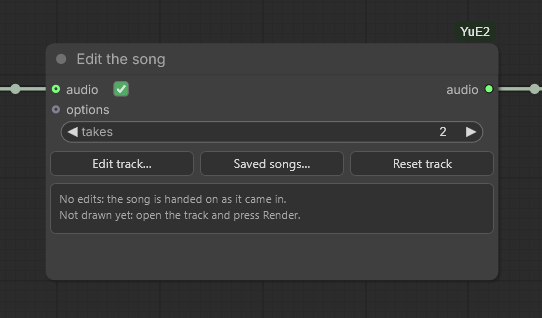
The node as template 11 has it. The ticked square beside audio is the switch:
untick it, and the node goes on with the song it was editing, or one opened with
Saved songs..., without running the node that sings into audio.
Outputs
| Name | Contents |
|---|---|
| audio | The song with every edit on the list made, 48 kHz stereo, or the song as it came when the list is empty |
Inputs
audio-- a song this install has sung: the output ofYuE2 Generate Song,YuE2 Render PlanorYuE2 Decode Latents, or a FLAC or WAV of one loaded withLoad Audio. Optional: with nothing joined, the node opens the song chosen withSaved songs.... The square beside this input on the node switches it off -- then the node goes on with the song it last edited, or one opened withSaved songs...since, and the node wired in is not run for it, so a song sung before a restart is not sung again to edit one bar of it. Opening a song withSaved songs...unticks the square.takes-- how many takes a retake, new words, new notes, another style or a song that goes on sings, to choose between by ear. Two by default. A cut and a move have one result each.options-- only what the run decides is read from it:device,offload,low_vram,vae,quantization,attention_backend,downloadandkeep_model_loaded. How the song was sung --cot, the sampling,cfg_scaleand the LoRA adapters it was sung with -- comes from the song itself, so that an edit sounds like the song it goes into.edits,song_key-- the list of edits and the chosen song, written by the track window and bySaved songs...and hidden behind them. Every run on a song joined toaudiowrites that song intosong_key. The list says which song it was made on, and on another song the node refuses it rather than cut and sing whatever stands in its bars.
Which songs. The pack keeps every song it sings -- its score, its tokens
and its latents, see Saved songs -- and the node finds the song
by its sound. A FLAC or WAV from Save Audio is found again after a restart;
an MP3 or any other lossy file changes nearly every sample, and the node says
that this is why it cannot find the song. A song made with vocals_only is
refused: edit the whole song and take the voice afterwards. A recording the
pack never sang cannot be edited yet.
The track window
Edit track... opens the song as a track: the waveform, and over it the bars
and sections of the song's score, laid onto the sound by the separated voice;
the words beside it, lit up as they are sung; under it the takes of the last
edit.
![The track window, titled Track -- YuE2 Edit Track, with the line The song as this node hands it on. Nothing is sung until Render, and every take already sung is kept, so undoing an edit or keeping another take costs nothing. On top Play, a greyed-out Play selected, 0:00 / 3:43, a greyed-out Fit and Saved songs..., and a blue Render button on the right. The section strip reads intro, verse, chorus, verse, chorus, bridge, chorus, interlude, verse, chorus, outro over bar numbers from 4 to 91, above the waveform of the whole song and a time ruler from 0:00 to 3:30. Under it Nothing selected, greyed-out Retake and Cut, then Notes..., Go on..., Break... and a greyed-out Undo last edit. On the right a Words panel with the song's Russian lyrics under [Verse], [Chorus], [Verse], [Chorus], [Verse], [Chorus], [Bridge] and [Outro]. At the bottom the lines The track is drawn. Select a stretch and press Retake or Cut. and No edits yet: the node hands the song on as it came in., the help on dragging, Alt, sections, the wheel, Space and Escape, and a Close button](https://raw.githubusercontent.com/pytraveler/YuE2-ComfyUI/HEAD/docs/track_editor_window.png)
A 3:43 song opened for the first time, with nothing selected yet. The names on the strip are the sections of the score the model wrote, and they need not match the tags of the lyrics beside them: here the score has a bridge where the lyrics have their third verse. The window lays the words on the score's sections by the same rule the node uses.
- Selecting. A drag selects whole bars and snaps to them, and with Alt
held, beats. A click on the section strip selects a section, either end of a
selection can be dragged, and
Clearor Escape drops it. The wheel zooms, Shift with the wheel and the slider scroll, andFitshows the whole song. - Playing. Space or
Playplays from the cursor or the selection, andPlay selectedstops at the end of it. Escape stops the sound first, then puts a message away, then clears the selection, and closes the window last. - Singing. The buttons write an edit onto the node's list and sing
nothing.
Renderruns this node alone, so several edits go in one run and a slip of the mouse costs no minute of the card. A blue box over the takes says what the next run will do, with a button that does it:Sing it,Cut it,Move it,Keep this take. The node's progress and a Cancel show in the window, and the list stays locked while the node runs. - Takes. Every take is a whole song. Choosing one changes the waveform, the
length and the sound in place, and while the song plays it goes on from the
same second, so takes are compared at one point.
As it wasis the song before the edit.More takessings another, and keeping a different take sings nothing, since they are all sung already. The takes live in this session's memory: after a restart only the kept one is sung again, and the rest showSing it, the same seed giving back the same take. The memory holds up to 1 GB of takes, about eleven of a four-minute song, and an edit on the list is never let go of to make room, so Render on the same list sings nothing again. Past that gigabyte the takes of edits taken off the list go first; then the edits before the last keep only their kept take, and an undo that makes one of them the last shows its others asSing it. - Knobs.
Seed,VarietyandGuideset one edit's seed, temperature and text guidance; left alone they are what the song was sung with.Fadeappears when a cut touches the first or last bar. Undo last edittakes the last edit off the list, andReset trackon the node clears it. What an edit was made on is still in memory, so neither sings anything.- Room. The window grows from its edges, or fills the browser tab with the square at its top right. It opens as it always did until it is given a height of its own, and then the wave takes all the height the window gains. The bar between the wave and the words moves to give the words more room or less, and a double click puts it back.
What an edit can do
-
Retake sings the selected bars again. The model sings on from the bar before, and the join is put where the next three seconds of the old song are likeliest, within two seconds either way; it lands on the bar line by itself. 9 retakes of 9 came back clean over three songs and three seeds. With Qwen3-ASR already on the machine the take that sings the most of the words there is kept, and otherwise the one whose join the model likes best. A take whose join sits well below the song's own at that point is marked "may be heard".
-
Cut takes the selected bars out and draws the two sides together; a section cut by more than half leaves the lyrics as well. The seam follows the phrases of the score, so a pickup into the next section stays with it. A cut at either end of the song gets a fade, 0.2 s in and 1.5 s out by default, which moves without singing anything.
-
New words. A click on a line in the words panel opens it for typing, and Shift takes a second line of the same section;
Sing these wordswrites the edit. The stretch opens on the last word of the line before, which the model sings again and runs on from into the new line. Where the lines fall comes from Qwen3-ForcedAligner, and the take heard singing the most of the new words is kept. A pop line came back whole in both takes, a rap line with 8 and 9 words of 10. -
Notes... opens the score editor on the song, with its words drawn under the notes. The bars whose notes changed are sung again, and changes far apart become edits of their own; the tempo, the bars, the key and the sections are fixed there. Four bars of new notes were sung 49 times in 50 in a pop song, 61 in 81 in a rap and 17 in 24 in a Russian ballad, and the old score over the same bars sang none of them: the model follows most changed notes, not every one.
-
Go on... carries the song on past its last line, with new lines under
After the last line, or with a new ending alone. The model writes the score of the new part itself, from the song's score up to that point, and ends the song by itself: 45 takes of 45 did. A new four-line bridge was heard at 86 to 100 percent of its words.The last section againfills in the words of the last section. -
Move. Drag a section along the strip above the track; a yellow line shows where it will go, which is where another section starts, or the end. The pieces are cut where the separated voice is quietest near their bar lines, and the bar before each seam is sung again so that the beat holds: on a real song 2 to 24 ms off at the seams, where the pieces joined as they were left it 76 to 146 ms off, and that was heard.
-
Break... puts an instrumental break of 1 to 16 bars, four by default, between two sections, and the list names both, the one before and the one after. A selected section gets the break after it, and with nothing selected it goes before the first chorus. The arrows move it by beats, for a phrase that runs across the bar line. The model writes those bars with nothing for the voice, and the take with the least voice in them is kept. Over four songs 7 breaks of 12 came out free of the voice, and a rap was sung over every time, so the node says when a voice is left.
-
Style... sings the selected bars in another style -- other instruments, another singer, another manner of singing -- with the same words. A panel opens in the words column with the style, filled in with the song's own to be changed, and written as on the song node. A retake cannot take another style: the model sings on in the style it hears itself singing, and a retake told a new style kept the old one. So every take sings the song again in the new style, from its start to a little past the selection, and its bars are laid into the song with the bar before each seam sung again, as a move does. A take costs about as long as singing the song that far.
Same noteskeeps the song's tune and takes any bars.New melodyhas the model write a tune for the new style, on from the bars before the selection -- a rapper's recitative, say -- and takes whole sections that are sung, the first excepted.- A voice sits where the notes are, whatever the style says: "male vocal" in
the style left a woman's song in her register in 6 songs of 6, and the
notes moved an octave toward the new voice moved it in all 6. For a man in
a woman's song choose
An octave down, andAn octave upthe other way round. - When other sections have the selected one's name,
and the other choruses, in the same voicesings them too, from the same take: one singer for all of them, at the price of one take. - With Qwen3-ASR already on the machine the take that sings the most of the words is kept, and otherwise the first.
Measured on the second verse of three songs, English and Russian: the stretch sounded as much like the new style as two songs sung in it from the start sound like each other, the words were sung as well as in a retake, 87 to 91 in 100 against 90, and the beat after the seams was 0 to 26 ms off; no seam was heard. A new melody finds the words of its sections by pairing the tags of the lyrics with the sections of the score by name, from the start. Where the model sang its sections in another order than the lyrics give them, the sections from that place on are refused, and the refusal names the bar; the tick takes every section of the name, so there untick it, or keep the notes.
A song sung with cot at off has no score and so no bars. It is selected and
edited by seconds, and the edits that need a score -- notes, going on, a move,
a break and another style -- say so.
Saved songs
Every song the pack sings is remembered in ComfyUI/user/yue2_comfy/songs:
its score, tokens and latents, about 0.8 MB for four minutes. Saved songs...,
on the node and in the track window, lists them newest first -- the date, the
style, the first lines, where the song came from, its length and its seed --
with the edits made of each song folded under it, every one with a strip of
the song and the edited stretch marked.
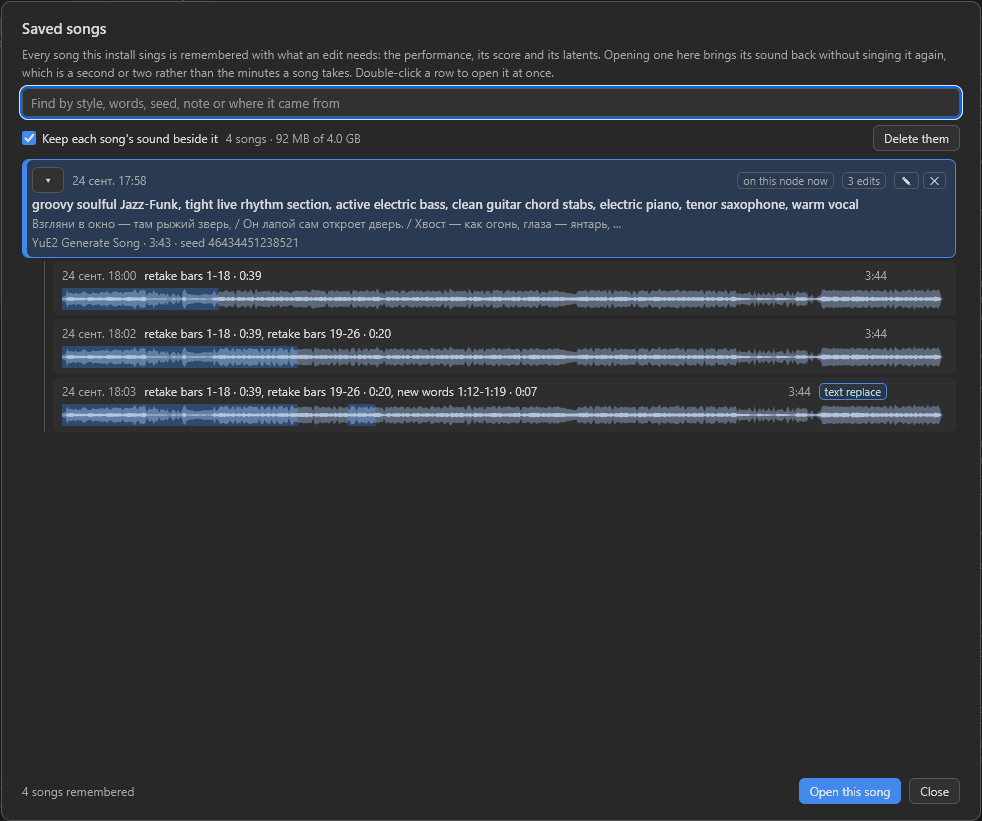
One song and the three edits made of it, each a song of its own that can be
opened and edited further. The sounds kept beside the four take 92 MB;
Delete them deletes those sounds and keeps the songs, since a sound is one
decode away.
- A double click, or
Open this song, puts the song on the node, which then opens it without singing anything: the song is decoded from its latents, 1.1 to 1.7 seconds for four minutes. The bars found on a song are kept beside it, so opening it again takes about two seconds instead of ten. While a song is joined toaudiothe button readsSwitch 'audio' off and open: it unticks the square besideaudioon the node, and ticking it again goes back to the joined song. Keep each song's sound beside itkeeps the sound as well, as FLAC -- 53 percent of the samples' size, read back in 0.2 s, sample for sample.Delete thembeside it deletes the kept sounds and leaves the songs.- The search finds a song by its style, words, seed or note; the pencil writes a note of up to 80 characters on it, and the bin deletes a song with its edits, or one edit alone.
- Songs and sounds get 4 GiB each, and the one used longest ago goes first. The folder can be deleted at any time; a song sung again with the same seed is found again.
What it runs
- YuE2 itself, with the song's own settings and adapters. The acoustic stage redraws a window of about 40 seconds around the edit rather than the whole song, which matches the whole-song result within its own spread.
- The voice separator (0.85 GB, the one
YuE2 Vocals Onlyuses) places the bars on the sound the first time a song is opened: the chroma of the mix alone put a rock song's bars 14 seconds off where the model had sung its intro nine bars short, and the voice placed all seven songs tried. Without it the bars come from the chroma alone, and the node says so. It also finds the bars of every song a take of another style sings. - Qwen3-ForcedAligner-0.6B (1.84 GB) finds where each line is sung. It is downloaded with the first change of words; with it on the machine, the lines light up by their real times. It hears the song a section at a time, on the separated voice: given a whole song of more than about two minutes it lost its place, and a line of a 312-second song stood 15 seconds early. On 28 songs, 304 of the 323 lines with a note for every syllable start within half a second of their phrase in the score, where one pass over the song had 219, and Qwen3-ASR hears 1915 of their 2300 words where the times put them, against 1731. A song with no score, or with lyrics that cannot be paired with its score's sections, is heard in one pass.
- Qwen3-ASR-1.7B (3.8 GB) hears the takes. New words and a song that goes on with new lines always use it, and fetch it; a retake, new notes or another style use it only when it is already there.
The listening models are unloaded after the run unless keep_model_loaded is
on, and Unload Models releases them, the takes of the session included.
Measured through the node on an RTX 5090, on a four-minute song: a retake of
a few bars in about 10 seconds, a cut in 7, a move in 19, a new ending in 11,
against about a hundred seconds to sing the song again. Another style costs a
song sung again as far as the selection, 31 to 49 seconds for the whole of a
song of two to two and a half minutes, and 13 to 16 more for the seams: two takes of both choruses
of a ballad rapped to a new melody took 199 seconds. On a three-minute song
with offload at auto, on and on with low_vram, a retake reserved
10.93, 5.15 and 3.09 GiB of the card, where singing the song had reserved
10.98, 5.46 and 3.48. Outside the edit the audio is the old file's own samples.
A song of five minutes opened for the first time in 15 seconds, most of them
the separator placing its bars, and in under a second after that; the words of
a take are timed in 2 to 3 seconds, only the sections its edit reached being
heard again.
Template 11, Edit a song, puts the node after a song and saves what it hands back. The window is in English only.
YuE2 LoRA
LoRA adapters for YuE2, one row each. The node hands them to the nodes that
sing -- YuE2 Generate Song, YuE2 Plan, YuE2 Plan Batch and
YuE2 Render Plan -- through their lora input, and another YuE2 LoRA node
plugged into this one adds its rows in front of these, so a set can be kept
together and reused.
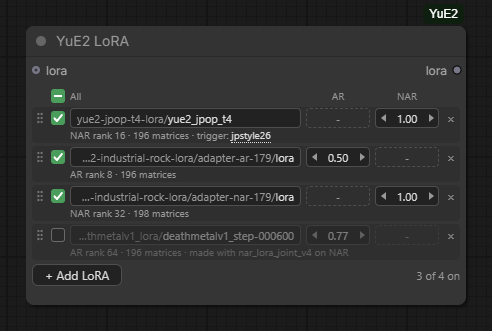
Four adapters, one of them switched off. A dash stands where a file changes nothing, and the line under each row says what it does change.
[YuE2 LoRA]
  loras  (the rows themselves, saved with the workflow)
  lora   (optional: the rows of another YuE2 LoRA node)
  -> lora
AR and NAR are the two halves of YuE2. AR writes the score and sings the
performance -- melody, structure, arrangement. NAR turns that performance into
sound -- timbre, mix, production. ComfyUI's own LoraLoader calls these two
strengths strength_clip and strength_model for YuE2; they are the same two
numbers. Most adapters are trained for one half, and the row shows a dash for
the other. A strength runs from -10 to 10, the arrows step it by 0.05 and by
0.01 with Shift held, and the number itself can be dragged sideways or clicked
and typed. Switching a row off leaves it in the workflow without singing it.
Where the files come from. Every loras folder ComfyUI knows about,
extra_model_paths.yaml included, and models/loras beside the checkout. The
pack never downloads adapters: these are the folders ComfyUI's own LoRA loader
lists, so a file that shows there shows here. The list reads each file's header
once and keeps what it found, so a folder of image LoRAs costs a tenth of a
second the first time and nothing after that. A row names its file by the path
under the folder; a bare file name, as a template writes it, is also found in
any folder there, as long as only one file has that name.
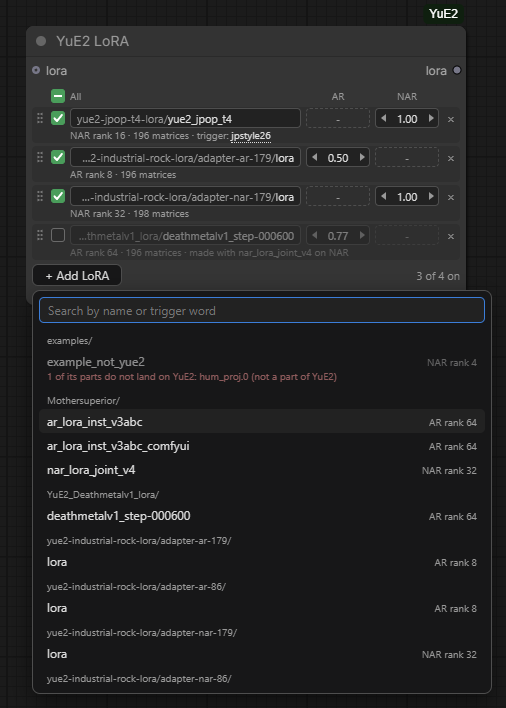
Only files that are for YuE2 are offered, grouped by folder and searchable by name or trigger word. One that cannot be used is greyed with the reason.
Two layouts are read. Files in ComfyUI's own layout -- what ai-toolkit
writes, and what _comfyui in a file name usually means -- and files in
m-a-p's layout, where the projections are separate and the NAR modules carry
their own names. ComfyUI's LoraLoader applies only the first kind: handed one
of the others it loads it, patches nothing and says so in the console, which is
easy to miss. Of the eight YuE2 adapters this pack was measured against, three
were in ComfyUI's layout.
What a row tells you. The halves the file changes and their rank, how many
matrices it touches, and whatever the file says about itself: its trigger word,
the cot it was trained for -- a run with another one says so in a warning --
and the acoustic adapter it was trained beside, which is the NAR file to add as
a second row. A trigger word is shown and never added for you; click it to copy
it and put it in the style where its author says. A file that is gone, or that
cannot be folded, turns its line red and stops the run before anything loads,
naming the file.
What it costs. The adapters are folded into the weights when a half arrives
on the card, once per stage: 0.12 to 0.47 seconds a half on an RTX 5090,
including reading the file, and about 0.15 GiB while it happens. After that the
song runs at the speed of one without adapters, because there is nothing left
to add per token. With low_vram the rows are packed to INT8 and cannot be
folded into, so the adapters ride beside them as factors instead, which costs 6
to 11 percent of the token speed.
What it does not change. The same seed with the same adapters gives the
same song in every offload mode, byte for byte, and a song without them is
the song this pack sang before adapters existed: the weights go back to the
checkpoint bit for bit when a set is removed or a run ends. On a file in
ComfyUI's layout the fold matches ComfyUI core's own calculate_weight to the
bit, so the same file gives the same weights whichever loader applies it.
The words survive them. Nine pairs of songs -- three adapter sets, three seeds each, the same style, lyrics and seed within a pair -- were heard back by a speech model. The J-pop NAR adapter left every word where it was, as it must: it changes nothing in the half that sings, so the performance is the one the base model gave and only its sound differs. The industrial pair came out level (68 percent of the words in order without, 71 with), and the death-metal set better with its adapters than without (48 against 63), where the base model's growl was the harder thing to hear.
The adapters travel with the run: a plan carries the set it was made with, a
lora input on YuE2 Render Plan replaces that set the way options does,
and the song memory writes down each adapter's name, file and strengths beside
the song.
Template 10, A song with LoRA, is the node in place with an empty list, ready for a file of your own.
Music with no voice. YuE2 sings whatever the style says; "instrumental" or
"no vocals" in it does not stop the voice. Mothersuperior's instrumental
adapter does (YuE2-instrumental-cot-full-loras,
CC BY-NC 4.0): it writes a score with no notes for the voice and plays it.
Used as its card says -- AR at 1, cot at full, the lyrics [instrumental]
or bare section tags such as [intro] and [chorus] -- it gave 17 songs of 17
with no voice in them, 100 to 180 seconds long, where the model without it
sang in 6 of 6. Three things bring the voice back: cot at melody (5 songs
of 6 sang), words in the lyrics (4 of 6), and an AR strength of 0.5 (3 of 3).
Template 12, An instrumental, is that setup. Taking the voice out of a sung
song with a separator and passing the rest through the model again is no
substitute: the model draws what the separator left behind back in.
YuE2 Options
Everything the main node deliberately does not ask about. An unconnected socket is never a special case: the defaults here are the same values the node uses when this node is not on the graph at all.
![YuE2 Options wired into YuE2 Generate Song. Options, top to bottom: cot full, max_seconds 0, keep_model_loaded false, cfg_scale 0.00, vae standard, device auto, attention_backend sdpa, download auto, quantization bf16, ode_steps 32, abc_temperature 0.70, abc_top_p 0.90, abc_top_k 30, temperature 1.00, top_p 0.95, top_k 100, repetition_penalty 1.200, offload auto, transpose 0, vocals_only false, low_vram false. Generate Song beside it: the options, style, lyrics and score_abc inputs, the seed with its control after generate, the Edit song... and Edit score... buttons, and the summary -- English, 88 BPM, expressive female voice; warm piano pop, acoustic piano, rounded bass and light drums, unhurried phrasing; the sections as [Verse] 2, [Chorus] 2; the lyrics -- above a panel reading no score yet](https://raw.githubusercontent.com/pytraveler/YuE2-ComfyUI/HEAD/docs/node_options.png)
Every widget at its default, before the first run. The two switches at the bottom
are the ones a small card wants: offload, and low_vram under it.
cot--fullplans melody and harmony,melodyplans the tune only,offskips the score and generates directly.fullis the default and the one the benchmark numbers come from.cfg_scale-- text guidance.0means the released default, which is 1.0 forfullandmelodyand 1.01 foroff.max_seconds-- the length ceiling.0works it out from the lyrics. See Song length.vae--standardfor listening,legacyto reproduce published benchmark numbers.device,keep_model_loaded-- where the model runs and whether it stays resident between runs.attention_backend-- the attention kernel for writing the score and singing it.sdpa, the default, is torch's own;fastsplits the attention over torch's efficient kernel and needs nothing installed;flashuses flash-attn's kernel and needs theflash-attnpackage in the Python ComfyUI runs on, which the pack does not install. Tokens a second of the performance on an RTX 5090: 103, 130 and 152, and in one user's ComfyUI a song took 68 seconds onfastagainst 95 onsdpa. Each repeats a seed to the bit and each sings a given seed its own way; see Reproducibility. A workflow saved with the oldcudnnruns asfast.fastandflashneed an RTX 30 card or newer; on an older one the node stops at once and says to choosesdpa.download,quantization-- where the weights come from when they are not on the machine yet, and which build to fetch. See Where the weights go.ode_steps-- solver steps for the acoustic stage.32is what the model was released with. Fewer is faster and thinner; more costs time and changes the result rather than clearly improving it.- Sampling for both stages: temperature, top-p, top-k, repetition penalty.
offload-- how much of the model the card holds at once. YuE2 has one set of weights for the score and the performance and another for the audio, and no stage needs both.onkeeps only the half the running stage needs, and neither during the decode;offkeeps everything on the card;auto, the default, moves a half off only when a stage would not fit beside it. The score, the notes and the words are identical in every mode, and so is the audio file as long as the decode has the same room to work in: on a card so full that cuDNN picks a cheaper convolution, the last stage renders a hair differently, measured 92 dB below the song itself. Measured,ontook a 40-second song from 9.81 GiB to 4.43 and a four-minute one from 9.95 GiB to 4.50, and gave a second or two back rather than costing one.transpose-- moves the song to another key, in semitones:2is a whole tone up,-3a minor third down. YuE2 has no key control of its own. A key named in the style line is ignored ('A minor', 'in the key of A minor' and 'E major' changed the key the model wrote 0 times in 18), and editingK:does not move a song either, because every note is read relative to it. What the model follows is the score, so this moves the score -- every note, chord and key by the same step -- just before it is sung, andscore_abcgives the moved one. Measured at -6, -5, -3, +2, +5, +6 and +12 on a pop song and a rap, the chroma of all 14 renders landed where asked, and the separated vocal moved by the requested amount to within 1.3 semitones in the pop song and 0.1 in the rap, a whole octave included. It is a new take of the same tune rather than the old recording pitched. It needs a score, so not withcotset tooff, and a score the parser cannot read is refused; none of the 52 the model wrote in testing was.vocals_only-- hands on only the voice of the song, separated from the band once the song is made. See YuE2 Vocals Only.low_vram-- for a card of about 4 GB. The 28 layers are kept on the card as INT8 rows rather than BF16, half their memory, and each matrix becomes BF16 again only for the multiply that needs it; the last stage decodes in 256-frame tiles instead of 1024. Measured withoffloadaton, a 40-second song peaked at 3.11 GiB instead of 4.43 and a four-minute one at 3.14 instead of 4.50, and both sang with the card capped at 3.5 GiB where they had needed 4.75. It is the one setting here that changes the song: an INT8 round trip is lossy, so the same seed writes the same score and a new performance of it, and the four-minute song took 110 seconds instead of 104. Both takes were read back by this pack's own speech recognition: the four-minute one sang the lyric through, and 98.6 percent of the words heard were words of the lyrics, the same as the BF16 take scored. InYuE2 TranscribeandYuE2 Edit Trackthe switch also holds the speech model's 28 text layers in INT8 and runs its convolutions and the word aligner's 40 seconds at a time: on a four-minute song 3.5 GiB instead of 5.5 for the speech model and 2.2 instead of 3.5 for the aligner, a fifth slower. Whisper and the speech model then take turns on the card.
Staged nodes
YuE2 writes an ABC score and then performs it. YuE2 Generate Song does both
and never shows you the middle. These five nodes open it up, and they sit one
level down in the menu, under YuE2/Advanced, because most people never need
them.
The score is the last point at which a change is cheap, and it is the only honest lever on where the stress of a line falls -- capitalising a syllable nudges the tokenizer, but editing the score moves the note.
- YuE2 Plan -- style, lyrics and a seed in; a
planand the score as text out. No audio is generated, so this is a small fraction of a full run. - YuE2 Render Plan -- a
planin, audio andlatentsout. Left unedited, the model's own score is sung, which gives exactly the songYuE2 Generate Songmakes from that seed. Change it withEdit score...and the change is what gets sung; see The score editor. - YuE2 Decode Latents -- the
latentsfrom a render turned back into audio without singing anything again. This is how to hear one performance through both decoders,standardandlegacy. - YuE2 Plan Batch and YuE2 Select Plan -- several scores from consecutive seeds, and a separate node that picks one. Picking is a separate node on purpose: changing the index does not rewrite the batch, so trying the next take costs only the singing.
An options node connected to YuE2 Render Plan overrides what the plan carried
-- except cot, which always comes from the plan. cot decides what the model
was told before it wrote the score, so changing it at the render would sing one
score under the instructions written for another.
Measured, on an RTX 5090, two lines of lyrics and a 40-second ceiling: the whole run took 8.9 s, of which the score was 2.2 s. Four scores cost 8.8 s against 35.7 s for four songs. The saving grows with length, because it is the singing that gets longer and the score that stays much the same.
Two things were checked rather than assumed. Rendering an untouched plan
produced audio byte for byte identical to YuE2 Generate Song on the same
seed. Changing one line of the score -- K:C to K:G -- produced a different
song, and a different length with it. Not the same tune in G, though: the
dialect reads every note relative to the key, so each F is sung as F-sharp and
nothing else moves. To move a whole song, use transpose in
YuE2 Options.
Song length
The model decides when the song is over, and on a short lyric it usually stops
well inside a minute. max_seconds is the ceiling for when it does not: given
four lines and three minutes of room, it will sometimes sing on long after the
words have run out.
Left at 0, the ceiling is worked out from the lyrics -- roughly a minute for
a verse and a chorus, and 180 seconds when there are no lyrics at all to count.
The resolved value is logged, so the console says length ceiling 60 s, from 4 sung lines rather than leaving you to guess. The score editor draws the same
ceiling as a dashed line across its piano roll; see
The score editor.
The ceiling stops the singing, not the score. The score has a budget of its own,
4096 tokens -- about five minutes of music -- and is written whole whatever
max_seconds says: one seed wrote the same score to the token at 0, 30 and 240.
Nor does a long score take seconds from the song. Sung at 30 seconds behind
scores of 511, 843 and 4096 tokens, every song got its 30 seconds; at the
360-second maximum there is still room in the model's context for the longest
score. What a low ceiling costs is the time spent writing bars that will not be
sung: 8 seconds, on a 124-second score sung for 30.
The ceiling is not a free parameter. It sizes the static KV cache and the captured CUDA graph, which changes the order the attention reduction runs in, so the same seed and the same lyrics under two different ceilings give two different songs. Measured on this pack: ceilings of 40 and 90 seconds agree for 79 tokens and diverge at the 80th, while 90 and 180 agree to the last token. Nothing is wrong with either take, but if you are hunting for a seed, settle the ceiling first.
Writing lyrics
Section tags in square brackets on their own line; the words underneath. The tags are directions rather than words, and the model sings none of them.
[Verse]
Neon fades along the lane
Footsteps keep the time of rain

[Chorus]
Let the day come into view
Every road begins with you
Upstream documents nothing beyond this. The model card says nothing about line
length, syllable counts or capitalisation, and the official skill file in the
YuE repository says only to put genre, instruments, vocal character, language
and tempo in style, and section tags and actual words in lyrics.
Stress, and what capital letters really do
A trick that circulates for other music models is to capitalise a syllable to move the stress. It does something here, but not what it looks like.
Lyrics reach the model verbatim -- there is no lowercasing anywhere in the chain -- and the tokenizer is a case-sensitive BPE. Measured on this pack's own tokenizer:
" record"   -> 1 token   [" record"]
" RECORD"   -> 1 token   [" RECORD"]         a different token, but equally whole
" recORD"   -> 2 tokens  [" rec", "ORD"]     split exactly at the stressed syllable
"CARRY EVERY SPARK OF WONDER" -> 8 tokens, split as C|ARRY, SP|ARK, WON|DER
So a capital in the middle of a word works by breaking the BPE merge at that point, which puts a boundary where a syllable break belongs. A word in full caps creates no boundary at all, and a line in full caps breaks in arbitrary places and is more likely to hurt than help.
Two consequences worth knowing. Changing the case changes the tokens, which
changes the whole song the way max_seconds does -- you do not get the same
take with better stress, you get a different take. And the stronger lever is
not the text at all: in full and melody modes the model writes an ABC score
first, and that is where it decides which syllable lands on a strong beat.
Reproducibility
The same seed with the same settings gives the same song, byte for byte. This holds because the pack pins the attention kernel of every stage rather than letting torch pick one per call.
"The same settings" includes attention_backend. sdpa, fast and flash
each repeat a seed to the bit, within one process and between processes, and
each sings a given seed its own way, because they add up the same numbers in a
different order; the words come out as clearly from any of them. The cudnn
choice of earlier versions did not repeat -- its kernel raced, and two to four
steps in four hundred came out differently -- so it is gone, and a workflow that
still names it runs as fast.
Since 0.9.0 the acoustic stage runs on cuDNN's attention, which repeats to the bit and is faster. A seed kept from 0.8 gives the same score and the same performance, and a sound 20 to 40 dB below the song apart from the old one.
"The same settings" also includes max_seconds and the exact text of the
lyrics, capitalisation included, for the reasons above.
Where the weights go
The node fetches them on first use, so on a fresh install there is nothing to do but run it. Files that are already on the machine are used as they lie, and nothing is downloaded twice. LoRA adapters are the exception: the pack never fetches one, and reads them from the folders listed under YuE2 LoRA.
| download | What it fetches | Where it puts it |
| --- | --- | --- |
| auto (default) | Comfy-Org's single checkpoint, 7.26 GB | ComfyUI/models/checkpoints/ |
| comfy-org | the same, plus the legacy decoder when vae is legacy | ComfyUI/models/checkpoints/, the decoder into ComfyUI/models/YuE2/ |
| original | the three files m-a-p released | ComfyUI/models/YuE2/ |
| off | nothing, and says which files are missing, the link to each and the folder it goes in | -- |
auto prefers the repackaged checkpoint for one reason: it is the same file
ComfyUI's own YuE2 nodes read. One download serves both, and if the ComfyUI
model manager has already installed it there is nothing to download at all.
The legacy decoder is the one file Comfy-Org does not publish, so with vae at
legacy it comes from m-a-p, 0.49 GB, beside whichever backbone the machine
already has: Comfy-Org's BF16 checkpoint and m-a-p's backbone are the same
weights, so a machine with the checkpoint fetches the decoder and nothing else.
The INT8 checkpoint is the same model only to within its quantization, so it
stands in for the backbone only with quantization at int8. On a machine with
nothing yet, auto takes m-a-p's files for legacy, which is 0.5 GB less than
the checkpoint plus the decoder. The same holds the other way round: a machine
that has m-a-p's backbone and only lacks the standard decoder fetches that
decoder, not the checkpoint.
| File | Size | Repository |
| --- | --- | --- |
| checkpoints/yue2_3b_bf16.safetensors | 7.26 GB | Comfy-Org/YuE2 |
| checkpoints/yue2_3b_int8_convrot.safetensors | 3.69 GB | Comfy-Org/YuE2 |
| YuE2-3B/model.safetensors | 6.76 GB | m-a-p/YuE2-3B |
| YuE2-Vae/model.safetensors | 0.49 GB | m-a-p/YuE2-Vae |
| YuE2-Vae-legacy/model.safetensors | 0.49 GB | m-a-p/YuE2-Vae-legacy |
| YuE2-3B/qwen.tiktoken | 2.4 MB | m-a-p/YuE2-3B |
YuE2 Write Song has a model of its own, fetched the same way and only when
the machine has no GGUF at all:
| File | Size | Repository | Licence |
| --- | --- | --- | --- |
| LLM/Qwen3.5-4B-Q4_K_M.gguf | 2.55 GB | unsloth/Qwen3.5-4B-GGUF | Apache-2.0 |
Any GGUF with a chat template in your ComfyUI model folders is offered in the
node's model list and is used instead, so this download is for people who
have none rather than a second requirement. The larger models of
the model list download the same way, when a run first picks
one.
YuE2 Transcribe has three models, fetched on first use with download at
anything but off: the speech model only once lyrics_auto_recognition is on,
and Whisper only once second_hearing is on as well:
| File | Size | Repository | Licence |
| --- | --- | --- | --- |
| audio_encoders/sheetsage2_bf16.safetensors | 1.29 GB | Comfy-Org/YuE2 | CC BY-NC 4.0 |
| YuE2/Qwen3-ASR-1.7B/model.safetensors | 3.80 GB | Qwen/Qwen3-ASR-1.7B-hf | Apache-2.0 |
| YuE2/Qwen3-ASR-1.7B/tokenizer.json, config.json | 11 MB | Qwen/Qwen3-ASR-1.7B-hf | Apache-2.0 |
| YuE2/whisper-large-v3-turbo/model.safetensors, tokenizer.json, generation_config.json | 1.62 GB | openai/whisper-large-v3-turbo | MIT |
SheetSage2 goes into ComfyUI's models/audio_encoders, the folder Comfy-Org's
repository puts it in and ComfyUI's own audio encoder loader reads. A copy
already on disk is used where it lies: SheetSage2 is recognised by its tensors
whatever the file is called, the speech model by the shape of its weights
next to its tokenizer.json, and Whisper by the size of its weights next to
its two files.
vocals_only and YuE2 Vocals Only share one model, fetched on first use with
download at anything but off:
| File | Size | Repository | Licence |
| --- | --- | --- | --- |
| YuE2/MelBandRoformer.ckpt | 0.85 GB | KimberleyJSN/melbandroformer | MIT |
It is fetched at the one revision this pack was checked against, because a
later upload under the same name would be a different model. A copy already on
disk is used where it lies: the released file by its name and size, and a
safetensors conversion of it by its tensors -- such as kijai's
MelBandRoformer_fp16.safetensors, which ComfyUI-MelBandRoFormer keeps in
models/diffusion_models. The .ckpt is read with torch's weights_only, which
loads tensors and runs no code.
YuE2 Edit Track finds the bars with that same separator, and for new words it
uses the speech model of YuE2 Transcribe and a word aligner, fetched with the
first change of words:
| File | Size | Repository | Licence |
| --- | --- | --- | --- |
| YuE2/Qwen3-ForcedAligner-0.6B/model.safetensors, config.json | 1.84 GB | Qwen/Qwen3-ForcedAligner-0.6B | Apache-2.0 |
Qwen ships the aligner without the one-file tokenizer this pack reads, and the
speech model's tokenizer.json is the same tokenizer -- the same entries and
merges, compared -- so that file is used, or fetched beside the aligner when the
speech model is not there. A copy of the aligner already on disk is recognised
by the model type its config.json names, since its files are named like the
speech model's.
ComfyUI/models/YuE2/ is registered with ComfyUI, so extra_model_paths.yaml
can redirect it like any other model folder, and checkpoints is whatever that
file already says it is.
Transfers resume. Bytes land in <name>.part and are renamed into place only
once whole, so an interrupted download costs the last chunk rather than the
whole file, and a half-written checkpoint is never mistaken for a model --
by this pack or by ComfyUI's own nodes, which read the same folder. Free space
is checked before the first byte.
What arrives is checked against the checksums published with it. m-a-p ships a
weights_manifest.json beside each release, so the original layout is
verified once, right after the download -- 6.76 GB in 4.7 seconds, measured --
and a file that is the right length but wrong inside is named rather than
loaded. That is the failure size cannot see: a truncated transfer is refetched
on the next run, while a complete-but-rewritten one is skipped forever as
already present. Comfy-Org's repack publishes no manifest, so for it size is
all there is, and this pack says so instead of inventing a verdict.
The INT8 build
quantization set to int8 fetches Comfy-Org's quantized checkpoint: 3.69 GB
instead of 7.26 GB.
It saves the download and not the VRAM, and it is a different thing from
low_vram, which is what keeps weights quantized on the card. The INT8 weights
are restored to BF16 as the file loads -- the
rotation that ConvRot applies is a 256-point Hadamard matrix, which is
symmetric and orthogonal and therefore its own inverse -- and the card holds
the same 6.8 GB either way. It is also not quite the same model: the round trip
costs about one percent of each weight, measured over all 896 restored tensors
against the BF16 release, worst cosine 0.99993. The same seed gives a different
song from the two files.
Whatever is already on disk is used before anything is downloaded, so choosing
int8 on a machine that has the BF16 file changes nothing.
low_vram packs the layers itself, from whichever file was loaded, so it needs
no second download and does not ask for this setting.
Using files you already have
Nothing has to be copied or renamed. The search looks, in this order, at every
root ComfyUI knows about -- models/YuE2 first, then diffusion_models,
vae, LLM and checkpoints -- and then at the Hugging Face cache, so a copy
pulled by any other tool is found where it lies.
Names carry no authority. A file that matches the published folder layout is
believed on sight, and anything else is identified by reading its header: eight
bytes of length and about a hundred kilobytes of JSON, never the seven
gigabytes behind it. A renamed yue2-music-model.safetensors dropped into
models/diffusion_models is found; an unrelated Qwen-shaped checkpoint sitting
next to it is not mistaken for it, because the discriminator is a tensor that
only this architecture has. The repackaged checkpoint is recognised the same
way, and the INT8 build is told apart from the BF16 one by what is inside it
rather than by its name -- loading one as the other would be 1355 tensor
mismatches.
Whichever layout is found, it is the same model. The conversion from the repackaged file was checked against the released checkpoints tensor by tensor: 628 of 628 in the language model and 435 of 435 in the VAE, bit for bit, and a song generated from each has the same waveform hash. The same holds for the checkpoint's backbone beside m-a-p's legacy decoder: rechecked on 2026-09-18, the backbone and the vocabulary are the released ones to the byte, and a legacy song from that pair had the score and the waveform hash of the one from the three released files.
If nothing is found, the refusal names every missing file at once -- the direct link and the exact folder for each -- because being told about one missing file per run turns one fix into three.
Environment variables
| Variable | Effect |
|---|---|
| YUE2_MODELS_ROOT | Search this directory and nothing else, and download into it too: the checkpoint into its checkpoints folder, SheetSage2 into audio_encoders, everything else beside them. An override that still lets the search wander is not an override, so setting this makes the answer to "where did it load that from" exactly one directory. ComfyUI's own YuE2 nodes do not look there, so a checkpoint fetched into it serves this pack only |
| YUE2_OLLAMA_MODELS | Where an Ollama store lives, for the ones this process will not reach on its own -- a WSL or container store |
| YUE2_LLAMA_BIN | The llama.cpp binary to use, ahead of every other place it is looked for |
| HF_HUB_CACHE, HF_HOME | Honoured when looking through the Hugging Face cache |
| YUE2_CONSOLE_PROGRESS | 0, no, off or false leaves the console alone; the bar on the node itself is untouched. Anything else, or nothing at all, draws the line |
Notes
Progress in the console. ComfyUI draws a node's bar in the browser, so a
terminal the server was started from says nothing while a song is made. Every
node of this pack draws the same fraction and the same caption there as well --
YuE2 Generate Song: Composing |######----| 58% [01:12] -- through tqdm,
which every ComfyUI has, or a line of its own where it is missing. There is no
ETA: the stages do not take the shares of the bar they are given, so a
remaining time worked out from the percentage would be a number this pack
cannot stand behind. A download knows its own and writes it into the caption.
VRAM accounting. The loaded model is cached by this pack rather than
registered with ComfyUI's model manager. That means no other node can evict it
mid-run, and also that ComfyUI does not count its 6.8 GB when it decides whether
something else fits. With keep_model_loaded off, which is the default, the
window where this matters is one node's execution.
Global torch state. YuE2 needs deterministic math settings that upstream applies process-wide and never puts back. This pack sets them for the length of one run and restores them afterwards, so nothing else in your graph is quietly changed until the next restart.
Sound that stops on Windows. ComfyUI sends files through the system's
sendfile, and on the client editions of Windows one request held open by a
browser's audio player -- which keeps it open while a long file plays -- stalls
every other file the server sends, the page and the previews included, until it
lets go. The track window of YuE2 Edit Track plays through a route of the
pack's own and is not affected. For the rest of ComfyUI, start it with the
environment variable AIOHTTP_NOSENDFILE=1.
Network paths are refused. A UNC path reaching the pack from a downloaded workflow or an API request is not followed: merely looking at one authenticates this machine against whatever host it names. Map the share to a drive letter and nothing is lost.
Inspected TLS still downloads. An antivirus or a company proxy that opens
HTTPS to look inside it installs its own certificate authority in the system
store, which certifi -- what requests verifies against -- knows nothing
about. When the handshake is refused for that reason the download is retried
against the store the rest of the machine uses, the same one the browser
trusts. Nothing is skipped: the certificate is still verified.
Licence
The code here is Apache-2.0, the SheetSage2, Qwen3-ASR, Qwen3-ForcedAligner, Whisper and Mel-Band RoFormer implementations included. The YuE2 and SheetSage2 weights are CC BY-NC 4.0, which is non-commercial, and the vendored upstream inference code keeps its own licence. The writer's default language model, the Qwen3-ASR speech model and the Qwen3-ForcedAligner word aligner are Apache-2.0, Whisper's weights and the voice separator's are MIT, and they belong to neither. See NOTICE.md.