
MiniMax-H3-Prompt-Rewriter-ComfyUI
Personal adaptation of the lightx2v/MiniMax-H3-Prompt-Rewriter-LoRA project for ComfyUI
Nodes (19)
The MiniMax-H3 'effects' that ship as files, not words — and how to make them actually fire
MiniMax-H3 prompt writing for people who can't run a 27B
Full-reference MiniMax-H3 prompts, six sections at a time
Get the MiniMax-H3 writing guide as prompt text — no model runs at all
Your Prompt Rewriter Ate the Trigger Word — Here's How to Put It Back
Caption a whole shot's references in one box, not five chained nodes
Check your MiniMax-H3 prompt before it costs you a render
A thousand finished MiniMax-H3 prompts, zero VRAM and zero downloads
MiniMax-H3 Prompt Reducer
The reference-quality MiniMax-H3 prompt rewriter, run fully local
The 8B MiniMax-H3 rewriter that actually looks at your frames
Give it a clip, get back the full six-field prompt
The MiniMax-H3 reducer that never runs a model
The MiniMax-H3 Reference Adapter
Turn an image, clip or sound into a reference_assets line
Your prompt says Voice 1 but the video speaks with Voice 2 — this is the node that stops that
The one options node that feeds half this pack
Both H3 LoRA rewriters in one node — one tab is all it takes to switch
References, their order, and the rewrite
MiniMax-H3 Prompt Rewriter for ComfyUI
ComfyUI nodes for the LightX2V MiniMax-H3 T2VA Prompt Rewriter LoRA. A short prompt goes in; a structured, production-ready audio-video description for MiniMax-H3 comes out — entirely locally.
Русская версия · 中文版 · Changelog
<p align="center"> <a href="https://github.com/pytraveler/MiniMax-H3-Prompt-Rewriter-ComfyUI/releases/latest"><img alt="Latest release" src="https://img.shields.io/github/v/release/pytraveler/MiniMax-H3-Prompt-Rewriter-ComfyUI?display_name=tag"></a> <a href="LICENSE"><img alt="License" src="https://img.shields.io/github/license/pytraveler/MiniMax-H3-Prompt-Rewriter-ComfyUI"></a> <img alt="Python 3.10+" src="https://img.shields.io/badge/Python-3.10%2B-3776AB?logo=python&logoColor=white"> <a href="https://registry.comfy.org/publishers/darkil/nodes/minimax-h3-prompt-rewriter"><img alt="ComfyUI Registry" src="https://img.shields.io/badge/ComfyUI-Registry-1B98E0"></a> <a href="https://huggingface.co/lightx2v/MiniMax-H3-Prompt-Rewriter-LoRA"><img alt="Hugging Face" src="docs/badges/hf-lora.svg"></a> <a href="https://huggingface.co/pytraveler/MiniMax-H3-Prompt-Rewriter-LoRA-GGUF"><img alt="GGUF adapter, 27B" src="docs/badges/gguf-27b.svg"></a> <a href="https://huggingface.co/pytraveler/MiniMax-H3-Prompt-Rewriter-LoRA-8B-GGUF"><img alt="GGUF adapter, 8B" src="docs/badges/gguf-8b.svg"></a> <a href="https://huggingface.co/pytraveler/MiniMax-H3-Prompt-Rewriter-LoRA-Omni-GGUF"><img alt="GGUF adapter, Omni" src="docs/badges/gguf-omni.svg"></a> <a href="https://www.youtube.com/watch?v=h3rZTIRB_G8"><img alt="Video review, in English" src="https://img.shields.io/badge/YouTube-review%20(EN)-FF0000?logo=youtube&logoColor=white"></a> <a href="https://www.youtube.com/watch?v=PZd9fWX15VA"><img alt="Video review, in Russian" src="https://img.shields.io/badge/YouTube-review%20(RU)-FF0000?logo=youtube&logoColor=white"></a> </p>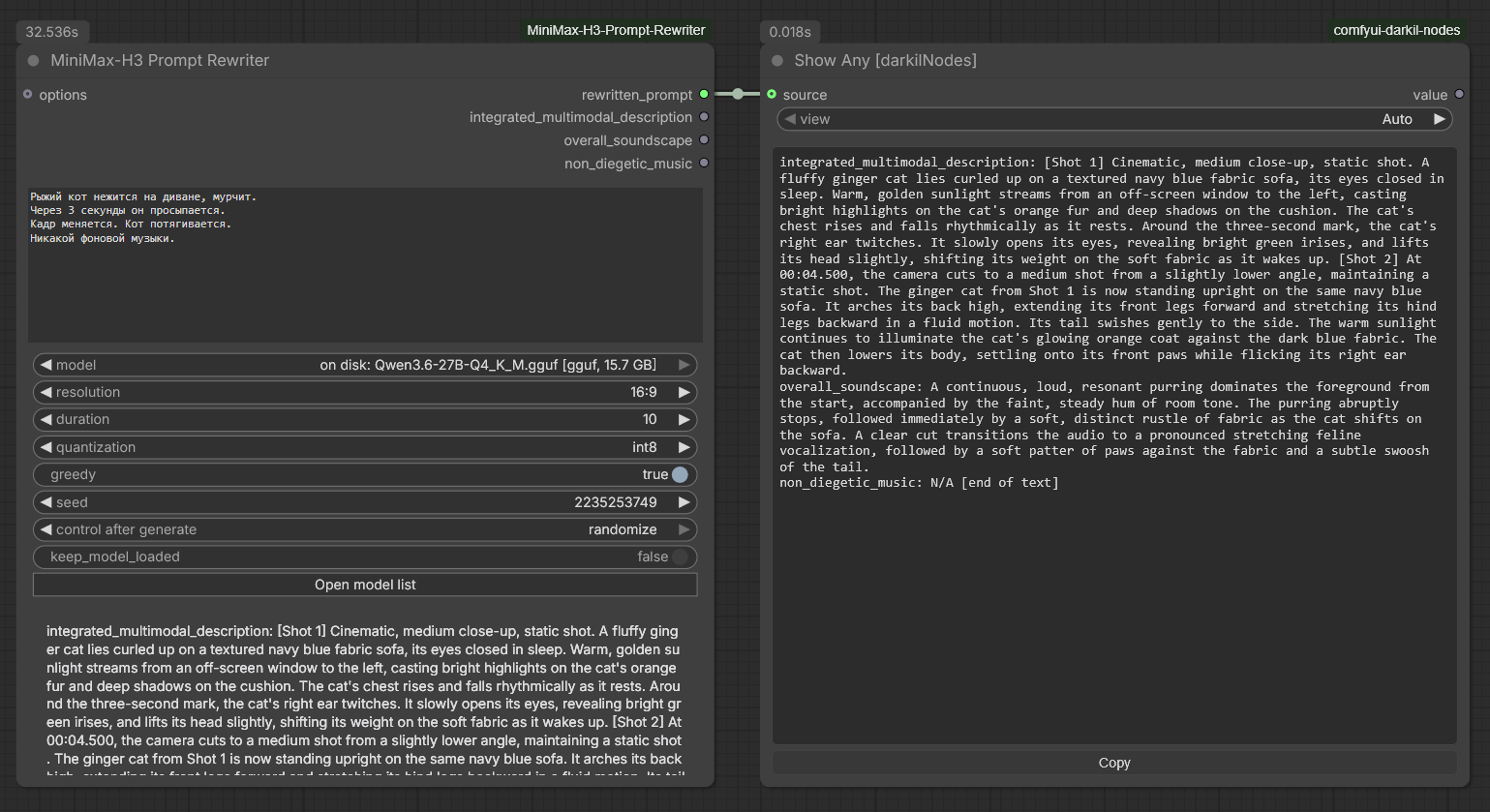
The prompt may be in any language the base model reads; the rewrite comes back in English, which is what MiniMax-H3 expects.
"A red fox walks through a snowy forest at dawn."  +  16:9  +  15s
                              │
                              ▼
              Qwen3.6-27B + Prompt Rewriter LoRA
                              │
                              ▼
   integrated_multimodal_description: [Shot 1] ... [Shot 2] 0:06 ...
   overall_soundscape: ...
   non_diegetic_music: ...
                              │
                              ▼
              MiniMax-H3 video + synchronized audio
There are three ways to get that output, and the pack ships all of them:
| | Rewriter node | Rewriter 8B | Rewriter Omni | Writer nodes | |---|---|---|---|---| | Where the format comes from | the LoRA — a 27B trained until H3 output came out of it unprompted | a second LoRA, on a model that also sees | a third LoRA, on a model that also hears | MiniMax's own writing guide, in the system prompt | | Model | Qwen3.6-27B only | Qwen3-VL-8B-Instruct only | Qwen2.5-Omni-7B only | any instruction-following GGUF | | Smallest working setup | ~10 GB download, ~13 GB VRAM | ~6.1 GB download, ~9 GB VRAM | ~6.2 GB download, ~9 GB VRAM | 2.6 GB download, ~5 GB VRAM | | Tasks | T2VA | T2VA, I2VA, FL2VA, L2VA | T2VA, I2VA, FL2VA, L2VA, Ref2VA | T2VA, I2VA, FL2VA, L2VA, Ref2VA | | Reference frames | described to it in words | it looks at them | it looks at them | described to it in words | | Clips and sound | described to it in words | described to it in words | it watches and listens | described to it in words | | Quality | the reference | the same trained contract, at a third of the download; wobblier on the alignment line | the only one that hears; six fields on Ref2VA | close, and it runs on hardware the LoRA cannot touch |
The first three columns are also available as one node — Universal Rewriter — where a tab swaps the adapter and everything else stays where it is.
Two of the four read text only. Reference Caption turns an image, an audio clip or a video into the text they need — 3 to 5 seconds per asset on a 3.4 GB model. When a whole shot's worth of references is waiting, Multi Reference Caption does all of them at once — or Universal Writer describes them and writes the prompt in the same node, with their order a widget you can drag rather than a consequence of which slot you happened to use. The 8B rewriter needs none of that for its reference frames: connect the picture and it reads it. The Omni rewriter needs none of it at all — a clip and a sound reach it as themselves.
And when the shortest way to a good prompt is somebody else's: Prompt Presets hands over one of a thousand finished MiniMax-H3 prompts that ship inside the pack, narrowed by look and subject, each with the frame of the clip it was written for and that clip a click away. No model is loaded for it and nothing is downloaded.
If your card has 8 GB, skip to the writer nodes.
Contents
- What you need before installing
- Install
- Nodes
- MiniMax-H3 Prompt Rewriter
- MiniMax-H3 Prompt Rewriter 8B (sees frames)
- MiniMax-H3 Prompt Rewriter Omni (sees and hears)
- MiniMax-H3 Universal Rewriter
- MiniMax-H3 Rewriter Options
- MiniMax-H3 Prompt Writer (T2VA/I2VA/FL2VA/L2VA)
- MiniMax-H3 Prompt Writer (Ref2VA)
- MiniMax-H3 Universal Writer
- MiniMax-H3 Reference Caption
- MiniMax-H3 Multi Reference Caption
- Captioning with a model ComfyUI already has loaded
- The captioner is loaded once, not once per reference
- MiniMax-H3 Guide Prompt (any LLM)
- MiniMax-H3 Prompt Check
- MiniMax-H3 Prompt Reducer
- MiniMax-H3 Reduce Prompt (any LLM)
- MiniMax-H3 Effect Embeddings
- MiniMax-H3 LoRA Triggers
- MiniMax-H3 Reference Adapter
- MiniMax-H3 Reference Slots
- MiniMax-H3 Prompt Presets
- The duration widget
- Repeating the last answer
- Unloading a kept model
- The answer is checked
- Acting on what it found
- The prompt library
- The guides are fetched, not bundled
- The model list
- Models you already pulled for Ollama
- Where the weights go
- Using a model you already have
- Smallest download without any extra install
- GGUF — smaller still, and nothing to install
- Notes
- Credits
- Licence
What you need before installing
The LoRA route is a 27-billion-parameter language model, not a small helper. There is no way around the following, because the adapter is bound to one specific base model. The writer nodes have none of these requirements — see their table below.
| Resource | Requirement |
|---|---|
| Disk | ~52 GB for Qwen/Qwen3.6-27B + ~3.5 GB for the adapter — or ~10–16 GB total on the GGUF route |
| VRAM (nf4, default) | ~16 GB |
| VRAM (int8) | ~28 GB |
| VRAM (bfloat16) | ~54 GB, spills into system RAM via accelerate |
| VRAM (GGUF) | ~13–19 GB depending on the quant, lower still with fewer offloaded layers |
| Packages | transformers, peft, accelerate, and bitsandbytes for nf4/int8. Nothing at all on the GGUF route: llama-cpp-python is used when it happens to be installed, and the official llama.cpp binaries are fetched when it is not |
The MiniMax-H3 text encoder cannot be reused for this. It is a different model (Qwen3-VL-32B, vocabulary 151936) from the LoRA's base (Qwen3.6-27B, vocabulary 248320); it contains none of the linear-attention
in_proj_*modules the adapter targets; it is truncated to the first 50 of 64 layers; and it ships withoutlm_heador a final norm, so it cannot generate text at all. It only produces hidden states for the DiT.
Install
Clone into ComfyUI/custom_nodes/ and install the requirements into the same
Python environment ComfyUI runs on:
cd ComfyUI/custom_nodes
git clone https://github.com/pytraveler/MiniMax-H3-Prompt-Rewriter-ComfyUI
For ComfyUI portable on Windows:
python_embeded\python.exe -m pip install -r ComfyUI\custom_nodes\MiniMax-H3-Prompt-Rewriter-ComfyUI\requirements.txt
Or install it from the Comfy registry through ComfyUI-Manager.
Example workflows
Seven workflows ship with the pack and appear in ComfyUI's template browser (Workflow → Browse Templates) under this node pack's name once it is installed. Each is a card of its own and each runs on its own: nothing is bypassed on open, and there is no second branch to mute before pressing Run.
| | Template | What it needs | |---|---|---| | 1 | Write a prompt — one line of an idea in, a full H3 audio-video description out | one 2.6 GB GGUF | | 2 | Rewrite a prompt with the 27B LoRA — the LightX2V adapter this pack is named after | one 15.7 GB GGUF | | 3 | Write a prompt from references — the writer describes your pictures and writes from what it saw | two GGUFs, 6 GB together | | 4 | Ready-made prompts — a thousand finished ones, picked in a browser with their frames | nothing at all | | 5 | Prompt to video — ComfyUI's text-to-video template with the writer in front of it | the MiniMax-H3 weights | | 6 | References to video — the same for Ref2VA, the pictures reaching the generator through the writer, in the order its strip numbers them | the MiniMax-H3 ref2va weights | | 7 | LoRA triggers and effects — the words an adapter answers to, and MiniMax's ten effects, put into a finished prompt | nothing at all |
Only 5 and 6 load a MiniMax-H3 checkpoint. The rest end at the text, which is what most of this pack is for. Those two are ComfyUI's own gallery templates with the generator folded into a single subgraph box, so what is on screen is the prompt side plus one node — the checkpoints they name are the ones the stock templates use, and ComfyUI offers to download any that are missing.
Every one carries a Read me first note: what it does, what it downloads, what to set before pressing Run, and where to go next. The image loaders in 3 and 6 ship empty on purpose — a file name saved into a template points at something your machine does not have — so choose your own pictures first.
The card pictures the browser draws beside each name come from
python tools/template_cards.py, which writes them as <name>.jpg next to the
workflow, where the browser looks for them.
For a community take, axiomgraph's workflows pair the Omni rewriter with FL2VA (GPL-3.0, and they use a few extra node packs — grab them from their repository).
Nodes
MiniMax-H3 Prompt Rewriter
The main node. It downloads whatever is missing, loads the model, generates, and releases the VRAM again.
Outputs
| Name | Contents |
|---|---|
| rewritten_prompt | The full rewrite, ready to paste into a MiniMax-H3 text input |
| integrated_multimodal_description | Just the shot-by-shot visual section |
| overall_soundscape | Just the diegetic audio section |
| non_diegetic_music | Just the score section |
Inputs
prompt— the short prompt to expand.model— the base model. The list holds every entry from your model list plus every Qwen3.6-27B already on disk (prefixedon disk:). Anything not present is downloaded on first use, resuming if interrupted. The Model list button edits the list in a window over the graph — see below.resolution/duration— conditions the rewrite is composed for. Keep them equal to what you pass to MiniMax-H3, or the shot pacing will not match. The list runs48:9down to9:16; the two ultrawides are the multi-monitor case — 32:9 is two 16:9 screens side by side, 48:9 three. They condition how the shot is composed, which is all this node decides; what a generator will render at that shape is its own question.aspect_ratio— the same setting, on a socket, and it wins while something is connected. Every writer and rewriter node in the pack has it, and it takes aSTRINGor aCOMBOlink, so the primitive that already sets ComfyUI's Resolution Selector can drive this from the same wire. It is there because the shape of the frame is usually decided elsewhere in the graph and spelled differently there: ComfyUI's own Resolution Selector calls 16:916:9 (Widescreen), a size node says3840x1080, a divider says1.78. All three are read, and a label around the pair is read through — the number pair is what counts. A frame size within 2% of a listed ratio is called by its name, so1376x768(which is what Resolution Selector produces for 16:9 at 1 MP) arrives as16:9rather than as43:24; a ratio that is nothing on the list passes through as itself, which is how2.39:1or5:4gets in. Something that is not a ratio at all is refused by name rather than composed for. Theresolutionwidget itself has no socket, so there is one way in and it is the one that reads what other nodes write. The picker greys out while the wire is connected — dimmed, nothing lit, clicks refused — because a lit square would be naming a ratio the run is not going to use. Unplugging clears the field: an upstream node writes its value into the widget — that is how a wire feeds a widget input at all — so the text would otherwise stay behind, and it is not inert while it sits there. Anything inaspect_ratiooutranks the picker, including a leftover.quantization— how to load an unquantized checkpoint:nf4(default, ~16 GB VRAM),int8(~28 GB),bfloat16/float16(~54 GB). Ignored when the checkpoint brings its own quantization.greedy— on by default for deterministic output. Turn it off to sample.seedkeep_model_loaded— off by default. The 27B model is released as soon as the rewrite finishes, so the same GPU can run H3 video generation next. Turn it on only when iterating on prompts back-to-back, and see Unloading a kept model for giving the card back afterwards.options— optional; connect a MiniMax-H3 Rewriter Options node.
MiniMax-H3 Prompt Rewriter 8B (sees frames)
The same idea on a much smaller model that is also multimodal. LightX2V's second adapter is trained on Qwen3-VL-8B-Instruct, so where the 27B has to be told what a reference frame contains, this one is shown the frame and writes the alignment line from what it sees. It covers four tasks rather than one, and fits on a card the 27B cannot go near.
![The 8B rewriter node in ComfyUI, set to T2VA: the options node on the left, the rewriter with its first_frame and last_frame inputs in the middle, and the finished rewrite on the right with numbered shots, an (S1) speaker id and a <d>[English] Hello.</d> dialogue tag](https://raw.githubusercontent.com/pytraveler/MiniMax-H3-Prompt-Rewriter-ComfyUI/HEAD/docs/node_rewriter_8b.png)
Outputs are the same four as the rewriter above, so the two are interchangeable downstream.
Inputs
prompt,resolution,duration,greedy,seed— as above.model— a Qwen3-VL-8B base, in either shape the adapter is published for. A GGUF entry is two files from the same conversion, the model and its projector. A safetensors entry is the official Qwen3-VL-8B-Instruct folder, which is what the adapter was trained on and what it is published as. Entries prefixedon disk:are already in your model folders. Only the 8B fits the adapter; a Qwen3-VL of another size is refused by name and number before anything is downloaded.quantization— how to load a safetensors base:nf4needs about 8 GB of VRAM,int8about 13,bfloat16about 20. Ignored for GGUF, which carries its own.task—T2VA,I2VA,FL2VA,L2VA. The model's own name for these is T2AV, I2AV, FL2AV and L2AV; they are the same four tasks.first_frame/last_frame— optional IMAGE inputs.I2VAreadsfirst_frame,L2VAreadslast_frame,FL2VAreads both,T2VAreads neither. Connect the wrong one and the node says which is missing before anything loads — which end of the clip a picture belongs to is part of what the model is told.keep_model_loaded— on a safetensors base every task honours it: the model is loaded in ComfyUI's own process and stays there. On a GGUF base onlyT2VAcan, because the three tasks with frames run throughllama-mtmd-cli, a fresh process each time that takes the model with it when it exits. The node says which it did rather than ignoring the switch.options— the same options node as everything else. Itsadapterdropdown lists both LoRAs; the first entry picks whichever one matches the base model you chose, so it needs no attention.
What it costs
| | Download | VRAM |
|---|---|---|
| Q4_K_M base + projector + Q8_0 adapter | 4.7 + 0.7 + 0.7 GB | ~9 GB |
| Q8_0 base + projector + F16 adapter | 8.1 + 0.7 + 1.3 GB | ~13 GB |
| safetensors base + adapter, nf4 | 17.5 + 2.8 GB | ~8 GB |
| safetensors base + adapter, bfloat16 | 17.5 + 2.8 GB | ~20 GB |
The GGUF rows pay for the runtime as well, once per machine: I2VA, FL2VA and
L2VA run through llama-mtmd-cli, so the first of them fetches the official
llama.cpp build — 34 MB, or 511 MB where llama_backend resolves to CUDA — and
an installed llama-cpp-python does not cover it. T2VA is the one task that
can take the wheel instead.
The GGUF route is much the smaller download and needs nothing installed. The
safetensors route is the shape the adapter was published in, keeps the model
resident for every task rather than only for T2VA, and is the one to reach for
if you already have the checkpoint — but it needs transformers and peft,
which the pack lists as dependencies.
What to expect of it. All four tasks produce the trained shape: T2VA starts
straight in on the three fields, and the other three open with the alignment
sentence MiniMax-H3 itself reads. The shot markers are the visible difference the
adapter makes — with use_lora off the same model still fills the three fields,
because the contract is in the system prompt, but it stops writing [Shot 2]
cut markers and the answer comes back about a third as long.
It is an 8B, and it shows in one place: the alignment line's timestamp is
sometimes formatted to three decimals instead of two, and on FL2VA the final
picture is occasionally credited to Shot 1 rather than the last shot. The
27B does not do this. Nothing downstream parses that line, so it costs
correctness nowhere — but it is worth a glance before pasting.
MiniMax-H3 Prompt Rewriter Omni (sees and hears)
LightX2V's third adapter, and the first that listens. It is trained on Qwen2.5-Omni-7B — the same model this pack's captioners already use — so a reference reaches it as the asset itself: the picture, the clip, or the sound. It is also the only one of the three that covers Ref2AV, the full-reference task, which answers with six fields instead of three.
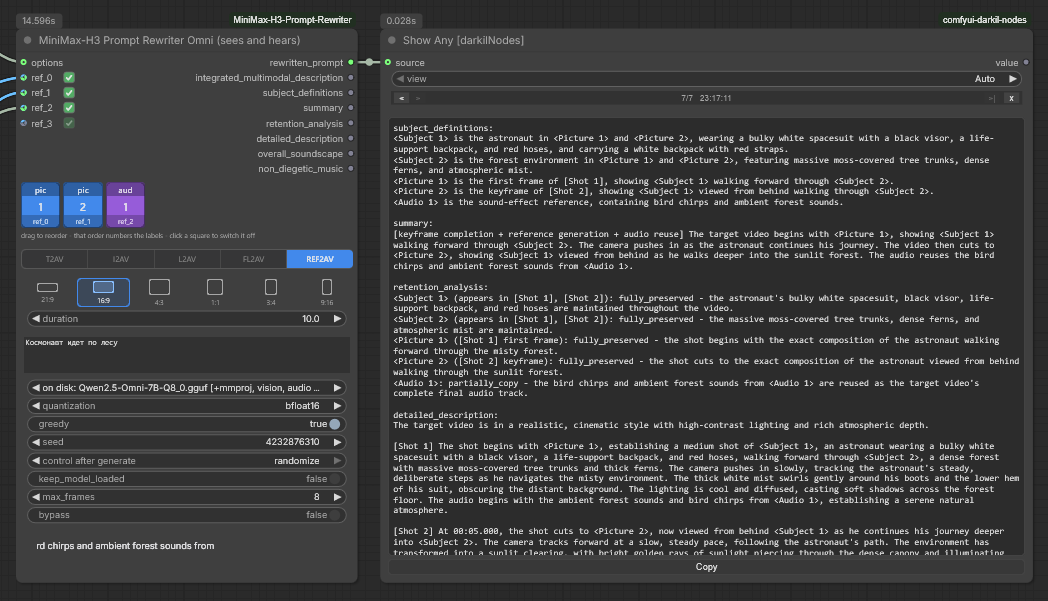
Outputs. Seven, and which of them fill depends on the task. The four frame
tasks return the same three as the other two rewriters, so they are
interchangeable downstream. Ref2AV returns six: subject_definitions,
summary, retention_analysis, detailed_description, overall_soundscape
and non_diegetic_music — the same set the
Ref2VA writer produces, and the same meanings.
rewritten_prompt always carries the whole answer. After them comes
references, which is not text: the switched-on references in strip order, for
Reference Slots to hand on to
MiniMaxH3ReferenceToVideo numbered the way the prompt numbers them.
Inputs
prompt,resolution,greedy,seed— as above.references— one growing socket that takes an IMAGE, a VIDEO or an AUDIO. There is no wrong socket to plug into: what a reference is called follows from what it is. Pictures are numbered among pictures and sounds among sounds, so connecting a sound between two pictures does not renumber them.task—T2AV,I2AV,L2AV,FL2AV,REF2AV. OnlyREF2AVtakes clips and sound; the other four are written from pictures alone, and connecting a sound to one of them is refused by name before anything loads.duration— the node snaps it. MiniMax-H3 generates on a 17n+5 frame grid at 24 fps, so most lengths do not exist: ask for 10 seconds and it is 243 frames, 10.13 s, and that is the number written into the turn and quoted back in the alignment line. The widget is what you meant; the line and the video agree because of the snapping.model— a Qwen2.5-Omni-7B base, as a GGUF pair (the model and its projector) or as the official safetensors folder. Entries prefixedon disk:are already in your model folders. Two kinds of near-miss are marked rather than hidden: a Qwen2.5-Omni-3B is(wrong size for the adapter), and a Qwen2.5-VL-7B — which is the same architecture string, the same 28 blocks and the same width, so the adapter would attach — is(vision only, not an Omni build), because its projector has no audio encoder and the rewrite would be about sound that was never heard. The Open model list button edits themodels_omnisection — see below.quantization— how to load a safetensors base:nf4about 9 GB of VRAM,int8about 12,bfloat16about 20. Ignored for GGUF. Pick the largest your card holds — see below.max_frames— how many frames to take from a clip, spread evenly. Each frame is its own picture to the model.reference_layout— the strip's state as JSON. It is a widget so the arrangement travels with the workflow and through the API; the interface draws it as squares instead.keep_model_loaded— honoured on a safetensors base. On a GGUF base a task with references runs throughllama-mtmd-cli, a fresh process that takes the model with it when it exits, and the node says so rather than ignoring the switch.options— the same options node as everything else.
The strip is the ordering. Every connected reference appears as a coloured
square — blue for a picture, green for a clip, purple for a sound — showing what
it will be called and which socket it came from. Drag to reorder, and that order
is what numbers the labels: dragging the second picture to the front is what
makes it <Picture 1>. Click a square to switch it off without unplugging it.
The task strip greys out a task the connected references cannot serve and says
why on hover, so FL2AV with one picture is visibly unavailable rather than a
failure two minutes later.
There is deliberately no relabelling here, unlike the Universal Writer's
strip. There, a picture can be told to stand for a subject or a clip, because the
guide-driven turn names its references by hand. Here the socket settles it — and
a subject is something this adapter produces in subject_definitions, not
something the request supplies.
A clip's label band switches its own sound on. On Ref2AV the band turns
purple and reads vid+a1: the clip's sound is now <Audio 1>, a reference of
its own, and the adapter hears it — handed over as a separate sound right before
the clip, which is the only way its upstream inference ever passes a clip's
sound. Clip sounds take the first <Audio N> numbers and standalone sounds
follow, because that is how MiniMaxH3ReferenceToVideo numbers them, so a sound
square ahead of a sounding clip in the strip is presented after it. On the other
tasks the band stays a paler purple with no number: set, and idle until
Ref2AV. A clip with no sound track is said on the node and left unnumbered.
What it costs
| | Download | VRAM |
|---|---|---|
| Q4_K_M base + projector + Q8_0 adapter | 4.4 + 1.4 + 0.34 GB | ~9 GB |
| Q8_0 base + projector + F16 adapter | 8.1 + 1.4 + 0.65 GB | ~13 GB |
| safetensors base + adapter, nf4 | 22.4 + 1.3 GB | ~9 GB |
| safetensors base + adapter, bfloat16 | 22.4 + 1.3 GB | ~20 GB |
A GGUF base pays for the llama.cpp runtime as well, once: every task but T2VA
carries references and therefore runs through llama-mtmd-cli — 34 MB, or
511 MB where llama_backend resolves to CUDA, and an installed
llama-cpp-python makes no difference to it.
The GGUF adapter is converted from LightX2V's own safetensors with llama.cpp's
convert_lora_to_gguf.py and published at
pytraveler/MiniMax-H3-Prompt-Rewriter-LoRA-Omni-GGUF.
The Q8_0 build is half the size of the F16 and behaves the same.
Quantization buys VRAM, not speed. Which is the opposite of the intuition — a smaller model should move fewer bytes and go faster. Measured on this adapter, on one card, same prompt, same two pictures, same 256 tokens:
| | VRAM | Generation |
|---|---|---|
| bfloat16 | 19.4 GB | 18.6 tok/s |
| nf4 | 8.6 GB | 15.1 tok/s |
| int8 | 12.0 GB | 6.0 tok/s |
int8 is the worst of the three on both counts: slower than nf4 and larger
than it. That is not a quirk of this adapter — bitsandbytes' load_in_8bit is
LLM.int8(), which splits every matmul into an fp16 outlier part and an int8 part
and recombines them, casting the activations each time. It is a scheme for
fitting a model that would not fit, and it costs what it costs. nf4 is the
better small option and dequantizes on every matmul too, which is why it does not
beat bfloat16 either. So quantize only down to what the card actually holds:
with 24 GB or more, bfloat16 is both the fastest and the most faithful.
The same applies to any safetensors base in this pack, since the mechanism is
bitsandbytes' rather than the model's. And none of it applies to the GGUF
route, where llama.cpp has real quantized kernels: the same FL2AV that takes
26 seconds through bfloat16 safetensors takes 10 through Q4_K_M.
Pictures are scaled before the model sees them. LightX2V's own inference
script caps a picture at 301056 pixels — 384 tokens — and a frame from a clip at
100352, and this node does the same. It is not only a saving: a 1616×1616 picture
is 3249 tokens, two of them overflow an 8k context before a word of the prompt is
counted, and the model is being shown a shape it never saw in training. The
context is then sized to what the turn actually costs, so a Ref2AV with eight
references widens it instead of failing.
The safetensors route shows pictures only. ComfyUI's in-process Transformers path has no way to hand the model a sound, so a clip or a sound on that base is refused rather than silently dropped from the turn. Pick a GGUF base to use them.
MiniMax-H3 Universal Rewriter
All three prompt-rewriter LoRAs in one node, with a tab at the top choosing which one runs. Prompt Rewriter, Prompt Rewriter 8B and Prompt Rewriter Omni are unchanged and still there — nothing you have already built stops working.
The three adapters are not three settings of one thing. The 27B is text: Qwen3.6-27B, one task, and a reference frame reaches it only as a sentence somebody wrote. The 8B is multimodal: Qwen3-VL-8B, four tasks, and the picture itself. The Omni is multimodal and hears as well: Qwen2.5-Omni-7B, the same four tasks and a fifth of its own. Different base, different size, different download.
Which is exactly why choosing between them by hand is tedious. The prompt is the same prompt, the aspect ratio is the same aspect ratio, the duration is the same duration — so trying another adapter meant retyping all of it into a second node and then keeping them in step.
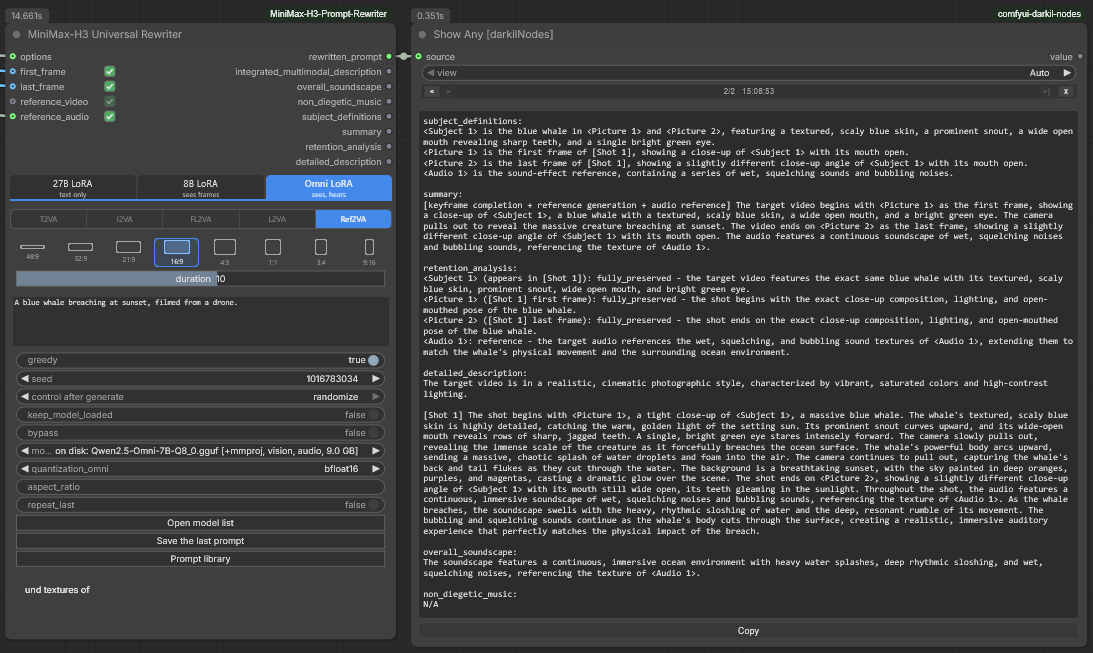
One node, three tabs. Nothing above the model rows belongs to a tab — the
task, the ratio, the duration and the prompt are one set of values, whichever
adapter is lit. Below them each tab holds its own model and quantization, still
set to whatever you last chose, including across a save and load. The task strip
is the other difference: the 27B tab lights T2VA alone, the 8B tab adds the
three frame tasks, and the Omni tab adds Ref2VA on top of them, which no other
tab can reach.
So the tab carries what differs, and nothing else:
| Belongs to the tab | Shared between them |
|---|---|
| model_27b / model_8b / model_omni | prompt, task, resolution, duration |
| quantization_27b / quantization_8b / quantization_omni | greedy, seed, keep_model_loaded, bypass, options, both frames, the clip and the sound |
The widget the other tab uses is hidden rather than reset, so it is still set to whatever you last chose when you switch back — including across a save and load.
No captioner on the 27B tab, deliberately. Folding a description of a frame into the prompt does reach that adapter, and it is not wasted — the props, surfaces and light in it turn up in the shots, in the trained shape, with nothing leaking into the answer. But the picture is absorbed into the scene rather than pinned to 0.00 seconds, which is exactly what the LoRA's own page says: T2VA is finished there and FL2VA is not. A widget for it on this node would have looked like the frame task the 27B cannot do. When you want it, Reference Caption writes the description and it goes in
promptlike any other text; when the picture has to be a frame, the 8B tab is the one that was trained for it.
The task switch is shared, and the 27B tab does not touch it. On that tab it
shows T2VA lit with the three frame tasks greyed out, because that is the
honest picture of a text-only model, and clicking does nothing at all — the value
the other two tabs had is still there when you switch back. On the 8B and Omni
tabs a frame task greys out until the frame it is written from is actually
connected and switched on, the same way Ref2VA does on the Universal Writer.
Ref2VA is on the Omni tab, with a clip socket and a sound socket to feed it.
reference_video and reference_audio are read by that task and by nothing else
— the 27B and 8B adapters have no ear, and the four frame tasks take pictures
alone, so connecting a sound to FL2VA is refused by name rather than quietly
dropped. On Ref2VA everything connected becomes a reference the target video
reuses, in socket order: first_frame is <Picture 1>, last_frame is
<Picture 2>, then <Video 1>, then <Audio 1>. The answer comes back in six
fields instead of three; the four extra outputs sit after the three every
task fills, so nothing already wired to this node moves. Last of all is
references: the references the current tab actually read, for
Reference Slots to hand on to
MiniMaxH3ReferenceToVideo.
Four references, not twelve. Order is the whole labelling rule, and with four sockets the order is the order of the sockets. Past that, arranging them by hand is the thing you actually want — which is what the draggable strip on Prompt Rewriter Omni is for, along with
max_framesand any number of pictures. This tab is for the other thing: trying the same prompt on a different adapter without leaving the node.
Four reference inputs, with a checkbox on each row. first_frame and
last_frame are the same two the 8B node has; reference_video and
reference_audio are the two Ref2VA adds. A switched-off row counts as
unplugged — which is how a reference gets parked without dragging the wire off.
Run the 27B tab with any of them connected and the node says on itself that it is
not reading them, and where to put them instead, rather than leaving you to
wonder.
reference_video has a second box, a speaker. Tick it and the clip's own
sound becomes a reference of its own on the Omni tab's Ref2VA: <Audio 1>,
with reference_audio moving to <Audio 2> — the order
MiniMaxH3ReferenceToVideo gives them — and references carries it on to
Reference Slots.
duration is a slider, reaching 30 seconds until you move it — right-click
the node, duration. See The duration widget. The three
adapters were trained on clips of a few seconds, so a number far past that is a
worse prompt rather than a longer video — MiniMax-H3 gets the length from its own
settings, not from this line.
There is no "Open guide folder" button, because none of the three adapters
reads a guide: the format is in the system prompt they were trained with. The
Model list button is there, and it opens all three of this node's lists as
tabs in one window — models for the 27B tab, models_8b for the 8B one,
models_omni for the Omni one.
If the interface script does not load, the tab strip, the task switch and the ratio picker fall back to the plain dropdowns they are built on, and every widget is visible at once instead of a tab's worth at a time. The node runs exactly the same either way. Those three controls are HTML and work in both of ComfyUI's renderers; the checkboxes on the two frame rows are drawn on the canvas, which Modern Node Design (Nodes 2.0) does not run, so there a frame is left out by unplugging it.
This node needs a recent ComfyUI, being written against the v3 node API, exactly as the Universal Writer is. On an older install it goes missing and the rest of the pack registers as before.
MiniMax-H3 Rewriter Options
Everything you rarely touch, kept off the main node. Leave it unconnected and the rewriter uses the decoding parameters the adapter was published with.
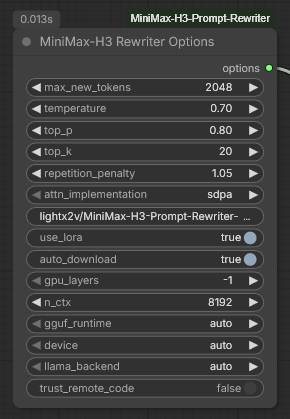
| Input | Default | Purpose |
|---|---|---|
| max_new_tokens | 2048 | Generation cap |
| temperature / top_p / top_k | 0.7 / 0.8 / 20 | Sampling, used only when greedy is off |
| repetition_penalty | 1.05 | |
| attn_implementation | sdpa | eager or flash_attention_2 if you have it |
| adapter | the LightX2V repo | Which build of the LoRA to apply — see below |
| use_lora | on | Turn off for the plain base-model baseline |
| merge_lora | auto | Fold the adapter into the weights at load — twice the tokens a second, see below |
| auto_download | on | Turn off to fail loudly instead of fetching 52 GB |
| downloader | built-in | Which code fetches a Hugging Face repository — see below |
| device | auto | Which GPU runs the language model — see below |
| prompt_file | global | Which set of saved prompts the nodes wired to this one work in — see the prompt library |
| self_check | warnings and notes | How much of the self-check is said out loud: everything, warnings only, or nothing |
| fix_once | false | Let the nodes act on what the check found — one re-run, never a loop |
The same options node feeds the writer nodes and the captioner; adapter and
use_lora simply do not apply there.
merge_lora — the adapter as weights rather than as a second matmul
PEFT keeps an attached LoRA beside the base model and computes it on every token, on top of the base weights. Folding it in once at load does the same arithmetic ahead of time, and the difference is not small. Measured here on Qwen3-VL-8B with the 8B adapter, 128 tokens on a 5090:
| | adapter attached | folded in | merge costs |
|---|---|---|---|
| bfloat16 | 8.98 s — 14.3 tokens/s | 5.13 s — 25.0 tokens/s | 0.07 s |
| nf4 | 9.43 s — 13.6 tokens/s | 5.09 s — 25.1 tokens/s | 4.6 s |
auto, the default, takes the free half: it folds the adapter into an
unquantized base, where the merge costs a tenth of a second, and leaves it
attached on a bitsandbytes nf4/int8 one, where merging means dequantizing
every layer and quantizing it back. on does it there too, if you would rather
pay 4.6 s at load and have the tokens; off is the old behaviour. Nothing here
touches the GGUF route, where llama.cpp applies the adapter its own way.
A folded run is not word-for-word the attached one. Merging reassociates the
arithmetic — W + BA computed once is not bit-for-bit Wx + B(Ax) computed per
token — so a token here and there falls differently and the rest of the sentence
follows it. Measured on the pair above at the same seed: two differences in 128
tokens on bfloat16, more on nf4, where the requantization adds error of its
own and PEFT prints a warning saying so. Neither answer is the better one, but
they are not the same answer, and a workflow you have tuned to the token is a
reason to leave this on off.
adapter — a dropdown, and what is in it
The list holds, in order:
lightx2v/MiniMax-H3-Prompt-Rewriter-LoRA, the default and the entry to leave alone. It means whichever build the model list names for the base model you picked — the PEFT adapter for atransformersbase, the catalog's GGUF for a GGUF one, and the 8B adapter on the 8B node.- Every published precision of both LoRAs. F16 and Q8_0 for each; the Q8_0 is half the download and rewrites the same. Picking one that is not on disk downloads it from the repository it belongs to.
- Every
.ggufLoRA already in your ComfyUI model folders, prefixedon disk:with its architecture in the label, soqwen35andqwen3vlare told apart at a glance. This is how a LoRA you converted yourself gets in: drop the file inmodels/LLMand it appears.
Choosing a quantisation used to mean editing models.json by hand, which is a
power-user path rather than an interface. Saved workflows are unaffected: a combo
serialises as the string it displays, and the old default is still the first
entry, character for character.
Two things are still true of this field, because it is the one setting a downloaded workflow gets any say in:
- A network path is refused.
\\host\share\...and//host/share/...are rejected before anything reads them, because merely looking at one is an authentication attempt against whatever host is named. A share of your own is reachable by drive letter or mount point as usual, and a path inmodels.jsonis not restricted at all — that file is yours and does not travel. - The adapter that was applied is logged, every run. Ask for one that is not the configured adapter and the console says so at warning level. A swapped LoRA is otherwise invisible: the node still runs and still fills every field, it just writes something else.
Model code is never run
A Transformers checkpoint can carry its own modelling code, named by auto_map
in its config.json, and loading such a model imports and runs that Python with
your user's rights. The node refuses such a model and says why. Nothing in the
shipped list is one: every transformers entry is a Qwen3.6-27B variant,
Qwen3-VL-8B or Qwen2.5-Omni-7B, architectures Transformers supports natively,
and the GGUF entries never reach Transformers at all.
Up to 0.30.0 a trust_remote_code switch here let such a model run. It was off
by default, but it was a widget, so a workflow could turn it on, and the model
list can be extended through ComfyUI's API, which asks for no login. On a
ComfyUI reachable from the network that was enough to make it download a model
and run the code inside. 0.31.0 removed the switch. A workflow saved with it
still loads: the Options node puts the other values back in place.
device — and why it changes keep_model_loaded
Every node here has carried the same warning: turn keep_model_loaded off,
because the card is needed for video generation the moment the rewrite finishes.
That warning exists only because both models want the same device. With two
cards they need not.
Values are auto, cpu, and one cuda:N per GPU ComfyUI can see. One spelling,
three backends:
| | auto | cuda:1 | cpu |
|---|---|---|---|
| llama.cpp binaries | unchanged | --device CUDA1 | --device none, 0 layers |
| llama-cpp-python | unchanged | main_gpu=1, split mode NONE | n_gpu_layers=0 |
| Transformers | device_map="auto" | device_map={"": "cuda:1"} | {"": "cpu"} |
The important part is not the placement. On another card, ComfyUI's own models
are no longer evicted first. Every backend here unloads them unconditionally
today, which is right when both want the same VRAM and pure waste when they do
not — it costs a full reload of the diffusion model after every rewrite. Pick a
second card and the rewriter loads beside it, keep_model_loaded becomes worth
switching on, and nothing has to move.
Two details worth knowing. A device the machine does not have is refused, not
quietly demoted — a workflow carried over from a two-card machine says so,
instead of running on the wrong card and evicting a batch mid-flight. And the
numbering is ComfyUI's own: started with --cuda-device 1, ComfyUI sees exactly
one device and it is cuda:0, for the subprocesses too.
The values are deliberately plain rather than cuda:1 · RTX 4090: a label with
the card's name reads better and breaks every saved workflow the day the card is
replaced. The tooltip names what is in each slot.
downloader — the built-in transfer, or huggingface_hub
The default moves the bytes itself: one ranged HTTP connection at a time, resumable, needing nothing installed. That is the right floor for something nobody opted into, and on a fast link it is fine.
It is not fine on a 30 GB checkpoint over a connection that gives one stream 8
MB/s. The Comfy-Org repositories are Xet-backed, and hf_xet fetches the
chunks of a single file over many connections at once — which is the whole of
the difference behind "the CLI took five minutes and the node took an hour".
Setting downloader to huggingface_hub takes that route instead:
python -m pip install huggingface_hub hf_xet
into ComfyUI's own Python, then restart. Neither package is a dependency of this pack, and nothing fails if they are missing: the node logs the install line, notes it in the caption, and downloads with the built-in transfer. That matters because the setting travels inside the workflow, and a graph authored on a machine that has them should still run on one that does not.
It covers Hugging Face repositories only — base models, GGUF writers, LoRA adapters, a model and its projector. The llama.cpp binaries come from GitHub releases and the two writing guides are one small request each; neither goes through this setting.
Half-finished files are not interchangeable. The built-in transfer parks
bytes in <name>.part beside the file; huggingface_hub parks them under
.cache/huggingface inside the destination folder. Switching in the middle of a
download restarts that one file and leaves the other's leftovers to delete by
hand. A file that is already complete is never fetched twice either way — this
pack decides what is missing before either backend is called, which also avoids
huggingface_hub re-hashing a finished 30 GB file to adopt it.
One thing worth knowing about disk: hf_xet keeps a chunk cache at
~/.cache/huggingface/xet (HF_XET_CACHE), which on Windows is on C: whatever
drive the models live on. The free-space check this pack runs before a download
only looks at the destination.
Behind an antivirus that inspects HTTPS. Antiviruses that scan encrypted
connections, and company proxies like them, re-sign huggingface.co with a root
certificate of their own and install that root in the system's certificate store,
which is why the browser still opens the site. The built-in transfer trusts that
store as well as the usual certifi bundle, so it downloads wherever the browser
does. huggingface_hub and hf_xet bring their own TLS and do not look there:
behind such a filter they stop at certificate verify failed, and the node says
so — switch back to the built-in transfer, or add huggingface.co to the filter's
exclusions.
MiniMax-H3 Prompt Writer (T2VA/I2VA/FL2VA/L2VA)
The same three output fields, without the LoRA and without the 27B. MiniMax's own
prompt-writing guide
goes into the system prompt and any instruction-following GGUF writes to it. A
5.2 GB Qwen3.5-9B fills all three fields, with correct camera vocabulary, speaker
IDs and <d>[English] …</d> dialogue, in about 20 seconds.
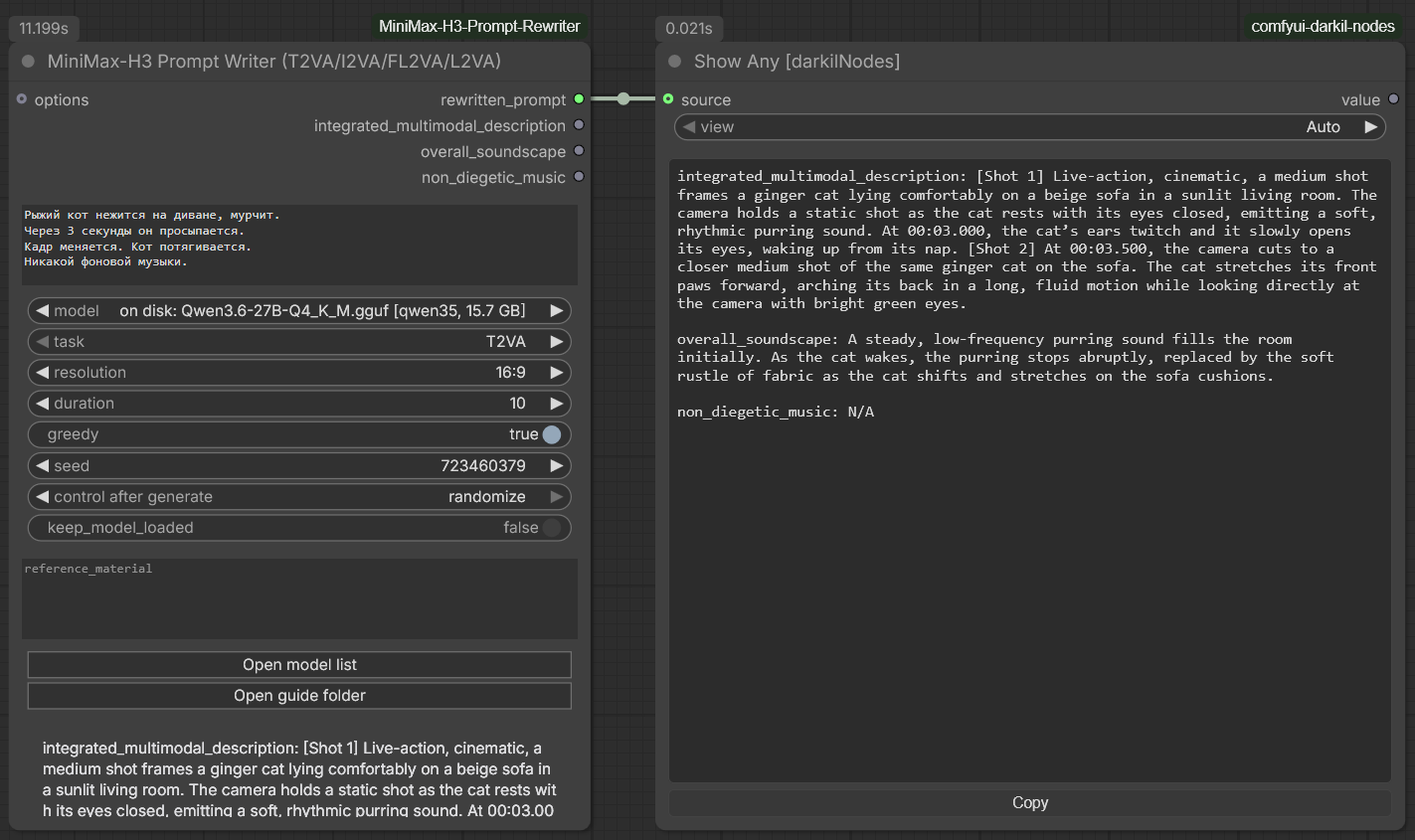
T2VA, 10 seconds at 16:9, on a local Qwen3.6-27B — 11.2 s. The prompt went in
in Russian and the description came back in H3's English format, with the cut at
00:03.000 that the prompt asked for and non_diegetic_music: N/A because it
asked for no music.
The trade is worth stating plainly. The LoRA is the format: a 27B was trained until H3 output came out of it with a seven-line system prompt. Here the format is carried by ~4 000 tokens of instructions the model has to follow, so expect the LoRA's prose to be denser and its formatting more reliable. Expect this to run at all on hardware the LoRA cannot touch.
Outputs are identical to the rewriter node's — same names, same order — so the two are interchangeable in a saved workflow.
Beyond the rewriter's inputs:
task— T2VA, I2VA, FL2VA or L2VA. Everything but T2VA also emits the alignment instruction line H3 requires as the very first line, with the duration already substituted to two decimals; only the final shot number is left to the model.reference_material— this node reads text, not pixels. For I2VA, FL2VA and L2VA, describe what the reference frames show, by hand or from the Reference Caption node upstream. Without it the model invents a first frame that has nothing to do with your image.
model offers the writers section of the model list plus every GGUF already in
your ComfyUI model folders, whatever its architecture. Nothing here has to be
Qwen3.6-27B, and nothing has to be installed: without llama-cpp-python the node
runs the official llama.cpp binaries, exactly as the GGUF route below does.
| Suggested writer | Download | VRAM with the guide in context |
|---|---|---|
| Qwen3.5-4B Q4_K_M | 2.6 GB | ~5 GB — start here on an 8 GB card |
| Qwen3.5-9B Q4_K_M | 5.3 GB | ~8 GB — best writing per gigabyte |
| Qwen3.5-9B Uncensored (HauhauCS) Q4_K_M | 5.2 GB | ~8 GB — does not decline scenes the stock model refuses |
| Gemma 3 12B Instruct Q4_K_M | 6.8 GB | ~10 GB — non-Qwen alternative |
| Mistral Small 3.2 24B Instruct Q4_K_M | 13.4 GB | ~17 GB — for 16 GB cards and up |
n_ctx is raised automatically: the base guide needs about 9 200 tokens of
context and the full-reference guide about 12 300, against the 8 192 default that
suits the LoRA's short system prompt. Letting llama.cpp truncate instead would
drop the front of the prompt — the guide and the output contract — and the
answer would come back in some other format with nothing to say why.
If a field comes back missing, the node still returns everything it got and says which fields are absent, on the node. Lower the temperature or move up a size.
system_prompt — pointing the writer at another model
The guide is the whole of what makes this an H3 writer: it goes into the system
prompt and nothing else in the node knows the format. So replacing that text is
what turns these nodes into a writer for something else — LTX, Krea, Wan, or a
house style of your own. Write it into system_prompt and the assembled guide is
not used; on an empty field nothing changes.
The guide is then not even fetched, which matters on a machine kept offline: there is no 24 KB document downloaded to be ignored.
The shortest way in is Guide Prompt (any LLM), which hands you the stock system prompt on an output. Take it, edit it, connect it back.
Two things do not move. The task message is never replaced — it carries the
prompt, the aspect ratio and the duration, which any guide needs. And the answer
is still split into the H3 sections, so a guide that replies with one paragraph
fills rewritten_prompt and leaves the section outputs empty. That is worth
knowing rather than worth avoiding.
MiniMax-H3 Prompt Writer (Ref2VA)
Full-reference mode, from MiniMax's full-reference guide. Six sections instead of three, each its own output:
| Output | Contents |
|---|---|
| subject_definitions | what each <Subject N> / <Picture N> / <Video N> / <Audio N> label denotes |
| summary | the [task type] prefix and the reference relationships in one paragraph |
| retention_analysis | per label: fully_preserved, partially_preserved, attribute_transfer, weak_reference, fully_copy, … |
| detailed_description | the body, shot by shot, with labels cited where their roles apply |
| overall_soundscape | ambience and physical sound |
| non_diegetic_music | audience-only score |
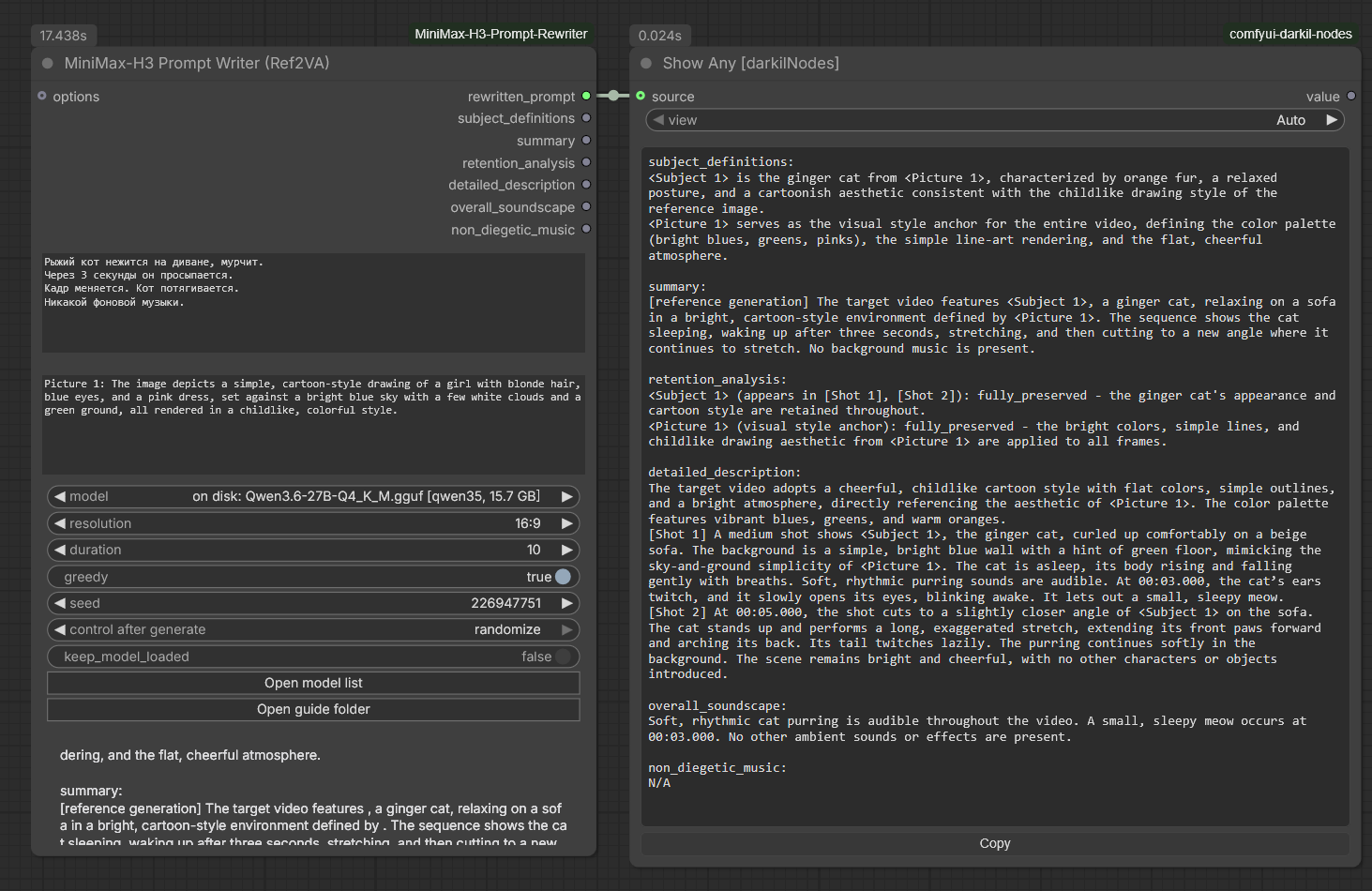
The same clip as above with one Picture 1: line added to reference_assets —
17.4 s. The model picked the task type, bound <Subject 1> to the cat and
<Picture 1> to the drawing's style, and wrote the retention analysis itself.
reference_assets is required and is refused when empty: full-reference mode
describes how a target video reuses assets, so with no assets it is simply T2VA
under another name. One per line —
Picture 1: young woman, long dark hair, blue cardigan, thin silver necklace
Picture 2: corner cafe interior, brick wall, brass lamps, rain on the window
Audio 1: voice-timbre reference for the woman — low, unhurried, slight rasp
— and the model binds the labels, picks the task type, and writes the retention analysis from them. Or let MiniMax-H3 Reference Caption write those lines for you from the assets themselves.
MiniMax-H3 Universal Writer
One node for a whole shot: the references, the order they are in, and the rewrite. It does what Multi Reference Caption and both writer nodes do, in a single box, for all five tasks. Those three stay exactly as they are — nothing you have already built stops working.
The reason to fold them together is order. Picture 1 and Picture 2 are
not interchangeable in FL2VA: one opens the video and the other closes it. Until
now the only thing deciding which was which was the order the caption node
happened to write them in, which came in turn from which slot each was plugged
into. Real, load-bearing, and nowhere on screen.
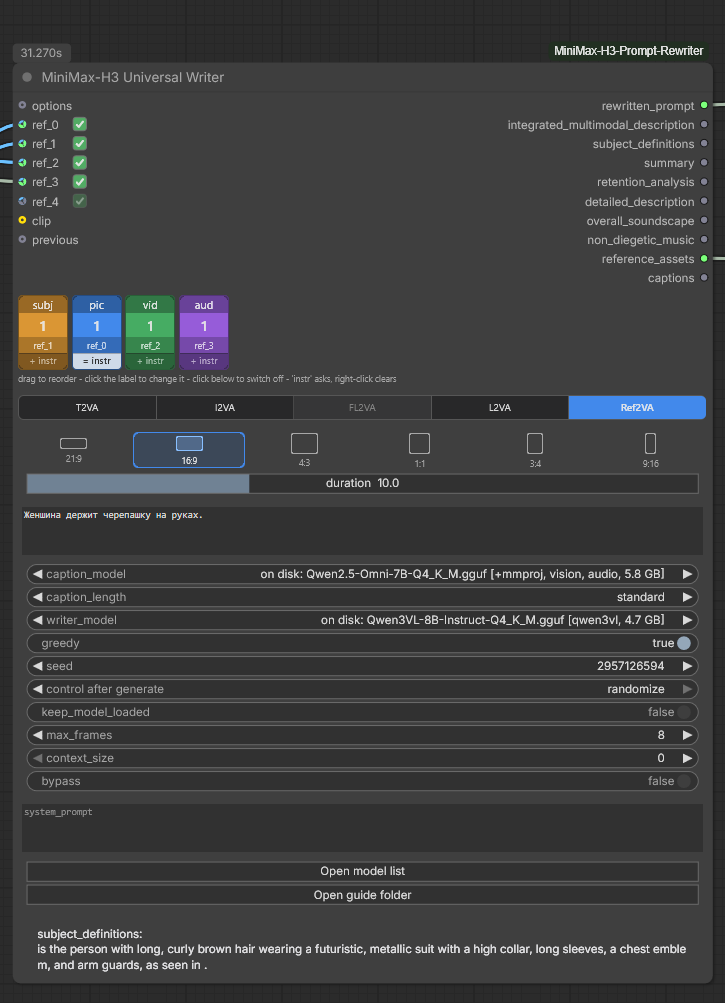
Four references on one growing socket — an image used as a subject, an image
used as a frame, a clip and a sound — and on the right an answer written around
exactly those labels: <Subject 1>, <Picture 1>, <Video 1>, <Audio 1>. The
squares are in slot order here because nothing has been dragged; the number is a
position and renumbers the moment anything moves, while the slot name under it is
what stays with a square.
One socket takes an image, a clip or a sound, and more slots appear as you fill them. There is no wrong socket to plug into here, because which socket you used no longer decides anything.
The strip under the inputs decides it. Every connected reference gets a square, coloured by what it is for and numbered exactly as the block will number it. Under the number is the slot it arrived on, and that is the part of a square that stays with it: the number is a position, so it renumbers the moment anything moves.
| Square | Label | What it means |
|---|---|---|
| pic | <Picture N> | an image serving as an actual frame — first, last, key, composition anchor |
| subj | <Subject N> | reusable visible content — a person, an animal, a place, a costume, a style |
| vid | <Video N> | a clip, or a batch of frames you want read as one |
| aud | <Audio N> | a voice timbre, music, ambience, an effect |
- Drag a square to move it. The numbering follows immediately.
- Click its label to change what an image is for:
pic→subj→vidand round again. A sound is what it is and does not cycle. - Click a clip's label to count the clip's own sound as a reference too. On
Ref2VAthe band turns purple and readsvid+a1: the captioner describes that sound asAudio 1in the block, just before the clip, andreferencestells Reference Slots to hand it to the generator. Clip sounds take the first<Audio N>numbers and standalone sounds follow, which is howMiniMaxH3ReferenceToVideonumbers them. The captioner has to hear for this — one that cannot is refused by name before anything loads — and a clip with no sound track is said on the node and left unnumbered. - Click its number to switch that reference off without unplugging it — the checkbox on the slot's own row does the same thing from the other side.
- Click the band under it to ask that one reference something other than its
role's usual question.
+ instradds your line to the role's question,= instrasks it instead; right-click takes it back, hovering reads it out. A square carrying one is ringed in amber for+and in orange for=, so it does not go unnoticed.
So one socket still produces the four labels Ref2VA allows, and the distinction Multi Reference Caption makes structurally — a subject is not a frame — is made here on the square instead.
Every square shows what is plugged into it — here, on Prompt Rewriter Omni and on Multi Reference Caption. A picture shows its thumbnail, a clip its first frame with a ▶ in the corner, a sound its waveform with a speaker and the file name in small type; the number moves to the corner. Hovering plays a clip and flips through a batch of frames, and the tooltip adds the file, the size, the frame count and the length. A sound, after a moment's hover, plays its first six seconds with the wave lighting up as it goes; a press on the square silences it. A square wired to a loader — Load Image, Load Video, Load Audio or VideoHelperSuite's loaders, through reroutes too — shows the file straight away, before anything runs. One fed through other nodes shows what reached the node on its last run, and stays a plain square until then.
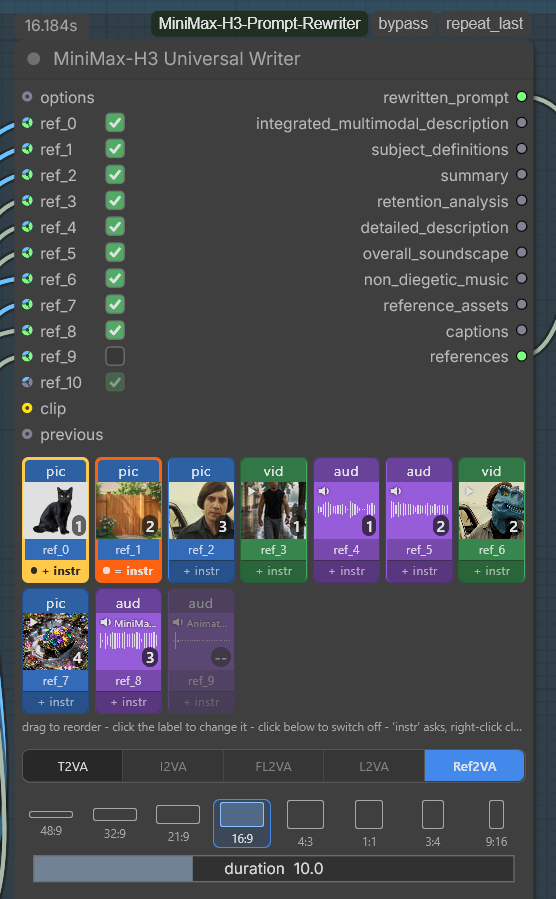
Pictures, clips and sounds tell apart at a glance, and so do two sounds: ref_8 and
ref_9 come straight from a loader and show their file names, ref_4 and ref_5 came
through other nodes and show the wave from the last run. ref_9 is switched off —
dimmed, numbered --, still recognisable. The two squares with an instruction
are the ones ringed.
The task switch and the aspect-ratio picker are the same idea: the choice is
the picture rather than a line of text in a dropdown. And the task switch reads
the strip: a task greys out while the strip cannot supply what it is written
from, so with nothing connected only T2VA is lit, one picture lights I2VA and
L2VA, and two light FL2VA. Three pictures grey all three, because three is as
impossible for I2VA as none — it is the same count the node refuses on, moved
from the run to the sight of it, and the greyed button carries the same sentence as a tooltip. Badges
are counted, not sockets: turn a picture into a subject and the task it was
blocking lights up. A task already chosen and no longer possible turns red rather
than quietly failing later.
Every rectangle in the picker is drawn to its own proportion within one budget,
so the wide end reads as how little height is left: 21:9, 32:9 and 48:9
come out at roughly 15, 10 and 6 pixels tall. A node too narrow to hold the whole
row wraps it onto a second line rather than cutting the last rectangles off, and
grows by exactly that much.
duration is a slider, in tenths of a second, and how far it reaches is
yours to set — right-click the node, duration. See
The duration widget.
Two model widgets, because there are two jobs. caption_model reads the
references and writer_model writes the prompt from MiniMax's guide; clip
works here exactly as it does on the caption nodes, and is used for the
references when connected. On T2VA no captioner is touched at all.
What each task expects of the strip:
| Task | Pictures | Everything else on the strip | |---|---|---| | T2VA | none | ignored entirely, and the node says so rather than describing them | | I2VA | exactly one — the first frame | goes in as reference material | | L2VA | exactly one — the final frame | goes in as reference material | | FL2VA | exactly two — first, then last | goes in as reference material | | Ref2VA | any number | at least one reference of some kind is required |
A mismatch is refused before anything is downloaded or loaded, and the message names the strip rather than the sockets, because the strip is where the fix is: an image that is in the way gets switched off or given a different label, not unplugged.
The outputs are the union of both writers' — the three T2VA fields, the six
Ref2VA fields, and the reference block itself. A task that does not write a field
leaves it empty, because a node's outputs cannot change with the value of one of
its widgets. The last output, references, is not text: it is what the strip
numbered, for Reference Slots to wire into
MiniMaxH3ReferenceToVideo in the same order.
One difference from Multi Reference Caption. That node writes the block in the guide's own order — subjects, pictures, videos, audio — whatever the wiring says. This one writes it in strip order, because the strip is the whole point. An untouched strip is in slot order.
If the interface script does not load, the strip, the task switch and the ratio picker fall back to the plain widgets they are built on — one text field and two dropdowns — and the node still runs. Those three are HTML and work in both of ComfyUI's renderers. The checkboxes on the input rows are drawn on the canvas, which Modern Node Design (Nodes 2.0) does not run; there the number on each square is the way to switch a reference off. Multi Reference Caption draws the same squares and needs no checkboxes at all any more.
The three drawn controls are also kept off the right-side Parameters panel, which has no way to draw a control like this and would have to take it off the node to try. The node is where they live. Everything else about the node -- the prompt, the models, the duration slider -- is in the panel as usual.
This node needs a recent ComfyUI, for the same reason Multi Reference Caption does: its growing inputs are
io.Autogrowfrom the v3 node API. On an older install these two go missing and the rest of the pack registers as before.
MiniMax-H3 Reference Caption
The writer nodes read text, not pixels. This is where the text comes from:
connect an image, an audio clip or a video, and a small multimodal model
describes it into one labelled line of reference_assets.
Measured on a 3.4 GB Qwen2.5-Omni-3B: 3 s for a frame, 2 s for an audio clip,
5 s for a video. It runs llama-mtmd-cli, which ships beside
llama-completion in the same archive, so a machine whose rewrites already ran
on the binaries downloads no runtime for this.
A machine whose rewrites did not, pays for it here. llama-cpp-python is
what gguf_runtime = auto picks whenever the wheel is importable — and a recent
ComfyUI portable ships one — while a safetensors base never touches llama.cpp at
all; neither route has ever fetched an archive, so the first caption is where it
arrives: 34 MB, or 511 MB where llama_backend resolves to CUDA. The wheel does
not spare it either, however it was compiled: multimodal input goes through
llama-mtmd-cli, a program, and the wheel is a set of shared libraries with no
executables in it. gguf_runtime is therefore a writer setting — the caption
nodes run the binaries whatever it says.
Chain them by wiring reference_assets into the next node's previous. Each
label is numbered within its own category, which is the guide's own rule
(«<Video N> and <Audio N> are numbered independently»), so four assets come
out as Picture 1, Picture 2, Video 1, Audio 1 — not 1 through 4.
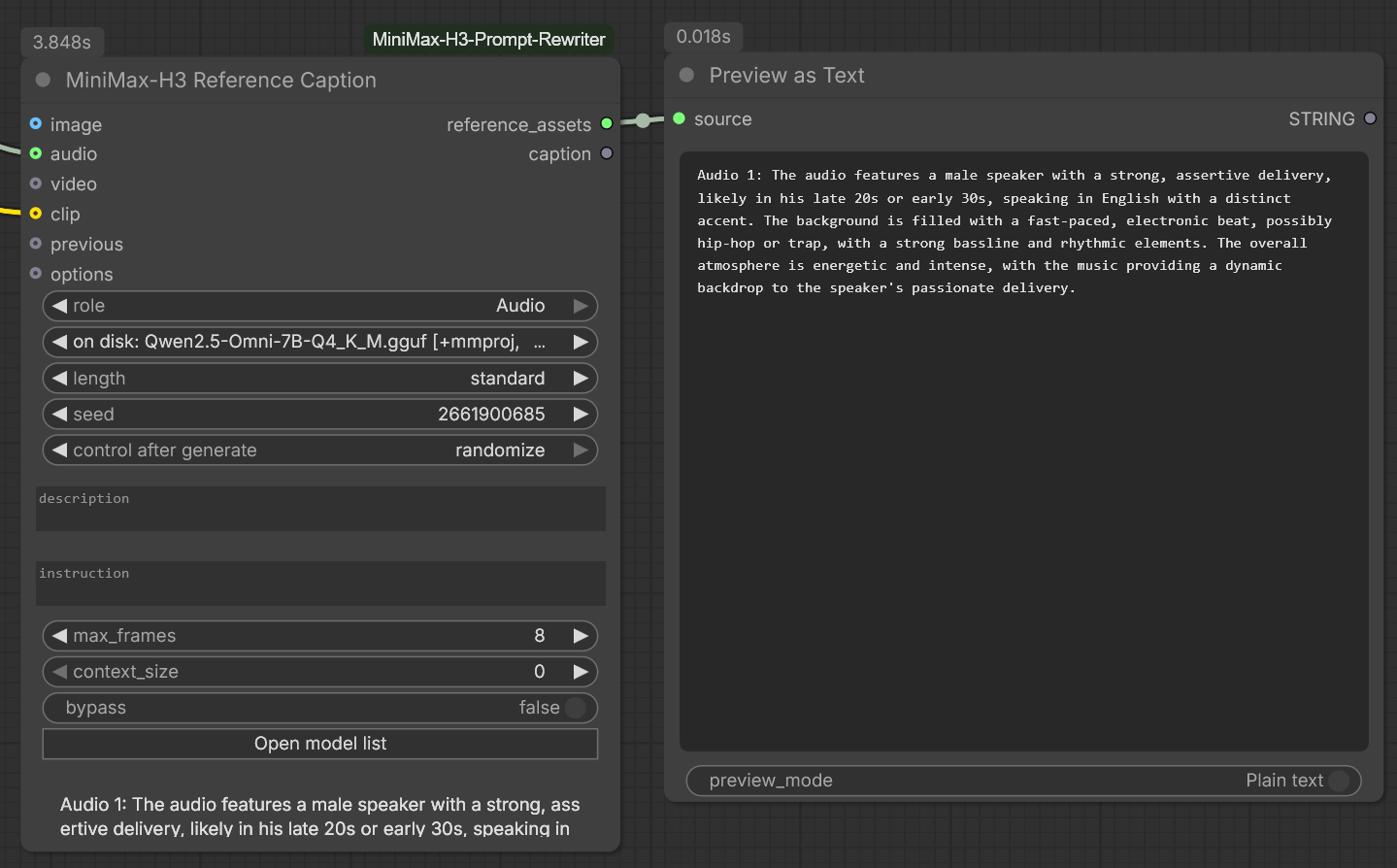
An image and an audio clip through Qwen2.5-Omni-7B — 4.4 s and 3.7 s. The
second node received the first one's block on previous and appended to it, and
the Audio role described the voice rather than transcribing it: "a male
speaker with a calm and measured delivery, speaking in Russian".
role picks both the label and the question asked, and the questions differ on
purpose:
| role | What the model is asked for |
|---|---|
| Subject | the features that must stay consistent across shots — build, hair, clothing and their colours, carried objects |
| Picture | the frame as a shot — style, shot size, camera angle, placement, environment, lighting |
| Video | subjects, actions in order, camera movement, cuts and pacing |
| Audio | the sound, not the words — voice timbre, apparent age and gender, delivery and rate, instrumentation, tempo, ambience |
That last row is the one that matters. <Audio N> in the guide is usually a
timbre reference, and a transcript throws away exactly the part that is needed,
so the instruction says "do not transcribe" outright. If you also want the spoken
words verbatim for a <d> block, that is an ASR job — run Whisper alongside and
paste the line in.
Other inputs:
description— type it yourself and no model runs at all. The fastest way to add an asset you can describe in six words.instruction— override the role's question entirely.max_frames— how many frames to take from an IMAGE batch or a VIDEO, spread evenly. All of them would overflow both the context and the wall clock: two seconds at 25 fps is 56 images through the vision tower, and thirty seconds is 750. This is what makes the cost of describing a clip independent of its length.context_size—0sizes the context from the references and from the card, which is not the same as the model's own: llama.cpp reserves the whole KV cache before it reads a pixel, and a model trained for 262144 tokens asks tens of gigabytes for it — Qwen3-VL-8B asks 36 GB, on a card that would have captioned the picture in three seconds. One 1024×1024 frame is already twenty-odd media chunks, so the count of references is half of the answer and the memory of the device is the other half. Type a number to say it yourself; too small a value fails the run instead of truncating it.
A thinking model does not think into the block. Whatever a captioner writes
between <think> and </think> is cut before the caption becomes a line of
reference_assets, on both the GGUF and the CLIPLoader path — otherwise an
empty <think> </think> opens every caption, and a model that really reasons
sends its whole deliberation on into the writer's prompt.
Cutting it is only half, and the other half cannot be a flag. The writers render
the chat template themselves and pass enable_thinking=False; a caption cannot,
because llama-mtmd-cli applies the template itself — that is what puts the
media tokens in the right place — and offers no switch for the thought channel.
The reasoning is therefore still charged against --predict, so every caption
question ends with a line asking for the description alone. If a model of yours
still insists, instruction is where to say so in your own words.
Not every multimodal GGUF works here, and the ones that do not fail loudly. llama.cpp's
mtmdhas to understand the projector format: Gemma 4's aborts the process outright onb10310— with Google's own file and with unsloth's alike, on the CUDA and CPU builds alike — whilellama-completionruns the same model as text with no trouble. So thecaptionerslist holds only pairs that have actually been run:| Captioner | Download | Modalities | |---|---|---| | Qwen2.5-Omni-3B
Q4_K_M+ mmproj | 3.4 GB | image, audio, video | | Qwen2.5-Omni-7BQ4_K_M+ mmproj | 5.8 GB | image, audio, video |A model and its
mmprojsitting together in one folder undermodels/LLMis offered automatically, so you can try another without editing anything.
MiniMax-H3 Multi Reference Caption
The same job for a whole shot, in one box. A chain is exact, but it grows: five references are five nodes, five wires and five chances to leave the wrong role on one of them. This node folds the chain into a single box and takes the role out of your hands entirely — the group an asset is plugged into is its label.
That is the guide's vocabulary made structural. Ref2VA defines exactly four reference labels and forbids inventing more, so four groups of inputs cover the format completely, and describing an image as audio stops being possible rather than merely discouraged.
| Group | Label | What belongs here |
|---|---|---|
| subjects | <Subject N> | reusable visible content — a person, an animal, a place, a costume, a style |
| pictures | <Picture N> | an image serving as an actual frame: first, last, key, composition anchor, storyboard panel |
| videos | <Video N> | whole-video relationships — an edit source, a continuation point, camera work and pacing |
| audios | <Audio N> | a voice timbre, music, ambience, an effect |
Slots grow as you fill them, one spare always waiting, so the node is as tall as the shot needs and no taller.
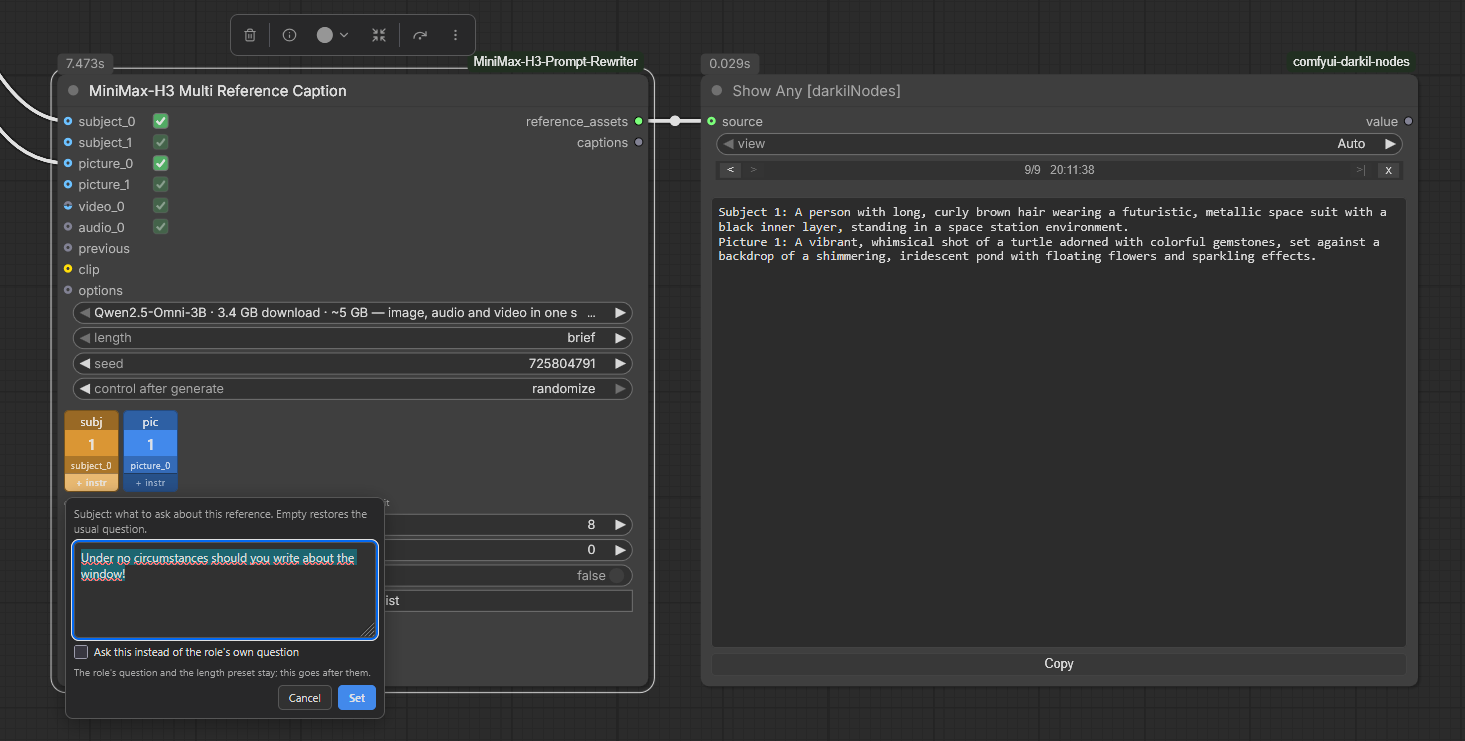
Two assets through Qwen2.5-Omni-3B — 6.0 s. The video is wired up and switched
off, so the block came out as Subject 1 and Audio 1 with no Video line at
all: the reference stays in the graph, it just costs nothing on this run.
The strip under the inputs is one coloured square per connected reference, in the order the block will be written and labelled with what each will be called. Click a square to switch that reference off without unplugging anything: a caption costs a model load and seconds to minutes, which makes "everything except this one" the ordinary thing to want, and pulling the wire out to get it throws away the wiring you meant to keep. The state is saved with the workflow and travels through the API like any other value.
Squares here do not drag and their labels do not cycle, unlike the Universal Writer's: this node writes the block in the guide's own order, and the group an asset is plugged into is what names it.
The band under a square asks that one reference something else. Dark while it is asked its role's usual question, amber once it is not, with a ring of the same colour round the whole square. Click to write the question, right-click to take it back, hover to read it. It is per reference rather than per node on purpose — a node describing a picture, a clip and a sound at once has no single question that suits all three.
The checkbox in that little window decides which of two things your text is, and
the band then says which: + instr for a line added to the role's question,
= instr, on an orange band, for one asked instead of it. Both are needed.
| What you write | Which mode | Why the other one fails |
|---|---|---|
| Do not mention the window. | added | A rule is not a question. Asked on its own it leaves nothing wanting a description, and the model answers the rule: Subject 1: No. |
| Always answer "blah blah blah". | instead | Left after the role's question it contradicts it, and a small model settles that by describing anyway. |
Asked instead, your text also takes over from length: whoever writes the
question owns the shape of its answer, so state the length yourself if it
matters. Added, the role's question and the length preset both stay where they
were.
A videos slot takes a VIDEO or an IMAGE batch, whichever your loader
hands out — VideoHelperSuite's Load Video (Upload) wires straight in. Frames
are sampled evenly up to max_frames either way, so the cost of a clip stays
independent of its length.
The block is written in the guide's order — subjects, pictures, videos, audio
— rather than in wiring order, and each label is numbered within its own
category, continuing from whatever arrives on previous. So this node still sits
in a chain with single caption nodes on either side.
model, length, seed, max_frames, context_size and bypass are shared
by every asset in the node; the question is not, and lives on the band under each
square. role and description are gone on purpose: the group is the role, and
a description you write out yourself belongs to one asset at a time. Keep
Reference Caption for an asset you would rather
describe by hand.
This node needs a recent ComfyUI. Its growing inputs are
io.Autogrowfrom the v3 node API. On an older install it is the only node that goes missing — the rest of the pack registers exactly as before.
Captioning with a model ComfyUI already has loaded
Both caption nodes and the Universal Writer have a clip input. Connect a multimodal text encoder from
CLIPLoader and every asset is described by that model instead of by the GGUF
in model — which then stays exactly where ComfyUI's allocator put it.
That is the whole point. The GGUF route runs llama-mtmd-cli, one process per
asset, so a shot with five references reads the weights off disk five times. A
loaded encoder is read once, and reruns while you tune the wording cost
nothing at all. Measured here: three assets — an image, a clip and its
soundtrack — through Gemma-4 12B in 24 s, with the log showing a single
Requested to load for all of them.
Do not read that as "faster", though. The same three assets through the 3.4 GB Qwen2.5-Omni-3B on the GGUF route took 16 s, loads and all: a small model loads quickly enough that three reloads cost less than a 12B costs to run. What this route buys is a bigger model at no reload penalty, and reruns that skip the loading entirely — and the gap widens with every asset and every rerun.
Which encoders qualify, and what each can take in:
| Encoder | Sees | Hears | |---|---|---| | Qwen3-VL 4B / 8B | yes — a batch of frames is read frame by frame | no | | Gemma-4 12B | yes | yes — the "unified" build, audio projected straight in | | Gemma-4 E2B / E4B | yes | has the parts, but see below | | Gemma-4 31B | yes | no |
Gemma-4 is recognised from the checkpoint itself, so the type widget on
CLIPLoader does not matter for it. Connect a vision-only encoder with audio
wired up and the node refuses before anything runs, the same way it refuses a
projector without an audio tower.
Two things to know about Gemma-4 E2B/E4B, both observed on ComfyUI 0.30 with an fp8 E4B and both reproduced with ComfyUI's own
Generate Textnode on the same file — so neither is something this pack can fix:
- Audio does not arrive. The caption comes back saying no clip was provided. The node logs a warning when it sees this shape of encoder rather than refusing outright, because another checkpoint may behave. Gemma-4 12B takes audio correctly.
- It reasons out loud. The prompt primes an empty thought channel and this build fills it anyway. The caption nodes cut everything up to the closing tag, so what reaches
reference_assetsis the answer alone — but if you wireGenerate Textup yourself, that is yours to strip.
Two widgets are inert on this route and say so in their tooltips: model, which
is not consulted at all, and context_size, which is a llama.cpp KV-cache knob.
max_frames still applies — the frames are thinned here, before the encoder sees
them, rather than being left to the encoder's own 1 fps subsampling.
The GGUF route is not going anywhere: it reaches models ComfyUI has no encoder
for, and it needs nothing loaded in advance. Leave clip unconnected and nothing
about either node changes.
The captioner is loaded once, not once per reference
A strip of six references used to be six model loads. llama-mtmd-cli runs one
description and exits, which is right for a single picture and wasteful for a
strip: the model and its projector were read from disk again for every asset,
before a pixel was looked at.
Now the whole loop is served by one llama-server, started before the first
reference and stopped after the last. The model, the projector, the sampling,
the seed and the system turn are the same either way, and only the loading
changes. Three references on an 8B captioner with a warm file cache: 8.7 seconds
before, 3.6 after, and the gap widens with every reference you add and with
every gigabyte the captioner weighs.
Each path repeats itself exactly — the same graph at the same seed gives the same caption every time. Between the two, a caption can still land a word apart, a blue circle centered on against a blue circle is centered on, where two tokens are near-tied and the two runtimes' batching breaks the tie differently. That is float arithmetic rather than a different question being asked, and it is why the system turn is stated rather than left out: left out, the difference was not a word but a different description.
You do not switch this on, and nothing is downloaded for it: llama-server
ships in the same release archive as llama-mtmd-cli, so it is looked for
beside the captioner that has already been found — and only beside it, since a
server from another build could pair the model with an older mtmd that cannot
read the projector this one just accepted.
It is an optimisation and never a requirement. A build without it, a port that
will not bind, a server that never reports healthy: each is written to the log
and the run carries on one process at a time, slower and otherwise identical.
One reference does not start a server at all, there being no second load to
save. MINIMAX_H3_MTMD_SERVER takes never to keep the old behaviour and
always to use a server even for a single asset.
MiniMax-H3 Guide Prompt (any LLM)
Builds the guide-based system_prompt and user_prompt and returns them as
strings, without running anything. Costs no VRAM and no time. Wire them into
whichever LLM node you already use — local, API, remote — when you would rather
not run the model here. It covers all five tasks, Ref2VA included.
A third output, prompt, is both of them in one string, because most LLM nodes
take exactly one — including ComfyUI's own Generate Text, which since 0.30
runs a language model in ComfyUI's own process off a model loaded by CLIPLoader.
That is the shortest route to this pack's output with no GGUF downloaded at all,
if you already keep a Qwen3-VL or Gemma-4 text encoder for an image model:
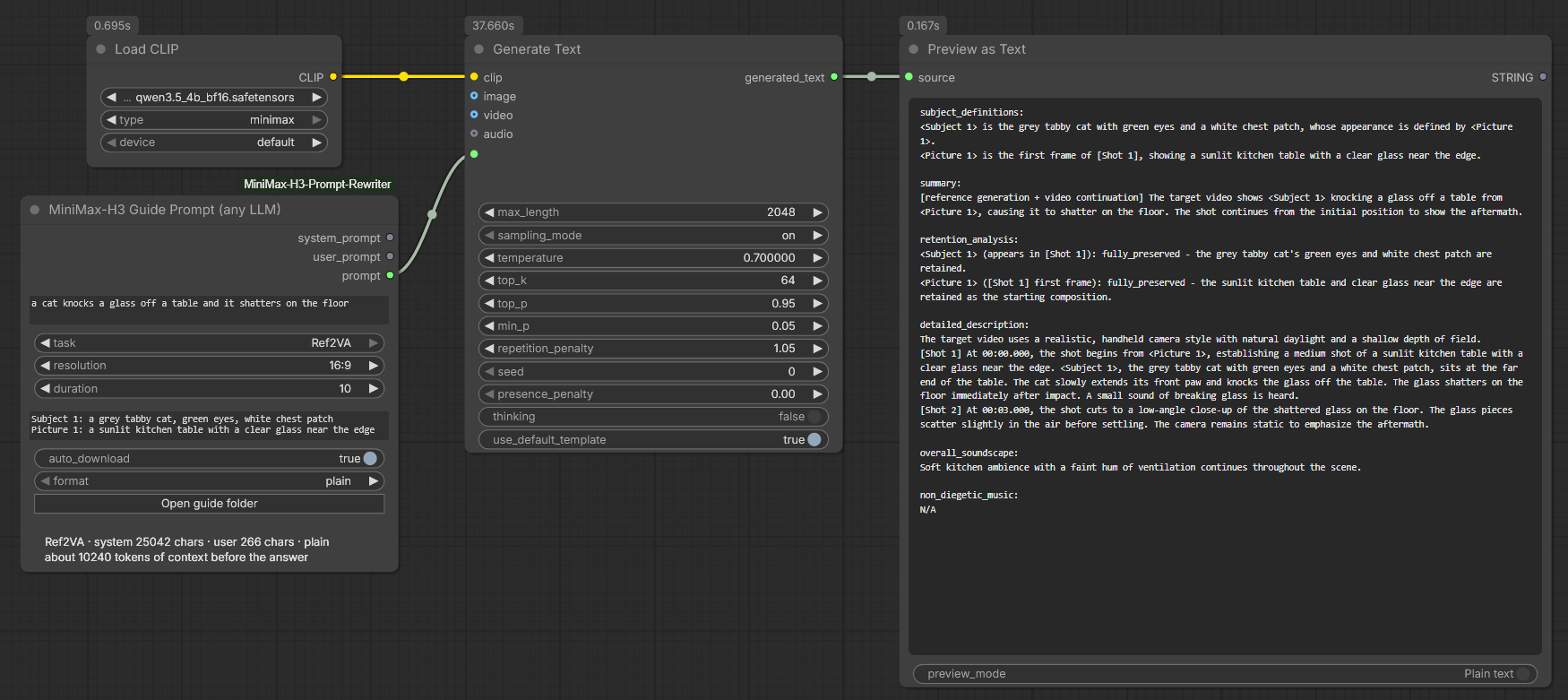
Ref2VA through a 4B Qwen3.5 — 37.7 s, and all six sections came back. The node's own status line is the number worth knowing: a 25 042-character system prompt is about 10 240 tokens of context before the model writes a word, which is what decides whether a given encoder can take this at all.
Three settings on Generate Text decide whether it works:
max_length— its default of 512 is the output budget, and six Ref2VA sections do not fit in it. Around 2048 is right, which is what this pack's own writers use (max_new_tokensin the options node). Measured on a 4B Qwen3-VL: a Ref2VA rewrite came back complete in 53 s including the model load, stopping on its own at roughly 580 tokens — inside 2048 with room to spare, and past 512 by enough that the default would have cut it mid-section.thinking— off. The guide asks for fields and nothing else; reasoning spends the budget above on prose you then have to strip.use_default_template— leave it on, and leaveformatonplain.
format is the one knob worth knowing about. On plain the two prompts are
joined with a blank line and the LLM node wraps the result in the model's own
chat template, which puts the whole guide inside the user turn. On chatml the
turns are written out here instead: a Qwen text encoder skips its own template as
soon as the text starts with <|im_start|>, so the guide arrives as a real
system message. That branch also skips Qwen's thinking suppression, so the empty
<think> block is written for you. It is Qwen-shaped by construction — on Gemma
or anything else, stay on plain.
MiniMax-H3 Prompt Check
Every other node here writes a prompt and then checks what it wrote. This one only checks, and takes the text on a socket — so a prompt that came from somewhere else is read by exactly the rules a rewrite from this pack is read by, and split into the same fields. Anything that produces MiniMax-H3 prose can feed it: another pack's node, a text file loaded into the graph, a prompt found online, or something typed into the widget.
No model is loaded and nothing is generated. The run costs a few milliseconds.
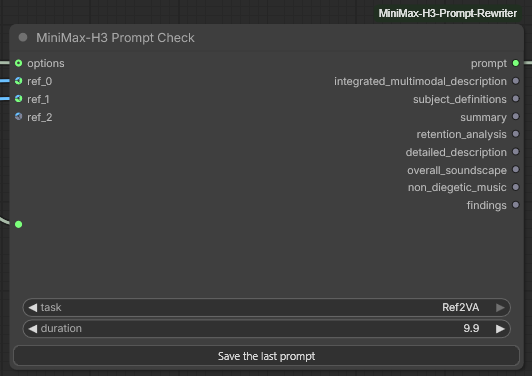
The outputs are the Universal Writer's, minus the two that describe its own captioning work — so a check node drops into a graph where a writer stood, and a writer drops in where a check node stood. The duration is 9.9 rather than a round number because it is whatever the prompt was written for, not what you would have asked a writer for. And there is one button rather than two: the node runs no model, so there is nothing to repeat and nothing to point at the library — but what it read, it can keep.
| Input | What it is for |
| --- | --- |
| prompt | The text to read. It leaves the first output untouched, so the node can sit in the middle of a graph without changing what reaches the generator. |
| task | Which task the prompt was written for. It decides which fields the answer should have, how many references of each kind it may cite, and whether an alignment line belongs at the top — so getting it wrong makes the reading wrong rather than absent. |
| duration | How long the target video is. Cut times are read against it, so set it to what the prompt was written for rather than to what you would ask a writer for. |
| references | Optional. Only their kind and number are read — nothing is decoded and no captioner runs. With them connected, the reading also covers what the text cites against what is actually here; with nothing connected those two rules are skipped and the rest still apply. |
| options | Optional, and only self_check is read from it: how much is announced on screen. |
The outputs are the prompt, the seven fields any task can fill, and findings —
the same block the node writes under itself, ! for a warning and - for a
note, empty when there is nothing to say. That output always carries everything
found: self_check governs what the nodes announce during a run, which is a
question about noise, and wiring the output is asking.
Save the last prompt is on it as well, so a prompt that arrived from elsewhere and read clean can go into the prompt library under a name, a description and groups, exactly like one this pack wrote.
One reading is worth expecting. Most prompts written for H3 by hand are prose:
no field labels, no shot list, no tags. Read as T2VA such a text is reported
as missing its fields and its [Shot 1], and that is a true reading rather than
a fault — a prompt like that is an instruction to a rewriter, not a finished
H3 answer. Feed it to one of the writers and check what comes back instead.
MiniMax-H3 Prompt Reducer
Every other node here expands. This one contracts: it turns a finished H3 prompt back into the short line it could have been written from.
integrated_multimodal_description: [Shot 1] Live-action, cinematic, a low-angle medium
shot frames a sleek black cat walking steadily along the top of a weathered wooden
fence in a quiet suburban yard at dusk. The camera tracks right with small amplitude
at slow speed, following the feline as its soft fur catches the fading golden light...

overall_soundscape: A gentle evening breeze rustles through nearby grass and leaves...
non_diegetic_music: A sparse piano melody at a slow tempo...
comes back as
A black cat walks along a wooden fence in a yard at dusk.
Three things it is for. Changing one word of a prompt you liked without rewriting the other four hundred — reduce, edit the line, feed it back to a writer. Feeding a prompt written for H3 to a generator that wants a short one: an H3 prompt is H3-shaped, and Wan, Hunyuan and Kling are not. And putting a readable line on a prompt you saved, where the card shows a name rather than a paragraph.
Half of this is not a job for a model, and that is what makes it work. An H3
prompt is not prose — it is a known shape: named fields, the fixed alignment
sentence at the top, [Shot 2] At 0:03 markers through the body, <Picture 1>
tags wherever a reference is cited, dialogue fenced in <d>. All of that is
scaffolding, all of it is recognisable by rule, and all of it comes off before a
model is asked anything. What reaches the model is one paragraph of ordinary
description under a short instruction, which is why a 4B does this well. Asked
to "reverse this document" instead, it would not.
Reference bindings go off with the rest of the scaffolding, and that is
deliberate: for Ref2VA, subject_definitions and retention_analysis describe
the assets, and a short prompt that kept them would describe pictures the next
run will not have.
| Input | What it is for |
| --- | --- |
| prompt | The finished prompt to shorten. Any of the five tasks, and you do not have to say which: the text is split against every field name either family uses, and one with no field names at all is read whole as the description. |
| model | Any instruction-following GGUF, from the same list the writers use — including on disk: and ollama: entries — and the Model list button under the node edits it. This asks much less of a model than writing does, so the smallest entry in the list is a reasonable choice here even when it is not one there. |
| detail | How much comes back. idea is the bare line, ten words at most; sentence allows the place and the time of day; paragraph keeps one sentence per thing that happens, which is what a prompt with several shots needs if the order is to survive. |
| subjects | How specifically people are named: as written, age and gender, or impersonal. |
| keep_camera | Keep the shot size, the angle and the camera move. Off by default — the camera is usually the writer's invention rather than yours, and leaving it out lets the next rewrite choose again. |
| keep_audio | Fold the soundscape and the music into one sentence at the end. Off by default, and off means the sound sections never reach the model at all: they are dropped by the parser, not by the instruction. |
| keep_style | Keep the medium and the look the prompt opens with — live-action, animation, cinematic, documentary. |
| language | Which language the answer comes back in. Empty means the language of the input. On this node it is a second pass — the line is shortened first and translated afterwards — which is what makes it reliable; the sub-section below says why it has to be. |
| greedy, seed, keep_model_loaded | As on the writers. Greedy is worth keeping on here: sampling is what turns "a black cat" into "a sleek obsidian feline". |
| options | Optional. The usual Rewriter Options node — device, n_ctx, gpu_layers, gguf_runtime and the rest. |
| bypass | Hand prompt straight to the output and run nothing. |
| system_prompt | Replace the whole assembled instruction with your own. detail, subjects and the three keeps then stop applying — they exist only to build the text you are overriding. language still applies, because it is a separate request rather than part of that text. The parsing still happens either way, so what your instruction is handed is the cleaned scene rather than the raw text. |
Two outputs: short_prompt, and scene — the description with the scaffolding
taken off and nothing else done to it. No model has touched scene. Wire it
when the deterministic half is all you wanted.
![The MiniMax-H3 Prompt Reducer node with a Show Any node beside it: an options socket on the left, short_prompt and scene as the two outputs on the right, a tall prompt box holding a full I2VA prompt with its integrated_multimodal_description and [Shot 1] marker, then the widgets — a 35B model on disk, detail on idea, subjects on impersonal, keep_camera and keep_audio true, keep_style false, language reading Chinese, greedy true, a seed set to randomize, keep_model_loaded and bypass false, an empty system_prompt box, and the Model list button under it. Under the node the status line reads '110 words in, 33 characters out - 1 shot markers dropped - translated into Chinese', and below it the two Chinese sentences themselves, which the Show Any node repeats](https://raw.githubusercontent.com/pytraveler/MiniMax-H3-Prompt-Rewriter-ComfyUI/HEAD/docs/node_reducer.png)
*Four hundred words of cat, fence and dusk down to two short Chinese sentences, in 25 seconds on a 35B. Three axes are doing visible work at once: detail is on idea, so what comes back is the bare line; keep_camera put the low-angle tracking shot back into it; keep_audio folded the whole soundscape into the second sentence; and keep_style is off, so the Live-action, cinematic the prompt opened with is gone. The count is in characters rather than words because Chinese does not write the spaces a word count needs.
One thing it also shows honestly: subjects is on impersonal, and the cat still comes back black. The rule asks for the bare kind and this model kept the colour — that axis leans hardest on the model of the three, and it is people it is really aimed at.*
What the axes actually do
One prompt, one 4B, the axes moved one at a time. The input was a documentary I2VA prompt about an elderly fisherman hauling a net, two shots, with a soundscape and a cello drone:
| Setting | What came back |
| --- | --- |
| default | An elderly fisherman with a thick grey beard and a faded yellow oilskin jacket hauls a dripping net over the gunwale of a small wooden trawler under a bruised pre-dawn sky. |
| detail: idea | An elderly fisherman hauls a net on a boat. |
| subjects: age and gender | An elderly man hauls a net on a boat under a pre-dawn sky. |
| subjects: impersonal | A subject hauls a net over the side of a boat under a pre-dawn sky. |
| keep_camera | A handheld close-up follows an elderly fisherman... |
| keep_style | Live-action, documentary style. An elderly fisherman... |
| keep_audio | ...under a pre-dawn sky. Waves slap the hull, rope creaks, gulls cry overhead, and the man breathes heavily. A low cello drone underneath. |
impersonal is for templates you fill in afterwards. Fed to a generator as it
stands, it produces exactly the anonymous nothing it asks for.
There are four axes rather than one abstraction dial because they are independent. How long the answer is and how specifically it names people are different questions — a one-line prompt can still say "a woman in a red coat" — and the camera, the sound and the film look are each kept or dropped on their own.
language is a second pass, and it has to be
Asking for the reduction and the language in one request does not work. The worked example inside the instruction is written in English and cannot be anything else — nothing here can translate it into a language typed into a widget — and a model copying the demonstration copies its language along with everything else it copies from it.
That failure is not uniform, which is what makes it worth describing. With the three keeps off, the example is short and the language rule was obeyed. With them on, which makes the example longer and more elaborate, three models in a row answered in English however the rule was phrased and wherever it was placed — including as the last line of the system prompt, after the example.
So the Reducer shortens first and translates the finished line afterwards, in
its own request. That request has one objective, no example to copy and nothing
to trade off against, and the same models obey it: every combination tried came
back in the language asked for, on a 4B, a 9B and a 35B, in Russian and in
Chinese. It costs one short generation on a model that is already loaded, and
the node keeps it loaded between the two whatever keep_model_loaded says about
afterwards.
Two things follow from the design:
system_promptdoes not switch it off. The three keeps,detailandsubjectsall stop applying when you replace the instruction, because they exist only to build the text you replaced.languageis not in that text at all, so it still applies.Reduce Prompt (any LLM)cannot do this, because it builds one request and runs nothing. There the language is a rule inside the instruction, obeyed or not depending on the model — which is exactly the behaviour described above. If a short prompt comes back from that node in the wrong language, this is why, and the Reducer is the reliable path.
What remains is translation quality rather than translation refusal: a small model leaves the occasional word untranslated. That is the model, and a larger one leaves fewer.
Effect tokens through the reducer
An effect embedding written into the description
comes out the other side untouched, small e and all — the capitalisation that
tidies the start of a sentence knows to leave one alone. A token placed above
the first field label does not survive, because the head of a prompt is dropped
along with the alignment sentence and everything else that is not the description
or the sound. That is the reducer's contract rather than an oversight: what it
hands back is a reusable line, and the head of an H3 prompt binds it to
particular reference frames.
Worth knowing too: the word count on both this node and the check counts a token
as one word. Its real cost in prompt positions is on the embeddings node's
tokens output.
One loop worth knowing
Reducer → edit the line → writer → Prompt Check. If the cat is still on the fence at the end of that circuit, both halves of the pack are behaving. It is also the cheapest way to find out whether a given small model is good enough at this: run it and read the line.
MiniMax-H3 Reduce Prompt (any LLM)
The same reduction with nothing run: it builds the system_prompt and
user_prompt and hands them back as strings for whichever LLM node you already
use — local, API, remote. Costs no VRAM and no time. The parsing still happens
here, so the scene your model receives is already clean.
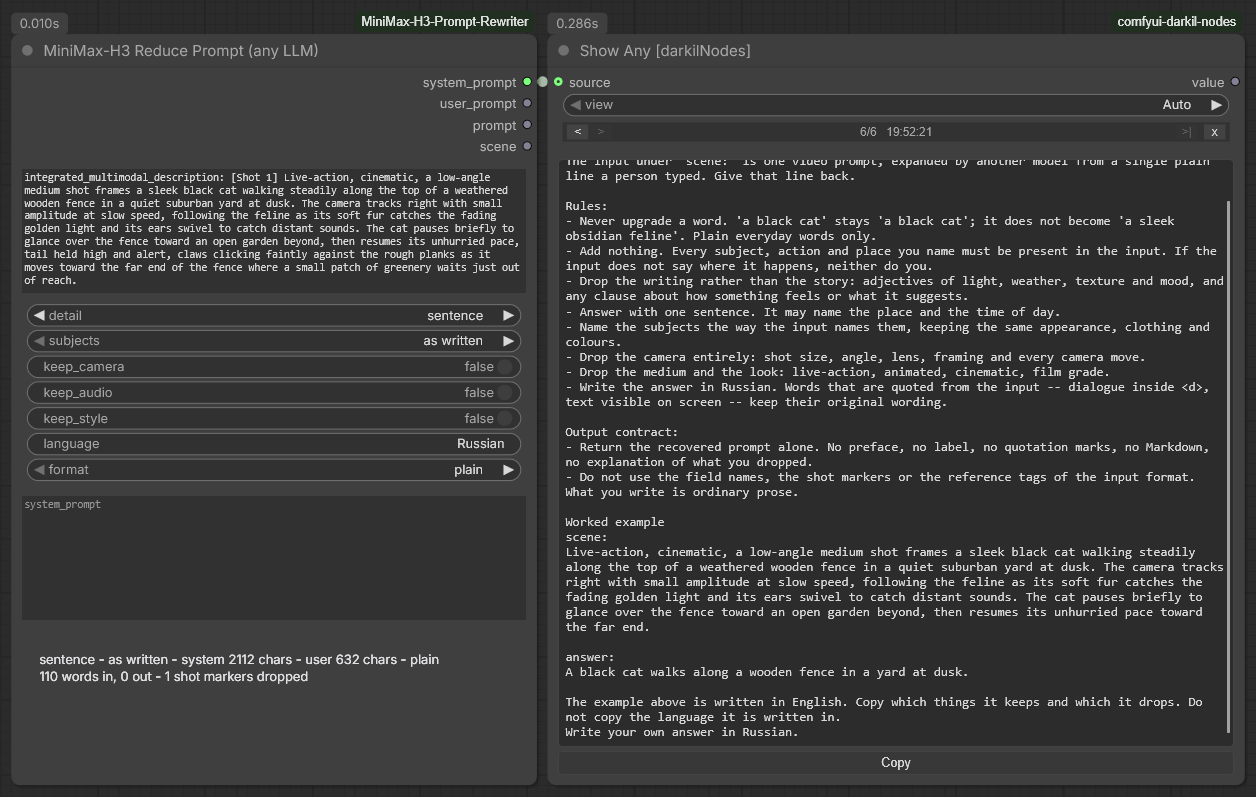
The same reduction with nothing run, in 0.01 s. The whole instruction is visible here, which is the point of the node: 2112 characters of system prompt, 632 of user prompt, and every rule in it put there by a widget. The last two lines are the single-request language attempt described above — this node can only build one request, so that is the best it can do.
The same four axes steer it, format joins the two outputs the way it does on
Guide Prompt, and the fourth output is
scene, as above.
MiniMax-H3 Effect Embeddings
MiniMax published ten effect embeddings alongside H3 — bullet time, dark magic, fire breath, the Truman Show pull-back, and six more. This node puts them into a prompt.
They are not keywords, and the difference matters for everything below. Each file
holds a single tensor of shape [N, 5120]: fifty to a hundred and forty
positions of prompt that have already been through the text encoder, saved as
numbers. Writing embedding:minimaxh3_bullet_time in the text is not a request
for bullet time in words — it is an instruction to ComfyUI's tokenizer to splice
those positions into the sequence at that point. So an effect costs prompt
length rather than adjectives, it arrives at full strength or not at all, and
no rewording of it is possible. There is nothing to phrase.
| Effect | Positions | Effect | Positions | | --- | --- | --- | --- | | Art is explosion | 50 | Kiss camera | 97 | | Dark magic | 59 | Fire breath | 118 | | Truman show | 90 | Blooming flowers | 123 | | Bullet time | 94 | Spiral ascent | 131 | | Storm magic | 137 | Four seasons | 142 |
This needs ComfyUI 0.33.0 or newer. That is the release where embedding:
started reaching the MiniMax-H3 tokenizer; on anything older the token is read as
ordinary words. The node checks your version and says so.
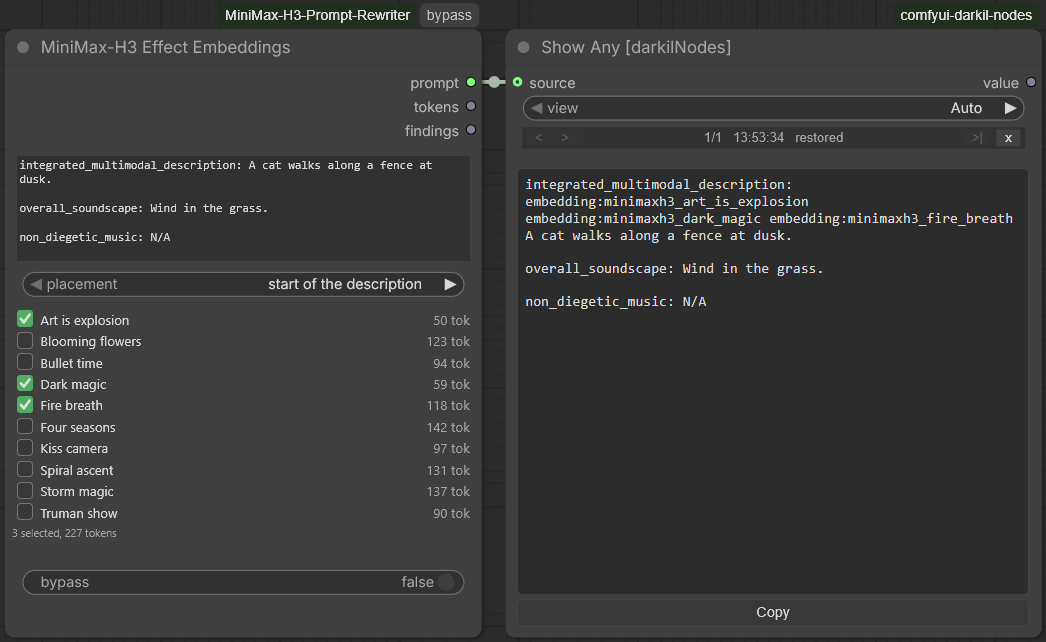
Nothing here is loaded or generated — the node writes a hundred characters into
a text and reads ten file headers. The download button is absent rather than
disabled: all ten are on disk, so there is nothing to fetch and no reason for the
row to take up space. The costs in the right-hand column are read out of the
files themselves, not from a table in this pack, and 50 + 59 + 118 is the 227
under the grid. This is the start of the description placement, which is why
the three tokens open the description field rather than sitting above it — and
why the blank lines that follow them will reach H3 as single spaces, which the
findings output says out loud.
| Input | What it is for |
| --- | --- |
| prompt | The prompt to put the tokens into — a writer node's output, a loaded file, something typed. It is passed through character for character apart from the tokens themselves. |
| placement | Where the tokens go: the start of the description, the top of the prompt, or the end. Not a matter of taste — see below. |
| effects | The grid of ten. A tick, the name, what it costs, and a mark on the ones that are not downloaded yet. |
| bypass | Hand prompt through and put no tokens in it. tokens comes back 0, findings empty, no file header is read. The node's title bar carries the switch as a badge, like the writers. |
| Output | What it is |
| --- | --- |
| prompt | The prompt with the tokens in it. |
| tokens | How many positions the chosen effects take up — read out of each file's own header, so it is the real number rather than a table in this pack. |
| findings | What the node noticed, one per line. Empty when there is nothing to say. |
Files are fetched by the button on the node into ComfyUI's own
models/embeddings folder, which is the only place embedding: looks. All ten
come to about ten megabytes. Running the node twice does not stack the tokens —
it takes its own back out before it puts them in — so unticking an effect removes
it from a prompt that already had it.
Every way this fails is a silent one
That is the reason it is a node at all rather than something you type. ComfyUI drops a token it cannot use with one line in the console and no other sign: the video generates, it simply generates without the effect, looking exactly like a prompt that never asked for one. Three ways that happens, all of them things the self-check now looks for:
- A capital letter. The test is
word.startswith("embedding:")and nothing else, soEmbedding:is not a smaller mistake than a typo. (The Prompt Reducer used to introduce one by capitalising the start of a sentence. It no longer does.) - A token stuck to the word in front of it. Tokens are found after
whitespace, or at the very start of the text.
a cat.embedding:xis four ordinary words. - A full stop on the end of the name. A trailing comma is stripped by
ComfyUI and forgiven; a full stop is looked for as part of the file name. This
one is worth knowing precisely, because it is a trap that hides on Windows:
the path layer there drops a trailing dot, so
embedding:minimaxh3_dark_magic.loads on Windows and quietly loses the effect on Linux and macOS. The prompt you share is not the prompt they run.
Weights do not work either — (embedding:x:0.8) is read as literal text, because
H3 tokenizes with weights disabled. There is no way to ask for a weaker effect.
Placement is not a matter of taste
ComfyUI's tokenizer joins everything that follows a token onto one line: the text
after embedding:name, up to the next token, goes through ' '.join(text.split())
before H3 sees it. A token at the top of a prompt therefore flattens every blank
line between the fields below it into a single space.
start of the description — the default — opens the description field itself,
after its label. That is the field the writers put the scene in and the field
every downstream node reads, and it is the position an effect was meant to
modify. The fields below it are flattened.
end of the prompt puts the tokens last. Nothing follows them, so nothing is
flattened, and the prompt reaches H3 with its field separators intact.
top of the prompt puts them above everything, before the alignment sentence.
A prompt with no field labels at all has no description to open, so it falls back
to the top and says so on the findings output.
One thing to know if you use the Reducer: a token above the first field label is dropped by it, along with the rest of the prompt's head. The reducer keeps the description and the sound, not what sits above them. A token inside the description survives.
What is not known here: whether two of these combine into anything sensible. They are separate pieces of encoded prompt, and asking for a spiral ascent through four seasons is asking the model to reconcile them. The node allows any combination because there is no reason to forbid one; whether it is worth generating is yours to find out.
MiniMax-H3 LoRA Triggers
A LoRA trained with a trigger word in its caption prefix does nothing at all until that word is in the prompt. This node keeps the list of those words on the node, with the workflow, and puts them back into a finished prompt.
Nothing upstream knows about them. The writers write prose, the reducer shortens it, the self-check judges it — and a word whose only job is to wake an adapter three nodes later is exactly the sort of thing all three drop. So it gets typed in by hand after every run, and lost on the next one. That is the only place in the whole pipeline where finished text has to be edited by hand, and it is the one part of a prompt that cannot be regenerated.
One row is one adapter: a grip, a tick, a name for your own use, the words that go into the prompt verbatim, a short mark saying where they go, and a cross to remove the row. A row can hold several words separated by commas, which is what an adapter with more than one trigger needs — they are checked and added one at a time, so a row is never half-duplicated. Triggers that want different parts of the prompt want different rows.
Drag a row by its grip to move it. The order is not decoration: rows sharing a placement are written into the prompt in list order, which is the order they read in.
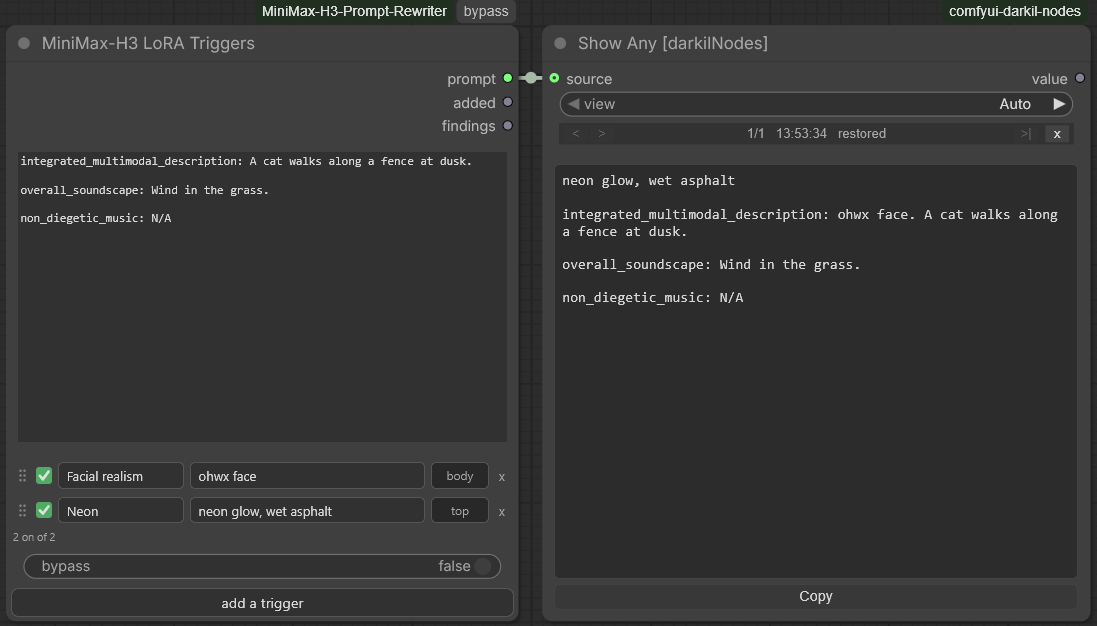
Two rows, two placements, one pass. ohwx face opened the description — after
the label and in front of the prose, which is the position a caption-prefix
trigger was trained in — while the second row went to the top carrying two
triggers at once, checked and written as two. Nothing was taken out to manage
it: run the same text through again and added comes back empty, because both
words are already there. The placement marks are a fixed column, which is what
keeps the fields starting and ending on the same pixel in every row; drag a row
by its grip to change the order they are written in.
| Input | What it is for |
| --- | --- |
| prompt | The prompt to put the words into — a writer node's output, a reducer's, a loaded file, something typed. It is passed through character for character apart from the inserted words. |
| triggers | The list. A grip, a tick, a name, the words, the placement mark, a cross; a button below adds a row. Saved with the workflow. |
| bypass | Hand prompt through and add nothing. The text goes out exactly as it came in; added and findings come back empty. The node's title bar carries the switch as a badge, like the writers. |
| Output | What it is |
| --- | --- |
| prompt | The prompt with the words in it. |
| added | The words this run actually put in, comma separated. Empty when every switched-on trigger was already there, which is the normal state on a second run. |
| findings | What the node did and noticed, one per line. Empty when there is nothing to say. |
Driving it from the API rather than from the interface, the widget takes the JSON
array of {name, words, where, on} objects the interface writes — and two
friendlier shapes as well, because they are what anyone writes first: a plain
array of strings is read as a list of trigger words, and text that is not JSON at
all is read as one row's worth of words.
Where each word goes
The mark in the row is short on purpose. Seeing where every word is bound for without opening anything is half of what the list is for, and five full dropdowns would not fit across a node at any sensible width. Clicking the mark opens the choice.
| Mark | Placement | Where it lands |
| --- | --- | --- |
| body | start of the description | Opens the description field itself, after its label. |
| top | top of the prompt | Above everything, before the field labels. |
| sound | start of the soundscape | Opens overall_soundscape, after its label. |
| music | start of the music | Opens non_diegetic_music, after its label. |
| end | end of the prompt | Last, after everything. |
The description is the default and usually the right answer: it is the field the writers put the scene in, the field every downstream node reads, and the position a caption-prefix trigger was trained in. The top and the end are positions rather than fields, which is why those two still work on a text carrying no labels at all.
The field set differs by task — three for T2VA, six for Ref2VA — and the node
only ever sees a text, which does not say which task wrote it. So a placement
naming a field this particular prompt has not got is not an error: the words go
to the top instead and the findings output says so.
A field that is there but says N/A gets a note of its own. Ref2VA prompts are
full of non_diegetic_music: N/A, and words put at the start of one leave a
field that names something and then says there is none of it. The node says so
and changes nothing else. Replacing the marker would have the field claim there
is music, called ohwx face — and the self-check reads that field; dropping
the words would be the node overruling a placement you asked for. Both are
decisions about your prompt, and this node does not make those.
One difference from the effect embeddings worth knowing, because the habit does
not carry over: ordinary words do not flatten the line breaks below them.
ComfyUI's tokenizer joins everything after an embedding: token onto one line,
but only after one. The top of the prompt is a safe place here.
It never takes anything out
This is where the node parts company with MiniMax-H3 Effect Embeddings, and the
reason is worth stating. Those ten tokens are strings known in advance, so the
node can cut its own back out before it puts them in — which is how unticking an
effect removes it. These words are yours. Cutting out a trigger spelled detail
would eat a hole in the prose it was sitting in.
So the rule here is presence, not removal:
- A word already in the text is not added a second time — matched on word
boundaries and without regard for case, so
manis not found insidewomanandOhwx mancounts asohwx man. It is reported onfindings. - Unticking a row stops it being added. It does not take it away. The word may well have come from the writer, and removing somebody else's word is not this node's call.
Running the same text through twice therefore changes nothing, which is what the node needs in order to be safe at the tail of a graph that gets run again and again.
bypass rather than Ctrl+B
Both of these nodes carry the pack's own bypass switch, with the same purple
badge in the title bar the writers have: click the badge or tick the widget, and
the prompt goes through untouched.
ComfyUI's own bypass is not the same thing on a node like this. It stands an
input in for each output by matching types, and there are three outputs here and
one socket to fill them from. Measured on the triggers node: prompt arrives,
findings is handed the whole prompt as though it were a finding, and added
loses its link altogether — which leaves whatever it fed with no input at all.
On the embeddings node tokens is an INT with no INT input to stand in for it,
so that link goes the same way. None of it is reported anywhere.
Put it at the very end of the graph
After the reducer and after MiniMax-H3 Prompt Check. Triggers add words, and
the check counts words against a ceiling — a node that lengthens the text after
it has been measured is fine, one that lengthens it before is arguing with the
measurement. And anything that rewrites the prompt downstream of this will drop
the words again, which is the failure this node exists to prevent.
What it does not promise
Only LoRAs that were trained with a trigger in the caption prefix. Sliders and turbo accelerators need no word at all — they work by weight — and on most machines those are the majority of what is installed. A trigger list will do nothing for them, and that is not a fault in the list.
Nothing is read out of the LoRA files, and that is a finding rather than a
shortfall. Of forty-four adapters on the machine this was written on, one carried
trigger_word, one carried an empty trigger_words, and none carried
ss_tag_frequency. The pack can read a safetensors header already, so this is
not about cost: the data is not there. And an adapter often answers to several
words where the metadata has room for one. The list is yours to keep, which is
also what makes it worth keeping.
MiniMax-H3 Reference Adapter
The writers take one reference per slot, and that is what makes the strip under them work: every asset gets a square, a role and a switch. It is also what puts them out of reach of a node that hands its references over together — an image batch, a list from a directory loader, a bundle assembled by another pack. One value holding many has no slot shape to go into.
This node is the join. Collected in on one socket, separated out on nine picture sockets, three clip sockets and three sound sockets — which is what the writers take, so the strip carries on working exactly as it did.
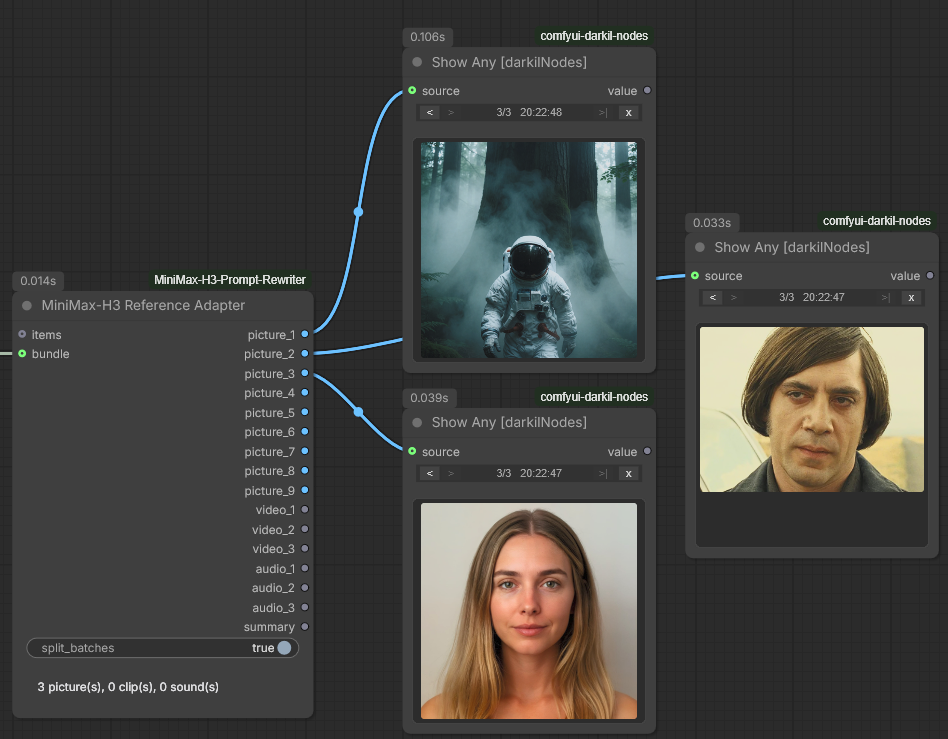
One wire in, three out — and thirteen outputs sitting idle, which is the ordinary case rather than a sign of something unfinished. The run cost 14 milliseconds because nothing here is loaded, decoded or described: the three photographs were carried through as they arrived. The line under the widget is the same text as the summary output, so what came in and where it went is readable off the node without wiring anything to a preview.
| Input | What it is for |
| --- | --- |
| items | References arriving together. Takes any type, because the nodes that produce collections mostly declare none; what each item is gets worked out from the value itself rather than from the wire, and anything that is not an image, a clip or a sound is skipped and counted. |
| bundle | A reference bundle from another pack, if you have one. Its pictures, clips and sounds are read out ahead of anything on items. A clip that arrives as frames goes out as a clip, not as pictures, with its paired audio track inside it; a track not paired with a clip is a sound of its own. |
| split_batches | Whether an image batch becomes one reference per frame, or stays one reference made of several frames. |
That last switch is a real choice rather than a formality. Split, six frames are six things the video reuses, each described and numbered on its own. Kept, they are one thing seen six times, described once — which is what a clip is. Turn it off when the batch is frames of a single shot.
Nine, three and three are what Ref2VA can hold, so that is the room there is.
Anything past it is reported on the summary output rather than dropped in
silence, along with anything skipped. Outputs left over hand on nothing, and a
writer skips those already, so there is no harm in wiring a socket that turns out
empty — plug in all nine and let the ones you did not fill sit idle.
It is a node of its own for a reason worth knowing, because it is not a choice.
Receiving a real ComfyUI list means declaring is_input_list, and that flag is
not per input: it rewrites the shape of every argument the node receives. On a
writer it would change how the prompt, the duration and the options arrive. So it
lives here, on a node that has nothing else to lose by it.
MiniMax-H3 Reference Slots
MiniMaxH3ReferenceToVideo — ComfyUI's own conditioning node for H3's reference
mode — numbers its references by the socket they arrive on: the first picture
socket is <Picture 1>, the first sound socket <Audio 1>. The writers here
number theirs by the strip, which you can drag. Wire the same assets to both by
hand and the two orders agree until the first time a square is dragged; from
then on the prompt describes one voice, the video is given another, and nothing
on screen says so. Switching a reference off goes wrong the same way — gone from
the prompt, still in the video.
So every writer that takes references hands on what it numbered, on a last
output called references, and this node puts each reference on the socket
carrying its number.
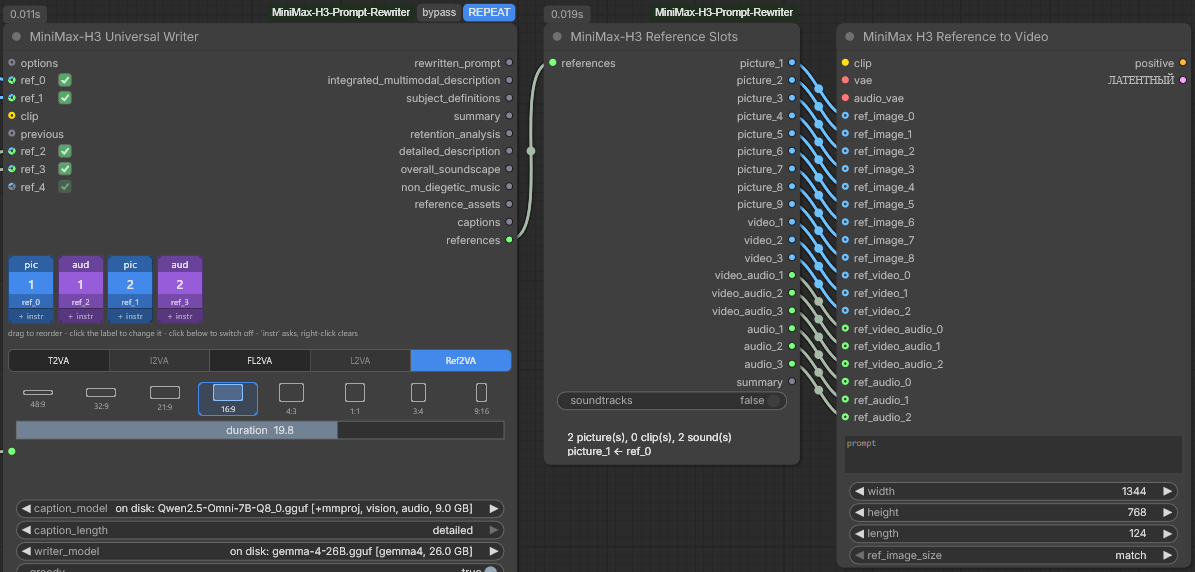
Wired once, all the way across, and never touched again: the arranging happens in the writer's strip. The squares read ref_0, ref_2, ref_1, ref_3 — so picture_2 carries ref_1 and audio_1 carries ref_2, whichever socket they were plugged into, and the generator numbers them exactly as the prompt does. The empty outputs cost nothing: the generator skips an empty socket. Nineteen milliseconds, because pictures and sounds are passed through as they are and there was no clip to decode.
Universal Writer ─ references ─▶ Reference Slots ─ picture_1 ─▶ ref_image_0 ┐
                                                 ─ picture_2 ─▶ ref_image_1 ├ MiniMaxH3ReferenceToVideo
                                                 ─ audio_1   ─▶ ref_audio_0 ┘
Wire it straight across once, in order — picture_N to the N-th ref_image,
video_N to the N-th ref_video, video_audio_N to the N-th
ref_video_audio, audio_N to the N-th ref_audio — and do the arranging in
the strip from then on.
| Output | What it is |
| --- | --- |
| picture_1 … picture_9 | The pictures, in the writer's order. |
| video_1 … video_3 | The clips, as frames at 24 fps. |
| video_audio_1 … video_audio_3 | A clip's own sound, paired by number — when the writer counted it, or for every clip with soundtracks on. |
| audio_1 … audio_3 | The sounds, as they came. |
| summary | Which output holds what and which writer slot it came from, plus anything that did not fit. |
A switched-off reference drops out on both sides. It is not in references
at all, so its socket hands on nothing, and MiniMaxH3ReferenceToVideo skips an
empty socket and closes up its numbering around the gap — the same thing the
writer did with its labels.
A subject goes after the pictures. On the Universal Writer a picture badged
as a subject is written as Subject N, never as <Picture N>. The generator
has no subject socket and numbers it as a picture like any other, so it goes
after the last picture: the only numbers the prompt is not already using.
Clips are decoded here, not in the writer. A writer runs whether or not
anything is wired to references, and fifteen seconds of 1080p as float frames
is several gigabytes, so the clip travels as the VIDEO it arrived as and costs
nothing until this node runs. Here it is read at 24 fps — a 30 fps clip loses one
frame in five, a 12 fps one shows every frame twice — scaled to the canvas
MiniMaxH3ReferenceToVideo would give it anyway, and cut at fifteen seconds, the
longest reference it is meant for. A trimmed VIDEO is read over its trim. An
image batch the writer was told to read as a clip is frames already and goes
through as it is.
A clip's sound goes across when the writer counted it. The generator gives a
clip's sound an <Audio N> of its own, numbered ahead of every standalone sound.
Click a clip's label band in the writer's strip — or tick the speaker box on the
Universal Rewriter's reference_video row — and the writer numbers that sound
the same way, has it described or heard, and says so in references. This node
then puts it on the clip's video_audio_N, and the prompt and the video agree.
A clip with no sound track has nothing to put there, and the writer has already
said so and left it unnumbered.
soundtracks gives every clip its sound, whatever the writer did. It is off
by default. A clip the writer left silent then takes an <Audio N> the prompt
never gave it, so the prompt's <Audio 1> is no longer the sound on audio_1;
the summary says by how many the labels moved.
What each writer hands on is what its prompt names, and nothing it did not read:
| Node | references carries |
| --- | --- |
| Universal Writer | Every switched-on square, in strip order. Nothing on T2VA. |
| Prompt Rewriter Omni | Every switched-on square, in strip order. Nothing on T2AV. |
| Universal Rewriter | Nothing on the 27B tab or on T2VA. The frames the task reads on the 8B tab. On the Omni tab the same frames — or, on Ref2VA, every switched-on row in row order. |
The output is built from the live inputs every time, bypass, a library pick
and repeat_last included, and is never stored: the library and the node's
memory keep text, and a saved prompt comes back with the references connected
now.
Not the Reference Adapter. That node feeds the writers: it sorts whatever arrives by kind and hands a clip on as a VIDEO, because a VIDEO is what a writer describes. This one feeds the generator, which takes a clip as frames and a clip's sound on a socket of its own.
referencesis a type of its own for the same reason — plugged into a node that expects another pack's bundle, a clip would arrive as a VIDEO and fail inside the generator.
One chain this does not cover. A Universal Writer with a block on
previouscounts that block's labels first, while itsreferencesholds its own references only and starts from one. Use one writer per shot when the output is going to the generator.
MiniMax-H3 Prompt Presets
A thousand finished MiniMax-H3 prompts ship inside the pack, and this node hands one of them on. Press Pick a preset and the browser opens: twenty shooting styles, twenty subjects, the shape of the frame, the number of shots and whether anyone speaks, all as tags that narrow the thousand down, with a search box over the words themselves. Each row carries the frame of the clip the prompt was written for — click it and the clip plays.
They are finished T2VA prompts in the format the writers here produce, the same
three labelled fields, which makes them useful in two directions. Wire prompt
at the generator and it is used as it stands; wire it into a writer's own
prompt and it is the starting point for a rewrite. That choice is a wire rather
than a widget, which is why this is a node of its own.
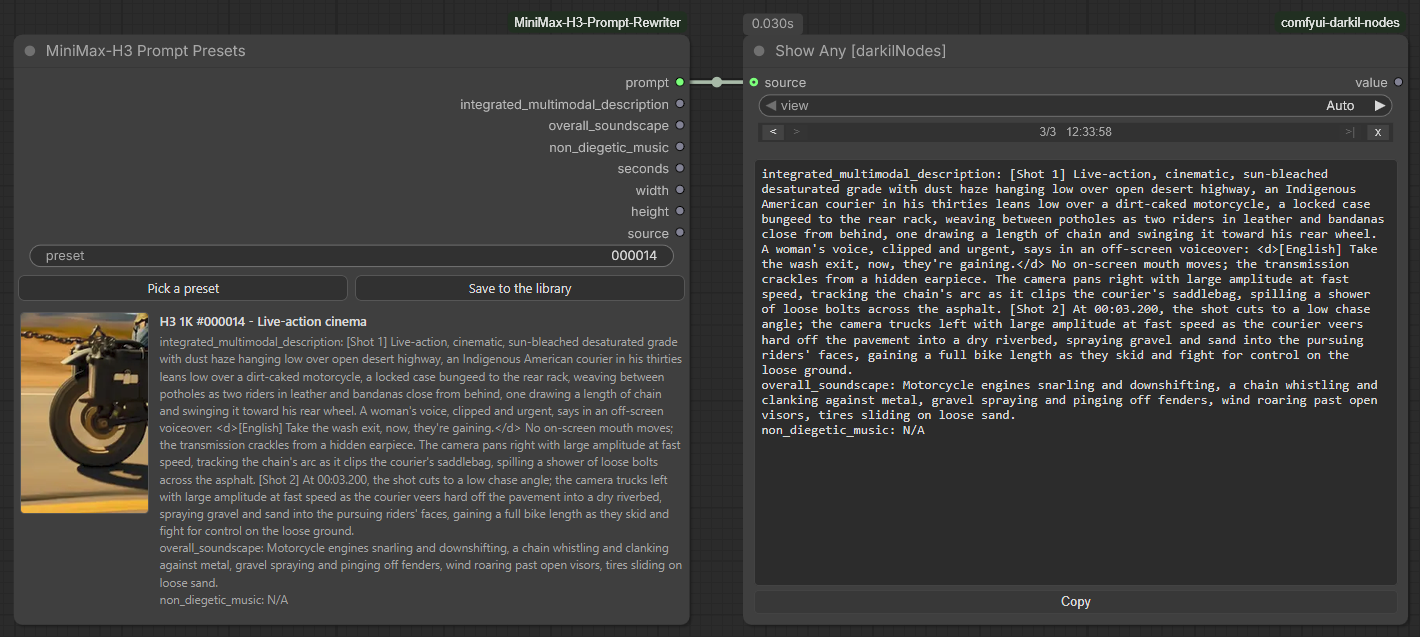
The preset is on the node rather than behind a dialog: the frame of the clip it was written for and the whole of its text are on the face of it before anything is run. The run itself took thirty milliseconds and loaded nothing — what came out of prompt is what the node had been showing all along.
| Output | What it is |
| --- | --- |
| prompt | The whole thing, three labelled fields, exactly as a writer here would have produced it. |
| integrated_multimodal_description, overall_soundscape, non_diegetic_music | The same three, separately. |
| seconds, width, height | The clip the prompt was written for. Every one of them is about five seconds, and the shot times inside the text are written against that. |
| source | Its number, both addresses the clip can be watched at, and who is owed the credit — for wiring into a text preview when a workflow is going somewhere else. |
Nothing is downloaded, at install or during a run. The prompts, their tags and one 256-pixel frame each come to 6 MB inside the pack; they are read off disk and unpacked the first time something asks, so a session that never opens the browser pays nothing, and a run takes single-digit milliseconds. The one thing that reaches the network is the clip in the preview, and only when somebody clicks a frame: huggingface.co first, hf-mirror.com when that does not answer, which is the address that answers from mainland China. Without a connection the frames are still there and only the video is missing.
Save to the library puts a copy in one of your own prompt sets, through the same editor the library uses — name, description, groups, and the self-check running as you type. From that point it is an ordinary record: editable, filed under your own groups, and available to every writer through the library window. The copy says in its description where it came from. The bundled preset is not touched by any of it.
A caution worth stating once: these are T2VA prompts for a five-second clip. Nothing stops you handing one to a task with references or to a much longer video, and nothing will complain, but the text describes neither.
The prompts and the clips they describe are ostris's work, carried here with the author's permission and with credit — ostris/minimax_h3_1k. The prompts are his own and effectively MIT; the clips are MiniMax-H3 output, whose licence forbids using it to train models, and the frames cut from them here carry that same restriction. The shooting-style and subject tags are the H3 Atlas's reading of that collection. All thousand pass the self-check with nothing to report, which is one way of saying what the format of a good H3 prompt actually looks like.
The duration widget
Every node in the pack that writes or reads a prompt has one, and it means the
same thing on all nine: how long the target clip is meant to be, in seconds. It
is a hint rather than a setting — it reaches the model as one line of text,
duration: 10s, and decides how many shots the rewrite plans and how it paces
them. How long the clip really turns out to be is settled downstream, by whatever
samples it.
It takes FLOAT and INT on the same socket. The widget itself is a float,
in tenths, because the cut times a rewrite writes are quoted to a thousandth —
At 00:02.378, the camera cuts to — and asking for 7.5 seconds is as ordinary as
asking for 8. But most graphs carry a length as a whole number, so the socket
takes either: an INT primitive, a node that counts frames, or a FLOAT off a
maths node all wire straight in, with no converter between. The two Universal
nodes draw it as a slider and the rest as a number field you can type into; the
range and the menu are the same either way.
Its upper end is yours to move. Right-click the node — on the classic canvas,
right-click the widget itself and the entry comes first — and there is a
duration submenu with two items:
| Item | What it does | | --- | --- | | Default value | Puts the widget back to the ten seconds it starts at. | | Longest offered… | Asks for a number and makes it the widget's top end. It is rounded to a tenth of a second and kept in the node, so it travels with the workflow. |
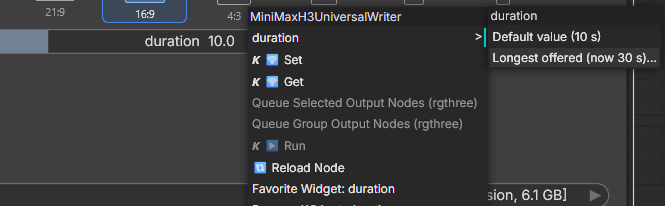
Right-clicking the widget itself puts duration at the top of the menu, as
here; right-clicking anywhere else on the node reaches the same submenu further
down. Both numbers in the submenu are the node's own and are saved with the
workflow.
Thirty seconds until you change it, and the server accepts up to six hundred. Two numbers rather than one because a widget's range is fixed when the node is declared and no single range suits every graph: MiniMax's own guide is written around clips of a few seconds, while the stretched pipelines the community has built run well past that. So the server takes anything sane, and the widget spans what you work with — a slider reaching ten minutes is a slider that cannot be nudged to 9.
That number is the node's own max_duration property, so the Properties Panel
reaches the same setting; a workflow saved before this existed simply gets the
thirty.
Repeating the last answer
Every writer, rewriter and captioner has a repeat_last switch. Turn it on and
the node hands back the answer it produced last instead of running the model
again — with nothing kept yet it runs once, keeps what it wrote and says so, and
from then on returns that same text for as long as the switch is on, whatever
else you change. That is the point of it: a fifty-second rewrite is not something
to pay for twice while you wire up everything downstream of it.
ComfyUI's own cache cannot do this. A node's cache key is its class, its
IS_CHANGED value and every input it received, so editing the prompt is exactly
what drops the entry — and IS_CHANGED can only add invalidation, never mask it.
So the answers are kept in a store of the pack's own, one per node.
That store lives in memory for the ComfyUI session and nowhere else: it is not
written to disk, it does not travel with the workflow, and a restart empties it.
Every run says where its answer came from in three places — the caption under the
node, the ComfyUI console, and the switch's own tooltip, which carries the time
it was kept, its length and the opening of the text. When the inputs no longer
match the ones that produced it, all three say so rather than pretending nothing
changed. bypass still wins over it.
And what is kept can be edited. Edit the last prompt opens the answer the
node is holding in the same editor the library uses: the
prompt in a box you can write in, read as you type by the rules the run was read
by. Saving splits the fields out of the new text again, so the section outputs
stay in step with the prose; everything the node kept past its fields belongs to
the run rather than to the prose and stays as it was. Nothing reaches disk — this
is the session store, and an edit worth keeping is saved to the library
afterwards.
The node hands the edited text on the next time repeat_last asks it to. An edit
changes none of the node's inputs, so each writer reports what it is holding as
its IS_CHANGED, the same way it reports the library record it is pointed at;
without that ComfyUI would go on serving the answer from before the edit.
Whether the edit reaches the output is a separate question, and the editor
answers it before you type. A saved prompt wins over the node's own answer, so
while one is chosen the edit waits behind it — clear the choice, or edit that
record instead. With repeat_last off the next run simply writes a new answer
over the edit, and on a greedy seed with unchanged inputs that new answer is
byte for byte the old one, which looks exactly like being ignored; so saving
switches repeat_last on when nothing else is in the way, the same way choosing
a library record does.
On the two caption nodes it is the caption that is kept, not the assembled block:
the numbering belongs to the chain, so the line is written again around whatever
arrives on previous, and an asset connected since is described for real.
The node's own last answer is what the switch hands back by default, and
the prompt library is how you point it at something else
instead. One switch either way: repeat_last decides whether a kept prompt is
handed on at all, the library window decides which one.
Unloading a kept model
keep_model_loaded leaves the writer in memory after a run. That is what you
want while iterating on a prompt, and what is in the way once the text is right
and the card is wanted for video. Turning the switch off does not give the card
back cheaply: the switch is an input, a changed input is a new run, and the node
writes the same text a second time before it unloads. Three things let the model
go without running it again.
Unload model is a button on every node that has the switch. It unloads
whatever the pack is holding, at once. Pressed while a node is still writing, it
waits for that run and unloads after it — whatever keep_model_loaded says,
because the press came later.
ComfyUI's own Unload Models reaches the pack's models too. They are not
ComfyUI models and its model management does not know them, so the pack hooks
itself into the unload. The same goes for everything else that asks ComfyUI to
unload all models: the /free route, the out-of-memory handler, and the
clean-up nodes of other packs — put one between the writer and the sampler, and
the writer is gone before the video model loads. It cuts the other way as well.
A sampler that clears the card for itself, as several wrappers do, takes a kept
writer along with the rest; and under --disable-smart-memory ComfyUI unloads
everything after every workflow run, so a kept model lasts for that run and no
longer.
repeat_last on with keep_model_loaded off unloads as well. A node that
hands back a kept prompt does not run the model, but it still reads the switch:
the text comes back from the node's own store, the model is unloaded, and
nothing is written twice.
All three let go of everything the pack holds inside the ComfyUI process — a
Transformers checkpoint or a GGUF on llama-cpp-python — and not only the model
of the node the button was pressed on. A GGUF run by the llama.cpp binaries was
never kept: the model leaves with the process.
The answer is checked
Every fresh answer is read back against the rules of MiniMax's own writing guides before it leaves the node — a self-check, silent when it finds nothing. When it does find something, it says so in three places: a toast in the ComfyUI window with the first few findings, because the caption under a node is easy to miss from the other end of the graph; the caption itself, which holds the full list above the answer; and the console, for runs nobody is watching. What it looks at:
- Shot structure.
[Shot 1]opens the description and carries no cut time; later shots are numbered in order, each with anAt MM:SS.mmmtimestamp that is later than the one before it and inside the requested duration. - Dialogue markup.
<d>and</d>come in pairs, and every block starts with its[Language]tag. - Reference tags, both ways. A tag the task cannot carry —
<Video 1>in a frame task, any tag at all in T2VA — is flagged, and so is the opposite: a reference that reached the node but is never cited, which the generator still receives with no say in what it is for. The nodes that see their references check the numbers against what is actually connected; the text-only writers skip that half rather than guess. - Full-reference bookkeeping. Every
<Subject N>thatsubject_definitionsintroduces owesretention_analysisa line, and the guide's 350–500 words fordetailed_descriptionis noted when missed. - The alignment line. I2VA, FL2VA and L2VA open with a fixed sentence telling H3 where the reference frames land; its absence is worth knowing about before a render finds out.
- Effect embedding tokens. The one rule here that is not MiniMax's: a
capital
Embedding:, a token stuck to the word in front of it, or a full stop on the end of a name is a token ComfyUI will drop in silence. It is in the self-check because the failure has the same shape as all the others — nothing in the output says so — and because that is where you look when an effect did nothing. A name that is not one of the ten is a note rather than a warning: it may well be your own textual inversion.
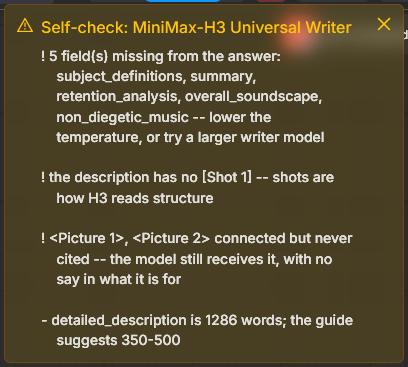
One deliberately bad run, read back. The ! lines are warnings — things H3
will likely misread; the - line is a note — something the guide merely
suggests. The toast shows the first few findings; the full list sits in the
caption under the node and in the console, where it outlasts the toast however
long the toast is given.
A refusal is the one thing the nodes do enforce, and it is said the same way: the sentence appears as a toast under Stopped before the exception goes up, so a run that halts does not look like it failed for no reason.
Findings are said, never enforced: the answer ships exactly as written, because
the model is sometimes right to bend a rule and only you know whether this is
that time. Warnings (!) are things H3 will likely misread; notes (-) are
things the guide merely suggests. A prompt handed on from the library is not
re-checked — it was checked when it was written, and the caption stays with the
record's name instead.
How much is said is self_check on the Options node: warnings and notes
is everything; warnings only drops the guide's softer suggestions, such as the
350–500 words, and keeps what H3 will likely misread; off says nothing. The
reading itself always happens — it is regexes over text already in memory and
costs nothing — so this decides what is reported, not what is looked at. An
unreadable setting reports everything: a stale workflow should leave the check
louder than intended, never silent.
The same toast carries the nodes' own warnings, under Heads-up instead of
Self-check: a reference the chosen task will not read, a saved prompt whose
references no longer match what the node is shown, a captioner that came back
with nothing for a connected asset. Those are about your wiring rather than the
model's prose, so self_check does not cover them and they are always said.
They were always in the caption and the console; now they are also impossible to
miss.
Some of it happens before the run. A task that cannot use what is connected
has always been refused before any weights move — I2VA with two pictures, a
clip wired into a frame task. Ref2VA now refuses the same way when the strip
holds more than H3 can take: nine pictures, three clips, three sounds. It used to
be described first and flagged afterwards, which cost a full captioning pass and
a rewrite to learn something countable in advance. Subjects are counted apart
from pictures, so a badge is often the whole fix.
Acting on what it found
fix_once on the Options node lets the nodes do something about the findings
rather than only report them. It is off by default, and off means a promise:
the answer you get is exactly what the model wrote, with nothing edited on the
way out.
Turned on, two things happen. The alignment line goes back on where it is
missing — that sentence is fixed text the node already formats when it builds
the prompt, so a model that dropped it has not made a judgement worth
respecting. No model runs, nothing can regress. Then, for the mechanical
findings — a cut time past the end, an unbalanced <d>, a tag pointing at a
reference that is not there — the writer is asked once more, with those
findings folded into the prompt as rules to obey.
Once, never a loop. A model that ignored a rule twice will ignore it a third time, and every attempt costs a full generation. Three things keep the single retry safe:
- It is refused on a hopeless answer. Half the fields missing means the model is not holding the format at all, and a second pass will not change that; the node says to try a larger writer instead of spending another minute.
- The constraints travel inside the prompt, not as a second conversational turn. That keeps the single-turn shape the LoRAs were trained on, so the re-run behaves the same on a trained adapter as on a guided model.
- The second answer is kept only if it is better — fewer warnings, or the same warnings and fewer findings overall. A tie keeps the first. So the worst case is a minute spent, never a worse prompt.
Whatever it did is said on the node: the line restored, the re-run and how much it gained, or that the first answer stood.
The prompt library
repeat_last holds one answer per node and forgets it when ComfyUI restarts. The
library is the other half: prompts you name and keep, in a JSON file under the
ComfyUI user directory, available to every workflow and every node.
Saving. The Save the last prompt button on any writer or rewriter opens a box asking for a name, a description and any number of groups — the groups already in the file are offered as chips, and a new one is a word and Enter. What gets saved is the run itself: the text, the sections after it, the task, the model, the ratio, the duration, the seed, and a 50x50 thumbnail of every reference the node was shown.
Those thumbnails are taken during the run, which is the only moment they can
be. By the time the box opens the node has returned strings and the tensors are
gone, so the picture, the first frame of the clip and the measurements are captured
as the answer is produced and travel with it. What is measured is what genuinely
exists: an image has a size; a clip that arrived as a real VIDEO has frames,
seconds and a frame rate, while one that arrived as a batch of images has a frame
count and nothing else, because a batch has no container to ask; a sound has a
duration, a rate and a channel count. References are labelled by position —
ref1-image, ref2-audio — rather than by file name, which a node cannot see
anyway.
Using one. The Prompt library button opens the list: this node's own last answer first, then everything in the file, newest first. Filter by group with the chips, or type in the search box to keep only the records whose name, description, prompt, groups, references or settings contain what you typed. Use points the node at a record; Copy puts the prompt on the clipboard without pointing the node at anything; Edit opens it for changing; Delete removes it from the file for good, after asking. The list answers the keyboard too: the arrow keys walk it without leaving the search box, Enter uses the lit record, and a double click on a card does the same. It opens scrolled to the record this node is pointed at.
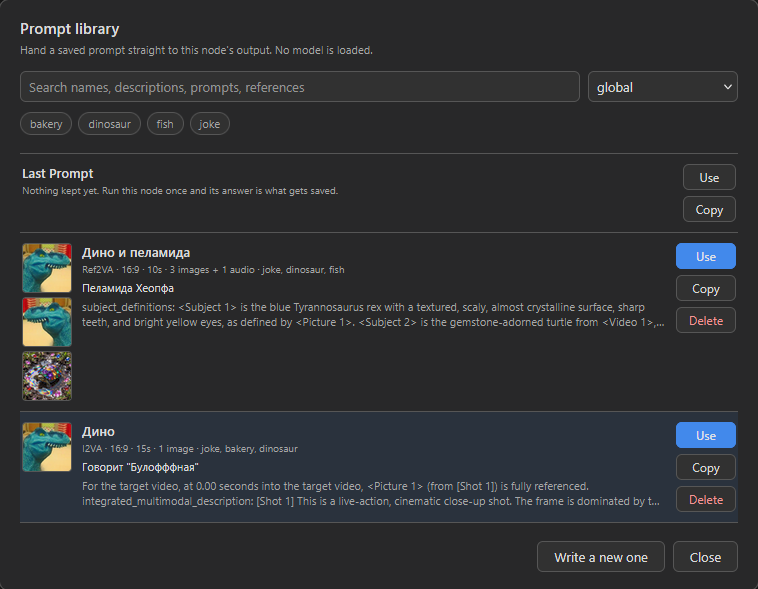
Everything on a card is searchable — the name, the description, the prompt, the
groups, the settings and the references — which is what keeps a file of a hundred
records usable. The line under the name ends with what the record was written for,
3 images + 1 audio, in the same words the node uses when it warns that what it is
being shown no longer matches; the thumbnails beside it say which pictures those
were. The tinted card is the current choice. The Last Prompt row sits above the
file because it is not in it — it is this session’s own answer, which is why it
has no Delete.
The library, the editor, the Model list and the bundled prompts size like any window: drag an edge or a corner, or fill the browser tab with the button in the top corner, and each kind remembers its own size. The footer says how many records the file holds, or how many a search has left, and what the last edit or delete did.
A chosen prompt reaches rewritten_prompt and the section outputs exactly as a
fresh one would — no model is loaded, nothing is generated, and the run takes about
a tenth of a second. A record written by another kind of node works too: when the
classes match the outputs come back verbatim, and otherwise the text is split into
sections by the node reading it, the same way it splits an answer it wrote itself.
Editing one. Edit opens the record: its name, its description, its groups, and the prompt itself in a box you can write in. What produced the record — the writer, the settings, the duration, the reference thumbnails — is shown but not editable, and does not change. That half is the account of a run, and a card that misreported its own provenance would be worse than no card.
The prompt is checked as you type, by the same rules the writers run over a model's answer and out of the same module, and against this record's own task, duration and references: a cut time that has drifted past the end of the video is named while you are still looking at it. That is the reason to edit here rather than in the JSON file — the file will take anything.
Escape and Cancel ask before they throw away anything typed, here and in the other boxes that take typing — Save the last prompt and the entry form of the Model list. With nothing typed they just close.
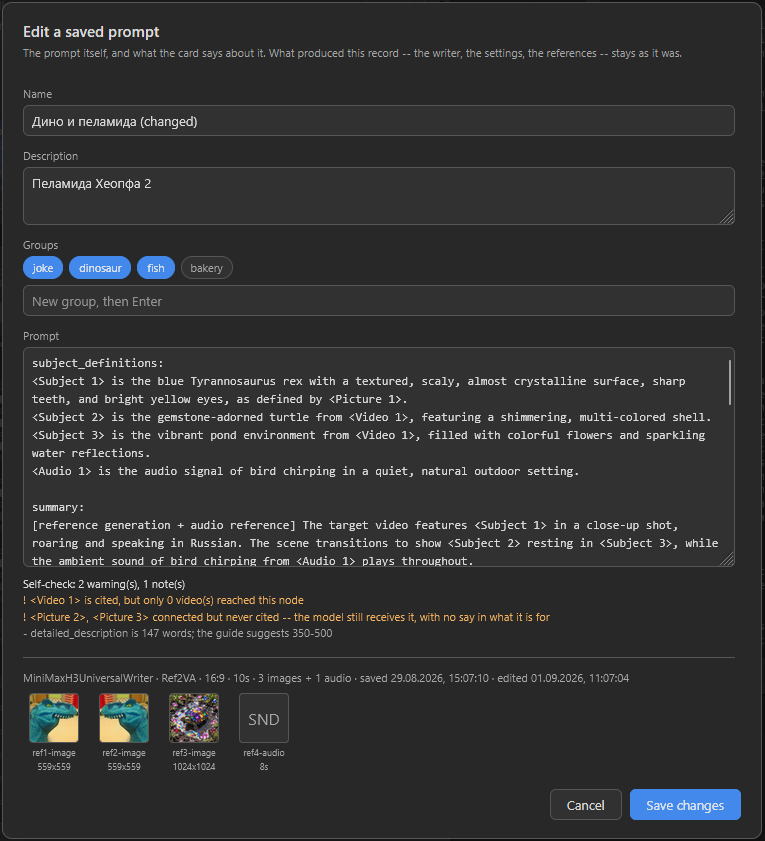
The findings are read from the record rather than guessed at: the task is Ref2VA, the duration ten seconds, and the references are the four at the foot — which is how it knows that <Video 1> is named in a prompt no video ever reached, and that two of the connected pictures are never cited. Amber is a warning, grey a note the guide merely suggests. self_check on the Options node governs what the nodes say during a run; the editor always shows both, since you asked for them by opening the box. Everything below the line is the half that cannot be edited.
Changing the text drops the writer's own split of that answer into fields, because the split was made from the text as it was. Without it the node reading the record splits the text itself, which is exactly what it already does with a prompt written by a different kind of node, so the section outputs stay in step with what you wrote. Everything else about the record survives, and its card gains the time of the edit beside the time it was saved.
A node already pointed at the record hands on the new text at its next run.
ComfyUI decides whether to run a node at all from its inputs, and an edit changes
none of them — the pick is still the same id in the same file — so each writer
reports the record's own content as its IS_CHANGED and the run happens. Nothing
else about caching moves: with no saved prompt in play the value is constant, and
a record renamed rather than rewritten does not make every node holding it run
again.
A record with references is pinned to them. A T2VA prompt is self-contained
and travels anywhere. A prompt for one of the frame tasks or for Ref2VA is not:
it names its references and describes them — <Subject 1> is the blue dinosaur
with the textured scaly skin — so giving that prompt a different set of assets
hands the generator a description of something that is not in front of it. The
thumbnails on the card are how you see what a record was written for, and the
node checks as well: when the kinds and counts of what it is being shown no
longer match what the record was written for, it says so on the node and in the
console before handing the prompt on. It says it rather than refusing — reusing a
description as a template is a legitimate thing to do, and only you know whether
that is what you meant. What no check can catch is one picture swapped for
another of the same kind; that is what the thumbnail is for.
One switch decides, the window decides what. Choosing a record switches
repeat_last on, because that switch is what hands a kept prompt on at all.
Turning it off gives the node back to the model and leaves the choice waiting;
Write a new one does both, forgetting the choice as well. The button says which
it is — Library: Storm at sea, or the same with (repeat_last is off) after it —
and the badge beside the node title reads REPEAT or LIBRARY.
The choice itself lives in a hidden widget, so it is saved with the workflow and reaches an API run: a graph reopened tomorrow returns the same prompt. If the record has been deleted since, the run stops and says so rather than quietly writing a new one — the graph asked for a particular prompt.
Sets. prompt_file on the Options node names the file the nodes wired to it
save into and list, global unless you say otherwise, and New prompt file
beside it makes another. One file is one working set, which is the cheapest way to
keep a project's prompts apart from everything else. They live in
ComfyUI/user/minimax_h3_rewriter/prompts/
as plain JSON, so they can be edited by hand, copied between machines or deleted. A record with one thumbnail and a full-length prompt is about 11 KB.
The guides are fetched, not bundled
The two guides are not shipped inside this pack. They are MiniMax's
Documentation, and the MiniMax H3 Community License grants the right to
redistribute the Materials only within its "Applicable Territory" — worldwide
excluding the European Union, the United Kingdom, the Republic of Korea and the
United States — and only alongside a copy of the agreement and a NOTICE file. A
node pack on a registry cannot honour a territory boundary, so each installation
fetches its own copy directly from MiniMax on first use: 16 KB and 24 KB, once,
under the same auto_download switch as everything else.
They land in
ComfyUI/user/minimax_h3_rewriter/guides/
which the Open guide folder button opens. Editing a copy changes the system prompt, and a fetch never overwrites a file that is already there — trimming the guide is the cheapest way to fit a small model's context.
The model list
The Model list button on any model-loading node opens a window over the graph: the models that node offers, with Add a model, Edit and Delete beside them, and a Check it that reads the model before you spend a download on it. Everything is kept in
ComfyUI/user/minimax_h3_rewriter/models.json
which is seeded from the packaged copy on first use, so updating the node pack
never overwrites your edits. Open models.json in the window's footer still
opens that file in your desktop's JSON editor — on the machine running ComfyUI,
which is not necessarily the one looking at the browser tab — for the two things
the window deliberately leaves alone: the adapters sections, and a path to a
network share.
The window shows only the lists the node it was opened from actually reads, because the adapters take different architectures and an entry from one list will not load in another's node. The Universal Rewriter therefore opens on three tabs and the captioner on one. Under the tabs is what that list requires — the architecture, the block count and width, whether a projector is needed and which encoders it has to carry — and below the entries, greyed out, the models the pack found by itself, in your ComfyUI model folders or in an Ollama store: those are offered in the dropdown too, and there is nothing to edit, because they are files on disk rather than lines in a file. A file an entry has already downloaded is not repeated there: the entry carries an on disk tag instead, and the dropdown offers that model once, under the entry's name.
![The Model list window over the graph, headed “Model list” above the line “The models this node offers. Entries are kept in models.json in the ComfyUI user directory, so they outlive an update of the pack and are shared by every workflow.” Two tabs, Captioners lit and Guided writers beside it, over what that list requires: GGUF only, one file run by llama.cpp rather than a folder of safetensors; any architecture as long as the file is a language model with an embedded chat template; and a pair — the model and its ‘mmproj’ projector, from the same conversion. Below them two entries badged FROM THE PACK — Qwen2.5-Omni-3B, a 3.4 GB download needing about 5 GB, and Qwen2.5-Omni-7B, 5.8 GB needing about 8 — each showing its format, repository, file and projector in monospace, with Edit and Delete buttons at the right. Under a rule, “Found in your model folders. These are offered too, and there is nothing to edit: they are files on disk, not entries in the file.” heads three unbuttoned rows: on disk: Qwen3VL-8B-Instruct-Q4_K_M.gguf [+mmproj, vision, 5.4 GB], and the Omni 3B and 7B pairs, both marked vision and audio](https://raw.githubusercontent.com/pytraveler/MiniMax-H3-Prompt-Rewriter-ComfyUI/HEAD/docs/model_list_dialog.png)
Opened here from a node that reads two lists, so there are two tabs; the Universal Rewriter opens on three and the reference captioner on one. What the list requires sits above the entries, because it is the reason an entry belongs in this list and not another one.
The footer counts the entries in the open list and says what the last save, delete or restore did — including how many nodes in this graph moved to an entry's new label, or still hold the name of one that is gone. Those keep the name, so that a run says the entry is missing rather than picking another model for them.
Check it answers as much as can be answered without moving any weights. A file already on this machine is read outright, so it reports the architecture and the shape, whether the model carries a chat template, and whether the projector carries vision and audio:
- 'Qwen2.5-Omni-7B-Q4_K_M.gguf' is a 'qwen2vl' model, 28 blocks of width 3584. That fits.
- It carries its own chat template.
- 'mmproj-Qwen2.5-Omni-7B-Q8_0.gguf' carries the vision and audio encoder.
The chat template matters more than it looks. The 27B rewriter and the guided
writers build their prompt from the model's own template, so a GGUF without one —
typically the base conversion of a model rather than the instruct one — reads as a
perfectly good model and then stops on the first run. There Check it refuses it,
and renders the template once on a system and a user turn, so a template this
pack cannot render is refused too. The captioners and the 8B and Omni rewriters
leave the template to llama-mtmd-cli, which falls back to ChatML without one, so
there a missing template is only a warning.
Anything only on Hugging Face is asked what its metadata can say: a transformers
repository is judged from its 4 KB config.json, and a GGUF repository is asked
whether the files you named are in it — which is what catches a typo that would
otherwise surface as a download failing minutes in, and fills in download_gb
for you while it is there. A GGUF's shape and chat template are in the file
itself, so for one still on the Hub those wait for the first run — or for Check
it again once the file is here.
Leave file empty and Check it answers a different question: what is in that
repository? It lists the GGUF files as buttons, smallest first. A click puts the
file into the form, and a name in the style of the packaged entries —
Qwen2.5-Omni-7B Q4_K_M — while you have not typed one of your own. A list that
runs a pair shows the projectors in a row of their own, for mmproj, and fills one
in by itself when the repository holds only one; once both halves are there the
check runs and adds up the download. A model split into parts,
-00001-of-00003.gguf, is counted and left out, because an entry names one file
and only that file is downloaded. A folder on this machine in repo is listed the
same way, and a file name the repository does not have brings up the same buttons.
Two things the window will not do. It refuses a network path in repo,
file or mmproj: it is reachable over the ComfyUI API, which has no CSRF
token and is routinely served on --listen, and merely looking at a UNC path is
an authentication attempt against the host it names. A path typed into
models.json by hand is still unrestricted — that file does not travel. And it
refuses to write at all while the file does not parse, since saving over it
would replace your own entries with the packaged list; it shows the parse error
and every button that would write is dead, leaving Open models.json. What it
lists in that state is the packaged copy, because that is what the dropdowns are
offering too until the file parses again.
Editing an entry's download size, VRAM note or note changes what the dropdown reads, and saved workflows remember that string — but an entry is found by its name, so a workflow holding the old label still runs it and moves to the new one when it is opened. Renaming the entry is different, since the name is what it is found by: the form says so before it commits, the graph you have open is moved across for you, and other workflows lose the choice.
Deleting an entry leaves the nodes that used it as they are: a run stops and says
the entry is gone, rather than picking another model and starting a download
nobody asked for. The one exception is an entry whose file is already here —
its on disk: row is back in the dropdown, and the nodes move to it.
The file holds five lists with the same fields. models feeds the LoRA
rewriter and has to be Qwen3.6-27B:
{
  "name": "Qwen3.6-27B FP8",
  "repo": "Qwen/Qwen3.6-27B-FP8",
  "download_gb": 28.8,
  "vram": "~29 GB, no extra package needed"
}
models_8b feeds the 8B rewriter, has to be Qwen3-VL-8B-Instruct, and needs
an mmproj beside the model — being multimodal, it is two files:
{
  "name": "Qwen3-VL-8B-Instruct GGUF Q4_K_M",
  "repo": "Qwen/Qwen3-VL-8B-Instruct-GGUF",
  "file": "Qwen3VL-8B-Instruct-Q4_K_M.gguf",
  "mmproj": "mmproj-Qwen3VL-8B-Instruct-Q8_0.gguf",
  "format": "gguf",
  "download_gb": 5.4,
  "vram": "~9 GB with the adapter"
}
models_omni feeds the Omni rewriter, has to be Qwen2.5-Omni-7B, and takes
the same two files — with the difference that its projector has to carry an audio
encoder, or the adapter attaches to a model that cannot hear:
{
  "name": "Qwen2.5-Omni-7B GGUF Q4_K_M",
  "repo": "ggml-org/Qwen2.5-Omni-7B-GGUF",
  "file": "Qwen2.5-Omni-7B-Q4_K_M.gguf",
  "mmproj": "mmproj-Qwen2.5-Omni-7B-Q8_0.gguf",
  "format": "gguf",
  "download_gb": 6.2,
  "vram": "~9 GB with the adapter and a 12k context"
}
Three lists rather than more entries in models, because an entry from any of
them would fail to load in either other node — different architecture, different
adapter. The three adapters live apart for the same reason, under adapters,
adapters_8b and adapters_omni.
writers feeds the writer nodes and can be anything, as long as it is a GGUF
language model with a chat template:
{
  "name": "Qwen3.5-4B",
  "repo": "unsloth/Qwen3.5-4B-GGUF",
  "file": "Qwen3.5-4B-Q4_K_M.gguf",
  "format": "gguf",
  "download_gb": 2.6,
  "vram": "~5 GB with the guide in context"
}
captioners feeds the reference caption node and needs one extra field,
mmproj — a multimodal model is two files and both come from the same
conversion:
{
  "name": "Qwen2.5-Omni-3B",
  "repo": "ggml-org/Qwen2.5-Omni-3B-GGUF",
  "file": "Qwen2.5-Omni-3B-Q4_K_M.gguf",
  "mmproj": "mmproj-Qwen2.5-Omni-3B-Q8_0.gguf",
  "format": "gguf",
  "download_gb": 3.4
}
Pointing an entry at a file you already have
repo need not be a Hugging Face id. Give it a folder on this machine and the
file is read straight out of it, with nothing downloaded and nothing copied:
{
  "name": "Gemma 4 26B",
  "repo": "X:/models/gemma-4-26B-A4B-it-UD-Q8_K_XL",
  "file": "gemma-4-26B.gguf",
  "format": "gguf"
}
Or put the whole path in file and leave repo out — both forms work, in all
three sections, because both are what people actually type. Two things to watch:
- Backslashes must be doubled in JSON, or written as forward slashes.
"X:\Programs\..."is not valid JSON at all —\Pis not an escape — and one bad character makes the whole file unreadable, not just that entry. Windows acceptsX:/Programs/...everywhere, so that is the easier habit. - A path that does not exist is reported, not downloaded around. The node names the file it could not find and stops.
For a whole folder of GGUFs you keep elsewhere, an entry each is the long way
round: point ComfyUI's extra_model_paths.yaml at it under the key LLM and
every file in it is offered automatically, with on disk: in front of the name.
If that folder comes first, new downloads go into it; a model already in any
LLM folder is found where it is and not fetched again.
Add an entry, refresh the browser tab — ComfyUI need not restart — and it is
in the dropdown. Keep name stable: it is what a saved workflow finds the entry
by. A node whose stored choice has vanished stops before anything runs and says
so by name, instead of silently picking something else.
When the list itself is broken
A syntax error in models.json used to be the quietest failure in the pack: the
parse threw, the packaged defaults were served instead, and the dropdown looked
ordinary. An edit that never took was indistinguishable from an edit that did
nothing.
Now the first entry in every model dropdown says so, with the line and column:
!! models.json is not valid JSON — Invalid \escape: line 3 column 30 (char 46) — showing the packaged list instead
The rest of the list is still there and ComfyUI still runs; picking that first entry and hitting Run repeats the message and names the file to fix. Fix it, refresh the tab, and it goes away.
Updates add new entries without touching yours
Your copy is never overwritten, but models added to the pack after you installed are merged in — otherwise "we will not touch your list" quietly becomes "you will never see anything new", with nothing anywhere to say the node knew about more.
The rule is set algebra, not a version check. Beside the lists your file records
seed_offered: every name the packaged list has ever put in front of this
installation. An update then adds
names in the pack − names in your file − names you were already offered
so an entry you deleted stays deleted, one you renamed is not duplicated, and a
genuinely new one arrives. Deleting a name from seed_offered offers that entry
again on the next start, and Restore the packaged entries in the model-list
window is that same edit as a button: it drops the record for one list, and the
next read brings back every packaged entry the list is missing. Entries you
wrote yourself are untouched by it.
One exception, once: a file written before this existed has no record of what it
was offered, so on the first update everything missing comes back — including
anything you had deleted by hand. The previous file is kept beside it as
models.json.bak, and from then on your deletions stick. That backup records
the merge and nothing else: edits you make in the model-list window do not
spend it, or two clicks would be all it took to lose the copy it exists for.
Merges are logged to the ComfyUI console by name. A file the node cannot parse is left exactly as it is and the packaged list is used for that session, so a stray comma costs you a restart, not your edits.
Models you already pulled for Ollama
If you run Ollama, the writers and captioners this pack wants are on your disk
already, and downloading the same quant a second time would be silly. They are
offered in the writer_model and caption_model dropdowns, prefixed ollama:
and named the way ollama list names them:
ollama: qwen3:8b [qwen3, 4.7 GB]
ollama: moondream:latest [+mmproj, vision, 1.7 GB]
Nothing is copied, converted or downloaded, and Ollama itself does not have to be running: what it pulls is a plain GGUF, and llama.cpp reads it where it lies. This is the file on disk, not Ollama's API — the server can be stopped, disabled or uninstalled and the models stay usable.
A multimodal model appears in both lists: as a writer without its projector, and as a captioner with it. The pairing comes out of the model's own manifest, where the two files are named together, so it is certain in a way that comparing file names in a folder is not.
Three places are looked at, and Ollama's layout is the same on every platform:
$OLLAMA_MODELS                     # if you set it
~/.ollama/models                   # the usual install, Windows included
/usr/share/ollama/.ollama/models   # Linux, installed as a service
A store anywhere else — inside WSL, in a container, on a drive the server knows
nothing about — is named by hand, in models.json
"ollama_stores": ["\\\\wsl$\\Ubuntu\\usr\\share\\ollama\\.ollama\\models"]
or in MINIMAX_H3_OLLAMA_MODELS, which takes several paths separated the way
PATH separates them. Those are not looked for automatically on purpose:
reaching \\wsl$\... starts a stopped WSL distribution, and these lists are
rebuilt every time a dropdown is filled. Opening a ComfyUI tab should not boot a
virtual machine.
ollama rm takes a model out of the dropdowns the way deleting any other file
does. What your workflow saves is the label rather than the path, so re-pulling
the same tag leaves it working — the store is content-addressed, and the same
files land back where they were. The label carries the size, though, and a
different quantisation is a different size, so re-pulling qwen3:8b at another
quant comes back as a choice you have to pick again.
Where the weights go
ComfyUI/models/LLM/
├── Qwen3.6-27B/                          # base model, ~52 GB
├── MiniMax-H3-Prompt-Rewriter-LoRA/      # adapter, ~3.5 GB
├── Qwen3.5-9B-Q4_K_M.gguf                # a writer model, one file
└── Qwen2.5-Omni-3B/                      # a captioner: model + mmproj together

ComfyUI/user/minimax_h3_rewriter/
├── models.json                           # your model list
├── guides/                               # the two writing guides, 40 KB
└── runtime/                              # llama.cpp binaries, if fetched
Already downloaded the LoRA? Point the adapter widget at that folder
directly (an absolute path is accepted) and nothing is fetched again.
Using a model you already have
52 GB is a lot to ask, so the node looks for the base model before offering to
download it. The model dropdown lists every Qwen3.6-27B found in
- all directories ComfyUI registers for
LLM,transformers,diffusers,text_encodersandclip— including anything mapped in throughextra_model_paths.yaml, and - the Hugging Face cache (
HF_HOME/HF_HUB_CACHE/~/.cache/huggingface/hub),
so a copy pulled earlier by any other tool is reused instead of downloaded twice.
Only directories whose weights are actually present are listed; a cache entry
holding nothing but config.json is not offered.
Smaller repackings
Any repository you put in the model list is checked from a 4 KB config.json
before a single weight moves. Every repacking keeps
the same fingerprint (model_type qwen3_5, hidden 5120, 64 layers, vocab 248320),
so what actually decides the outcome is the quantization runtime:
| Build | Download | Runtime package | LoRA attaches? | Verdict |
|---|---|---|---|---|
| quant_method: bitsandbytes (nf4 repack) | ~17 GB | bitsandbytes, already required | yes | works as shipped — the low-resource route |
| Qwen/Qwen3.6-27B (bf16) | 52 GB | none; bitsandbytes for nf4/int8 | yes | works as shipped |
| Qwen/Qwen3.6-27B-FP8 | 29 GB | kernels, plus a kernel fetched from the Hub | yes | advanced only; needs >29 GB of VRAM |
| quant_method: awq | ~19 GB | autoawq | yes | works after installing it |
| quant_method: gptq | ~19 GB | gptqmodel | yes | works after installing it |
| quant_method: compressed-tensors | ~19 GB | compressed-tensors | no | not supported |
| quant_method: modelopt (NVFP4) | ~20 GB | nvidia-modelopt | no | not supported |
PEFT ships LoRA dispatchers for bitsandbytes, AWQ, GPTQ, HQQ, EETQ, AQLM and
torchao layers, and plain nn.Linear covers bf16/fp16 and FP8. For
compressed-tensors and modelopt there is no dispatcher, so the adapter cannot be
attached at all — no package will fix that.
A repository's name is not its format:
cyankiwi/Qwen3.6-27B-AWQ-INT4andunsloth/Qwen3.6-27B-NVFP4are bothcompressed-tensors, so neither can take the LoRA. The node reports the realquant_methodand the exact reason before downloading anything.
If the node says a package is missing
Nothing in the recommended routes needs one. bf16, the nf4 repacks and the
nf4/int8 options all run on packages this pack already declares, so a
missing-package message only appears for a build you went looking for.
When it does appear it names the package and the command for the interpreter
that is actually running ComfyUI — pip install kernels typed into an
ordinary terminal installs into whichever Python is on PATH, which on a portable
install is never the right one, and the node goes on refusing:
This base model cannot run the prompt-rewriter LoRA.
  - the 'fp8' checkpoint needs the 'kernels' package, which is not installed in
    this Python environment. Install it with:
      "…\python_embeded\python.exe" -m pip install kernels
    Note: installing it is only half of it: the FP8 matmul is a Triton kernel
    that transformers then downloads from 'kernels-community/finegrained-fp8'
    on the first generation, and that needs a build matching this torch and
    CUDA version.
Run the line as printed and restart ComfyUI. The pack installs nothing into your environment on its own, and never will: a node that silently pip-installs is a node that can break an unrelated part of ComfyUI while you watch a progress bar.
Smallest download without any extra install
A bitsandbytes nf4 repack of Qwen3.6-27B is ~17 GB to download and ~16 GB of
VRAM, and it needs nothing this node does not already require. That is the
route to point people at: same code path as the official checkpoint, no new
dependency, a third of the download.
Those repacks are third-party — the node verifies the architecture from
config.json before fetching anything, which proves the shape is right, not that
the uploader is trustworthy. Judge that yourself, or make your own repack once
from the official weights.
GGUF — smaller still, and nothing to install
Pick a [gguf] entry from the model list and the rewriter runs under llama.cpp
instead of Transformers. No pip install is involved. If llama-cpp-python
happens to be in ComfyUI's environment the node uses it; if it is not, it runs an
llama.cpp the machine already has, and failing that fetches the official binaries
(~34 MB, or ~511 MB where llama_backend resolves to CUDA — see the table below)
into ComfyUI/user/minimax_h3_rewriter/runtime/ and runs
llama-completion as a subprocess. Same download switch as the weights:
auto_download.
The subprocess reloads the model on every run, which costs nothing in practice —
the node's default is keep_model_loaded = False, because the card is needed
for video generation the moment the rewrite finishes, and the in-process backend
already unloads after every run too. What the binary backend genuinely cannot do
is honour keep_model_loaded = True. Two things come free with it: VRAM is
returned by the operating system rather than by a deallocator, and a llama.cpp
crash takes down a child process instead of ComfyUI and its queue.
Two options in the options node control this, and they answer different
questions. gguf_runtime picks what runs the model:
| gguf_runtime | Meaning |
|---|---|
| auto | llama-cpp-python if it is importable, the binaries otherwise |
| llama-cpp-python | force the wheel; fails with a clear message if it is absent, rather than quietly using something else |
| llama.cpp | force the binaries, even when a wheel is installed — the way out when the installed wheel is broken |
Only llama-cpp-python can honour keep_model_loaded; the binaries hand the
model back to the operating system when the subprocess exits.
llama_backend then picks which official build to fetch, and applies only
when the binaries are in use:
| llama_backend | Download | Notes |
|---|---|---|
| auto | 34 or 511 MB | the fastest build this machine can run, not the smallest. CUDA on Windows with an NVIDIA card of compute capability 8.6, 8.9, 12.0 or 12.1 — the archive carries native SASS for exactly those and no PTX to fall back on — and Vulkan everywhere else |
| vulkan | 34 MB | NVIDIA, AMD and Intel alike; about half the CUDA throughput. Pick it explicitly to keep the download small on a card auto would send to CUDA |
| cuda | 511 MB | ~2× faster on NVIDIA; Windows only — upstream publishes no Linux CUDA build, so on Linux you compile one yourself and the node runs it |
| cpu | 17 MB | no GPU at all |
An llama.cpp you already have is run as it is. Before fetching anything the
node looks in four places, in order: the path in MINIMAX_H3_LLAMA_BIN, the
path written in ComfyUI/user/minimax_h3_rewriter/llama_bin.txt, the copy it has
already unpacked for the backend in use, then PATH. A build you compiled
yourself therefore needs no setting at all — put its build/bin on PATH, or
name it outright:
export MINIMAX_H3_LLAMA_BIN=/opt/llama.cpp/build/bin # the folder, or the binary in it
On a server, prefer the file. An export reaches a server started from that
same shell and nothing else — a systemd unit, a container entrypoint or a
launcher script hands the process an environment of its own, and never reads
your ~/.bashrc. One line in llama_bin.txt is read by the node itself and
does not care who started ComfyUI:
echo /opt/llama.cpp/build/bin > ~/comfy/ComfyUI/user/minimax_h3_rewriter/llama_bin.txt
llama_backend then stops mattering: it picks which archive to download, not
what an existing binary was compiled against. This is the road to a CUDA
llama.cpp on Linux — build it once with -DGGML_CUDA=ON, name it here, and
device = cuda:0 does what it says. The caption nodes look for
llama-mtmd-cli beside it; a build without that target sends the node back to
the archive for that one job.
The unpacked copy is per backend, in runtime/<release>-<backend>, so an
archive already sitting in runtime/b10310-vulkan does not answer for a run that
resolved to CUDA — the node fetches that one too. Changing llama_backend is
therefore a second download, and unpacking a build by hand means putting it in
the folder named for the backend you will actually run.
A path pointing at nothing is an error rather than a quiet download, so a typo
says so instead of costing half a gigabyte. And when nothing is found anywhere,
the refusal prints what the ComfyUI process actually had — the variable, the
file, the folder and its PATH — instead of repeating advice you may already
have taken in a shell it never saw.
Why not the
llama-cpp-pythonCUDA wheels. Both current ones fail on ordinary consumer hardware, in two unrelated ways:| Wheel | Build flags | What happens | |---|---|---| |
v0.3.34-cu130|AVX512 = 1,ARCHS = 750..900| weights load, thenllama_init_from_modeldies with0xC000001D— no consumer Intel 12th–14th gen chip has AVX-512 | |v0.3.34-cu132|AVX512 = 0,ARCHS = 750..900| reaches the first kernel, thenthe provided PTX was compiled with an unsupported toolchain— nosm_120in the list, so an RTX 50-series card falls back to JIT, which a driver older than the build's toolkit refuses | |v0.3.34-vulkan|AVX512 = 0, no arch list | works, and picks upNV_coopmat2where the driver offers it |The official release archives have neither problem. They carry 14 CPU backend variants and choose one at run time, which is why the same model runs fine under
llama-clion the machine where the cu130 wheel dies. And their CUDA archive carries native SASS with no PTX at all —cuobjdump --list-elfreportssm_86 sm_89 sm_120a sm_121a— so the driver is never asked to compile anything.If you want the in-process backend anyway, the Vulkan wheel is the one that works:
pip install https://github.com/abetlen/llama-cpp-python/releases/download/v0.3.34-vulkan/llama_cpp_python-0.3.34-py3-none-win_amd64.whl
| Base quant | Download | VRAM with the adapter |
|---|---|---|
| Q4_K_M | 15.7 GB | ~19 GB |
| IQ4_XS | 14.4 GB | ~18 GB |
| UD-Q3_K_XL | 13.5 GB | ~17 GB |
| UD-IQ2_M | 10.1 GB | ~13 GB, noticeably lower fidelity |
Lower gpu_layers in the options node to fit a smaller card, at the cost of
speed. With Q4_K_M fully offloaded to a high-end consumer NVIDIA card, CUDA
generates at roughly 50 tok/s with the adapter against 78 tok/s without it —
that ~35% is llama.cpp doing the adapter's matmuls — and Vulkan at roughly half
the CUDA figure.
A smaller Qwen3.5 is not a substitute. Qwen3.5-9B carries the same
general.architecture = qwen35in its header, so it looks like a match and the model list will show it — but it has 32 blocks of width 4096 where the adapter needs 64 of 5120. llama.cpp refuses to attach the LoRA (tensor 'blk.0.attn_gate.weight' has incorrect shape) and the run fails. The node checks those two header numbers first and says so before anything is downloaded, and labels such files(wrong size for the adapter)in the dropdown. If you see a 9B producing a plausible-looking rewrite, it is running without the adapter: the format comes from the system prompt, not from the LoRA. That is not a dead end — it is precisely what the writer nodes do on purpose, with the full guide in the prompt instead of seven lines.
Neither is a later Qwen. Qwen3.8-27B is
qwen35with the same 64 blocks of width 5120, so the shape check passes it and llama.cpp attaches the LoRA without complaint — to weights it was never trained on. The adapter was trained on Qwen3.6-27B and nothing else. The node reads the names a GGUF gives itself and warns, on the node and in Check it, when none of them is Qwen3.6-27B. It does not refuse, because those names are optional and written by whoever quantised the file. An MTP build of Qwen3.6-27B is fine: it reports 65 blocks because it carries a draft head for speculative decoding, and the node counts the head out — llama.cpp never loads it here, and the adapter has nothing for it.
The GGUF route uses a converted adapter, not the PEFT one — F16 and Q8_0 of
the 27B LoRA and of
the 8B one. It is fetched
without asking; to use one of your own, drop the .gguf into models/LLM and
pick it from the options node's adapter list, or set adapters.gguf.repo in
the model list. The prompt is built from the GGUF's own chat template with
enable_thinking=False, and the result is byte-identical to what
transformers.apply_chat_template produces — the model sees exactly the text the
LoRA was trained on.
When the checkpoint carries its own quantization, the quantization widget is
ignored — bitsandbytes is not stacked on top of AWQ or FP8.
Progress on the node
Downloads, weight loading, and token generation all report onto the node itself through ComfyUI's own progress channels — a bar plus a caption with the current file, transferred size, speed and ETA. No custom frontend extension is involved, so nothing breaks when the ComfyUI frontend updates.
Environment variables
| Variable | Effect |
|---|---|
| HF_TOKEN | Access token for gated or private repositories |
| HF_ENDPOINT | Mirror to download from instead of huggingface.co |
| MINIMAX_H3_LLAMA_BIN | An llama.cpp already on this machine: the executable, or the folder holding it |
| MINIMAX_H3_MTMD_SERVER | auto, never or always: whether a caption run holds one model open instead of loading it per reference |
Languages
Set ComfyUI to Russian (Settings → Comfy → Locale) and the nodes come up in Russian: what each node is, and every widget's tooltip — the long explanations are the point of the translation, since they are what you actually read.
Widget names stay English on purpose. repeat_last, fix_once,
prompt_file are identifiers, not prose: they are the keys in the workflow
JSON and in an API call, they are what this README and the issue tracker call
things, and the tooltips name widgets by them. Translating the label would
leave every one of those references pointing at nothing, so a Russian tooltip
can say repeat_last and it matches what is written on the node.
One tooltip is left in English deliberately — device on the Options node,
which is built at run time and ends with the machine's own GPU list. A static
file cannot carry that without shipping one person's hardware to everyone.
Translations live in locales/<lang>/nodeDefs.json at the root of the pack,
which is where ComfyUI looks. Adding a language is adding a folder; nothing in
the Python needs to know. Two things help keep one honest:
python tools/locales.py report ru     what is missing, and what has gone stale
python tools/locales.py fill ru       add the missing keys, in English, to translate over
report asks a running ComfyUI what the nodes actually are, so it cannot drift
from the code the way a checked-in copy would; fill never overwrites a key
that already has a translation. The test suite covers the rest — that a file is
valid JSON, that it names only this pack's nodes, and that every key is one
ComfyUI actually reads, since a misspelled key fails silently and simply never
appears.
A node already on the canvas keeps the title it was created with. Switching language does not rename it, because that title is saved in the workflow. Add the node afresh to see the translated name.
Notes
- Speed. Qwen3.6-27B is a hybrid model: 48 of its 64 layers use linear
attention. Without
flash-linear-attentionandcausal-conv1dinstalled, Transformers falls back to a slower pure-PyTorch path and says so in the console. The fallback is correct, just slower; both packages are optional and awkward to build on Windows. - Determinism. With
greedyon, the same prompt, resolution, duration and seed produce the same rewrite, and ComfyUI caches the node accordingly. - Interruption. Cancelling a run stops both a download and a generation in progress; a partial download resumes on the next run.
- Format on the writer nodes is followed, not guaranteed. A general model is
obeying instructions rather than reproducing a distribution it was trained on.
Keep
greedyon — small models drift out of the format as soon as they sample — and if a field is missing the node returns everything it did get and names the gap on the node rather than failing. - A chat template that rejects a system role still works. Gemma's calls
raise_exceptionon one; the guide is then folded into the first user turn, as those models' own cards prescribe. - Listing your GGUF models is nearly free. Building the dropdown needs six
values from the first few kilobytes of each file, but
gguf.GGUFReadermaterialises the whole header the moment it opens one — includingtokenizer.ggml.tokens, a quarter of a million strings. Ten files in a model folder cost 31 seconds, paid the first time ComfyUI answered/object_info. The header is now walked directly and skipped past, which is the same six values in 0.4 s. A half-downloaded file is still refused, by checking its tensor offsets against its size rather than by failing to map them. - The captioner writes media to a temporary folder — an IMAGE and a VIDEO become PNGs, an AUDIO a 16-bit WAV written with the standard library — and removes the folder afterwards, including when the child process crashes.
- A VIDEO is sampled here, not passed to
llama-mtmd-cli --video. That flag feeds the file toffprobethrough stdin, and when the MP4 carries itsmoovatom at the front — which is what "faststart" means, and what ComfyUI, phones and most of the web produce — ffprobe has what it needs after a few kilobytes and exits without reading the rest. llama.cpp is still writing the remaining megabytes into that pipe and blocks there for good: no output, no error, no end. Same clip withmoovmoved to the end runs in six seconds. Frames are decoded in-process instead, which also makesmax_framesmean something for a VIDEO. - The rewrite may add details a short prompt never stated. Review it before generating when identity, dialogue, timing or composition must be exact.
Credits
The model work is entirely LightX2V's — this repository only wires their adapter into ComfyUI. If you find it useful, star ModelTC/LightX2V, where the MiniMax-H3 inference support and future rewriter tasks (FL2VA, Ref2VA) are maintained.
| Component | Source |
|---|---|
| LoRA adapter | lightx2v/MiniMax-H3-Prompt-Rewriter-LoRA |
| LoRA adapter, 8B | lightx2v/MiniMax-H3-Prompt-Rewriter-LoRA-8B |
| Base language model | Qwen/Qwen3.6-27B |
| Base language model, 8B | Qwen/Qwen3-VL-8B-Instruct |
| Video/audio generator | MiniMaxAI/MiniMax-H3 |
| Prompt-writing guides | MiniMaxAI/MiniMax-H3 docs/ — fetched at run time, see above |
| Inference framework | ModelTC/LightX2V |
| Bundled prompts, and the clips they describe | ostris/minimax_h3_1k — used with the author's permission; the prompts are effectively MIT, the clips and the frames cut from them are MiniMax-H3 output and may not be used to train models |
| Shooting-style and subject tags for them | H3 Atlas |
The prompt templates in minimax_h3_rewriter/prompt_template.py and
prompt_template_8b.py are reproduced byte-for-byte from their adapter
repositories; changing them degrades the rewrite.
Use of MiniMax-H3 is governed by the licence and acceptable-use terms in the official MiniMax-H3 repository.
Thanks to AxiomGraph for the first video review of these nodes — «Stop Struggling With MiniMax H3 Prompts. Do This Instead.» — and for the community workflows linked above.
Thanks to ЭйАй Генератьон for a second and more detailed one, in Russian, which places these nodes among the other MiniMax-H3 packs rather than on their own — «MiniMax H3 - как создать непрерывное длинное видео. Обзор наборов нод для ComfyUI + рерайтер промта».
Licence
MIT — see LICENSE. This covers the ComfyUI integration code only; the model weights carry their own licences.