
Breeze
Frontend extensions that make a ComfyUI graph easier to read and work in. They draw over the canvas; the workflow that runs is never changed.
Breeze for ComfyUI
Frontend extensions that make a ComfyUI graph easier to read and to work in. They answer the questions a graph raises while you look at it: what feeds this node, what this wire carries, where the nodes went when the screen is empty, what the next run will compute again.
<p align="center"> <a href="LICENSE"><img alt="License: Apache-2.0" src="https://img.shields.io/badge/License-Apache--2.0-blue"></a> <img alt="Python 3.10+" src="https://img.shields.io/badge/Python-3.10%2B-3776AB?logo=python&logoColor=white"> </p>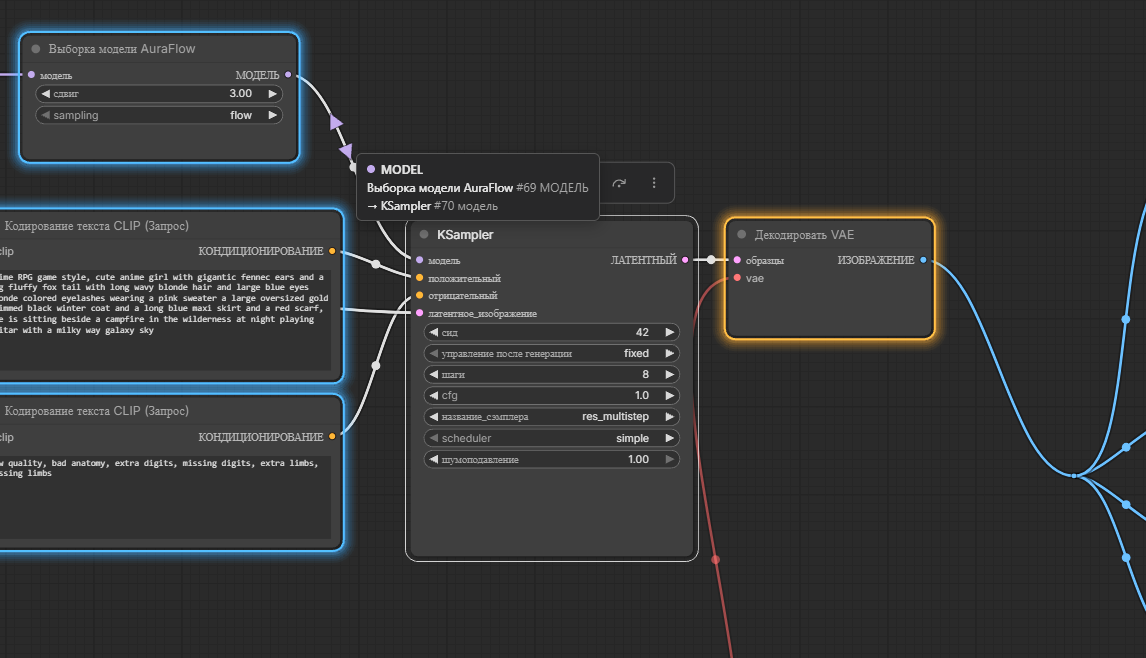
KSampler is selected: what feeds it is outlined in blue, what it feeds in amber. The pointer rests on a wire, which names its ends and shows the two arrows that carry the view to them. On the right, one output's wires share a trunk.
What it does
- What feeds a node, and what it feeds. Select a node and everything it depends on is outlined in blue, everything that depends on it in amber, each with a soft glow of its colour, and the rest of the graph fades, wires and prompt boxes included. Select several and they light up together; a node between two of them is outlined in violet. Frontend reroutes and Reroute nodes are followed like any other link.
- What a wire is. Rest the pointer on a wire for a moment and a tooltip
names its type, the output it leaves and the inputs it reaches, and what went
along it in the last run:
1x1536x1024x3 float32for an image, the head of the text for a string,latent 1x16x128x128 float32,ModelPatcher: Flux. Where wires overlap, each one is described. - Where a wire leads. Two arrows in the wire's colour appear on the wire beside the resting pointer, one pointing back along it to the output it leaves, one ahead to the input it reaches, and a click on one carries the view there, slowly enough to follow. They stand wherever the pointer is, so a wire too long to see either end of can be followed from the middle; when several of the wires under the pointer leave one output, the arrow ahead frames every input they reach. Where the view lands, the node flashes in the wire's colour, twice, and fades. Zoomed in, the arrows grow with the wire. The wire itself stays drawn.
- One trunk for a fan of wires. Wires that leave one output for inputs standing in a column, a CLIP into both prompts or a VAE into several decoders, run as one trunk that splits just before the column, at a small dot, instead of each crossing the graph on its own. It is drawn as a reroute in front of the column would draw it, in every link render mode, but nothing is added to the graph: the links stay as they are. A click, the tooltip and the arrows find the trunk like any wire, and the arrow ahead on it frames every input it splits to. A wire through a reroute of yours keeps its own line.
- What the next run computes again. Rest the pointer on Run and every node the run needs is outlined: green where its result comes from the cache, orange where it is computed again, yellow where it is computed on every run, dashed orange where only a lazy input asks for it, which the node may or may not do. Above each node computed again stands the time it took the last time it was computed, and a note under the button sums it up: computed again 2, from the cache 3, about 40 s. The answer comes from ComfyUI's own cache, so a run from another tab, an entry the cache let go and a seed that changes after every run all count. Under Settings > Breeze > Forecast the marks can stay on the nodes all the time instead, renewed after every edit and every run.
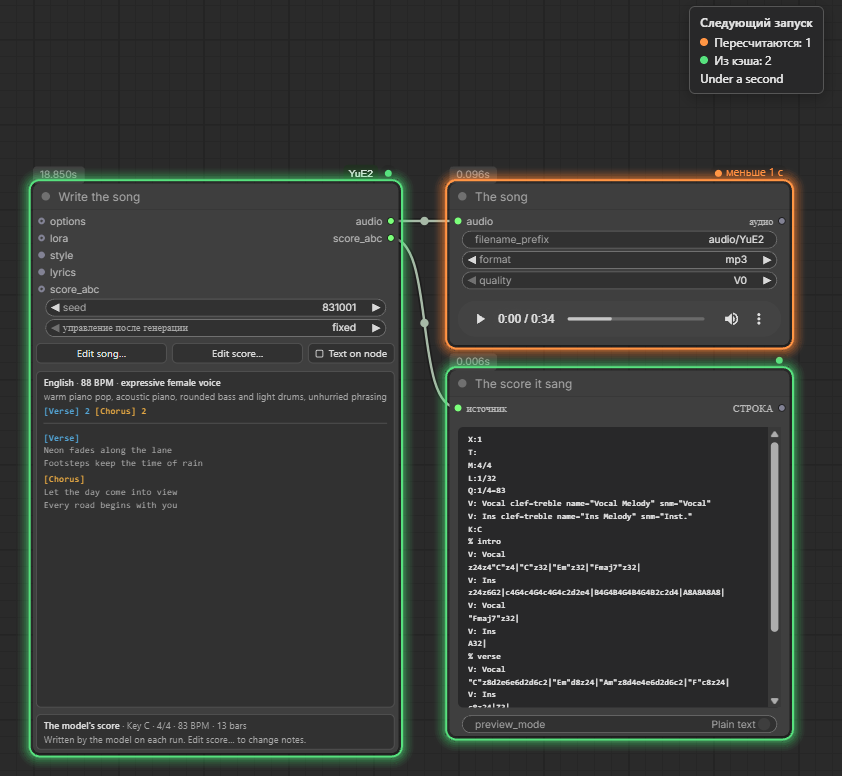
Only the format of the save node has changed, so the next run saves the song again and takes the 19 seconds of singing from the cache.
Each can be switched off under Settings > Breeze, which is also where the fade, the glow's radius and the three outline colours are set; a radius of 0 turns the glow off. A colour given in eight hex digits carries an alpha as well. With ComfyUI set to Russian the settings and the tooltip are in Russian; in any other language they read in English.
Next on the list: a compass to the nodes off screen.
Where the values on a wire come from
ComfyUI tells the browser about a node's result only when the node displays it. For everything else the pack's server side writes a line about each output while the prompt runs -- the shape and dtype of a tensor, the head of a string, a number -- and keeps that line, never the value, under the workflow the prompt was queued from. Nodes taken from the cache are described too, so a run in which nothing had to be computed again still fills every wire in.
The tooltip asks the server for those lines, so they survive a reload of the page and show in every tab with the same workflow open; they last until ComfyUI restarts. A line is shown only while the node it describes is still of the same type, and only on the top level of a workflow: inside a subgraph the tooltip gives the type and the ends, not yet the value. A prompt queued through the HTTP API carries no workflow and leaves nothing behind.
To read the outputs the pack wraps PromptExecutor.execute_async, to learn
which workflow is running, and three methods of ExecutionList, one of them
to time each node. The originals run first and unchanged; a description that
fails is dropped, never raised into the run. If an update of ComfyUI moves
any of them, the pack wraps none, logs a warning at startup, and the tooltip
shows no values and Run no forecast; everything else keeps working.
How the forecast is made
ComfyUI takes a node from its cache when the node's key is there: its class,
its inputs, what its IS_CHANGED says, and the same for everything upstream.
The browser cannot see that cache, so it sends the server the prompt Run
would queue, and the server builds the keys for it the way a run does and
looks them up in the cache the last run left. The prompt goes through what
ComfyUI does to a queued prompt first, node replacements and validation, so a
prompt ComfyUI would refuse gets the reason instead of a forecast. Handlers
other packs register for queued prompts are not called.
The cache is only read. IS_CHANGED does run, as it does when a prompt is
queued, so a LoadImage hashes its file; that happens on a thread of its own,
one forecast at a time. The cache can still change before the prompt runs,
which is why it is a forecast. The seconds are those of the node's last
computation in the same workflow, and a node no run has computed yet has
none.
Not yet supported
- With "Modern Node Design (Nodes 2.0)" turned on under Settings > Comfy > Nodes 2.0, the lineage fades the wires but not the nodes, and the forecast marks no nodes; the note under Run still sums it up.
- Inside a subgraph the forecast marks nothing; on the top level a subgraph's node takes the mark of what is inside it.
- A trunk only forms for inputs ahead of the output, on the left of their nodes; wires that run backwards, or into inputs too close to the output to gain anything, are drawn as before.
How it changes a workflow
It does not. Everything is drawn over the canvas, and anything an extension
has to remember is kept in the workflow's extra field. No node is added and
no link is rewired, so a workflow saved with these extensions loads and runs
the same without them. The principle is borrowed from
Zip Ties.
Install
The pack is in the Comfy Registry as
comfyui-breeze: find Breeze in ComfyUI-Manager's Custom Nodes Manager, or
install it with comfy-cli:
comfy node install comfyui-breeze
Or clone the repository into ComfyUI's custom_nodes:
cd ComfyUI/custom_nodes
git clone https://github.com/pytraveler/ComfyUI-Breeze
Either way, restart ComfyUI afterwards. The pack needs nothing beyond ComfyUI itself: no Python packages, no models.
Development
The suite runs without ComfyUI, torch or a browser:
python -m pip install pytest
python -m pytest tests -q
With Node.js 22 or later on PATH it also parses every script under web/js
and runs the browser-free parts of them against tests/js; without Node those
tests skip. CI installs Node and sets BREEZE_REQUIRE_NODE, so there they
fail instead.
The suite also carries the house rules, so CI and the release archive enforce them as well:
- ASCII only, outside the translations.
- Both changelogs describe every release, and the version in
pyproject.toml, the git tag and the GitHub release always agree. The release workflow refuses a tag that breaks either rule.