
ComfyUI-HunyuanVideo-Foley
Generate Audio from any video and or text
Nodes (6)
Running a foley model on a GPU that has no business hosting it
The unsung assembly node that loads four models you never think about
The node that turns a silent clip into footsteps, wind, and rain
A ~30% speedup you have to wait two minutes to get
The Foley loader that decides whether the whole thing fits your GPU
The tiny node that keeps batch foley from drowning you in audio
🎵 ComfyUI – HunyuanVideo‑Foley Video to Audio
A tidy set of nodes for Tencent HunyuanVideo‑Foley that runs on modest GPUs and scales up nicely.
⚡ Optimized Models Available
Pre-converted safetensors models with fp16 and fp8 variants are available for faster loading and reduced VRAM usage. The fp8 models enable operation under 8GB VRAM, and with block swap, you can run under 4GB VRAM. See model files section for download links and file details.
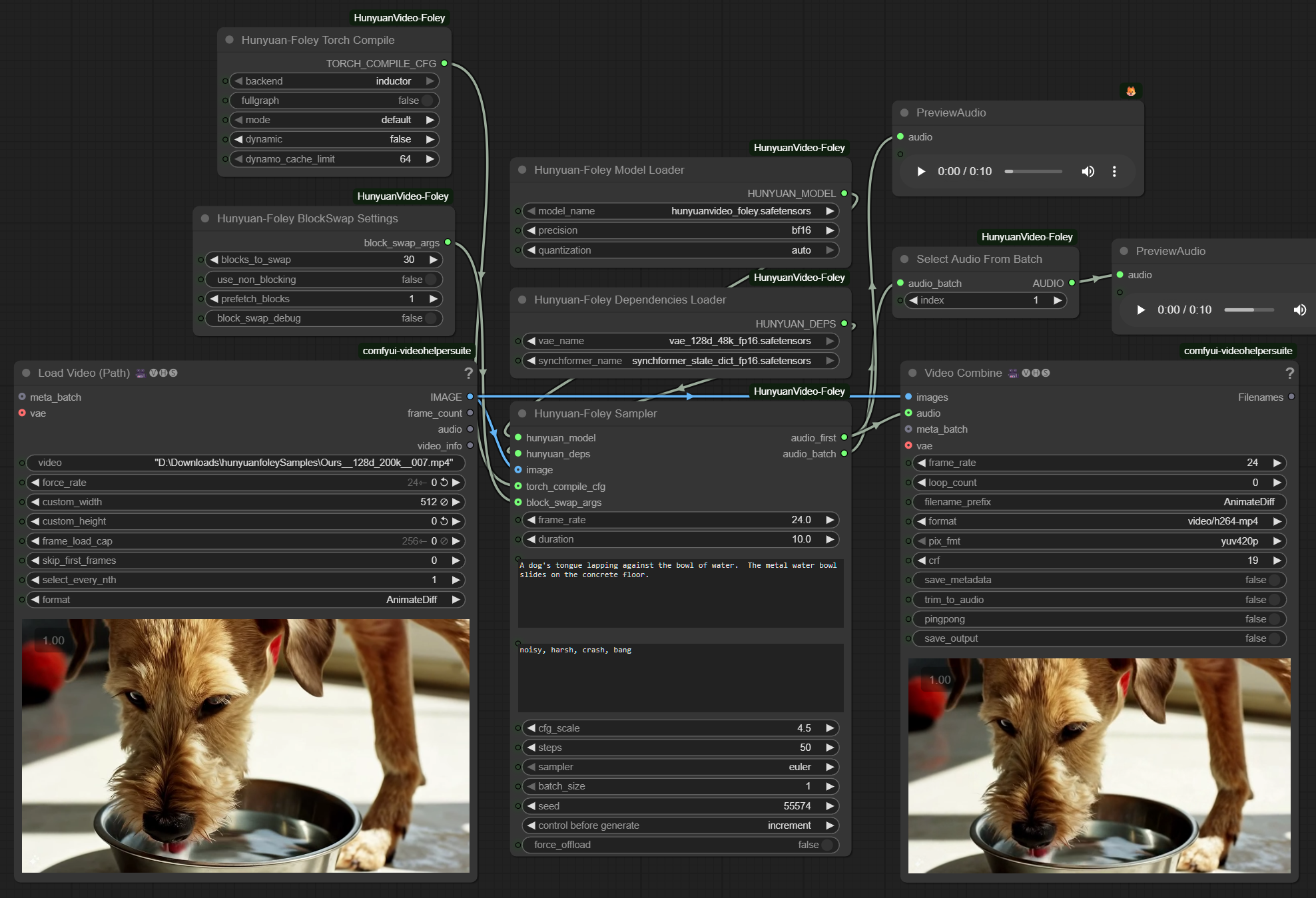
🚀 Node overview (start here)
-
Hunyuan‑Foley Model Loader – loads the main model. Two simple knobs:
- Precision: runtime math quality (bf16/fp16/fp32).
- FP8 Quantization (weight‑only): lowers VRAM usage < 12GB. Turn this on if you're GPU‑poor.
-
Hunyuan‑Foley Dependencies Loader – loads DAC‑VAE, SigLIP2, Synchformer, and CLAP.
-
Hunyuan‑Foley Sampler – makes the audio. Images are optional (works great as Text→Audio). Supports negative prompt and batching.
-
Hunyuan‑Foley Torch Compile (optional) – uses
torch.compilefor speed. First run compiles; repeats are ~30% faster. -
Hunyuan‑Foley BlockSwap Settings (optional) – enables under 4GB VRAM operation by offloading transformer blocks to CPU.
⚡ Quick start
- Drop Model Loader → Dependencies Loader → (optional) Torch Compile → Sampler.
- For Text→Audio, leave the image input empty. For Video→Audio, connect an image sequence and set
frame_rate. - Tweak Prompt and Negative Prompt. Leave sampler on Euler,
CFG≈4.5,Steps≈50. - Press Queue and preview the audio.
📁 Where to put the model files
Optimized safetensors files available at: https://huggingface.co/phazei/HunyuanVideo-Foley (converted safetensors with fp16 and fp8 variants)
I couldn't tell any difference between the quality with fp8 and fp16, so I'd suggest the 8. For those on a 3090 and lower, torch compile will only work with the e5m2 file.
Be sure to set quantization on the loader node to auto or fp8 if using an fp8 model or it will be upcast to fp16 in memory
Converted safetensors files:
hunyuanvideo_foley.safetensors             # ~10.3 GB  main model (fp16)
hunyuanvideo_foley_fp8_e4m3fn.safetensors  # ~5.34 GB  main model (fp8)
hunyuanvideo_foley_fp8_e5m2.safetensors    # ~5.34 GB  main model (fp8)
synchformer_state_dict_fp16.safetensors    # ~475 MB   sync encoder (fp16)
vae_128d_48k_fp16.safetensors              # ~743 MB   DAC‑VAE (fp16)
Place them in ComfyUI/models/foley/:
Original files: Download from Hugging Face: https://huggingface.co/tencent/HunyuanVideo-Foley/tree/main (original PyTorch files)
hunyuanvideo_foley.pth         # ~10.3 GB  main model
synchformer_state_dict.pth     # ~0.95 GB  sync encoder
vae_128d_48k.pth               # ~1.49 GB  DAC‑VAE
Tested with PyTorch 2.7 and 2.8.
⚙️ The Model Loader dropdowns
-
Precision = how carefully the math runs.
bf16/fp16are fast and standard;fp32is heaviest. Pickbf16(default) orfp16on 30‑series GPUs if you prefer. -
FP8 Quantization = store big Linear weights in FP8 to save memory. Compute still runs in
Precision, so sound quality holds. (Must be selected for fp8 safetensors)autotries to match the checkpoint or uses a safe default.- Expect less VRAM, not more speed.
💾 Memory & speed at a glance
-
Typical 5s / 50 steps on a 24 GB card:
- Baseline: ~10–12 GB
- With ping‑pong offloading (built‑in): ~9–10 GB
- With FP8 quant: subtract another ~4+ GB (under 8GB VRAM)
- With Block Swap: under 4GB VRAM It's slower the higher the swap, up to 60s for 5s, but it'll fit!
- Torch Compile: after the first compile, runs are ~30% faster
-
Under‑12 GB recipe: set FP8 Quant on, keep batch_size=1, steps ≤ 50. That's it.
🔄 Batching
batch_sizegenerates multiple variations at once. VRAM scales roughly with batch size.- Use Select Audio From Batch to pick the clip you like.
💡 Tips & fixes
- If you OOM, drop
batch_size, reducesteps, or enable force_offload in the sampler.
🙏 Credits
- Model & weights: Tencent HunyuanVideo‑Foley.
- ComfyUI and community for the scaffolding.
- This repo adds VRAM‑friendly loading, FP8 weight‑only option, block swap for ultra-low VRAM, and an optional torch.compile speed path.