
Anima Artist Mixer Forge
Forge fork of Anima-Artist-Mixer: a ComfyUI node pack for multi-artist mixing on the Anima model by hooking into its cross-attention layers.
Nodes (20)
The definitive 'is this artist actually doing anything' test
The one node to grab first for mixing Anima artists
:weight, @layers, and %timing — build them
Validate your Anima artist chain before you pay the encoding cost
Turn your A/B comparison series into one labeled grid
The manual Anima artist mixer, for when presets aren't enough
See the actual pixels an Anima artist changed — or prove it changed nothing
See what the Anima mixer is actually doing to your chain
Stabilizers, VRAM controls, and norm locks for Anima mixing
The node that makes multi-artist prompts on Anima actually work
Twelve one-knob mixing modes for Anima, from balanced to anchor-locked
Where the Anima artist mixing actually gets patched in
Measure where each Anima artist's style actually lives in the model
Read the probe results, and get a suggested chain back
Rehydrate a shared Anima mix from a single JSON string
Pack your entire Anima mix into one paste-able string
The friendly layer/timing controls for the Anima artist mixer
The Anima artist mixer node with a training-wheels guide built in
One slider for the 'my Anima mix flips between dominant artists' problem
Is that artist tag even real? This encoder-side check answers for free
Anima-Artist-Mixer-Forge
A ComfyUI custom node pack that enables multi-artist mixing for the Anima model by hooking into its cross-attention layers.
Forge notice: this is a community fork ("forge") of An1X3R/Anima-Artist-Mixer. It continues the v26 line (submitted upstream as PR #4) and adds new nodes going forward. Node names are unchanged, so workflows built for the original keep loading — but do not install both packs at the same time: they define the same node names and would shadow each other. On the ComfyUI registry this pack is
anima-artist-mixer-forge(the original isanima-artist-mixer).

First image in 60 seconds
You need the three Anima model files in your ComfyUI folders: the Anima
UNET (models/diffusion_models), the qwen_3_06b_base text encoder
(models/text_encoders), and qwen_image_vae (models/vae) — the same
files every plain Anima workflow uses.
- Install the pack (see Installation) and restart ComfyUI.
- Open the menu Workflow → Browse Templates, find
Anima-Artist-Mixer-Forge in the sidebar, and open 01_quick_start.
(On older frontends without the template browser: drag
workflow/01_quick_start.jsononto the canvas.) - Point the three loader nodes at your Anima files, then press Queue.
That's it — the template ships with three artists (@uof, @kieed, @ciloranko),
a working prompt, and a fixed seed, so the very first queue reproduces the
template's thumbnail. Then make it yours: put your artists (comma
separated) in the top box of the big node and your prompt in the bottom
box, and switch preset to strong_style when you want more style.
The other templates in the browser: 02_preset_sample is the multi-node
preset route (AnimaArtistPack -> AnimaArtistPresetApply) you graduate to
when you need per-artist weights and routing;
03_compare_artists renders a same-seed series (baseline / each artist
solo / full mix) and returns it as ONE labeled contact-sheet image;
04_probe_autobalance measures each artist's real influence and renders
the auto-rebalanced mix in the same queue; and
artist-layer-role-routing shows character / clothing / background
layer routing.
What it does
Anima uses an LLM as its text encoder. When multiple artist tags are stacked in a single prompt, the LLM's contextualization causes them to interfere with each other, producing a conditioning that resembles neither artist clearly. This node encodes each artist independently and mixes them at the model's cross-attention layer, sidestepping the interference at the prompt-encoding stage.
The bundled AnimaArtistPack node provides a one-shot experience: write your artist list (separated by commas or newlines) in one text box, your main prompt in another, and the node handles splitting, encoding, and packaging automatically.
Product principle: the default path is predictable artist mixing on top of the base model. It should preserve the prompt and expose artist influence in a controllable way; automatic low-drift routing and stabilizers are opt-in tools, not the default style source.
The current release line (v26; Forge releases start at v27) keeps the original controllable artist-mixer path, then makes the preset workflow clearer and safer. balanced stays close to the original mixer behavior; prompt_passthrough uses the no-mixer/direct-prompt path while preserving positive 1.2::tag:: weighting syntax; drift_auto and the scene presets are opt-in low-drift routes. v26 also supports prefix artist weights (1.2::artist::), base-prompt tag weights (1.2::masterpiece::), negative artist weights for style subtraction, timing fades (%0.0-0.45~0.1), recipes, the layer probe, VRAM controls, a CFG correctness fix for batch sizes > 1, sample workflow fixes, and tests/CI. Existing per-artist layer and timing routes remain supported. See CHANGELOG.md.
Quick links
- Simple starter workflow — safe preset route using
AnimaArtistPresetApply - Node usage workflows — Chinese guide covering all bundled nodes
- Layer role workflow — character / clothing / background routing example
- Full documentation — usage, parameters, modes, stabilizers, performance tips
- Changelog — version history
- Issues — bug reports, feature requests
- Discussions — usage questions, results sharing
Installation
Via ComfyUI-Manager or comfy-cli, using the registry id:
comfy node registry-install anima-artist-mixer-forge
Or clone into your ComfyUI custom_nodes directory:
git clone https://github.com/Rinne414/Anima-Artist-Mixer-Forge
Restart ComfyUI. No extra dependencies.
If the original Anima-Artist-Mixer is installed, remove or disable it first — both packs define the same node names.
Requirements
- Anima model only — depends on Anima's built-in
LLMAdapter(preprocess_text_embeds) - Use the same CLIP loader that Anima's own text-encoding workflow uses (the one whose tokens carry
t5xxl_ids) - Inference only
Quick start
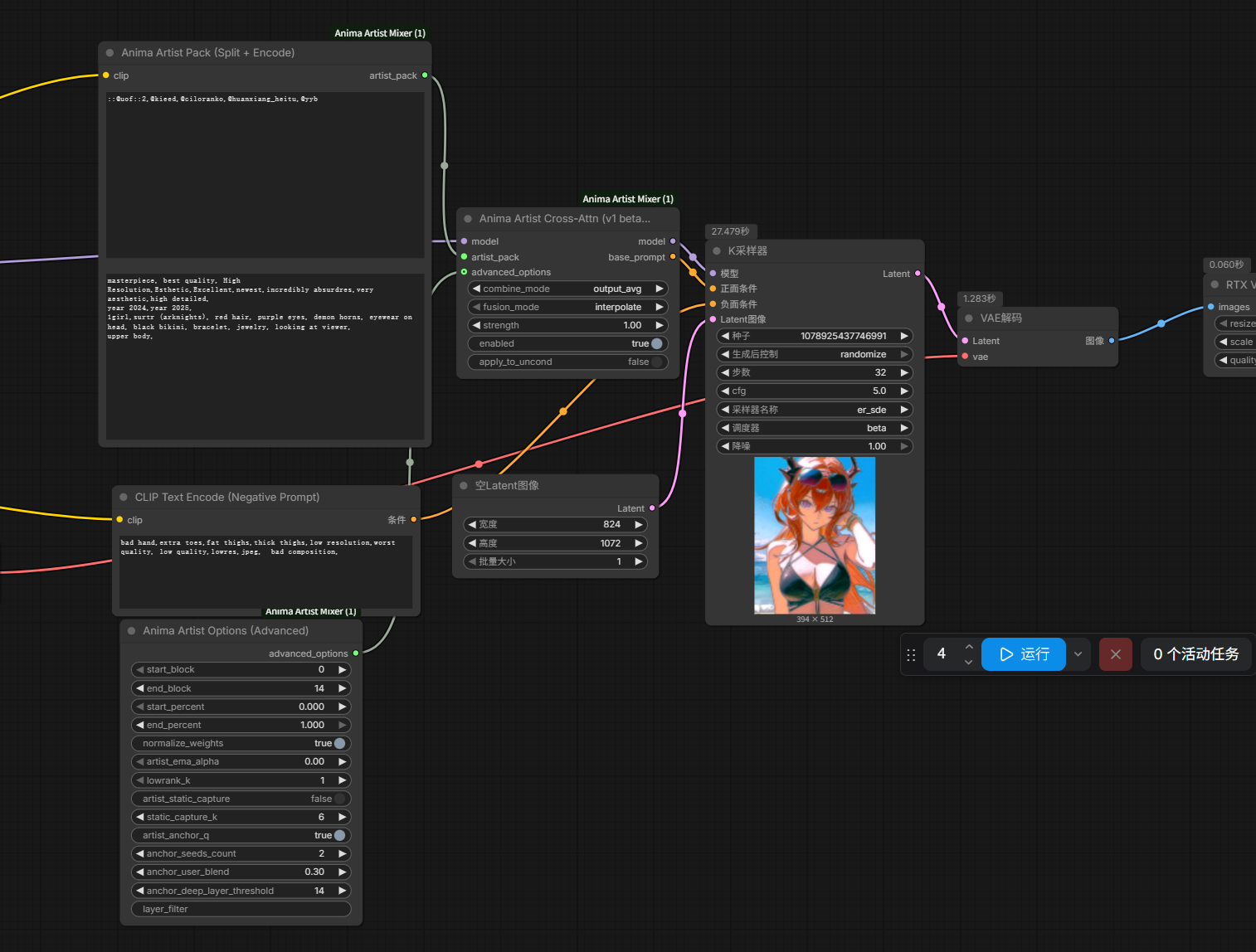
One-node quick start: AnimaArtistBasic
For the simplest setup, use Anima Artist Basic (Recommended). It wraps
AnimaArtistPack + AnimaArtistPreset + AnimaArtistPresetApply in a single node:
model/clip— your Anima model and its Anima-compatible CLIP loaderartist_chain— your artists, comma or newline separatedbase_prompt— your main prompt (do not repeat artist names here)preset—balanced(default),strong_style,drift_auto, orprompt_passthroughintensity— preset strength multiplier, range0–2(default1.0)enabled— master switch
Wire its model output to KSampler's model input and its base_prompt output to
KSampler's positive input. Move to the multi-node route below when you need presets
beyond those four, per-artist layer/timing routing, recipes, or the inspector.
Open sample workflow.json first. It uses the current
AnimaArtistPack -> AnimaArtistPresetApply preset route and avoids the old
manual widgets that are ignored when a preset is connected.
Open workflow/node_usage_showcase/README_zh.md
when you want examples for every node in the pack.
Open workflow/artist-layer-role-routing.json
for a bundled AnimaArtistPreset -> AnimaArtistPresetApply character /
clothing / background layer-role example using separate per-artist @layers
windows.
- Top text box of
AnimaArtistPack: your artist chain (comma or newline separated) - Fastest first run: use
AnimaArtistStarter, fillartist_table, then follow its in-UI guide - Use
AnimaArtistChainBuilderwhen you do not want to hand-write1.2::artist::,@layers, and%timing - Builder's three visible rows are only shortcuts; use its
artist_tablefield for larger chains - Use
AnimaArtistChainPreviewto validate a chain before paying the CLIP encoding cost - Bottom text box: the main prompt (no need to repeat artist names here)
- Wire
AnimaArtistPresetApply'sbase_promptoutput directly to KSampler's positive input - For a sane first run, connect
AnimaArtistPresetwithpreset = balanced, then wire it intoAnimaArtistPresetApply - For common layer/timing tweaks, use
AnimaArtistSimpleOptions; keepAnimaArtistOptions (Expert)for stabilizer A/B and debugging - If the workflow also uses regional prompting, Forge Couple-style routing, or other attention patchers, start with
preset = compatibility_safe - When a workflow behaves strangely, connect
AnimaArtistInspectorand read the effective weights / warnings directly in ComfyUI - Report/preview nodes (
AnimaArtistInspector,AnimaArtistChainPreview,AnimaArtistProbeReport,AnimaArtistStarter) print through the node's ownui.textpanel; on older ComfyUI frontends that do not render it, wire the node'sSTRINGoutput into a Show Text node instead
For full parameter explanations and recommended combinations, see docs/USAGE.md.
Recommended defaults
For most users, start with:
AnimaArtistStarter:
recipe    = balanced
layout    = layer_scheduled

or:

AnimaArtistPreset:
preset    = balanced
intensity = 1.0

AnimaArtistPresetApply:
connect model + artist_pack + preset
Manual equivalent:
combine_mode = output_avg
fusion_mode  = interpolate
strength     = 1.0
artist_ema_alpha = 0.0
match_base_norm  = False
To weight individual artists within the chain, use prefix injection weights:
wlop, 1.2::sakimichan::, (krenz:0.7), -0.4::pixiv_style::
(name:1.2)— CLIP-side weighting (same as SD/A1111), non-linear, applied at text encoding1.2::name::— injection-side weighting, linear and predictable, applied at cross-attention output-0.4::name::— negative injection weight: subtracts that artist's style direction instead of adding it (style subtraction); range is [-4, 4]1.2::masterpiece::in the base prompt — tag weighting, expanded to normal prompt weight syntax before encoding- Older postfix forms like
::name::1.2still load for compatibility, but new examples use prefix syntax - Any valid injection weight automatically disables normalization at runtime so explicit weights stay absolute
- Per-artist layer routing is supported with
@layers:wlop@0-8, krenz@33%-67%, [email protected] - Per-artist sampling timing is supported with
%start-end:wlop@0-8%0.0-0.45, krenz@9-18%0.45-0.85 @0.0-0.5is a normalized layer range, not sampling timing. Use%0.0-0.5for the first half of sampling progress.- Timing windows can fade in/out smoothly with
~fade(v26+):wlop%0.0-0.45~0.1ramps the artist's weight with a smoothstep over a 0.1-progress-wide edge instead of switching on/off abruptly - Anima artist tags that start with
@are safe:@wlopremains the artist name; only a final numeric suffix like@0-8,@33%-67%, or@0.33-0.67is treated as layer routing - When combining weight and routing, put the route inside the weighted target:
1.2::@artist_a@0-8::, not1.2::@artist_a::@0-8
Compatibility notes
This node wraps Anima cross-attention. Other nodes that also patch attention, regional prompts, Forge Couple-style routing, or model forward wrappers can change the same execution path. If the artist effect disappears or becomes very weak, use AnimaArtistPreset(preset = compatibility_safe) first. It forces the tolerant concat + concat_with_base path and disables cache-heavy stabilizers. Use AnimaArtistInspector to confirm parsed artists, weights, layer routes, timing routes, block map, and effective normalize state.
Cross-seed stability
In multi-artist setups, the same prompt with different seeds tends to produce noticeably different style mixes — sometimes one artist dominates, other times another, even at equal weights. This is structural to how cross-attention interacts with seed-driven hidden state.
v26 keeps balanced close to the original mixer behavior by default. Common layer/timing controls live in AnimaArtistSimpleOptions; optional stabilizers live in AnimaArtistOptions (Expert), ordered from light to heavy:
| Stabilizer | Strength | Notes |
|---|---|---|
| match_base_norm + norm_lock_mode=token + norm_lock_scope=per_artist | optional | Per-artist token RMS lock; reduces seed-specific style-strength spikes before artists are mixed |
| artist_ema_alpha | light | Temporal EMA across sampling steps |
| combine_mode = lowrank_avg + lowrank_k | medium | Deterministic low-rank constraint on multi-artist deltas |
| artist_static_capture + static_capture_k | heavy | Freeze artist attention after K warmup steps. This is an expert A/B control; current presets avoid it by default after multi-artist evidence showed it can over-constrain style. |
| stabilizer_end_percent | optional | Lets EMA/static/anchor stabilizers stop after an early sampling window; keep 1.0 for full-pass behavior, try 0.4-0.6 when late-step samplers need dynamic motion. |
| contribution_balance | optional | Delta-strength equalizer for artist dominance flips; default off until it has stronger live evidence |
| mixed_delta_cap | optional | Caps the final mixed artist delta against base attention energy before fusion; default off while it is evaluated as a live A/B candidate |
| artist_anchor_q | heaviest | Replace user-seed Q with a fixed-seed anchor's Q; anchor_lock now uses one anchor, user-Q blend, strength 0.9, and auto layers 9-15 to reduce pose artifacts |
| anchor_base_norm_ref | optional | Anchor the norm reference too when testing anchor_q + match_base_norm; off by default and mainly useful for A/B |
Recommended progression: start with balanced for original-style behavior, then use stable_seed or drift_auto for content-safer cross-seed work. Use prompt_passthrough only when you want the no-mixer/direct-prompt path while keeping positive artist weight syntax such as 1.2::@artist::; it returns the unpatched model and does not support negative style subtraction, layer routes, or timing routes. For lower drift, drift_auto keeps broad 4+ artist prompts on the style-mixer path: wide / background-heavy scenes route to scene_lock, simple fullbody and broad portrait/street prompts route to drift_soft, 4+ artist close-ups route to stable_seed plus mixed_delta_cap_ratio=0.75, and smaller close-up face prompts route to face_lock. Use compatibility_safe explicitly for regional prompting or other attention patchers, not as the default multi-artist style path. See docs/USAGE.md for detailed mechanics and tuning.
Style amplification
strength accepts values in [0, 4]:
0 ~ 1— interpolation between base and artist (strength=1= pure artist replacement)1 ~ 4— CFG-style extrapolation:out = base + strength * (artist - base), amplifying the artist's deviation from base for stronger style
1.5 ~ 2.5 is a common range for "stronger style without breaking content"; pushing past 3 tends to oversaturate.
Performance notes
Generation time scales with the number of active artists, active layers, and active sampling steps. In output_avg / lowrank_avg, each active layer computes the base attention plus one attention pass per active artist, so multi-artist balanced is expected to be slower than no mixer.
| Path | Speed expectation |
|---|---|
| no mixer / prompt_passthrough | close to the ordinary Anima prompt path |
| balanced, drift_soft, scene_lock, face_lock, stable_seed | slower as active artist count increases |
| fast_preview / compatibility_safe | usually faster concat path, but less precise as an artist mixer |
| layer routes / timing routes | reduce cost only for the layers or sampling steps where artists are inactive |
| artist_static_capture / artist_anchor_q | expert A/B controls; may help some repeated-seed workflows but can add overhead or constrain style, so they are not the default speed recommendation |
For speed, first limit the active artist count, layer range, or sampling window through AnimaArtistSimpleOptions. Quality impact is prompt- and artist-dependent, so check the result rather than treating a faster setting as automatically equivalent.
Measuring where styles live (v26)
Instead of guessing @layers routes, wire AnimaArtistProbe between your model loader and the sampler, run one generation, and read AnimaArtistProbeReport (connect any post-sampler output as its trigger). The report shows each artist's per-layer style influence (||artist_out − base_out|| / ||base_out||) as a bar chart and suggests a concrete artist@lo-hi route per artist. The probe pass does not alter the generated image. Since v27.2 the report opens with a per-artist contribution split (share of total influence with a plain-language verdict — dominant / balanced / weak / negligible) and per-step influence curves showing when in sampling each artist matters.
Checking whether each artist actually works (v27.1)
The diagnostics nodes answer "is this artist doing anything, what did it change, and how strongly" — and since v27.6 they can also fix what they find:
- Anima Artist Tag Check (Encoder) — wire it to
AnimaArtistPack's output. Zero extra cost: it reuses the conditionings already in the pack and flags[DUPLICATE]entries (repeats or aliases that encode the same style vector) and exact[NO-OP]entries. Since v27.3 it also checks every entry against a bundled Danbooru tag vocabulary (~140k tags with post counts and aliases): known artist tag, alias of a canonical tag, wrong-category tag (a character tag in the artist chain), or not-in-list.AnimaArtistChainPreviewruns the same vocabulary check before you pay any encoding cost. Since v27.4 a not-found entry also suggests the closest artist tags — "did you meanyuchi_(salmon-1000)(208 posts)?" — covering missing disambiguators and typos. Caveat kept honest on purpose: the list is a filtered snapshot, so "not found" can also mean a small/new artist below its threshold — the solo A/B below stays the definitive test. Since v27.6 the report also ranks pairwise style-direction similarity (cosine between artist-minus-base deltas) so near-redundant pairs stand out. - Anima Artist A/B Variants — feed it your chain, wire its
artist_chainoutput intoAnimaArtistPack.artist_chainand itslabeloutput intoSaveImage.filename_prefix. One queue then renders a same-seed comparison series (no-mixer baseline, full mix, plussolo_each/leave_one_out/cumulativevariants). This is the definitive "is artist X doing anything" test. Since v27.6, wire the decoded images and thelabeloutput into Anima Artist Contact Sheet to get the whole series back as one labeled comparison grid instead of scattered files. - Anima Artist Impact Map (A/B Diff) — give it two same-seed renders (for example
01_no_mixervs03_solo_wlop) and it returns an[A | B | change-overlay]triptych, an impact score, changed-area %, composition-vs-texture and luminance splits, and a plain-language verdict ("no visible change" when an artist or setting did nothing). - Anima Artist Probe Report — besides the contribution split and per-step curves, since v27.6 it outputs a ready-made
suggested_chain: weights that equalize the measured per-artist influence (routes preserved), wireable straight back intoAnimaArtistPack.
See workflow/node_usage_showcase/07_diagnostics_tagcheck_ab_impact.json for all three wired together.
Since v27.2 the node menu groups the pack into Anima/Basic, Anima/Setup, Anima/Diagnostics, and Anima/Recipes (menu-only; node ids and saved workflows are unaffected).
Sharing recipes (v26)
AnimaArtistRecipeSave packs the artist chain plus the full effective configuration (combine/fusion/strength/advanced options) into one JSON string; AnimaArtistRecipeLoad turns it back into artist_chain + a preset payload you can wire straight into AnimaArtistPresetApply. Paste-friendly for sharing exact mixes with other users.
Important caveat
This node cannot achieve the near-lossless artist mixing that SDXL does. Anima's text encoder is non-linear, so any mixing strategy introduces some distortion. What this node does is make that distortion controllable. Style-similar artists mix well; style-divergent artists may "regress to the mean" into a compromise look — lowrank_avg accepts more of this regression in exchange for cross-seed stability.
Development
The implementation lives in the anima_mixer/ package (nodes.py is a compatibility shim). Run the broad local test suite with:
python -m pytest -q
CI runs ruff plus pytest on Python 3.10/3.12 for pushes to main and all PRs.
See docs/DEVELOPMENT.md for how to add a new node and how releases are published to the ComfyUI registry.
Acknowledgements
This pack is a fork of An1X3R/Anima-Artist-Mixer — full credit to An1X3R for the original project. Special thanks to 汐浮尘/utowo for co-development, testing, and design contributions. The AnimaArtistPack split-and-encode design comes from their improvement.
License
MIT License. See LICENSE for the full text.