
ComfyUI Input Thumbnails
A ComfyUI custom node that adds a fast, visual thumbnail gallery picker for browsing and selecting images from the input directory. Does not replace core Load Image.
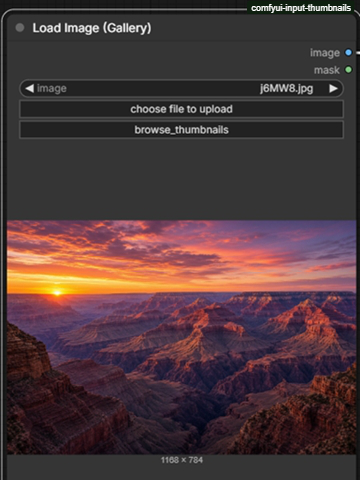
Load Image (Gallery)
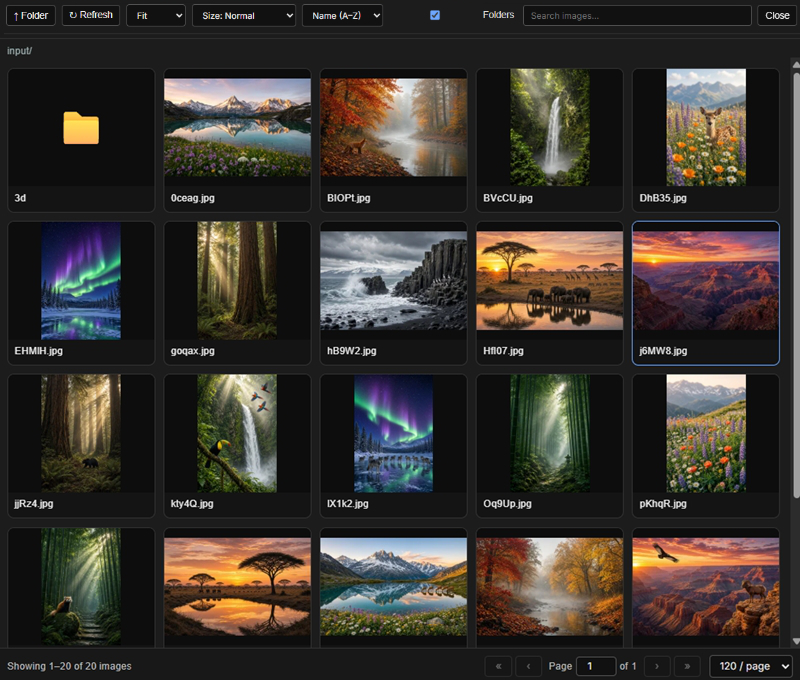
A small ComfyUI custom node that shows thumbnails while you browse ComfyUI/input.
- New node: Load Image (Gallery)
- Does not replace the built-in Load Image node
- Does not delete files
- Stays inside the
input/folder (rejects..path traversal) - Subfolder navigation, search, sort by name / newest / oldest
- Same outputs as Load Image:
IMAGE+MASK
Install
-
Copy the
ComfyUI-InputThumbnailsfolder into:ComfyUI/custom_nodes/ComfyUI-InputThumbnails -
Restart ComfyUI.
-
Hard-refresh the browser (
Ctrl+F5/Cmd+Shift+R).
Use
- Add node: image → Load Image (Gallery)
- Click a folder card to enter it, ↑ to go up.
- Click a thumbnail to select it.
- Wire
imageinto the rest of the workflow as usual.
The dropdown and upload button still work. The grid is just the visual picker.
Files
ComfyUI-InputThumbnails/
  __init__.py
  load_image_gallery.py   # node + /input_thumbs/list API
  js/input_thumbnails.js  # thumbnail grid UI
  README.md
Thumbnail Cache (.cache/thumb)
To maximize gallery performance and eliminate lag when browsing folders with many or large images:
- Location: Thumbnails are cached in
ComfyUI/input/.cache/thumb/(created automatically). - Namespaced & Isolated: All cache operations are strictly confined to
.cache/thumb/. It will never modify user images or interfere with other custom nodes using.cache/. - Filename & Hash Matching: Cached thumbnails match the source filename and SHA-256 content hash. If an image is modified or overwritten, the cache updates automatically and obsolete thumbnails are cleaned up.
- Subfolder Structure: Cache files mirror your input subfolder hierarchy and shard by hash prefix (
input/.cache/thumb/<subfolder>/<hash[:2]>/<filename>_<hash>.webp). - High-Resolution Quality (Up to 320px): Thumbnails are generated as optimized WebP images up to 320px, providing ultra-sharp Retina rendering on standard grids and native clarity when scaling up.
- Smooth & Non-Blocking: On first load, real images stream immediately while thumbnails generate in background daemon threads (ComfyUI never freezes and exit is never blocked).
- Hidden from UI: The
.cachedirectory is filtered out so it never appears as an image card or in the node's dropdown list. - Full Resolution Execution: Caching is strictly for visual browsing. When running a workflow, the node always loads the original, uncompressed full-resolution image.
- Safe to Delete: You can safely delete
input/.cache/thumb/at any time to free up disk space; it will automatically recreate itself on demand.
Thumbnail Sizes, Display Styles & Settings
You can customize the thumbnail size and image fitting in the gallery using the header dropdowns:
Thumbnail Sizes
- Size: Normal (Default, 1x): 140px box, compact grid for browsing large collections quickly.
- Size: Large (2x): 280px box, 2x enlargement for checking details without leaving the picker.
- Size: X-Large (3x): 420px box, 3x ultra-large preview cards for high-detail inspection.
Display Styles
- Fill (Default): Scales the image to fill the card square, cropping excess edges (
object-fit: cover). - Fit: Scales the full image to fit inside the square without cropping, showing letterboxing on non-square ratios (
object-fit: contain). - Stretch: Stretches the image to fill the entire square (
object-fit: fill). - Center: Displays the center of the image at 1:1 unscaled resolution, clipping any overflow (
object-fit: none).
All display style and thumbnail size choices are persisted on the server in ComfyUI/input/.cache/thumb/settings.json. If this file is ever missing or corrupted, it automatically self-heals by restoring default settings.
Pagination & High-Capacity Browsing
To smoothly support folders containing thousands of images without browser DOM lag or memory bloat:
- Pagination Controls: Navigate large directories using « First, ‹ Previous, Page [X] of Y, Next ›, and Last ».
- Adjustable Page Size: Choose between 60, 120, 240, 300, or 600 items per page via the footer dropdown (default: 60).
- Global Search: The search box searches across all images in the current folder, then paginates the matching results.
- Index Out-of-Bounds Protection: Automatic index clamping and input sanitization prevent invalid page requests.
- Settings Persistence: Your chosen page size is saved alongside your display style in
input/.cache/thumb/settings.json. - Memory Safety: Blob URLs from previous pages are revoked automatically during navigation to keep memory usage low.
Sorting & Folder Display
Customize your browsing order and view in the gallery header:
- Sorting Modes:
- Name (A → Z) (Default): Natural alphanumeric sort (
image2appears beforeimage10). - Name (Z → A): Reverse alphanumeric sort.
- Newest First: Most recently modified images first (using file
mtime), with filename tie-breaking. - Oldest First: Oldest modified images first.
- Name (A → Z) (Default): Natural alphanumeric sort (
- Folder Toggle:
- A checkbox in the header allows you to enable or disable displaying subfolder cards in the grid.
- When checked (Default), subfolder cards appear on Page 1 at the top of the grid.
- When unchecked, subfolder cards are hidden, dedicating 100% of the grid to images.
- Subfolder navigation is always preserved via the ↑ Folder button.
- Settings Persistence: Both
sort_byandshow_folderspreferences are saved ininput/.cache/thumb/settings.json.
Notes
Do not install this and a pack that also overrides core LoadImage if you only want one picker. This pack uses its own class name (LoadImageGallery), so it will not fight those packs — you will simply have two different loader nodes.
License
GPL-3.0-or-later. See LICENSE.txt.