
ComfyUI Dynamic LoRA Loader Stack
A ComfyUI custom node, Dynamic LoRA loader stack. Toggle each LoRA on or off without setting it to None, and set a dynamic slot count from 1 to 50. Includes a single-strength node and a split model/CLIP strength node, supports batch-loading LoRA settings from a text config without requiring manual, individual setup.
Nodes (2)
Dynamic LoRA Loader Stack
A ComfyUI custom node pack in the spirit of Lora Loader Stack (rgthree): several LoRA dropdowns in one node, with model and clip in and out.
You can toggle each LoRA on or off without setting it to None, and set a dynamic number of LoRA slots (1–50, default 5).
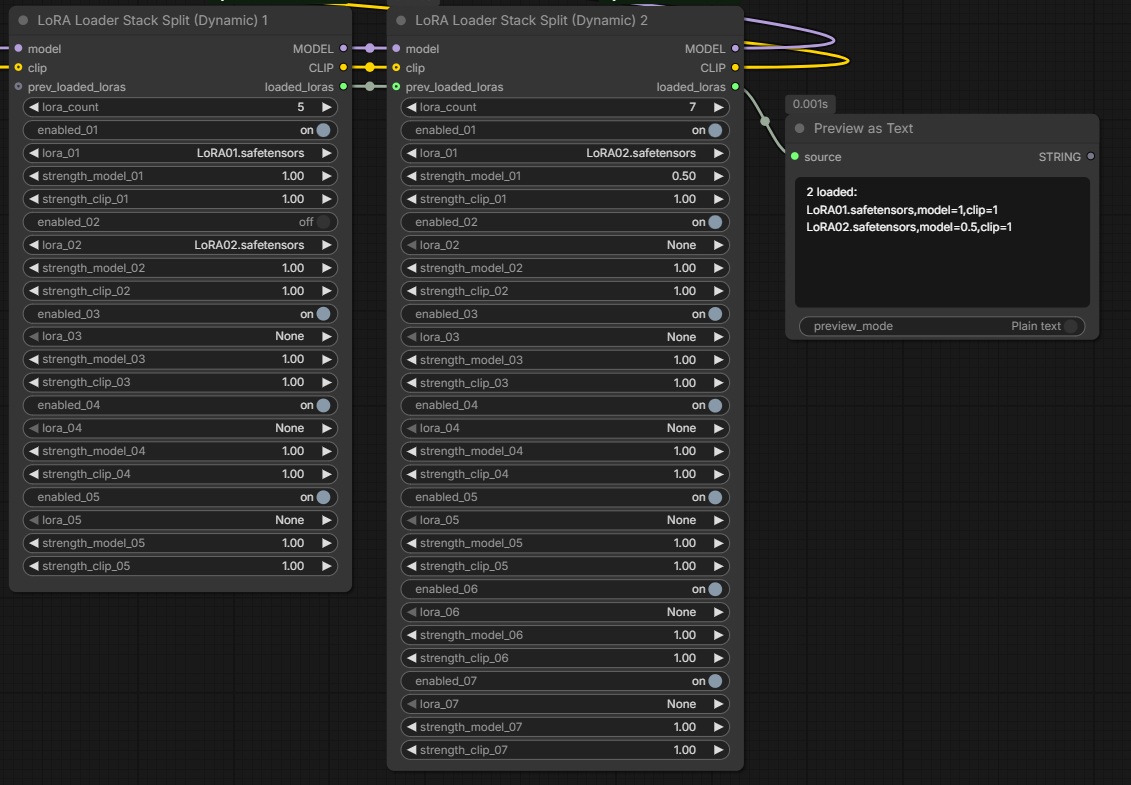
Two nodes ship together. One install from ComfyUI Manager gives you both.
| Node | Strength |
| --- | --- |
| LoRA Loader Stack (Dynamic) | One strength_NN, applied to both model and CLIP |
| LoRA Loader Stack Split (Dynamic) | Separate strength_model_NN and strength_clip_NN |
Features
Toggle a LoRA on or off without setting it to None.
Each slot has an enabled_NN checkbox. Uncheck it to skip that LoRA. The dropdown and strengths stay as they are, so you can turn it back on without picking the file again.
Dynamic number of LoRA slots.
Type a count in lora_count. Default is 5, range is 1–50. The node shows only that many selectors and hides the rest. Lowering the count does not wipe the hidden slots.
Also:
- Numbering starts at
01. - Strength range -100 to 100, step
0.01, same as the official Load LoRA node. clipis optional. Leave it disconnected to patch the model only.loaded_lorasis a text summary of what was actually applied.- Chain nodes by wiring the previous
loaded_lorasinto the nextprev_loaded_loras. The last output lists the whole chain. config_lorasis an optional preset input string in the same format asloaded_loras. When wired, it configures which LoRAs and strengths to apply for this node instead of using the manual slot widgets.
Install
-
Copy the
ComfyUI-InputThumbnailsfolder into:ComfyUI/custom_nodes/ComfyUI-InputThumbnails -
Restart ComfyUI.
Slot layout
Single strength:
enabled_01
lora_01
strength_01
Split strength:
enabled_01
lora_01
strength_model_01
strength_clip_01
A slot loads only when it is within lora_count, enabled, not None, and at least one strength is non-zero.
loaded_loras & config_loras format
Single strength:
2 loaded:
lora03.safetensors,strength=2
lora04.safetensors,strength=-20
Split strength:
2 loaded:
lora01.safetensors,model=1,clip=1
lora02.safetensors,model=1.2,clip=1.5
Wire loaded_loras to a Show Text node if you want to see it, or leave it disconnected if you do not.
Preset Input (config_loras)
You can wire a string in loaded_loras format into config_loras to drive the node like a preset:
- Format Interoperability:
- The Single Strength node accepts both formats (if split format
model=X,clip=Yis provided, it uses the strength frommodel). - The Split Strength node accepts both formats (if single format
strength=Xis provided, it assigns both model and CLIP the same value).
- The Single Strength node accepts both formats (if split format
- Validation:
- If disconnected or the input string is empty, the node leaves all existing LoRA slots unchanged.
- If connected and provided with text,
config_lorasrequires a minimum of 1 LoRA (e.g.1 loaded:\n...). - If the header count does not match the number of LoRA lines, if lines are malformed, or if strengths are invalid, out of range [-100.0, 100.0], or exceed 2 decimal places (step 0.01), an error is raised and the workflow will not run.
- Security: LoRA names are strictly inspected to disallow directory traversal (
..), absolute paths, null bytes, and dangerous injection characters. - Missing LoRAs: If a LoRA in the preset is not installed, it is safely skipped.
- UI Synchronization: Connecting a preset string (from a Primitive or Text node) or running the workflow automatically updates the node widgets (
lora_count, dropdown selectors, and strength values) on the canvas to match the preset. - Cross-Platform Compatibility: Fully compatible with all operating systems supported by ComfyUI (Windows, Linux, macOS). Supports both
/and\path separators, all line endings (CRLF, LF, CR), case-insensitive fallback matching (e.g. sharing workflows from Windows to Linux), and international UTF-8 filenames. - Context Menu Options: Right-clicking the node provides "Apply Preset from Clipboard" and "Apply Preset from Text..." to quickly populate node widgets directly from copied presets.
Security
This pack does not make network calls, run shell commands, read environment variables, or touch files outside ComfyUI's normal LoRA loader. It only calls ComfyUI's LoraLoader with names from your models/loras folder. Input presets (config_loras) and chained stack summaries (prev_loaded_loras) are strictly sanitized against path traversal, control characters, and command injection.
License
GPL-3.0-or-later. See LICENSE.txt.