
comfyui-sbs-long-video
A video-first custom node package for converting flat video into 3D stereoscopic output inside ComfyUI using Depth Anything 3 AI model for depth estimation on monocular input video.
Nodes (3)
ComfyUI Stereo Long Video
ComfyUI Stereo Long Video is a video-first custom node package for converting flat video into 3D stereoscopic output inside ComfyUI. Using the Depth Anything 3 AI model for depth estimation on a monocular input video. Resulting in a SBS or top/bottom stereo video that can be used on 3D displays.
Instead of pushing long clips through image-batch workflows, this project treats video as a stream:
ffmpegdecodes frames in chunks- depth is estimated once per chunk with a long-lived runner
- stereo reprojection happens on the GPU with
torch.grid_sample - frames are streamed into an encoder instead of being kept in RAM
- source audio can be muxed back into the final file
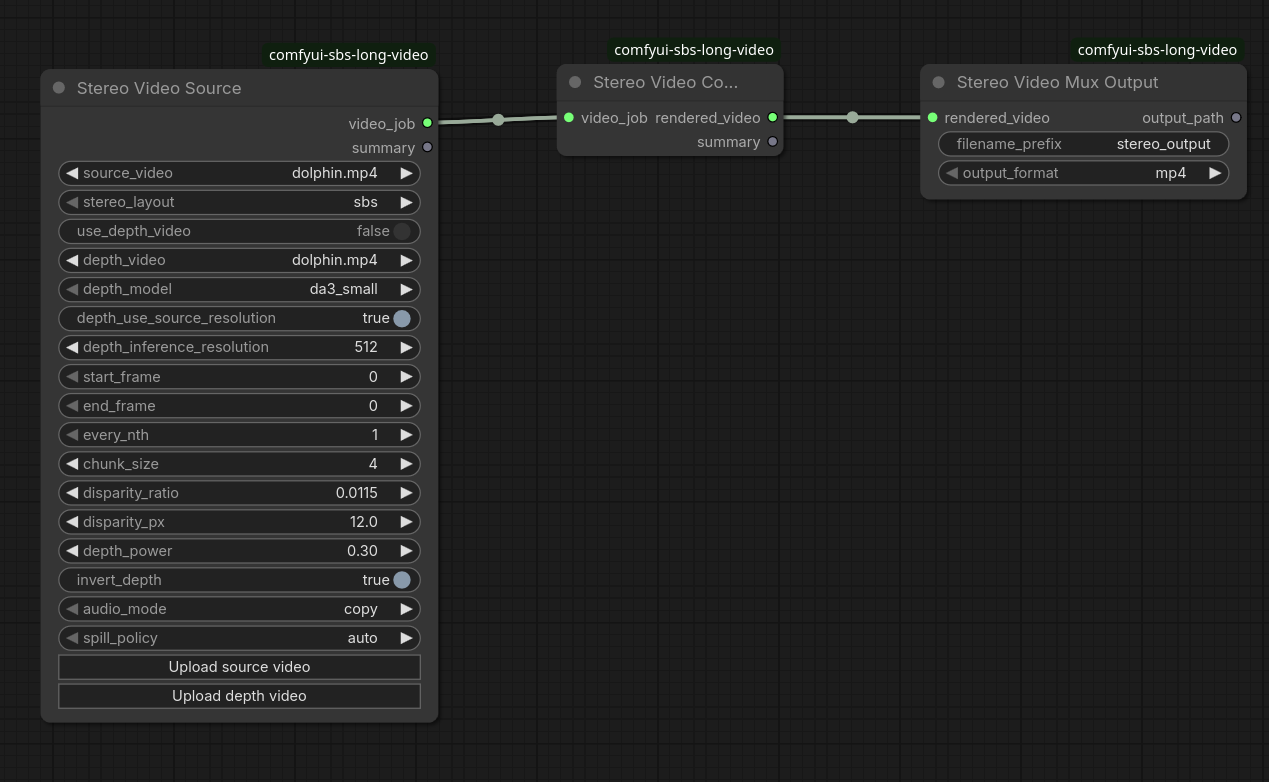
Purpose
This project is meant for long-form stereo video generation in ComfyUI, especially where clip length, VRAM, and encode time make image-oriented nodes impractical.
The repo currently ships three nodes:
StereoVideoSourceStereoVideoConvertStereoVideoMuxOutput
Why This Exists
Most 2D-to-3D video workflows either process video as large image batches or rely on video-native depth models that can require substantial VRAM, especially at higher resolutions.
This project targets a different use case: a memory-efficient SBS video converter for ComfyUI that can still run on low VRAM and RAM machines. It decodes video in chunks, runs per-frame depth estimation with Depth Anything, renders stereo on the GPU, and streams frames into the encoder instead of keeping the whole clip in memory.
That design involves a tradeoff. Video-oriented depth models can deliver stronger temporal consistency, but they often demand more VRAM for higher-resolution inputs. This project instead prioritizes practical long-video conversion on modest hardware while still producing useful depth estimation and stereo output for higher-resolution material.
A central goal was to implement GPU-based image processing for the heavy lifting so that conversion runs many times faster than CPU-bound alternatives. In practice, the pipeline works like this: FFmpeg decodes the source video in configurable chunks and feeds raw frames into the pipeline. Each chunk is moved to the GPU once; Depth Anything runs depth inference there. The stereo reprojection step then runs entirely on the GPU: depth is turned into per-pixel disparity, and left/right views are generated with torch.grid_sample (bilinear sampling). Hole-filling for disoccluded regions uses GPU avg_pool2d iterations. The resulting stereo frames are streamed straight into an ffmpeg encoder process via a pipe, so only one chunk lives in memory at a time. By keeping decode → depth → render → encode in a single streaming loop and doing all per-frame image work on the GPU, the converter avoids CPU-bound warping.
Installation
Clone the repo into your ComfyUI custom_nodes directory:
cd /path/to/ComfyUI/custom_nodes
git clone https://github.com/oskar13/comfyui-sbs-long-video.git
Install the Python dependencies into the same environment that runs ComfyUI:
cd /path/to/ComfyUI
python -m pip install -r custom_nodes/comfyui-sbs-long-video/requirements.txt
System requirements:
ffmpegandffprobemust be available onPATHtorchmust be installed in the ComfyUI environment- a CUDA-capable GPU is strongly recommended for practical runtime
Optional depth backend:
- if the official Depth Anything 3 package is available, install it in the ComfyUI environment:
python -m pip install git+https://github.com/ByteDance-Seed/Depth-Anything-3.git
- otherwise the plugin falls back to
transformers-compatible checkpoints
After installing dependencies, restart ComfyUI.
Workflow
- Add
Stereo Video Sourceand choose a source clip from ComfyUI's input directory. - Leave
use_depth_videooff to estimate depth automatically using the Depth Anything 3 model, or enable it and select a matching depth video. - Send the job into
Stereo Video Convertto run decode, depth, stereo rendering, and temporary video encode. - Finish with
Stereo Video Mux Outputto save the final file into ComfyUI's output directory.
How Files Are Produced
This plugin works with ComfyUI's standard directories:
- Source clips are read from the ComfyUI input directory.
- Optional external depth videos are also selected from the input directory.
StereoVideoConvertwrites a temporary rendered video into the ComfyUI temp directory.StereoVideoMuxOutputwrites the final video into the ComfyUI output directory.
Final filenames are auto-incremented:
prefix_00001.mp4prefix_00002.mp4prefix_00001.webmprefix_00001.mkv
Available final container choices:
mp4webmmkv
Audio behavior:
audio_mode = copytrims and muxes audio from the original source clipaudio_mode = nonewrites a video-only file
Preview and batch behavior:
start_frame,end_frame, andevery_nthlet you create short previews or partial exportschunk_sizecontrols how many frames are processed at oncefilename_prefixcontrols the base name of each final export
Depth Modes
Current depth sources:
- built-in depth estimation via
depth_anything_v3 - external depth video via
use_depth_video
Use external depth video when you already have a precomputed depth pass. For generating one, you can use https://github.com/DepthAnything/Video-Depth-Anything. Lenght in frames and resolution has to match on both input videos.
Node Reference
StereoVideoSource
Builds the video job definition.
source_video: main input clipstereo_layout:sbsortop_bottomuse_depth_video: switch between built-in depth estimation and external depth videodepth_video: optional external depth clip; must match the selected source rangedepth_model: built-in depth model sizedepth_use_source_resolution: run depth at source resolution when enableddepth_inference_resolution: manual inference size when source-resolution mode is disabledstart_frame: first frame to processend_frame: last frame boundary;0means use the rest of the clipevery_nth: frame skipping factor for faster previews or lower output FPSchunk_size: frames processed per chunkdisparity_ratio: stereo separation as a fraction of image widthdisparity_px: legacy fallback used only whendisparity_ratiois0depth_power: depth response curve before reprojectioninvert_depth: flips the inferred or provided depth mapaudio_mode:copyornonespill_policy: reserved for future workflow or memory policy changes
StereoVideoConvert
Executes the job.
video_job: internal handle fromStereoVideoSource- returns a rendered temp-video handle for the output node
StereoVideoMuxOutput
Writes the final deliverable.
filename_prefix: base name for the exportoutput_format:mp4,webm, ormkv