
comfyui-json-nodes
Composable JSON-building and schema-validation nodes for ComfyUI
Nodes (5)
Collect a list of strings into one clean JSON array
Build a typed JSON payload one dot-path at a time
Eight inline key=value slots when you don't need the heavy machinery
Combine fragments into one payload without hand-writing JSON
The output node that validates your payload before anything else sees it
comfyui-json-nodes
Composable ComfyUI nodes for building, merging, previewing, and validating JSON objects and arrays.
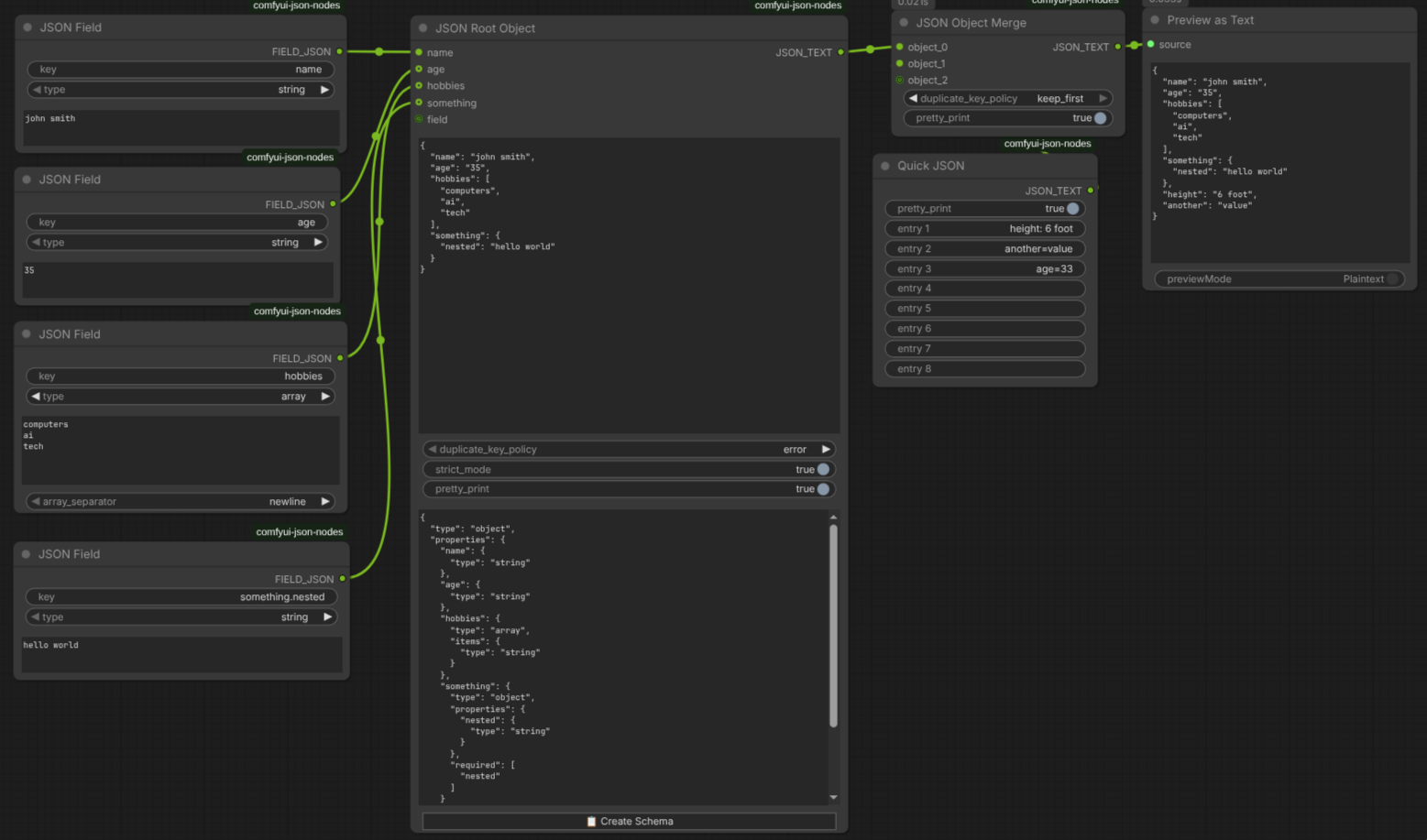
Installation
Clone this repository into your ComfyUI custom_nodes directory:
cd <ComfyUI>/custom_nodes
git clone <repo-url> comfyui-json-nodes
Restart ComfyUI. The nodes appear in the utils/json category.
Nodes
JSON Field (JsonFieldNode)
Create one typed JSON field fragment for use in Merge or Root.
| Input | Type | Default | Details |
|---|---|---|---|
| key | STRING | none | Dot-separated path. Supports nested objects (camera.lens), array indexes (subjects[0].name), and hyphenated keys (lens-mm). |
| type | COMBO | string | One of string, int, float, boolean, array, object. |
| array_separator | COMBO | newline | Optional schema input used when type=array. The frontend hides or shows the same widget based on type, and the backend normalizes positional execution when ComfyUI omits this hidden optional slot. Options: newline, comma. |
| value | STRING | "" | Multiline value input. Parsed according to type. |
| Output | Type | Details |
|---|---|---|
| FIELD_JSON | STRING | JSON object fragment such as {"camera": {"lens-mm": 85}}. |
Behavior:
- Empty
keyraises an error. intrequires a whole number.floatrejectsNaNand infinities.booleantreats1,true,yes, andonas true; everything else is false.arrayaccepts JSON array syntax directly or splits plain text by the selected separator with best-effort coercion for ints, floats, booleans, andnull.objectrequires a valid JSON object.- Sparse array paths are padded with
null, sosubjects[2].descriptionproduces[null, null, {...}]. - Field errors are reported as human-readable key/value errors.
Quick JSON (JsonObjectFromFieldsNode)
Build a small object from inline entries without separate Field nodes.
| Input | Type | Default | Details |
|---|---|---|---|
| entry_0 ... entry_7 | STRING | "" | Optional entry slots. UI labels them as entry 1 through entry 8. Format: key=value or key: value. |
| pretty_print | BOOLEAN | true | Pretty-print the output JSON. |
| Output | Type | Details |
|---|---|---|
| JSON_TEXT | STRING | Final JSON object string. |
Behavior:
- Blank entries are ignored.
- Values stay as strings; Quick JSON does not type-coerce.
- Entries are processed in numeric order, and later duplicates overwrite earlier ones.
- Invalid entry syntax raises an error that points to the expected
key=valueorkey: valueformat.
JSON Array Merge (JsonArrayMergeNode)
Build a JSON array from autogrow inputs.
| Input | Type | Default | Details |
|---|---|---|---|
| items | AUTOGROW STRING inputs | at least 1 | ComfyUI creates item_1 ... item_64 inputs as needed. Each connected input is parsed as JSON first; if parsing fails, the value is included as plain text. |
| pretty_print | BOOLEAN | true | Pretty-print the output JSON. |
| Output | Type | Details |
|---|---|---|
| JSON_ARRAY | STRING | Final JSON array string. |
Behavior:
- Inputs are collected in numeric autogrow order (
item_1,item_2, ...). - Valid JSON values keep their parsed types, including objects, arrays, numbers, booleans,
null, and quoted JSON strings. - Plain text inputs fall back to JSON string values.
JSON Object Merge (JsonObjectMergeNode)
Merge multiple JSON object strings using autogrow inputs.
| Input | Type | Default | Details |
|---|---|---|---|
| objects | AUTOGROW STRING inputs | at least 2 | ComfyUI creates json_object_1 ... json_object_64 inputs as needed. Each connected input must contain a JSON object string. |
| duplicate_key_policy | COMBO | error | One of error, overwrite, keep_first. |
| pretty_print | BOOLEAN | true | Pretty-print the output JSON. |
| Output | Type | Details |
|---|---|---|
| JSON_TEXT | STRING | Merged JSON object string. |
Behavior:
- Inputs are merged in numeric autogrow order (
json_object_1,json_object_2, ...). - Nested objects are deep-merged.
- Non-object inputs or invalid JSON raise readable errors.
- Duplicate key conflicts use the selected policy:
error: fail with messages likeDuplicate key 'name' in object 1 and object 2.overwrite: later input wins.keep_first: first value wins.
JSON Root Object (JsonRootObjectNode)
Output node that merges field/object fragments, validates them, and shows a live preview in the UI.
| Input | Type | Default | Details |
|---|---|---|---|
| objects | AUTOGROW STRING inputs | at least 1 | ComfyUI creates json_input_1 ... json_input_64 inputs as needed. Each connected input must contain a JSON object string. |
| preview_json | STRING | {} | Internal preview channel used by the frontend. The node execution ignores its value; the frontend keeps it read-only. |
| duplicate_key_policy | COMBO | error | One of error, overwrite, keep_first. |
| schema_json | STRING | "" | Optional JSON Schema-like object. Supports type, required, properties, enum, pattern, and items. |
| strict_mode | BOOLEAN | false | When enabled, object keys not declared in properties are rejected. |
| pretty_print | BOOLEAN | true | Pretty-print the output JSON. |
| Output | Type | Details |
|---|---|---|
| JSON_TEXT | STRING | Final merged JSON object string. |
Behavior:
- Root merges connected inputs in numeric autogrow order.
- Duplicate-key handling uses the selected policy, with human-readable source labels such as
field 1andfield 2. - If
schema_jsonis provided, it must be a JSON object. If its top-leveltypeis omitted, Root treats it asobject. - Supported schema types are
any,string,int,float,boolean,array, andobject. strict_modeapplies while validating nested objects too.- Validation errors use clearer schema wording, for example missing required fields, type mismatches, unexpected keys, invalid schema JSON, and duplicate-key conflicts.
- The frontend keeps
preview_jsonread-only and serializable, appends a runtime-onlyCreate Schemabutton, and relabels connected root inputs from attached field keys when possible. Create Schemainfersint,float,boolean,string,object,array, andanyfrom the current preview. Mixed arrays and empty arrays becomeitems: { "type": "any" }.
Settings
Open ComfyUI Settings -> JSON Nodes to set defaults for new nodes:
| Setting | Type | Default | Applies to |
|---|---|---|---|
| Default strict mode | Boolean | false | JSON Root Object |
| Default pretty print | Boolean | true | Quick JSON, JSON Array Merge, JSON Object Merge, JSON Root Object |
| Default array separator | newline / comma | newline | JSON Field |
| Default duplicate key policy | error / overwrite / keep_first | error | JSON Object Merge, JSON Root Object |
These defaults apply when a node is created. Existing workflows keep their saved values.
Development
Frontend source lives in src/ and is bundled with Bun to web/js/jsonNodes.js. Backend nodes live in nodes/ with helpers in utils/.
Typical development flow:
bun install
bun x tsc --noEmit
bun run bun.build.ts
python -m pytest tests/ -v
node tests/test_frontend_preview.mjs
make ci
Other useful targets:
make build
make typecheck
make lint
make format
make test
make integration
make release
make clean
Notes:
make ciruns the repository's build, typecheck, lint, unit-test, frontend-test, and integration-test targets.make testcurrently runs Pythonunittestdiscovery plusnode tests/test_frontend_preview.mjs.python -m pytest tests/ -valso works in this repo becausepyproject.tomlandconftest.pyare configured for pytest.
Tooling requirements:
- Bun for the TypeScript frontend build
- Node.js for the frontend preview test
- Pytest for the direct Python test command above
- Ruff for Python formatting and linting
- Biome for the committed JavaScript/MJS lint/format pass
- Python 3.10+ for the backend tests
License
MIT