
ComfyUI-ImageResolutionFixer
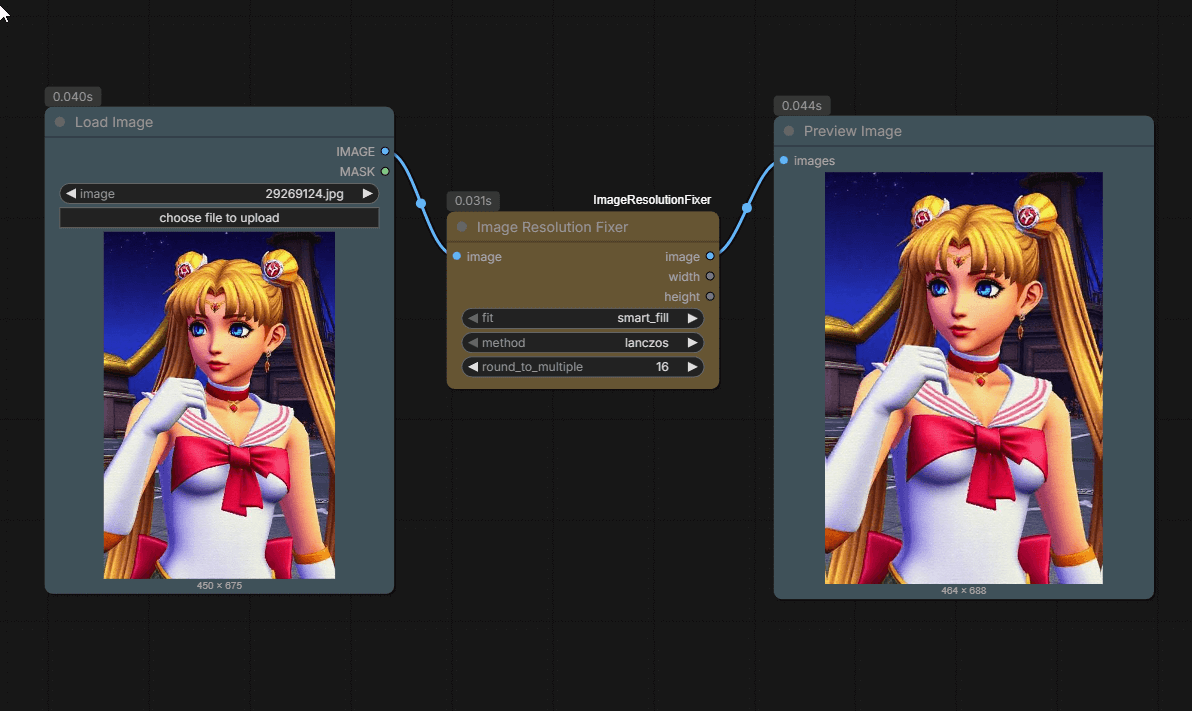
A lightweight ComfyUI node that intelligently rounds image dimensions to compatible resolutions using smart reflection mirroring.
Nodes (1)
Image Resolution Fixer - ComfyUI Custom Node
A lightweight ComfyUI node that intelligently rounds image dimensions to compatible resolutions (divisible by 2, 4, 8, 16, 32, 64, etc.) using smart reflection mirroring. Solves tensor size mismatch errors without quality loss.
A ComfyUI custom node that fixes image resolutions to be compatible with models that require specific dimension constraints (e.g., divisible by 8, 16, etc.). This node makes minimal changes to your images - just rounding up dimensions by a few pixels to the nearest compatible size.
Dependencies
This node requires:
opencv-python(cv2) - for smart_fill reflection mirroring algorithm
Most ComfyUI installations already have OpenCV installed. If not, install it with:
pip install opencv-python
Features
- Minimal Scaling: Only adjusts dimensions by a few pixels to meet requirements
- Smart Fill: Uses reflection mirroring for seamless edge extension (no streaking!)
- Multiple Fit Modes: smart_fill, fill, letterbox, or crop
- Various Resampling Methods: Lanczos, Bicubic, Hamming, Bilinear, Box, Nearest
- Round to Multiple: Ensures dimensions are divisible by 2, 4, 8, 14, 16, 28, 32, 64, 128, 256, or 512
- Outputs: Returns resized image plus final width and height values
How It Works
Instead of aggressively scaling images, this node simply rounds your existing dimensions UP to the nearest compatible multiple:
- Input: 450×603 image
- Round to multiple: 8
- Output: 456×608 image (just +6×5 pixels!)
The smaller the multiple, the fewer pixels added. Perfect for fixing tensor mismatch errors without changing your image composition.
Installation
Method 1: Git Clone (Recommended)
-
Navigate to your ComfyUI custom nodes directory:
cd ComfyUI/custom_nodes/ -
Clone this repository:
git clone https://github.com/ohmygoobness/ComfyUI-ImageResolutionFixer.git -
Install dependencies (if needed):
pip install opencv-pythonOr for ComfyUI portable:
python_embeded\python.exe -m pip install opencv-python -
Restart ComfyUI
Method 2: Manual Installation
-
Navigate to your ComfyUI custom nodes directory:
cd ComfyUI/custom_nodes/ -
Create a new directory for this node:
mkdir ComfyUI-ImageResolutionFixer cd ComfyUI-ImageResolutionFixer -
Copy the
image_resolution_fixer.pyand__init__.pyfiles to this directory -
Restart ComfyUI
Usage
Node Inputs
Required:
image: Input image from any ComfyUI image source (e.g., "Load Image" node)fit: How to adjust the image when rounding dimensionssmart_fill: Uses OpenCV's BORDER_REFLECT_101 to mirror image content at edges (default, recommended)- Mirrors texture seamlessly:
[A,B,C]→[A,B,C,B,A,B]instead of stretching[A,B,C,C,C,C] - Extremely fast (pure memory operation), no artifacts
- Perfect for small border additions (1-64 pixels)
- Mirrors texture seamlessly:
fill: Stretch/compress to exact dimensions (minimal distortion for small changes)letterbox: Add black bars to reach dimensions (preserves exact aspect ratio)crop: Center crop to reach dimensions (may lose edge information)
method: Resampling algorithm for qualitylanczos: Highest quality (recommended)bicubic: Good quality, balanced speedbilinear: Fast, lower qualityhamming: Good for small adjustmentsbox: Good for downscalingnearest: Fastest, pixelated (not recommended)
round_to_multiple: Round dimensions to be divisible by this value- Options: 2, 4, 8, 14, 16, 28, 32, 64, 128, 256, 512
- Smaller values = minimal changes to your image
- Common: 8 for most SD models, 64 for SDXL
- Video models: 14, 16, 28, 32, or 64 depending on model (see table below)
Node Outputs
image: Resized image tensorwidth: Final width (INT)height: Final height (INT)
Example Workflows
Example 1: Fix Odd Dimensions for SD 1.5
Problem: Image is 1023x767, Stable Diffusion requires dimensions divisible by 8
Settings:
- fit:
fill - method:
lanczos - round_to_multiple:
8
Result: Image becomes 1024x768 (scaled up by just 1 pixel in each dimension)
Example 2: Make Image Compatible for SDXL
Problem: Image is 450x603, SDXL works best with dimensions divisible by 64
Settings:
- fit:
fill - method:
lanczos - round_to_multiple:
64
Result: Image becomes 448x640 (minimal scaling to nearest compatible size)
Example 3: Fix Dimensions with Smart Fill (Recommended)
Problem: Image is 1920x1081, need dimensions divisible by 8 without black bars or distortion
Settings:
- fit:
smart_fill - method:
lanczos - round_to_multiple:
8
Result: Image becomes 1920x1088 (7 pixels added by mirroring image content - seamless texture continuation!)
Common Use Cases
Quick Reference: Video Model Requirements
| Video Model | Round to Multiple | Frame Formula |
|------------|-------------------|---------------|
| Wan 2.1 / 2.2 | 16 or 32 | (4 * n) + 1 |
| LTX-Video / LTX-2 | 32 | (8 * n) + 1 |
| Hunyuan Video | 16 or 32 | (4 * n) + 1 |
| SVD / SVD-XT | 14, 28, or 64 | Fixed (14 or 25) |
For Stable Diffusion Models
- Most SD models require dimensions divisible by 8
- Set
round_to_multiple:8 - Use
lanczosorbicubicfor best quality
For SDXL
- SDXL works best with dimensions divisible by 64
- Set
round_to_multiple:64 - Common sizes: 1024x1024, 1152x896, 1216x832, etc.
For Video Models
Video models have more stringent requirements than image models due to both Spatial VAE (width/height) and Temporal Compression (frame count) constraints.
Wan 2.1 & Wan 2.2 (T2V and I2V variants)
- Round to Multiple:
16(mandatory) or32(highly recommended) - Optimized for: 1280x720, 832x480
- Frame Count: Multiples of
4or specific counts like 81, 121
LTX-Video & LTX-2 (Lightricks DiT architecture)
- Round to Multiple:
32(strict requirement) - Optimal Sizes: 768x512, 1216x704
- Frame Count: Must follow formula
(8 * n) + 1(e.g., 65, 97, 129)
Hunyuan Video 1.0 & 1.5 (3D VAE with space-time compression)
- Round to Multiple:
16(minimum) or32(safest) - Optimal Sizes: 1280x720 (native), 848x480 (fast)
- Frame Count: Formula
(4 * n) + 1(e.g., 17, 33, 49, 129)
SVD / SVD-XT (Stable Video Diffusion)
- Round to Multiple:
64(recommended) or14(alternative) - Fixed frame counts: 14 or 25 frames
- Note:
14and28multiples are included specifically for SVD compatibility
Pro Tip: If you see tiling artifacts or a grid pattern in your video output, increase round_to_multiple to 64 - this is the most universal safe value for modern DiT models.
Tips
-
Choosing the Right Multiple:
- Use
8for most Stable Diffusion 1.5/2.1 models - Use
64for SDXL models - Use
32for many video models - Use
2or4for minimal changes when you're not sure
- Use
-
Quality vs Speed:
- Use
lanczosfor highest quality (recommended for small adjustments) - Use
bilinearfor faster processing
- Use
-
Choosing Fit Mode:
- Use
smart_fillfor best results (recommended) - extends edges naturally - Use
fillwhen slight stretching is acceptable - Use
letterboxif you need traditional black bars - Use
cropif you prefer cropping over padding
- Use
-
Understanding the Changes:
- With multiple=8: Maximum 7 pixels added per dimension
- With multiple=64: Maximum 63 pixels added per dimension
- The node always rounds UP, never down
Troubleshooting
Issue: Node not appearing in ComfyUI
- Solution: Make sure the file is in
ComfyUI/custom_nodes/ImageResolutionFixer/ - Restart ComfyUI completely
Issue: Import errors / "No module named 'cv2'"
- Solution: Install OpenCV:
pip install opencv-python - Or if using ComfyUI portable:
python_embeded\python.exe -m pip install opencv-python
Issue: Tensor size mismatch still occurring
- Solution: Increase
round_to_multipleto a higher value (try 64 or 128)
License
This project is licensed under the Apache-2.0 License.