
Comfyui-Tiktok-Caption
TikTok Caption — ComfyUI custom node that renders CSS-styled captions/subtitles from SRT or plain text using the tscaps engine, with a 1:1 in-node live preview.
Nodes (1)
Comfyui-Tiktok-Caption
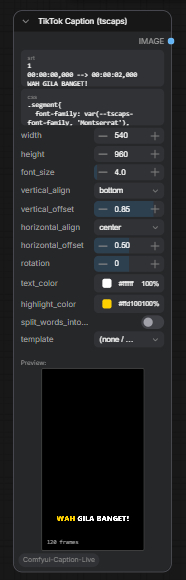
ComfyUI custom node that renders CSS-styled captions and subtitles from SRT or plain text. Built on the tscaps engine, with a 1:1 in-node live preview.
Features
- CSS-styled caption rendering (font, color, shadow, outline, highlight animation)
- SRT input or plain text input (each line becomes a 2-second segment)
- 30 built-in templates (anya, cleo, freya, kai, luna, etc.)
- Live preview inside the ComfyUI node (native resolution, pixel-identical to output)
- Headless final render via CloakBrowser (Chromium) -- same engine, identical pixels
- Customizable: font size, rotation, text color, highlight color, alignment (vertical + horizontal)
- Output: IMAGE tensor (batch of frames) ready for video encoding downstream
Installation
ComfyUI Manager (recommended)
Search for "TikTok Caption" in ComfyUI Manager and install.
Manual
cd ComfyUI/custom_nodes
git clone https://github.com/obvirm/Comfyui-Tiktok-Caption.git
cd Comfyui-Tiktok-Caption
pip install -r requirements.txt  # or: pip install numpy pillow cloakbrowser
Comfy Registry
comfy node install comfyui-tiktok-caption
How It Works
Algorithm
-
Input normalization -- The node accepts either valid SRT (contains
-->) or plain text. Plain text lines are converted to SRT segments with 2-second duration each. -
Document construction -- The SRT string is parsed by tscaps'
SrtTranscriberinto an internalDocumentobject containing timed subtitle segments. -
CSS styling -- A style definition is built from the CSS input plus inline CSS variable overrides (from template defaults, font size, rotation, colors, alignment). The tscaps engine applies these styles using standard CSS -- fonts, colors, shadows, text-transform, letter-spacing, etc.
-
Frame rendering -- The engine renders each frame at the target timestamp by:
- Laying out subtitle segments into the caption box (positioned via
verticalAlign/horizontalOffset) - Splitting text into lines (balanced pixel width) and words
- Applying CSS animations (highlight color transition during narration)
- Drawing to an offscreen canvas at the exact output resolution
- Laying out subtitle segments into the caption box (positioned via
-
Sampling -- Frames are sampled at 30 FPS (fixed internal rate, not exposed). The engine walks the SRT timeline and renders one canvas per frame.
-
Output -- Preview returns
ImageBitmap[](direct canvas draw, no serialization). Final render returns PNG data URLs via CloakBrowser, decoded totorch.Tensor(N,H,W,3 float32 normalized to 0-1).
Preview vs Output
Both paths use the exact same tscaps engine and vendored source. The only difference:
| Path | Environment | Return type |
|------|------------|-------------|
| Preview | Browser (ComfyUI frontend) | ImageBitmap[] drawn to canvas |
| Output | Headless Chromium (CloakBrowser) | PNG bytes -> torch.Tensor |
This guarantees pixel-identical output between preview and final render.
Node Parameters
| Parameter | Type | Default | Description |
|-----------|------|---------|-------------|
| srt | STRING (multiline) | Sample SRT | SRT subtitle text or plain text |
| css | STRING (multiline) | DEFAULT_CSS | CSS for .segment, .line, .word, .word.word-being-narrated |
| width | INT | 540 | Output frame width in pixels |
| height | INT | 960 | Output frame height in pixels |
| font_size | FLOAT | 0 | Font size in cqh (% of frame height). 0 = use template/CSS default |
| vertical_align | ENUM | bottom | Caption anchor: top, center, bottom |
| vertical_offset | FLOAT | 0.85 | Vertical position (0.0 = top edge, 1.0 = bottom edge) |
| horizontal_align | ENUM | center | Horizontal anchor: left, center, right |
| horizontal_offset | FLOAT | 0.5 | Horizontal position (0.0 = left edge, 1.0 = right edge) |
| rotation | FLOAT | 0 | Text rotation in degrees (-180 to 180) |
| text_color | STRING | (empty) | Override text color (hex). Empty = use template default |
| highlight_color | STRING | (empty) | Override highlight color (hex). Empty = use template default |
| template | ENUM | (none / custom) | Select a built-in template (overrides CSS + colors) |
CSS System
The caption engine uses standard CSS with cqh units (percentage of the caption frame height). This means font sizes scale proportionally with the output resolution.
CSS Variables
Templates and the node expose these --tscaps-* variables:
| Variable | Purpose | Example |
|----------|---------|---------|
| --tscaps-font-family | Font family | 'Montserrat' |
| --tscaps-font-weight | Font weight | 800 |
| --tscaps-font-style | Font style | italic |
| --tscaps-font-size | Font size (cqh) | 13cqh |
| --tscaps-letter-spacing | Letter spacing (em) | 0.02em |
| --tscaps-word-spacing | Word spacing (em) | 0.13em |
| --tscaps-line-spacing | Line spacing (em) | 0.3em |
| --tscaps-text-align | Text alignment | center |
| --tscaps-text-transform | Text case | uppercase |
| --tscaps-text-decoration | Text decoration | none |
| --tscaps-rotation | Text rotation (deg) | 0deg |
| --tscaps-primary-color | Main text color | #ffffff |
| --tscaps-highlight-color | Word highlight color | #ffd400 |
| --tscaps-shadow-color | Text shadow color | rgba(0,0,0,0.6) |
| --tscaps-outline-color | Text outline color | #000000 |
| --tscaps-quote-color | Quote text color | #e6d647 |
Default CSS Structure
.segment {
  font-family: var(--tscaps-font-family, 'Montserrat'), system-ui, sans-serif;
  font-weight: 800;
  font-size: var(--tscaps-font-size, 13cqh);
  color: var(--tscaps-primary-color, #ffffff);
  -webkit-text-stroke: 0.02em #000;
  paint-order: stroke fill;
}

.word.word-being-narrated {
  color: var(--tscaps-highlight-color, #ffd400);
}

.word.word-already-narrated {
  color: #e0e0e0;
}
The .word-being-narrated and .word-already-narrated classes are applied by the engine based on the current playback time. Templates use CSS animations on .word to create highlight transitions (e.g., color fade from primary to highlight during narration).
Templates
30 built-in templates are included in web/templates/. Each template is a folder containing:
web/templates/anya/
  style.css      -- CSS rules for .segment, .line, .word, animations
  template.json  -- metadata + default values
Template JSON Structure
{
  "name": "Anya",
  "categories": ["clean"],
  "typography": {
    "fontFamily": "Playfair Display Variable",
    "fontWeight": 700,
    "fontSize": 2.97,
    "letterSpacing": 0.02,
    "wordSpacing": 0.13,
    "italic": true
  },
  "styleControls": [
    {
      "id": "primary-color",
      "label": "Text",
      "type": "color",
      "default": "#fff8e7"
    },
    {
      "id": "highlight-color",
      "label": "Highlight",
      "type": "color",
      "default": "#f5c982"
    }
  ],
  "segmentSplitters": [
    { "type": "boundary" },
    { "type": "limit_by_scaled_chars", "maxChars": 36 }
  ],
  "lineSplitter": {
    "type": "balanced-pixel-width",
    "maxLines": 2
  },
  "alignment": {
    "verticalAlign": "top",
    "verticalOffset": 0.75
  }
}
Fields
- typography -- Maps to
--tscaps-*CSS variables.fontSizeis incqhunits (multiplied by 3.5 internally for vertical frames). - styleControls -- Array of color/font controls. Each
idmaps to a CSS variable. Thedefaultvalue is used as the initial value. - segmentSplitters -- How the engine splits subtitle text into segments.
boundarysplits on sentence boundaries;limit_by_scaled_charscaps segment length. - lineSplitter -- How segments are split into visual lines.
balanced-pixel-widthwithmaxLineslimits line count. - alignment -- Default caption position inside the frame.
Adding a New Template
- Create a folder in
web/templates/with the template name (lowercase, no spaces) - Add
style.css-- define styles for.segment,.line,.word, and optionally.word.word-being-narratedanimations - Add
template.json-- define typography defaults, style controls, splitters, and alignment - The template automatically appears in the node's template dropdown
CSS variables use var(--tscaps-*) with fallback values so the template works even without the engine.
Style.css Patterns
Simple highlight animation (color flash):
.word {
  display: inline-block;
  margin: 0 0.13em;
  animation: highlight var(--word-being-narrated-duration)
    var(--on-word-being-narrated-starts) ease-in-out forwards;
}

@keyframes highlight {
  0%, 100% { color: var(--tscaps-primary-color, #fff); }
  20%, 80% { color: var(--tscaps-highlight-color, #ffd400); }
}
Outline + shadow:
.segment {
  -webkit-text-stroke: 0.02em var(--tscaps-outline-color, #000);
  paint-order: stroke fill;
  text-shadow: 0 0.11em 0.47em var(--tscaps-shadow-color, rgba(0,0,0,0.6));
}
Engine Attribution
This node uses a vendored copy of tscaps by Franco Zanardi. The tscaps engine handles CSS-based subtitle rendering, text splitting, and frame drawing. The vendored source lives in vendor/tscaps-engine/modules/.
Requirements
- Python >= 3.9
- numpy >= 1.20
- pillow >= 9.0
- cloakbrowser (auto-downloads Chromium on first use)
- Node.js (for building the frontend bundle only -- not required at runtime)
License
MIT