
LoRA Control
LoRA stacks for ComfyUI: pick LoRAs by hand, by partial name or from a folder, at random or in sequence.
Nodes (4)
The node that actually loads the weights
Let the workflow pick the character for you
One style per render, straight off your hard drive
Six LoRAs, six toggles, one wire
LoRA Control for ComfyUI

Four nodes for building LoRA stacks: pick LoRAs by hand, by part of their name, or from a folder, at random or in sequence, then apply the lot in one go.
| Node | Adds to the stack |
| --- | --- |
| LoRA Stack | Up to six LoRAs, each with its own on/off and strength |
| LoRA by Name | One LoRA whose name contains a pattern, such as char- |
| LoRA from Folder | One LoRA from a folder, with or without its subfolders |
| Apply LoRA Stack | Loads everything in the stack onto MODEL and CLIP |
They pass along a standard LORA_STACK, the same type the Comfyroll and
Efficiency stack nodes use, so they chain with each other in any order and
with those packs. Every node also outputs a text line naming what it picked,
so a random choice is never a mystery. Wire it to a Preview Any or into a
filename prefix.
All four are under loaders › LoRA Control in the node menu.
Who this is for
Anyone with more than a handful of LoRAs who wants to try them without rewiring: cycle through a folder of styles one per run, let a random character LoRA pick itself, or keep a fixed set of helper LoRAs on while another changes. The nodes only choose and apply LoRAs; they never modify, move or download files.
Install
LoRA Control is on the Comfy Registry, so any of these work. Restart ComfyUI afterwards.
-
ComfyUI-Manager: open the Manager, choose Custom Nodes Manager, search for LoRA Control and install it.
-
comfy-cli:
comfy node install comfyui-lora-control -
By hand: clone it into
ComfyUI/custom_nodes:cd ComfyUI/custom_nodes git clone https://github.com/nzkritik/comfyui-lora-control
No extra Python packages are needed. It uses ComfyUI's V3 node API, so it needs ComfyUI 0.3.48 or newer (tested on 0.37).
Example workflow
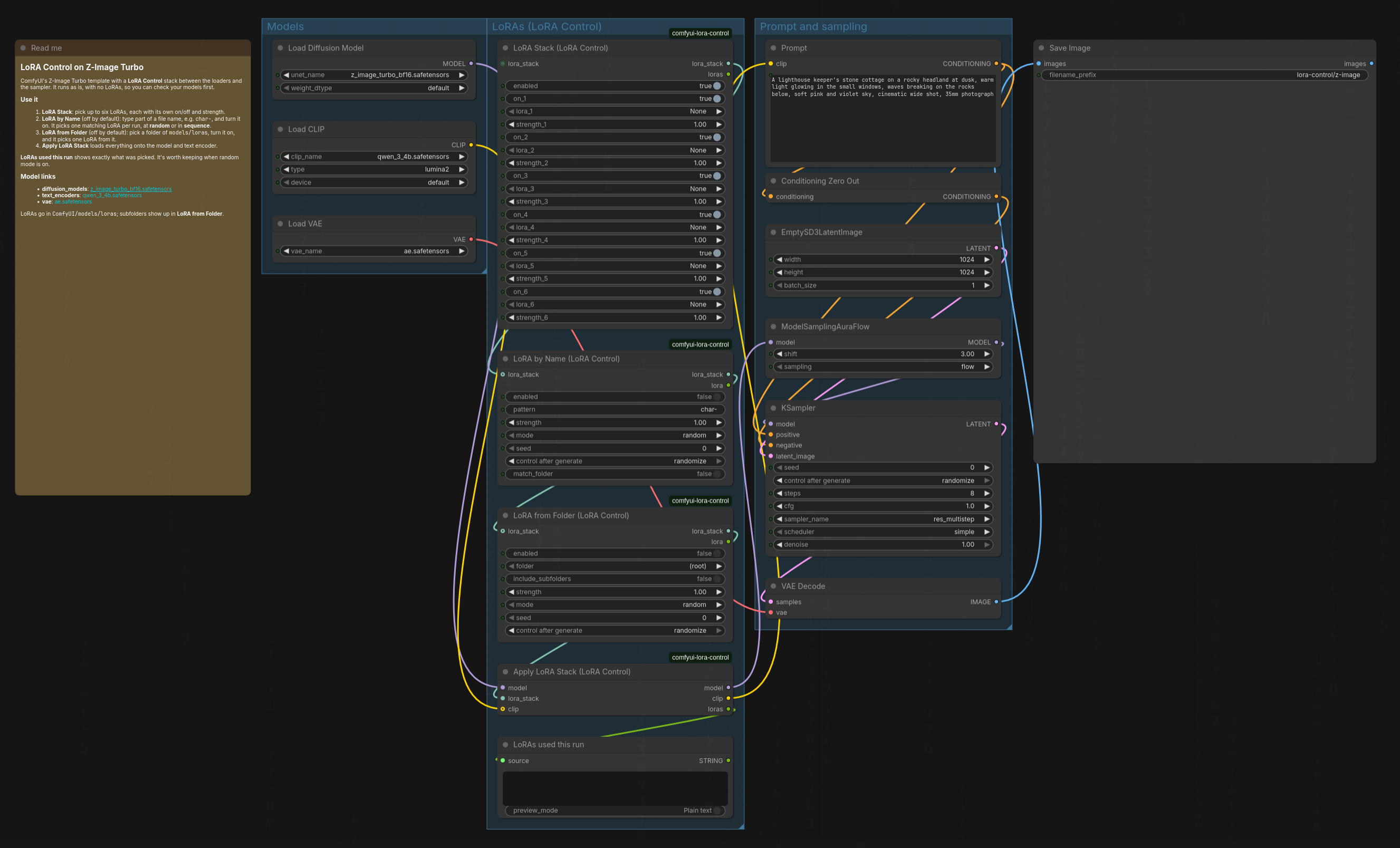
Workflow › Browse Templates › comfyui-lora-control › LoRA Control - Z-Image
Turbo is ComfyUI's own Z-Image Turbo template with a LoRA Control stack
between the loaders and the sampler. It uses the template's model files
(z_image_turbo_bf16, qwen_3_4b, ae), with download links in its note,
and it runs as is with no LoRAs, so you can check your models first. Then
pick LoRAs in the stack, or turn on LoRA by Name or LoRA from Folder.
Random or in sequence
LoRA by Name and LoRA from Folder both have a mode and a seed:
- random (the default) picks one of the matching LoRAs using the seed. The same seed always picks the same LoRA, so reopening an old image's workflow gives the same result. The seed's control is set to randomize, so every run picks afresh.
- sequence takes the matching LoRAs in name order, one per run, and wraps around at the end. The seed is the position in that list, and switching to sequence sets its control to increment, so each run moves on by one. Set the seed to 0 to start from the top.
The seed control only changes when you change the mode, so a workflow you saved with some other setting keeps it.
In random mode a picker skips LoRAs already earlier in the stack, so two
LoRA by Name nodes on char- never land on the same one. Sequence mode
doesn't skip, because that would shift the order you're stepping through.
LoRA by Name
pattern is any part of the file name, in any case: char- matches
char-Alice.safetensors and CHAR-Bella.safetensors. Only the file name
counts, not the folder it is in, unless you turn on match_folder, which lets
characters/ select a whole folder.
Wildcards (*, ?, [...]) switch to matching the whole name instead:
char-A* is every char- LoRA that starts with A, and *-ink is any name
ending in -ink.
LoRA from Folder
folder lists every folder under models/loras that holds LoRAs, plus
(root) for the top level. With include_subfolders on, LoRAs in folders
below it count too.
If nothing matches
A pattern or folder with no LoRAs in it stops the run with an error naming it, rather than quietly rendering without the LoRA.
Stack order
Apply loads LoRAs in stack order, first to last. The order changes the image very slightly (the patches are summed in bf16), so the same LoRAs and seed in a different order are close but not pixel-identical. Keep the order fixed when you need to reproduce an image exactly.
Tests
uv run --no-project --with pytest python -m pytest tests # selection logic, no ComfyUI needed
The other checks drive a real ComfyUI. tests/make_test_base.py builds a
throwaway base directory with dummy LoRAs and this pack linked in; start a
second ComfyUI on it, as its docstring shows, then:
python3 tests/api_check.py http://127.0.0.1:8189   # the nodes, through the HTTP API
node tests/ui_check.mjs http://127.0.0.1:8189      # the seed-control script, in headless Chromium
tests/zimage_check.py --lora <a Z-Image LoRA> renders one seed three ways
(no LoRA; the LoRA through these nodes; the same LoRA through
ZImageTurboLoraStackV4) on a ComfyUI with Z-Image Turbo, and reads the log for
skipped LoRA keys. On ComfyUI 0.37, ComfyUI's own loader applies Z-Image
LoRAs completely: no skipped keys, and a render pixel-identical to the V4
node's.
Licence
MIT