
ComfyUI Ideogram Helper
Visual studio for composing Ideogram 4 structured JSON box prompts in ComfyUI
Nodes (11)
Filter the studio's boxes down to the ones you actually want
Turn any JSON caption into a visual overlay, no editor needed
Add a whole new box to the caption without touching the canvas
Patch one box's description from the graph
The un-wrapper that turns the studio's blob into usable pixels
Push a finished caption into the editor and keep your loop in the loop
Drive the studio's fields from the graph instead of the editor
The merge node that keeps multiple overrides from fighting
Pick colours by eye instead of typing hex into overrides
See the last generation under your boxes as a trace
Draw your prompt on a canvas instead
ComfyUI-IdeogramHelper
A visual studio for composing Ideogram 4 structured-JSON box prompts inside ComfyUI — drag boxes on a canvas, write into them, and get the exact wire-format caption plus an overlay you can composite over your result.
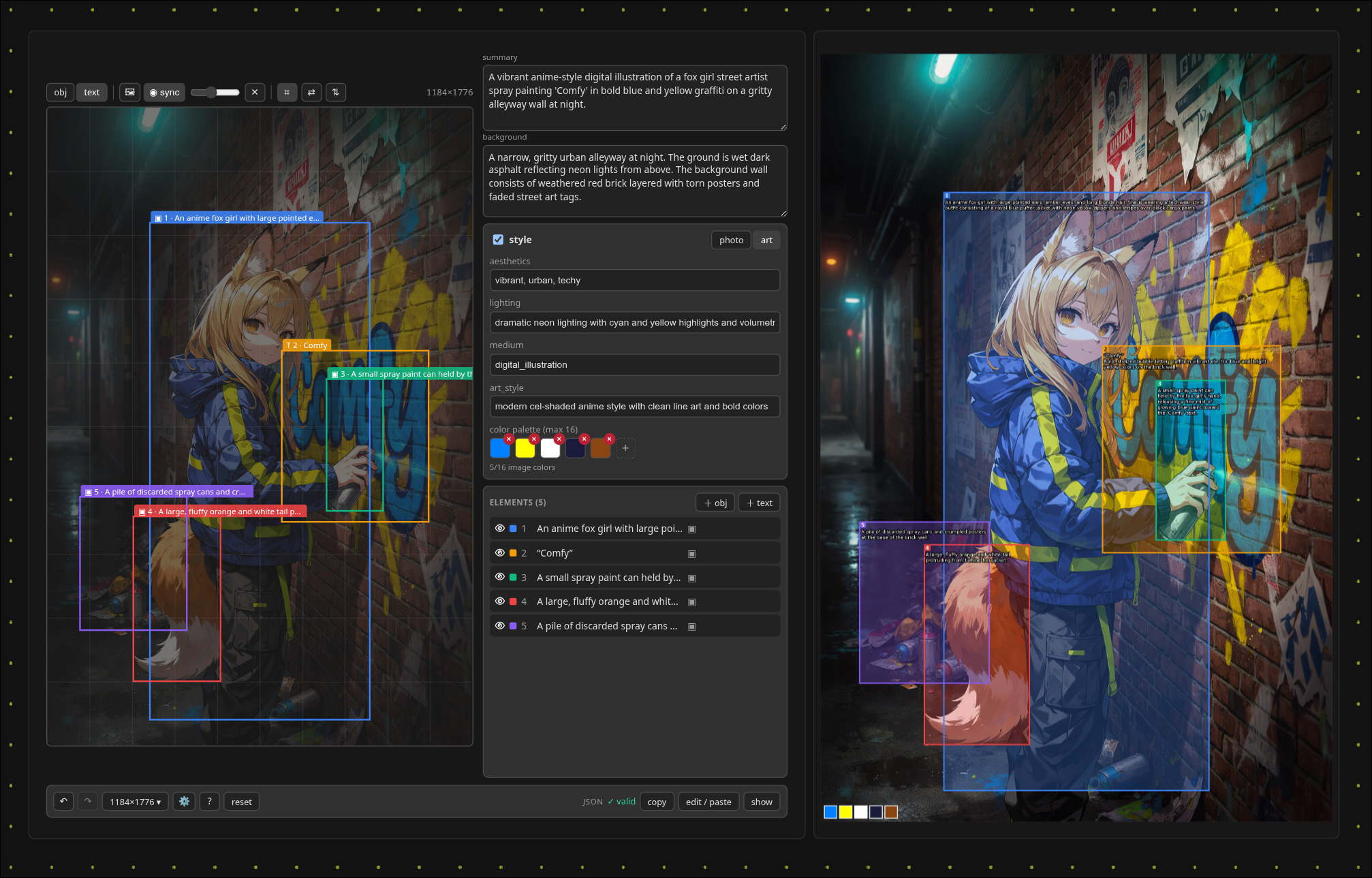
Ideogram 4 is trained on structured JSON captions: a high_level_description, a
style_description, and a compositional_deconstruction of bounding-boxed
elements. Writing that by hand is tedious — this studio makes it visual.
Install
cd ComfyUI/custom_nodes
git clone https://github.com/nynxz/ComfyUI-IdeogramHelper
The frontend ships pre-built in js/. Restart ComfyUI, then add
Ideogram → Ideogram Studio.
Quick start
- Drop an Ideogram Studio node.
- Set the resolution (the chip in the bottom bar — aspect ratio × megapixels, or type an exact W×H); the canvas and overlay use it.
- Drag on empty canvas to add a box; drag a box to move it, drag a handle to resize. Toggle each box between object and text. Ctrl/Shift-click to multi-select and move several boxes together.
- Fill in the summary (high-level description), background, per-box descriptions (and literal text for text boxes), and the style panel.
- Wire
captioninto your Ideogram sampler's prompt. - (Optional) Add an Ideogram Studio Extras node off the
extrasoutput to getoverlay/alpha/width/height, then ImageCompositeMasked the overlay over your generation (usingalphaas the mask) to check whether the model placed things where your boxes were — the right-hand side of the screenshot above.
💡 App Mode: the studio also works as a standalone panel in ComfyUI's App Mode — a focused, full-screen prompt builder with the graph out of the way.
<img src=".github/assets/app_example.jpg" alt="Ideogram Studio running in ComfyUI App Mode" width="520">
Example workflow
Want a ready-made graph? Drag
workflow_example.png onto the ComfyUI
canvas — the full example (studio → sampler → overlay compare) is embedded in
the image and loads instantly. Prefer the raw file? Grab
id4studio_workflow.json and load it
via Workflow → Open.

Nodes
Four nodes, all under the Ideogram category. Only Ideogram Studio is
required — the other three are optional helpers that snap onto its ports. In
short: an optional Override feeds the Studio; the Studio's caption goes
to your sampler and extras to an Extras node for the overlay; and a Ref
Sync node placed after a generation pushes it back as a trace backdrop.
Ideogram Studio — the editor (required)
The whole UI — resolution, overlay style, boxes, palettes — lives in the node widget, so nothing is configured in two places. Outputs the finished caption and a bundle of render extras.
| Port | Dir | Type | Notes |
| :--- | :-- | :--- | :--- |
| overrides | in (optional) | IDEOGRAM_OVERRIDE | Patches from an Override node. |
| caption | out | STRING | Minified canonical JSON — wire into any Ideogram sampler. |
| extras | out | IDEOGRAM_EXTRAS | Overlay/alpha/width/height bundle — unpack with Extras. |
Ideogram Studio Extras — unpack the overlay (optional)
Splits the studio's extras bundle into usable ports. Kept off the main node so
the studio stays compact; only add it when you want the overlay.
| Port | Dir | Type | Notes |
| :--- | :-- | :--- | :--- |
| extras | in | IDEOGRAM_EXTRAS | From the studio's extras output. |
| overlay | out | IMAGE | Boxes + labels + text + palette swatches, at the chosen resolution. |
| alpha | out | MASK | Overlay alpha — use as the mask in ImageCompositeMasked. |
| width / height | out | INT | The studio's resolution, e.g. to feed an Empty Latent. |
Ideogram Studio Override — drive fields from the graph (optional)
An input breakout: set any of these from the graph and they override the
studio's own values (handy for sweeps/automation). Blank fields — and medium
left at (keep) — are ignored. Filling photo forces photo-mode, art_style
forces art-mode.
| Port | Dir | Type | Notes |
| :--- | :-- | :--- | :--- |
| high_level_description, background, aesthetics, lighting | in (optional) | STRING | Override the matching field. |
| medium | in (optional) | combo | Photograph / illustration / … or (keep). |
| photo, art_style | in (optional) | STRING | Sets photo- / art-mode style text. |
| colors | in (optional) | STRING | Image palette — comma-separated hex (raw, or from a Palette node), max 16. |
| overrides | out | IDEOGRAM_OVERRIDE | Wire into the studio's overrides input. |
Ideogram Studio Palette — pick colours visually (optional)
A small node with the same swatch editor as the studio (+ to add, ✕ to remove,
click to recolour). It outputs the palette as comma-separated hex — wire it into
an Override's colors input so you can pick colours instead of typing raw hex.
| Port | Dir | Type | Notes |
| :--- | :-- | :--- | :--- |
| palette (widget) | — | — | The visual swatch editor. |
| colors | out | STRING | Comma-separated #RRGGBB → an Override's colors. |
Ideogram Studio Element Override — overwrite one element by index (optional)
Programmatically replace a single element's description / text / colours by its
number — e.g. if element 1 is your character, drive its desc from the graph.
id is the element number shown in the studio (starts at 1); blank fields are
ignored and text only applies to text elements. To patch several at once, feed
multiple of these into an Override List (below).
| Port | Dir | Type | Notes |
| :--- | :-- | :--- | :--- |
| id | in | INT | Which element to overwrite (the number shown in the list, from 1). |
| desc | in (optional) | STRING | New description for that element. |
| text | in (optional) | STRING | New literal text (text elements only). |
| colors | in (optional) | STRING | Comma-separated hex (e.g. #FF0000, #0a0, FFAA00), max 5. |
| overrides | out | IDEOGRAM_OVERRIDE | Wire to an Override List or the studio. |
Ideogram Studio Override List — combine many overrides (optional)
Merges several override bundles into one, with autogrowing inputs — plug an
Override / Element Override into a slot and a fresh empty slot appears, so you can
build a list of per-element overrides without chaining. Wire the single output
into the studio's overrides input. (Scalar fields take the last value; style
and per-index element patches are merged.)
| Port | Dir | Type | Notes |
| :--- | :-- | :--- | :--- |
| overrides_1, overrides_2, … | in (optional) | IDEOGRAM_OVERRIDE | Grow automatically as you connect. |
| overrides | out | IDEOGRAM_OVERRIDE | The merged bundle → studio. |
Ideogram Studio Ref Sync — trace over a generation (optional)
An output node for the iterate loop: route a generation into it and, with a studio's sync toggle on, that image appears under your boxes as a trace backdrop. So: generate → see it under the boxes → tweak → regenerate. It re-broadcasts every run (so a page refresh re-syncs on the next queue) and reaches every studio that has sync on.
| Port | Dir | Type | Notes |
| :--- | :-- | :--- | :--- |
| image | in | IMAGE | The generation (or any image) to trace. |
| enable | in | BOOLEAN | Off = pass through without syncing. |
| image | out | IMAGE | Passthrough, so the node sits inline. |
Ideogram Studio JSON Sync — push a caption into the studio (optional)
The text-side counterpart to Ref Sync: feed it a JSON caption and any studio with json sync on (the ⟳ toggle in the JSON bar) imports it live into the editor — handy for loading captions from another node, an LLM, or a saved file.
| Port | Dir | Type | Notes |
| :--- | :-- | :--- | :--- |
| json | in | STRING | An Ideogram JSON caption (paste, or wire one in). Invalid JSON errors the node. |
| enable | in | BOOLEAN | Off = pass through without syncing. |
| json | out | STRING | Passthrough, so the node sits inline. |
Features
- Drag-and-drop boxes — drag empty canvas to add a box, drag it to move, grab a handle to resize.
- Multi-select & group move — Ctrl/Shift-click boxes (on the canvas or in the list) to move several at once.
- Object & text boxes — text boxes carry the exact words to render, plus a description of how they should look.
- Per-box colours keep overlapping boxes readable, and the overlay keeps every box visible even when they overlap.
- Mute a box to keep it in the editor but leave it out of the prompt — no need to delete it.
- Linked boxes — reuse one prompt across several positions; edit one and the rest follow.
- Style panel — photo or art direction, with image-wide and per-box colour palettes.
- Reference backdrop — drop in an image (or live-sync a generation) to trace over; it's never sent to the model.
- Overlay output — composite the boxes over your result to check whether the model placed things where you asked.
- Smart resolution — pick an aspect ratio + megapixels, or an exact size; it matches what the model actually outputs so the overlay lines up.
- Live JSON with friendly warnings, undo/redo, and paste-to-import an existing caption.
- Light & dark — follows your ComfyUI theme.
Under the hood it writes Ideogram's exact JSON format for you, and editor-only bits like box colours and links never end up in the prompt.
Development (frontend)
npm install        # or reuse a sibling node's node_modules
npm run build      # -> js/main.js   (vite lib build)
npm run dev        # watch mode
js/main.js is committed on purpose — ComfyUI serves it directly and users never
run a build. Commit source and the rebuilt bundle separately. Hard-refresh the
browser after a frontend build; restart ComfyUI after Python changes (node
definitions load at startup).