NO8D-controls
NO8D custom nodes for LoRA stacking, prompt generation, image loading, generation and masking, style selection, image comparison and composition, and dataset saving in ComfyUI.
Nodes (20)
Stop squinting at two Preview nodes
The LLM prompt node that needs no LLM of its own
MiniMax H3 wants a storyboard, not a prompt — NO8D-Dynamic-Prompt writes it for you
Aspect ratios without the mental math
Sampling, inpainting, outpainting, and edit-model references in one node
Stop bouncing to Photoshop just to lay out three images
A contact sheet without the photo editor
Fix your image dimensions, and see the crop before you commit to it
Label batches without an image editor
The grounded instruction encoder behind Krea2 edit
The model patch that makes Krea2 edit work
A browser, not a dropdown
Load a batch, not a single file
Multiple LoRAs, one clean node
Keep the edit reference, fix its size
The pixel-shuffle cleanup nobody wires by hand
Glue for your prompt pieces
See your prompt before it hits the sampler
Strip the edit reference from conditioning
Image-plus-caption pairs for training sets
ComfyUI-NO8D-controls


English | 简体中文
This custom node pack provides an end-to-end optimization solution covering the entire workflow from image loading to image generation. It redesigns key nodes for image generation, LoRA stacking, prompt generation, and more to simplify ComfyUI workflow construction, improve generation efficiency across nodes, and significantly lower the barrier to building and using workflows.
Quick navigation
Installation · Nodes · Prompt API & LLM · More tips · License · Star History
Installation
Clone the repository into ComfyUI/custom_nodes:
cd ComfyUI/custom_nodes
git clone https://github.com/no8d/ComfyUI-NO8D-controls.git
ComfyUI Manager installs the dependencies from requirements.txt automatically. If you clone or update the node manually, install them with ComfyUI's Python environment:
cd ComfyUI/custom_nodes/ComfyUI-NO8D-controls
python -m pip install -r requirements.txt
For Windows Portable, run this from the portable root instead:
python_embeded\python.exe -m pip install -r ComfyUI\custom_nodes\ComfyUI-NO8D-controls\requirements.txt
openpyxl is required for importing and exporting XLSX prompt libraries. Do not install it into an unrelated system Python environment.
Restart ComfyUI and hard-refresh the browser page. No frontend build step is required.
An example workflow is included at examples/NO8D-controls-example.json.
The Prompt Libraries example is available at examples/NO8D-Prompt-libraries.json.
You can also follow NO8D on Patreon for project updates.
Nodes
All nodes are available under the NO8D-control or NO8D-controls category.
NO8D-Prompt-libraries
Browse, manage, and combine reusable prompt libraries visually.
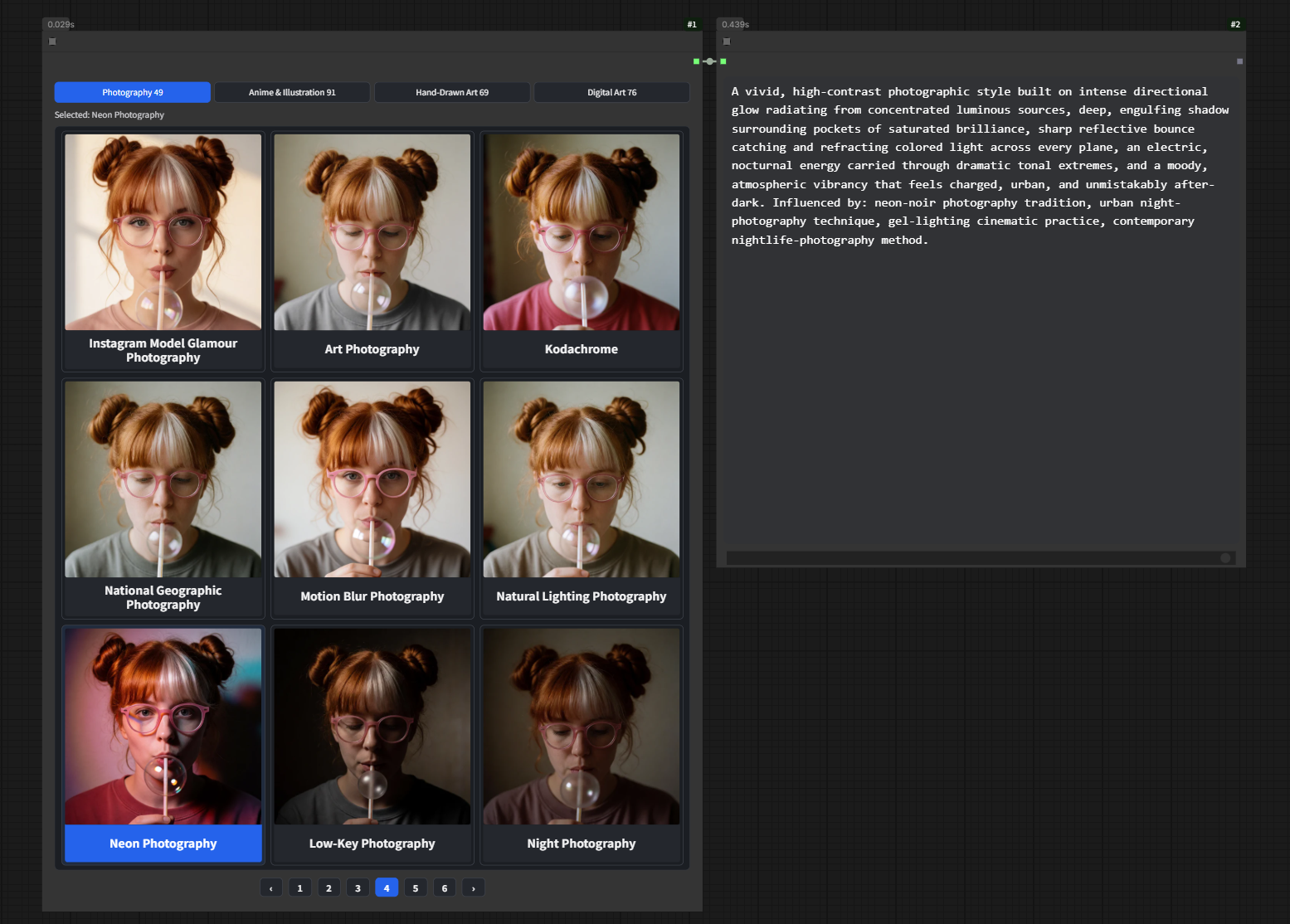
- Starts empty; eight optional XLSX libraries are bundled in
data/krea_style_libraries/for manual import. - Imports TXT, CSV, XLSX, and public Google Sheets, with search, favorites, history, editing, and portable export.
- Supports single, multiple, all, or random card output and preserves prompts exactly as stored.
- Supports mouse navigation and
Arrow,PageUp,PageDown,Home, andEndshortcuts.
📖 Read the NO8D-Prompt-libraries tutorial on Patreon.
NO8D-Prompt Merge
Merge outputs from multiple Prompt Libraries or other text nodes into one prompt, following the visible input-port order.
NO8D-LoRA stack
Load a UNET through ComfyUI's native loader, then manage and apply multiple LoRAs without a CLIP input.
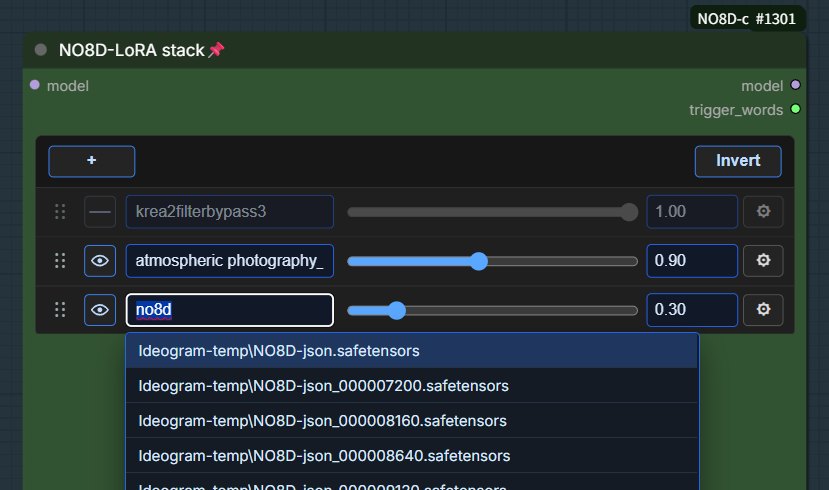
- Add, remove, enable, disable, and reorder LoRAs.
- New LoRAs start at strength
1.0with a default0–2slider range. - Merge trigger words from enabled LoRAs into one text output.
- The UNET controls are inherited from ComfyUI's native loader and follow upstream updates.
NO8D-Prompt
Expand text, analyze a reference image, or combine both into a complete positive prompt through a configured API.
Before first use: This node is an API client and does not include an LLM. Configure an OpenAI-compatible API or a local Ollama service first. See Prompt API and LLM configuration.
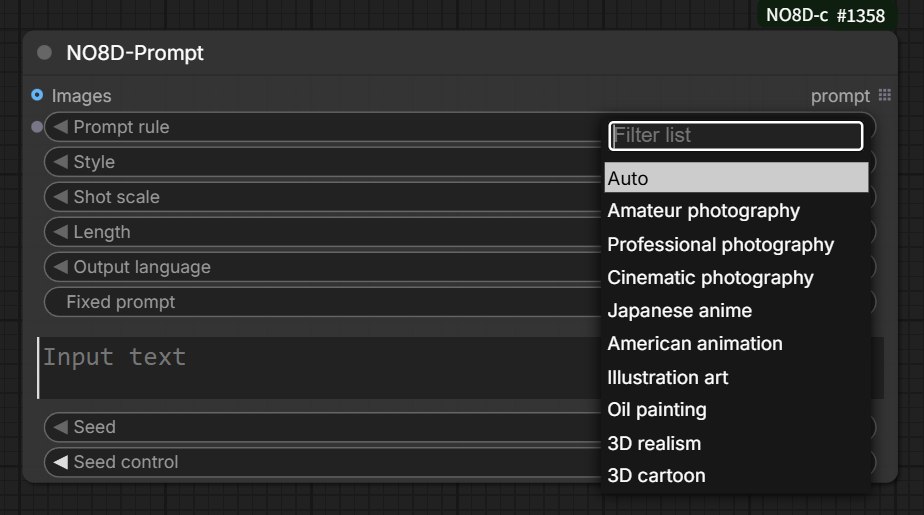
- Supports text-only, image-only, and text-plus-image input.
- Provides style, shot-scale, and prompt-length controls, including a no-style-description mode.
- Keeps the source medium separate from a locked target style and corrects conflicting style vocabulary once when needed.
- Allows separate text and vision model selection.
- Text-only prompting requires a text-capable LLM; reference-image analysis requires a vision-capable multimodal model.
NO8D-Prompt-view
Display and edit prompt text before sending it downstream.
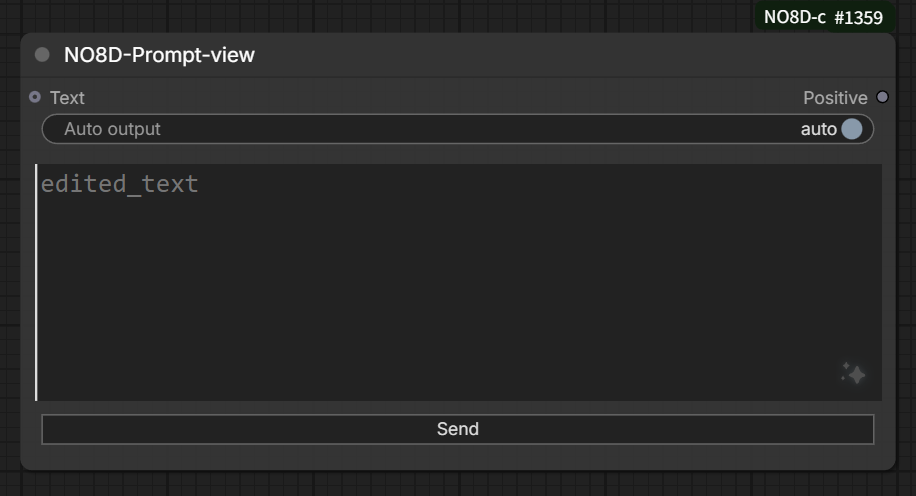
- Automatically displays incoming prompt text.
- Supports a fixed prompt that is prepended whenever the node emits text.
- Supports manual editing and one-click downstream sending.
- Can temporarily stop automatic text output without losing the editor content.
NO8D-Load-images
Load and organize one or more local images as a ComfyUI list output.
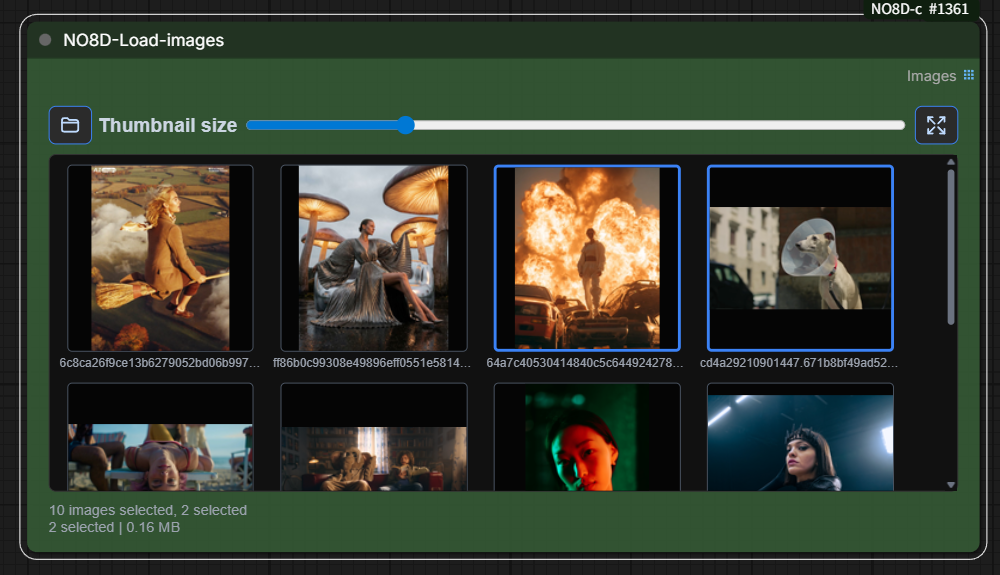
- Add images by file picker, drag-and-drop, or clipboard paste.
- Automatically selects the first image in each newly imported batch.
- Select, reorder, and preview individual images.
- Sends only selected images downstream; selecting all outputs all images, while selecting none produces no output.
NO8D-Generate
Combine ComfyUI sampling controls, image preview, inpainting, and outpainting in one compact node.
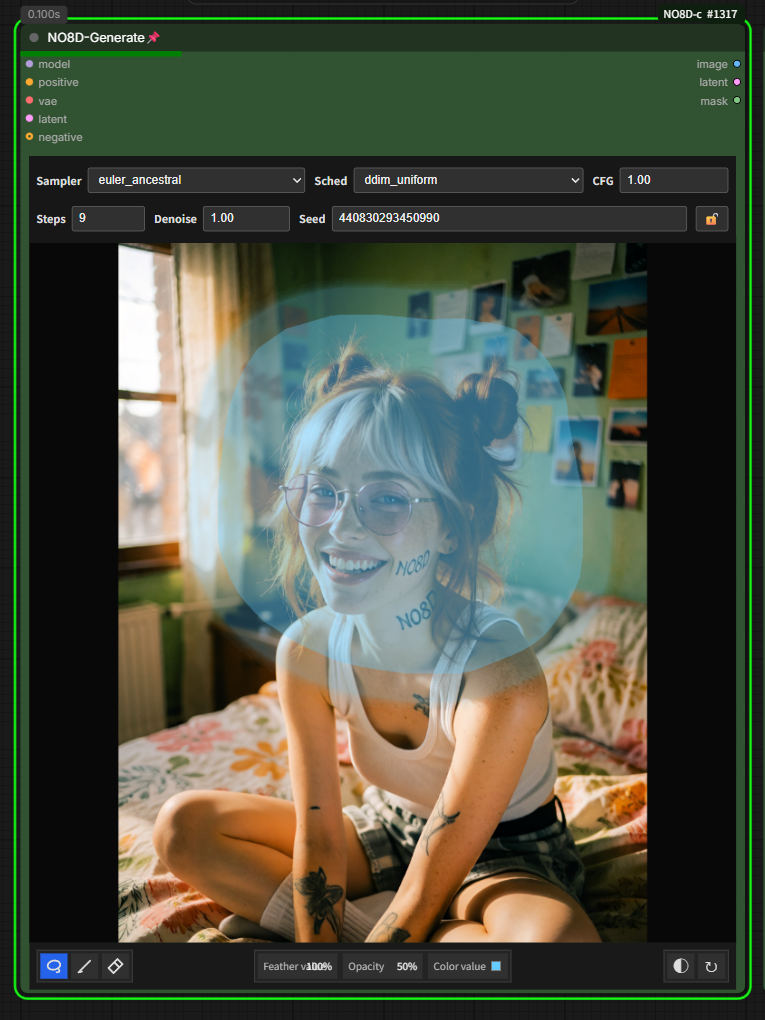
- Controls sampler, scheduler, steps, CFG, denoise, and seed.
- Supports editable canvas ratios, portrait/landscape swapping, source-image positioning, lasso masks, feathering, opacity, invert, and clear controls.
- Automatically switches between normal generation, native inpainting, and outpainting according to the canvas state.
- Supports native reference workflows for Flux2 Klein and Krea2 Identity Edit while preserving the connected latent for ordinary generation.
- Outputs the final generated image.
NO8D-Remove Krea2 Reference Latents
Remove Ostris Krea2 reference_latents from conditioning while preserving the prompt, visual-language conditioning, and other metadata.
NO8D-Match Krea2 Reference Latents
Resize Ostris Krea2 reference-latent grids to match a target latent while preserving the remaining conditioning metadata.
NO8D-A/B preview
Compare two image streams with an interactive split preview.
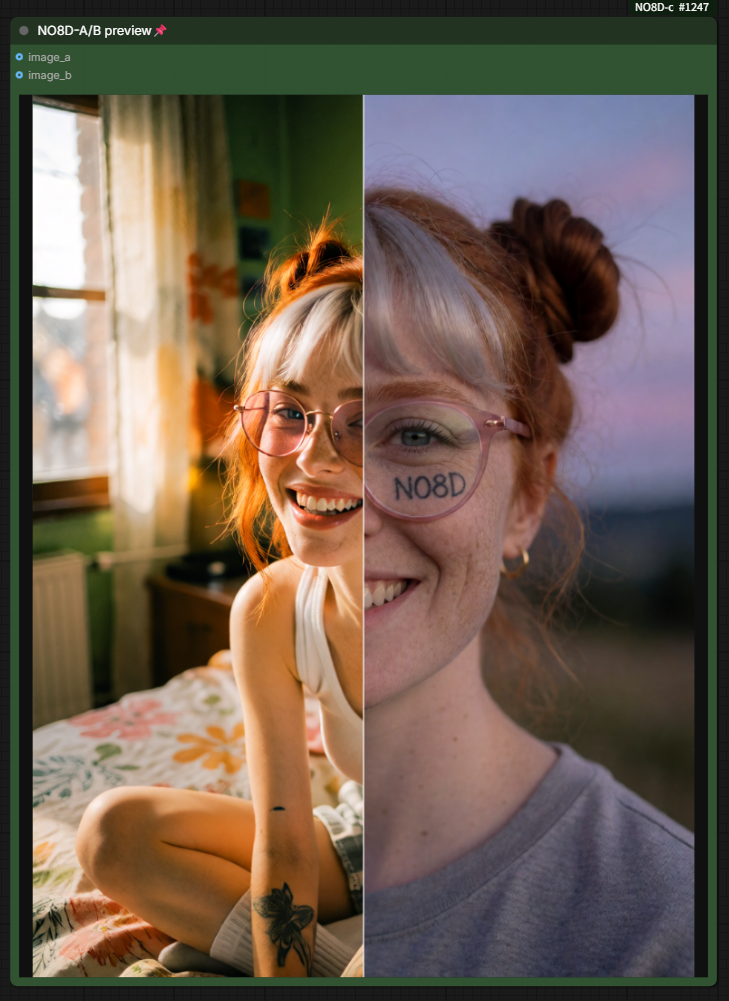
- Displays image A and image B with their original dimensions.
- Supports list-page switching and single-stream history comparison.
- Provides separate
image_aandimage_boutputs; the auto-output switch controls the image A branch. - Native ComfyUI image actions target the A or B image selected under the right-click pointer.
NO8D Image Composer
Compose imported images as layers on a freeform canvas. The node shows only a thumbnail and an editor button; images are added inside the editor, including by drag-and-drop or paste.
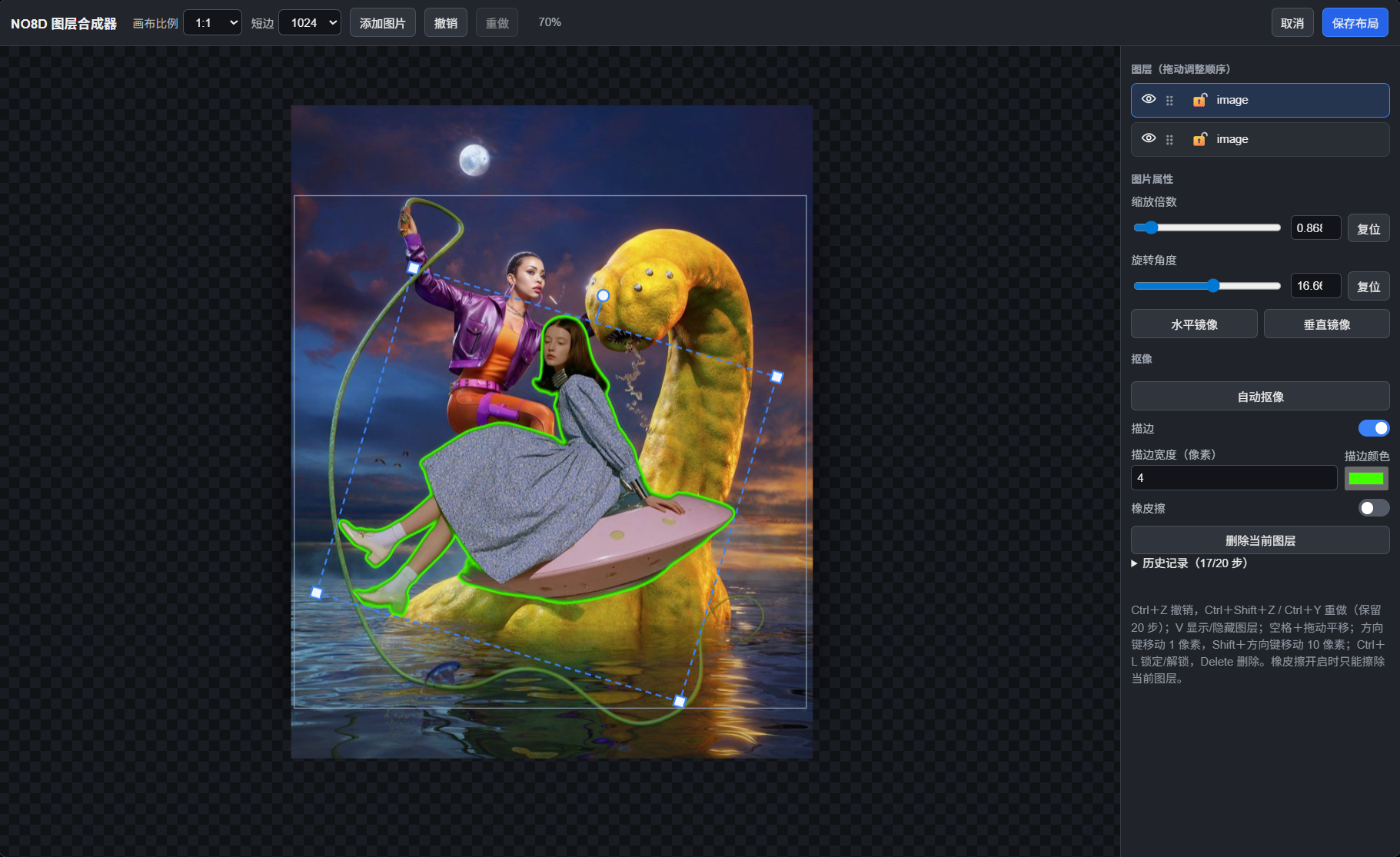
To get started, add NO8D Image Composer from the NO8D-control category, open its editor, choose an aspect ratio and short-side size, then add images by picker, drag-and-drop, or paste. Arrange the layers and click Save layout; connect the node's image output to the next node in your workflow.
- Set the canvas aspect ratio and short-side size; use the wheel to zoom and Space-drag to pan. Images remain visible beyond the output canvas while editing.
- Reorder, hide, lock, multi-select, move, scale, rotate, and flip layers. Scale and rotation also accept exact keyboard values.
- Use automatic cutout, then optionally enable an outline or erase the current cutout layer. Cutout requires
rembginstalled in ComfyUI's Python environment. On first use, it also needs the U2Net model (about 176 MB): download it from the official source and save it asu2net.onnx. The legacy default is%USERPROFILE%\.u2net\u2net.onnx; newer rembg versions use%USERPROFILE%\.rembg\models\u2net\u2net.onnx. IfU2NET_HOMEorREMBG_HOMEis set, use the corresponding model directory. If automatic download fails, check the ComfyUI console. Once cached, the model normally works offline. The rest of the editor does not requirerembg. - Press
Vto show or hide a layer,Ctrl+Lto lock or unlock it, andDeleteto remove unlocked selected layers. Arrow keys nudge by 1 pixel;Shift+arrow keys nudge by 10. - The editor keeps 20 undo steps (
Ctrl+Z) and supports redo (Ctrl+Shift+ZorCtrl+Y). History lasts only while the editor is open; save the layout to retain the composition in the workflow. Labels follow ComfyUI's Chinese/English language setting. - The final output is clipped to the black canvas and includes width and height outputs.
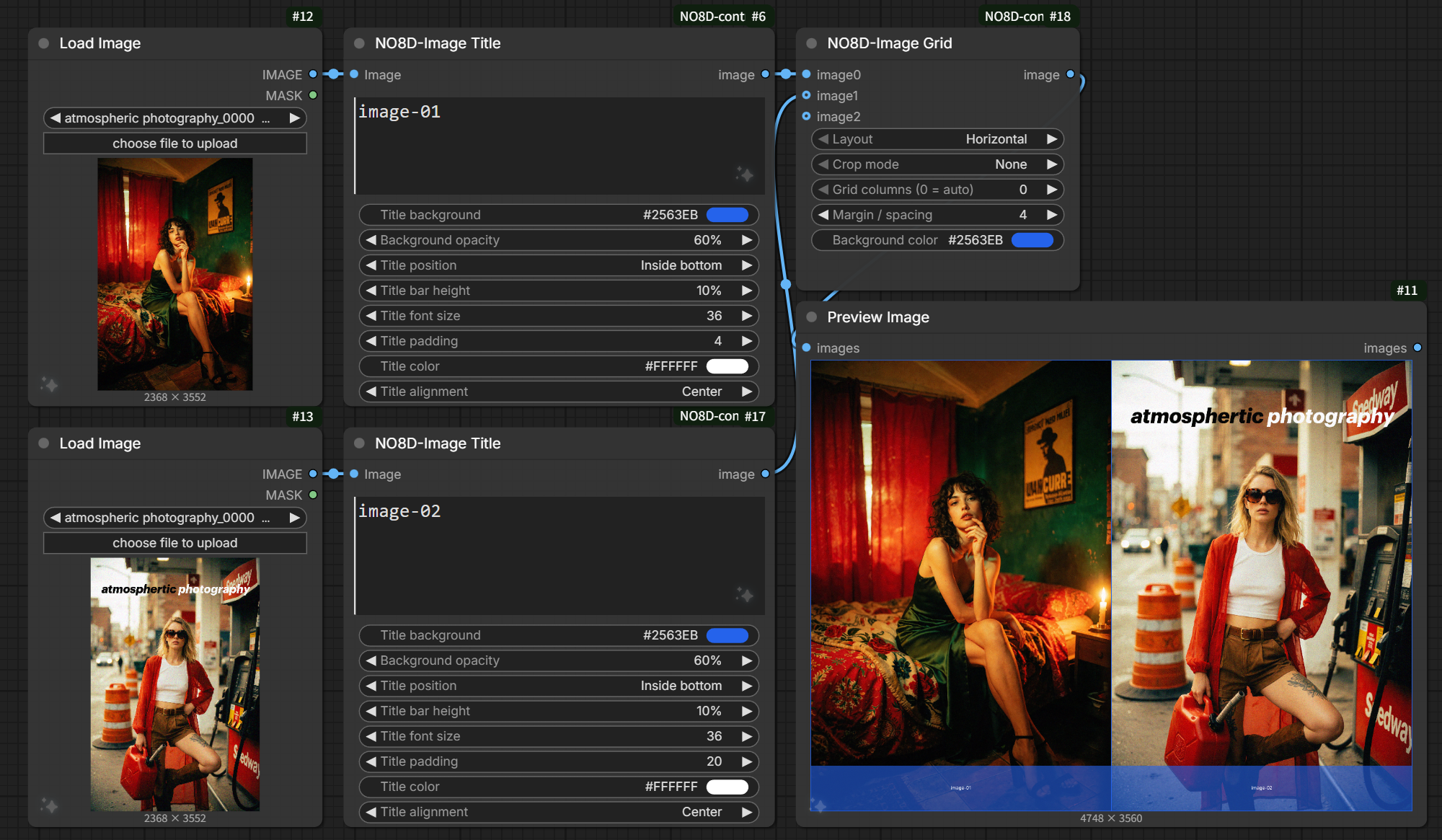
NO8D Image Grid
Combine multiple image inputs or image batches into one image.
- Arrange images horizontally, vertically, or in an automatic grid using the first image as the size reference.
- Standard, left, center, and right crop modes keep the combined image content at the first image dimensions.
- Crop modes expand the canvas for outer margins and center spacing, preserving image content and filling added areas with the background color.
- Cropped images follow the layout direction: horizontal splits left/right, while vertical and one-column grids split top/bottom.
- Use one value for the outer margin and image spacing; grid padding uses a darkened background color.
NO8D Image Title
Add title bars outside the top or bottom edge, or overlay a title across the middle.
- Set independent batch titles with one line per image; blank titles skip title rendering.
- Resize by the longest edge to the original size, 1K, 2K, or 4K before rendering the title, while preserving aspect ratio.
- Control the title background, opacity, position, height, font size, padding, text color, and alignment.
- Top and bottom bars increase output height; middle titles preserve the source dimensions.
- Inner top and inner bottom positions overlay the image edges without changing output dimensions.
- Title-bar opacity and height use percentages; bar height is relative to the source image height.
NO8D save
Save images and matching captions for image-text datasets.
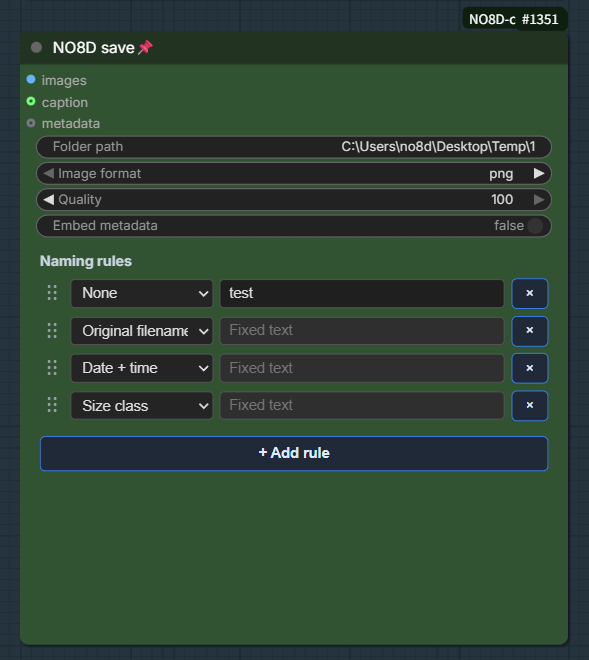
- Builds filenames from fixed text, source filename, date/time, and size class.
- Supports drag-to-reorder filename parts.
- Saves caption text alongside each image.
NO8D-Empty latent
Choose dimensions and create the latent through ComfyUI's native EmptyLatentImage node.
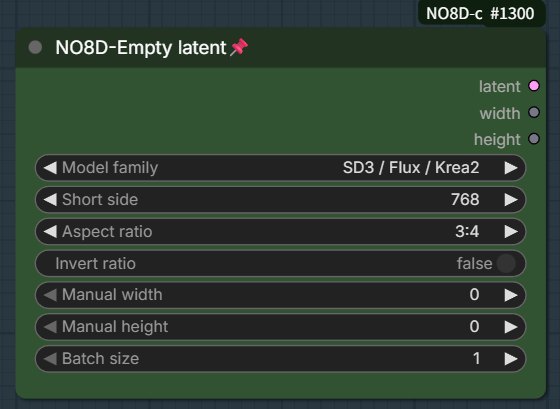
- Provides portrait and landscape aspect ratios with short-side presets and manual short/long-side overrides.
- Existing saved values are migrated from the previous model-family and width/height controls.
- Outputs the latent together with its calculated width and height.
Prompt API and LLM configuration
NO8D-Prompt sends your text or reference image to a configured large language model (LLM), then returns the generated prompt. It can connect to an OpenAI-compatible API or a locally running Ollama service.
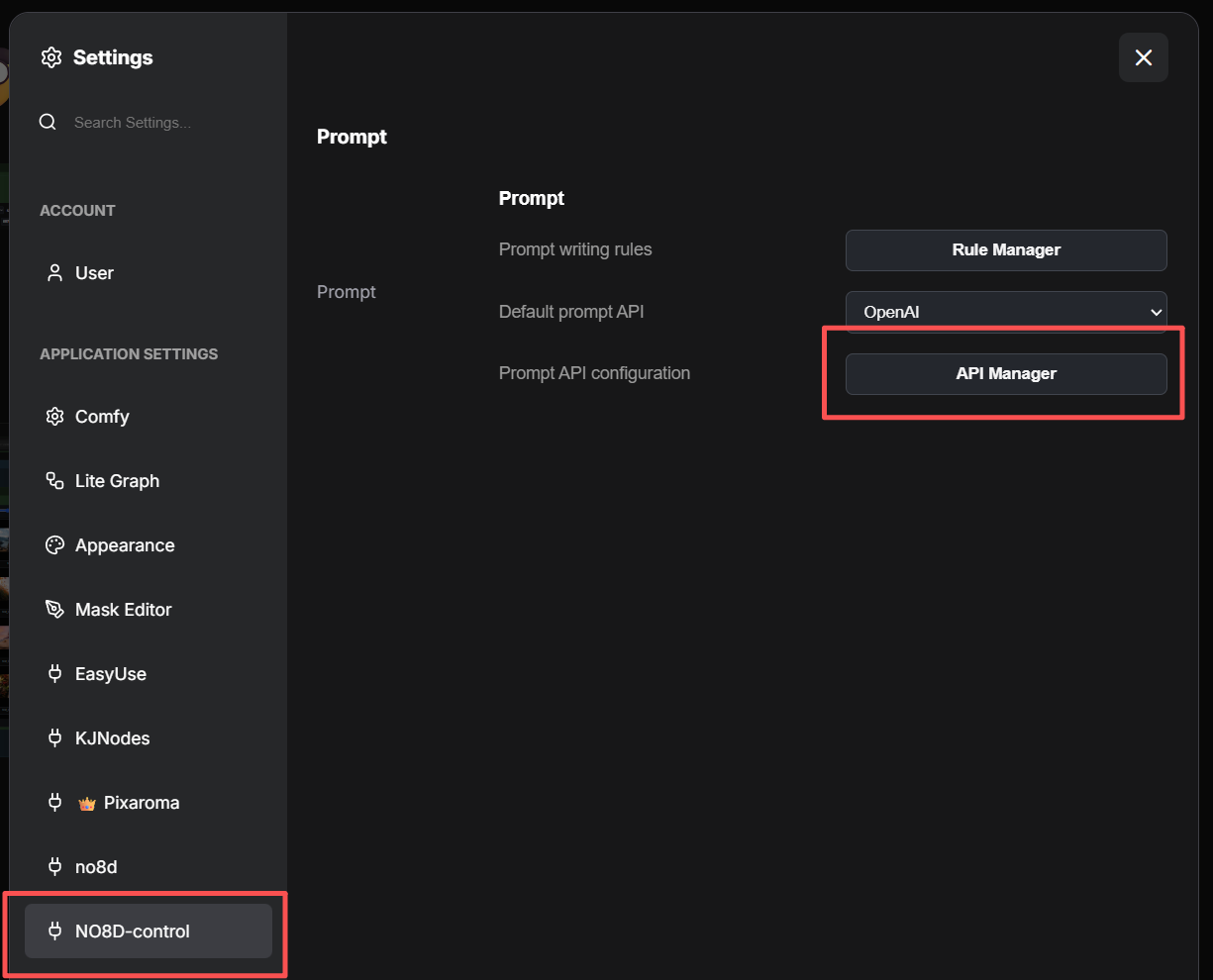
1. Open the API Manager
Open ComfyUI Settings, select NO8D-control in the left sidebar, then click API Manager under Prompt API configuration in the Prompt panel.
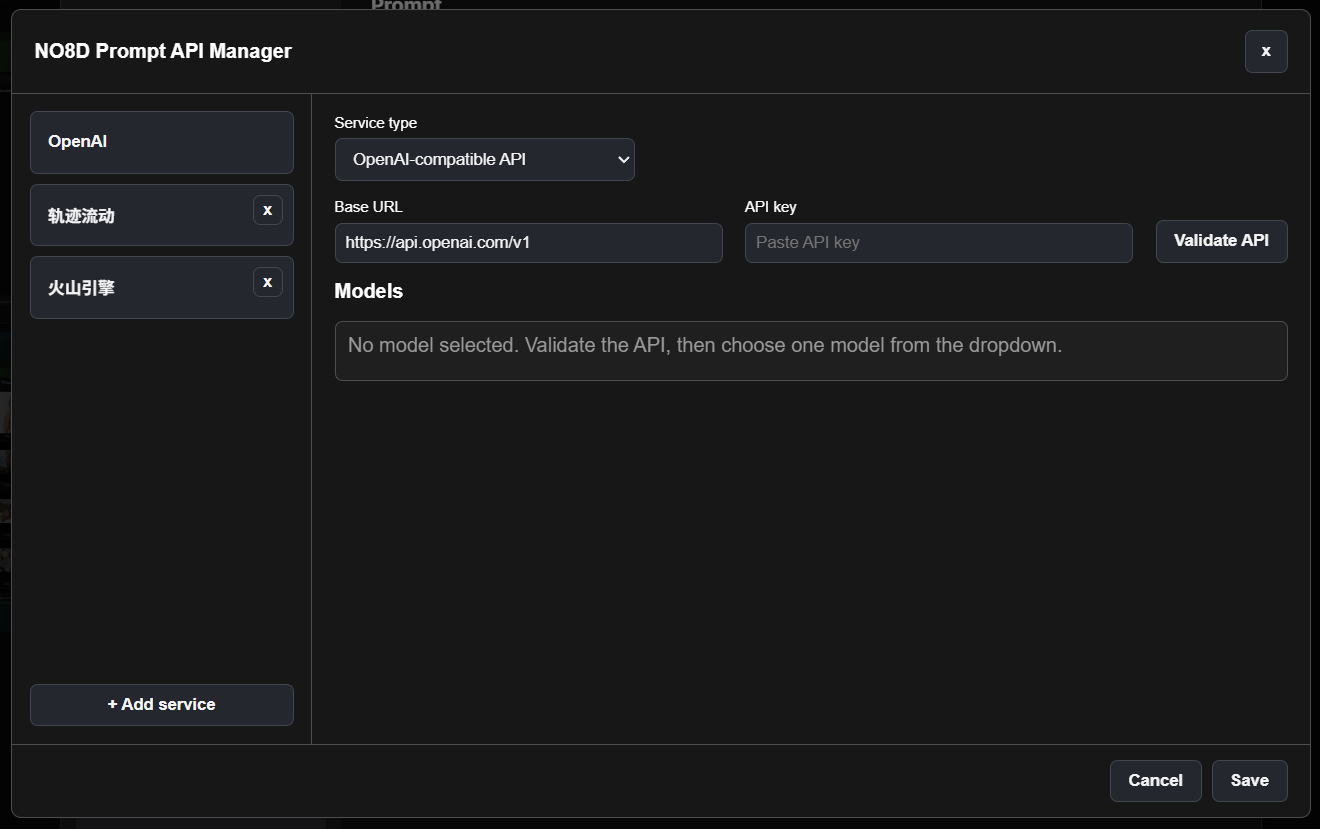
2. Add and validate a service
- Select an existing service on the left, or click + Add service.
- Choose OpenAI-compatible API or Local LLM (Ollama) as the service type.
- Enter the provider's Base URL and API key if required. A local Ollama service does not require an API key.
- Click Validate API. After validation succeeds, choose the available text and vision models.
- Click Save.
3. Choose the right model
- Text model: used for text expansion and text-only prompt generation.
- Vision model: used for image-only and text-plus-image prompting; it must support image input.
- A multimodal model may be selected for both roles if it supports text and image input.
After saving, return to the Prompt settings page and select the service under Default prompt API. If no models appear, check the Base URL and API key, then validate the service again. For Ollama, make sure Ollama is running and the required model is already installed locally.
API keys remain in the local ComfyUI environment and should never be committed to the repository.
More tips and experimental nodes
For more usage tips, workflow ideas, and experimental NO8D nodes, visit Patreon. You can also follow ongoing updates and support the project's continued development there.
License
MIT. See LICENSE.
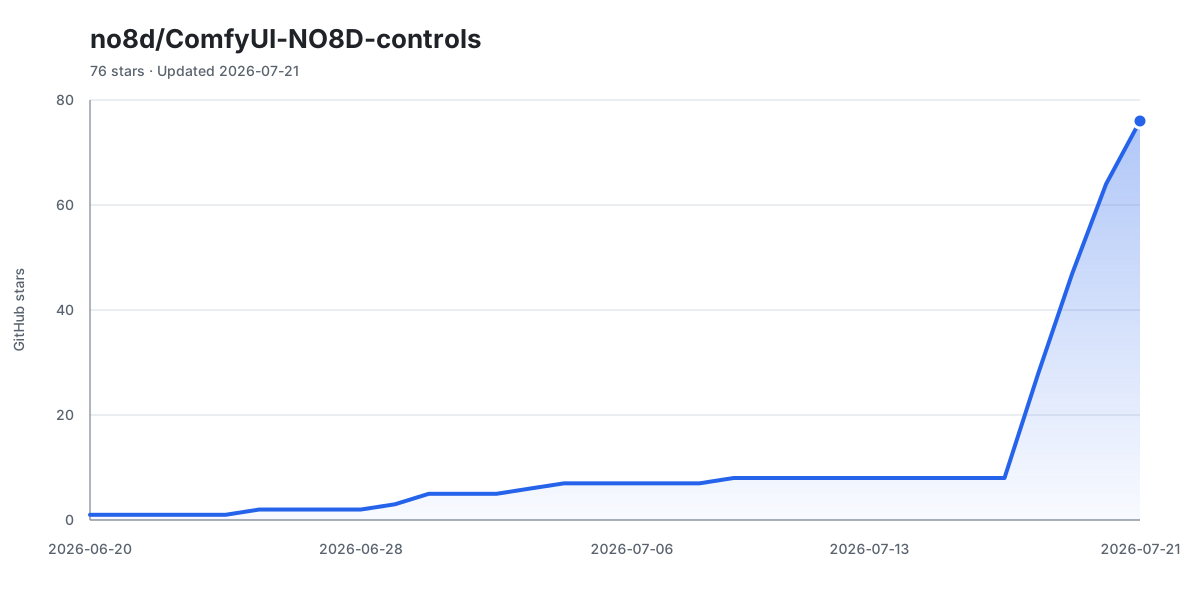
Star History