
Spreadsheet2Video
Use a spreadsheet as input for ComfyUI execution
Nodes (10)
The node that turns a CSV into a ComfyUI loop
Add a Column to Your Spreadsheet Without Hand-Typing 50 Rows
Turn a folder of files into a spreadsheet column
The invisible node that stitches your rows into one video
The marker node that feeds one spreadsheet column to your whole workflow
Point it at a .csv or .xlsx and skip the copy-paste
Cross your spreadsheets to build a full parameter grid
Where each spreadsheet row hands its result to the next one
The invisible node that chains one row's frame to the next
One node, one column of numbers, a whole sweep of seeds
Use a spreadsheet as input for ComfyUI execution.
Examples
Or in manager -> templates -> Spreadsheet2Video
Instructions
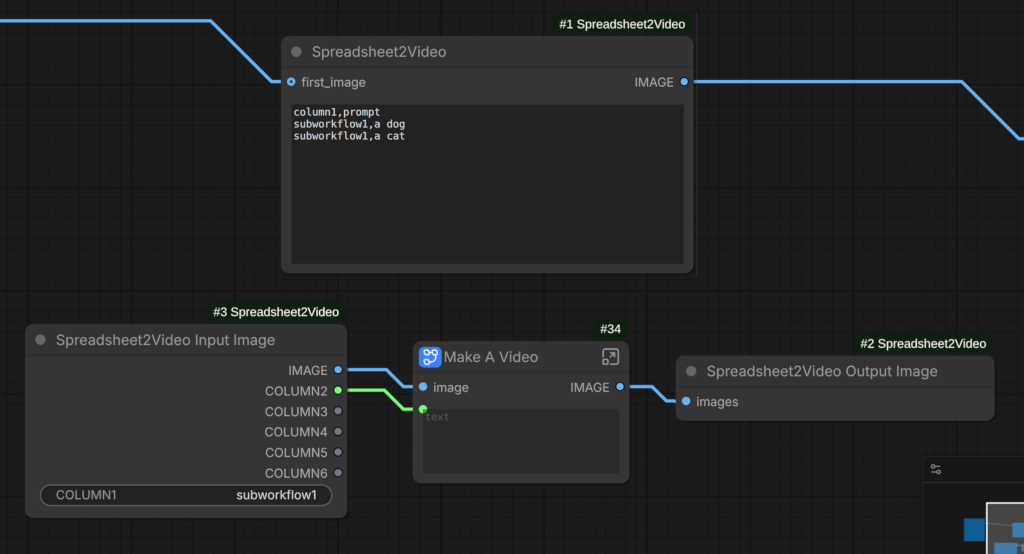
- Make a spreadsheet with the first column as the name of the part of the workflow you want to execute for that row. Put a header row in the spreadsheet.
- Use the "Spreadsheet2Video Input Image" and "Spreadsheet2Video Output Image" nodes to specify which part of the workflow you want to execute. You can have as many of these as you want but they must be separate, cannot depend on each other to run.
- Link up an image to the main Spreadsheet2Video node
- Row 1 will use the first image. Row 2 will use the image output from Row 1. If row 1 outputs a video, row 2 will get the last frame of video from row 1.
Multiply spreadsheet node Instructions
Uses
- Columns can be connected to most things, files, drop downs, strings, numbers, booleans.
- Can be used for non-video workflows. See the example workflow in the templates.
Long video
<div align="center"> <video src="https://github.com/user-attachments/assets/d29d5793-12de-41da-9320-a00dd34d5011" width="70%" poster=""> </video> </div>Long video (Wan + Flux Klein edit) workflow
The video was made with the workflow and panning was done later in a video editor. Using flux klein edit(to make new objects appear) + wan video.
<div align="center"> <video src="https://github.com/user-attachments/assets/656c2f7e-081c-45e1-8e7d-dcef2ee018e2" width="70%" poster=""> </video> </div>Long video (LTX) workflow (Video)
Comparison video
<div align="center"> <video src="https://github.com/user-attachments/assets/65fc85b0-d24f-4f4e-9f52-6c23aa54d115" width="50%" poster=""> </video> </div>Deforum-like videos example
- Make zoom / rotate / move parameters with a game controller
- Copy and paste into a .csv file. example .csv file
- workflow
Non video
Nodes
| Node | Description |
| -- | -- |
| Spreadsheet2Video | Use a start image or use EmptyImage node if you don't want to make a video |
| Spreadsheet2Video Input Image | Give it a name. Link the columns to your workflow. |
| Spreadsheet2Video Output Image | Put the output image here. Link the image to the Spreadsheet2Video Input Image node if you have no image output. The next row will use this image or the last frame if it is a video. |
| Spreadsheet2Video Load Spreadsheet | Optional. Loads a file, link to spreadsheet when you want to use a .csv, xlsx, ods file instead of typing in the data. Can put the file into input or input/csv folders. |
| Spreadsheet2Video Multiply Spreadsheet | Adds extra columns to a spreadsheet. Multiplying the spreadsheet. workflow |
| Other nodes | Ignore them. Used internally only |
- The raw frames are in the
ComfyUI/tempfolder if you want lossless quality
Warning
-
The preview might not open the workflow in in the assets list. You need to download the file and open the file instead.
-
To load .ods spreadsheets. Run
pip install odfpy. -
When you set the seed to "randomize". The number only changes after every run. It will be the same seed after each row. Add another column and connect it up to the seed to get a different seed every row.
Changes
- v1.0.9: Fixed up warning message for nodes inside the image input / output nodes.
- v1.0.8: Add column node. Adds a column, repeats values until it fills the source spreadsheet's rows
- v1.0.7: Reverted changes for errors/warnings when running. It wasn't working for KJ get/set nodes.
- v1.0.6: Fix missing first image in video. Remove checking errors/warnings when running.
- v1.0.5: File list node now uses the input folder as source. Don't crash when numbers in the columns are not correct.
- v1.0.4: Added sequence, file list nodes.
- v1.0.3: Don't use the first image because some workflows may resize it by default.
- v1.0.2: Added audio. Removed the need for the output image node if we are not making a long video.
- v1.0.1: Allow running of non-video workflows without using a blank image or video output. Added multiply spreadsheet node.