
ComfyUI-Emotional-Gallery
A visual character LoRA expression gallery for ComfyUI with Anima support, trigger-word toggles, and persistent preview caching.
Nodes (9)
ComfyUI Emotional Gallery
English | Русский
v1.0.0 — first stable release. Release notes
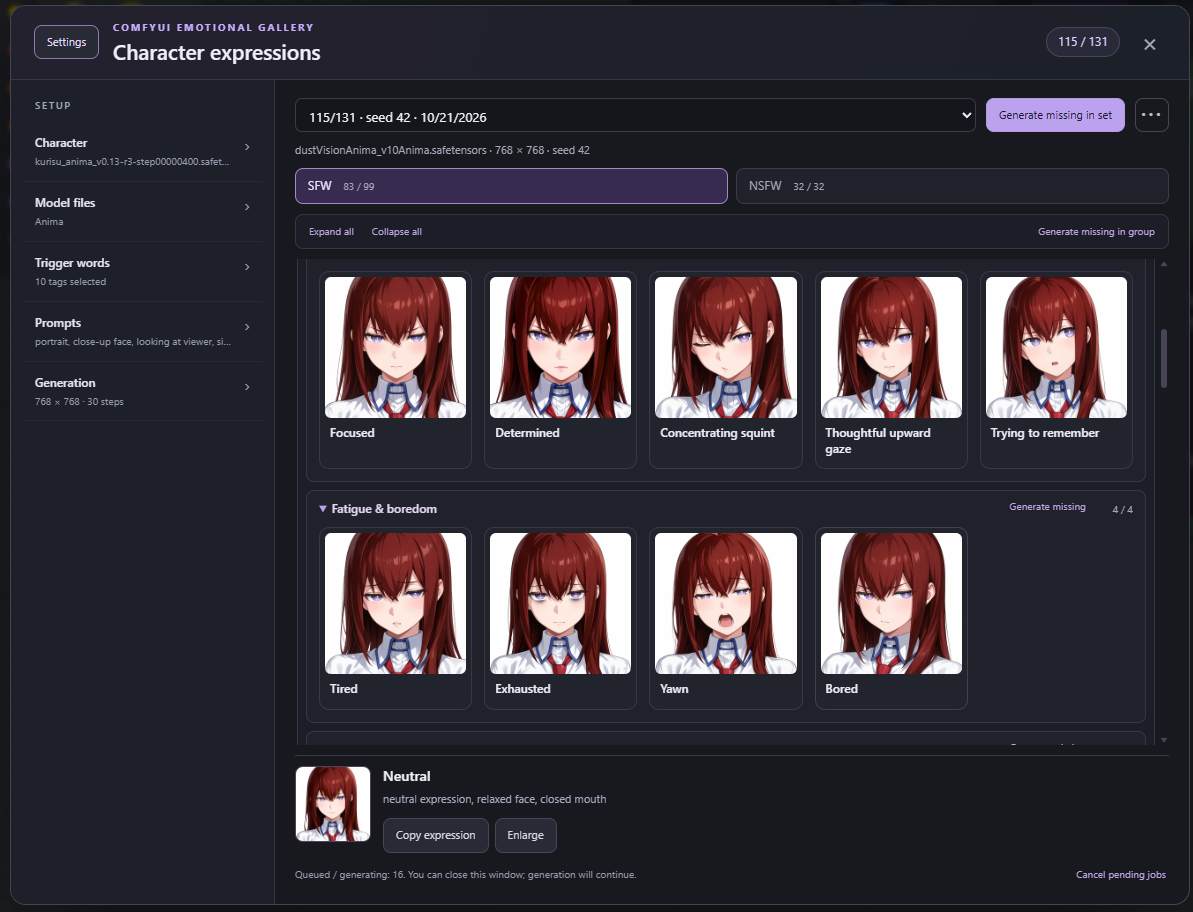
A custom ComfyUI extension for generating, caching, and browsing facial expressions for character LoRAs. Open ◉ Expressions, choose your character and generation settings, then build a visual expression library. The interface is always in English. Users work through this window; the extension's implementation nodes are hidden from the node library, search, and Add Node menu.
Features
- Independent local generator with profiles for Anima, Illustrious / NoobAI, Pony, SDXL, SD 1.5, Flux.1 Dev / Schnell, SD3 / SD3.5, Qwen Image, and Z-Image Base / Turbo, with model, LoRA, prompt, sampler, seed, and image-size controls.
- Searchable LoRA picker, including subfolders and ComfyUI extra model paths.
- Trigger-word toggles from local LoRA metadata, with group selection and remembered choices for each LoRA.
- 131 built-in expressions: 99 SFW and 32 NSFW, organized into collapsible subcategories. Add your own expressions to any subcategory.
- Persistent image sets for each character and generation recipe. Generate only missing previews, delete unwanted sets, and restore the last deleted set.
- Fixed Expand all / Collapse all controls above the scrolling list, with remembered scroll positions when switching tabs.
- Select a preview and use Copy expression to copy only its expression tags.
- Click a card to select its expression. Double-click a cached card, or use Enlarge or the selected thumbnail, to view the full image. Browse cached expressions in the current tab with the arrow buttons or Left / Right keys; close with Escape.
- Collapsible setup sections remember their state. Settings hides the sidebar, and ••• contains custom-expression and saved-set actions.
- A draggable launcher that can float or dock in the ComfyUI toolbar.
Installation
From your ComfyUI/custom_nodes directory:
git clone https://github.com/nikminer/ComfyUI-Emotional-Gallery.git comfyui_emotional_gallery
Restart ComfyUI and hard-refresh the browser (Ctrl+F5). There are no additional Python packages to install and no JavaScript build step: the extension uses ComfyUI's dependencies.
For the release ZIP, extract it directly into ComfyUI/custom_nodes/; it already contains the comfyui_emotional_gallery folder. Alternatively, download the repository and place its contents in ComfyUI/custom_nodes/comfyui_emotional_gallery. On Windows, the included installer accepts the path to your custom_nodes directory:
.\install.ps1 -CustomNodesPath 'C:\path\to\ComfyUI\custom_nodes'
For updates, run git pull inside the extension directory, restart ComfyUI, and hard-refresh the browser. Keep one installed copy of the extension. Existing cache paths and node identifiers are preserved.
Usage
- Open ◉ Expressions and choose a Model profile. The window shows the files required by that architecture and applies its starting resolution, sampling settings, and CLIP strength. The LoRA must match the model architecture. Filename matches suggest model files; you can select differently named compatible files manually. Missing models remain unselected instead of falling back to an unrelated architecture.
- Search for a Character LoRA. Use Refresh models and LoRAs after adding model files.
- Select trigger words using the toggle buttons. Group mode, All on / All off, and Reload tags help manage metadata groups; the text field also accepts manual edits. Metadata is read locally from LoRA Manager, rgthree, Civitai sidecars, descriptions marked with trigger words, and explicit safetensors activation metadata.
- Set the base portrait prompt, negative prompt, LoRA strength, and generation settings. Anima defaults are 768×768, 30 steps, CFG 4,
euler_ancestral/simple, shift 3, and CLIP strength 0. These are starting values you can adjust. - Click Create gallery. Each expression is submitted to the regular ComfyUI queue. A shared seed makes comparison easier.
- Click a card to select its expression. Copy expression copies only expression tags; generation still uses your character trigger words and base prompt. To open the full image, double-click a cached card, or use Enlarge or the selected thumbnail below the cards. Browse with Left / Right and close with Escape.
The sidebar has five collapsible sections: Character, Model files, Trigger words, Prompts, and Generation. Only Character starts expanded; missing model files open their section automatically. Section states and sidebar visibility are remembered in this browser. Use Settings to give the gallery the full window width. ••• opens custom-expression, delete-set, and restore-set actions.
Expression groups
| Tab | Subcategories | Built-in expressions | | --- | --- | --- | | SFW | Neutral, Focus, Fatigue & boredom, Smile, Affection, Smirk, Playful, Blush, Pout & sulking, Sadness, Anger, Surprise, Worry | 99 | | NSFW | Ahegao, Torogao, Ohogao, Ohhoai, Ikigao, Aroused, Seductive smile | 32 |
Click a subcategory header to expand or collapse it. Expand all / Collapse all and Generate missing in group remain visible above the list. Each subcategory also has Generate missing. Card names do not include SFW or NSFW prefixes. Some specialized expression tags may be interpreted inconsistently by different models.
Everyday expressions include calm, serious, attentive, focused, tired, yawning, bored, relieved, disappointed, annoyed, curious, skeptical, and apologetic faces. Pout & sulking contains eight variants: Pout, Puffed cheeks, One puffed cheek, Sulking, Offended, Stubborn, Playful pout, and Teary pout. Use Generate missing in a subcategory to add its previews to an existing set.
Use ••• → + Custom expression to add a name, expression prompt, category, and subcategory. Custom definitions are shared across LoRAs and saved in user/emotional_gallery/custom_emotions.json. Older custom expressions without a subcategory appear in Custom.
Cache and queue
Cache files live in ComfyUI/user/emotional_gallery/, or the equivalent path under your configured ComfyUI user directory. They include PNG images, WebP thumbnails, and JSON settings. LoRA files are never modified.
A set is identified by its model files, LoRA, prompts, strengths, seed, and generation settings. Anima also includes the text encoder, VAE, and shift. Model paths, sizes, and modification times are part of the identity. Selecting a LoRA opens its latest saved set; choose other sets from the dropdown.
Generate missing in group and each subcategory's Generate missing continue the selected saved set using its saved settings and skip completed or queued expressions. They keep that set even if a model file's timestamps have changed. With unchanged form settings, Generate missing in set does the same; changing the form switches the main button to Create gallery, which uses the current model files and settings to identify a set. Closing the gallery or refreshing the browser does not cancel queued work. Restarting ComfyUI loses unfinished queue entries; completed previews remain cached.
Stopping remaining gallery tasks removes only that set's waiting tasks. The current generation finishes, and other workflows continue. Tasks carry the originating ComfyUI client identifier so native progress and completion events reach the correct browser window.
Delete set moves the selected set into user/emotional_gallery/.trash/. Restore deleted set restores the last deleted set, including its images, unless a replacement set already occupies the same cache identity. Deletion is unavailable while that set is generating.
Launcher
Drag the launcher's dotted handle to move it. Drop it on Dock Expressions in the ComfyUI toolbar to dock it, or drag it out again to float. Position is remembered in your browser. With the handle focused, Enter toggles docking, arrow keys move it by 10 pixels, Shift + arrow keys move it by 1 pixel, and Escape cancels a drag.
The gallery's selection panel contains Copy expression and Enlarge. Internal generation nodes stay registered for execution and compatibility with older workflows, but are not offered for adding to a workflow. Nineteen close variants are hidden from the current built-in gallery while their legacy identifiers remain available to old workflows and direct cache reads.
Model profiles and compatibility
The extension runs models locally through ComfyUI's native loaders and sampling nodes. It does not use paid generation APIs or download models. Add the model files and matching LoRAs to your existing ComfyUI model directories, then use Refresh models and LoRAs. Additional architectures require their native nodes in your ComfyUI version.
| Profile | Required model files | Starting settings | | --- | --- | --- | | Anima | Diffusion model, Qwen3 0.6B, Qwen Image VAE | 768×768, 30 steps, CFG 4 | | Illustrious / NoobAI, Pony, SDXL | Complete checkpoint containing text encoders and VAE | 1024×1024, 28 steps, CFG 5 (Pony: 6) | | SD 1.5 | Complete checkpoint | 512×512, 24 steps, CFG 7 | | Flux.1 Dev | Diffusion model, CLIP-L, T5-XXL, Flux.1 / ae VAE | 1024×1024, 20 steps, CFG 1, guidance 3.5 | | Flux.1 Schnell | Diffusion model, CLIP-L, T5-XXL, Flux.1 / ae VAE | 1024×1024, 4 steps, CFG 1 | | SD3 / SD3.5 | Checkpoint containing VAE, separate CLIP-L, CLIP-G, T5-XXL | 1024×1024, 28 steps, CFG 4.5 | | Qwen Image | Text-to-image diffusion model, Qwen2.5-VL 7B, Qwen Image VAE | 1024×1024, 30 steps, CFG 4 | | Z-Image Base | Diffusion model, Qwen3 4B, Flux.1 / ae VAE | 1024×1024, 25 steps, CFG 4 | | Z-Image Turbo | Diffusion model, Qwen3 4B, Flux.1 / ae VAE | 1024×1024, 8 steps, CFG 1 |
These are editable starting values. At CFG 1, negative-prompt guidance is disabled; Flux Dev uses its separate Guidance field. The original SD 1.5 / SDXL (saved settings) profile remains available for earlier caches. Changing a profile creates a separate recipe; previous sets remain accessible. Replacing any of the selected text encoders invalidates that recipe's cache.
Model-file recipes follow the official ComfyUI examples for Flux.1, SD3 / SD3.5, Qwen Image, and Z-Image. The supported scope is native text-to-image model files. GGUF loaders, Flux.2, reference-image/editing variants, video generation, and external services need different recipes and are not included.
Expression quality and character consistency depend on the model, matching LoRA, trigger words, and generation settings. A preview does not guarantee identical expression or composition in another workflow. Models, LoRAs, and generated images are not included in this repository.
Development checks
From a source checkout, backend tests use mocked ComfyUI services and need no GPU or model files:
python -m pip install pillow aiohttp
python -m unittest discover -s tests -v
node --check web/gallery.js
node --check web/launcher.js
node --check web/locale.js
node --check web/triggers.js
node --check web/models.js
node --check web/internal_nodes.js
node tests/test_locale.mjs
node tests/test_trigger_picker.mjs
node tests/test_models.mjs
node tests/test_internal_nodes.mjs
node tests/test_generation.mjs
Use Node.js 24 for the JavaScript checks. The same checks also run before publishing a stable release to Comfy Registry.
Build the installable release archive, GitHub release text, and checksum from the source checkout with Python 3.10 or newer:
python scripts/build_release.py
The output is written to dist/v1.0.0/. The installable ZIP contains only runtime files, documentation, the license, and the installer. Models, generated images, local settings, and development files are excluded.
Publishing to Comfy Registry
Publish to Comfy Registry runs when a stable GitHub release is published. It checks out the released commit, verifies that its tag matches v<project.version>, runs the Python and JavaScript checks, builds the release ZIP, and publishes with the official Comfy action. Drafts, prereleases, and ordinary pushes do not publish packages.
One-time setup:
- Create a Registry Publishing API Key for the
nikminerpublisher in Comfy Registry.PublisherId = "nikminer"is already set inpyproject.toml. - In this GitHub repository, open Settings → Secrets and variables → Actions → New repository secret. Name it
REGISTRY_ACCESS_TOKENand paste the Registry key as its value. See the official publishing instructions. - Commit and push the workflow,
.comfyignore, metadata, and release source before creating the release tag.
For each release, update project.version and CHANGELOG.md, then publish a GitHub release with the matching tag, for example v1.0.0 for version 1.0.0. Watch Actions → Publish to Comfy Registry for the result. The ZIP built during checks is temporary; the official action packages the tracked source using .comfyignore, which excludes tests and development tools.
Missing credentials or failed checks stop publication. After fixing a missing secret, use Re-run failed jobs on that release's workflow run. Registry versions cannot be overwritten: publish subsequent changes under a new version and tag.
License
MIT.