
Prompt Gallery
Adds a Prompt Gallery tab to the ComfyUI sidebar. Import previously generated PNGs, extract the positive prompt from their embedded metadata, and reuse it in the current workflow with one click.
Prompt Gallery (ComfyUI sidebar extension)
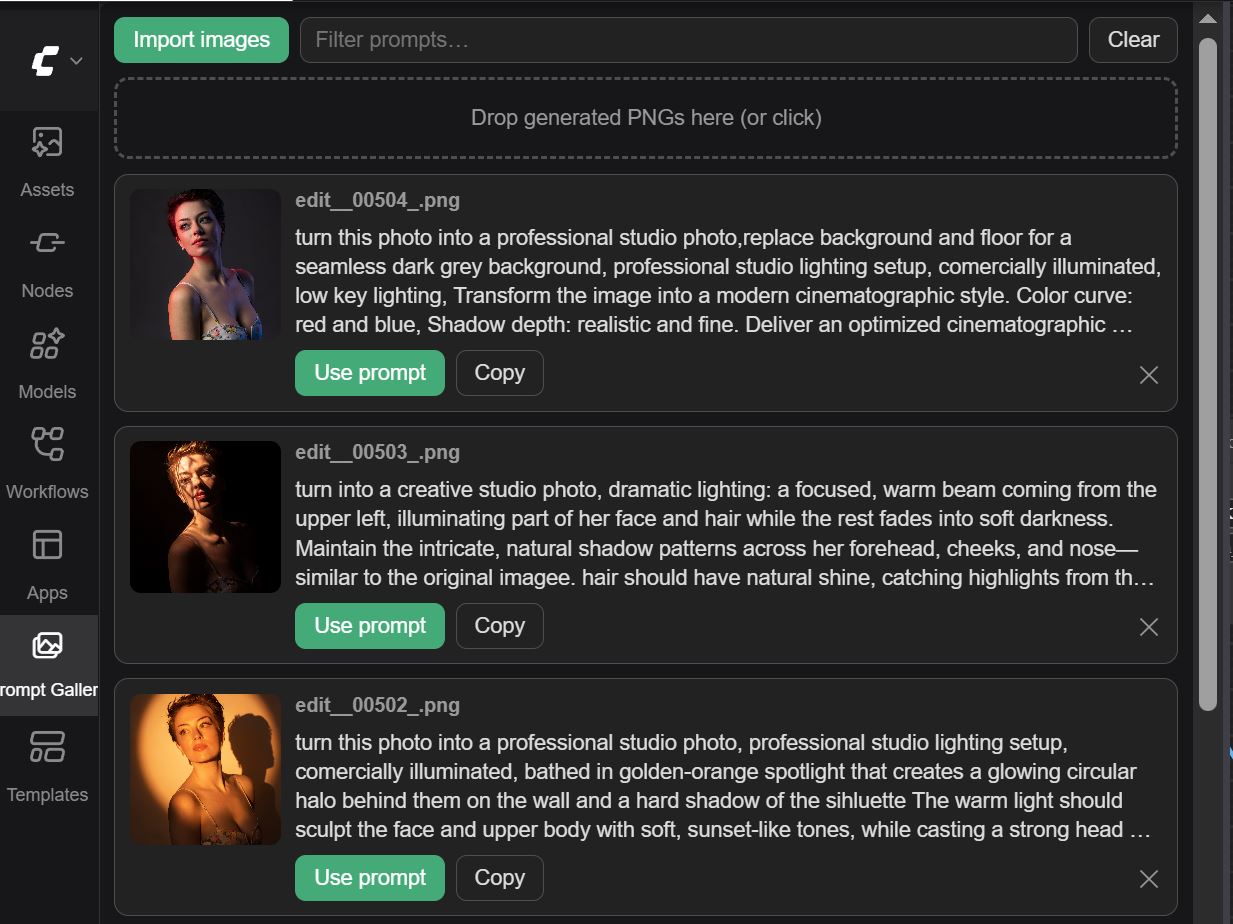
Adds a Prompt Gallery tab to the ComfyUI sidebar. Import previously generated images, and the extension reads the metadata embedded in each PNG, extracts the positive prompt from the saved workflow, and shows the images gallery-style with their prompt beside them. One click writes a prompt into the positive text node of the workflow you currently have open.
Features
- 📥 Import images via file picker or drag & drop (multiple at once)
- 🔍 Client-side PNG metadata parsing — reads the
prompt/workflowchunks ComfyUI embeds (A1111parameterstext is supported as a fallback) - 🧠 Smart positive-prompt detection: traces the sampler's
positiveinput back through conditioning nodes to the real text source - 🖼️ Gallery cards with thumbnail + prompt, click a thumbnail to enlarge, click a prompt to expand it
- ✅ Use prompt fills the positive
CLIP Text Encodeof the current workflow (if you have a text node selected, that one is used instead) - 📋 Copy button, search/filter box, per-image remove and Clear all
- 💾 Persistent gallery: imported images and their prompts are saved to the browser's IndexedDB and restored automatically in future sessions
Install
Copy (or clone) this folder into your ComfyUI custom_nodes directory:
ComfyUI/custom_nodes/prompt-gallery/
├── __init__.py
└── web/
    └── promptGallery.js
Restart ComfyUI and reload the browser tab. Open the sidebar and click the images icon ("Prompt Gallery").
Requires a recent ComfyUI frontend (sidebar-tab API, ComfyUI ≥ ~0.2 / frontend 1.3.22+).
How the prompt target is chosen
When you click Use prompt, the extension picks the destination node in this order:
- The single node you currently have selected, if it has a text widget
- The node feeding any sampler's
positiveinput (followed through ControlNet/conditioning nodes) - The first
CLIP Text Encodenode whose title doesn't contain "negative"
The receiving node is selected and centered on the canvas so you can see what changed.
Notes
- Only images that still contain their metadata work — PNGs saved by ComfyUI's Save Image node keep it; screenshots, re-encoded, or web-stripped copies do not.
- The gallery is stored in your browser's IndexedDB, so it survives page refreshes and ComfyUI restarts. It is per-browser/per-machine: opening ComfyUI in a different browser (or clearing site data) starts with an empty gallery. Removing an image or using Clear also deletes the saved copy.