
Nanaix Image Nodes
Nanaix image generation and editing nodes for ComfyUI
Nodes (2)
NanAix ComfyUI Nodes
Use NanAIX image generation models directly inside ComfyUI.
This custom node package adds two ComfyUI nodes:
| Node | Purpose | Output |
| --- | --- | --- |
| Nanaix_Text | Text-to-image generation | ComfyUI IMAGE |
| Nanaix_Image | Image-to-image generation or image editing with reference images | ComfyUI IMAGE |
The output is native ComfyUI image tensor data, so it can connect directly to built-in nodes such as PreviewImage, SaveImage, image upscalers, post-processing nodes, and most other image pipelines.
Highlights
- Native ComfyUI
IMAGEoutput, not a URL-only node. - Two nodes:
Nanaix_TextandNanaix_Image. - Supported model families:
gpt-image-*, includinggpt-image-2nano-banana-*, includingnano-banana-2andnano-banana-pro
- A single visible
api_keyfield in each node. - Free-form
modelinput, so future Nanaix model names can be typed without updating the node UI. Nanaix_Imagesupports up to 8 reference image inputs.- Batched reference inputs are expanded into individual reference images before submission.
- Large reference images are downscaled and JPEG-compressed before upload to reduce timeout risk.
- Successful node settings are saved locally and used to prefill newly created nodes.
- Failed runs do not overwrite the last known working local config.
- Detailed errors for missing keys, missing images, invalid API keys, wrong account groups, upstream availability, and timeouts.
- Banana models use the async task flow: submit with
POST /api/generate, then poll withGET /api/result?id=task-id.
Examples
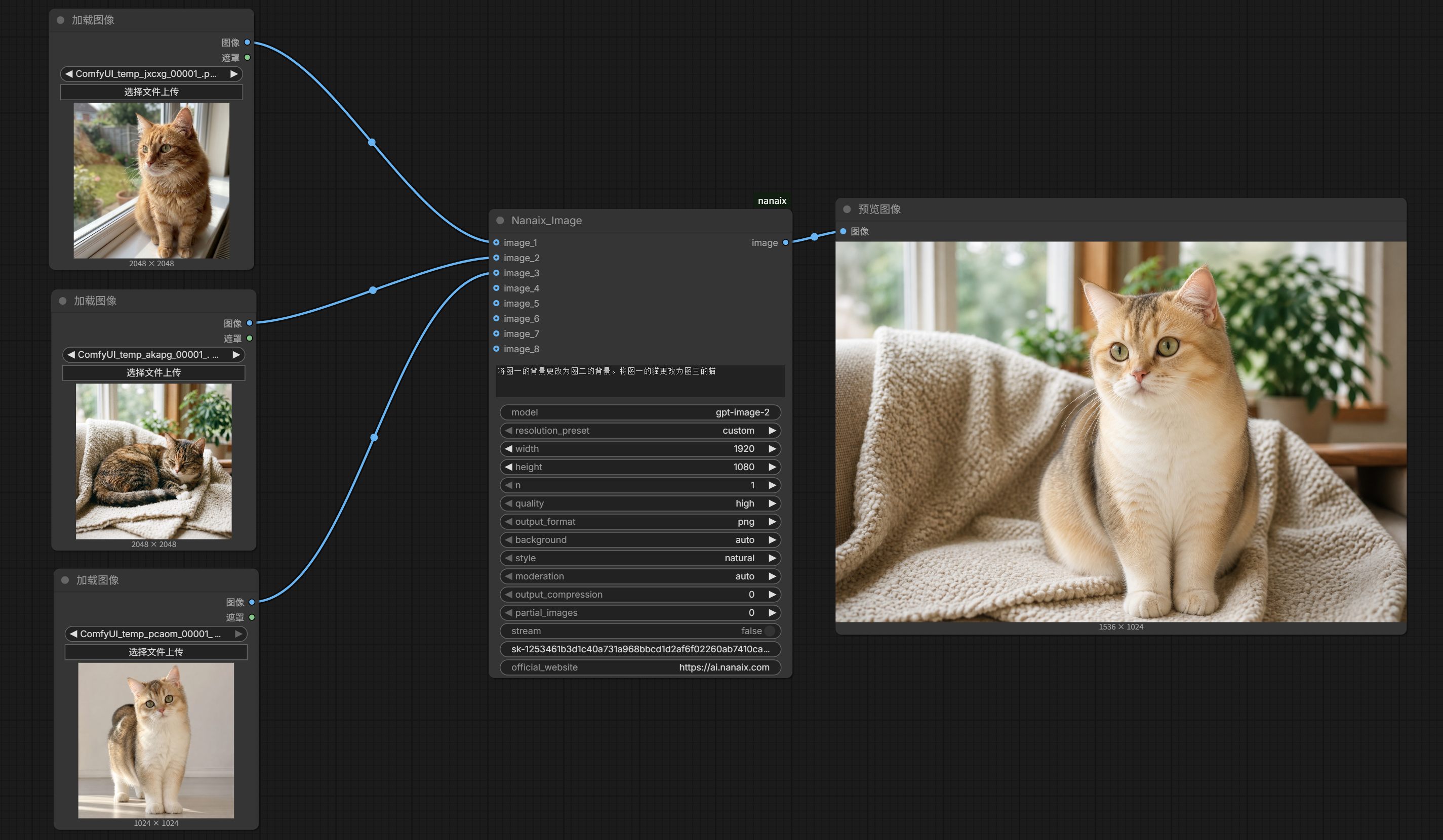
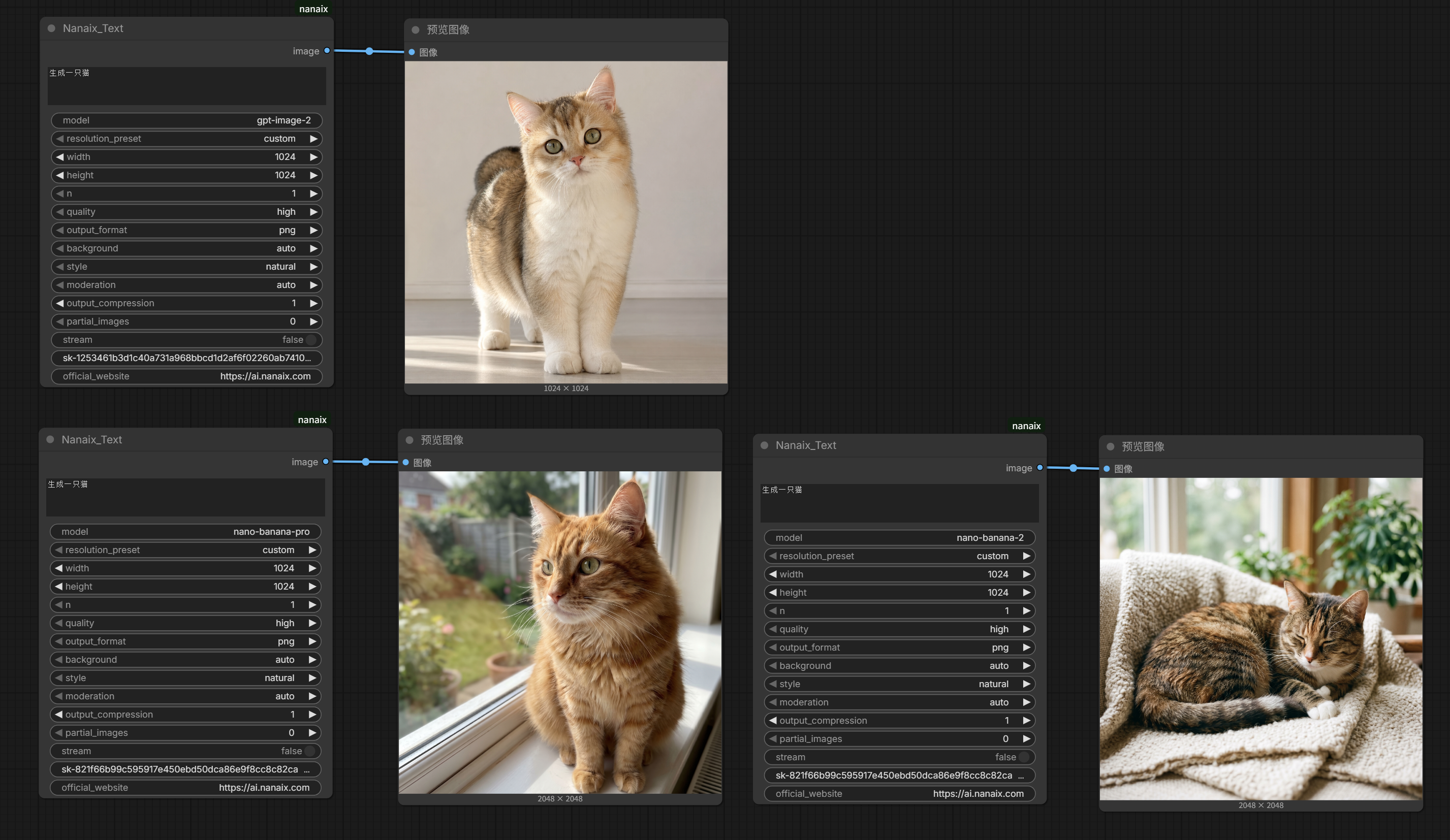
These example images are generated from real ComfyUI runs and are sanitized for GitHub, so they do not include API key screenshots.
Nanaix_Image: Multi-Reference Image Editing
Nanaix_Text: Text-to-Image Across Supported Model Families
Supported Models
The node routes requests by model name prefix:
| Model name | Provider route | Notes |
| --- | --- | --- |
| gpt-image-2 | image-2 Images API | Text-to-image and image-to-image/editing |
| gpt-image-* | image-2 Images API | Free-form future-compatible prefix route |
| nano-banana-2 | Nano Banana API | Text-to-image and reference-image generation/editing |
| nano-banana-pro | Nano Banana API | Text-to-image and reference-image generation/editing |
| nano-banana-* | Nano Banana API | Free-form future-compatible prefix route |
Unsupported model names are rejected before any network request is sent.
Quick Install
Clone this repository into your ComfyUI custom_nodes folder:
cd ComfyUI/custom_nodes
git clone https://github.com/nan-boop/NanAix_comfyui.git nanaix_Comfy
Install dependencies in the Python environment used by ComfyUI:
cd nanaix_Comfy
pip install -r requirements.txt
Restart ComfyUI after installation.
If you use a portable Windows build, run pip through the bundled Python:
F:\ComfyUI-aki-v3\python\python.exe -m pip install -r F:\ComfyUI-aki-v3\ComfyUI\custom_nodes\nanaix_Comfy\requirements.txt
Then restart ComfyUI and search for:
Nanaix_Text
Nanaix_Image
Helper Install Script
If you downloaded the repository somewhere outside ComfyUI, you can deploy it with the helper script:
python scripts/deploy_to_comfyui.py --custom-nodes "D:\ComfyUI\custom_nodes" --force
Use the Python runtime that ComfyUI uses for verification:
python scripts/deploy_to_comfyui.py --custom-nodes "D:\ComfyUI\custom_nodes" --python "D:\ComfyUI\python\python.exe" --force
If you do not know where ComfyUI is installed, scan common locations:
python scripts/find_comfyui.py
Run a local readiness report:
python scripts/doctor.py
Run a one-shot deployment and verification flow:
python scripts/runbook.py --force
Node: Nanaix_Text
Nanaix_Text generates images from a text prompt.
Inputs
| Input | Type | Required | Description |
| --- | --- | --- | --- |
| prompt | String | Yes | Text prompt describing the image to generate. |
| model | String | Yes | Model name, for example gpt-image-2, nano-banana-2, or nano-banana-pro. |
| api_key | String | Yes | Nanaix API key for the selected model family. |
| resolution_preset | Dropdown | Yes | Common size preset. Use custom to keep manual width and height. |
| width | Integer | Yes | Requested output width when using custom, or a value that may be mapped by the preset. |
| height | Integer | Yes | Requested output height when using custom, or a value that may be mapped by the preset. |
| n | Integer | Yes | Requested number of images. For banana models the node submits one task per image. For image-2, keep n=1 because the upstream docs recommend not depending on multi-image responses. |
| quality | Dropdown | Yes | Output quality selector, commonly high, medium, or low. |
| output_format | Dropdown | Yes | Output format preference: png, webp, or jpeg. |
| background | Dropdown | Yes | Kept in the UI for image-2-style compatibility. Current stable requests intentionally avoid unstable optional fields unless the provider path supports them reliably. |
| style | Dropdown | Yes | Kept in the UI for image-2-style compatibility. |
| moderation | Dropdown | Yes | Kept in the UI for image-2-style compatibility. |
| output_compression | Integer | Yes | Kept in the UI for image-2-style compatibility. |
| partial_images | Integer | Yes | Kept in the UI for image-2-style compatibility. |
| stream | Boolean | Yes | Kept in the UI for image-2-style compatibility. |
| official_website | String | Yes | Read-only helper field pointing to https://ai.nanaix.com. |
Output
| Output | Type | Description |
| --- | --- | --- |
| image | IMAGE | Standard ComfyUI image output. Connect it to PreviewImage, SaveImage, or downstream image nodes. |
Node: Nanaix_Image
Nanaix_Image generates or edits images using one or more reference images.
Inputs
| Input | Type | Required | Description |
| --- | --- | --- | --- |
| prompt | String | Yes | Describe the final image or edit instruction. |
| model | String | Yes | Model name, for example gpt-image-2, nano-banana-2, or nano-banana-pro. |
| api_key | String | Yes | Nanaix API key for the selected model family. |
| image_1 | IMAGE | At least one image is required | Main reference image. |
| image_2 to image_8 | IMAGE | Optional | Additional reference images for style, lighting, layout, subject, or environment cues. |
| resolution_preset | Dropdown | Yes | Common size preset. Use custom to keep manual width and height. |
| width | Integer | Yes | Requested output width. |
| height | Integer | Yes | Requested output height. |
| n | Integer | Yes | Requested number of images. For banana models the node submits one task per image. For image-2, keep n=1 for the most predictable behavior. |
| quality | Dropdown | Yes | Output quality selector. |
| output_format | Dropdown | Yes | Output format preference: png, webp, or jpeg. |
| background | Dropdown | Yes | Compatibility field for image-2-style controls. |
| style | Dropdown | Yes | Compatibility field for image-2-style controls. |
| moderation | Dropdown | Yes | Compatibility field for image-2-style controls. |
| output_compression | Integer | Yes | Compatibility field for image-2-style controls. |
| partial_images | Integer | Yes | Compatibility field for image-2-style controls. |
| stream | Boolean | Yes | Compatibility field for image-2-style controls. |
| official_website | String | Yes | Read-only helper field pointing to https://ai.nanaix.com. |
Output
| Output | Type | Description |
| --- | --- | --- |
| image | IMAGE | Standard ComfyUI image output. It can be previewed, saved, or passed into other image nodes. |
Reference Image Notes
- Connect at least one reference image before queueing the workflow.
image_1is the best default input for a single-image edit.- For multi-reference edits, a practical pattern is:
image_1: subject, composition, silhouette, or main layout.image_2: style, lighting, palette, background, or environment.image_3+: extra supporting references.
- If a connected reference input is a batch, the node expands it into individual images.
- The current MVP does not expose mask input or local inpainting mask controls.
- Reference images are normalized for upload. Large images are downscaled to a maximum edge of 1536 pixels and encoded as JPEG quality 85 to reduce large-payload timeout risk.
Resolution Presets
| Preset | Size |
| --- | --- |
| custom | Use the entered width and height. |
| square | 1024x1024 |
| square_2k | 2048x2048 |
| square_4k | 4096x4096 |
| landscape_hd | 1536x1024 |
| portrait_hd | 1024x1536 |
| landscape_2k | 2048x1024 |
| portrait_2k | 1024x2048 |
| landscape_4k | 4096x3072 |
| portrait_4k | 3072x4096 |
For image-2 requests, common supported sizes are preserved when possible. For banana requests, width and height are mapped to the provider's aspectRatio and imageSize concepts internally, but the current stable request path only sends parameters that have been verified to behave reliably.
API Behavior
image-2 route
Models starting with gpt-image- are routed to the image-2 Images API:
- Text generation endpoint:
POST /v1/images/generations - Image edit endpoint:
POST /v1/images/edits - Model visibility check:
GET /v1/models
The request is intentionally conservative. The stable text payload includes:
{
  "model": "gpt-image-2",
  "prompt": "A cinematic neon city at night",
  "size": "1024x1024",
  "quality": "high",
  "output_format": "png",
  "response_format": "b64_json"
}
For image edits, the node adds serialized reference images to the request.
Nano Banana route
Models starting with nano-banana- are routed to the Nano Banana API:
- Submit task:
POST /v1/api/generate - Query task:
GET /v1/api/result?id=task-id
The stable submit payload includes:
{
  "model": "nano-banana-2",
  "prompt": "A cute orange cat looking at neon signs"
}
When reference images are connected, the node adds an images list. The node then polls the result endpoint until the task reaches a known success or failure state.
Recognized success statuses include:
COMPLETEDSUCCEEDEDSUCCESSDONEFINISHED- lower-case variants such as
succeeded
Recognized failure statuses include:
FAILEDERRORCANCELLEDCANCELED
Local Config Behavior
After a successful run, the node saves working settings to:
nanaix_config.json
This file is stored in the plugin root directory and is ignored by Git.
Saved values include:
api_keymodelresolution_presetwidthheightnqualityoutput_formatbackgroundstylemoderationoutput_compressionpartial_imagesstream
Important details:
- The config is saved only after a successful run.
- Failed runs do not overwrite the last working config.
- Newly created nodes try to prefill from the saved config.
- Saved config is not a hidden runtime fallback.
- If the visible
api_keyfield is blank, the node raises an error even ifnanaix_config.jsoncontains an old key. - Legacy config files with
image2_api_keyorbanana_api_keyare migrated into the current singleapi_keyfield when possible.
Example Workflows
Example ComfyUI workflows are included:
| File | Purpose |
| --- | --- |
| examples/minimal_text_workflow.json | Minimal Nanaix_Text -> PreviewImage/SaveImage workflow. |
| examples/minimal_image_workflow.json | Minimal LoadImage -> Nanaix_Image -> PreviewImage/SaveImage workflow. |
| examples/minimal_multi_image_workflow.json | Multi-reference Nanaix_Image workflow using multiple LoadImage nodes. |
Import one of these JSON files into ComfyUI to start quickly.
Smoke Tests Outside ComfyUI
Run a text generation smoke test with image-2:
python scripts/smoke_test.py --model gpt-image-2 --prompt "A red lantern on a rainy street" --image2-key YOUR_IMAGE2_KEY --output output.png
Run a text generation smoke test with banana:
python scripts/smoke_test.py --model nano-banana-pro --prompt "A red lantern on a rainy street" --banana-key YOUR_BANANA_KEY --output output.png
Run an image edit smoke test:
python scripts/smoke_test.py --model nano-banana-2 --prompt "Turn this into a watercolor illustration" --banana-key YOUR_BANANA_KEY --reference-image input.png --output edited.png
List visible image-2 models:
python scripts/smoke_test.py --model gpt-image-2 --image2-key YOUR_IMAGE2_KEY --list-models
List supported banana models:
python scripts/smoke_test.py --model nano-banana-pro --banana-key YOUR_BANANA_KEY --list-models
Run a preflight check without generating an image:
python scripts/smoke_test.py --model gpt-image-2 --image2-key YOUR_IMAGE2_KEY --preflight
python scripts/smoke_test.py --model nano-banana-pro --banana-key YOUR_BANANA_KEY --preflight
To avoid putting keys directly into shell history, set environment variables:
set NANAIX_IMAGE2_API_KEY=YOUR_IMAGE2_KEY
set NANAIX_BANANA_API_KEY=YOUR_BANANA_KEY
On PowerShell:
$env:NANAIX_IMAGE2_API_KEY="YOUR_IMAGE2_KEY"
$env:NANAIX_BANANA_API_KEY="YOUR_BANANA_KEY"
The ComfyUI nodes themselves use the visible api_key widget. The environment variables are for helper scripts and live smoke tests.
ComfyUI Verification Scripts
Verify the package import from a custom nodes directory:
python scripts/verify_install.py --custom-nodes "D:\ComfyUI\custom_nodes"
Start a temporary ComfyUI instance and confirm the nodes register:
python scripts/comfyui_smoke.py --comfy-root "D:\ComfyUI\ComfyUI" --python "D:\ComfyUI\python\python.exe"
Submit one of the bundled workflows to a running ComfyUI instance:
python scripts/workflow_smoke.py --workflow examples/minimal_text_workflow.json --comfy-root "D:\ComfyUI\ComfyUI" --python "D:\ComfyUI\python\python.exe"
Run a live end-to-end generation smoke test through ComfyUI:
python scripts/live_comfy_smoke.py --comfy-root "D:\ComfyUI\ComfyUI" --python "D:\ComfyUI\python\python.exe"
Run a live image-edit smoke test:
python scripts/live_comfy_smoke.py --mode image --comfy-root "D:\ComfyUI\ComfyUI" --python "D:\ComfyUI\python\python.exe" --input-image-name "workflow_smoke_input.png"
Troubleshooting
Invalid API key
The key is wrong, missing, or not being sent. Paste the correct key into the node's visible api_key field.
Images API is not supported for this platform
The key likely belongs to a group that does not have image API access. Use a key from an image-enabled Nanaix group.
No available compatible accounts
The upstream service currently has no compatible available account. Retry later or use another model/key if available.
At least one reference image is required
Nanaix_Image needs at least one connected IMAGE input. Connect a LoadImage node to image_1.
request timed out while waiting for Nanaix
The request or result download took too long. For image editing, try fewer reference images, smaller reference images, or a smaller output size.
Banana task timed out waiting for completion
Banana models are asynchronous. The node submits a task and polls /api/result?id=task-id. If the task does not finish before the local timeout, the node reports the task id so you can retry or query it manually.
Node changes do not appear in ComfyUI
Restart ComfyUI. Python custom nodes are imported at startup and are not always hot-reloaded correctly.
Development
Install development dependencies:
pip install -r requirements.txt
Run tests:
pytest -q
Build a release zip:
python scripts/package_release.py --output-dir "D:\releases"
Build and verify with a ComfyUI Python runtime:
python scripts/package_release.py --output-dir "D:\releases" --python "D:\ComfyUI\python\python.exe"
The package includes ComfyUI node help pages:
web/docs/Nanaix_Text.mdweb/docs/Nanaix_Image.md
Repository Layout
nanaix_Comfy/
  __init__.py
  nodes/
    nanaix_text.py
    nanaix_image.py
  services/
    image2_client.py
    banana_client.py
    router.py
  utils/
    image_io.py
    size_mapping.py
    validation.py
    errors.py
  config/
    settings.py
  web/docs/
    Nanaix_Text.md
    Nanaix_Image.md
  examples/
    minimal_text_workflow.json
    minimal_image_workflow.json
    minimal_multi_image_workflow.json
  scripts/
    doctor.py
    deploy_to_comfyui.py
    smoke_test.py
    runbook.py
Security Notes
- Do not commit
nanaix_config.json. - Do not share API keys in screenshots, workflow JSON, issues, or logs.
- The node requires the visible
api_keyfield to be filled before generation. - Helper scripts can read keys from environment variables, but the ComfyUI nodes use the node widget value.
中文说明
NanAix ComfyUI 节点
这个仓库把 NanAIX 的图片生成接口接入到 ComfyUI 里,提供两个自定义节点:
| 节点 | 用途 | 输出 |
| --- | --- | --- |
| Nanaix_Text | 文生图 | ComfyUI 原生 IMAGE |
| Nanaix_Image | 图生图 / 参考图生成 / 图片编辑 | ComfyUI 原生 IMAGE |
节点最终返回的是 ComfyUI 标准图片数据,不是单纯的 URL,所以可以直接连接原生的 PreviewImage、SaveImage、放大节点、后处理节点,以及其他图片工作流节点。
功能特点
- 输出为 ComfyUI 原生
IMAGE,可直接预览和保存。 - 提供
Nanaix_Text和Nanaix_Image两个节点。 - 支持模型族:
gpt-image-*,例如gpt-image-2nano-banana-*,例如nano-banana-2、nano-banana-pro
- 节点里只有一个可见密钥输入框:
api_key。 model是自由文本输入,后续有新模型时用户可以自己填写模型名,不需要频繁改节点代码。Nanaix_Image支持最多 8 路参考图输入。- 如果输入的是图片 batch,节点会自动拆成多张参考图再提交。
- 大尺寸参考图会在上传前压缩到最长边 1536,并转成 JPEG quality 85,降低请求体过大导致超时的概率。
- 成功运行后会保存本地配置,新建节点时自动预填。
- 失败运行不会覆盖上一次成功的配置。
- 缺密钥、缺参考图、密钥错误、账号组不支持图片、上游账号不可用、请求超时等情况都会返回更具体的错误信息。
- Banana 模型使用异步任务流程:先
POST /api/generate提交,再GET /api/result?id=task-id查询结果。
示例图
下面两张图来自真实 ComfyUI 运行结果,并且已经做成适合 GitHub 展示的安全版本,不包含 API key 截图。
Nanaix_Image:多参考图图生图示例
Nanaix_Text:文生图多模型示例
支持的模型
节点按模型名前缀自动路由:
| 模型名 | 路由到 | 说明 |
| --- | --- | --- |
| gpt-image-2 | image-2 Images API | 文生图和图生图 |
| gpt-image-* | image-2 Images API | 兼容未来同前缀模型 |
| nano-banana-2 | Nano Banana API | 文生图和参考图生成 |
| nano-banana-pro | Nano Banana API | 文生图和参考图生成 |
| nano-banana-* | Nano Banana API | 兼容未来同前缀模型 |
如果模型名不以 gpt-image- 或 nano-banana- 开头,节点会在发送网络请求前直接报错。
快速安装
进入 ComfyUI 的 custom_nodes 目录,然后克隆仓库:
cd ComfyUI/custom_nodes
git clone https://github.com/nan-boop/NanAix_comfyui.git nanaix_Comfy
安装依赖:
cd nanaix_Comfy
pip install -r requirements.txt
如果你用的是 Windows 便携版 ComfyUI,建议用 ComfyUI 自带的 Python 安装:
F:\ComfyUI-aki-v3\python\python.exe -m pip install -r F:\ComfyUI-aki-v3\ComfyUI\custom_nodes\nanaix_Comfy\requirements.txt
然后重启 ComfyUI,在节点搜索里查找:
Nanaix_Text
Nanaix_Image
使用部署脚本安装
如果仓库不在 ComfyUI 目录里,也可以用脚本复制部署:
python scripts/deploy_to_comfyui.py --custom-nodes "D:\ComfyUI\custom_nodes" --force
指定 ComfyUI 使用的 Python 做验证:
python scripts/deploy_to_comfyui.py --custom-nodes "D:\ComfyUI\custom_nodes" --python "D:\ComfyUI\python\python.exe" --force
不知道 ComfyUI 在哪里时,可以扫描:
python scripts/find_comfyui.py
查看本地诊断报告:
python scripts/doctor.py
一键部署并验证:
python scripts/runbook.py --force
节点:Nanaix_Text
Nanaix_Text 用提示词直接生成图片。
输入参数
| 参数 | 类型 | 必填 | 说明 |
| --- | --- | --- | --- |
| prompt | 字符串 | 是 | 图片提示词。 |
| model | 字符串 | 是 | 模型名,例如 gpt-image-2、nano-banana-2、nano-banana-pro。 |
| api_key | 字符串 | 是 | 当前模型对应的 NanAIX 密钥。 |
| resolution_preset | 下拉选项 | 是 | 常用分辨率预设。选 custom 时使用手动宽高。 |
| width | 整数 | 是 | 输出宽度。 |
| height | 整数 | 是 | 输出高度。 |
| n | 整数 | 是 | 生成数量。Banana 模型会按数量提交多个任务;image-2 建议保持 1,因为上游文档建议不要依赖多图返回。 |
| quality | 下拉选项 | 是 | 质量选项,常用 high、medium、low。 |
| output_format | 下拉选项 | 是 | 输出格式:png、webp、jpeg。 |
| background | 下拉选项 | 是 | 保留的 image-2 风格兼容参数。当前稳定请求会避免发送容易导致上游 502 的不稳定可选字段。 |
| style | 下拉选项 | 是 | 保留的 image-2 风格兼容参数。 |
| moderation | 下拉选项 | 是 | 保留的 image-2 风格兼容参数。 |
| output_compression | 整数 | 是 | 保留的 image-2 风格兼容参数。 |
| partial_images | 整数 | 是 | 保留的 image-2 风格兼容参数。 |
| stream | 布尔值 | 是 | 保留的 image-2 风格兼容参数。 |
| official_website | 字符串 | 是 | 只读官网提示:https://ai.nanaix.com。 |
输出
| 输出 | 类型 | 说明 |
| --- | --- | --- |
| image | IMAGE | ComfyUI 标准图片输出,可以直接接 PreviewImage、SaveImage 或其他图片节点。 |
节点:Nanaix_Image
Nanaix_Image 用一张或多张参考图生成/编辑图片。
输入参数
| 参数 | 类型 | 必填 | 说明 |
| --- | --- | --- | --- |
| prompt | 字符串 | 是 | 描述最终想要的图片或编辑方向。 |
| model | 字符串 | 是 | 模型名,例如 gpt-image-2、nano-banana-2、nano-banana-pro。 |
| api_key | 字符串 | 是 | 当前模型对应的 NanAIX 密钥。 |
| image_1 | IMAGE | 至少需要一路图片 | 主参考图。 |
| image_2 到 image_8 | IMAGE | 否 | 额外参考图,可用于风格、光影、主体、布局、环境等。 |
| resolution_preset | 下拉选项 | 是 | 常用分辨率预设。选 custom 时使用手动宽高。 |
| width | 整数 | 是 | 输出宽度。 |
| height | 整数 | 是 | 输出高度。 |
| n | 整数 | 是 | 生成数量。Banana 模型会按数量提交多个任务;image-2 建议保持 1。 |
| quality | 下拉选项 | 是 | 质量选项。 |
| output_format | 下拉选项 | 是 | 输出格式:png、webp、jpeg。 |
| background | 下拉选项 | 是 | 保留的 image-2 风格兼容参数。 |
| style | 下拉选项 | 是 | 保留的 image-2 风格兼容参数。 |
| moderation | 下拉选项 | 是 | 保留的 image-2 风格兼容参数。 |
| output_compression | 整数 | 是 | 保留的 image-2 风格兼容参数。 |
| partial_images | 整数 | 是 | 保留的 image-2 风格兼容参数。 |
| stream | 布尔值 | 是 | 保留的 image-2 风格兼容参数。 |
| official_website | 字符串 | 是 | 只读官网提示:https://ai.nanaix.com。 |
输出
| 输出 | 类型 | 说明 |
| --- | --- | --- |
| image | IMAGE | ComfyUI 标准图片输出,可以直接预览、保存或继续接其他节点。 |
参考图建议
- 队列运行前必须至少连接一张参考图。
- 单图编辑优先使用
image_1。 - 多参考图常用方式:
image_1:主体、构图、轮廓、主要布局。image_2:风格、光影、色彩、背景、环境。image_3+:更多辅助参考。
- 如果某一路输入本身是 batch,节点会拆成多张参考图。
- 当前 MVP 不提供蒙版输入,也不提供局部重绘 mask 控件。
- 参考图上传前会做归一化处理。大图会压到最长边 1536,并用 JPEG quality 85 编码,降低请求体过大导致超时的概率。
分辨率预设
| 预设 | 尺寸 |
| --- | --- |
| custom | 使用手动输入的 width 和 height |
| square | 1024x1024 |
| square_2k | 2048x2048 |
| square_4k | 4096x4096 |
| landscape_hd | 1536x1024 |
| portrait_hd | 1024x1536 |
| landscape_2k | 2048x1024 |
| portrait_2k | 1024x2048 |
| landscape_4k | 4096x3072 |
| portrait_4k | 3072x4096 |
image-2 路径会尽量保留常见支持尺寸。Banana 路径内部会把宽高映射到上游的比例和尺寸概念,但当前稳定请求只发送已经验证更可靠的字段。
接口行为说明
image-2 路径
模型名以 gpt-image- 开头时走 image-2 Images API:
- 文生图:
POST /v1/images/generations - 图生图:
POST /v1/images/edits - 模型列表:
GET /v1/models
当前请求会尽量保守,文生图稳定 payload 类似:
{
  "model": "gpt-image-2",
  "prompt": "A cinematic neon city at night",
  "size": "1024x1024",
  "quality": "high",
  "output_format": "png",
  "response_format": "b64_json"
}
图生图会在此基础上加入序列化后的参考图。
Nano Banana 路径
模型名以 nano-banana- 开头时走 Nano Banana API:
- 提交任务:
POST /v1/api/generate - 查询任务:
GET /v1/api/result?id=task-id
稳定提交 payload 类似:
{
  "model": "nano-banana-2",
  "prompt": "A cute orange cat looking at neon signs"
}
如果连接了参考图,节点会加入 images 列表。提交后节点会轮询结果接口,直到任务成功、失败或超时。
已识别成功状态:
COMPLETEDSUCCEEDEDSUCCESSDONEFINISHED- 小写状态,例如
succeeded
已识别失败状态:
FAILEDERRORCANCELLEDCANCELED
本地配置行为
成功运行后,节点会把可复用配置保存到插件根目录:
nanaix_config.json
这个文件已加入 .gitignore,不要提交到 GitHub。
保存字段包括:
api_keymodelresolution_presetwidthheightnqualityoutput_formatbackgroundstylemoderationoutput_compressionpartial_imagesstream
注意:
- 只有成功运行后才保存。
- 失败运行不会覆盖上一次成功配置。
- 新建节点会尝试读取本地配置并预填。
- 本地配置不是隐藏兜底。
- 如果节点界面里的
api_key是空的,即使配置文件里有旧密钥,也会报错。 - 旧版本配置里的
image2_api_key或banana_api_key会尽量迁移到现在的单个api_key字段。
示例工作流
仓库里包含示例 ComfyUI workflow:
| 文件 | 用途 |
| --- | --- |
| examples/minimal_text_workflow.json | 最小 Nanaix_Text -> PreviewImage/SaveImage 工作流。 |
| examples/minimal_image_workflow.json | 最小 LoadImage -> Nanaix_Image -> PreviewImage/SaveImage 工作流。 |
| examples/minimal_multi_image_workflow.json | 多参考图 Nanaix_Image 工作流。 |
可以直接导入 ComfyUI 使用。
ComfyUI 外部 smoke test
image-2 文生图:
python scripts/smoke_test.py --model gpt-image-2 --prompt "A red lantern on a rainy street" --image2-key YOUR_IMAGE2_KEY --output output.png
banana 文生图:
python scripts/smoke_test.py --model nano-banana-pro --prompt "A red lantern on a rainy street" --banana-key YOUR_BANANA_KEY --output output.png
图生图:
python scripts/smoke_test.py --model nano-banana-2 --prompt "Turn this into a watercolor illustration" --banana-key YOUR_BANANA_KEY --reference-image input.png --output edited.png
查看 image-2 可见模型:
python scripts/smoke_test.py --model gpt-image-2 --image2-key YOUR_IMAGE2_KEY --list-models
查看 banana 支持模型:
python scripts/smoke_test.py --model nano-banana-pro --banana-key YOUR_BANANA_KEY --list-models
只做密钥/模型可见性预检,不实际生成:
python scripts/smoke_test.py --model gpt-image-2 --image2-key YOUR_IMAGE2_KEY --preflight
python scripts/smoke_test.py --model nano-banana-pro --banana-key YOUR_BANANA_KEY --preflight
为了避免密钥进入命令历史,可以设置环境变量:
set NANAIX_IMAGE2_API_KEY=YOUR_IMAGE2_KEY
set NANAIX_BANANA_API_KEY=YOUR_BANANA_KEY
PowerShell:
$env:NANAIX_IMAGE2_API_KEY="YOUR_IMAGE2_KEY"
$env:NANAIX_BANANA_API_KEY="YOUR_BANANA_KEY"
注意:ComfyUI 节点本身使用节点界面里的 api_key 字段;环境变量主要给脚本和 live smoke test 使用。
常见问题
Invalid API key
密钥错误、缺失或未发送。请把正确密钥填到节点可见的 api_key 字段。
Images API is not supported for this platform
当前密钥所在分组可能没有图片接口权限。请使用图片组的 NanAIX 密钥。
No available compatible accounts
上游暂时没有可用兼容账号。可以稍后重试,或切换其他可用模型/密钥。
At least one reference image is required
Nanaix_Image 至少要连接一张图片。常见做法是用 LoadImage 接到 image_1。
request timed out while waiting for Nanaix
请求或结果下载耗时过长。图生图时建议减少参考图数量、缩小参考图尺寸,或降低输出尺寸。
Banana task timed out waiting for completion
Banana 模型是异步任务。节点会先提交任务,再查询 /api/result?id=task-id。如果任务在本地等待时间内没有完成,会报出 task id,方便重试或手动查询。
节点更新后 ComfyUI 里没变化
重启 ComfyUI。Python 自定义节点通常在启动时导入,不一定能可靠热更新。
开发
安装依赖:
pip install -r requirements.txt
运行测试:
pytest -q
打包发布 zip:
python scripts/package_release.py --output-dir "D:\releases"
使用 ComfyUI 的 Python 进行打包验证:
python scripts/package_release.py --output-dir "D:\releases" --python "D:\ComfyUI\python\python.exe"
节点内置帮助文档:
web/docs/Nanaix_Text.mdweb/docs/Nanaix_Image.md
安全建议
- 不要提交
nanaix_config.json。 - 不要在截图、workflow JSON、issue、日志里泄露 API key。
- 节点运行前必须填写可见的
api_key。 - 脚本可以从环境变量读取 key,但 ComfyUI 节点使用节点里的输入框。