
comfyui-original-character-generator
ComfyUI custom nodes for generating original character prompts and reusable settings.
Nodes (7)
One seed, a settings object, and a brand-new anime character
Batch character generation, seed by seed
The all-in-one OC generator
Load a saved preset instead
The pack's persistence bridge
Where this pack's character dice actually live
See what's actually inside that settings object
comfyui-original-character-generator






ComfyUI custom nodes for generating original character prompts and reusable settings.
Languages: English | 日本語 | 한국어 | 简体中文
Screenshots
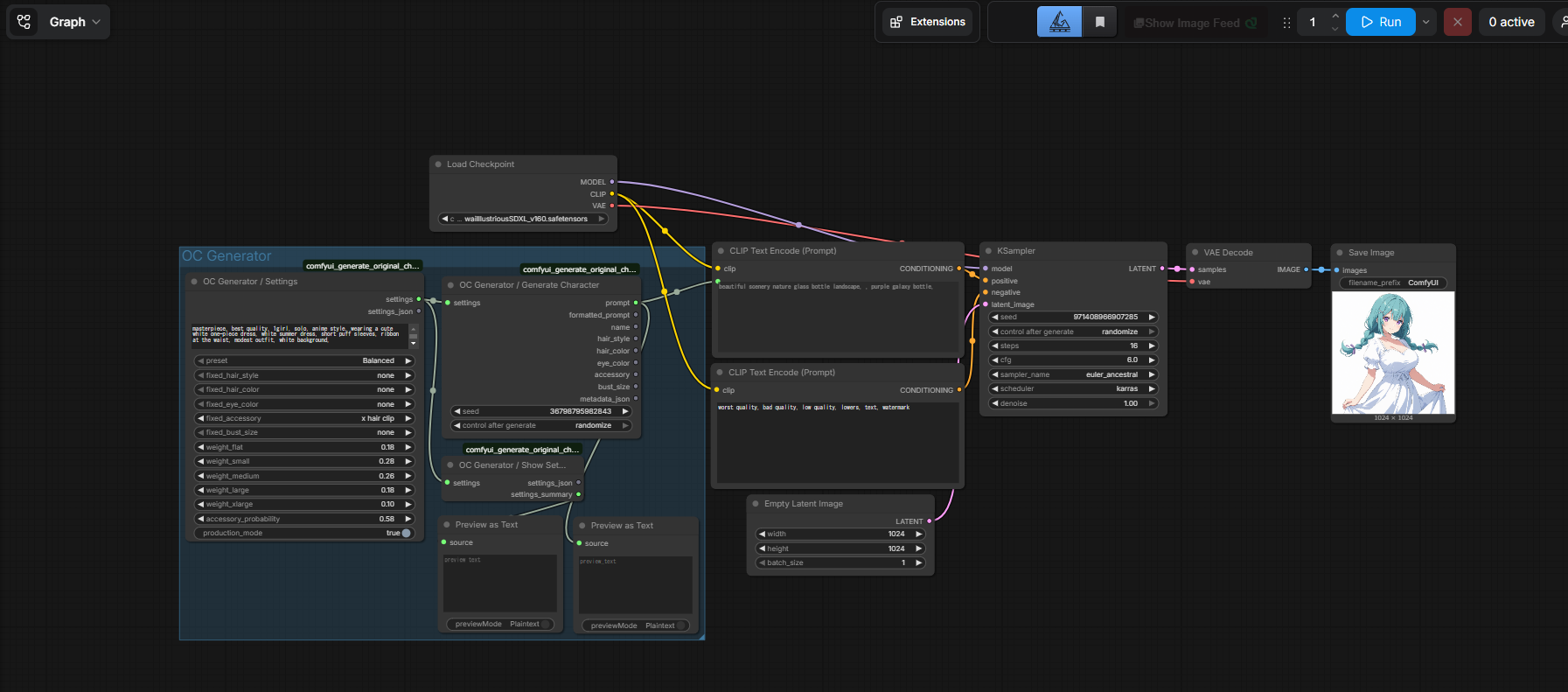
Workflow Overview
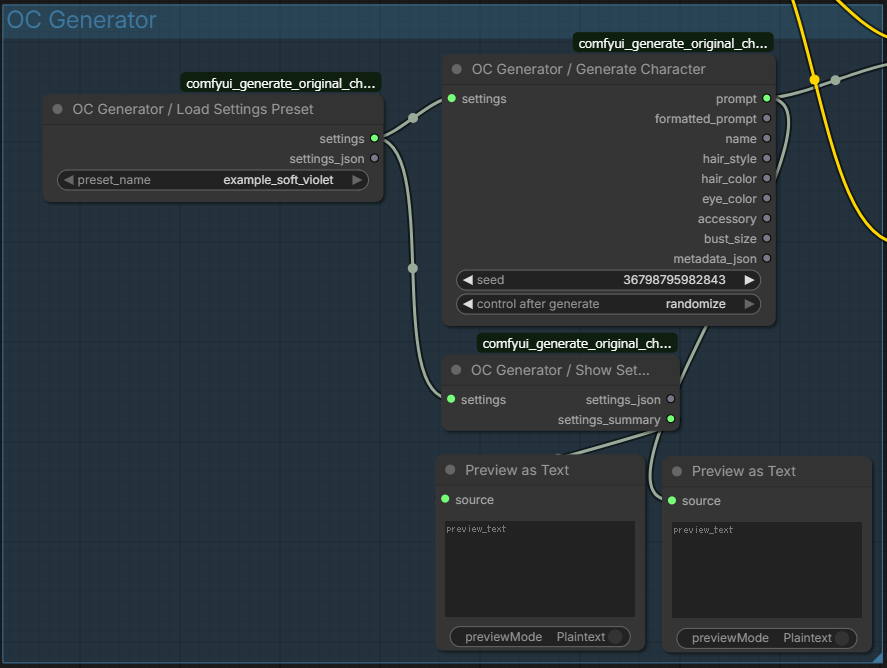
Saved Settings Preset
Sample Outputs
<p align="center"> <img src="examples/original-character-example-01.png" alt="Original character example 01" width="30%" /> <img src="examples/original-character-example-02.png" alt="Original character example 02" width="30%" /> <img src="examples/original-character-example-03.png" alt="Original character example 03" width="30%" /> </p> <p align="center"> <img src="examples/original-character-example-04.png" alt="Original character example 04" width="30%" /> <img src="examples/original-character-example-05.png" alt="Original character example 05" width="30%" /> <img src="examples/original-character-example-06.png" alt="Original character example 06" width="30%" /> </p>Workflow Render Samples
<p align="center"> <img src="examples/ComfyUI_00001_.png" alt="Workflow render sample 01" width="30%" /> <img src="examples/ComfyUI_00002_.png" alt="Workflow render sample 02" width="30%" /> <img src="examples/ComfyUI_00003_.png" alt="Workflow render sample 03" width="30%" /> </p> <p align="center"> <img src="examples/ComfyUI_00004_.png" alt="Workflow render sample 04" width="30%" /> <img src="examples/ComfyUI_00005_.png" alt="Workflow render sample 05" width="30%" /> </p>More examples are available in examples/.
Try the Web Version
If you want to try the generator in your browser first, use the web version here:
The web app can export compatible settings_json files for this ComfyUI node set.
Note for Existing Users
Some recent updates may break existing workflows or require reconnecting nodes.
Sorry for the inconvenience, and thank you to everyone who already cloned and tried the project.
Features
- Generate original character prompts from reusable settings objects
- Use fixed attributes for hair style, hair color, eye color, accessory, and bust size
- Adjust weighted bust-size distribution and accessory probability
- Save and load
settings_jsonpresets fromuser_presets - Inspect settings with a dedicated
Show Settingsnode - Use included sample workflows and sample preset data
Installation
Option 1: Download or copy the folder
- Place this repository folder inside
ComfyUI/custom_nodes/. - Restart ComfyUI.
- Search for
OC Generatorin the node menu.
Option 2: git clone
cd ComfyUI/custom_nodes
git clone https://github.com/nade-eaf4fc/comfyui-original-character-generator.git
After cloning, restart ComfyUI.
Included Nodes
The current node set is:
OC Generator / SettingsOC Generator / Show SettingsOC Generator / Save Settings JSONOC Generator / Load Settings PresetOC Generator / Generate CharacterOC Generator / Generate Character ListOC Generator / Generate Character Simple
OC Generator / Settings
Builds a reusable settings object and also outputs settings_json.
Inputs:
base_promptinclude_base_promptpresetfixed_hair_stylefixed_hair_colorfixed_eye_colorfixed_accessoryfixed_bust_sizeweight_flatweight_smallweight_mediumweight_largeweight_xlargeaccessory_probabilityproduction_mode
Outputs:
settingssettings_json
OC Generator / Show Settings
Displays a readable settings summary.
Outputs:
settings_summary
OC Generator / Save Settings JSON
Parses a settings_json string, optionally saves it into user_presets, and outputs a reusable settings object.
Inputs:
settings_jsonfile_namesave_enabled
Outputs:
settingssettings_jsonsaved_namesaved_path
OC Generator / Load Settings Preset
Loads a saved preset from the user_presets directory.
Outputs:
settingssettings_json
OC Generator / Generate Character
Generates one result from a settings object.
Outputs:
promptformatted_promptnamehair_stylehair_coloreye_coloraccessorybust_sizemetadata_json
OC Generator / Generate Character List
Generates multiple results from a settings object.
Outputs:
prompt_listformatted_prompt_listname_listhair_style_listhair_color_listeye_color_listaccessory_listbust_size_listmetadata_list
OC Generator / Generate Character Simple
One-node version for quick use. It includes the same setting inputs and can output either a single result or a list.
Presets and Saved Settings
Built-in presets:
BalancedPetiteCurvyStatement
Saved preset files are stored in:
user_presets/*.json
Sample preset:
The companion web UI can export compatible settings_json files that can be imported into this node set.
Example Files
Workflow examples:
workflows/oc-generator-basic-workflow_simple_and_list.jsonworkflows/oc-generator-soft-violet-preset-workflow.json
Image examples:
Behavior Notes
- The same
seed, settings, and data files will produce the same result. - List generation uses
seed + index. - Bust weights accept raw values in the
0.00to1.00range and are normalized internally. include_base_prompt = falseomits the base prompt from generated output.- If
include_base_prompt = trueandbase_promptis empty, the default base prompt is used. - If all bust weights are
0, generation falls back to theBalancedpreset distribution. fixed_bust_sizeoverrides weighted bust selection.fixed_accessoryoverrides accessory probability when a concrete accessory is selected.fixed_accessory = nonemeans no fixed accessory in the node UI.- The special forced-no-accessory state is supported through saved
settings_jsondata from the web integration. production_mode = truehides entries marked withdevelopmentOnly: true.
Extending Data
Edit the JSON files under data/:
data/base_prompt.jsondata/presets.jsondata/hair_styles.jsondata/hair_colors.jsondata/eye_colors.jsondata/accessories.jsondata/bust_sizes.json
Supported option fields:
keypromptlabelnamedevelopmentOnly
Simple string entries are also supported in category files.
Acknowledgements
Built with development assistance from OpenAI Codex, powered by GPT-5.4.
License
This package is released under the MIT License.