
ComfyUI-RT-HeartMuLa
RT HeartMuLa is a powerful suite of multilingual AI music generation nodes for ComfyUI that enables the creation of professional-quality full songs with lyrics directly on your local hardware.
Nodes (7)
The One-Node Way to Hear What You Just Made
Where a Four-Minute Song Actually Gets Built
See What Your Loader Actually Loaded
The HeartMuLa Loader Is Where Your VRAM Budget Gets Decided
The Paper's Tag Format, Without the Typing
The Optional Model Most People Skip
Round-Trip Your Generated Song Back to Lyrics
$${\color{white}ComfyUI-}{\color{orange}R}{\color{yellow}T}{\color{white}-HeartMuLa}$$ (v 1.09)
 A custom node suite for ComfyUI.
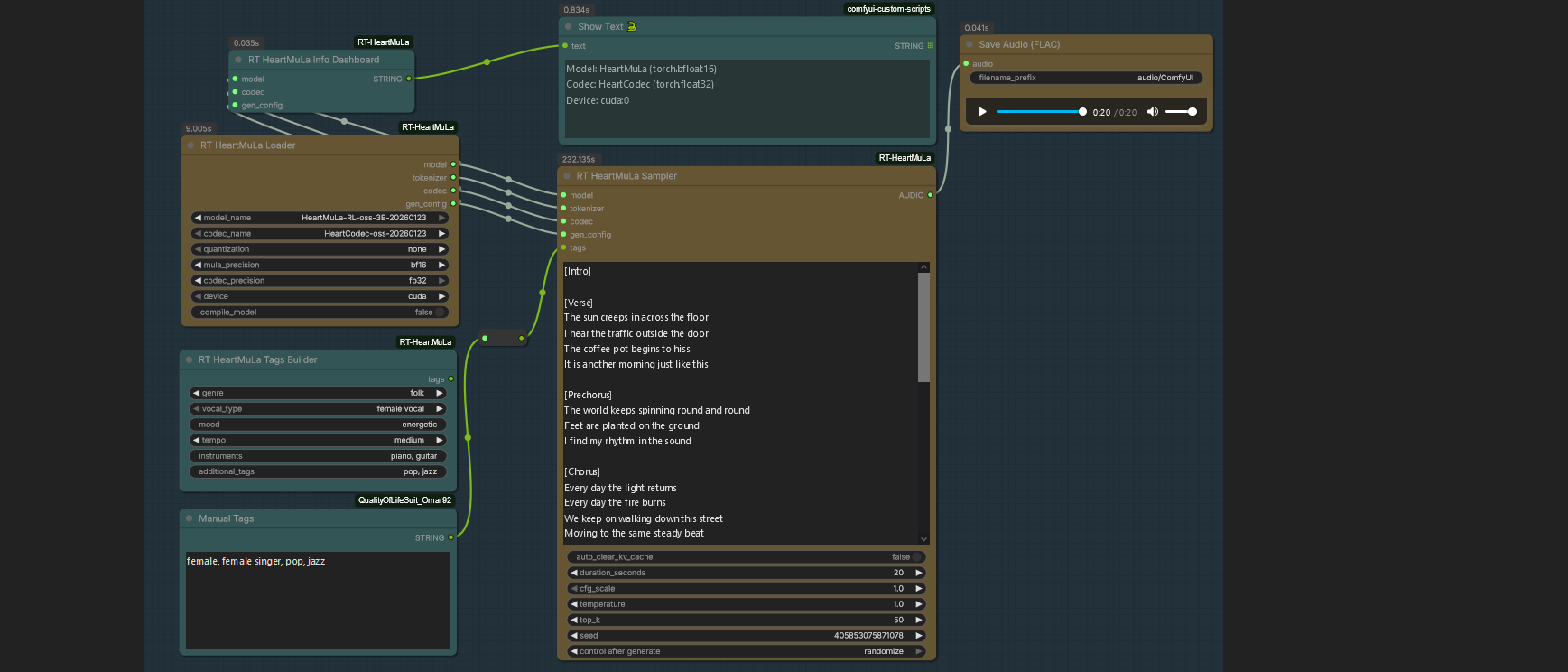
Recommended Loader Settings # $${\color{Green}First \ generate \ 20 \ seconds \ audio \ to \ check \ the \ quality}$$
| GPU Tier | Target Use Case | Quantization | Precision (Mula / Codec) | Compile? | Explanation |
| :--- | :--- | :--- | :--- | :--- | :--- |
| High-End<br>(24GB+ VRAM)<br>RTX 3090 / 4090 | Highest Quality | none | bf16 / fp32 | True | none quantization loads full weights for max fidelity. fp32 codec ensures zero high-frequency hiss. Compile speeds up batch runs. |
| Mid-Range<br>(12-16GB VRAM)<br>RTX 3060 / 4070 | Balanced | 4bit | bf16 / bf16 | False | 4bit saves ~50% VRAM, allowing longer song context. bf16 is faster on modern cards (Ampere/Ada). |
| Low-End<br>(8GB VRAM)<br>RTX 2060 / 3050 | High Speed | 4bit | fp16 / fp16 | False | fp16 is universally supported and lighter. Quantization is mandatory here to prevent Out-Of-Memory (OOM) errors. |
Key Settings Explained
quantization:none: Best quality but requires ~16GB+ dedicated VRAM.4bit(Recommended): Virtually indistinguishable audio quality for most users. Reduces model size significantly, allowing for longer generation durations on standard cards.
codec_precision:fp32: Critical for studio-quality "High Fidelity" output. It prevents metallic artifacts in high frequencies (cymbals, "s" sounds) but is slower.bf16/auto: Good for speed and lower memory usage.
compile_model:True: Adds a 1-2 minute delay on the first generation to optimize the graph. Makes subsequent generations 20-30% faster. Ideal for batch production.False: Instant start. Best for testing single prompts.
Installation
Follow these steps to get ComfyUI-RT-HeartMuLa up and running.
$${\color{yellow}Step \ 1: \ Clone \ the \ Repository}$$
Open your terminal or command prompt, navigate to your ComfyUI\custom_nodes folder, and run:
git clone https://github.com/monnky/ComfyUI-RT-HeartMuLa
$${\color{yellow}Step \ 2: \ Navigate \ to \ the \ Directory}$$
Change into the project folder:
cd ComfyUI-RT-HeartMuLa
$${\color{yellow}Step \ 3: \ Install \ Dependencies}$$
First Try install only 3 dep's
pip install soundfile
pip install torchtune
pip install torchao
(if doesnt work, install all requirements) Install the required Python packages:
pip install -r requirements.txt
$${\color{yellow}Step \ 4: \ Download \ Model \ Files}$$
Navigate to your ComfyUI/models directory and download the required weights.
[!TIP] Ensure you have the git-lfs-windows.exe installed. Run the Installer: Double-click the downloaded git-lfs-windows.exe file and follow the setup wizard prompts.
# 1. Go to ComfyUI/models folder and open CMD
cd ComfyUI/models

# 2. Initialize LFS (Crucial for downloading large model files)
git lfs install

# 3. Clone the main Generation repo wrapper
git clone https://huggingface.co/HeartMuLa/HeartMuLaGen HeartMuLa

# 4. Enter the directory
cd HeartMuLa

# 5. Clone the NEW Jan 23, 2026 Components: (Clone components into subdirectories)
# New RL-Tuned Model (3B)
git clone https://huggingface.co/HeartMuLa/HeartMuLa-RL-oss-3B-20260123

# New Codec
git clone https://huggingface.co/HeartMuLa/HeartCodec-oss-20260123
$${\color{yellow}optional \ only \ download \ if \ you \ want}$$
# Transcriptor
git clone https://huggingface.co/HeartMuLa/HeartTranscriptor-oss

---------------------------------------------
old models
git clone https://huggingface.co/HeartMuLa/HeartMuLa-oss-3B
git clone https://huggingface.co/HeartMuLa/HeartCodec-oss
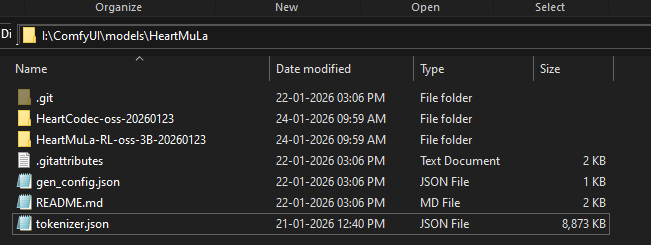
Model File Structure
Once downloaded, your folder should look like this:
$${\color{yellow}Model \ Sources}$$
Explore the technical foundations and official repositories for the models used in this project:
- GitHub Repository: HeartMuLa/heartlib
- Technical Paper: ArXiv: 2601.10547
- Official Demo: HeartMuLa Project Page
Hugging Face Model Hub:
- HeartMuLaGen Config Files: HeartMuLaGen
- Main Model (3B): HeartMuLa-oss-3B
- Codec: HeartCodec-oss
- Transcriptor: HeartTranscriptor-oss
$${\color{yellow}Credits}$$
Special thanks to the HeartMuLa team for providing the open-source weights and research that make these nodes possible.
- HeartMuLa Organization: Hugging Face Profile
Changelog
[1.09] - 2026-01-24
Updated
- Model Weights: Updated core model and codec files to the latest versions (20260124) for improved adherence and stability.
[1.06]
Fixed
- CFG Scale Crash: Fixed a critical "Batch Size Mismatch" error when switching between CFG 1.0 and higher values. Implemented a hard KV-Cache reset to synchronize batch dimensions.
- Decoder Hang: Fixed an issue where the
fp32codec would hang indefinitely when used with quantized models. Added explicit device casting and eval mode synchronization. - Linting Errors: Resolved formatting issues in the generation logic for better code stability.
Optimized
- Long-Form Audio: Improved audio clarity for 4-minute tracks by implementing Temperature Decay and aggressive VRAM cache cleanup to prevent robotic artifacts.
- Tag Compliance: Updated conditioning nodes to strictly enforce lowercase and comma-separated tag formatting as required by the paper.
[1.01]
Added
- Split codec support (Dual Precision for Model/Decoder)
[1.00]
Initial Release
- First public release