
ComfyUI Extension
ComfyUI-LLM-CLIP
These nodes allow you to use a distilled Qwen3-4B model as your text encoder in Stable Diffusion XL.
molbal/ComfyUI-LLM-CLIP
Nodes2
On cloudLocal install
CategoryLLM_CLIP
Stars4
Updated9 months ago
Nodes (2)
Readme
LLM-CLIP Custom Nodes for ComfyUI
These nodes allow you to use a distilled Qwen3-4B model as your text encoder in Stable Diffusion XL.
Installation
- Download https://huggingface.co/molbal/qwen-clip-resampler-adapter/blob/main/resampler.pth and place it in the text encoders directory
- Navigate to your ComfyUI custom nodes folder.
- Clone this repository.
- Install the required Python packages.
pip install transformers accelerate peft bitsandbytes
Nodes
LLM CLIP Loader
This node loads the LLM and the Resampler weights.
- base_repo_id: The Hugging Face ID of the base LLM (use
unsloth/Qwen3-4B-unsloth-bnb-4bit). - resampler_name: The local
.pthfile containing your trained Resampler weights. - lora_repo_id: The Hugging Face ID or local path of your trained LoRA adapter. (use
molbal/qwen-clip-resampler-adapter)
LLM CLIP Text Encode
This node converts your text prompt into SDXL conditioning.
- text: Multiline input for your prompt.
- clip_bundle: Connection from the Loader node.
Usage
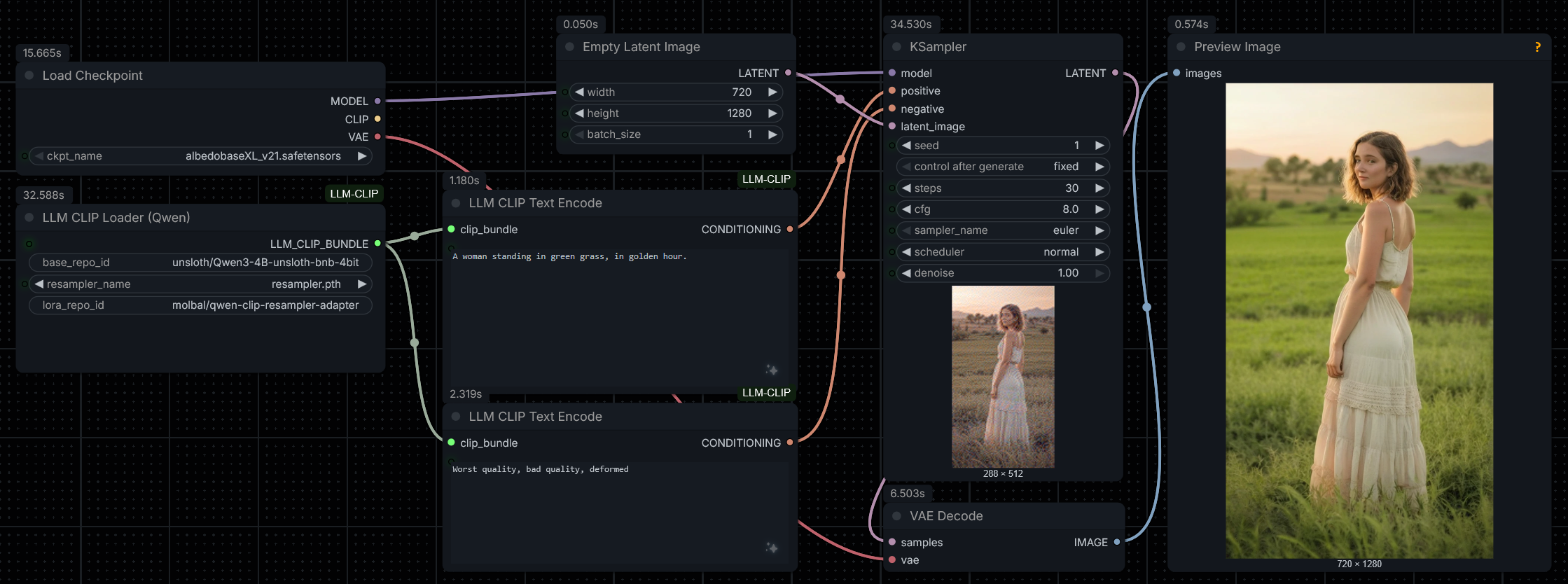
Connect the CONDITIONING output from the LLM CLIP Text Encode node to the positive or negative inputs of a KSampler. This replaces the standard CLIP Text Encode nodes.