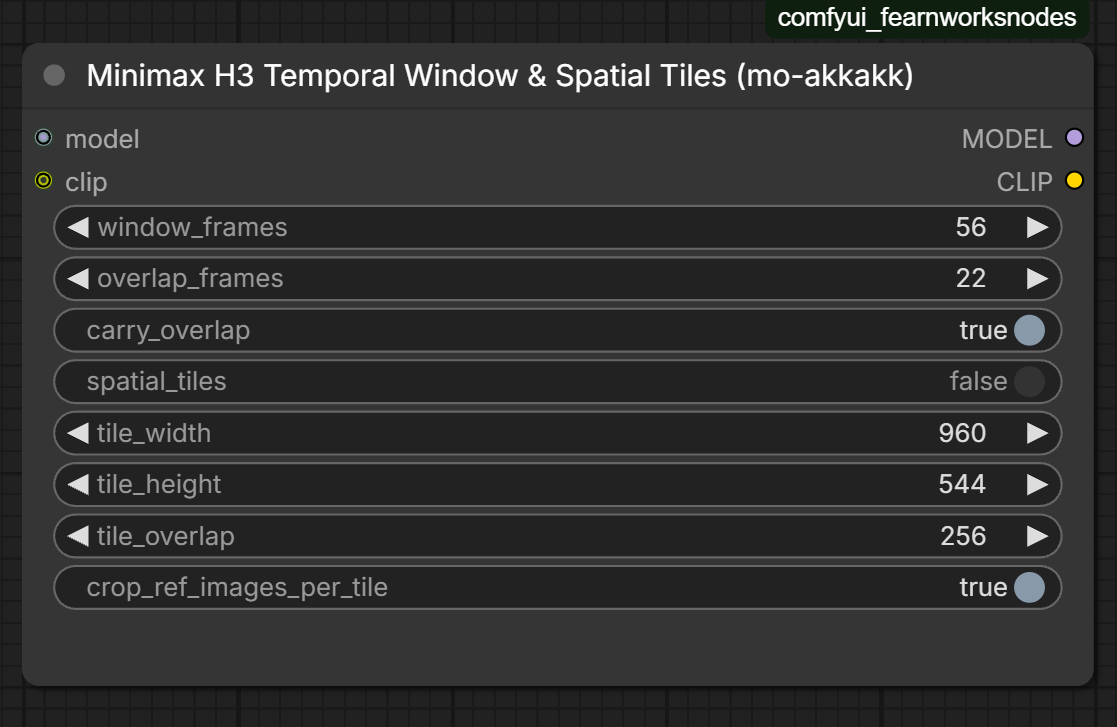
Minimax H3 Temporal Window & Spatial Tiles
Minimax H3 Temporal Window & Spatial Tiles: long video-to-video for the open-weights MiniMax H3 as overlapping temporal windows sampled one after another (stage 1 and 2), plus spatial tiles for a stage-2 refine. One model patch, works with native ComfyUI H3 nodes.
Minimax H3 Temporal Window & Spatial Tiles
by Mohamed (mo-akkakk)
Long video-to-video for the open-weights MiniMax H3 in native ComfyUI. It is one node that goes after the model.
- Temporal windows (stage 1 and stage 2). The shot is sampled as overlapping windows, one after another. Each window is an ordinary native H3 run on its own slice of the plate. It starts from the previous window's finished overlap frames, video and audio, which are given to it as a frame-0 guide. The overlap is then crossfaded. This keeps every window inside the length where H3 tracks the plate accurately, while the result runs as long as you like.
- Spatial tiles (stage 2 only). When refining an upscaled latent with partial sigmas, each window is split into overlapping tiles. Each tile runs on its crop of the plate, and the tiles are feather-blended.
Nothing inside the model is patched, and every window and tile goes through the native H3 conditioning and sampling code. With a single window and no tiles, the output is bit-identical to the plain native workflow.
Install
ComfyUI Manager / Registry: search for Minimax H3 Temporal Window & Spatial Tiles.
Manual:
cd ComfyUI/custom_nodes
git clone https://github.com/mo-akkakk/ComfyUI-MiniMaxH3-TemporalWindow-SpatialTiles
Restart ComfyUI. It needs ComfyUI with native MiniMax H3 support (v0.35.0 or newer) and has no extra dependencies.
Wiring
UNETLoader -> (shift / LoRA / low-VRAM patches) -> Minimax H3 Temporal Window & Spatial Tiles -> BasicGuider or KSampler
CLIPLoader ------------------------------------> (clip in ... clip out) -> MiniMax H3 Reference to Video
Everything else is the stock H3 workflow: Reference to Video, Add Guide, SamplerCustomAdvanced or KSampler, and VAE Decode.
- Stage 1: full sigmas,
spatial_tilesoff. - Stage 2: decode → upscale → VAE Encode → Concat AV Latent (with the stage-1 audio). Then use a second copy of the node with
spatial_tileson, and sample with the low part of SplitSigmas.
Route the CLIP through the node. It records what Reference to Video encodes and re-encodes the prompt per window, and per tile in stage 2. Qwen then sees only that window's frames of <Video N>, with timestamps from 0, exactly like a manually cut batch. Without this, every window reads a description of the whole shot, and timing drifts.
Settings
| Input | Meaning |
|---|---|
| window_frames | Frames per window, on H3's 17k+5 grid (124 = 5.2 s, 175 = 7.3 s). Keep it within what H3 handles accurately on your setup. |
| overlap_frames | Frames shared by neighbouring windows (5, 22, 39…). They are carried into the next window as its frame-0 guide, then crossfaded. The last window is pulled back to end on the last frame, so its overlap can be larger. |
| carry_overlap | Carry the finished overlap (video and audio) into the next window. |
| spatial_tiles | Stage 2 only. A full-denoise pass in tiles repeats the subject in every tile. |
| tile_width / tile_height / tile_overlap | Tile size in pixels. Use roughly the stage-1 resolution, with ≥ 192 px overlap. |
| crop_ref_images_per_tile | Crop <Picture N> to each tile as well. Turn it on when the picture is a frame of the shot (e.g. an edited first frame). Turn it off for character, product or style references. |
Reference videos (the plate) are always sliced per window and cropped per tile, because they are frame-aligned with the output. Frame guides from Add Guide go only into the window that contains their frame.
Tips
- Load the plate
- Write the prompt as true for every frame, because each window reads it on its own.
- If you see a seam where windows join, increase
overlap_frames(22 → 39).
How it works
The node registers an OUTER_SAMPLE wrapper on the model, so it works with any guider and sampler. For each window it does the following:
- It slices the noise and latent to the window, and the audio to the matching span on H3's 40 Hz audio grid.
- It re-times the native conditioning to the window. Reference-video latents are sliced, and keyframes are moved to window time.
- It appends the previous window's finished overlap as a keyframe clip at frame 0.
- It swaps in the per-window prompt encoding.
- It runs the normal sampling call.
Windows start on H3's 17-frame VAE-clip boundaries, so every window and every carried overlap is a valid H3 length.
Tests
python custom_nodes/ComfyUI-MiniMaxH3-TemporalWindow-SpatialTiles/tests/test_windows.py
Run this from the ComfyUI root. The tests run ComfyUI's real H3 conditioning, model and sampler code on CPU, with a tiny random-weight DiT and recording stand-ins for Qwen and the VAE. They check that:
- a single window is bit-identical to native sampling;
- each window gets its own slice of the plate;
- the overlap carry is correct;
- the per-window prompt shows only that window's frames, with timestamps from 0;
- it works through KSampler;
- stage-2 tiles work with partial sigmas.
Limits
- Stage-2 tiles are sampled independently and blended afterwards. A strong refine can show differences between tiles, so lighter sigmas and a wider overlap help.
- In stage 2 each tile renders its own soundtrack and the node averages them. Keep the stage-1 audio for the final file.
- Batch size 1, the same as native H3.
License
MIT, © 2026 Mohamed (mo-akkakk).