
ComfyUI-Speech-Bubble
A versatile, high-quality custom node for ComfyUI that overlays comic/manga speech bubbles and text onto generated images in post-processing.
ComfyUI-Speech-Bubble
A versatile, high-quality custom node for ComfyUI that overlays comic/manga speech bubbles and text onto generated images in post-processing.
Say goodbye to messy AI-generated "alien text"! With ComfyUI-Speech-Bubble, you can easily embed readable, beautifully rendered Japanese dialogue (vertical & horizontal) or multi-language text, thought balloons, shout bubbles, and narration boxes directly after image generation.
🎨 Preview
<p align="center"> <img src="node.png" alt="ComfyUI Speech Bubble Node" width="400"> </p>| Horizontal Dialogue (横書き) | Vertical Dialogue (縦書き) |
| :---: | :---: |
| 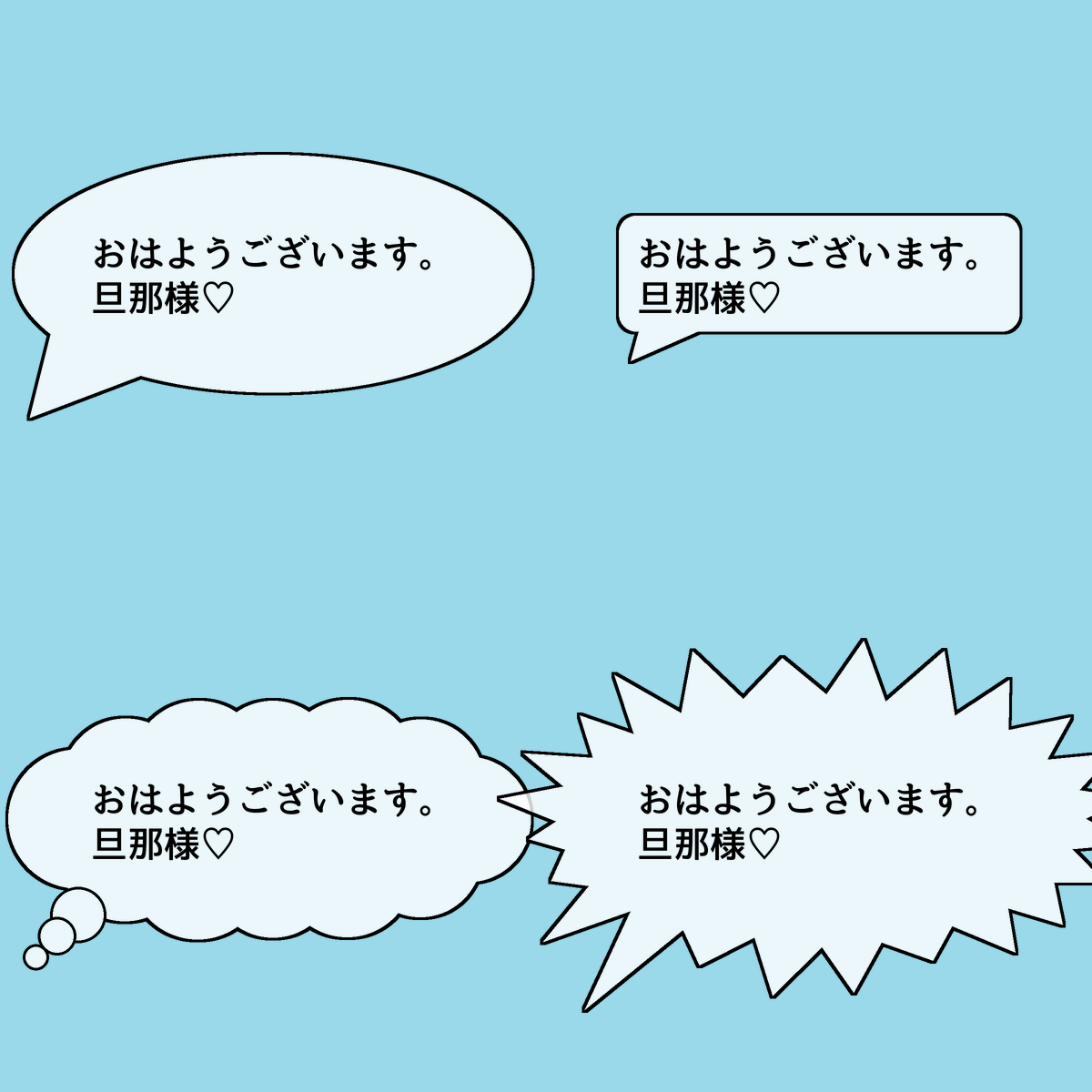 |
| 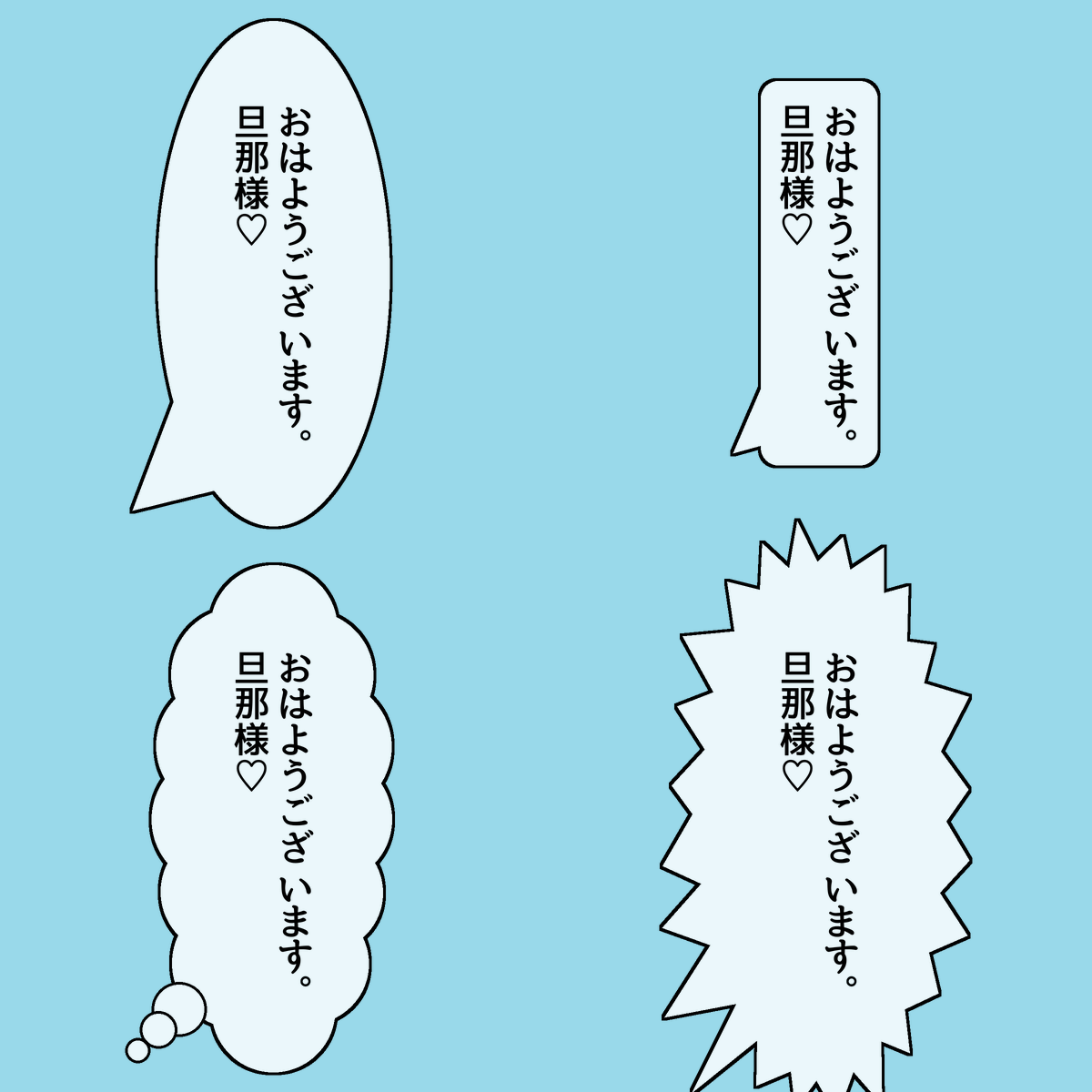 |
|
- Vertical & Horizontal Top/Left-Aligned Layout:
- Full support for traditional Japanese vertical text (right-to-left columns, top-to-bottom reading).
- Top-aligned (vertical) and left-aligned (horizontal) text positioning, allowing you to easily adjust indentation and line drops simply by inserting full-width spaces (
- Pixel-perfect punctuation snapping: Automatically anchors Japanese commas (
、) and periods (。) to the lower-right corner of the preceding character, ensuring authentic manga typesetting across all fonts. - Automatic 90-degree rotation for brackets (
(),「」), dashes, and long sound marks (ー).
- 4 Manga Bubble Styles with Procedural Randomization:
ellipse: Classic smooth speech balloon.rounded_rect: Narration box or modern chat bubble.thought: Fluffy cloud-like thought balloon with trailing floating dots.shout: Dynamic explosion balloon with sharp, hand-drawn manga flash spikes.- Procedural Seed Control: Use the
seedparameter with ComfyUI's native randomize feature to generate unique organic cloud shapes and spike bursts on every run!
- Tail Direction and Length Control:
- Point the tail toward the speaker's mouth (
bottom_left,bottom_right,top_left,top_right, ornone). - Use the
tail_lengthslider to reach distant characters smoothly.
- Point the tail toward the speaker's mouth (
- Independent Bubble Opacity:
- Adjust
bubble_opacityto make the bubble background semi-transparent while keeping text and border outlines 100% crisp and readable.
- Adjust
- True Font Name Auto-Detection:
- Directly inspects TrueType/OpenType binary metadata (Name Table) to display official localized font family names (e.g.,
源暎アンチック v5,07やさしさアンチック,游ゴシック,MS ゴシック) instead of raw filenames. - Automatically discovers installed system fonts on Windows, macOS, and Linux.
- Drop your favorite manga fonts (
.ttf,.otf,.ttc) into the localfonts/folder to use them instantly.
- Directly inspects TrueType/OpenType binary metadata (Name Table) to display official localized font family names (e.g.,
- Ultra-Crisp Anti-Aliasing:
- Rendered with 2x supersampling and downscaled with the Lanczos filter for smooth outlines without jagged pixels.
📦 Installation
Via Git Clone
Navigate to your ComfyUI custom_nodes directory:
cd ComfyUI/custom_nodes/
git clone https://github.com/miya805843/ComfyUI-Speech-Bubble.git
Then restart ComfyUI.
Requirements
Pillow >= 9.5.0numpytorch(already included in ComfyUI)
⚙️ Node Parameters
| Parameter | Type | Default | Description |
| :--- | :--- | :--- | :--- |
| image | IMAGE | - | Input image tensor from a generator node (e.g. KSampler). |
| text | STRING | Multiline | Dialogue or caption text. Full-width spaces ( ) can be used for indenting. |
| direction | ENUM | vertical | Text direction: vertical (Japanese manga style) or horizontal. |
| bubble_type | ENUM | ellipse | Bubble shape: ellipse, rounded_rect, thought, or shout. |
| tail_direction | ENUM | bottom_left| Direction of the tail: bottom_left, bottom_right, top_left, top_right, or none. |
| tail_length | FLOAT | 0.7 | Tail length multiplier (0.0 to 3.0). Set to 0.0 for no tail. |
| pos_x / pos_y | FLOAT | 0.5, 0.35| Normalized bubble center position on the image (0.0 to 1.0). |
| font_name | ENUM | System Default | Selected font from system fonts or local fonts/ folder. |
| font_size | INT | 36 | Font size in pixels. |
| text_color | STRING | #000000 | Hex code or color name for dialogue text. |
| bubble_color | STRING | #FFFFFF | Hex code or color name for the bubble background. |
| border_color | STRING | #000000 | Outline border color. |
| border_width | INT | 3 | Border thickness in pixels. |
| bubble_opacity| FLOAT | 1.0 | Background opacity (0.0 to 1.0) to reveal hair or background through the bubble. |
| padding | INT | 24 | Padding between text and bubble boundary. |
| max_chars_per_line | INT | 10 | Automatic wrapping character limit per column/line. |
| line_spacing | INT | 6 | Spacing between lines or vertical columns. |
| thought_bump_size | FLOAT | 1.0 | Size multiplier for thought (cloud) bumps and shout (spike) peak heights (0.2 to 3.0). Adjusts cloud fluffiness or shout spike intensity. |
| opacity | FLOAT | 1.0 | Overall opacity of the entire speech bubble and text (0.0 to 1.0). |
| seed | INT | 0 | Random seed for thought (cloud) and shout (spike) procedural shapes. |
📄 License
This project is licensed under the MIT License.