
ComfyUI Blender Layout
Blender (WebAssembly) inside a ComfyUI node: block out scenes, stage actors and cameras, and render structure-control video or images. Photo and video input routes download their models in-node after a licence confirmation.
ComfyUI Blender Layout
Real Blender running as WebAssembly inside a ComfyUI node. Block out scenes with gray geometry, place and animate characters, set up cameras, and render the blockout directly into structure-controlled video or image workflows—or export a .blend file to keep working in desktop Blender.
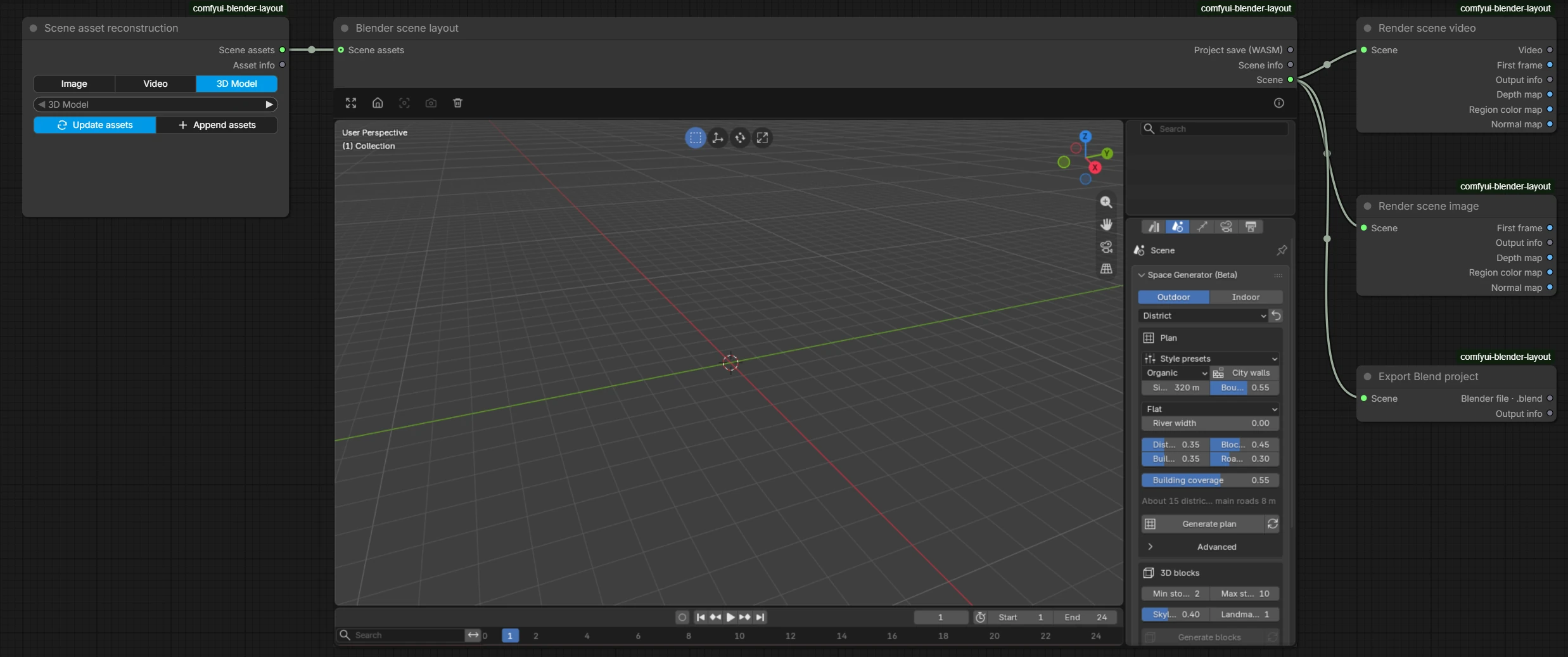
The nodes: Scene asset reconstruction brings images, videos or 3D models into the scene; Blender scene layout runs the Blender editor inside the node; Render scene video and Render scene image render the camera view together with depth, region color and normal maps; Export Blend project writes a .blend file.
Features
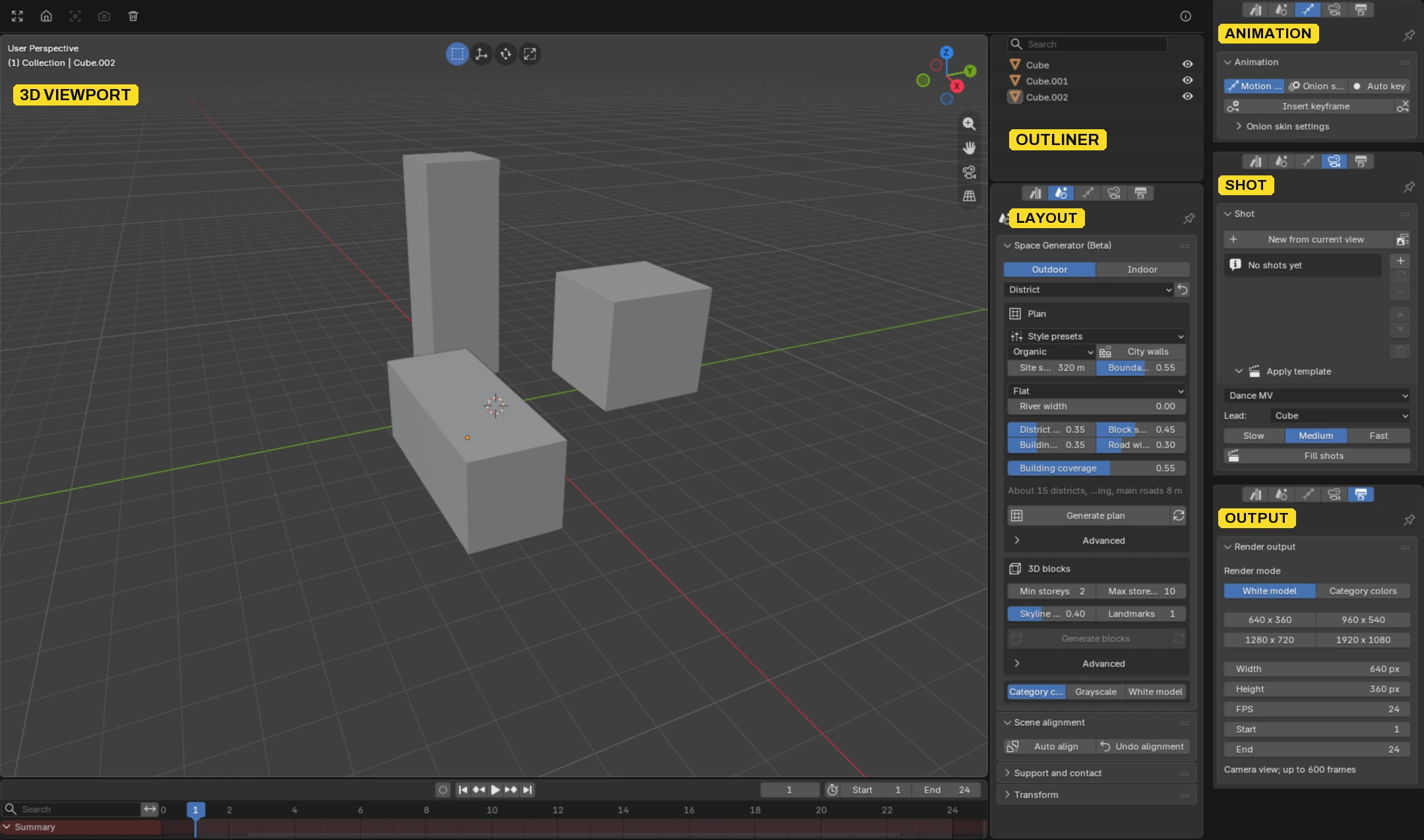
Inside the Blender node: Blender's own 3D viewport, outliner and timeline, plus the Properties stage pages added by this project: Layout (Space Generator, scene alignment), Animation (motion paths, onion skin, keyframes), Shot (shots from the current view, camera templates) and Output (render mode, frame size, frame rate and range).
- Blender Scene Layout Node: Blender 5.3 (WASM) embedded directly in ComfyUI with custom UI and operators. Every save creates a traceable revision.
- Scene Asset Reconstruction Node:
- Scene Photo → 3D: Generates editable block meshes and a matched camera (
Qwen3.5-4B+MoGe-3). - Person Photo → 3D: Reconstructs 3D human bodies from a single image (
SAM 3D Body). - Video → Motion: Extracts motion from single-person video using
GEM-X(default) orGVHMRand retargets it to built-in rigged actors. - GLB Import: Supports skinned animations and cameras.
- Scene Photo → 3D: Generates editable block meshes and a matched camera (
- Space Generator (Beta): A unified layout system for interiors and exteriors (grid, radial, linear, rings, tree, courtyard, organic, scatter) with hierarchy, terrain, landmarks, corridors, and rooms. Everything stays editable geometry.
- Staging & Camera Control: Character paths with root motion, foot locking to reduce sliding, and keyframed camera shots.
- Render & Export Nodes: Uses headless desktop Blender to render
VIDEO/IMAGEoutputs directly into ComfyUI (ready for Wan, MiniMax H3, or other control workflows) or export.blendfiles. - Local Workflow Scripting: Automated local runs powered by
@comfyorg/sdk(apps/server/run-workflow.mjs). No cloud API keys required.
Requirements
| Component | Requirement |
| :--- | :--- |
| OS | Windows 10/11 x64 (uses PowerShell scripts and directory junctions) |
| GPU | NVIDIA GPU with CUDA PyTorch (developed on 24GB RTX 4090; ~16GB VRAM target) |
| Browser | Recent Chrome or Edge with WebGPU, SharedArrayBuffer, and OffscreenCanvas |
| ComfyUI | v0.37.4 or newer (tested: v0.37.4, v0.44.0; untested newer versions get a warning, not an error) |
| Node.js | v24 or newer (runs the two local services that host the Blender editor) |
| Desktop Blender | Blender 5.2 LTS or newer (tested 5.2.3 and a 5.3 build); used only by the render and export nodes, which report a clear error until it is configured |
| Tools | git, ffmpeg, and ffprobe available on PATH |
Quick Start
Run all commands in PowerShell from the repository folder. There are two ways to install; both end with the same three local processes: ComfyUI, and two small Node services that host the Blender editor (step 3 explains why).
The nodes load even before you run any script: without runtime/local-config.json every model route simply shows as not ready.
Keep the install path short. Two optional environments unpack upstream source trees up to 165 characters deep below this repository (runtime/gem-adapter/...). With Windows' default 260-character limit the repository folder itself should stay under about 90 characters (for example C:\ComfyUI\custom_nodes\comfyui-blender-layout). The setup scripts check this first and stop with a message; enabling Windows long paths (LongPathsEnabled = 1) also works.
1a. Install with ComfyUI Manager (or git clone into custom_nodes)
ComfyUI Manager → Install via Git URL → https://github.com/minrixa02/comfyui-blender-layout, or:
cd <ComfyUI>\custom_nodes
git clone https://github.com/minrixa02/comfyui-blender-layout.git
cd comfyui-blender-layout
ComfyUI loads the nodes through the repository's root __init__.py; there are no Python requirements to install into ComfyUI's environment. The Manager does not run the remaining steps; run them in the cloned folder:
# Finds ComfyUI (two folders up), its Python (.venv, venv or the portable python_embeded) and node on PATH
./scripts/configure-local.ps1 -Blender <desktop blender.exe>
npm ci --ignore-scripts
# Pinned Blender WASM runtime (~60 MB, SHA-256 checked) into runtime/wasm/
./scripts/fetch-blender-wasm.ps1
Do not run install-editor-bridge.ps1 in this layout (it would load the nodes twice; the script detects this and does nothing). Restart ComfyUI once after the install. Updating through the Manager (git pull) keeps everything under runtime/, which Git ignores.
1b. Install in a separate folder, linked into ComfyUI
git clone https://github.com/minrixa02/comfyui-blender-layout.git
cd comfyui-blender-layout
./scripts/configure-local.ps1 `
  -ComfyHome <ComfyUI dir> `
  -ComfyPython <ComfyUI python.exe> `
  -Node <node.exe> `
  -Blender <desktop blender.exe>
npm ci --ignore-scripts
# Links comfyui/whitebox_director into ComfyUI/custom_nodes/ as a directory junction
./scripts/install-editor-bridge.ps1
./scripts/fetch-blender-wasm.ps1
-Blender is optional in both layouts: only the render and export nodes need desktop Blender, and they report a clear error until it is set (or set WHITEBOX_BLENDER). -InputModelRoot <dir> is only for existing installs that already keep the input models in their own folder; new installs leave it out and use ComfyUI's model folders.
2. Models (downloaded from inside the node, only when you ask)
Nothing is downloaded at install or first start. On the Scene Asset Reconstruction node each route in the model list is marked Ready, Download X GB or Needs environment setup. Pick a route that is not ready and press Download… on the node: a dialog shows every model, its licence, whether commercial use is allowed, any regional restriction, the size and the target folder. The download starts only after you tick the licence box (and, for GVHMR, the non-commercial box; for MiniMax H3, the territory box). It runs in the ComfyUI backend, shows progress in the node's status line, can be cancelled (the partial .part file resumes next time) and checks every file against its pinned SHA-256. The node menu entry Models (download, status)… — also on the render nodes — lists every route, including the optional H3 and Wan generation models.
If a route is run while its models are missing, the node stops with an error that names the missing files and points to the button; it never downloads silently.
Where files go. Models live in ComfyUI's own model folders, so your extra_model_paths.yaml applies as for any other model:
| Files | ComfyUI folder |
| --- | --- |
| MoGe-3 | models/geometry_estimation/ |
| SAM 3D Body | models/detection/ |
| SAM 3.1 | models/checkpoints/ |
| MiniMax H3, Wan 2.2 | models/diffusion_models/, text_encoders/, vae/, loras/, model_patches/ |
| Qwen3.5-4B GGUF + mmproj, GEM-X + SOMA-X, GVHMR, SAM 3D Objects | models/whitebox_director/<route>/ (e.g. whitebox_director/vlm/Qwen3.5-4B/, whitebox_director/gem/pretrained/) |
A download goes to the first folder ComfyUI lists for that type; mark an extra_model_paths.yaml entry is_default: true to download onto another drive. Files you already have are found wherever ComfyUI looks, and an input_model_root from an older runtime/local-config.json is still checked first, so existing installs need not move anything. The whitebox_director: folder uses the same layout as the old input model root, so an old root can also be listed there.
Environment setup that is not just files is not done by the button; the dialog shows the command instead. Run it with ComfyUI's own Python from the repository folder (the default for --comfy-python is the Python running the script). Each one builds an isolated venv under runtime/ that reuses ComfyUI's installed packages (torch, numpy, ...) through a .pth pointer, installs only its pinned extras into that venv, and never changes ComfyUI's environment:
# GEM-X motion route (default video route): three pinned GitHub source archives + isolated venv
& <ComfyUI python.exe> scripts/prepare-gem-input.py --fetch-sources --create-venv --install-overlay
# GVHMR raw-motion route (research, non-commercial weights): pinned git checkout + timm/yacs/OpenCV (~45 MB)
& <ComfyUI python.exe> scripts/prepare-gvhmr-input.py --fetch-source --create-venv --install-overlay
GVHMR needs git; both need network access only while they run. The GVHMR environment was checked on ComfyUI's torch 2.12.1+cu130 against the earlier torch 2.5.1+cu118 build: on the same clip the joint rotations agree within 0.004° and the root within 0.01 mm. Restart ComfyUI (or refresh the page) afterwards and the route shows Ready.
The Scene Photo → 3D route's llama.cpp b11767 server (two SHA-pinned GitHub release zips, 0.7 GB) is fetched and unpacked into runtime/llama-b11767/bin/ by the same Download button. The SAM 3D Objects pixi runtime is experimental and still prepared by hand.
Static base-mesh library (optional). The four Blender Human Base Meshes in the asset library are not bundled. Download the official CC0 bundle (human-base-meshes-bundle-v1.4.1.zip), unzip it and build them with desktop Blender 5.2:
& <blender.exe> --background --factory-startup --disable-autoexec --python-exit-code 1 -t 1 `
  --python scripts/build-static-human-library.py -- `
  --source <unzipped>/human_base_meshes_bundle.blend `
  --output <ComfyUI>/models/whitebox_director/assets/library/human-base-meshes-v1.4.1
Until then those four entries show as not built; everything else works.
Command line instead of the button (same verified downloader; GVHMR is skipped unless you add --include-noncommercial):
& <ComfyUI python.exe> scripts/download-models.py docs/research/input-models.lock.json runtime/input-models-verified.json <target dir>
None of the pinned Hugging Face repositories needs a login or a terms click-through (checked 2026-11-05). If you use a token anyway, set HF_TOKEN for the ComfyUI process; it is sent only to huggingface.co from the backend.
3. Start the Server
The Blender editor is a WebAssembly build that needs SharedArrayBuffer, so the page must be cross-origin isolated (Cross-Origin-Opener-Policy: same-origin and Cross-Origin-Embedder-Policy: require-corp). ComfyUI's own server does not send those headers, so a ComfyUI Manager install alone loads the nodes but cannot open the editor. Two small Node services from this repository fix that, both on 127.0.0.1 only:
- gateway (default port
3031): proxies the ComfyUI page and API and adds the isolation headers. You open ComfyUI through this port. - runtime (default port
3032): serves the Blender WASM runtime and stores the editor's projects inruntime/wasm-projects/.
- Start ComfyUI as usual (it listens on
127.0.0.1:8188, ComfyUI Desktop on8000). - Start the two services (they keep running in the background; logs in
runtime/logs/):
./scripts/start-blender-prototype.ps1
# if ComfyUI is not on 8188, or the default ports are taken:
./scripts/start-blender-prototype.ps1 -ComfyPort 8000 -GatewayPort 3031 -NativePort 3032
- Open
http://127.0.0.1:3031/(the gateway port) instead of ComfyUI's own address. Opened on ComfyUI's port directly, the Blender node shows "This page lacks cross-origin isolation".
The script never starts or restarts ComfyUI; it reuses services that are already healthy on those ports and refuses ports held by anything else. Run it again after a reboot.
4. Run an Example Workflow
Load workflows/input-native-v2.workflow.json (Scene Asset Reconstruction → Blender Scene Layout). Pick a scene photo and run the workflow. Edit the reconstructed blocks or generate a new layout inside the Blender node, add actors and camera paths, and connect Render Scene Video to your control workflow (e.g., workflows/wan-control.api.json or workflows/h3-control.api.json).
Models & Licenses
Model weights are not in this repository; download them yourself and check each licence for your use and country. Pinned revisions and SHA-256 hashes are in docs/research/*.lock.json, and scripts/download-models.py <lock file> <receipt.json> <target dir> downloads and verifies a lock's files. More detail in THIRD_PARTY.md.
Tested with: a single RTX 4090 (24 GB), Windows 11, ComfyUI v0.37.4. The demo video uses SAM 3D Objects, SAM 3D Body, GVHMR, MiniMax H3 and MOSS-Image.
Disk space: the editor itself, GLB import and the Space Generator need no models, and nothing is downloaded by default. The default photo and video routes take about 11.3 GB if you download all three (scene photo 5.2 incl. llama.cpp, person photo 2.0, GEM-X motion 4.1). GVHMR (5.4 GB, non-commercial) is never part of a default download. All input routes take about 33.4 GB. The optional generation models take about 75.8 GB (H3 44.3, Wan 18.2, MOSS-Image 13.3); MOSS-Image is not pinned by a lock file and is downloaded by hand.
Input models (photo / video → editable assets)
| Model | What it does here | Download | Files needed | Size | Licence | Needed for |
| --- | --- | --- | --- | --- | --- | --- |
| Qwen3.5-4B GGUF (Unsloth) + llama.cpp b11767 | Reads a scene photo: objects, categories, boxes (vision encoder = mmproj) | unsloth/Qwen3.5-4B-GGUF · llama.cpp b11767 | Qwen3.5-4B-Q5_K_M.gguf, mmproj-F16.gguf; llama-b11767-bin-win-cuda-12.4-x64.zip, cudart-llama-bin-win-cuda-12.4-x64.zip | 3.8 GB + 0.7 GB | Apache-2.0; llama.cpp MIT | Scene / prop photos (default) |
| MoGe-3 ViT-L (Comfy-Org) | Depth and geometry of the scene photo → block meshes and matched camera | Comfy-Org/MoGe | geometry_estimation/moge_3_vitl_fp16.safetensors | 0.7 GB | MIT | Scene / prop photos (default) |
| SAM 3D Body INT8 (Meta, Comfy-Org) | Person photo → posed body, retargeted to a built-in actor | Comfy-Org/sam-3d-body | detection/sam_3d_body_dinov3_int8_convrot.safetensors | 2.0 GB | Meta SAM License | Person photos |
| GEM-X + SOMA-X (NVIDIA) | Single-person video → motion (default video route) | nvidia/GEM-X · nvidia/soma-x · code NVlabs/GEM-X | gem_soma.ckpt, vitpose.pth, scale_comps.pth, scale_mean.pth; SOMA_neutral.npz, correctives_model.pt, MHR/* | 3.9 GB + 0.1 GB | NVIDIA Open Model License; SOMA-X Apache-2.0 | Video motion (default) |
| GVHMR (+ HMR2, ViTPose-H) | Single-person video → raw motion (research route) | ryanrudes/gvhmr · code zju3dv/GVHMR | gvhmr_siga24_release.ckpt, epoch=10-step=25000.ckpt, vitpose-h-multi-coco.pth | 5.4 GB | Non-commercial research / education only | Optional video route |
| SAM 3.1 (Meta, Comfy-Org) | Instance masks for the photo → separate objects route | Comfy-Org/sam3.1 | checkpoints/sam3.1_multiplex_fp16.safetensors | 1.7 GB | Meta SAM License | Optional photo route |
| SAM 3D Objects (Meta; community safetensors) | Photo → one mesh per prop (experimental route) | apozz/sam-3d-objects-safetensors | all 17 files (ss_*, slat_*, dinov2_vitl14_reg, moge_vitl, pipeline.yaml, SAM3D_LICENSE) | 14.9 GB | Meta SAM License (community conversion, not an official Meta release) | Optional photo route |
Lock files: input-models.lock.json (Qwen, MoGe, SAM 3D Body, GEM-X, SOMA-X, GVHMR) and input-runtime.lock.json (llama.cpp).
Optional generation models (downstream of the blockout render)
| Model | What it does here | Download | Files needed | Size | Licence |
| --- | --- | --- | --- | --- | --- |
| MiniMax H3 (Comfy-Org quantized set) | Video from the blockout render with depth / pose control | Comfy-Org/MiniMax-H3 | diffusion_models/minimax_h3_fl2va_pruned_int8_convrot.safetensors (21.0 GB), text_encoders/qwen3vl_32b_minimax_h3_nvfp4_awq.safetensors (15.7 GB), vae/minimax_h3_video_vae_int8_convrot.safetensors (2.8 GB), vae/minimax_h3_audio_vae_fp32.safetensors (0.6 GB), model_patches/minimax_h3_fun_controlnet_union_pruned_int8_convrot.safetensors (2.3 GB), loras/minimax_h3_fl2v_turbo_8step_v1.0_comfyui_bf16.safetensors (2.0 GB) | 44.3 GB | MiniMax H3 Community License; excludes the EU, the UK, the Republic of Korea and the USA; see LICENSES/MiniMax-H3-NOTICE.txt |
| MOSS-Image SFT INT8 + colour/depth control LoRA | Illustration from the blockout render, guided by colour regions and depth | Comfy-Org/MOSS-Image · LoRA by darask0/MOSS-Image-color-depth-control | diffusion_models/moss_image_sft_int8_convrot.safetensors (5.4 GB), text_encoders/qwen3.5_9b_w4a8_gptq.safetensors (7.3 GB), vae/flux2-vae_small.safetensors (0.2 GB), loras/moss_image_color_depth_control.safetensors (0.3 GB) | 13.3 GB | Apache-2.0 (OpenMOSS MOSS-Image; darask0 LoRA) |
| Wan 2.2 Fun Control 5B (Comfy-Org repackaged) | Alternative control-video generation | Comfy-Org/Wan_2.2_ComfyUI_Repackaged · Comfy-Org/Wan_2.1_ComfyUI_repackaged | diffusion_models/wan2.2_fun_control_5B_bf16.safetensors (10.0 GB), vae/wan2.2_vae.safetensors (1.4 GB), text_encoders/umt5_xxl_fp8_e4m3fn_scaled.safetensors (6.7 GB) | 18.2 GB | Apache-2.0 |
Lock files: h3-models.lock.json and models.lock.json (Wan; the default manifest of scripts/download-models.py). The MOSS-Image files are not pinned by a lock file; the sizes above are those of the files we tested.
Known Limitations
- Platform: Windows only.
- WASM Build Stability: The embedded Blender 5.3 Alpha WASM build requires WebGPU, has limited undo support, and may occasionally crash. Saving creates non-destructive revisions so progress isn't lost.
- Motion Quality: Video-to-motion extraction is approximate (feet may sink or slide; joints can drift) and is meant for layout/control guidance rather than final mocap.
- Space Generator (Beta): Currently supports rectangular sites only (no ramps, stairs, or mezzanines yet).
- Static Human Library: Ships with thumbnails only; build the GLBs locally from the official CC0 bundle (see Static base-mesh library in Quick Start).
License & Credits
- Code: MIT (
LICENSE), except for scripts running inside Blender and the WASM client (apps/blender-prototype/*.py,client.js,native-pointer.js,map-engine-*.js), which are licensed under GPL-2.0-or-later. - Assets: Bundled characters are CC0-1.0 (MPFB2, VRoid Studio, Blender Human Base Meshes). Legacy character is CesiumMan (CC-BY-4.0). Icons by Lucide (ISC). See
THIRD_PARTY.mdfor the complete list.
ComfyUI Blender Layout is an independent project, not affiliated with or endorsed by the Blender Foundation or Comfy Org. (Former working name: Whitebox Director; the Python package whitebox_director and node class names keep that name so existing workflows still load.)
Acknowledgments to the Blender Foundation, forge-play-studio/blender-wasm, Comfy-Org, MakeHuman (MPFB), VRoid Project, NVIDIA, Meta, and the MoGe, Qwen, llama.cpp, GVHMR, MiniMax, OpenMOSS, and Wan teams.