
ComfyUI-Prompt-Iterator
A ComfyUI custom node package that provides two nodes for iterating through prompts and templates. Perfect for batch processing, testing multiple prompts, or creating variations.
Nodes (2)
ComfyUI Prompt Iterator
A ComfyUI custom node package that provides two nodes for iterating through prompts and templates. Perfect for batch processing, testing multiple prompts, or creating variations.
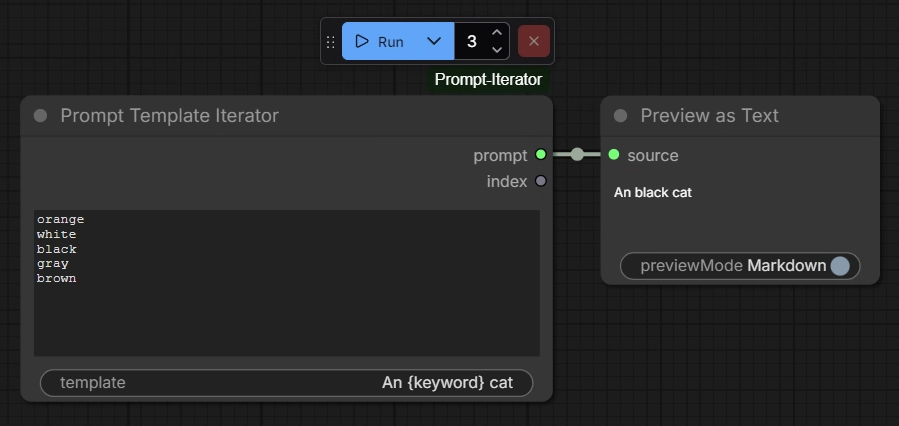
Screenshots
Features
- Prompt Iterator: Cycle through multiple prompts line by line
- Prompt Template Iterator: Fill templates with keywords from a list
- Global Counter: Shared counter across all iterator nodes in a session
- Index Display: Shows current iteration index in output
- Auto-wraparound: Automatically cycles back to the beginning when reaching the end
- Reset Counter on change: Reset the counter when the input changes
Installation
-
Navigate to your ComfyUI custom nodes directory:
cd ComfyUI/custom_nodes/ -
Clone or copy this repository:
git clone https://github.com/mingchoi/ComfyUI-Prompt-Iterator.gitOr manually copy the
ComfyUI-Prompt-Iteratorfolder intocustom_nodes/ -
Restart ComfyUI
-
The nodes will appear in the Utils category in the node menu
Nodes
Prompt Iterator
Iterates through a multi-line list of prompts, outputting one prompt per execution.
Inputs:
prompts(STRING, multiline): List of prompts, one per line
Outputs:
prompt(STRING): The current promptindex(INT): The current iteration index
Example:
Input prompts:
a beautiful sunset
a mountain landscape
a city at night

Execution 1 → "a beautiful sunset"
Execution 2 → "a mountain landscape"
Execution 3 → "a city at night"
Execution 4 → "a beautiful sunset" (wraps around)
Prompt Template Iterator
Iterates through a list of keywords and fills a template string with each keyword.
Inputs:
keywords(STRING, multiline): List of keywords, one per linetemplate(STRING): Template string with{keyword}placeholder
Outputs:
output(STRING): The filled templateindex(INT): The current iteration index
Example:
Input keywords:
cat
dog
bird

Input template:
A photo of a {keyword} in a garden

Execution 1 → "A photo of a cat in a garden"
Execution 2 → "A photo of a dog in a garden"
Execution 3 → "A photo of a bird in a garden"
Execution 4 → "A photo of a cat in a garden" (wraps around)
Usage
Basic Workflow
- Add a Prompt Iterator or Prompt Template Iterator node to your workflow
- Enter your prompts or keywords (one per line)
- Connect the output to your desired node (e.g., CLIP Text Encode)
- Run the workflow multiple times - each run will use the next prompt/keyword
- The node displays the current index (e.g., "Index: 2 / 5")
Shared Counter Behavior
Both nodes share a global counter that:
- Increments on each execution
- Persists across workflow runs in the same ComfyUI session
- Resets to 0 when ComfyUI is restarted
- Is shared between all iterator nodes
This means if you use both nodes in the same workflow, they will advance together:
Execution 1: Prompt Iterator outputs prompt[0], Template Iterator outputs template with keyword[0]
Execution 2: Prompt Iterator outputs prompt[1], Template Iterator outputs template with keyword[1]
License
MIT License - Feel free to use and modify as needed.
Contributing
Contributions are welcome! Please feel free to submit issues or pull requests.