
Infinite Movie
Turn a few still images into one seamless, looping film with video models (MiniMax H3, LTX 2.5, Wan 2.2): auto prompts from the images, A/B shot review, motion-evened assembly, upscale, model download with size check.
Infinite Movie (ComfyUI)
<p align="center"><img src="assets/a4_nosun.gif" width="320" alt="Four seasons in one film: summer, autumn, winter, spring"></p> <p align="center"><sub>Four stills, one LTX 2.5 render pass (737 frames, 24 fps), shown at 2x speed.</sub></p>Turn a few still images into one smooth, looping film. For each pair of images a video model renders the transition (start image → end image); the pack joins all shots into one film, evens out the motion and saves it. A local vision model writes the prompts for you if you like. Built for a single GPU (also one shared with a local LLM).
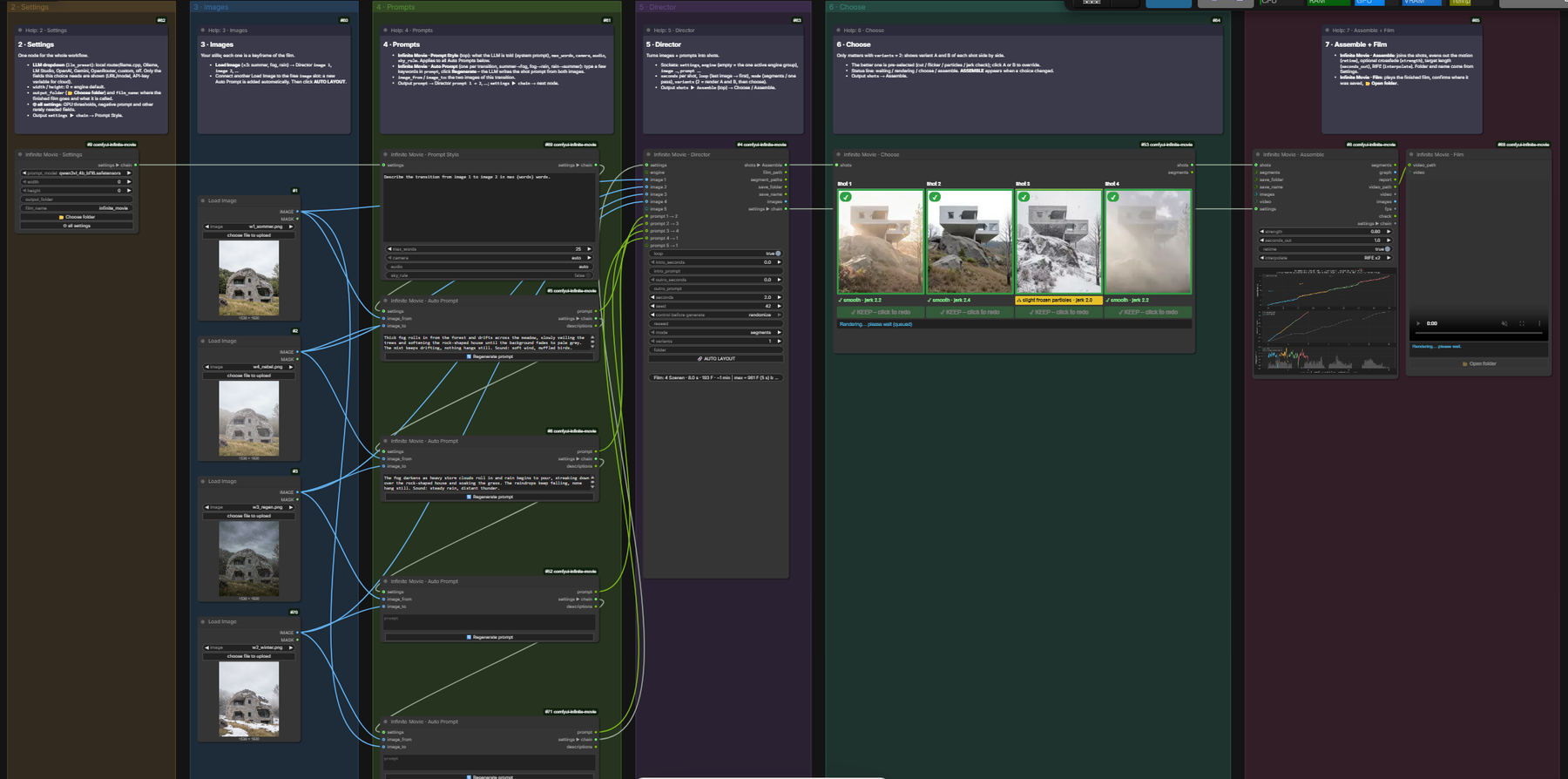 <sub>Example workflow (four seasons): images + prompts → Director → Choose → Assemble.</sub>
Quick start
- Install. Clone this repository into
ComfyUI/custom_nodes/and restart ComfyUI. Also needed: VideoHelperSuite (brings ffmpeg). Optional: ComfyUI-Frame-Interpolation for RIFE. - Open the workflow
Infinite Movie(Workflow menu › Browse Templates › comfyui-infinite-movie, or dragexample_workflows/Infinite Movie.jsononto ComfyUI). - Get the models. ComfyUI lists missing model files when the workflow opens, with a download button per file. Or press 📦 Check models on the Settings node: it shows every missing file with its size, the total and the free disk space, and downloads after you confirm. ⚠ The default engine needs about 42 GB, the prompt writer 9 GB more – see Models and download sizes.
- Set the number of images in Director ›
images(1–12) – Load Image nodes and their Auto Prompts are added and laid out for you. Then load your pictures into them (1 image works too, see One image). - Write the prompts. Type a few keywords into each Auto Prompt and press 🔄 Regenerate prompt, or write the prompt yourself.
- Run. The shots render and stop at Choose. Look at them, keep or redo, then press ASSEMBLE ▶ – the film appears in the Film node and in your output folder.
The workflow at a glance
The engine sits at the top, below it one row read from left to right. Every area has a help note at its top.
| Area | What you do there |
|---|---|
| 1 · Engine | The video model (MiniMax H3). Normally nothing to change. |
| 2 · Settings | Prompt model, picture size, output folder, film name, sound on/off, 📦 Check models. |
| 3 · Images | Your stills, top to bottom = order in the film. |
| 4 · Prompts | Prompt Style (how prompts are written) and one Auto Prompt per transition. |
| 5 · Director | images (how many), seconds per shot, loop (last image back to the first), variants (1 or 2 per shot). |
| 6 · Choose | Check the shots, pick A/B, mark shots to redo, ASSEMBLE / RERENDER. |
| 7 · Assemble + Film | Joins the shots, evens out the motion, shows and saves the film. |
| 8 · Upscale | Optional (muted): sharper, larger film. Select the group and press Ctrl+M to turn it on. |
Settings are passed along one chain: Settings → Prompt Style → Auto Prompts → Director → Assemble.
Node colours: green = positive prompt, red = negative prompt, blue = model loader, cyan = engine connection (Engine Start / Engine Result), yellow = help notes.
Models and download sizes
Put the files into the folders under ComfyUI/models/. You only need one engine.
| Use | Files | Download |
|---|---|---|
| MiniMax H3 (default engine, with sound) | 5 files | 42.0 GB |
| Prompt writer qwen3vl_4b_bf16 (optional: writes the prompts) | 1 file | 8.9 GB |
| LTX 2.5 (other engine, 🔒 gated) | 4 files | 38.7 GB |
| Wan 2.2 (other engine, no sound) | 6 files | 38.0 GB |
| Upscale model (group 8) | 1 file | 0.01 GB |
MiniMax H3
| File | Folder | Size | Download |
|---|---|---|---|
| minimax_h3_fl2va_pruned_int8_convrot.safetensors | diffusion_models | 21.0 GB | Comfy-Org/MiniMax-H3 |
| minimax_h3_fl2v_turbo_8step_v1.1_768p_comfyui_bf16.safetensors | loras | 2.0 GB | lightx2v/Minimax-h3-Turbo |
| qwen3vl_32b_minimax_h3_nvfp4_awq.safetensors | text_encoders | 15.7 GB | Comfy-Org/MiniMax-H3 |
| minimax_h3_video_vae_int8_convrot.safetensors | vae | 2.8 GB | Comfy-Org/MiniMax-H3 |
| minimax_h3_audio_vae_fp32.safetensors | vae | 0.6 GB | Comfy-Org/MiniMax-H3 |
Prompt writer (Settings › prompt_model; any Qwen3-VL in text_encoders works, off = write prompts yourself)
| File | Folder | Size | Download |
|---|---|---|---|
| qwen3vl_4b_bf16.safetensors | text_encoders | 8.9 GB | Comfy-Org/Qwen3-VL |
The model links for LTX 2.5 and Wan 2.2 are in their engine workflows (help note) and in models.json.
LTX 2.5 is gated: accept the license on Hugging Face first; for the
automatic download set the environment variable HF_TOKEN to your Hugging Face token.
Engines
The video model is always visible in the workflow as an engine group:
Infinite Movie · Engine Start (from Director) → your model chain → Infinite Movie · Engine Result (to Director)
| Engine | Workflow with only this group | fps | Frame grid | Sound |
|---|---|---|---|---|
| MiniMax H3 (default, built into Infinite Movie) | Infinite Movie - Engine MiniMax H3 | 24 | 17k+5 | yes |
| LTX 2.5 | Infinite Movie - Engine LTX 2.5 | 24 | 8n+1 | yes |
| Wan 2.2 | Infinite Movie - Engine Wan 2.2 | 16 | 4n+1 | no |
- Switch engine: open the engine workflow, copy its group (Ctrl+C), paste it into your workflow (Ctrl+V) and mute the MiniMax group (select it, Ctrl+M). Only one engine group may be active; muted groups never run.
- The Director finds the one active Engine Result by itself. With several active groups, connect the wanted
Engine Result to the Director's
engineinput. - Own engine: build any loader/sampler chain between Engine Start and Engine Result. There are no hidden presets – what you see is what renders.
- MiniMax H3 group: first/last-frame model + 8-step turbo LoRA, KSampler (8 steps, cfg 1,
res_multistep,simple, negative = ConditioningZeroOut). Without the LoRA: bypass it and use 20–25 steps. - The H3 and LTX text encoders cannot write prompts; Settings ›
prompt_modelhides them.
One image
loopoff: an open shot – starts on the image and runs free.loopon: two passes – shot 1 runs free from the image, shot 2 runs from shot 1's last frame back to the image. Each shot has its own prompt (shot 1: what happens, shot 2: how it returns).
Leave images out
Lower Director › images: the last images are muted (not deleted), their Auto Prompts too, and keep their text – raise it again to bring them back. Or select any Load Image and press Ctrl+M: the Director skips it the same way.
Sound
Settings › audio is off by default (faster, no audio model is loaded). Turn it on for engines with sound
(MiniMax H3, LTX). Assemble keeps the sound only with even_motion off – evening out changes the timing, so the film
stays silent then. Prompts can describe sound, e.g. sound: howling wind.
Nodes
| Node | What it does |
|---|---|
| Settings | Shared settings for the whole chain: prompt_model, aspect + long_side (both sides rounded to 32; 4:5 + 960 = 768×960), output_folder (📂 Choose folder), film_name, audio, 📦 Check models. GPU check on Run: if another program holds too much GPU memory, nothing is queued and a message names it – the pack never closes other programs. |
| Prompt Style | What the prompt model is told, max_words, camera (appended; none = no camera sentence). |
| Auto Prompt | One per transition. Looks at both images and writes the prompt from your keywords when you press 🔄 Regenerate prompt (only this node; ~20 s with Qwen3-VL 4B). Never writes on Run: a filled prompt is used as is. |
| Director | 1–12 images + one prompt per transition → renders all shots. images sets the count: more adds Load Image nodes (copy of the last image) with Auto Prompts, fewer mutes the last ones. seconds per shot (snapped to the engine's frame grid), loop, variants (2 = render A and B per shot). Outputs shots ▶ Assemble, settings ▶ chain. Shows progress and remaining time. |
| Engine Start / Engine Result | Left and right edge of an engine group (see Engines). |
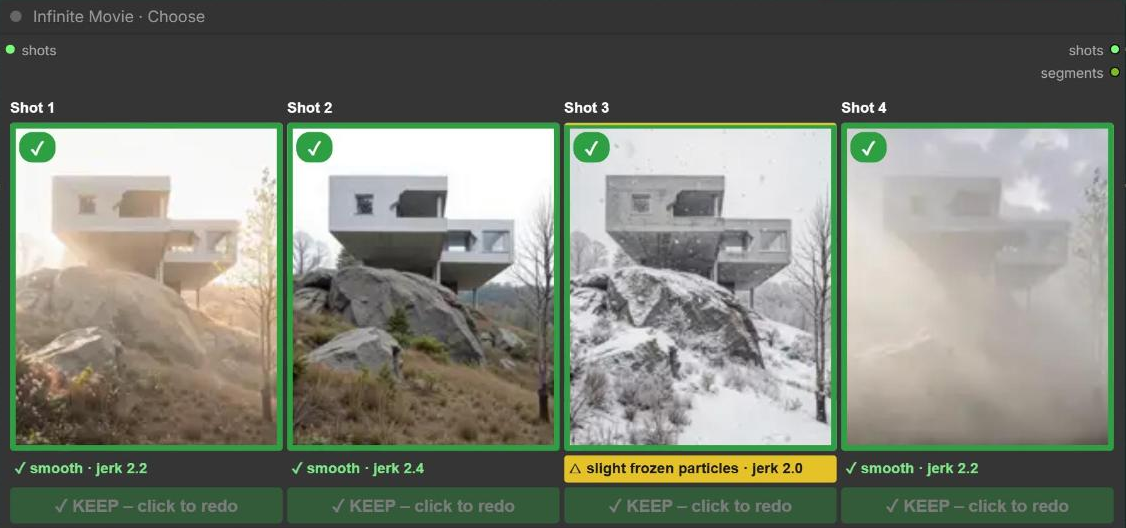
| Choose | One tile per shot (A above B with variants). Hover plays, click picks; ✓ KEEP / ✗ REDO per shot. Each tile shows a check in plain words: green ✓ smooth, yellow △ slight flicker, red ⚠ HARD CUT / HARD SEAM. ✎ prompt and ⏱ seconds change one shot and mark it REDO. Big button: ASSEMBLE ▶ (build the film from your picks) or RERENDER n ↻ (only the marked shots). 3×3 contact sheet of the shot under the mouse. |
| Assemble | Joins the shots into the film. even_motion re-picks frames so each carries about the same change; strength (how strongly), keep (share of each shot's length: 1 full, 0 auto = drop still parts). interpolate RIFE x2 (fewer repeated frames), output_size (as rendered, Instagram 4:5, Reel 9:16, 2×). Runs only on ASSEMBLE. The film mp4 contains the prompt and the workflow. Viewer (3×3 Load-Image tiles, all tabs the same size): Graph, Timeline, Heatmap, Frames (slider, ▶, onion skin), Particles (motion trails), Sheet (3×3 … 8×8, click = open frame). Outputs video_path, video, last_frame, first_frame. |
| Film | Plays the finished film, shows where it was saved, 📂 Open folder, remembers the last three films. |
| Last Frame | Last frame of a film, an image batch or a file – e.g. the start image of the next part. Reads frame by frame. |
| Movie to GIF | Film → GIF or WebP with live preview and size estimate (crop, fps, trim, speed, boomerang, palette, max_mb). |
| H3 Loop / H3 Loop Decode | Seamless loops in one MiniMax H3 pass (end wrapped around to the start while sampling). |
| LTX Refine | See Upscale. |
(internal) nodes are used by the engine expansion and are not meant to be placed by hand.
Choose and variants
With Director › variants = 2 every shot renders twice: A (seg_XXX.mp4) and B (seed + 500,
seg_XXX_b.mp4). Run renders and stops at Choose; pick per shot, then ASSEMBLE – only Assemble runs.
Changing only the pick never re-renders. RERENDER re-seeds only the marked shots. Cancel removes the
half-finished film.
Upscale
Group 8 · Upscale (muted) in the main workflow, or the separate workflow Infinite Movie - LTX Upscale for any film:
VHS Load Video → Upscale Crop Universal (×1.3334, multiple of 64) → Infinite Movie · LTX Refine (1:1)
- LTX Refine re-renders the film with LTX 2.5 in overlapping chunks (49 frames, 17 overlap) at low denoise to bring
back detail. Works for any length, keeps loops seamless and the sound, saves
<name>_upscale.mp4next to the film. Needs the LTX 2.5 models (🔒 gated). - Prompt
photographic, 4k, negative empty, sigmas0.421875, 0.0(higher = softer, more flicker). - Base upscale model: 2x-LiveActionV1-SPAN by jcj83429
(CC-BY-NC-SA-4.0) – download
(9 MB) into
models/upscale_models/. Upscale Crop Universal ships with this pack.
Requirements and troubleshooting
- ComfyUI with the V3 node API, a recent frontend, an NVIDIA GPU (tested on 24 GB, 768×960).
- ffmpeg: comes with VideoHelperSuite (
imageio-ffmpeg); otherwise install it (Windows builds, ffmpeg.org) and put it on PATH. - Run does not start and names another program: that program holds too much GPU memory; close it and press Run again.
- Silent film in VHS Load Video fails:
python tools/patch_vhs_silent_audio.pypatches VideoHelperSuite to return silence (re-run after VHS updates,--checkto test). - Missing model after download: check the folder (table above) and press R in ComfyUI to refresh the lists.