
From Mesh to Motion
One rest-pose mesh to a registered keyframe sheet an auto-rigger can animate from.
Nodes (8)
A number for 'has my character changed colour by keyframe 12'
The labelled contact sheet you hand a rigger
You write 20 words, it writes the 130 that hold the shot together
16 stills out of a five-second clip, spaced on purpose
A folder of PNGs is not a deliverable
Glue the three renders into one canvas before the video model sees them
Your clip didn't come back the size you sent it
Cut the animated canvas back into three columns, per frame
From Mesh to Motion
Turn one rest-pose 3D mesh into a keyframe sheet an auto-rigging tool can animate from — 16 keyframes, three orthographic views each, all in register. It runs as one ComfyUI graph plus a headless Blender pass.
Published on the Comfy Registry as
from-mesh-to-motion under @meryboth:
comfy node install from-mesh-to-motion
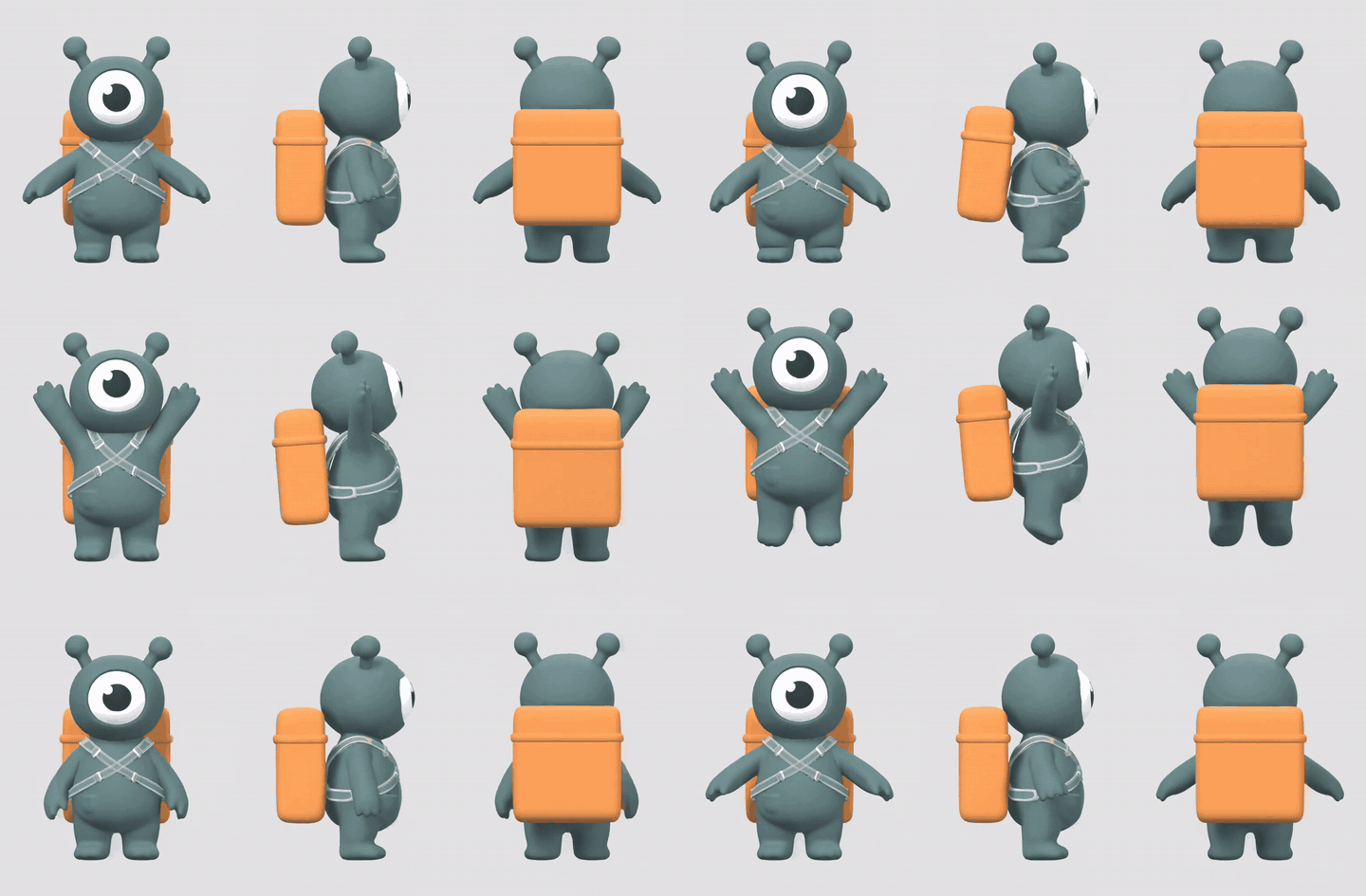
<sub>One canvas, three orthographic views, animated in a single pass. Nothing enforces that the panels agree — they agree because they are the same picture.</sub>
Everything here is a research demo. The mascot, its mesh and its motion were generated for this repository and are released CC0. No client work, brand or likeness is involved, and every generated asset is machine-made.
Full write-up: docs/report/index.html — the method, the measurements, and the scope.
Technical reference: docs/report/reference.html — every node's contract, the CLI, the data
formats, the metrics and the results per character, generated from the code and the runs by scripts/build_reference.py.
What it does
An auto-rigger does not have to infer motion from a sentence. Give it a rigged mesh and a sheet of keyframes drawn in orthographic views, and it reads the poses off the pictures instead.
Producing that sheet is the hard part. Asking an image model for front, then side, then back
is three independent requests, and they come back as three drawings of three slightly different
characters in three slightly different poses — by keyframe 12 the drift is not subtle. This
repository produces the sheet without that contradiction, leaving the rig and the final animation
to Astra, Meshy, or a human.
| Stage | What happens | Where |
|---|---|---|
| 0 · Mesh | A concept image becomes a textured, A-posed GLB. Optional — bring your own mesh. | Cloud |
| 1 · Anchors | Blender renders the rest pose from a true orthographic camera: front, side, back, one scale, one pivot. This is geometry, not generation. | Local |
| 2 · Triptych | The three views are composited onto one 21:9 canvas. | Local |
| 3 · Motion | Image-to-video animates that canvas. All three panels move inside one frame, so they stay in step by construction. | Cloud |
| 4 · Register | Frame 0 is matched against the submitted canvas to recover however the model rescaled it. | Local |
| 5 · Sheet | 16 frames sampled, panels cut apart, contact sheet + keyframes.json + handoff.txt. | Local |
| 6 · Rig & animate | The sheet goes to Astra or Meshy with the rest-pose mesh. | Manual |
The idea that makes it work
Three views of one pose have to agree with each other, or the rigging tool gets contradictory instructions and splits the difference into mush.
The usual fix is to generate a view and then try to rotate it, which is a hard problem. This pipeline sidesteps it: it never generates a view on its own. The three orthographic renders are glued into a single image before the video model ever sees them, so the model is not animating three characters — it is animating one picture that happens to contain three panels. Panels in one frame share the model's attention, and they stay synchronised for free.
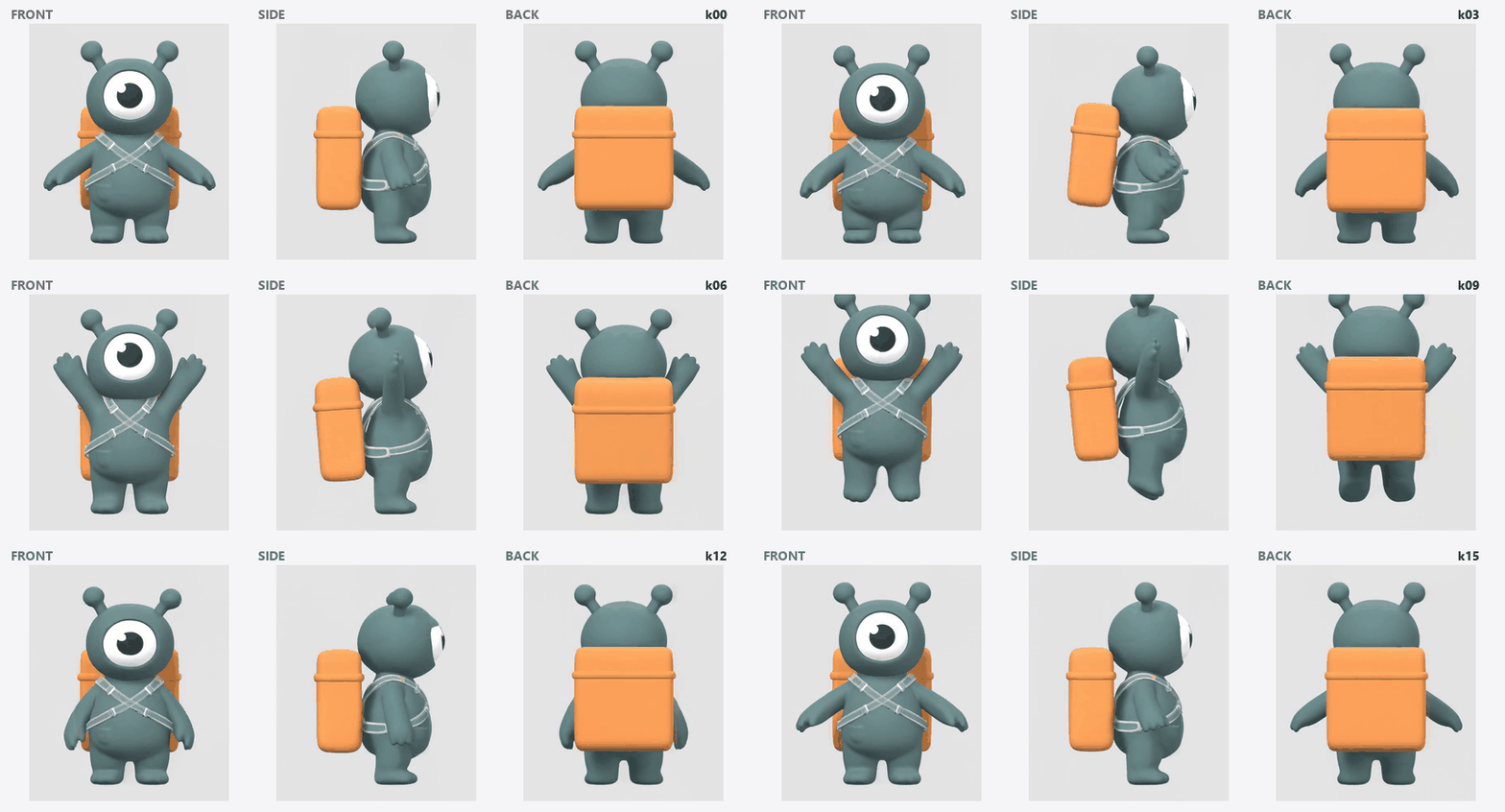
<sub>The sixteen keyframes that come out, stepped one at a time. These are the split panels, so this is exactly what lands in the sheet.</sub>
Two details carry the weight:
The anchors are rendered, not generated. Blender rotates the object and never moves the camera, so all three views share one ortho scale and one pivot to the pixel. A limb at a given height in the front view is at that same height in the side view. Nothing downstream can restore that property if it is not true at the start.
The clip is registered before it is cut. Video models do not return what they were given: the 1904×816 canvas came back as 1536×672, a 2.1% non-uniform rescale. Since frame 0 of an image-to-video clip is very nearly the input image, the mapping is recovered from the two content bounding boxes and applied to every frame.
This is insurance, not a rescue, and the numbers say so. Mean absolute error of the split panels against the source, per 255:
| What the model returned | Split naively | Registered first | |---|---|---| | Rescaled — what MiniMax H3 actually did | 0.28 | 0.85 | | Letterboxed into 16:9 | 18.35 | 0.89 | | Centre-cropped by 6% | 20.19 | 0.54 |
For the clip this repo ran, a naive stretch was already fine — registration cost about half a point
of resampling error and fixed nothing. It earns its place on the providers that letterbox or crop,
where it is twenty times better, and it turns a silent 2% shear into a printed warning either way.
Regenerate the table with python scripts/build_docs_assets.py.
Tested on three characters
Beyond the mascot it was developed on, the pipeline was run on two more invented characters with different body plans: a quadruped (no obvious front, a side view far wider than its front) and a tall, wire-thin robot with a scarf.
| Character | mean drift | max drift | identity gate | |---|---|---|---| | mascot | 0.0109 | 0.0209 | pass | | quadruped | 0.0119 | 0.0228 | pass | | thin robot | 0.0191 | 0.0522 | outside scope |
The quadruped needed no changes: its rear-up onto the hind legs reads in all three panels at once. On the robot, a deliberately one-sided wave stays correctly mirrored in the back view on every keyframe; its wire-thin profile and loose scarf are outside the pipeline's scope, and the identity gate flags them. See Scope.
Install
For the ComfyUI nodes, install from the registry — via ComfyUI Manager, or:
comfy node install from-mesh-to-motion
The eight nodes appear under from-mesh-to-motion. Cloning into ComfyUI/custom_nodes/ works
too, and is the right choice if you want the example assets and the write-up, which the registry
package deliberately leaves out.
For the CLI and the Blender pass:
git clone https://github.com/meryboth/from-mesh-to-motion
cd from-mesh-to-motion
pip install -r requirements.txt
Blender 4.2+ is needed for the anchor renders — no add-ons, no GPU. The pipeline finds it on
PATH, in $BLENDER, or in the usual install locations.
Your GPU is barely involved: all eight nodes in the pack are Pillow and numpy, and the one heavy node in the graph is MiniMax, a ComfyUI partner node that runs on Comfy's side. A 6 GB laptop card is plenty.
Run it
# 1 - orthographic anchors from the rest-pose mesh
python -m pipeline anchors --mesh out/01_mesh/mascot.glb --out out/02_anchors

# 2 - glue them into one canvas
python -m pipeline triptych --anchors out/02_anchors --out out/03_triptych

# 3 - animate out/03_triptych/triptych_rest.png  (ComfyUI, or any i2v model)

# 4 - clip in, sheet out
python -m pipeline keyframes \
    --video out/04_video/motion.mp4 \
    --triptych out/03_triptych/triptych_rest.png \
    -n 16 --out out/05_keyframes
Step 3 is workflows/02_triptych_to_keyframes.json, which does steps 2–5 inside ComfyUI as well.
If your mesh does not face the camera on import, --yaw-offset 90 rotates every view together
rather than re-authoring the mesh.
How to use it
The full walkthrough, with the graph drawn and explained node by node, is in the write-up. The short version:
- Install ComfyUI (the desktop app is simplest) and this pack — ComfyUI Manager, or
comfy node install from-mesh-to-motion. - Sign in to a Comfy account in ComfyUI, or set Settings → API Keys → Comfy API Key. Only the MiniMax video node uses it, once per run. It is not the registry key.
- Pick a character the method can handle: chunky, readable from every side, A-pose, nothing loose. See Scope.
- Render the three views with Blender, from
ComfyUI/custom_nodes/from-mesh-to-motion:python -m pipeline anchors --mesh character.glb --out anchors. If the character faces the wrong way, add--yaw-offset 90(or 180, 270). No mesh?workflows/01_concept_to_mesh.jsonmakes one. - Open
workflows/02_triptych_to_keyframes.jsonin ComfyUI. - Load
beauty_front.png,beauty_side.png,beauty_back.pnginto the three Load Image nodes, in that order. - Write the action in the Write only the action here node — just what the character does.
- Queue. One paid call, a few minutes. Change the seed on the video node for another take.
- Check the Triptych Register report (skew) and the Identity QA report (PASS/FAIL), and look at the side column yourself — the QA measures colour, and profiles fail on shape.
- Collect from
ComfyUI/output/from_mesh_to_motion/and give Astra the rigged rest-pose mesh,keyframe_sheet.pngand the text ofhandoff.txt.
| You see | It means | |---|---| | The three views differ in size | The renders came from different runs — render all three together. | | Save Keyframe Manifest got timings for 0 of 16 | The timings link from Sample Keyframes is missing — reload the workflow file. | | A skew warning | The model reshaped the canvas by more than 2%; registration corrects it, glance at row one. | | Identity QA: FAIL | Colour drifted — usually loose cloth or a thin profile. Simplify, or try another seed. |
Where you say what the animation is
One place: the Motion Prompt node, or motion.action in config/job.json. You write only
what the character does —
"action": "raises its right arm and waves twice, then lowers it"
— and the node builds the ~130 words around it that lock the panels down: static camera, no zoom, panels that never move or change angle, all copies in unison. Those words are the reason the three views agree, and they are easy to break by accident, so they are not yours to edit.
Two details in that template were arrived at by running it, not by taste. The action goes first: with the constraints in front, a "crouch and jump" prompt produced arms overhead and feet that never left the ground. And the background description is read from the triptych's own layout, so the prompt cannot describe a white canvas the model is being handed in grey — a repainted background breaks the split step.
Check what will be sent before spending anything on it:
python -m pipeline prompt --triptych out/03_triptych/triptych_rest.png
The same node also emits the short summary that goes into keyframes.json and the Astra handoff,
so the sheet's provenance cannot claim one motion while the clip shows another.
Scope
The pipeline turns a rest-pose mesh and a one-line motion description into a keyframe sheet — sixteen keyframes, three orthographic views each, in register, with the timing of every pose — for a rigging tool to animate from.
Designed for
| | |
|---|---|
| Characters | Chunky, rigid or near-rigid, readable from every side, in an A-pose. Humanoid or not — tested on a biped and a quadruped. |
| Motion | In place, one beat per run: raising arms, waving, crouching, stretching, rearing up, nodding, an idle. |
| Length | One clip per run, 4–15 s as MiniMax H3 accepts (documented runs used 5 s); 16 keyframes by default. |
| Output | Contact sheet, per-view PNGs, keyframes.json with the time of each pose, handoff.txt. |
Outside its scope — these follow from the method (a fixed orthographic camera, three fixed viewpoints, one clip), not from a particular model:
- Travelling across the frame. In-place motion, including an in-place walk cycle, is in scope.
- Turning on the spot — the panels are defined as front, side and back.
- Secondary motion: cloth, hair and other free-moving parts. The sheet is authoritative on pose.
- Multi-beat sequences, which are built from several runs sharing their end poses.
- Very thin silhouettes, which leave the side view too little to work with.
- Facial animation, props and multiple characters were not part of this work.
What stays in your hands: rigging and the final animation (Astra, Meshy or a person), the orthographic renders in Blender with the bundled CLI, and a last look at the side column.
Built-in checks: Triptych Register reports how the model reshaped the canvas, and Identity QA
(or python -m pipeline qa) scores the sheet for drift on the character's dominant colours, weighted
by the rest pose — so a raised arm does not count as drift but a colour change does.
The nodes
| Node | In → out |
|---|---|
| Motion Prompt | the action alone → the full, panel-locking video prompt |
| Triptych Compose | three ortho views → one canvas + its layout |
| Triptych Register | canvas + frame 0 → the layout corrected for what came back |
| Sample Keyframes | video frames → N evenly spaced stills |
| Triptych Split | stills + layout → three per-view batches |
| Keyframe Sheet | three batches → the labelled contact sheet |
| Save Keyframe Manifest | → keyframes.json + handoff.txt |
| Identity QA | three batches → drift report and pass/fail, the same gate as pipeline qa |
The layout travels between them as JSON, so it survives a save/reload and can be read by a human when a run looks wrong.
The handoff
A folder of PNGs is not a deliverable. keyframes.json records which pose happens when, which view
is which, and every model, seed and prompt that touched the sheet. handoff.txt is the text to
paste next to the sheet in Astra:
The sheet has 16 keyframes down the page and 3 orthographic views across it (front, side, back). Every view shares one camera scale and one pivot, so a limb at a given height in the front view is at that same height in the side and back views. Read the pose from all 3 views together, not from the front alone.
Repo layout
blender/render_ortho.py     headless orthographic turnaround renderer
pipeline/                   sheet geometry, video sampling, manifest, CLI
comfy_nodes/                the seven ComfyUI nodes
workflows/                  editor graphs, plus API-format copies under api/
scripts/build_workflows.py  generates both formats from one spec
scripts/build_graph_diagram.py  draws the graph into the write-up, from the workflow file
tests/test_nodes.py         round-trip test, loaded the way ComfyUI loads it
docs/report/index.html      the write-up
config/job.example.json     subject + motion description
Publishing to the Comfy Registry
Live at registry.comfy.org/nodes/from-mesh-to-motion,
published as from-mesh-to-motion under the publisher @meryboth. Releases are automatic:
bump version in pyproject.toml, push to main, and .github/workflows/publish_action.yml does
the rest. A version lands as pending while the registry scans it, then goes active.
.comfyignore keeps the research record out of the installed package — out/ alone is 54 MB of
renders, meshes and clips. What ships is the node pack and the workflows, 191 KB.
To set this up on another repo:
- Create a publisher at registry.comfy.org. The handle after the
@is your PublisherId; it is permanent and must match[tool.comfy] PublisherId. - Create an API key on the publisher's page and store it once — it cannot be retrieved later.
- Add it as the repo secret
REGISTRY_ACCESS_TOKEN(Settings → Secrets and variables → Actions). - Bump
versionand push, or runpip install comfy-cli && comfy node publish.
If the action fails with Option '--token' requires an argument, the secret is missing or misnamed.
That is what an empty REGISTRY_ACCESS_TOKEN looks like from inside the runner.
The other API key
There are two, and they are unrelated. The one above publishes the pack. Running the graph needs a
different one: workflows/02_triptych_to_keyframes.json calls MiniMax H3 through a partner API
node, which bills a Comfy account. In ComfyUI that key lives in Settings → API Keys → Comfy API
Key, or you sign in to your Comfy account from the desktop app and it is handled for you. It is
never stored in this repo.
Only the video step needs it. anchors, triptych, keyframes, qa and prompt all run locally
and free, so the pack is useful without any key at all — you just have to bring your own clip.
Rights
Code: MIT. The generated mascot, its mesh, and the example renders: CC0. Generated with Flux 2 Pro (concept), Meshy 7 (mesh) and MiniMax H3 (motion) — each subject to its own provider terms when you re-run the pipeline.