
From 3D to Campaign
Turn a 3D model of a building into social-ready campaign assets: geometry-faithful renders, an automatic quality gate, validated copy and a laid-out post — all in one ComfyUI graph.
Nodes (7)
The validator that catches an LLM echoing your JSON schema back at you
Build the LLM prompt with a fact whitelist, so it can't invent a second bathroom
A design system in a node, so your headline can't end up on the balustrade
One JSON line per run, so the cost of your pipeline isn't a guess
Make control lines from a normal map instead of lying to yourself with Canny
The node that tells you your render invented a balcony
Get the render passes out of your 3D scene without opening a browser
From 3D to Campaign
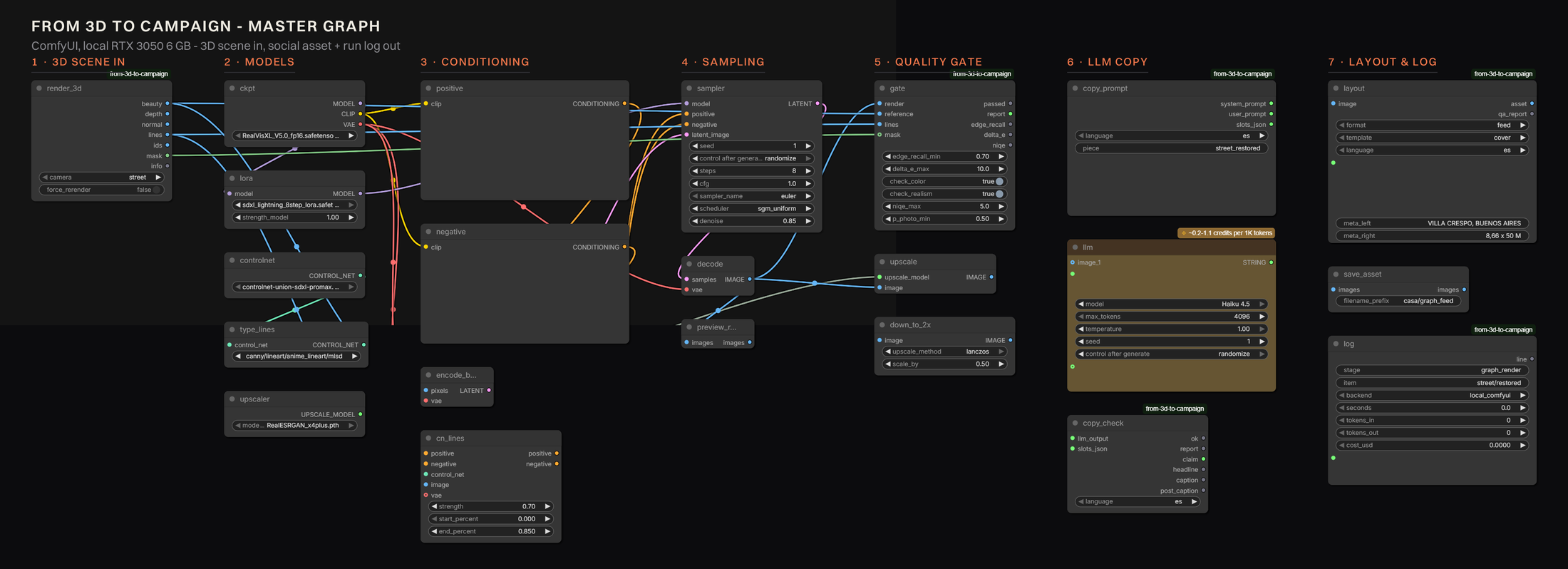
Turn the 3D model of a building into a library of social-ready campaign assets — stills, copy, formats and languages — with a quality gate that protects the architecture and a cost line for every piece. It runs as one ComfyUI graph.
Everything in the examples is hypothetical. The developer form and order, the project Casa Larga 1408 and its figures are invented for this R&D. No real brand, listing or company is represented, and every generated asset carries an AI disclosure.
Full write-up: docs/report/index.html — the case study, with the
benchmarks, the metrics that failed, and the cost model.
What it does
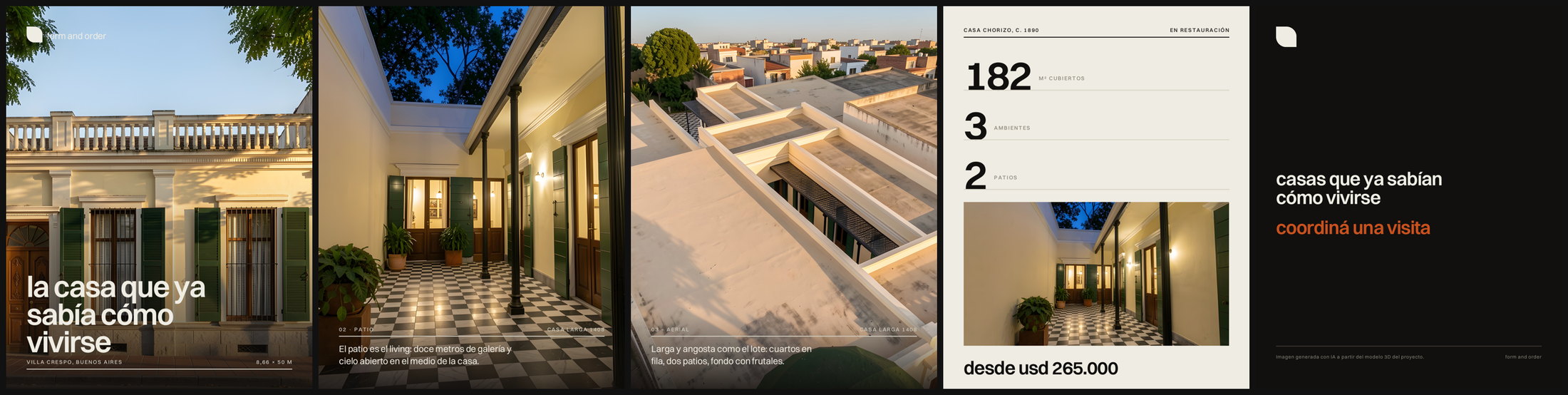
A developer marketing a building has one 3D model and needs fifty pieces of content: the street shot, the patio at dusk, the aerial, each cropped for feed, story and link, in every language the audience speaks, with copy that does not invent a second bathroom.
Prompting an image model is fast and produces a building that does not exist — which, in real estate, is not a style problem but a legal one. So this pipeline does the opposite: it drives the generative models with signals taken from the geometry itself, and then measures the result against that same geometry before anything reaches a layout.
| Stage | What happens |
|---|---|
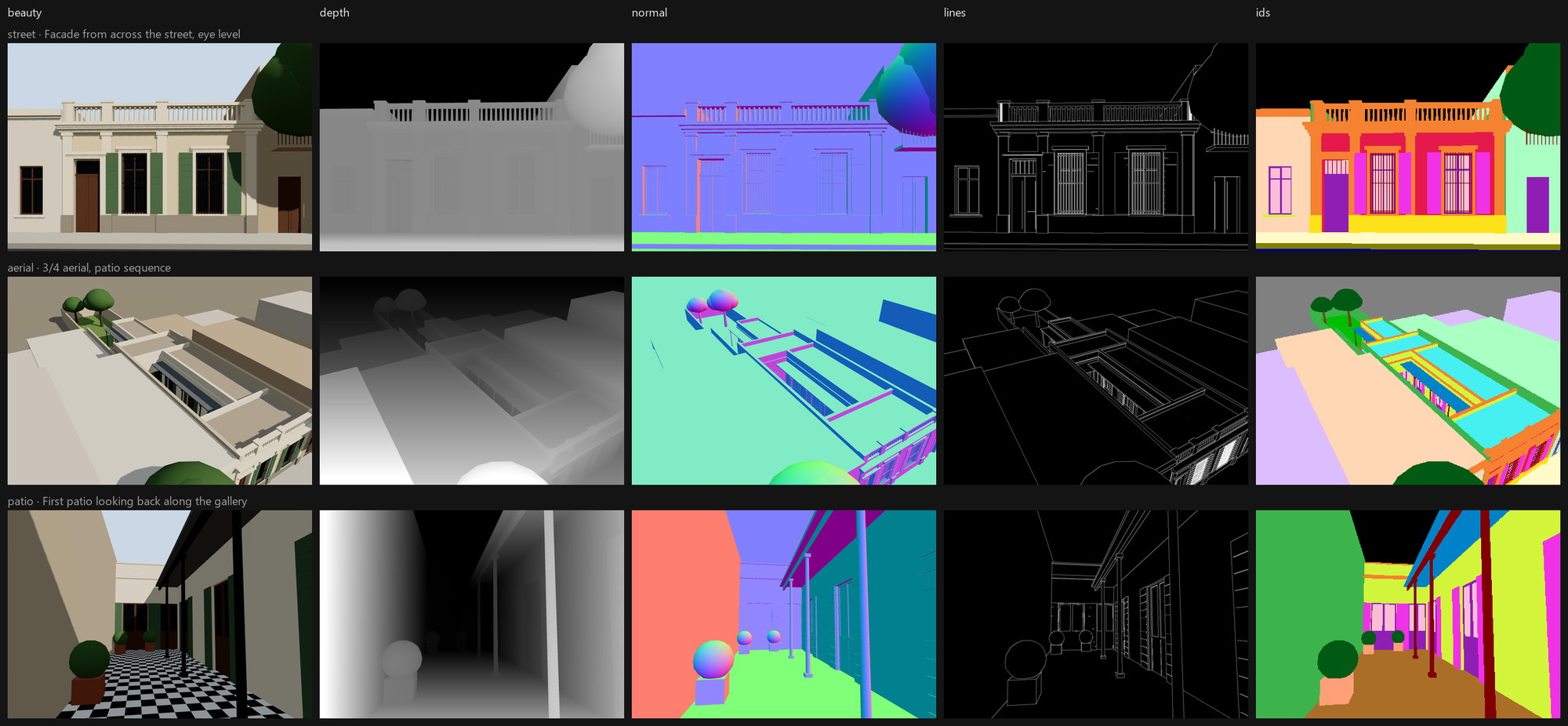
| 1 · 3D scene in | The house is a data spec in metres. The renderer emits beauty, depth, normals, a material-ID map and a line map. Content-hash cached. |
| 2 · Render | SDXL + ControlNet locally, or a reference-edit model in the cloud. The beauty pass is the starting latent; the line pass drives ControlNet. |
| 3 · Quality gate | Edge recall against the 3D lines, ΔE after white balance, NIQE, CLIP photo-vs-CG. Fail → new seed → prompt fix → human review. |
| 4 · Library | 4× Real-ESRGAN down to 2×, plus crops framed on the building using the ID mask. |
| 5 · Copy | An LLM with a fact whitelist and per-slot character limits, then a validator with a repair loop. |
| 6 · Layout | A design system in code: 12-column grid, type scale, safe zones, brand mark, stamped AI disclosure — with its own contrast and collision QA. |
| 7 · Log | One line per run in out/runs.jsonl: seconds, cache hits, tokens, credits, dollars. |
How it works
The 3D scene is data, not a file
scene/house.json describes the building in metres — lot, rooms, galleries, patios, facade
openings, cornice, balustrade — and scene/src/ turns it into geometry. Every mesh carries a
semantic material key, and that key feeds both the look and the material-ID pass.
That is what makes the control signals possible:
| Pass | How it is made | Used for |
|---|---|---|
| beauty.png | Shadows, ACES tone mapping | Reference image, starting latent, before/after |
| depth.png + .npy | Linear view depth → disparity (MiDaS convention), per-camera range | Depth ControlNet, geometry scoring |
| normal.png | View-space normals | Normal ControlNet, line reconstruction |
| lines.png | G-buffer discontinuities: ID change, relative depth jump, normal crease ≥ 35°, 2× supersampled | Lineart ControlNet, edge recall |
| ids.png | Flat semantic colours, no anti-aliasing | Masks for QA, ID-framed crops |
Lines come from the geometry, not from Canny on the beauty, so textures, shadows and foliage never produce a false edge. Cameras use a vertical lens shift instead of tilting, so verticals stay vertical the way architectural photography does it.
Lines alone are not enough control
Driven by a line ControlNet only, SDXL kept the facade's rhythm and invented a second storey with a balcony — edge recall 0.51–0.63, three of three rejected by the gate. A line map is a silhouette plus creases; nothing in it says how tall the building is. What fixes volume is depth, or the beauty pass itself as a starting latent (denoise 0.85) or as a reference image. With that: edge recall 0.79–0.88, gate PASS.
The quality gate
Four metrics, thresholds in config/qa.json so the gate is configuration, not code:
| Metric | Question | What we learned | |---|---|---| | Edge recall vs the 3D line map (±2 px, inside the house mask) | Is this the same building? | Works. Catches drift and invented openings. There is a ceiling — the beauty pass scores 0.78 against its own lines — so the threshold sits at 0.70. | | ΔE (CIE76, Lab) after gray-world white balance | Is this the brand's palette? | Works with caveats: needs a coverage floor (on the aerial the facade is 0.37 % of the frame) and a looser threshold at dusk. | | NIQE (pyiqa) | Does it read as a photograph? | The best photo-vs-CG separator: 3D beauty 9.8, local img2img 3.5–5.8, cloud edit ~2.9, text-to-image ~2. | | CLIP zero-shot photo vs render | Same, cheaply | Saturated (0.97–0.99). Kept as a coarse filter. |
Fidelity and realism pull in opposite directions — the settings with the best geometry read most like CG — which is exactly why there are two thresholds and not one score.
Copy that cannot invent a fact
The system prompt is built from the brand voice plus a fact whitelist: you may use these numbers and nothing else; if a fact is not in this list, it does not exist. Each slot carries a character limit, because a headline is a layout constraint. The validator parses the JSON, enforces the limits, rejects banned phrases and any number that is not in the project data, and sends a repair call with the issue list when something fails — far cheaper than regenerating.
It earned its place on day one: the first run was rejected in all three languages because the prompt showed the JSON schema as if it were the object to return. The validator caught it as "expected a string, got dict" — a prompt bug that looked exactly like a model bug.
Layout is part of the pipeline
pipeline/design.py is a design system in code — 12-column grid, 9 px baseline, a type scale with
its own tracking and leading, platform-UI safe zones, a brand mark drawn from code. Every text block
is checked for WCAG contrast against the pixels actually behind it, for minimum size, and for
collisions with other blocks. The AI disclosure is stamped by the layout engine in the asset's
language, not left to whoever writes the caption.
Everything is measured
Each stage appends to out/runs.jsonl — seconds, cache hit or miss, tokens, credits, dollars — and
pipeline/cost_table.py generates docs/costs.md from it. Nothing is estimated
after the fact. The whole project, every benchmark and rejected render included, cost $0.145;
per approved piece, $0.021.
Install
As a ComfyUI node pack
Published on the ComfyUI Registry: open the ComfyUI Manager, search From 3D to Campaign, install. Or clone it yourself:
cd ComfyUI/custom_nodes
git clone https://github.com/meryboth/from-3d-to-campaign
cd from-3d-to-campaign
npm install                     # the Three.js scene + headless exporter
Restart ComfyUI. Seven nodes appear under from 3d to campaign.
The realism metrics are optional and are not declared as dependencies, because both packages pull their own torch build and would replace the CUDA one ComfyUI runs on. To enable them:
<ComfyUI-python> -m pip install --no-deps open_clip_torch pyiqa
Without them the gate still runs the geometry and colour checks and says realism skipped in its
report.
Models
Nothing downloads models for you — provenance is the user's choice. All four are commercial-use licences:
| File | Folder | Licence |
|---|---|---|
| RealVisXL V5.0 fp16 | models/checkpoints | openrail++ |
| SDXL-Lightning 8-step LoRA | models/loras | openrail++ |
| ControlNet Union SDXL Promax (xinsir) | models/controlnet | Apache 2.0 |
| RealESRGAN x4plus | models/upscale_models | BSD-3 |
As a standalone pipeline
git clone https://github.com/meryboth/from-3d-to-campaign && cd from-3d-to-campaign
npm install
python -m venv .venv && .venv/Scripts/pip install -r requirements-dev.txt
Headless rendering uses the system's Microsoft Edge through playwright-core, so no browser is
downloaded.
Run it
In ComfyUI: load workflows/ui/casa-master.json from the sidebar and press Run. The graph
renders the 3D passes, generates, gates, upscales, writes and validates the copy, lays out the asset
and appends a line to the run log.
From the command line:
npm run export                        # all cameras -> out/passes (cached)
npm run export -- street              # one camera
npm run scene                         # interactive preview: /?cam=street, press "p" to log the pose

python pipeline/render.py --camera street --style restored --gate 3
python pipeline/post.py --post casa-larga-1408 --langs es en pt
python pipeline/cost_table.py         # regenerates docs/costs.md
python scripts/report_assets.py       # rebuilds the case-study figures
Point it at your own building
Everything the pipeline knows about a project is configuration:
| File | What it holds |
|---|---|
| scene/house.json | The building in metres |
| config/cameras.json | Cameras, lens shift, depth ranges, output size |
| config/brand.json | Palette, typeface, voice, formats, AI disclosure per language |
| config/copy.json | The fact whitelist — the only numbers the LLM may use |
| config/styles.json | Subjects and styles per camera |
| config/qa.json | Every gate threshold, with per-style overrides |
| config/design.json | Grid, type scale, safe zones |
The nodes
| Node | In → out |
|---|---|
| CasaRender3D | camera → beauty, depth, normal, lines, ids, mask, info |
| CasaPasses | normal (+ mask) → line map, for graphs that start from Load3D or an external normal pass |
| CasaQAGate | render, reference, lines, mask → passed, report, edge recall, ΔE, NIQE |
| CasaCopySpec | language, piece → system prompt, user prompt, slots JSON |
| CasaCopyCheck | LLM output, slots → ok, report, claim, headline, caption, post caption |
| CasaLayout | image, copy → the laid-out asset + a design-QA report |
| CasaLogRun | stage, item, seconds, tokens, cost → one line in runs.jsonl |
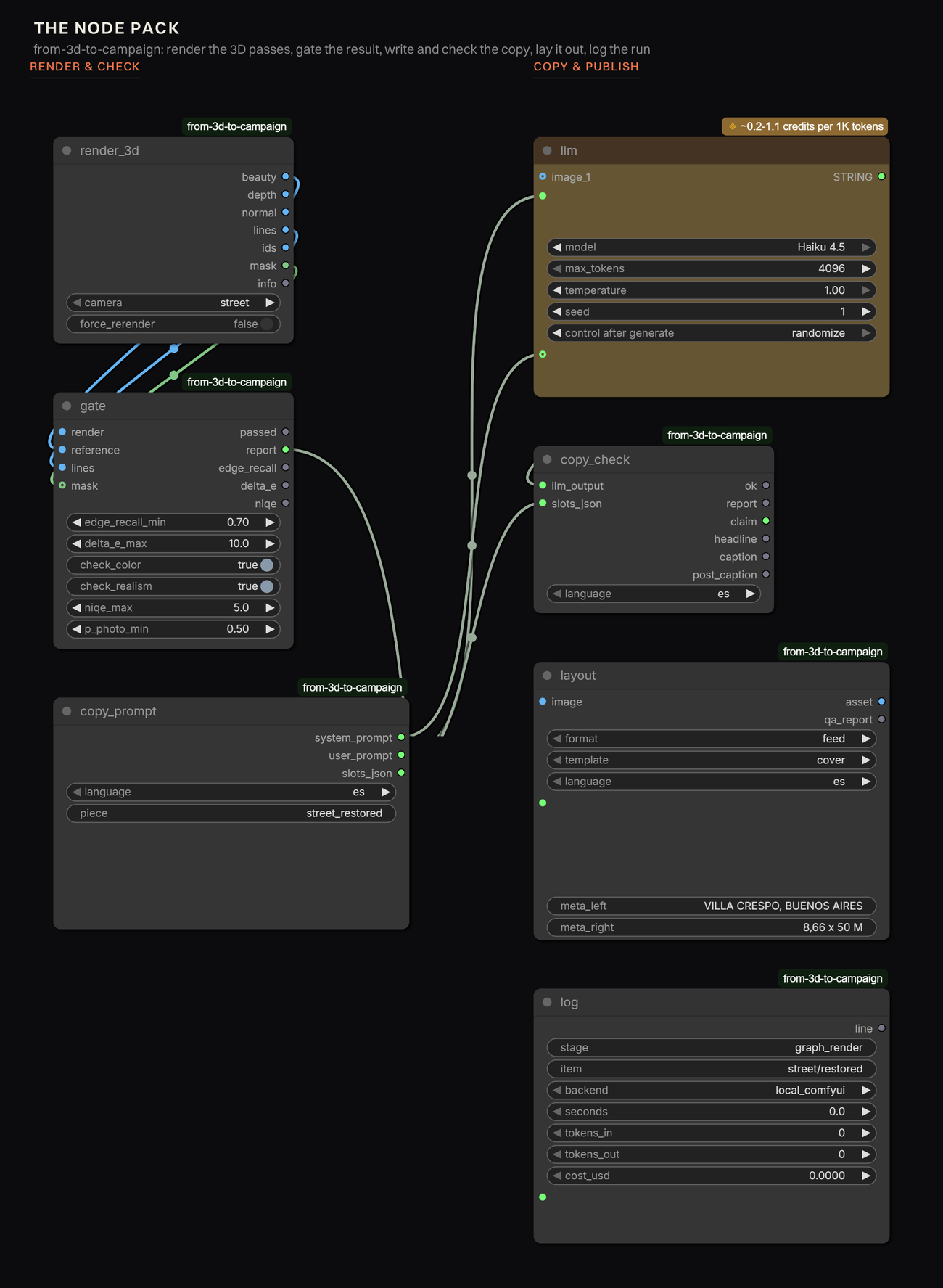
They are thin on purpose: each calls the same pipeline/ module the CLI uses.
A note on Load3D: it looks like the obvious way to bring a GLB into a graph and it does not work
here — it renders in the browser frontend, so a headless or queued run produces nothing. Hence
CasaRender3D, which shells out to the same Playwright exporter.
A note on partner API nodes (the LLM): ComfyUI attaches the auth token in the frontend, and they bill against a pay-as-you-go credit balance, separate from a Cloud plan. A prompt queued straight against the HTTP API comes back Unauthorized even when you are signed in. Run those from the app window, or swap in any other LLM node — the prompt builder and the validator do not care which model answers, as long as it returns the JSON object.
Repo layout
scene/            house.json + the Three.js builder and pass renderer
scripts/          headless exporters (passes, GLB) and the report figure tools
pipeline/         render, qa, realism, gate, library, post, design, cost table, comfy client
comfy_nodes/      the ComfyUI node pack (thin wrappers over pipeline/)
config/           cameras, brand, styles, copy facts, qa thresholds, design tokens
workflows/        api/ and ui/ ComfyUI graphs, including the master graph
docs/             the case study, the lab journal, the cost table
out/              renders, passes, library, posts, runs.jsonl   (git-ignored)
Publishing to the Comfy Registry
Published as from-3d-to-campaign under the publisher @meryboth. Releases are automatic:
bump version in pyproject.toml, push to main, and .github/workflows/publish_action.yml does
the rest. A new version lands as pending while the registry scans it, then goes active.
To reproduce the setup on another repo:
- Create a publisher at registry.comfy.org. The handle after the
@is your PublisherId and it is permanent — it must match[tool.comfy] PublisherIdinpyproject.toml. - Create an API key on the publisher's page and store it once; it cannot be retrieved later.
- Add it to the repo as the secret
REGISTRY_ACCESS_TOKEN(Settings → Secrets and variables → Actions). - Publish — either
pip install comfy-cli && comfy node publish, or bumpversioninpyproject.tomland push.
If the action fails with Option '--token' requires an argument, the secret is missing or misnamed:
that is what an empty REGISTRY_ACCESS_TOKEN looks like from inside the runner.
Still worth doing before calling it stable: node-level CI (load the pack headless, run the graph on a fixture scene, assert the gate's numbers against stored values), a model bootstrap script with checksums, and removing the Node.js requirement for users who bring their own GLB.
Rights
- Models: RealVisXL V5 (openrail++), xinsir ControlNet Union (Apache 2.0), Real-ESRGAN (BSD-3), Z-Image Turbo + Fun ControlNet (Apache 2.0), FLUX.2 klein (Apache 2.0). 4x-UltraSharp (CC BY-NC-SA) and FLUX.1-dev (non-commercial) were deliberately avoided.
- Typeface: Switzer, Fontshare licence, commercial use allowed.
- Brand: the mark is drawn from code; the visual language is generic modernist; the developer and the project are invented.
- Disclosure: every asset carries "image generated with AI from the project's 3D model" in its own language, stamped by the layout engine.
- The real risk in real estate is misrepresentation. An image that adds a balcony is a legal problem, not an aesthetic one. That is what the geometry check is for, and why borderline images go to a review queue with the reason recorded next to them.
Code: MIT (LICENSE).
Limitations
- Gate thresholds are calibrated by eye on ~30 images; they need a VLM judge or human labels to be defensible at scale.
- The aerial camera is the weakest case: the facade is 0.37 % of the frame, so colour QA there is skipped by a coverage floor.
- Custom nodes run on local ComfyUI. Comfy Cloud executes its own catalogue, so cloud runs use stock nodes and the gate runs afterwards, locally.
- The local tier's light is flatter than the cloud edit model's (NIQE 4.2–4.4 vs ~2.9). Good enough for drafts, not for the hero image.
- Video is untested. Next experiment: a reels clip from the same passes, with the gate applied per frame.
Docs
docs/report/index.html— the case studydocs/journal.md— the lab journal: decisions, numbers, what brokedocs/report-notes.md— the working notes behind the case studydocs/costs.md— generated cost table