
NukeViewer
Nuke-style image viewer for ComfyUI (beta): buffers, A/B compare, colour correction, video timeline, and EXR with full AOV support.
ComfyUI-NukeViewer






Español · Quick guide / guía rápida · Issues
Beta 0.2.1. Tested against ComfyUI 0.30.2 with
comfyui-frontend-package1.42.15. No minimum version is claimed because nothing older has been tested. Bugs and requests: issues.
A Nuke-style image viewer for ComfyUI. Connect the viewer to any node, compare buffers with wipe or difference, measure pixels, open EXR files with all their AOVs, play video with a real timeline, correct colour on float data, and browse a persistent gallery of everything you've generated.
It registers no nodes. Nothing appears in the Add Node menu: this is a UI extension, driven by the keyboard and the node context menu.
Bilingual interface, English and Spanish, auto-detected from the browser and switchable from the toolbar.
At a glance
| | |
|---|---|
| Nine numbered buffers + MAIN | Bound to node IDs, so a re-run refreshes them all at once |
| V on any node | Injects a preview and shows intermediate results that never had one |
| Wipe · difference · blend | With a lockable B side, an A/B swap, and a vertical wipe |
| EXR with layers and AOVs | Decoded in the browser. No OpenEXR, no OpenImageIO, no pip install |
| Colour correction | Display transforms, saturation, curves, clipping and false colour |
| Video and image sequences | mp4, webm, animated WebP/GIF and IMAGE batches, on one timeline |
| Pixel probe | Real float on EXR, negatives included. Measures the file, not the view |
| Round trip to the graph | N drops what you're looking at back in as a working LoadImage |
| Zero dependencies | No build step. Copy the folder and restart |
How the panel is laid out
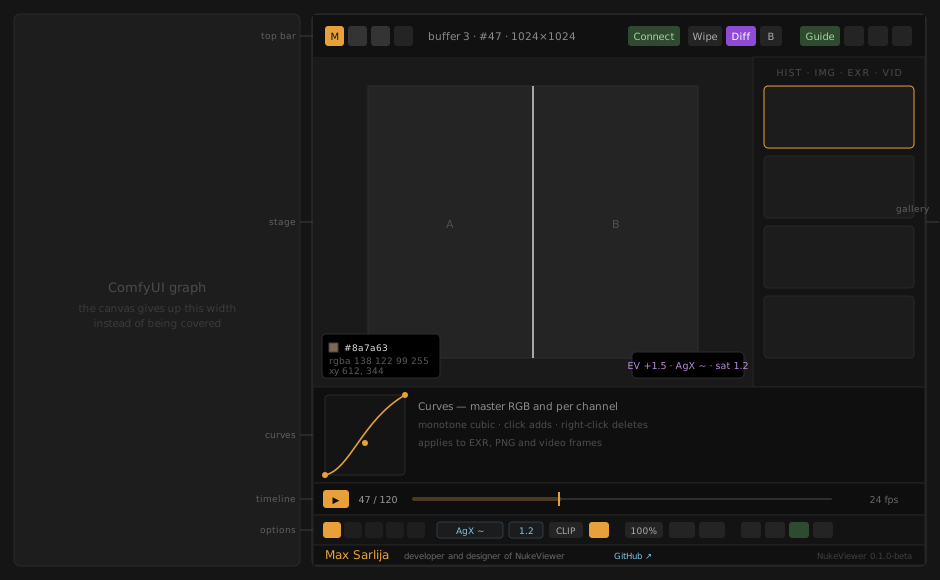
Two bars. The top one answers what am I looking at and what am I comparing it to; the bottom one answers how is it shown and what do I do with it. The curve panel and the timeline appear between them when they are relevant.
Install
Clone it into your custom_nodes directory:
cd ComfyUI/custom_nodes
git clone https://github.com/maxsarlijagit/ComfyUI-NukeViewer.git
Or download the ZIP and extract it there. Either way you end up with:
ComfyUI/custom_nodes/ComfyUI-NukeViewer/
    __init__.py
    nv_server.py
    pyproject.toml
    ruff.toml
    LICENSE
    THIRD-PARTY-NOTICES.md
    README.md
    README.es.md
    GUIDE.md
    web/
        nukeviewer.js          the whole interface
        nv_exr.mjs             EXR header reading, layers and tone mapping
        nv_video.mjs           frame access for video and animated WebP/GIF
        vendor/exr/            EXR decoder (see licenses below)
There is no build step, no pip install, and no dependencies. Copy the
folder and it works.
Then restart ComfyUI completely and hard-refresh the browser (Ctrl+Shift+R). Both steps are needed and they do different things — see The development loop.
To confirm it loaded, open the console (F12):
[NukeViewer 0.2.1-beta] ` toggle · V connect · X diff · Z 1:1 · ? help [en]
And in ComfyUI's startup log:
[NukeViewer] routes registered at /nukeviewer/*
If you see the first but not the second, the frontend is fine and you have only lost persistent history, PNG metadata and the EXR listing.
The core idea
ComfyUI has no viewer. You attach PreviewImage nodes and squint at
thumbnails scattered across the canvas. Nuke solved this decades ago: one
viewer, numbered buffers, instant A/B comparison.
This addon brings that model over.
Press V with any node selected. The addon injects a PreviewImage,
wires it to that node's IMAGE output, assigns it to a free buffer, and queues
the prompt. You can now see intermediate results that had no preview before.
Shift+V removes every injected preview at once.
Buffers, MAIN and pins
Nine numbered buffers plus MAIN. Buffers store the node ID, not the image — so when you re-run the graph, every buffer updates by itself.
MAIN (0 or M) always shows the most recent generation, from any node.
It hooks the executed API event, so nothing escapes it.
Hovering a buffer tab shows a thumbnail and the node name.
Pins — P freezes the current view into a slot that never updates.
Compare "before the change" against a live buffer without losing your
reference. They show up as purple 📌 tabs; right-click to remove. The cap is
six.
Comparison
| Mode | Key | What it does |
|---|---|---|
| Wipe | W | Split screen between the current and previous buffer. Shift+W for momentary. |
| Difference | X | A minus B. Unchanged areas go black, drift lights up. |
| Blend | O | Cycles over · difference · add · multiply · screen |
| Gain | [ ] | Amplifies difference up to ×20, or sets blend opacity |
The B side of any comparison is the slot you looked at second-to-last,
assigned automatically whenever you change slots — unless you pin it with
Shift+B, which holds one slot there while you navigate everything else.
Tab swaps A and B.
Difference mode is the one that earns its keep. Chain two image-edit passes and you see instantly how much the model touched the parts you asked it to leave alone.
EXR
EXR files open in the viewer with all their layers. Decoding happens entirely
in the browser: the backend only enumerates files, and the bytes are served
by ComfyUI's own /view route, which does not filter by extension.
To open one: cycle the gallery's source button to EXR. It lists the .exr files
in your input/ and output/ directories along with each file's size — an
AOV render runs to hundreds of megabytes and it's worth knowing before you
wait.
Layers and AOVs
The layer picker appears in the toolbar whenever the current slot holds an EXR. Channels are grouped by the prefix before the last dot, the way Nuke presents them:
ViewLayer.Combined.R/G/B/A→ layer Combined, rgbaViewLayer.Normal.X/Y/Z→ layer Normal, read as a tripletViewLayer.CryptoObject00.r/g/b/a→ its own layer, lowercase rgbaViewLayer.Depth.Z→ a loose mono layer
Channels that form no triplet become standalone mono layers, so depth, mist, object indices and mattes stay reachable instead of being dropped. A Blender Cycles render with 117 channels resolves into about 41 navigable layers.
The R G B A buttons dim to match the channels the current layer actually
has: a depth pass has one, not four.
Exposure and gamma
| Key | Action |
|---|---|
| , . | Exposure ∓0.5 stops |
| Shift + , . | View gamma |
| Click the readout | Reset to 0 stops / γ2.2 |
This only means anything on float data. On an 8-bit PNG, "raising exposure" multiplies values that were already clipped: the blown highlight does not come back, because the data isn't there. On a linear EXR, exposure in stops is the real operation and recovers range that was present all along.
The readout at the bottom right shows EV +2.0 · γ2.2.
The probe on EXR
Over an EXR the probe reports the true float value of every channel in the active layer, with their names, negatives and over-range values included. The colour swatch still shows what you see; the numbers show the raw data.
EXR metadata
I over an EXR shows resolution, compression, the active layer, and the full
channel list with each channel's pixel type. If the file is tiled, multipart
or deep, it says so.
Pixel probe
Hovering the image gives a live readout at the bottom left: hex, RGBA, coordinates and dimensions.
It reads from the composited canvas too — so in difference mode it gives you the exact numeric delta between buffers, not a visual impression. Colour correction does not change what it reports: it measures the file, not the view.
Channels
R, Shift+G, B, A isolate a channel in grayscale. C returns to
colour. On an EXR the isolation is applied to the float data, before tone
mapping, not to already-clipped 8-bit pixels.
View
Zoom and pan belong to the viewer, not the image — switching buffers keeps your framing, exactly like Nuke. You can inspect a region at 400% while jumping between buffers without losing position.
Z— 1:1, actual pixels, nearest-neighbour above 2.5×F— fit to screen- The wheel zooms toward the cursor, not the centre
- Left-drag pans
Gallery
A persistent sidebar of every generation, grouped by day, with thumbnail, node name and filename.
- The star marks favourites; the ★ button filters to those only
- The dropdown filters by generating node
- Right-click a thumbnail → send it to a buffer
- The source button cycles HIST → IMG → EXR → VID: the session history,
images on disk,
.exrfiles, or videos — the last three readinginput/andoutput/
Getting images in. The IMG source is what makes anything ComfyUI
imported visible at all: the history only knows what it watched being
generated, so a file someone dropped into input/ used to be unreachable from
here. You can also drop files onto the panel: they upload to
input/nukeviewer/ through the same route ComfyUI's own drag-and-drop uses,
so they land within LoadImage's reach as well as opening in the viewer.
Broken cards. When the file is no longer on disk the card removes itself
instead of sitting there as a grey box — the ⊘ button toggles that, and the
gallery footer says how many were hidden. The history entry is left alone:
the file may be back tomorrow, and losing the record of what was made is worse
than a gap. Right-click ⊘ to check again.
- History survives restarts (
ComfyUI/user/nukeviewer/history.json, capped at 2000 entries on disk and 400 in memory)
The gallery renders up to 150 cards at a time, and skips the rebuild entirely while the panel is closed.
The interactive guide
The Guide button, top right, opens a thirteen-step tour that points at the controls on the real interface rather than at screenshots: what it explains is what is on screen, in whatever language and layout you have.
It advances on its own every nine seconds with a progress bar, and pauses
with the space bar or the ❚❚ button — an onboarding that moves on while you
are still reading is worse than none. The arrows navigate, Esc leaves.
Steps whose control isn't on screen are skipped rather than pointing at
nothing, and the curves step opens the curve panel so there is something to
look at.
It runs by itself once, the first time you open the panel — not when ComfyUI starts. After that it lives in the button.
Compositor tools
Locked B side (Shift+B, or the B button). By default the B side of
every comparison is the slot you came from, which makes B a side effect of
navigation. Locking it turns one slot into a reference and leaves it there
while you move around — the difference between glancing at two renders and
actually matching one to the other. The button shows which slot is held.
Swap A and B (Tab). A locked B stays locked through the swap.
Vertical wipe. Right-click the Wipe button to flip the axis. A sky replacement is judged with a horizontal cut, not a vertical one.
Mirror (H horizontal, Shift+H vertical). The old trick for looking at
a composition with fresh eyes. It is a view transform, not a pixel one: the
probe un-mirrors the coordinate before reading, and the export never sees it.
Guides (Y, or the ⊞ button): thirds → safe areas → grid. They sit over
the image and follow zoom and pan, not over the panel — thirds pinned to the
panel edge would be decoration.
Zoom with a numeric readout. The chip in the toolbar shows the real zoom; click cycles 25/50/100/200/400, right-click fits.
Copy to clipboard. Right-clicking the export button copies the view as a PNG, which is how an image actually reaches a chat window without a detour through the downloads folder.
Interface size. The A button, top right, makes text and icons bigger;
right-click makes them smaller. 85% to 175%, persisted. It scales the panel
only: the image is left alone, because scaling it along with the chrome would
make every pixel measurement a lie.
Colour correction
The controls live in the options bar at the bottom and are always visible: saturation, curves and clipping work on EXR, PNG and video frames alike. The one exception is the display transform, which greys out — rather than hiding — when the slot is not float, with a tooltip saying why.
On 8-bit the maths is the same and shares its ramp and marker colours with the float path, so a shot that reads "two stops over" in EXR reads the same way in the PNG next to it. What it cannot do is recover anything: a highlight already flattened to 255 is gone.
Curves
U, or the ∿ button. A 240×240 panel with a master RGB curve and one per
channel.
- Click adds a point, drag moves it, right-click on a point deletes it. The two end points only move up and down — a curve that doesn't start at black and end at white is a crop, not a curve.
- Monotone cubic interpolation (Fritsch–Carlson). Monotone matters: a plain spline overshoots between two close points, and that overshoot shows up as a bright halo nobody asked for.
- All four curves are drawn at once, the inactive ones dimmed. A curve you can't see is a curve you forget you left bent.
- Curves are applied last, to values that are already display-referred, which is where they behave the way anyone who has used one expects: the middle of the graph is mid grey.
- Internally the channel and master curves collapse into a single 256-entry table per channel, so the pixel loop does one lookup instead of two.
Display transform. Replaces the bare pow(1/gamma) that came before:
| View | What it is |
|---|---|
| sRGB | The standard curve, exact. Default. |
| Rec.709 | The video curve, exact. |
| Filmic ~ | Analytic approximation of ACES (Narkowicz's fit). |
| AgX ~ | AgX in its compact form: matrix, log2, sigmoid, matrix. |
| raw γ | The old behaviour: pow(1/gamma) with the view gamma. |
The tilde is not decoration. Filmic and AgX approximate transforms whose
reference implementations are a LUT and an OCIO config: good enough to judge
an image by, not good enough to match a studio pipeline pixel for pixel.
sRGB and Rec.709 are the exact curves.
View gamma (Shift+, .) only does anything in the raw view. Elsewhere
the value is still stored but not applied, and the viewer says so rather than
letting you think the key broke.
Saturation in linear light, with Rec.709 luma weights — the same place
Nuke's Saturation node operates. On 8-bit it goes through sRGB-to-linear
tables and back: a pow per channel per pixel would be felt at 4K.
Clipping and false colour (Shift+C, or the CLIP button):
- Clipping: red stripes where a channel goes above 1.0, blue where it falls below 0.0. On EXR that is real information, because the data exists beyond 1.0. On 8-bit there is no "above 1.0" to warn about, so it marks where the file is already pinned at 255 or 0 — which is also useful.
- False colour: luminance mapped to stops on a fixed scale, documented in
the help panel (
?). Yellow is mid grey.
Neither is persisted: they are probes, and finding one still on three days later reads as a broken viewer.
None of this is baked into the export. E writes what you see, display
transform included, because it is a visual reference PNG. Difference mode, on
the other hand, runs on the already-corrected canvases: if you are measuring,
keep the view fixed on both sides.
To the graph as LoadImage
N, or the ⤴ button, drops what you are looking at into the open workflow
as a working LoadImage node, placed at the centre of the current view and
already selected.
LoadImage reads from input/ and nowhere else, so the file is copied there
first, through the same /upload/image route ComfyUI's own drag-and-drop
uses — path sanitising included. Everything lands in input/nukeviewer/.
- An image already in
input/is used where it is, not duplicated. - On a paused video it uploads the frozen frame as a PNG, with the frame number in the name.
- On an EXR it refuses and says why:
LoadImagecannot read EXR, and quietly handing it a tone-mapped PNG would throw away the float that made the file worth opening.
Video and timeline
Any slot holding more than one frame gets a timeline across the bottom of the
stage: draggable playhead, frame counter, editable fps, loop, and in/out
markers. It makes no difference where the frames come from — an IMAGE batch,
an .mp4, an animated WebP all drive the same transport.
What plays
| Source | How it arrives |
|---|---|
| IMAGE batch | Any node emitting more than one image |
| .mp4 · .webm · .mov | SaveVideo, SaveWEBM, VideoHelperSuite |
| Animated WebP / GIF / APNG | SaveAnimatedWEBP, SaveAnimatedPNG, VHS |
| Files on disk | The gallery's VID source: input/ and output/ |
V on a video node binds it to a buffer directly instead of injecting a
PreviewImage — SaveVideo has no IMAGE output to hang one off.
Playing vs. paused. While playing, the stage holds the <video> element
running its own clock, and difference, probe, channel isolation and export
stand down: nothing is reading pixels. Pause and the frame freezes into a
canvas, at which point all of them work exactly as they do on a still,
because to the rest of the viewer a frozen frame is just another image. That
is also why comparing two videos has no synchronisation problem: it never
plays two videos at once, it compares two frozen frames at the same index.
There is one playhead and every slot shares it, so switching buffers keeps you on the same frame. With two renders of the same shot in two buffers, that is exactly what you want.
fps. HTML5 never reports a frame rate, so it gets measured: a few frames are played muted and the median gap between presentations wins. When the file is variable-rate or the measurement fails, the timeline's fps field is editable and whatever you type wins.
Honest limits. The frame index comes from the time the browser actually
reports, not the one you asked for, so on a variable-rate file you can ask for
47 and land on 46 — you will see the real number rather than an invented one.
And frame-by-frame decoding of animated WebP/GIF uses ImageDecoder, which
today exists only in Chromium; ComfyUI Desktop is Electron, so it is always
there.
Metadata
I opens a panel reading the PNG's embedded workflow: prompt, seed, steps,
guidance, model and other parameters, broken down per node.
Useful when iterating prompts — you can see exactly which prompt produced which result instead of guessing.
Export
E writes a PNG of the current comparison — both halves of the wipe with
labels, or the composited view if you're in difference or blend mode.
Layout
The panel has two bars. The top one answers what am I looking at and what am I comparing it to: buffers, slot name, connect, wipe, difference, blend, B side, swap, pin, and the window controls pinned to the right edge. The bottom one answers how is it shown and what do I do with it: channels, layer, view, saturation, clipping, curves, zoom, guides, mirror, metadata, export, send to graph and gallery.
Twenty controls in one row was a row nobody could read, and in a narrow panel the right-hand end fell off the edge — including the button that docks it again. Both bars now scroll sideways when they have to, and the window controls stay pinned and visible.
Between them, when relevant, two more rows appear: the curve panel (folded away unless asked for) and the timeline (only when the slot has more than one frame). There is no left rail: it would be a third edge of chrome eating stage width to repeat controls that already have a home.
| Mode | How |
|---|---|
| Docked | Right-side panel, drag the left edge to resize. Default. |
| Floating | D again, or double-click the toolbar. Drag the toolbar to move it and resize from any edge or corner, like any other window |
| Fullscreen | D again, or the mode button |
| Separate window | The ⧉ button |
Docked is a real dock, not an overlay: the panel mounts into ComfyUI's own
right-hand layout slot (#comfyui-body-right), so the graph canvas gives up
the width rather than being covered, and ComfyUI's menus stay on top of the
panel instead of under it. On a frontend that doesn't expose that slot the
panel falls back to the old fixed overlay on the right edge.
On ComfyUI Desktop, the ⧉ button opens ComfyUI in your browser instead of
a separate window. Desktop is Electron, and its window-open handler denies
about:blank popups — which is exactly what a JavaScript-written window
needs. The browser tab has its own graph, so the viewer is fully functional
there, buffers included, which a standalone page could not manage.
Buffers, layout, language, favourites, exposure and gamma all persist in localStorage.
Shortcuts
Global — always active
| Key | Action |
|---|---|
| ` | Open / close the viewer |
| V | Connect viewer to selected node |
| Shift+V | Disconnect all auto-previews |
Everything else only fires while the viewer is open, so it won't collide with ComfyUI's own shortcuts.
The toggle key is matched by physical position, not by the character it
produces. On Spanish and Latin American layouts the grave accent is a dead
key and never arrives as `, so the top-left key is used instead — the
one labelled |°¬ on those keyboards.
Viewer open
| Key | Action |
|---|---|
| 0 · M | MAIN — latest generated |
| 1–9 | Buffer (assigns if a node is selected) |
| P | Pin current view |
| ← → | Previous / next frame |
| Shift + ← → | Jump 10 frames |
| Space · K | Play / pause (Space only while the pointer is over the viewer) |
| Home · End | First / last frame of the range |
| Shift+I · Shift+O | Set the in / out point |
| W | Wipe toggle |
| Shift+W | Momentary wipe |
| X | Difference mode |
| O | Cycle blend mode |
| [ ] | Difference gain / blend opacity |
| , . | Exposure ∓0.5 stops (EXR) |
| Shift + , . | View gamma (EXR) |
| Z | Zoom 1:1 |
| F | Fit |
| R Shift+G B A | Isolate channel |
| C | Back to colour |
| I | Metadata panel |
| E | Export comparison |
| N | Send to the graph as LoadImage |
| Shift+C | Clipping → false colour → off (EXR) |
| Tab | Swap A and B |
| Shift+B | Lock / release the B side |
| Y | Guides: thirds → safe areas → grid |
| U | Curve panel |
| H · Shift+H | Mirror horizontally / vertically |
| G | Gallery |
| D | Cycle dock → floating → fullscreen |
| ? | Shortcut help |
| Esc | Close |
Right-click any node → NukeViewer ▸ to connect or assign without the keyboard.
A compositing workflow
Von the sky-generation node → buffer 1Von the final composite → buffer 2Xfor difference — see exactly which regions changed[]to raise gain if the drift is subtle- Probe along the horizon to verify the luminance match
Zto inspect the mask edge at actual pixelsEto export the comparison
The development loop
There is no build, no tests and no frontend linter. You edit in place. What changes is what needs reloading:
| You changed | Do this |
|---|---|
| nv_server.py or __init__.py | Restart ComfyUI completely |
| Anything under web/ | Ctrl+Shift+R in the browser |
ComfyUI serves the JS cached: a normal reload runs the old code and makes a correct fix look broken.
A ruff configuration for the Python side lives in ruff.toml (79-column,
py313). Nothing is installed for you; run your own ruff if you want it.
Backend
Seven routes registered inside ComfyUI's own server:
| Route | Method | Purpose |
|---|---|---|
| /nukeviewer/history | GET | Read stored history |
| /nukeviewer/history | POST | Append entries |
| /nukeviewer/history | DELETE | Clear |
| /nukeviewer/meta | GET | Read a PNG's metadata |
| /nukeviewer/exr/list | GET | Enumerate .exr files in input/ and output/ |
| /nukeviewer/video/list | GET | Enumerate playable files — containers and animated stills |
| /nukeviewer/image/list | GET | Enumerate stills on disk, so imported files are reachable |
Registration happens at import time, wrapped in an except that only prints.
If the backend fails, the frontend still works: you lose persistence,
metadata and the EXR listing, nothing else.
Known limitations
Things worth knowing before you run into them:
- EXR files have no gallery thumbnail. No browser decodes EXR, so the card shows a label with the filename and size. Decoding happens when you open it.
- Buffers 1–9 need the live graph. They store node IDs, so they only work in the tab that has the graph loaded. MAIN, the gallery and EXR files do not depend on it.
- The B side is implicit by default — it's the previous slot.
Shift+Blocks it, but you have to remember to lock it. - Pins do not survive a reload. They live in memory, not localStorage.
PreviewImagenodes injected byVstay in the graph. RunShift+Vbefore saving a clean workflow.- Large EXR files take a while. A 150 MB render is downloaded whole and decompressed before anything appears. The cache retains up to 600 MB of buffers and then drops whatever isn't pinned.
- Switching layers re-decodes. The file stays cached, but decompression runs again.
- Gallery thumbnails crop. They are fixed at 3:2 with
object-fit: cover, so a 9:16 portrait shows only its middle band. - Video playback rides on
<video>, so on a variable-rate file the frame number is approximate. The UI shows the real frame with an asterisk whenever it differs from the one you asked for.
Troubleshooting
Nothing happens when I press `. Check the browser console (F12) for
the [NukeViewer …] line. If it isn't there the file never loaded: confirm
the folder sits directly in custom_nodes/ (not nested one level deeper),
restart ComfyUI completely, then hard-refresh with Ctrl+Shift+R. A normal
reload serves the cached copy.
The panel works but there is no history or PNG metadata. The frontend
loaded and the backend didn't. Look for
[NukeViewer] routes registered at /nukeviewer/* in ComfyUI's startup log;
if it says backend unavailable instead, the message after it is the
reason. The viewer keeps working either way — that failure is deliberately
non-fatal.
Keyboard shortcuts do nothing. The handler ignores everything while a text field has focus, which includes ComfyUI's own widgets. Click on the image first.
An EXR takes forever or fails. A multi-AOV render is hundreds of
megabytes and the whole file is downloaded and decompressed before anything
appears; the gallery shows each file's size for that reason. If it fails
outright, the layer list in the metadata panel (I) usually shows why.
A video won't scrub. Animated WebP and GIF need ImageDecoder, which
today exists only in Chromium — ComfyUI Desktop is Electron, so it is always
there, but a Firefox tab is not. Containers (.mp4, .webm) work anywhere.
The frame number has an asterisk. The container returned a different frame than the one requested, which happens on variable-rate files. The number shown is the real one; correct the fps in the timeline field.
Buffers 1–9 are empty in a second tab. They hold node IDs, so they only resolve in the tab that has the graph loaded. MAIN, the gallery and the file sources work everywhere.
Contributing
Issues and pull requests are welcome at the repository.
There is no build step and no dependencies, which is a constraint worth keeping: the whole install is "copy a folder". If a change needs a bundler, it needs a conversation first.
A few things that will save a review round trip:
- Every user-facing string goes in the
STRINGStable, in both languages. A key added to only one shows up asundefinedat runtime. - Don't rename
LS_KEYorLS_FAV. They are storage keys; renaming one silently wipes every existing user's buffers, layout and favourites. Migrate insideloadLocal()instead. - New shortcuts belong in the scoped tier, after the
state.visibleguard. A global key is taken away from ComfyUI for everyone, permanently. - Comments explain why, not what. The code already says what.
Credits and licenses
Developed and designed by Max Sarlija — [email protected]. The same signature appears in the panel's bottom bar.
This project is MIT. It bundles third-party code under web/vendor/exr/,
with the original notices preserved and reproduced in
THIRD-PARTY-NOTICES.md; the technical detail of
what was vendored and patched is in
web/vendor/exr/README.md:
| Component | Origin | License |
|---|---|---|
| EXRLoader | three.js | MIT |
| DataUtils | three.js | MIT |
| fflate | fflate | MIT |
| Parts of EXRLoader derived from TinyEXR | Syoyo Fujita | BSD 3-Clause |
| Parts of EXRLoader derived from OpenEXR | Industrial Light & Magic | BSD 3-Clause |
EXRLoader is vendored with two changes: its import lines, and a contained
patch to channel selection that allows arbitrary AOVs to be read. No codec
was modified. Everything is documented in the vendor README.
License
MIT — see LICENSE. Do whatever you want with it.