
ComfyUI-Draggable-Prompt-Sorter
A custom node for ComfyUI that receives a comma-separated string and displays each item as a draggable button that can be toggled on or off.
ComfyUI Draggable Prompt Sorter
日本語
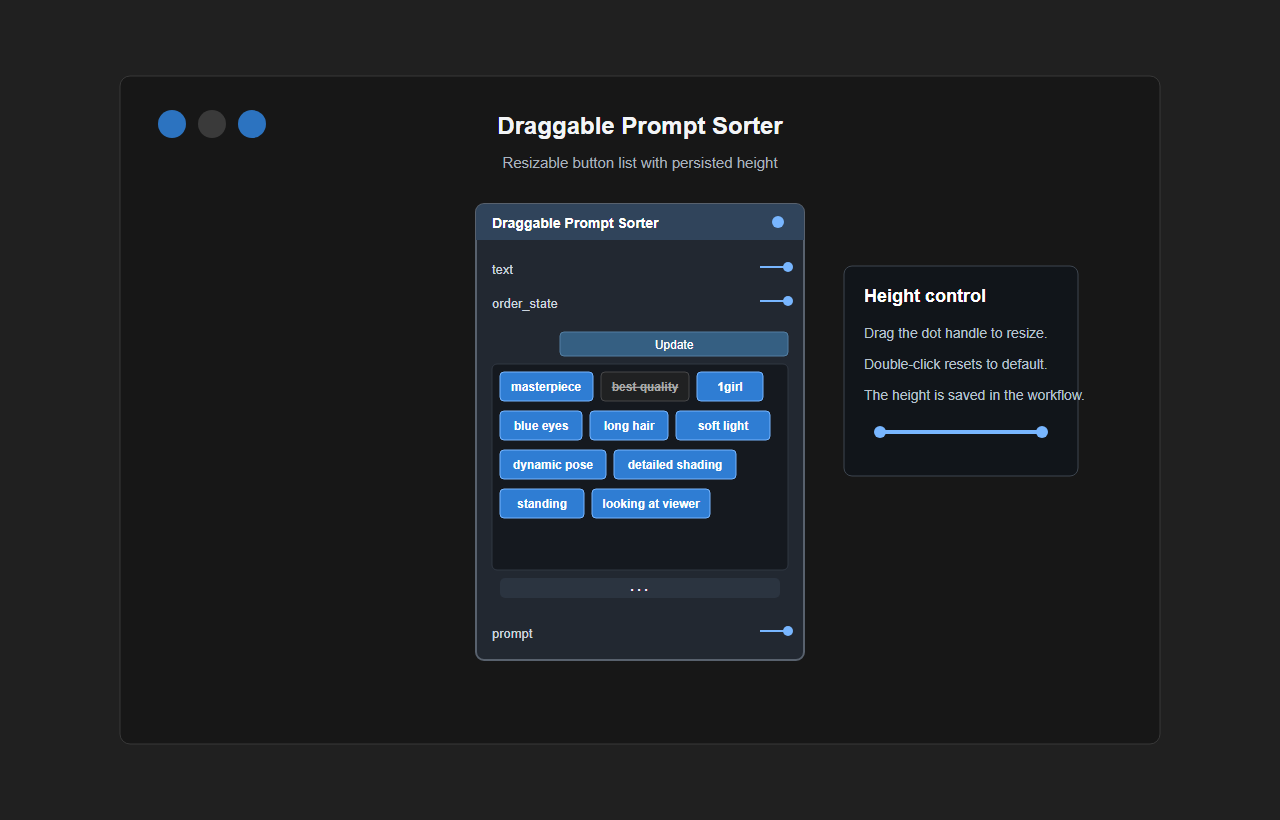
ComfyUI用のカスタムノードです。前段ノードからカンマ区切りの文字列を受け取り、各要素をドラッグ可能なボタンとして表示します。ボタンはクリックでオン・オフでき、オンの項目だけを現在の順番で次のノードへ渡します。
インストール
Comfy Registry / ComfyUI-Manager
このカスタムノードはComfy Registryに公開済みです。
ComfyUI-ManagerのCustom Nodes Managerから検索してインストールできます。
- ComfyUI-Managerの
Custom Nodes Managerを開きます。 Draggable Prompt Sorterを検索してInstallを押します。- ComfyUIを再起動し、ブラウザを再読み込みしてください。
Gitから手動でインストール
ComfyUIの custom_nodes ディレクトリでcloneします。
cd ComfyUI\custom_nodes
git clone https://github.com/matsukasa/ComfyUI-Draggable-Prompt-Sorter.git
clone後にComfyUIを再起動し、ブラウザを再読み込みしてください。
配置例:
ComfyUI/
  custom_nodes/
    ComfyUI-Draggable-Prompt-Sorter/
      __init__.py
      web/
        prompt_flat_button_sorter.js
Gitで更新
cd ComfyUI\custom_nodes\ComfyUI-Draggable-Prompt-Sorter
git pull --ff-only
更新後はComfyUIを再起動し、ブラウザをリロードしてください。
使い方
promptカテゴリからDraggable Prompt Sorterを追加します。- 前段ノードのカンマ区切りテキスト出力を
textに接続します。STRING/TEXT系の出力に対応しています。 Updateを押すと、ワークフロー全体ではなく、このノードまでを実行して前段テキストを取得します。- カンマごとの要素が1つずつボタンとして表示されます。
- ボタンをドラッグ&ドロップして順番を入れ替えます。
- ボタンをクリックしてオン・オフを切り替えます。オフの項目は出力から除外されます。
- 必要に応じてボタンをダブルクリックし、出力用テキストを編集します。
- 次のノードへ渡すときは通常どおりQueue / Runしてください。
入力例:
masterpiece, best quality, 1girl, blue eyes
best quality をオフにして並べ替えた場合の出力例:
blue eyes, masterpiece, 1girl
表示と状態
- ボタンのテキストは省略されません。長いテキストはボタン内で折り返して全文表示します。
- 入力項目が増減してもノードサイズは自動変更されません。ボタン領域を縦スクロールして確認できます。
- ボタン領域の下端にあるリサイズハンドルで、表示領域の高さを変更できます。
- ボタン領域の高さはワークフローに保存され、ボタン更新後も維持されます。
- ボタンをダブルクリックすると、出力用テキストを編集できます。
- Queue / Runや
Updateを実行しても、入力項目が同じなら現在の順序、オン・オフ状態、編集済みテキストを維持します。 Updateは前段入力だけを再取得し、現在オフのボタンをオンへ戻しません。- 入力内容が変わった場合、元の入力項目が完全に揃っているときだけ保存済み状態を再利用します。それ以外は入力順・全オン・未編集状態で初期化します。
- 同じテキストが複数ある場合も、それぞれ別のボタンとして操作できます。
English
A custom node for ComfyUI. It receives a comma-separated string from an upstream node and displays each item as a draggable button. Buttons can be toggled on or off, and only enabled items are passed to the next node in the current order.
Installation
Comfy Registry / ComfyUI-Manager
This custom node is published on the Comfy Registry
and can be installed through Custom Nodes Manager in ComfyUI-Manager.
- Open
Custom Nodes Managerin ComfyUI-Manager. - Search for
Draggable Prompt Sorterand selectInstall. - Restart ComfyUI and reload the browser.
Manual installation from Git
Clone the repository inside ComfyUI's custom_nodes directory.
cd ComfyUI\custom_nodes
git clone https://github.com/matsukasa/ComfyUI-Draggable-Prompt-Sorter.git
Restart ComfyUI and reload the browser after cloning.
Example layout:
ComfyUI/
  custom_nodes/
    ComfyUI-Draggable-Prompt-Sorter/
      __init__.py
      web/
        prompt_flat_button_sorter.js
Update with Git
cd ComfyUI\custom_nodes\ComfyUI-Draggable-Prompt-Sorter
git pull --ff-only
Restart ComfyUI and hard-refresh the browser after updating.
Usage
- Add
Draggable Prompt Sorterfrom thepromptcategory. - Connect an upstream comma-separated text output to
text.STRING/TEXT-style outputs are supported. - Press
Updateon the same row as the input socket to execute only up to this node and fetch the upstream text without running the whole workflow. - Each comma-separated item appears as one button.
- Drag and drop buttons to reorder them.
- Click a button to toggle it. Disabled items are omitted from the output.
- Double-click a button when you want to edit the output text for that item.
- Queue/run normally when you want to pass the result to the next node.
Input example:
masterpiece, best quality, 1girl, blue eyes
Example output after disabling best quality and reordering:
blue eyes, masterpiece, 1girl
Display and State
- Button text is never truncated. Long text wraps inside the button and remains fully visible.
- The raw upstream input and internal state fields are hidden; only item buttons are displayed.
- Internal JSON remains serialized in the workflow without being shown; only
Updateand item buttons are visible on the node. Updateappears directly below the title bar on the input socket row and refreshes upstream input by executing only up to this node.- The tag button area starts immediately below
Updatewithout an extra input-row gap. - The node does not resize when items change. Use the button area's vertical scrollbar when needed.
- Use the resize handle below the button area to change the visible button-list height.
- The button-list height is saved in the workflow and preserved when buttons update.
- Double-click a button to edit its output text.
- Button order, enabled state, edited text, and button-list height are saved in the workflow.
- Queue / Run and
Updatepreserve the current order, enabled state, and edited text when the incoming source items are unchanged. Updaterefreshes upstream input without turning currently disabled buttons back on.- Saved state is reused only when the incoming text contains exactly the same source items. Otherwise, items reset to input order, enabled, and unedited.
- Duplicate text items remain separate buttons and can be controlled independently.