
Prompt Syntax Highlight
Highlights [Shot 1] / <d</d / (s1) markers inside any ComfyUI prompt text box. Pure front-end, no nodes, no dependencies.
ComfyUI Prompt Syntax Highlight


Install from the Registry:
comfy node install comfyui-prompt-syntax-highlight— or search Prompt Syntax Highlight in ComfyUI Manager. Registry page: https://registry.comfy.org/nodes/comfyui-prompt-syntax-highlight
Colour your prompt structure. This extension highlights [Shot 1], <d>...</d>, (s1) and any
marker you define, inside any prompt text box in ComfyUI — the editable multiline STRING widget
as well as read-only Show Text boxes.
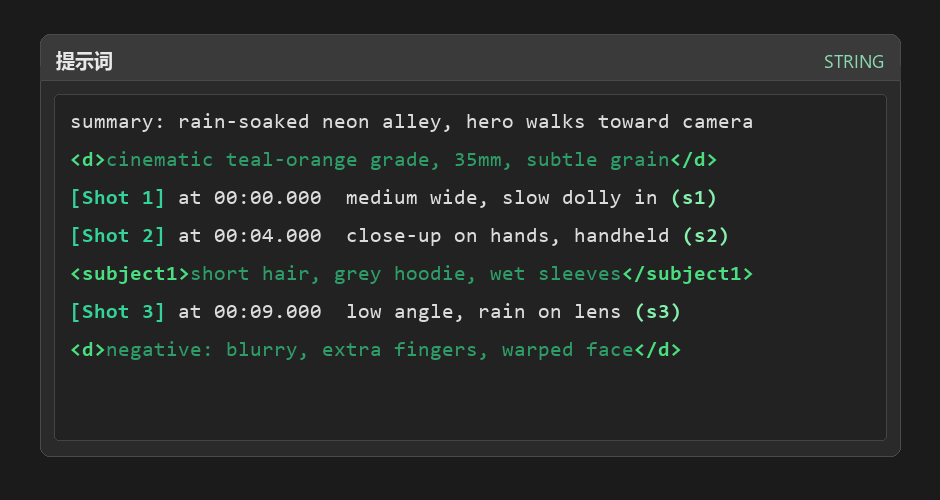
Rendered illustration of the highlight rules (same palette as the CSS, not a screenshot).
Why
Long structured prompts (shot lists, subject_definitions blocks, negative sections) are hard to
scan when everything is one colour. Wrapping markers in colour makes shot boundaries and tagged
sections visible at a glance while you type, without changing what actually reaches the model.
- Zero changes to the prompt. It is a visual overlay only. The text that gets encoded is byte-for-byte what you typed.
- Works on other people's nodes. It hooks multi-line
textareaelements, so third-party text nodes get highlighted too. - No nodes, no dependencies, no Python. Delete the folder and every trace is gone.
Features
| | |
|---|---|
| Editable prompt boxes | Highlights while you type, caret / selection / undo unaffected |
| Read-only text boxes | Same rules, no editing required (e.g. Show Text) |
| Tagged content | Content wrapped by a paired tag is tinted as a block |
| Canvas zoom & drag | The overlay follows the box every frame, including transform: scale |
| Chinese IME | Composition is never obscured — native text returns during composition |
| Configurable | Rule list is a small array at the top of one JS file |
| Toggles | Master switch plus separate switches for editable / read-only boxes |
Install
ComfyUI Manager — search for Prompt Syntax Highlight and install.
comfy-cli
comfy node install comfyui-prompt-syntax-highlight
Manual
cd ComfyUI/custom_nodes
git clone https://github.com/matrixnio/ComfyUI-PromptSyntaxHighlight.git
Restart ComfyUI. After that, editing only the JS needs no restart — just a hard refresh
(Ctrl+F5), because the browser caches extension files.
To uninstall, delete the folder and restart ComfyUI.
Usage
Open any workflow with a prompt box and type. Default rules:
summary: rain-soaked neon alley, hero walks toward camera     <- plain text, unchanged
<d>cinematic teal-orange grade, 35mm, subtle grain</d>        <- tag: bright green bold, body: dark green
[Shot 1] at 00:00.000  medium wide, slow dolly in (s1)        <- bracket: teal bold, (s1): light green bold
Settings → search Prompt highlight (or 提示词高亮):
| Setting | Default | Effect |
|---|---|---|
| PHL.Enabled | on | Master switch |
| PHL.Editable | on | Apply to editable prompt boxes |
| PHL.Readonly | on | Apply to read-only display boxes |
Automatically skipped: single-line inputs, disabled elements, and boxes whose placeholder contains
search / filter / 搜索 / 查找.
Rules
Rules live in the RULES array at the top of web/prompt_syntax_highlight.js.
Order is priority — later rules overwrite overlapping earlier ones.
| Priority | Match | Example | Colour |
|---|---|---|---|
| 1 (lowest) | content between a paired tag | good sad reminder | #2e9e68 dark green |
| 2 | the tag itself | <d> </d> <subject1> <picture 1a> | #4ade80 bright green, bold |
| 3 | square brackets | [Shot 1] [Shot 2] | #34d399 teal, bold |
| 4 (highest) | parenthesised indices | (s1) (s2) (shot 3) | #86efac light green, bold |
Add a rule:
{ id: 5, re: /【[^】\n]{1,40}】/g }, // CJK lenticular brackets
then add the class name to CLS_NAME (5: "phl-bracket" reuses an existing colour) or define a new
one in CSS.
Want only the symbols coloured and the wrapped content left alone? Delete rule
1(the one withgroup: 2).
How it works
- The original textarea is left untouched — typing, caret, selection, copy, undo and scrolling all still happen there.
- A
position: fixed<pre>mirror is stacked above it and filled with colour<span>s. - The textarea's own text is made transparent (
color+-webkit-text-fill-color), whilecaret-colorkeeps the caret visible. - Every frame the mirror re-reads
getBoundingClientRect()and follows the box; the zoom ratio is computed asrect.width / offsetWidth, so canvas scaling stays pixel-aligned. - Font metrics are copied from computed style, sampled once every 15 frames.
- During IME composition the mirror hides and the native text returns.
Safety valves: the native text only goes transparent after the mirror has painted and been positioned; it is restored immediately when the box is covered by a modal or scrolled out of view; any parse error falls back to plain text. The box can never end up blank.
Compatibility
- ComfyUI ≥ 0.3.0 (tested on 0.3.x, Windows, Chrome/Edge). No Python dependency.
- Uses only public extension APIs:
app.registerExtension,app.ui.settings.addSetting,WEB_DIRECTORY. It does not patch other extensions. - Nodes 2.0 (experimental) changes the DOM; scanning is done both through the graph object and a DOM fallback, but that mode is not covered by tests yet.
Troubleshooting
curl http://127.0.0.1:8188/prompt_syntax_highlight/status
{"version": "1.0.0", "hits": 6, "targets": 4, "painted": 4, "last_error": ""}
| Symptom | Meaning | Fix |
|---|---|---|
| hits = 0 | the front-end never ran | ComfyUI not restarted, or cached JS — hard refresh |
| hits > 0, targets = 0 | no textarea found | no multiline text node on the canvas, or it is collapsed |
| targets > 0, painted = 0 | render failed | check last_error |
| text disappeared | mirror not tracking | reload; if it repeats, report last_error |
A last_error such as ta=3 ro=false h=120 is a diagnostic string emitted when nothing could be
taken over (it reports how many textareas existed and their properties).
Privacy
Everything happens in your browser. Prompt text never leaves the page: the only network calls are
POST /prompt_syntax_highlight/ping and /report, which send a count of tracked/painted boxes and,
on failure, a short diagnostic string. Telemetry can be ignored or removed — the extension works
without the backend routes.
Disclaimer
This is an independent, community-made extension. It is not affiliated with, endorsed by, or sponsored by Comfy Org or the ComfyUI project. "ComfyUI" is used descriptively to indicate compatibility, as is customary for custom-node repositories.
License
MIT © 2026 matrixnio