
H3 LongTake
Long MiniMax H3 videos clip by clip with continuity: motion/identity transfer (Ref2VA) and style transfer / retexture (guide latent + StyleTransfer LoRA), resumable, one clip in VRAM at a time.
Nodes (7)
The face is 60 pixels across in the wide shot. H3 LongTake FaceRefine goes back for it
One Photo, Thirty Seconds of Video, Without Batching Your Way Off a 16 GB Card
The Second Pass Is Where Your H3 Video Stops Looking Like Plastic
MiniMax H3 taps out at 15 seconds. This node gets you a minute.
Glue the clips together and get your audio back
Stop hand-typing <lora:> tags into your model metadata
The adapter that lets Image Saver tag a LongTake mp4
ComfyUI-H3-LongTake
Long videos with MiniMax H3, rendered clip by clip with continuity between clips, on consumer GPUs: VRAM and RAM only ever hold one clip, however long the video. Three nodes:
- Motion / identity transfer — a reference video drives the performance, one or more pictures define who is in it (Ref2VA).
- Style transfer and retexture — the source video is re-rendered in a new style (Ghibli, Van Gogh, GTA, pop-art, The Simpsons…) or an outfit's material/colour is changed, keeping motion, framing and scene, with NRDX's StyleTransfer LoRA.
- Image to Video — a long video from a single picture, one prompt block per 5 s, with identity references against drift; the audio is the one H3 generates.
- Refine — a second pass at a higher resolution, clip by clip, on any finished project.
Every clip is written to disk as soon as it is done: you can stop, resume, redo a single clip, and assemble the final video with the original audio. The full workflow is stored inside the project folder and inside the final mp4, so any output can be dropped back onto ComfyUI to reopen the graph.
Depends on ComfyUI core ≥ 0.34 only (no other node packs required; the Refine and the latent upscale workflow can use an optional latent upscaler pack, see Models). Tested on a 16 GB GPU (RTX 4080-class) with 25 GB of Qwen text-encoder weights staged in system RAM.
Examples
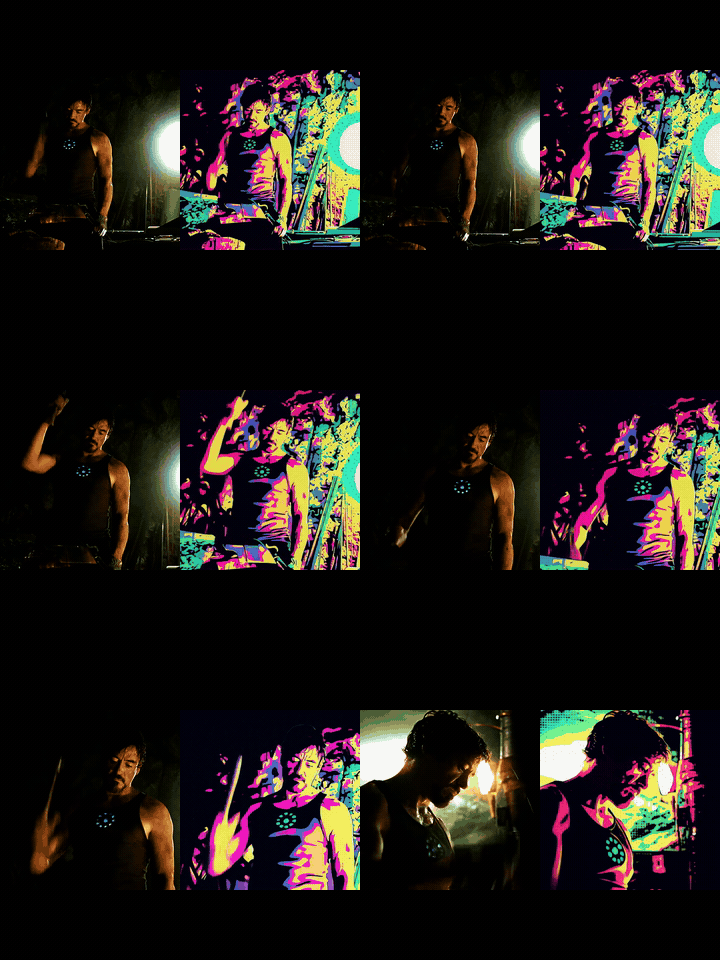
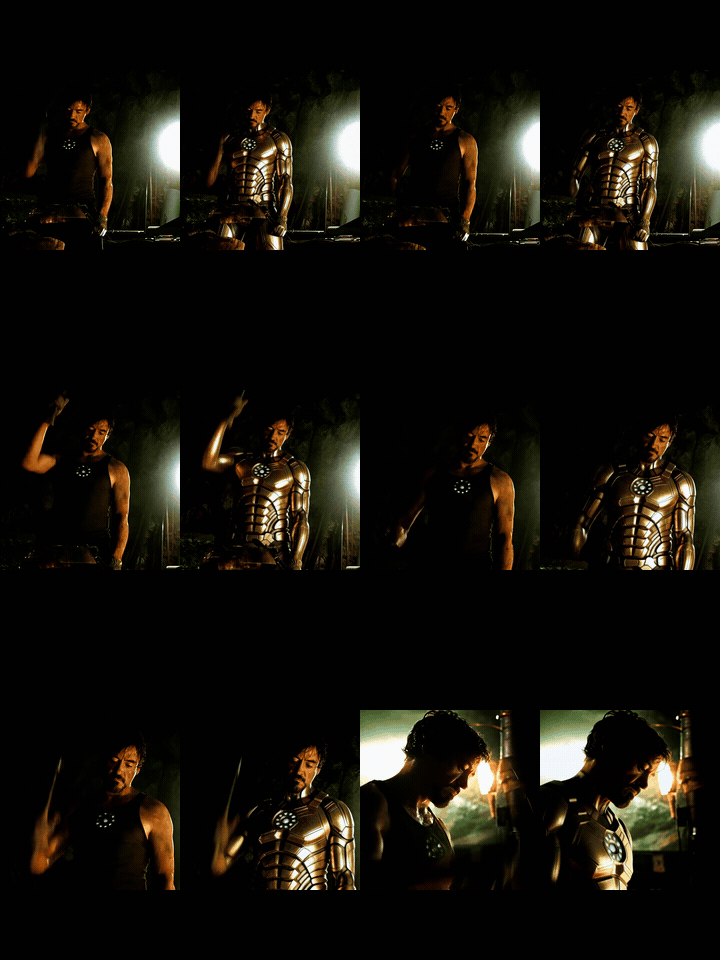
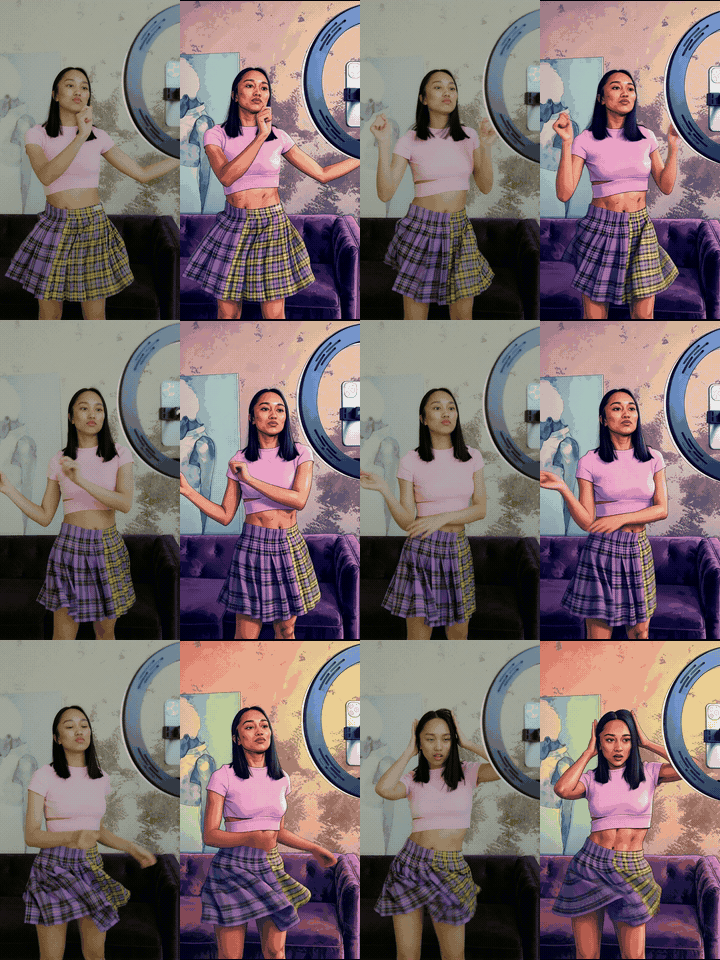
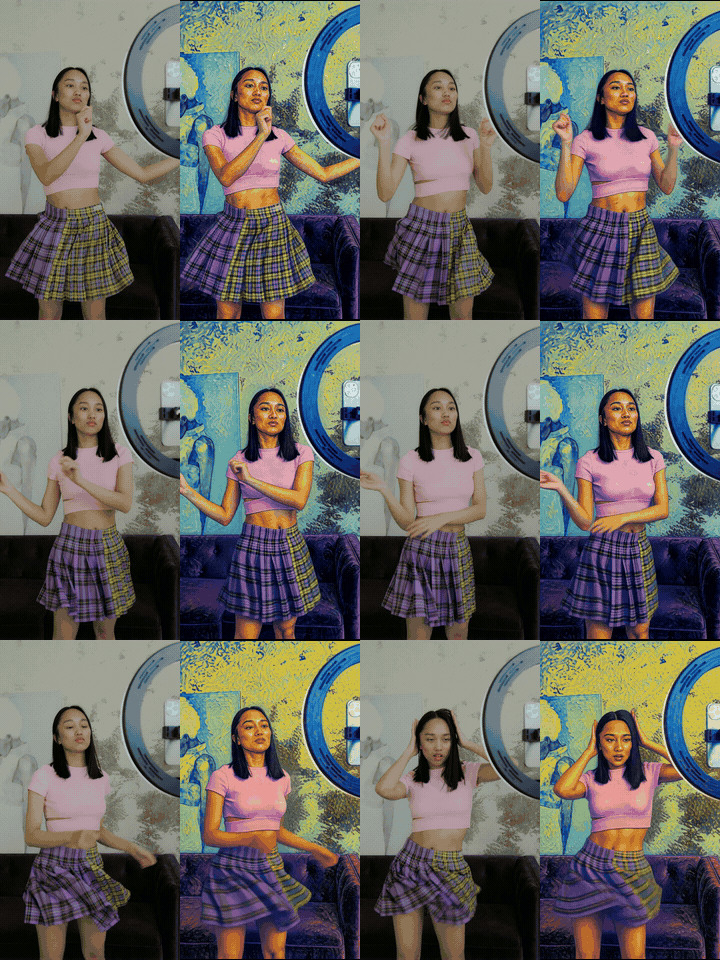
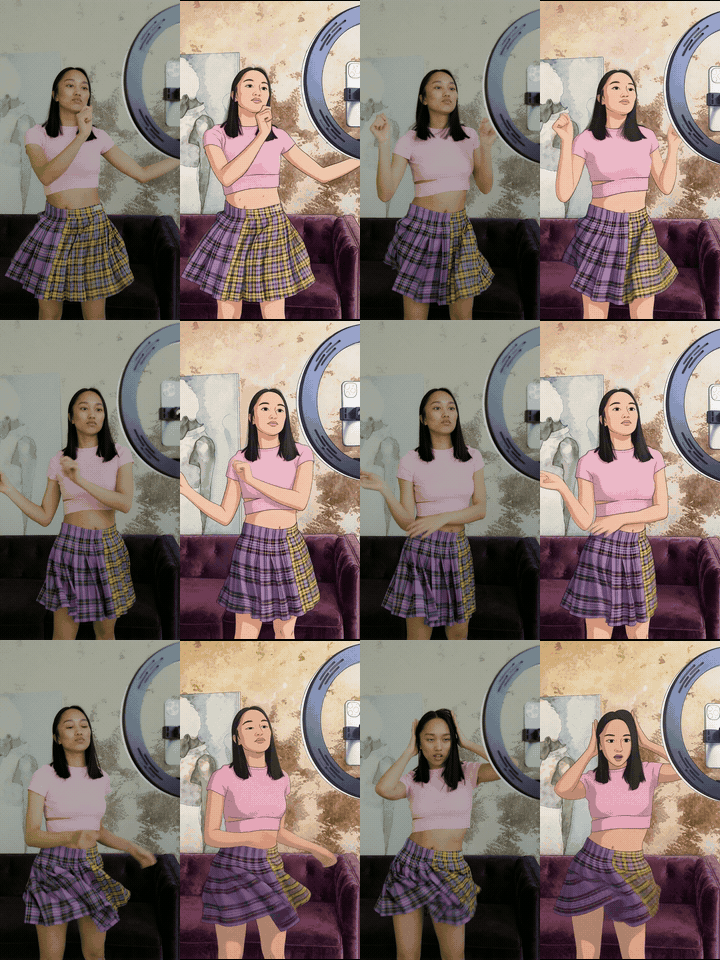
Source on the left, result on the right (8 s excerpts, 10 fps GIFs; full clips with audio in
examples/video/). Style examples rendered with source_role = guide, the character swap
with source_role = reference; 4 Turbo steps, context_frames = 5, seam_match = color, on a 16 GB GPU.
| Pop-art from a swatch | Outfit retexture (text only) | GTA from a swatch |
|---|---|---|
|  |
|  |
|  |
|
|
| style_transfer: … the style of <Picture 1>: bold graphic style, vibrant flat colours, clean black outlines, flat shading, halftone dots. with this swatch | retexture: change the tank top to shiny gold metallic armour plating, keeping face, hair, arc reactor, background, lighting and motion unchanged. | style_transfer: … the style of <Picture 1>: cel-shaded illustration, thick clean outlines, flat saturated pastel palette… Keep the original indoor room… with this swatch |


| Van Gogh (text only) | Studio Ghibli (text only) | The Simpsons (text only) |
|---|---|---|
|  |
|  |
|  |
|
|
| … in the style of Vincent van Gogh: thick swirling impasto brushstrokes, visible paint texture… | … in the style of a Studio Ghibli anime film: hand-drawn 2D animation look, soft clean linework… | … in the style of The Simpsons cartoon: flat 2D cel animation, thick clean black outlines, yellow skin… |
| Character swap (reference, no StyleTransfer LoRA) | | |
|---|---|---|
| 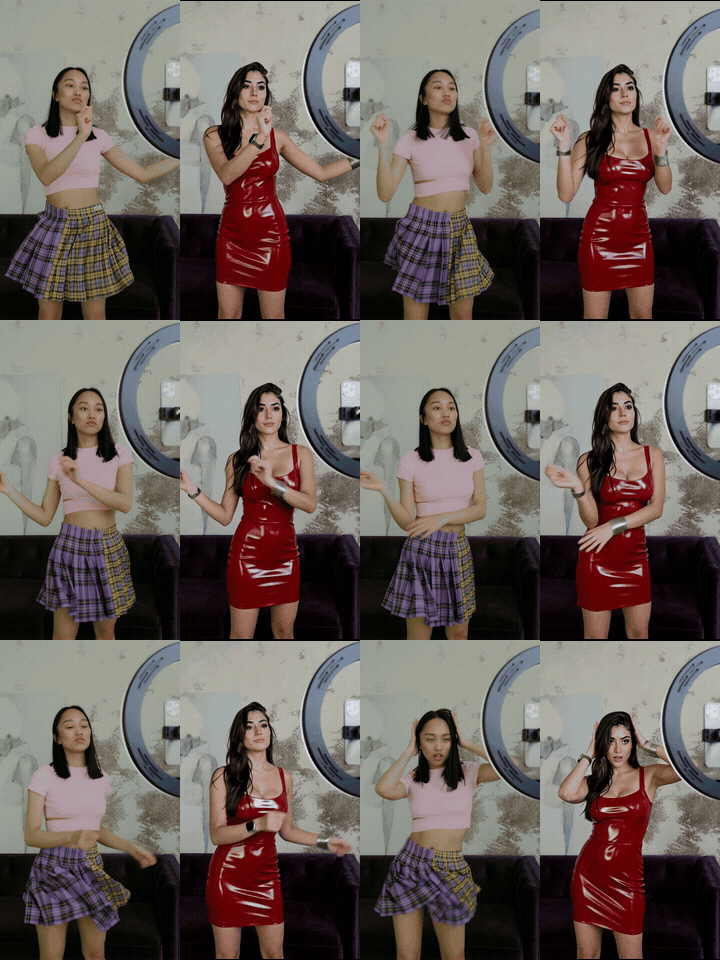 | <img src="examples/ref_charswap.jpg" width="180" alt="reference"> |
 <Video 1> provides the full performance, motion, timing, camera distance and framing. Replace the dancer with the woman from <Picture 1>: long dark brown wavy hair, thick eyebrows, a fitted glossy red latex mini dress, silver bangles and rings, photorealistic. Keep the room, lighting, sofa and background exactly as in <Video 1>; do not use the graffiti wall or neon lights from <Picture 1>. |
| Image to Video (fl2va, 15 s from one picture, 3 prompt blocks) + Refine (1.0 MP, denoise 0.25) | | |
|---|---|---|
| 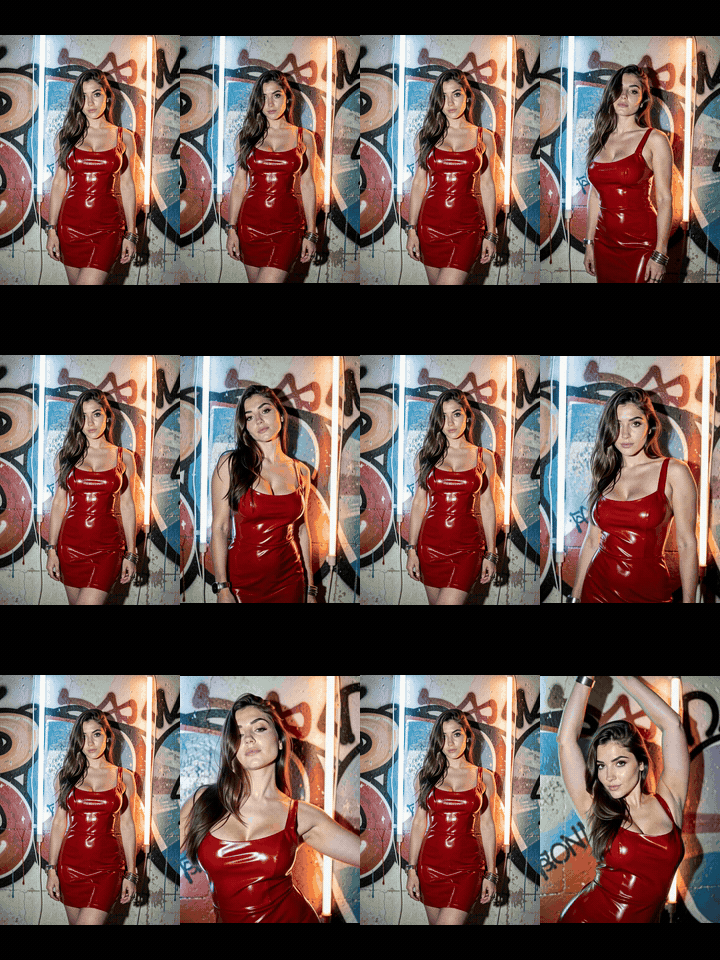 | the still on the left is the only input; audio generated by H3 (full clip with sound in
 examples/video/i2v.mp4) | …she looks at the camera and slowly starts to sway to the music, subtle camera push-in — --- — She raises her arms and dances…the camera slowly orbits to the left — --- — She turns her back to the camera, walks a few steps toward the wall, then looks back over her shoulder and smiles |
Full prompts in the use-case table below. The dancer and press-conference clips are free Pexels videos (no audio track on the dancer clip); the cave clip is a film excerpt; the character-swap reference and the image-to-video still are AI-generated pictures.
Installation
ComfyUI-Manager: Custom Nodes Manager → search H3 LongTake → Install (or Install via Git URL with the address below). Manually:
cd ComfyUI/custom_nodes
git clone https://github.com/mark9009/ComfyUI-H3-LongTake
Restart ComfyUI. On ComfyUI builds with comfy-aimdo's dynamic VRAM (the default since September 2026) the Render
and Image to Video free the VRAM before each heavy phase and unload the models from the first clip on: without
that, a second run in the same session could slow down until it hung. ffmpeg must be reachable: the node uses VideoHelperSuite's ffmpeg if that pack is installed,
otherwise the imageio-ffmpeg binary (pip install imageio-ffmpeg into ComfyUI's Python), otherwise ffmpeg on
the PATH. No other Python dependency.
Italian interface (1.3.6): with ComfyUI set to Italian (Settings → Comfy → Locale) node names, descriptions and tooltips
appear in Italian (locales/it/nodeDefs.json). Menu values (inpaint, (auto from project)…) stay in English
because they are saved in the workflows; the Italian entries of older workflows are still accepted.
Troubleshooting
- The Manager asks to install "Fearnworks Nodes" for the H3 LongTake nodes: workflows saved before 1.3.3 carried
a wrong pack label on the LongTake nodes. Install this pack (H3 LongTake) and load the workflows from
workflow/of 1.3.3 or later (or the 1.3.3 workflow pack on Civitai); Fearnworks Nodes is not needed. only first/last keyframe anchors are supported: ComfyUI older than 0.34.0. Every clip after the first is anchored to the previous one with keyframes inside the clip, which ComfyUI supports from 0.34.0. Update ComfyUI; from 1.3.3 the node says so in the error.- A workflow embedded in a gallery video asks for
H3ChainDirector: that is the author's private prompt-writing tool, not part of this pack. Delete that node and write the prompt blocks yourself (or with the instruction indocs/PROMPTING.md); everything else in those workflows (FaceRefine,object_image, H3 Video File, H3 LoRA Tags) is in this pack from 1.3.4. - Image to Video: a one-frame jump at every join between clips (most visible with a static camera and slow
motion): set
anchor_mode = inpainton the Image to Video node (the default from 1.3.5; workflows saved before keepkeyframe). Withkeyframethe previous clip's last frames reach the model as a guide and it redraws them, so the new clip does not start exactly where the old one ended. Withinpaintthey are copied into the latent and protected by the mask. Measured on a real 15 s case (3 clips, same seed): jump at the joins 5.4x and 6.8x the normal frame-to-frame change withkeyframe, 1.5x and 1.7x withinpaint;context_frames = 22makes it worse (up to 19x). - An older workflow shows odd values in
source_faceor the Refine'sdetail: ComfyUI stores widget values by position, so workflows saved before those inputs existed carry a neighbouring value there. From 1.3.4 the nodes accept it (keep/ 0, noted in the report); re-save the workflow to clean it up. - Out-of-memory in the second clip (often during text encoding, with little memory "allocated" but a lot
"reserved"): the nodes already free VRAM between clips (models unloaded,
empty_cache+ipc_collect). From 1.4,memory_mode = aggressiveon Render / Image to Video frees it before every phase (references, text, DiT, decode) on any ComfyUI and runs Python's garbage collector each time. If it persists, the reserved memory is fragmented: start ComfyUI with--disable-cuda-mallocand the environment variablePYTORCH_CUDA_ALLOC_CONF=expandable_segments:True, and prefer the NVFP4 text encoder (~16 GB) to int8 (~26 GB). At high resolution the reference video also goes through the text encoder: a smallerref_video_size/megapixelsfor the first pass, then the Refine, keeps it light.
Models
| slot | file (ComfyUI folder) | notes |
|---|---|---|
| diffusion model | minimax_h3_ref2va_pruned_fp8_scaled.safetensors (models/diffusion_models) | from the official Comfy-Org MiniMax-H3 release |
| text encoder | a MiniMax H3 Qwen3-VL-32B build (models/text_encoders), loaded with CLIPLoader, type minimax | int8 (~26 GB) and NVFP4 (~16 GB) builds both work and give the same output; with 64 GB of RAM prefer NVFP4 (see Face fidelity) |
| video VAE | minimax_h3_video_vae_fp16.safetensors (models/vae) | |
| audio VAE | minimax_h3_audio_vae_fp32.safetensors (models/vae) | |
| Turbo LoRA | minimax_h3_ref2v_turbo_4step_v0.1_comfyui_bf16.safetensors (models/loras) | 4 steps, the node samples positive-only (CFG 1) |
| Turbo LoRA, 8 steps (optional) | minimax_h3_ref2v_turbo_8step_v1.0_768p_comfyui_bf16.safetensors (models/loras) | lightx2v v1.0, strength 1.0, steps = 8: steadier video and better faces in profiles, 2× the sampling time — recommended for the Refine (see Face fidelity) |
| H3 latent upscaler (optional, Refine and upscale_latent workflow) | minimax_h3_latent_upscaler_3d_fp16.safetensors (models/latent_upscale_models) + the Comfyui_Minimax_h3_latent_Upscaler node pack | used by the Refine's upscale = latent_model (default): faster and much more detail; without it the Refine falls back to the pixel upscale and says so in its report. The upscale_latent workflow also uses its MMH3 Split Upscale node and VideoHelperSuite to save the mp4 |
| StyleTransfer LoRA (optional) | minimax_h3_style_transfer_v1.0_r64.safetensors (models/loras) | NRDX on Civitai — needed only for source_role = guide |
| Character Swap LoRA (optional) | h3_character_swap_pro4500_1000.safetensors (models/loras) | akatz-ai on Hugging Face, strength 1.0 — for character swap, see Character swap with the Character Swap LoRA |
| insightface (optional) | buffalo_l in models/insightface + pip install insightface onnxruntime | only for the Render's source_face (downloaded on first use) |
| ComfyUI-H3-FaceRefine (optional) | Carasibana's node pack + a YOLO face detector (face_yolov8m.pt in models/ultralytics) | only for the H3 LongTake FaceRefine node |
The example workflows reference these file names; pick your own text-encoder file in the CLIPLoader.
Quick start
- Load
workflow/H3_LongTake_example.json(motion + identity),workflow/H3_LongTake_character_swap.json(a picture's character performs the video),workflow/H3_LongTake_style.json(style transfer / retexture) orworkflow/H3_LongTake_i2v.json(a long video from a single image, one prompt block per clip, with the second pass). From 1.3.4 alsoworkflow/H3_LongTake_character_swap_v2.json(character swap with the Character Swap LoRA andsource_face) andworkflow/H3_LongTake_i2v_facerefine.json(Image to Video + FaceRefine on the small faces). From 1.3.5workflow/H3_LongTake_upscale_latent.json: latent upscale of a project you already rendered (see H3 LongTake Stitch). From 1.3.6workflow/H3_LongTake_i2v_upscale_latent.jsondoes it all in one queue (Image to Video → Stitch → latent upscale), with the models wired without lines by Anything Everywhere (cg-use-everywhere). - Put your source video in
ComfyUI/input/and select it insource_file; connect your picture(s) toref_image_1..3. - Set
dry_run = trueand queue: the node prints the slicing plan (how many clips, how long). - Set
dry_run = false,max_clips = 2, queue: check identity/style and the seam in the node's preview. - Set
max_clips = 0,mode = continue, queue: the whole video. If ComfyUI stops, queue again — it resumes from the first missing clip. - A clip came out wrong?
mode = redo_one,redo_from_clip = N, change the seed. Want to change direction from clip N on?mode = redo_from. - Unmute H3 LongTake Stitch (Ctrl+M): it concatenates the chunks without re-encoding and puts the original
audio back. Output:
ComfyUI/output/<output_name>.mp4.
Timing on a 16 GB GPU at 544×960, 124-frame clips, Turbo 4 steps: ~4:40 per clip (VAE encode 26 s, Qwen 58 s, sampling 2:35, decode 40 s). A 60 s video ≈ 12 clips ≈ 1 hour.
How it works
L = clip_frames (17k+5)          C = context_frames

clip 0 : source [0, L)                                   → all of it goes out
clip i : source [i·(L−C), i·(L−C)+L)  anchor = tail of i−1 → first C frames trimmed
For every clip, the matching slice of the source (24 fps, decoded by ffmpeg just for that clip) becomes
<Video 1> — or a guide latent in style mode — and the pictures become <Picture 1..3>. The last C latent
frames (video + audio) of the previous clip are anchored at frame 0 as a native H3 keyframe. The node samples,
decodes, trims the C overlapping frames, and writes clip_NNN.mp4 + clip_NNN.latent.pt to
output/h3_longtake/<project_name>/. The last clip is padded to the next 17k+5 length by freezing the last
source frame, then trimmed: the output has exactly the source's duration.
Between clips the node evicts the models from VRAM (they stay staged in RAM and reload in a second): with the DiT resident, the 25 GB Qwen encoder goes from 1 minute to 10 minutes per clip.
Use cases (all tested, prompts verbatim)
Settings unless noted: source_role = guide, context_frames = 5, anchor_mode = keyframe,
seam_match = color, Turbo 4 steps, StyleTransfer LoRA 1.0, 0.5–0.7 MP.
| case | <Picture 1> | prompt | result |
|---|---|---|---|
| Motion + identity (Ref2VA, source_role = reference) | photo of the person, same framing as the video | see workflow/H3_LongTake_example.json | the person of the picture performs the video; seam 0.96, motion correlation 0.57 |
| Character swap, photoreal (reference, no StyleTransfer LoRA; dancer clip, 10 s, 2 clips) | full-body AI photo of a woman in front of a graffiti wall | <Video 1> provides the full performance, motion, timing, camera distance and framing. Replace the dancer with the woman from <Picture 1>: long dark brown wavy hair, thick eyebrows, a fitted glossy red latex mini dress, silver bangles and rings, photorealistic. Keep the room, lighting, sofa and background exactly as in <Video 1>; do not use the graffiti wall or neon lights from <Picture 1>. | identity faithful (face, dress, bangles), room kept, the picture's graffiti wall and neon excluded by the text constraint alone; motion lag −2 frames, frame similarity 0.86 |
| Character swap, anime (reference) | full-body 3D render of an anime character, neutral background | same structure, character described in words (an anime girl with long orange hair and blue flower hairpins, white cropped top with a mint collar, long white skirt, barefoot, cel-shaded anime look) | faithful character, room and framing kept; motion follows loosely (correlation 0.60, lag +12 frames) |
| Character swap with guide+reference + StyleTransfer LoRA | same pictures | style_transfer: Re-render this video replacing the dancer with the character of <Picture 1>: … Keep the original room, background, framing and motion exactly as in the video; do not add … | motion and timing exact (lag 0, similarity constant across clips) but the face is more generic and the look more "3D render"; +25 % time. Use it only when pose-by-pose sync matters |
| Character swap with guide alone + LoRA | same | same | do not: clip 0 barely changes, clip 1 jumps to the character — the LoRA alone carries no identity |
| Pop-art from an image | synthetic halftone swatch, no figures | style_transfer: Re-render this video with the style of <Picture 1>: bold graphic style, vibrant flat colours, clean black outlines, flat shading, halftone dots. | style applied, room and people of the video kept; seam ΔE 0.9 |
| Outfit retexture (guide_retexture) | none | retexture: change the dress to red glossy latex, keeping face, hair, background and motion unchanged. | only the garment changes, consistent across clips; ΔE 3.4. Name the exact garment ("the dress", not "the outfit") |
| GTA from text | none | style_transfer: Re-render this video in the style of GTA V cover artwork: cel-shaded comic illustration, thick dark outlines, flat saturated colours, hard-edged shadows, glossy highlights. Keep the original indoor room, furniture and background exactly as in the video; do not add any new scenery. | works; without the last sentence the model may invent a city skyline; "loading screen" in the prompt adds HUD boxes |
| GTA from a full artwork (skyline, water, characters) | the whole poster, prompt without attributes | — | fails: the room becomes a skyline in clips 0–1 and a room again in clip 2 |
| GTA from a swatch | crop of the artwork with no scenery (a shirt/torso) | style_transfer: Re-render this video with the style of <Picture 1>: cel-shaded illustration, thick clean outlines, flat saturated pastel palette, hard-edged shadows, glossy highlights. Keep the original indoor room, wooden ceiling, furniture and background exactly as in the video; do not add any scenery, buildings or water from <Picture 1>. | room kept for 15 s over 3 clips, ΔE 0.8 / 0.2 |
| Van Gogh from text | none | style_transfer: Re-render this video in the style of Vincent van Gogh: thick swirling impasto brushstrokes, visible paint texture, bold complementary colours with deep blues and warm yellows, expressive dark outlines. Keep the original indoor room, wooden ceiling, furniture, people and framing exactly as in the video; do not add any new scenery. | impasto strokes, Starry-Night swirls on flat surfaces; room, people and motion kept; ΔE 2.1 / 0.8 |
| Studio Ghibli from text | none | style_transfer: Re-render this video in the style of a Studio Ghibli anime film: hand-drawn 2D animation look, soft clean linework, flat cel shading with gentle gradients, warm pastel palette, painterly watercolour backgrounds. Keep the original indoor room, wooden ceiling, furniture, people and framing exactly as in the video; do not add any new scenery. | clean 2D anime look, faces redrawn yet recognisable, watercolour background; ΔE 0.6 / 0.6 |
| The Simpsons from text (press conference at a podium, 19.8 s, 4 clips, 16:9) | none | style_transfer: Re-render this video in the style of The Simpsons cartoon: flat 2D cel animation, thick clean black outlines, flat bright colours, yellow skin, simplified cartoon faces with large round white eyes, no shading. Keep the original setting, podium, flags, wall, framing and motion exactly as in the video; do not add any new scenery or characters. | yellow skin and caricature face, flags/podium/gestures kept; ΔE 1.2 / 0.9 / 0.3 |
| The Simpsons from the family artwork | the whole poster (house + 5 characters) | same as above with <Picture 1> and "do not add any scenery, house or characters from <Picture 1>" | with the constraint the scene is kept; the picture pushes the palette (flatter, more saturated) and caricatures the face less |
Prompting rules that came out of the tests
- Named styles work from text alone (Ghibli, Van Gogh, GTA, The Simpsons): list 3–5 visual attributes and say what to keep. Use an image when the style has no name, or to impose a specific palette.
- Never mix a style name and
<Picture 1>in the same sentence — the model follows the text and ignores the image (LoRA author's note, confirmed). - With
<Picture 1>, always list the attributes to copy and say what to keep of the video. Without that, the LoRA copies scenery from the picture (a poster with a skyline turns the room into a city). - Style images without faces or scenery: crop a swatch (fabric, shading, palette) if needed. Pictures with prominent figures transfer identity.
retexture:changes material/colour of one item while keeping motion — no masks needed. Name the exact item.- Character swap: use
reference, describe the character in words as well as<Picture 1>(hair, outfit, accessories, art style), and if the reference photo has a recognisable background forbid it explicitly ("do not use the graffiti wall or neon lights from<Picture 1>"). A photo framed like the video (full body vs full body) keeps the motion nearly in sync; a different framing tends to win over the video after 1–2 s. - A ready-made system prompt for an LLM that writes these prompts from a plain request is in
docs/PROMPTING.md.
Node reference
H3 LongTake Render
| input | notes |
|---|---|
| model, clip, vae, audio_vae | LoRAs already applied to model |
| source_file | video in input/; ffmpeg decodes only each clip's slice |
| start_seconds / end_seconds | range of the source to use (0 = all). Cut useless tails such as TikTok end cards; the Stitch takes the audio from the same point |
| source_video / source_fps / source_audio | alternative: IMAGE batch, only for short tests (float32 ≈ 6 MB/frame) |
| ref_image_1..3 | <Picture N> |
| ref_mask_1 | subject mask of ref_image_1 (1 = subject, e.g. a rembg node's output): the still is composited on a flat background of the source's first-frame mean colour, so its scenery does not end up in the video (measured: a still with a graffiti wall → graffiti in the video; with the mask → the video's room is kept) |
| prompt / prompt_text | use <Video 1> and <Picture N> (Ref2VA) or the style_transfer: / retexture: templates (guide). prompt_text is a socket for an external text node and, when connected, replaces the field. Changing source_role fills the field with the role's template unless you already wrote your own |
| source_role | reference (default): the slice is <Video 1>, a motion suggestion. guide: the slice is a guide latent anchored at frame 0 for the whole clip — frame-accurate motion and framing, for the StyleTransfer LoRA with <Picture 1> = style. guide_retexture: like guide, text-only retexture: template. guide+reference: both — for style transfer no gain (+50 % time); for a character swap it gives exact motion at the cost of identity |
| aspect / megapixels | output canvas: source = the source's aspect ratio (default). A canvas with a different aspect makes H3 copy <Video 1> and ignore <Picture 1>. width/height only count with manual |
| clip_frames | 124 = 5.2 s (default), 243 = 10.1 s. Longer clips ≈ proportionally longer sampling |
| context_frames | 5 (default): clean seam and reference adherence equal to no anchor. 22: longer anchor, measured worse for adherence. Every clip yields L−C new frames |
| anchor_mode | keyframe (default): latent tail as H3 guide on frames 0..C−1, then trimmed. inpaint: tail copied into the latent and protected by the denoise mask (fine with 5, a cut with 22; leaves a faint smear on the copied frames). none: independent clips. Changing it changes the plan → restart |
| seam_match | off (default) / color / luminance: corrects the first 24 frames of each clip towards the previous clip's last frames (exposure ±0.25 EV and, in color, a per-channel hue offset), cosine fade. Pixels only. Measured with guide + keyframe 5: seam ΔE 5.8 → 0.9. Recommended color for style transfer |
| mode | continue: skip clips already on disk · restart: delete everything · redo_from: redo from redo_from_clip on · redo_one: redo only redo_from_clip, head anchored to the previous clip and tail to the next (seams stay) |
| max_clips | render only the first N |
| dry_run | print the plan only |
| use_source_audio | source audio as <Video 1>'s soundtrack (lip-sync; costs tokens) |
| ref_video_size | match (default): <Video 1> scaled to the output area · native: the core node's 768 canvas |
| source_face | character swap (1.3.4): keep (default), blur or blur_keep_mouth on the face of the person in the <Video 1> slice. Blurred, that face no longer passes its identity on to the result, which takes it from your pictures; blur_keep_mouth leaves the mouth visible so lip sync survives. Measured (Character Swap LoRA, 2 seeds × 2 clips): likeness to the character 0.41 → 0.52, to the source person 0.41 → 0.22, lip sync 0.63 → 0.55 (0.03 with blur). It matters when the source person's identity leaks into the result; with a character very different from the source person it changes little. Needs insightface (CPU, ~1 s per 3 frames); clip_NNN_ref.mp4 shows what the model received |
| text_cond | experimental: frozen text embedding of a MiniMax H3 finetune (e.g. Viggle-Animate's Load Text Conditioning) instead of clip; the prompt is ignored and only ref_image_1 is used. Not recommended for production: the finetune we tested syncs motion frame-accurately but renders softer faces and needs a still matching the first frame.
Outputs: last_clip, project_dir, report. The node shows a preview of every chunk present (preview.mp4,
no audio) and the plan.
If you change canvas, clip_frames, context, source role or source, the node refuses to continue an existing
project: use restart or another project_name.
Getting back to a project. At the start of every run (before clip 0) the node writes into the project folder
workflow.json (the full graph — drop it onto ComfyUI), api_prompt.json and settings.json (readable summary:
prompt, source, images, LoRA chain, parameters); the *_first.json copies belong to the first run and are never
touched again. The preview and the Stitch output carry workflow/prompt tags inside the mp4 exactly like core
SaveVideo: dropping the final video onto ComfyUI reopens the graph.
H3 LongTake Stitch
Concatenates the chunks without re-encoding, puts the original audio back and shows the result
(output/<output_name>.mp4). Connect the Render's project_dir to the project_dir socket: project and audio
(audio_file = (auto from project), from the same start_seconds) come from there. Alternatively pick/upload a
video in audio_file or connect an AUDIO. Audio is cut to the video's length, never the other way round.
Existing files are never overwritten (_001, _002… suffixes). With project_dir linked to a Render in
dry_run, the Stitch (like the Refine) stops with a message instead of re-assembling the old project under
project_name; while project_dir is linked, project_name is greyed out.
latent output (1.3.5): the AV latent of the whole project, the clip latents one after the other without the
repeated context frames (5 context frames = 2 latent tokens, so the clips fit without shifting the token cycle; the
audio is cut to the video's length). It is empty if a clip's latent is missing. Use it to feed any MiniMax H3 latent
node, for example a latent upscaler, or to decode the whole video in one go. With anchor_mode = inpaint the
context tokens of each clip are identical to the previous clip's tail (measured difference 0.0), so the joined latent
is continuous.
workflow/H3_LongTake_upscale_latent.json works on a project you already rendered (no clip is rendered again):
Stitch latent → the MiniMax H3 latent upscaler 3D of
LBH-123-AI (to 1 MP) → a light second pass in
overlapping time chunks (MMH3 Split Upscale, same pack, 0.2 denoise, 2 steps) → VAE Decode (Tiled) of the whole
video + audio. Measured on 10 s at 480x704: 832x1248 in 532 s on 16 GB, much finer hair, knit and skin, same face;
decode only (no upscale) 34 s. Use the model and LoRAs you rendered with.
H3 LongTake Image to Video
A long video from a single image (fl2va), with the Render's machinery: one clip in memory, chunks on disk,
redo_one, seam match, Stitch. There is no source video: clip 0 starts from start_image as a keyframe at
frame 0 (like the core MiniMax H3 Image to Video node), the following clips from the previous clip's tail.
H3 generates the audio: it is decoded per clip, trimmed to the new frames and written into the chunk's mp4;
the preview and the Stitch concatenate it.
| input | notes |
|---|---|
| model, clip, vae, audio_vae | fl2va + Turbo fl2v (no references) or ref2va + Turbo ref2v (with identity_reference / face_image) |
| start_image | first frame; end_image optional = keyframe on the last frame of the last clip (fl2va) |
| prompts | one block per clip (5.2 s with clip_frames=124), separated by a --- line; the last block repeats. The dry run prints the clip → time → prompt table. prompt_text from an external node replaces the field |
| duration_seconds | length of the video; the plan covers it with clip_frames clips (the last one may be short) |
| identity_reference | start_image also as <Picture 1> in every clip (ref2va): an anchor against drift |
| face_image | a close-up of the face as <Picture 2> (or <Picture 1> alone) in every clip: the strongest anchor for the face. The node prepends the reference tags to the prompt |
| character_sheet | a character sheet (several views in one image) as the last <Picture N> in every clip. The node tags it "the same person seen from several angles in", so the model reads the views as one person instead of several. Use it on top of identity_reference / face_image, not instead of them (see below) |
| aspect / megapixels | canvas: source = start_image's aspect |
| object_image | experimental, not measured: an object to keep the same in every clip (e.g. a mug with its logo) as the last <Picture N>, with a sentence that names it; a sharp logo on a flat background (ref2va) |
| reference_strength, master_shot_context, detail, seam_fade | measured, no gain over run-to-run noise: kept at their neutral defaults (1.0 / off / 0 / off) so workflows that set them still load. reference_strength mixes the references towards noise; master_shot_context passes clip 0 as <Video 1> (doubles the time per step); detail is the Detail Daemon timestep shift (4-8 turbo steps touch too few sigmas); seam_fade is a 12 ms audio ramp at the joins (with audio_context there is no click to remove) |
| anchor_mode | inpaint (default from 1.3.5): the previous clip's tail is copied into the latent and protected by the mask, the model does not redraw it — clean joins (see Troubleshooting: 5.4-6.8x → 1.5-1.7x). keyframe: the tail as a guide, redrawn by the model. none: independent clips |
| song / song_mode / song_start_seconds | a song for the whole video (1.4, ref2va): connect the full track; see Image to Video on a song below |
| memory_mode | auto (default) or aggressive: see Troubleshooting (out-of-memory in the second clip) |
| the rest | as the Render (context_frames, seam_match, mode, redo_from_clip, max_clips, dry_run, chunk_crf) |
Image to Video on a song (1.4). Connect a Load Audio with the whole song to song (ref2va model): the node
encodes the song once (the audio encoder keeps its context across clip boundaries) and gives every clip its
own window. With song_mode = both (default) the clip's new audio goes in as <Audio 1> — the context frames
already carry the previous clip's audio — and the clip's whole window goes in as an audio guide from frame 0.
The node prepends "The music is the song heard in <Audio 1>." to every block: in the blocks, ask for movement on
the beat. song_start_seconds picks where in the song the video starts. The song is saved as song.wav in the
project and the Stitch assembles the original song instead of the regenerated audio (also for the Refine's
/hr project). Changing the song or its start is a different plan: use mode = restart or a new project.
Measured on a 100 BPM beat, 15 s = 3 clips, 2 seeds, share of the motion that falls on the beat (1.67 Hz and its
double; chance is about 0.2): 0.49-0.52 with this method, 0.33-0.38 with every clip's slice encoded on its own,
0.10 on one clip without audio. Joins unchanged (1.5x at most). Lip sync on a sung track is not reliable: the
model reproduces the song but the lips follow it loosely. Ideas from LongForge (whole-file audio encoding,
reference on the new frames only). Workflow: workflow/H3_LongTake_i2v_song.json.
Workflow: workflow/H3_LongTake_i2v.json (Refine and Stitch muted, Ctrl+M to enable them). Every shipped workflow
carries a README note inside the graph with the setup, the steps and the measured defaults.
Identity drift, measured (30 s = 6 clips, ArcFace similarity to the reference face, one sample per second, 0.5 MP, seed 0, the same 6 prompt blocks):
| references in every clip | model | mean | by quarter (0–7 / 8–15 / 16–22 / 23–30 s) | seam |
|---|---|---|---|---|
| none | fl2va | 0.27 | 0.44 → 0.30 → 0.16 → 0.15 (a different person by 20 s) | 0.059 |
| <Picture 1> whole image | ref2va | 0.40 | 0.55 → 0.46 → 0.39 → 0.16 | 0.047 |
| image + face | ref2va | 0.55 | 0.71 → 0.58 → 0.47 → 0.35 | 0.043 |
| face only | ref2va | 0.60 | 0.77 → 0.57 → 0.54 → 0.46 | 0.037 |
Without a reference the face is lost and never comes back; with one it returns even after profile stretches. The close-up raises fidelity from clip 0 (0.75–0.8 vs 0.6 with the keyframe alone). Recommended: image + face (face only pulls the framing towards a close-up). 15 s = 9.7 min at 0.5 MP.
Character sheets (character_sheet, added in 1.2.0). A sheet holding several views of the subject can be
fed as an extra reference in every clip. Measured on a deliberately hard case — 15 s = 3 clips, one seed, the
prompt blocks written so that clip 1 ends on a tight shot with no face in frame and clip 2 opens wide, which
is where identity usually breaks:
| references | mean | clip 0 | clip 1 | clip 2 (the wide reopen) | min |
|---|---|---|---|---|---|
| identity_reference + face_image | 0.599 | 0.701 | 0.708 | 0.414 | 0.160 |
| sheet alone | 0.470 | 0.625 | 0.577 | 0.221 | 0.064 |
| both + sheet | 0.627 | 0.709 | 0.712 | 0.480 | 0.259 |
A sheet on its own is clearly worse than the photo + face pair: in the wide reopen it is visibly a
different person. Added on top of them it helps — it raises the floor and holds the identity about a
second longer after the framing opens — and it costs no measurable time. Panels being small was not a
problem (a dense 12-panel sheet did slightly better than a trimmed 3-view one), but keep the background flat
and avoid panels shot in a location other than the video's: reference composition is known to bleed into the
output. None of this rescues the underlying case — every variant still drops in clip 2. A clip that ends
on a framing containing neither the face nor the place leaves the next clip with nothing to continue from,
and no reference fixes that; context_frames does not either (22 measured the same as 5, at the cost of an
extra clip).
Steps, Turbo strength and sigma shift do not change the grain (flat-area noise < 1 level of 8 bit at 4 / 6 / 8 steps, strength 0.85, shift 9): what you see at 0.5 MP is softness, and the cure is the second pass.
H3 LongTake Refine (second pass)
Video "hires fix", clip by clip, on an already rendered project (Render or Image to Video): latent → upscale to
the new canvas (H3 latent upscaler, or decode → lanczos → re-encode) → partial denoise (the same sigmas as the core KSampler with
denoise < 1) → new chunk in <project>/hr, with the original chunk's audio (the latent's audio branch is
protected by the mask). The hr folder has its own plan.json: the Stitch assembles it like the original (connect project_dir from the Refine, or project_name = name/hr).
| input | notes |
|---|---|
| model, clip, vae | ref2va + Turbo (with ref_image_1) or fl2va + Turbo |
| project_name / project_dir | source project (or the project_dir output of the Render / Image to Video) |
| megapixels | second-pass canvas, same aspect (1.0 MP = 864×1184 from 608×832) |
| denoise | 0.25 recommended: adds detail while keeping content and motion; 0.4 regenerates more (same identity); beyond that the scene changes |
| steps | second-pass steps (schedule over steps/denoise, the tail is used: 4 steps at 0.25 → sigmas 0.80 → 0.45 → 0). Keep 4 or more: with 1 step the model removes all the added noise in a single jump and thin structures (fingers) come out softer than in the first pass |
| prompt | empty: Image to Video projects use their per-clip blocks, otherwise a generic quality prompt |
| ref_image_1 | <Picture 1>: puts (or restores) the identity even on a project generated without it |
| face_image | a close-up of the face as <Picture 2> (or <Picture 1> alone): the second pass restores the picture's face on the whole video, even where the first pass lost it |
| character_sheet | the same sheet you gave the Render, as the last <Picture N>: connecting it to only one of the two passes leaves them working from different references |
| upscale | latent_model (default, 1.3.0): the H3 latent upscaler, without going through the VAE. Needs the Comfyui_Minimax_h3_latent_Upscaler pack and minimax_h3_latent_upscaler_3d_fp16.safetensors in models/latent_upscale_models. Without them, with frames_from = mp4 or with a canvas smaller than the source it uses pixel (decode, lanczos, re-encode); the report says which one ran |
| detail | Detail Daemon timestep shift: measured, no gain with 4-8 turbo steps; leave it at 0 |
| frames_from | latent (default) or mp4: with mp4 the clip's new frames are read from its clip_XXX.mp4 chunk instead of the latent, to refine chunks you edited in pixels (a face fix, a colour grade); the context frames stay from the latent |
| anchor | previous (default, 1.4): every clip's context frames are the previous clip's already refined tail, protected by the mask, so the refined clips continue from each other instead of each being refined on its own. Measured at 1 MP (one project, one seed): join jump 1.3x → 0.9x on one join, the other unchanged, same sharpness — a small gain at no cost. none: the behaviour before 1.4 |
Latent upscaler against pixel (416×608 → 832×1216, denoise 0.4 / 4 steps, same references and seed): 253 s
against 375 s per clip, face sharpness 222 against 85 (grain 5.5 against 4.0), identity 0.838 against
0.836, hands +60 %.
Measured on a 15 s I2V project (3 clips, 608×832 → 864×1184, denoise 0.25, <Picture 1>): real skin, hair and
make-up where 0.5 MP looked "plastic"; face 0.31 → 0.49; seams 0.059 → 0.048 (clips refined on their own do not
create cuts); ~5.7 min per clip on 16 GB with the pixel upscale (1.0 MP with 4 partial steps + two VAE round
trips; about a third less with the latent upscaler). High-contrast
textures (graffiti) stay a touch softer than the original.
Face coherence through the second pass alone (30 s I2V project rendered with fl2va and no references, ArcFace similarity to the picture): original 0.27 (0.44 → 0.30 → 0.16 → 0.15, a different person by 20 s) → refined with image + face 0.62 (0.72 → 0.67 → 0.49 → 0.59, min 0.29), face only 0.61; seams 0.059 → 0.047. Motion and framing are the first pass's; the identity comes from the second. So a practical two-step flow is: a fast first pass without references, identity and detail in the Refine.
Face fidelity: what we measured (character swap from a video)
Nothing here needs new code — only what you connect and which LoRA / encoder you pick. Private test: a 13.7 s
vertical dance video, the character replaced by a picture (<Picture 1>), ArcFace similarity between the video's
face and a close-up of the picture's face (one sample per second; higher is better, 1.0 = the same photo).
| step | what changes | face similarity (mean / worst second) |
|---|---|---|
| first pass, 0.5 MP, <Picture 1> only | baseline | 0.60 / 0.51 |
| + the face close-up as ref_image_2 (<Picture 2>), named in the prompt | +0.12 | 0.72 / 0.52 |
| + the same close-up again as ref_image_3 | +0.01, one minute more | 0.73 / 0.53 |
| first pass with Turbo 8-step v1.0 768p (8 steps, strength 1.0) instead of 4-step v0.1 | flicker −18 %, worst second +0.11, 2.1× the time | 0.74 / 0.63 |
| Refine 1.0 MP (denoise 0.25, ref_image_1 + face_image) on the 4-step first pass | | 0.79 / 0.68 |
| Refine with the 8-step v1.0 LoRA (8 partial steps) on the 8-step first pass | best identity and stability | 0.81 / 0.70 |
| fal Realism-People LoRA in the Refine | no gain (−0.02) | 0.77 / 0.63 |
Recommendations that follow:
- Character swap: connect a face close-up as
ref_image_2(512×512 is enough) and say so in the prompt: "Replace the dancer with the character from<Picture 1>, whose face is the face shown in<Picture 2>: …". The whole-body picture gives the clothes and the build, the close-up gives the face. Repeating the close-up asref_image_3does not pay. - Turbo LoRA:
minimax_h3_ref2v_turbo_8step_v1.0_768p_comfyui_bf16(lightx2v, 8 steps, strength 1.0) gives a steadier video and a better face in profiles than the 4-step v0.1, at twice the sampling time. Use it at least in the Refine (steps = 8), where it costs ~2 minutes more per clip; keep the 4-step for fast first passes. - Text encoder: on 64 GB of RAM the int8 build (26 GB) leaves ~5 GB free with the model and the VAEs staged; an NVFP4 build (~16 GB) gives the same output (pixel difference 6.5/255 at the same seed, same similarity) and 11 GB of headroom. On Ada GPUs it runs de-quantised (the prompt encode is a few seconds longer, nothing else).
- After the second pass: a classic face swap (ReActor
inswapper_128+ GPEN-BFR-512) on the refined video reaches 0.88 / 0.85 with the most faithful face, at the price of a "restored" skin; a face detailer that re-generates only the face with H3 (ComfyUI-H3-FaceRefine) keeps H3's skin but gains only +0.05 on a 1.0 MP video, and needs a guard that puts the original frame back where no face is visible (hair, turned head), or H3 paints the wall where the face should be. Both are post-production, outside this node pack.
Character swap with the Character Swap LoRA (1.3.4)
The Character Swap LoRA by akatz-ai was trained to
replace one person in a video with the character of a picture, and its author found it reliable on 4-5 s shots
and drifting on longer ones. That is exactly how LongTake works: every 5 s clip gets its own slice of the source as
<Video 1>. Workflow: workflow/H3_LongTake_character_swap_v2.json.
Setup: the Character Swap LoRA at 1.0 on the ref2va, Turbo 8-step v1.0 768p (8 steps, res_multistep /
simple, the configuration the LoRA author tested) and shift 10/3 for a 0.5 MP base; the character picture as
ref_image_1, a close-up of the face as ref_image_2, and the prompt in the formula the LoRA was trained on:
Replace only the woman in the green sweater in
<Video 1>with the character in<Picture 1>: hair, distinctive face traits (makeup, piercings, glasses, freckles), outfit. Keep the replacement character's identity, outfit and art style from<Picture 1>. Preserve the source video's camera, place, background, lighting, objects and all other people. Match the target person's position, scale, pose and movement. Do not show the reference sheet or its background. The character's face is shown in<Picture 2>.
Name the target by something visible, and do not add expression instructions: the LoRA author found they can
switch the swap off. docs/PROMPTING.md has an instruction you can give a vision LLM to write this prompt from the
character picture.
What we measured (ArcFace to the character's face; "source" = to the person in the source video; background = mean difference from the source in the side strips, lower = more faithful):
| test | setup | character | source | background | time |
|---|---|---|---|---|---|
| synthetic, 10 s, 2 seeds | v1 workflow (Turbo 4-step, no LoRA) | 0.38 | 0.43 | 18.2 | 421 s |
| | Turbo 8-step, same prompt, no LoRA | 0.37 | 0.43 | 18.8 | 656 s |
| | + Character Swap LoRA | 0.41 | 0.41 | 15.1 | 646 s |
| | + LoRA + source_face = blur_keep_mouth | 0.52 | 0.22 | 15.9 | 675 s |
| real 14 s TikTok, 1 seed | a head-swap LoRA, Turbo 4-step | 0.21 | ≈0 | 34.0 | |
| | Character Swap LoRA + Turbo 8-step | 0.27 | ≈0 | 18.3 | 995 s |
| | + face close-up as ref_image_2 | 0.32 | ≈0 | 17.7 | 1075 s |
| | + a multi-view sheet as ref_image_3 | 0.32 | ≈0 | 17.6 | 1215 s |
- The LoRA alone keeps the scene: background about 20 % closer to the source, on every seed.
source_face = blur_keep_mouthis the big step when the source person's identity leaks into the result (two women of similar look: 0.41 → 0.52 to the character); lip sync stays (correlation 0.55 against 0.63). When the character is very different from the source person (the TikTok test) the source identity is already gone and it changes nothing.- The face close-up as
<Picture 2>helps for free; a multi-view sheet on top did not, here. - Motion follows the source the same way in every setup (wrist/elbow error 12.5-12.7 % of the frame height).
- Limit: the likeness still falls clip after clip on the long TikTok (0.40 → 0.27). For small faces in wide shots, FaceRefine (below) is the tool.
H3 LongTake FaceRefine (1.3.4)
Regenerates small faces clip by clip on a rendered project and writes <project>/fr, which the Stitch assembles
with the audio. It drives the nodes of ComfyUI-H3-FaceRefine
(Carasibana), which must be installed (a dialog says so if it is missing); FaceRefine's model must be the ref2va
with a Turbo LoRA, and face_image a close-up. Clips whose median face is taller than max_face_px (150) are copied
as they are: there FaceRefine gains nothing. Measured on a 15 s take with a wide closing shot at 0.55 MP: face identity
in the wide shot 0.25-0.33 → 0.63-0.67, face steady on the head (slip < 1.5 % of the side), flicker +2 %, 3.5 min.
Inputs: denoise 0.25-0.35 (above, the head drifts against the body), description (hair and outfit),
seam_blend_frames (fade to the original at the inner joins). Workflow: workflow/H3_LongTake_i2v_facerefine.json.
H3 Video File and H3 LoRA Tags (1.3.4)
Two small helpers for Civitai metadata with Image Saver: H3 Video File turns a saved mp4 path (the Stitch's
path) into VHS_FILENAMES plus its real width and height, for Image Saver Video Metadata; H3 LoRA Tags reads
the LoRAs applied to the connected MODEL from the graph and returns <lora:name:strength> tags and the base model name,
for Image Saver Metadata.
Measurements (124-frame clips × 2, seed 0, vertical TikTok source, 16 GB GPU)
Ref2VA (source_role = reference):
| anchor | seam (1 = no cut) | follows the motion (corr.) | |---|---|---| | none | 0.02 | 0.56 | | keyframe, 22 | 0.96 | 0.38 | | keyframe, 5 | 0.96 | 0.57 | | inpaint, 5 | 0.97 | 0.56 | | inpaint, 22 | 0.04 | 0.70 | | keyframe at negative indices | 0.02 | 0.69 |
Ref2VA treats <Video 1> as a suggestion: framing drifts towards <Picture 1> after 1–2 s when the picture has
a different framing than the video. Use a picture with the same framing and say so in the prompt — or use
source_role = guide for rigid control.
Guide latent (source_role = guide, StyleTransfer LoRA):
| anchor | seam | follows the motion (corr. / frame similarity) | colour jump at the seam (ΔE) |
|---|---|---|---|
| none | 0.87 | 0.80 / 0.93 | 25 (palette changes) |
| inpaint, 5 | 0.99 | 0.78 / 0.93 | 10 (smear on copied frames) |
| keyframe, 5 | 0.96 | 0.78 / 0.93 | 6 → 0.9 with seam_match = color |
| keyframe, 5 + <Video 1> | 0.98 | 0.75 / 0.92 | 10, +50 % time |
| inpaint, 5, 8 steps | 0.99 | 0.72 / 0.92 | 9, +50 % time |
With the guide, framing drift disappears (frame similarity 0.93 constant vs 0.57 for Ref2VA); the anchor is still
needed to keep the palette between clips. Every clip also saves clip_NNN_ref.mp4: the reference exactly as the
model saw it.
Limits
- Ref2VA:
<Video 1>is a motion guide, not frame-accurate control; useguidefor that. - The prompt defines who is who: a second person entering the source without a
<Picture 2>gets invented. Ref2VA regenerates the whole scene, it does not replace a single person. - Guide mode regenerates the whole scene as well: a scene change in the source is a scene change in the output.
- Positive-only sampling (CFG 1), designed for the Turbo LoRA.
- Long chains degrade slowly (each clip is generated from the previous one's output); the latent context avoids one VAE round trip per link. Restart the project at a natural cut for very long material.
Credits
- Motion-context idea: NikoDemon80 (Motion-Context) and the Banodoco MiniMax H3 seamless-extension thread; ethanfel (Context-Loop) for slicing the reference with overlap = context.
- Seam exposure match idea: nikaskeba (ComfyUI-Minimax-H3-Reference-Library), extended here to hue.
- StyleTransfer / retexture LoRA: NRDX.
- MiniMax H3 core support: ComfyUI team.
License: MIT.