
ComfyUI-BooleanExpression
A collection of logic and comparison nodes for ComfyUI. This package adds building blocks for boolean logic, arithmetic comparisons, and string comparisons, making it easier to design conditional workflows directly in ComfyUI.
Nodes (30)
Both conditions? Then And is your node
Binary Comparison
Equal to, and the floating-point trap hiding in it
Let Greater than make the call
Greater than or equal to
The quiet workhorse of aspect-ratio checks
Less than or equal to (and why that space is in its name)
The simplest way to say 'everything but'
Binary Expression
ComfyUI's if/then, minus the surprises (mostly)
A tiny False node, and why constants earn their keep
The boolean gate everyone forgets (until they need it)
The 'neither of these' gate
The one-word inverter that fixes half your logic bugs
The 'any of these' gate
Equal strings, without the case drama
Ordering strings so a workflow can sort
The inclusive end of the string sort
String ordering without a dictionary
The boundary, included
\"Not equal to\" in ComfyUI without writing a line of Python
Turn a keyword into a workflow fork
The ComfyUI node that sniffs file extensions
Gating workflows on what is NOT there
Skip the pass you don't need
Filter out the noise before it reaches the graph
Routing workflows by model family, one prefix at a time
The one string node to rule them all
The ComfyUI node that outputs... true. It's more useful than it looks.
The boolean node for 'exactly one, never both'
ComfyUI Boolean Expressions




A collection of logic and comparison nodes for ComfyUI.
This package adds building blocks for boolean logic, arithmetic comparisons, and string comparisons, making it easier to design conditional workflows directly in ComfyUI.
✨ Features
- Boolean logic (
And,Or,Not, etc.) - Arithmetic comparisons (
<,>,=, …) - String comparisons (
contains,starts with,ends with, …) Conditional Branch(if–then–else logic flow)- Organized under Boolean Expressions category
- Works with booleans, numbers, and strings
Use these nodes to:
- Switch between inputs based on conditions.
- Build parameterized prompts.
- Compare numbers or strings dynamically.
- Create reusable logical subgraphs.
📦 Installation
With ComfyUI Manager
- Open ComfyUI Manager in your ComfyUI installation.
- Search for ComfyUI-BooleanExpression.
- Click Install.
Manual install
Clone this repository into your custom_nodes folder:
cd ComfyUI/custom_nodes
git clone https://github.com/marco-zanella/ComfyUI-BooleanExpression.git
Restart ComfyUI, and the nodes will appear under the Boolean Expressions category.
📸 Examples
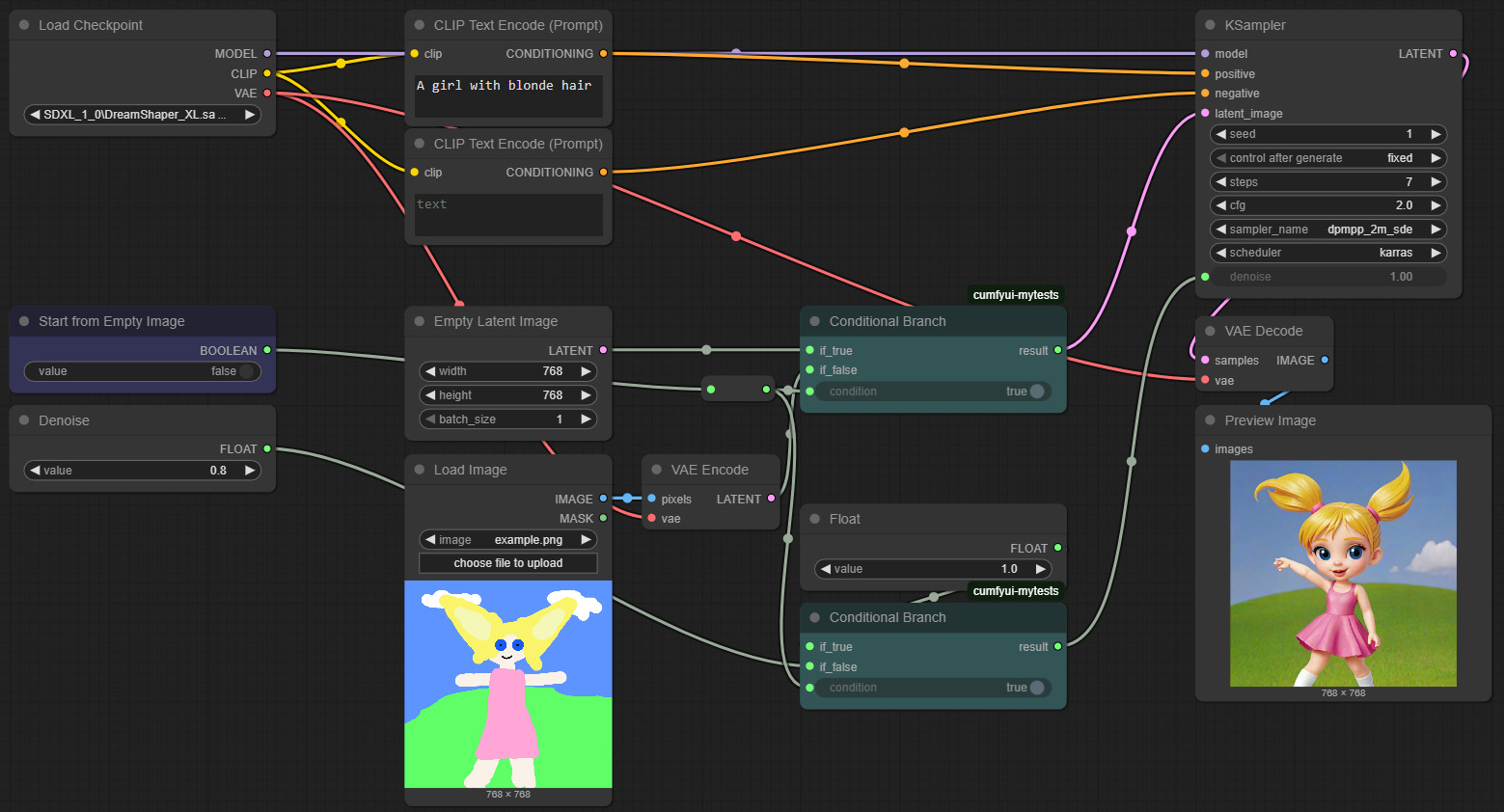
Conditional Latent Image
This workflow demonstrates how a boolean toggle can control whether generation begins from an empty latent image or from a selected input image converted into latent space. Two Conditional Branch nodes manage the logic: the first selects which latent image to use, while the second determines the correct denoise factor, applying a user-defined value when starting from an existing image and defaulting to 1.0 when starting from an empty latent.
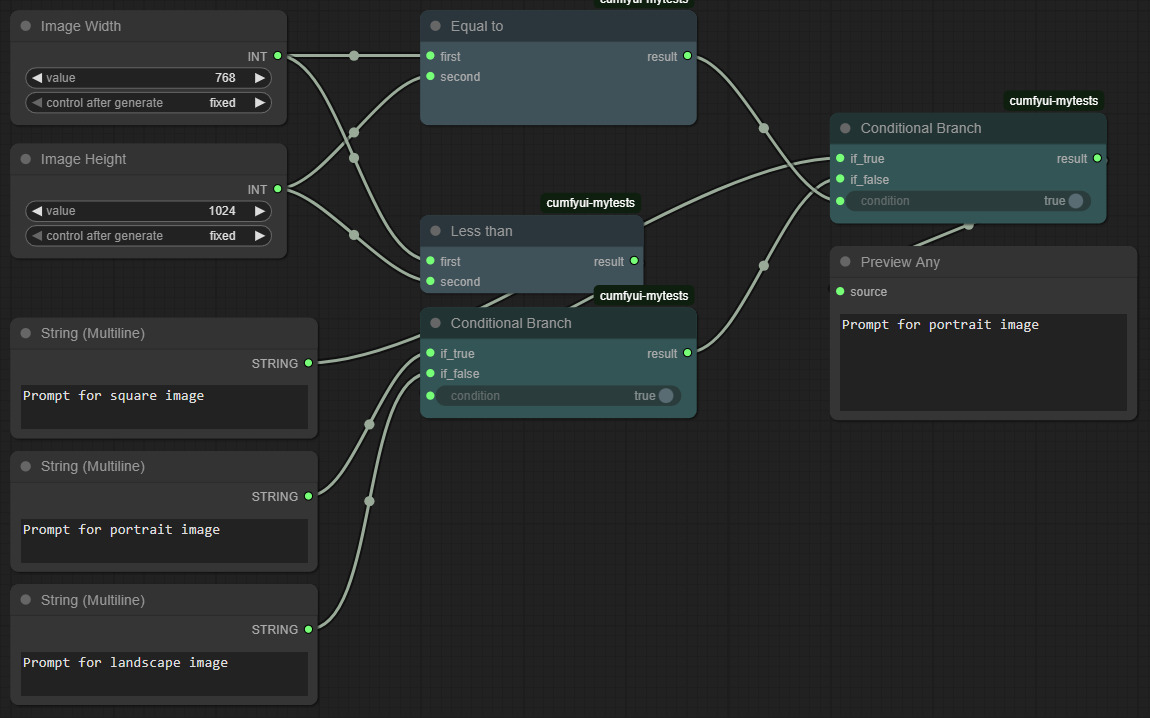
Conditional Format Prompt
This workflow demonstrates how to automatically select prompts optimized for square, portrait, or landscape images based on the configured width and height. Arithmetic comparison nodes (Equal to and Less than) determine the image’s aspect ratio, and two Conditional Branch nodes then return the appropriate prompt.
🔧 Detailed Node List
Boolean Logic
- False
- True
- Not
- And
- Or
- Xor
- Nand
- Nor
- Binary Expression
- Conditional Branch (if–then–else)
Arithmetic Comparison
- Less than
- Less than or equal to
- Equal to
- Not equal to
- Greater than or equal to
- Greater than
- Binary Comparison
String Comparison
- Comes before (alphabetical less than)
- Comes before or equal to
- Equal to
- Not equal to
- Comes after or equal to
- Comes after
- Contains
- Does not contain
- Starts with
- Does not start with
- Ends with
- Does not end with
- String Comparison