
Detail Stitch
Crop and paste nodes with metadata for detail stitching in ComfyUI
Nodes (4)
Layer-style compositing with offsets, blur, and scale
Crop a region and remember where it was — the whole point of detail stitching
This node just phones BFL's API
Paste an edit back where it came from — and leave every other pixel alone
Detail Stitch — ComfyUI custom nodes
Two nodes for precise crop and paste workflows with metadata in ComfyUI. The nodes are useful to make precise edits for two main reasons: using all the pixels in a limited area (so more detial and coherence) and leaving all the rest of the image untouched by the edit. Even though edit models can make edits on a specific part of the image they ruin and create artifacts on the rest during the sampling process, these nodes avoid that.
Nodes
Crop with Metadata
Crops an image (or uses a mask bounding box) and saves position metadata for later recomposition. Supports pixel or percent padding.
Paste with Metadata
Pastes a processed image back into the original at the exact position stored in the metadata. Supports exclude mask.
Example Workflow
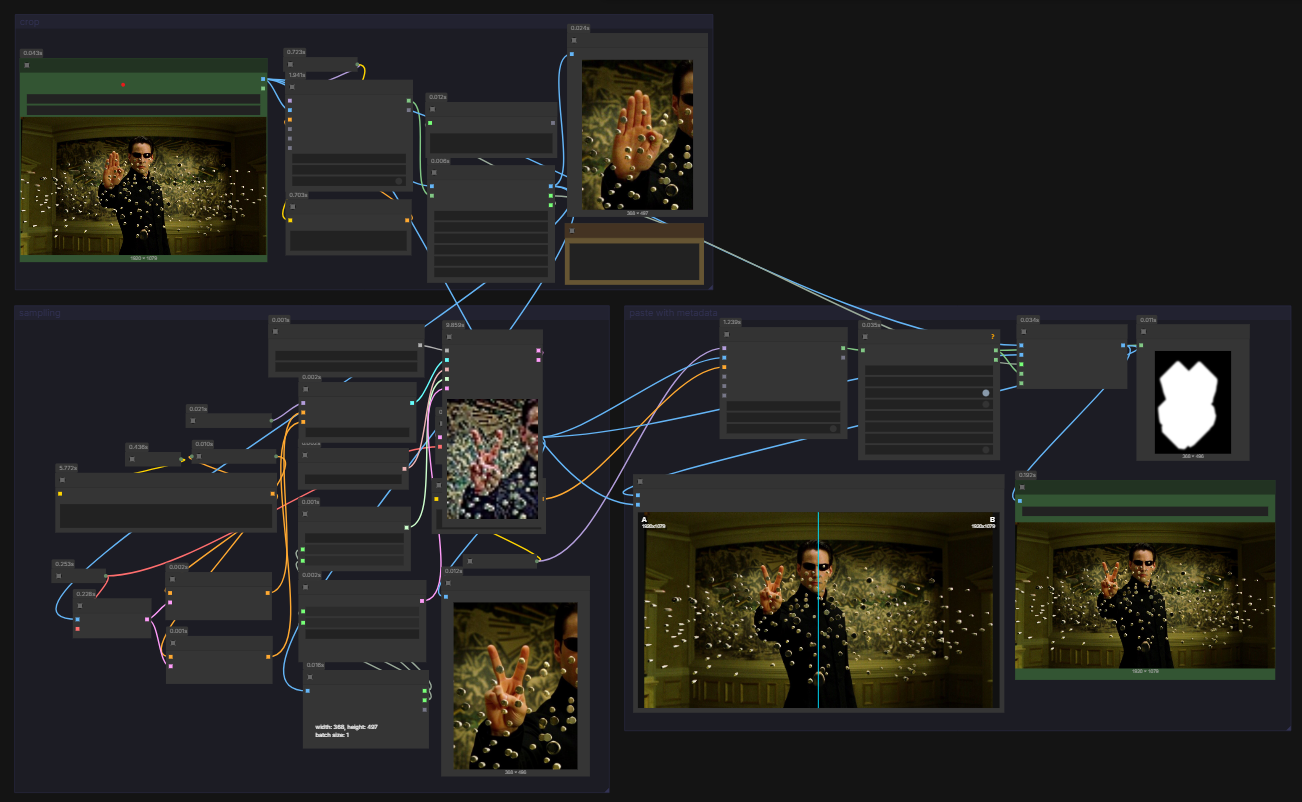
The included workflow (workflow/crop with metadata_example.json) demonstrates an example of a detail stitch pipeline using:
- SAM 3.1 (built-in ComfyUI) for segmentation
- FLUX.2-klein-9B for sampling — other models work too
- The following custom nodes:
Installation
Install via ComfyUI Manager or clone manually:
cd ComfyUI/custom_nodes
git clone https://github.com/mancusog/comfyui-detail-stitch.git