
ComfyUI-V-Prediction-Node
Node to set v-prediction sampling when using SDXL and other models that may not have the necessary metadata to identify it as a v-prediction model. This node is useful for quantized models since they lack the necessary metadata.
Nodes (3)
Loading the extracted SDXL CLIP pairs that plain ComfyUI refuses
The four-slot preset combiner for Pony, Illustrious, and NoobAI quality tags
The two-click fix when ComfyUI thinks your v-pred model is epsilon
ComfyUI-DJ_nodes
A collection of custom nodes for ComfyUI designed to streamline workflows, specifically for SDXL, quantized models, and prompt management.
Features
- DJ V Prediction Param: Force v-prediction or epsilon parameterization on models missing metadata (common in quantized models).
- DJ Load SDXL CLIPs: Load bundled CLIP-L and CLIP-G safetensors with automatic key normalization.
- DJ Prompt Presets: Manage and apply prompt presets from a JSON file with support for dynamic concatenation.
Nodes Detail
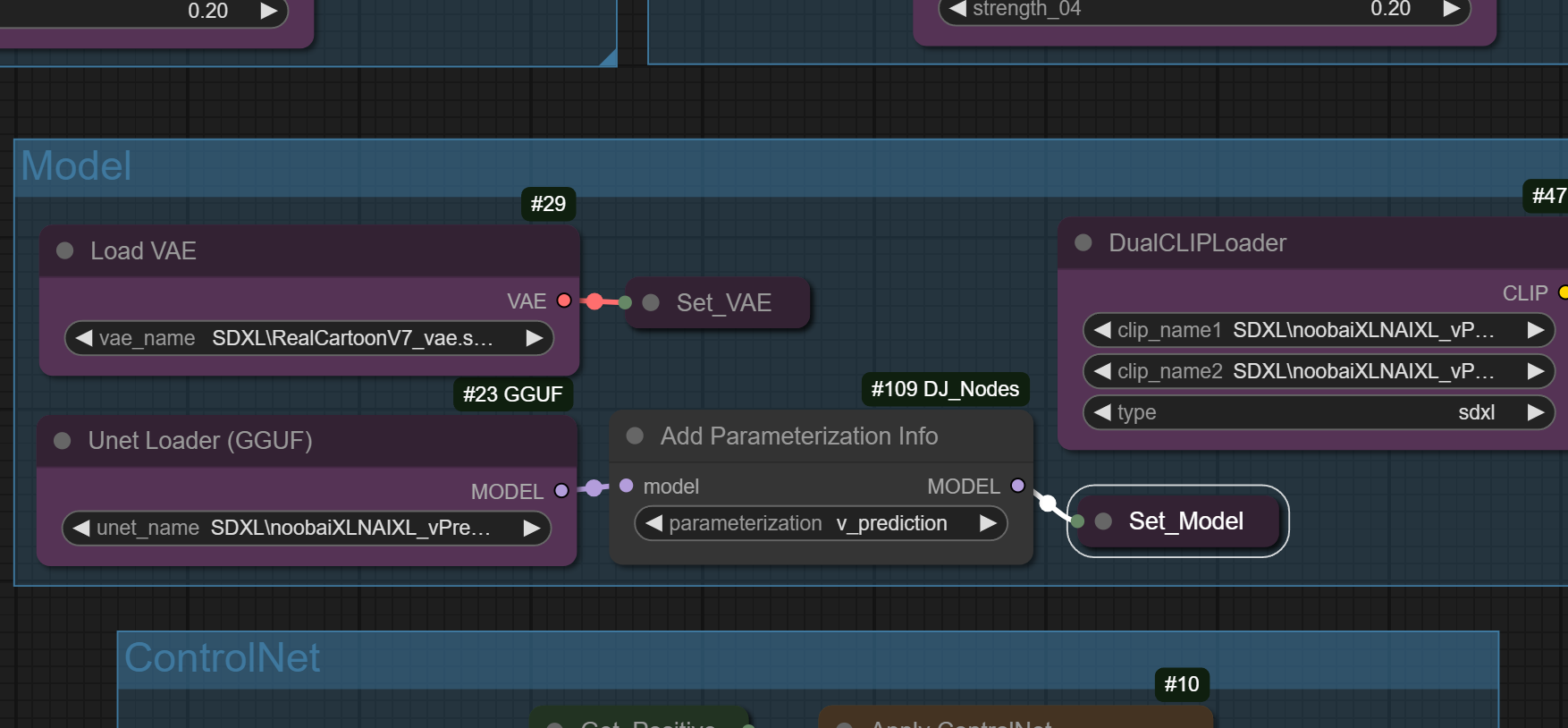
1. DJ V Prediction Param
This node allows you to manually set the parameterization of a model. This is especially useful for quantized models (like GGUF) that may lack the necessary metadata for ComfyUI to automatically identify them as v-prediction models.
How to use:
- Connect the
MODELoutput from your loader to themodelinput of this node. - Select either
epsilonorv_predictionfrom the dropdown. - Use the
MODELoutput for your sampler.
2. DJ Load SDXL CLIPs
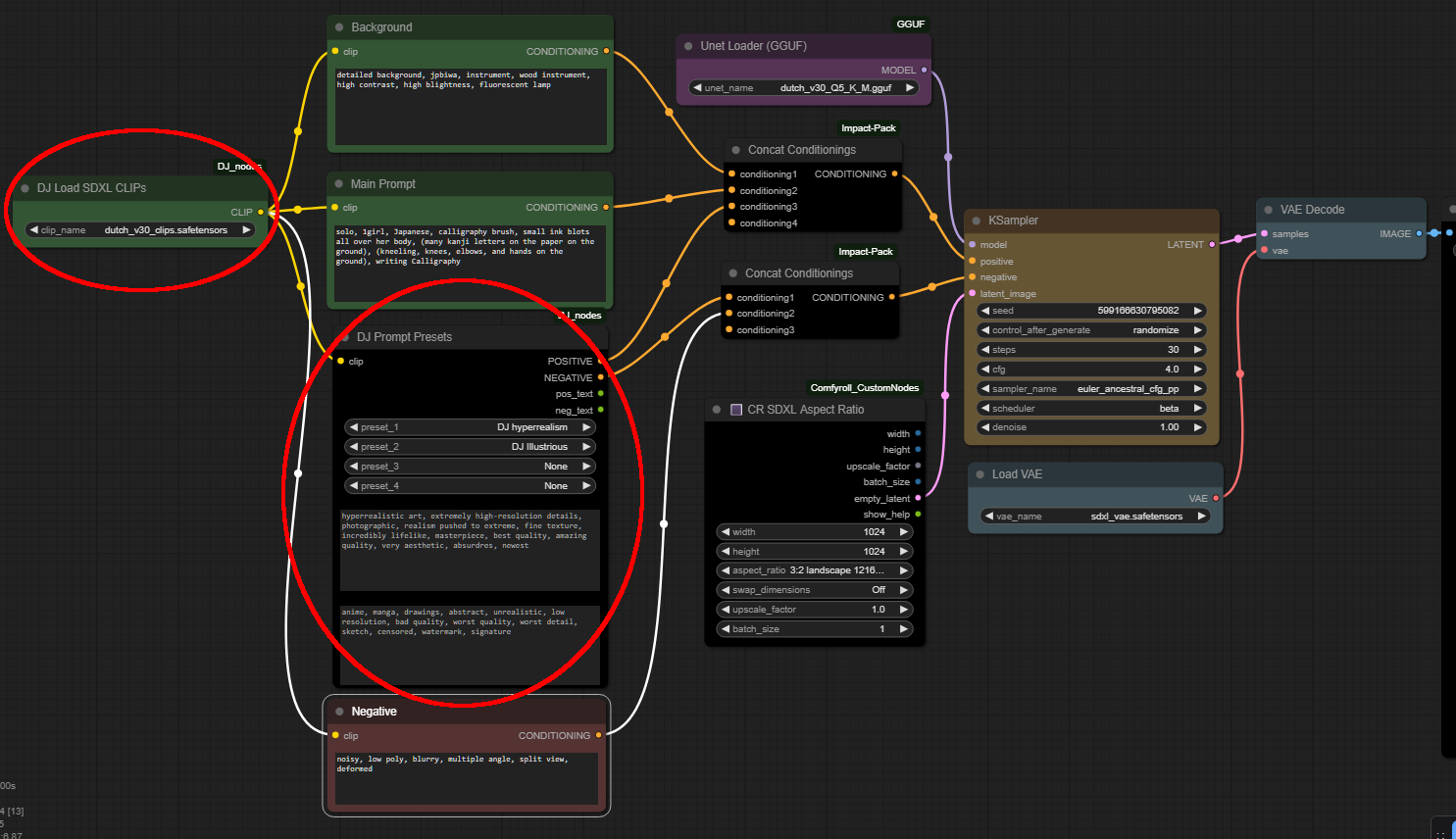
Specifically designed for loading extracted SDXL CLIP models bundled into a single safetensors file.
Key Features:
- Automatically handles
CLIP-LandCLIP-Gseparation. - Fixes common key mismatches (e.g.,
conditioner.embedders,transformer.prefixes). - Injects dummy weights for missing layers (like
text_projection) to ensure compatibility with standard loaders. - Eliminates "missing layer" errors when loading standalone CLIP files in ComfyUI.
⚠️ CRITICAL: SDXL GGUF Quantize Tool
I have made a simple local app that you can run to extract SDXL models and quantize Unet to GGUF format.
By default, this tool will extract "Bundled CLIPs" in safetensors format that is designed to be used with this node.
You can get the tool here: 👉 Download SDXL GGUFQuantize Tool Here
3. DJ Prompt Presets
A specialized prompting node that lets you quickly apply pre-defined styles or prompt blocks. I made this to add model specific prompt blocks for Pony and Illustrious and style blocks such as hyperrealistic, digital illustration, fantasy, and others.
Key Features:
- 4 Preset Slots: Select up to 4 different presets from
Prompt_presets/base_preset.json. - Dynamic Concatenation: Prompts and negative prompts from selected presets are automatically combined.
- UI Feedback: Displays the final concatenated positive and negative prompt strings directly on the node in ComfyUI.
Configuration:
Presets are stored in Prompt_presets/base_preset.json. You can easily add your own presets by following the JSON structure in that file.
Installation
- Navigate to the
custom_nodesfolder inside your ComfyUI directory:cd ComfyUI/custom_nodes - Clone this repository:
git clone https://github.com/magekinnarus/ComfyUI-DJ_nodes.git - Restart ComfyUI.
Acknowledgement
- ComfyUI: This suite of nodes utilizes the robust modules provided by the ComfyUI codebase.