
PromptFlow
Modular prompt engineering with wildcards, variations preview, auto-sort, and presets. Two modes (Simple/Extended), LoRA Manager integration, and 7 themes shared with FlowPath.
Nodes (2)
📝 PromptFlow
Modular Prompt Engineering for ComfyUI



Features | Installation | Wildcards | Variations | Examples | Support
See It In Action
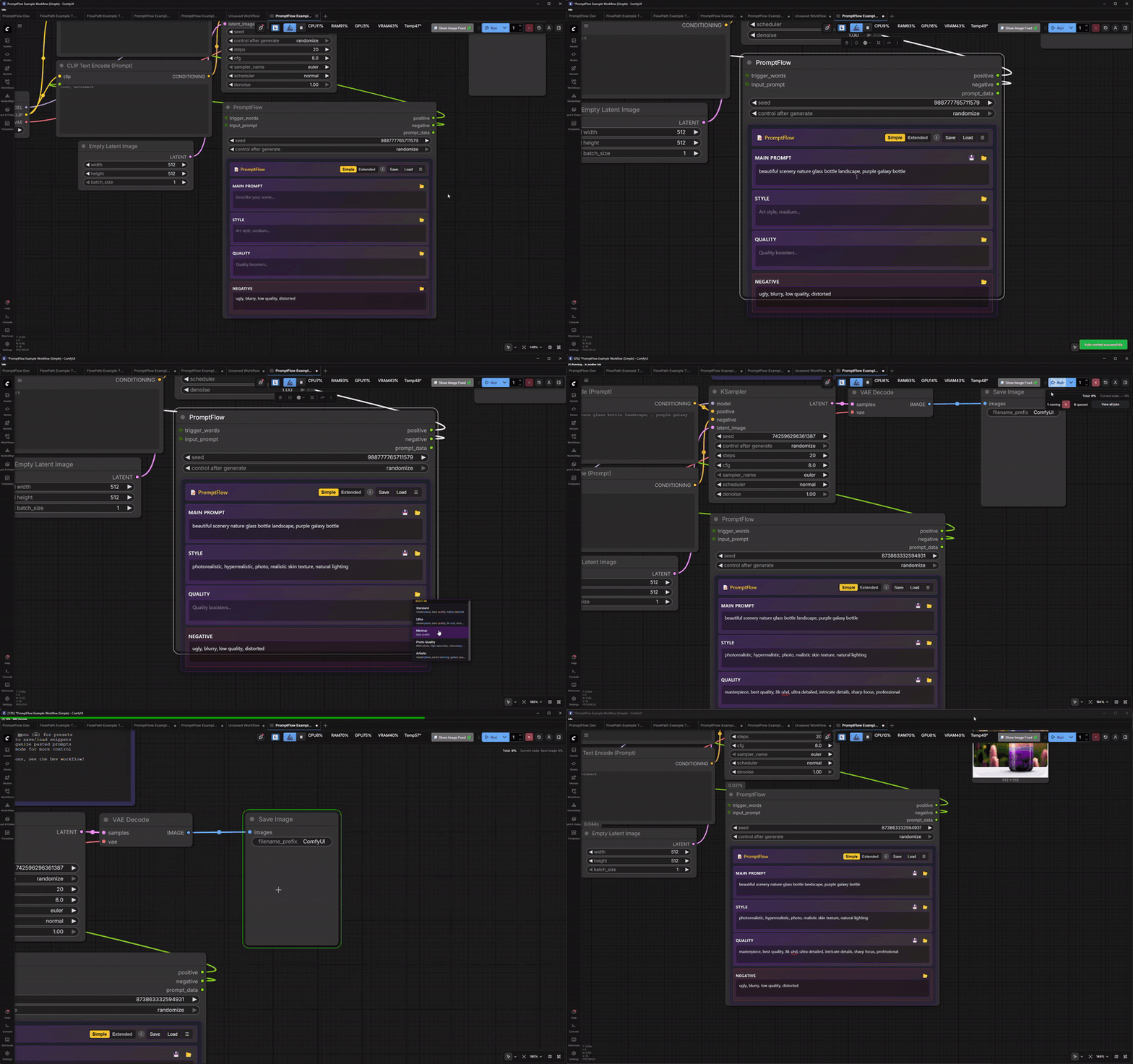
Simple Mode + Presets + Auto-Sort - Quick prompting with built-in presets
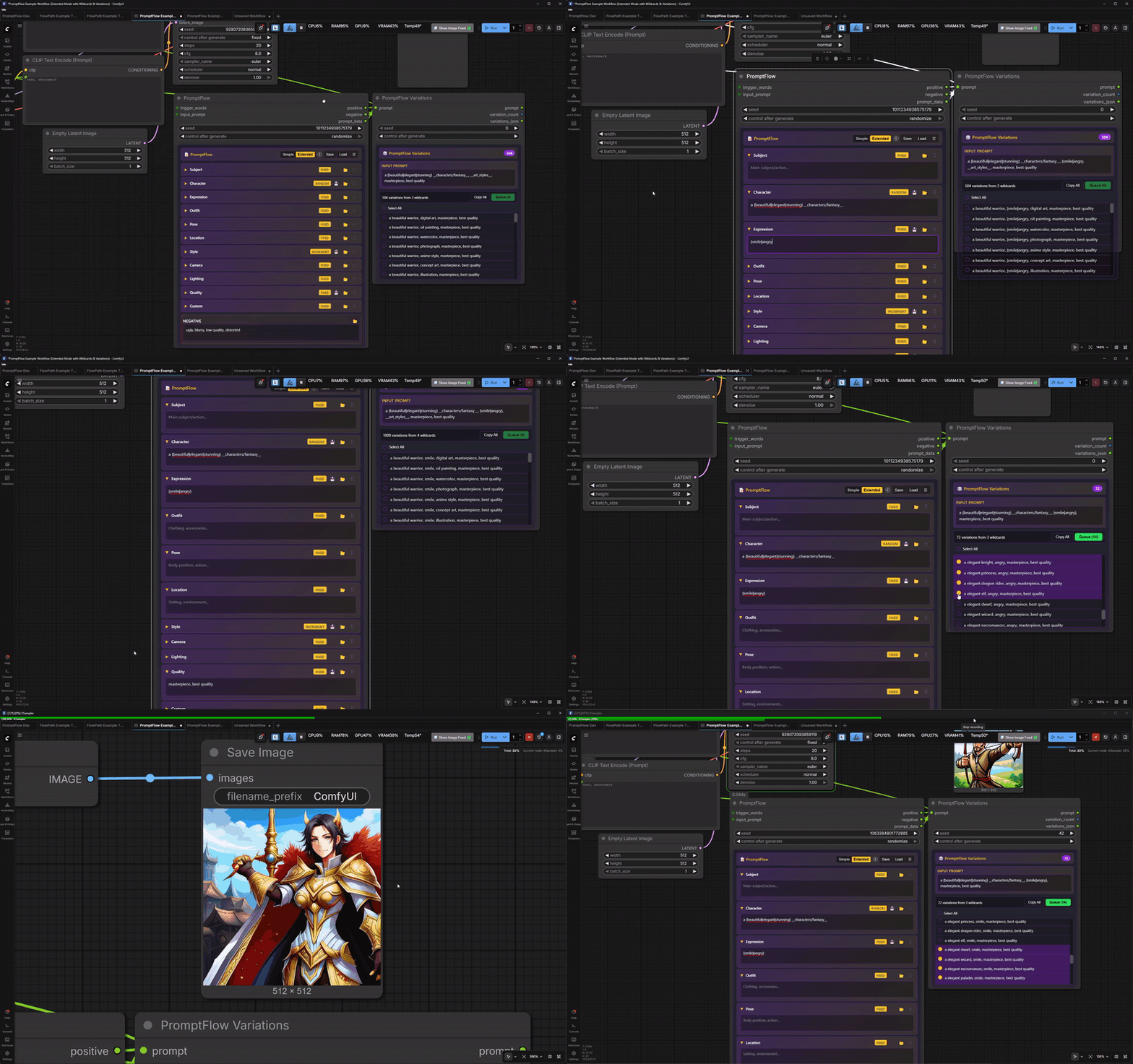
Variations Preview - See all wildcard combinations before generating
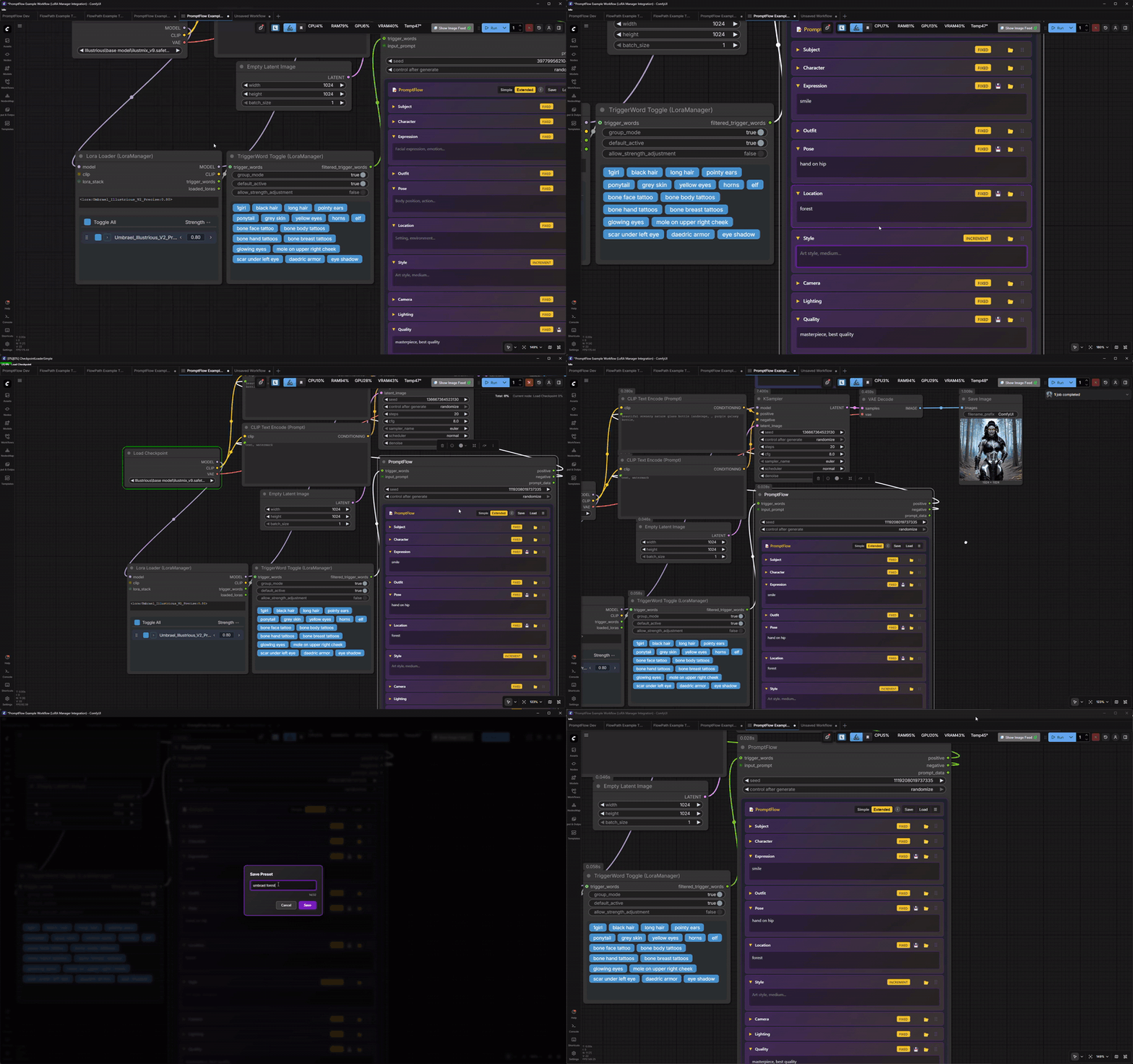
LoRA Manager + Saving Presets - Trigger words integration and custom presets
PromptFlow is a free and open source ComfyUI custom node that organizes your prompt workflow. Build structured prompts with wildcards, presets, and intelligent auto-sorting!
- 📝 Two Modes - Simple (3 fields) or Extended (11 fields) for any workflow
- 🎲 Wildcards -
{option1|option2|option3}syntax with 4 selection modes - 📁 File Wildcards -
__folder/filename__loads from ComfyUI/wildcards/ - 🔀 Auto-Sort - Paste any prompt, auto-distribute to categories
- 🎯 Variations Node - Preview all combinations before generating
- 💾 Presets - Built-in + custom presets with export/import
- 🎨 7 Themes - Shared theme system with FlowPath
- 🔗 LoRA Manager - Trigger words integration
✨ Key Features
| Feature | Description |
|---------|-------------|
| 📝 Simple Mode | 3 focused fields: Main Prompt, Style, Quality |
| 📋 Extended Mode | 11 granular fields: Subject, Character, Expression, Outfit, Pose, Location, Style, Camera, Lighting, Quality, Custom |
| 🎲 Wildcards | {a\|b\|c} inline syntax + __file__ wildcard files |
| 🔒 Field Modes | Fixed, Random, Increment, Decrement per field |
| 🎯 Variations Node | See all possible combinations with seed hints |
| 🔀 Auto-Sort | Paste prompts, auto-categorize with 200+ keywords |
| ↕️ Drag & Drop | Reorder extended mode fields |
| 💾 Presets | 22 built-in + unlimited custom presets |
| 📤 Export/Import | Share presets as JSON |
| 🔗 LoRA Manager | Auto-prepend trigger words |
| 🎨 7 Themes | Synced with FlowPath |
| ⌨️ Shortcuts | Ctrl+Z undo, right-click menus |
🚀 Quick Start
Installation
Method 1: ComfyUI Manager (Recommended)
- Open ComfyUI Manager
- Search for "PromptFlow"
- Click Install
- Restart ComfyUI
Method 2: Git Clone
cd ComfyUI/custom_nodes
git clone https://github.com/maartenharms/comfyui-promptflow
Then restart ComfyUI.
Method 3: Manual Download
- Download the latest release ZIP
- Extract to
ComfyUI/custom_nodes/comfyui-promptflow - Restart ComfyUI
Basic Usage
- Add PromptFlow node to your workflow (under "📝 PromptFlow" category)
- Fill in prompt fields - Or use Auto-Sort to paste existing prompts
- Connect outputs:
positive→ CLIP Text Encode (positive)negative→ CLIP Text Encode (negative)
- Generate!
🎲 Wildcard System
Inline Wildcards
Use {option1|option2|option3} in any field:
a {beautiful|elegant|stunning} {woman|lady} in a {forest|garden|meadow}
File Wildcards
Use __folder/filename__ to load from text files:
__characters/fantasy__ wearing __outfits/medieval__
Place .txt files in ComfyUI/wildcards/ folder (one option per line).
Field Modes
Each field can have its own mode:
| Mode | Behavior | |------|----------| | 🔒 Fixed | Always uses first option | | 🎲 Random | Random selection (seed-based) | | 📈 Increment | Cycles forward through options | | 📉 Decrement | Cycles backward through options |
🎯 Variations Node
The PromptFlow Variations node shows all possible prompt combinations:
- Connect
prompt_dataoutput → Variations node input - See total combinations (e.g., "24 variations from 3 wildcards")
- Click rows to select specific variations
- Shift+click for range selection
- Queue Selected to generate only chosen variations
Perfect for batch generation with specific combinations!
🔀 Auto-Sort
Paste any prompt and auto-distribute to the right categories:
- Click the ☰ menu → Auto-Sort
- Paste your prompt
- Preview shows categorization
- Click Apply
Works in both Simple and Extended modes!
💾 Preset System
Built-in Presets
- 10 Style Presets - Photorealistic, Cinematic, Anime, Oil Painting, etc.
- 5 Quality Presets - Standard, Ultra, Minimal, Photo, Artistic
- 7 Negative Presets - Standard, Anatomy Fix, Full, NSFW Filter, etc.
Custom Presets
- Save button on each field to save content
- Load button to apply presets
- Right-click fields for quick save
- Global Presets save entire prompt state
Export/Import
Share presets via ☰ menu → Export/Import Presets
🔗 LoRA Manager Integration
PromptFlow integrates seamlessly with LoRA Manager:
[LoRA Manager] --trigger_words--> [PromptFlow] --positive--> [CLIP Encode]
Trigger words are automatically prepended to your positive prompt.
📋 Node Reference
PromptFlow (Main Node)
Inputs: | Input | Type | Description | |-------|------|-------------| | seed | INT | For deterministic wildcard selection | | trigger_words | STRING | From LoRA Manager (optional) | | input_prompt | STRING | Prepend to output (optional) |
Outputs: | Output | Type | Description | |--------|------|-------------| | positive | STRING | Combined positive prompt | | negative | STRING | Negative prompt | | prompt_data | STRING | For Variations node |
PromptFlow Variations
Inputs: | Input | Type | Description | |-------|------|-------------| | prompt_data | STRING | From PromptFlow's prompt_data output |
Shows all wildcard combinations with selection and batch queuing.
🎨 Themes
Choose from 7 beautiful themes in Settings → PromptFlow → Theme:
| Theme | Primary | Accent | Vibe | |-------|---------|--------|------| | 🌊 Ocean Blue | Blue | Teal | Cool ocean waves | | 🌲 Forest Green | Green | Amber | Lush nature | | 🎠 Pink Pony Club | Hot Pink | White | Fun and playful | | 🧡 Odie | Orange | Sandy Tan | Warm and friendly | | 💜 Umbrael's Umbrage | Purple | Gold | Regal and mysterious (DEFAULT) | | ⚪ Plain Jane | Gray | Gray | Simple and minimal | | 🦇 The Dark Knight | Black | Yellow | For when Gotham needs you |
Note: Themes are shared with FlowPath!
⌨️ Keyboard Shortcuts
| Shortcut | Action | |----------|--------| | Ctrl+Z | Undo | | Ctrl+Y | Redo | | Escape | Close modal/dropdown | | Right-click | Context menu (Copy, Paste, Save, Clear) |
📁 Example Workflows
Check out the examples folder for ready-to-use workflows:
- PromptFlow Example Workflow (Simple).json - Basic 3-field workflow
- PromptFlow Example Workflow (Extended Mode with Wildcards & Variations).json - Full featured
- PromptFlow Example Workflow (LoRA Manager Integration).json - Trigger words workflow
All workflows include explanatory notes to help you get started!
🛠️ Troubleshooting
PromptFlow node not appearing
- Make sure you extracted to
ComfyUI/custom_nodes/comfyui-promptflow - Restart ComfyUI completely
- Check console for errors (search for "PromptFlow")
Wildcards not expanding
- Check syntax:
{option1|option2}for inline,__filename__for files - For file wildcards, ensure
.txtfile exists inComfyUI/wildcards/ - Check field mode is set to Random/Increment (not Fixed)
Auto-Sort not categorizing correctly
- Auto-Sort uses keyword matching - some tags may be ambiguous
- Review the preview before applying
- Manually adjust categories as needed after applying
Theme not applying
- Go to Settings → 📝 PromptFlow → Theme
- Select your theme
- Node should update instantly
- If not, try reloading ComfyUI browser tab
💝 Support Development
PromptFlow is 100% free and open source
If you find it useful, consider supporting development:
☕ Ko-fi: https://ko-fi.com/maartenharms
⭐ Star the repo: https://github.com/maartenharms/comfyui-promptflow
📣 Share with others: Help spread the word!
Every donation helps support continued development and new features
🤝 Contributing
PromptFlow is open source and welcomes contributions! Whether you're fixing bugs, adding features, or improving documentation, we'd love your help.
How to Contribute
- Report Bugs - Open an issue describing the problem
- Request Features - Share your ideas for new features
- Submit Code - Fork, code, and submit a Pull Request
- Improve Docs - Fix typos, add examples, clarify instructions
Contribution Ideas
- ✅ Add new auto-sort keywords
- ✅ Create new preset packs
- ✅ Improve wildcard parsing
- ✅ Fix bugs and improve performance
- ✅ Enhance documentation
- ✅ Add new field types
📜 License
MIT License - Free to use, modify, and distribute
Copyright (c) 2026 Maarten Harms
See LICENSE file for full details.
🔗 Also By Me
| Extension | Description | |-----------|-------------| | FlowPath | Intelligent path organization for ComfyUI - A1111-style counter, template variables, auto-detection, and 7 shared themes |
🙏 Credits
Created by Maarten Harms (Mern)
Special thanks to:
- The ComfyUI community for feedback and support
- Everyone who helped test and improve PromptFlow
- Contributors who help make PromptFlow better
- Users who share their workflows and presets
📞 Contact & Links
- 🐙 GitHub: https://github.com/maartenharms/comfyui-promptflow
- ☕ Ko-fi: https://ko-fi.com/maartenharms
- 💬 Discord: @itsmern
- 📧 Issues: https://github.com/maartenharms/comfyui-promptflow/issues
Made for the ComfyUI community 📝
Write better prompts - generate better images!