
Flomfy-Flame-Node-Tree
Flame-style node tree tools for the ComfyUI canvas: node kissing (drag + Alt + Shift), link cutting (Shift + drag), D-click delete. Frontend only.
Flomfy-Flame-Node-Tree
Flame-style node tree tools for the ComfyUI canvas. Frontend only: no nodes, no Python dependencies. Each tool has its own off switch under Settings > Flomfy.
Install
With ComfyUI Manager: search for Flomfy-Flame-Node-Tree in the Custom Nodes Manager and install it. Or with comfy-cli:
comfy node install flomfy-flame-node-tree
Or by hand:
cd ComfyUI/custom_nodes
git clone https://github.com/lukaszomasta/Flomfy-Flame-Node-Tree
Restart ComfyUI and reload the browser tab.
Works with the classic (canvas) node rendering; it does nothing with Nodes 2.0 (Vue nodes). Built against ComfyUI 0.46.x / frontend 1.59.
Usage
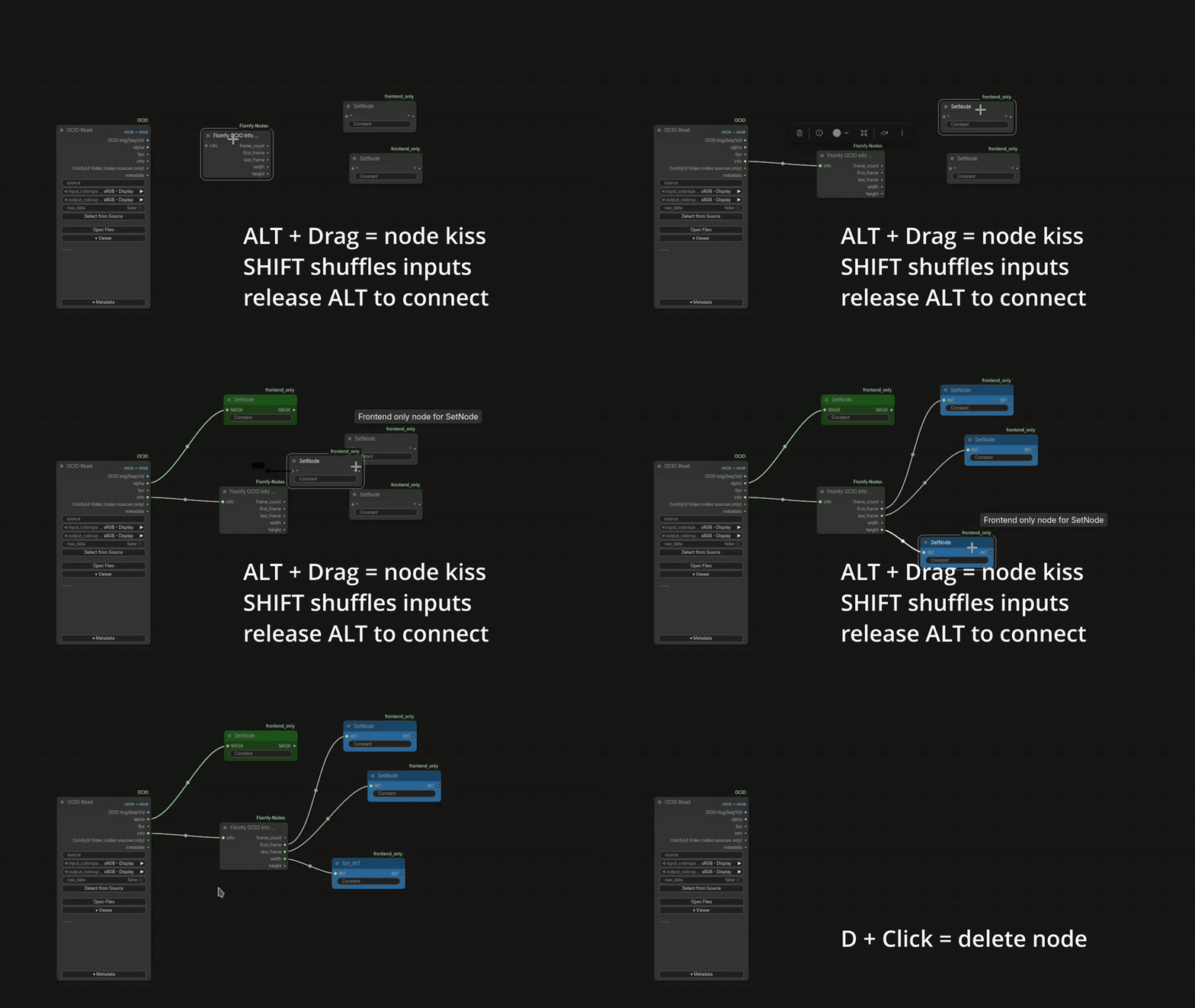
Tools
Node kissing (web/kiss.js)
Flame-style kissing on the canvas. While dragging a node, hold Alt and tap Shift: a pip
sticks out of the node's first input, with its name and n/total. Each further Shift tap
(Alt still held) moves it to the next input; plain inputs come first, then widget inputs,
and inputs that are already connected are included so a kiss can replace a link. Touch the
pip's tip to an output of the same type on another node (it gets a white ring) and let go
of Alt to connect; the node stays in your hand. Dropping the node first, or Esc, drops the
pip without connecting. The kiss is its own undo step (Ctrl+Z), separate
from the move. Plain Shift during a drag still snaps to grid.
Off switch: Settings > Flomfy > Node kissing. Classic canvas rendering only; it does nothing with Nodes 2.0 (Vue nodes).
Link cutting (web/cut.js)
Shift + drag on empty canvas draws a red dashed knife line; links it crosses turn red. Release to cut them, as one undo step (Ctrl+Z). Cutting through a reroute cuts every link that passes through it. Esc cancels. Shift + drag on a node still snaps to grid.
Off switch: Settings > Flomfy > Link cutting. Classic canvas rendering only.
D-click delete (web/delete.js)
Hold D and click a node to delete it, as one undo step (Ctrl+Z). While D is held the node under the mouse gets a red outline. Typing "d" in a text field does nothing special.
Off switch: Settings > Flomfy > D-click delete. Classic canvas rendering only.
License
MIT, see LICENSE.