
ZC Image Batch Audit
ComfyUI node and CLI for offline image-batch preflight reports.
ZC-image-batch-audit
English · 简体中文





Add a release preflight to ComfyUI output folders—or audit any image batch from the command line before publishing it.
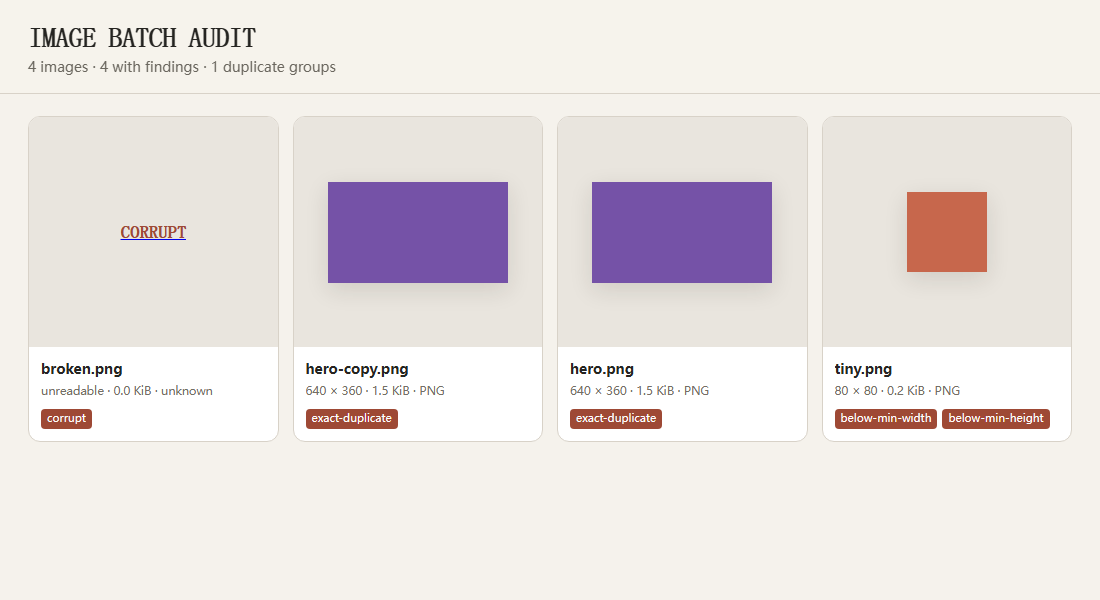
The HTML report embeds lightweight previews, while the JSON report records dimensions, file size, SHA-256, exact duplicates, corrupt files, and minimum-size findings.
Why this exists
Image-generation and publishing pipelines often fail in two different ways: a file is technically invalid at full size, or it loses clarity at feed-thumbnail size. This tool makes both inspection scales available in one pass without uploading images to a service.
It was extracted from a batch-review workflow used for generated-art publishing, where corrupt outputs, accidental duplicates, and undersized images must be caught before release.
Features
- Scans PNG, JPEG, WebP, and GIF files.
- Generates a responsive offline proof sheet with embedded thumbnails.
- Opens the original file from each proof-sheet card when the report stays beside the image folder.
- Records dimensions, format, color mode, byte size, and SHA-256.
- Flags corrupt images, exact byte duplicates, and configurable minimum dimensions.
- Handles an empty folder and a corrupt file without crashing the rest of the batch.
- Supports non-recursive and recursive scans.
- Returns an optional CI-friendly failure code when findings exist.
Use as a ComfyUI custom node
Clone the repository into ComfyUI's custom_nodes directory and install its single dependency with the same Python environment that runs ComfyUI:
cd ComfyUI/custom_nodes
git clone https://github.com/lucaszhouc/ZC-image-batch-audit.git
cd ZC-image-batch-audit
python -m pip install -r requirements.txt
Restart ComfyUI, then add ZC → quality → ZC Image Batch Audit. The node scans a subfolder relative to ComfyUI's configured output directory and writes:
output/<subfolder>/_audit/image-audit.html
output/<subfolder>/_audit/image-audit.json
Use 0 for either minimum dimension to disable that threshold. The node always re-runs when queued because files in the output folder may change without a workflow edit. Paths containing ../ cannot escape the configured ComfyUI output directory.
Civitai publishing preflight
Run the node after a generation batch and open image-audit.html before upload. It catches accidental byte-identical duplicates, unreadable files, and wrong dimensions without calling the Civitai API or exposing account data. The report is an inspection aid, not a replacement for human visual review.
Install
Clone the repository and install with pipx:
pipx install .
For development:
python -m pip install -e .
Quick start
Create image-audit.html inside an image folder:
image-batch-audit ./outputs
Add recursive scanning, minimum dimensions, and a JSON report:
image-batch-audit ./outputs \
  --recursive \
  --min-width 1024 \
  --min-height 1024 \
  --json ./outputs/image-audit.json
Use it as a quality gate:
image-batch-audit ./outputs --min-width 1024 --fail-on-findings
Exit codes are 0 for a successful audit, 1 for invalid input or an I/O failure, and 2 when --fail-on-findings finds at least one affected image.
Report
The HTML contains embedded, reduced-size PNG previews, so its grid remains visible offline. File names are relative and the report does not expose the scanned root path. Card links point to the original relative files; keep the report in the scanned folder if you want those links to remain portable.
Duplicate detection in v0.1 is deliberately exact: files are duplicates only when their SHA-256 values match. It does not claim to find visually similar recompressions.
The optional JSON report has three top-level keys:
{
  "summary": {
    "images": 12,
    "images_with_findings": 2,
    "exact_duplicate_groups": 1
  },
  "duplicate_groups": [["a.png", "copy.png"]],
  "images": []
}
Options
--recursive             include nested folders
--min-width N           flag images narrower than N pixels
--min-height N          flag images shorter than N pixels
--thumbnail-width N     embedded preview width; default 180
--output PATH           HTML path; default ROOT/image-audit.html
--json PATH             optional JSON report path
--fail-on-findings      return exit code 2 when findings exist
Privacy
All processing happens locally. The tool makes no network requests. The HTML report contains image thumbnails and file names, so inspect it before sharing publicly if the source batch is private.
Development
python -m pip install -e .
python -m pytest -q
python -m build
See CONTRIBUTING.md for the maintenance model. Security reports should follow SECURITY.md.
Contact
GitHub notifications may be checked infrequently. Email [email protected] for the fastest response.