
ComfyUI-EditUtils
A collection of utility nodes for advanced image editing in ComfyUI, supporting multiple AI models including Qwen, Qwen-Image 2.1, Flux2Klein, Flux3Klein and Krea2.
Nodes (45)
Let the Image Tell You
Qwen-Image 2.1 Hands You a Cutout With Dirty Alpha — This Is the Brush
The Converter Node That Just Lets a Wire Be a Wire
Wrap a Loose Latent Tensor Into Something a Sampler Will Accept
How to Feed Boogu More Than Three Reference Images
Repositioning References Without Regenerating
Prompt, Refs, and a Built-In Negative in One Node
The One-Line Handshake That Tells EditUtils You're Running Boogu
Unpacking Boogu's Black Box Into Wires You Can Actually Use
BreastSizeControl_EditUtils
Keep Your Reference Images From Leaking Into the Wrong Wire
Drive Your Reference Settings From a JSON String Instead of Twenty Widgets
Deliver Edits at the Original Size, Not With Black Bars
Find Exactly What Changed Between Two Images — Without a Naive Pixel Diff
The One Encode Node to Rule All the Edit Models in This Pack
Unlimited Reference Images for Klein, One Chained Config at a Time
Move References Around the Canvas
Prompt, Up to Three Refs, Done
The Tiny Config Node That Picks Flux 2 Klein's Side of the Pipeline
Turn Klein's Encode Black Box Into Eight Usable Wires
FLUX.3 Wants Its Layout as JSON — This Node Lets You Draw It Instead
The Switchboard Every FLUX.3 Reference Passes Through Before Sampling
The FLUX.3 Patch Node That Deliberately Patches Nothing
One Node, Three Images, One FLUX.3 Prompt
Telling EditUtils You're Running FLUX.3
What FLUX.3 Actually Sent to the Model
The Node That Turns Krea 2 Into an Instruction Editor
The Config Node That Sneaks Krea 2 Through the Qwen Pipeline
Grab one thing out of a LIST — that's the whole job
Reload a saved conditioning without re-encoding
Same cache loader, but organized by LoRA name instead of by file
Stock LoadImage, plus a filename output — so you can actually do something with it
Resize-and-pad your reference the way EditUtils does — without burning a CLIP encode
One config node to rule the model switcher — until you switch to Flux2Klein
One image, one config block — chain these to feed unlimited references
The encode node's kitchen sink, unpacked into 11 usable wires
The one-node Qwen edit encode — three images, one wire in, sampler-ready out
One Ticket Per Reference Image
Putting a Reference Where You Want It
Three Reference Images, One Node
The Tiny Node That Decides You're on the Qwen-Image 2.1 Path
Put each reference exactly where you want it — ROPE-positioned regional editing
The Qwen config node that can't be misconfigured — fixed name, fixed VAE unit
Paint where the reference goes — a mask becomes your regional-edit coordinates
Stop re-encoding the same image every run — save the condition once
ComfyUI-EditUtils
A collection of utility nodes for advanced image editing in ComfyUI, supporting multiple AI models including Qwen, Qwen-Image 2.1, Flux2Klein, Flux3Klein and Krea2.
Update
- 20261016 Added FLUX.3 Klein support (
flux3kleinroute) with a bounding-box editor: theFlux3Klein*nodes plus a draw-your-layout canvas onFlux3KleinBBox_EditUtils. Draw a box on the reference, type its id and desc, and the node appends the FLUX.3 element table as a JSON array to the prompt —generationrows ({id, bbox, desc}) for layout,editingrows ({id, from, src_bbox, tgt_bbox, desc}) for keep/move/create/remove. Requires a ComfyUI build with FLUX.3 support. Working example: flux3 editutils example.json. - 20261015 Added BreastSizeControl_EditUtils — draw a breast-size control (
_bd) condition image on the node's own canvas: black background, one or two#FADBAEellipses you can move, shape (circle ⇄ ellipse), rotate and colour, with the measured flat/small/medium/large/huge/gigantic areas one button away. The marker's area is the size dial. Working Krea2 example: k2 breasts size control.json. - 20261007 Added AlphaNoiseFilter_EditUtils — clean the alpha channel of Qwen-Image 2.1 alpha generations (clip low-value alpha noise, drop small alpha islands, erode/dilate, then feather) and output a clean RGBA image plus a mask. Feathering works strictly inwards: the gradient band is created inside the matte's own edge, so the silhouette never grows into the transparent background and no background colour can leak out as a halo.
- 20260920 Added Qwen-Image 2.1 support (QwenImage21ModelConfig / QwenImage21ConfigPreparer / QwenImage21EditTextEncode / QwenImage21EditApply). 64ch 16x VAE, Qwen3-VL text encoder, vision-slot latent splicing and per-reference ROPE offsets. Example workflow: edit utils qwen image 2.1 example.json. Requires ComfyUI with upstream Qwen-Image 2.1 support.
- 20260504 Added Longest Edge Image Process, Clear Ref Latents, Save/Load Condition nodes. Fixed no_refs_cond output in Output Extractors.
- 20260407 Fixed Extra Height Unit Pad Which Introduce Color Shift
Overview
ComfyUI-EditUtils is the follow-up version of ComfyUI-QwenEditUtils, offering enhanced capabilities for image editing workflows with support for multiple AI models. This package provides a comprehensive set of tools for advanced image editing, featuring flexible configuration options and model-specific optimizations.
Examples
- RunningHub Single Image Workflow: https://www.runninghub.ai/post/2045207600739913729/?inviteCode=rh-v1279
- RunningHub Simple Krea2 Depth Workflow (工作流:Simple Krea Depth): https://www.runninghub.ai/post/2082077636234313729/?inviteCode=rh-v1279
Usage Tips
For better consistency in local editing, it's recommended to use this workflow with Consistency Edit LoRA:
- Civitai Download: Consistency Edit LoRA
- Huggingface Download: Consistency Edit LoRA
FLUX.3 Klein
EditUtils supports FLUX.3 Klein (base and step-distilled) editing through the flux3klein route, including the bounding-box element table that FLUX.3 uses to place and edit elements.
FLUX.3 klein is not a rename of FLUX.2 klein. It is a different architecture: per-mode blocks plus joint single blocks over three token modes (image, image_cond, text), a Qwen3-VL text encoder (8 stacked hidden states →
joint_attention_dim20480, text window right-padded to a multiple of 80), references told apart on thelposition axis with negative coordinates (-1, -2, …), image H/W RoPE scaled byimage_rope_scale = 0.5, and a flow-map distilled variant (4–16 steps, no CFG). The VAE is the FLUX.2 packed autoencoder (32 latent channels, 8x downscale, 2x2 patchify → 16 px per token), sovae_unit = 16.
ComfyUI already implements this natively (comfy/ldm/flux3/model.py, image_model: "flux3"), so the reference latents travel on the standard reference_latents conditioning key and the model derives reference position ids itself.
Nodes:
| Node | Purpose |
|---|---|
| Flux3KleinModelConfig_EditUtils | Model config (flux3klein route, vae_unit=16). flow_map records whether the checkpoint is step-distilled. |
| Flux3KleinConfigPreparer_EditUtils | Per-image config (to_ref, ref_main_image, ref_longest_edge, …). Chain multiple nodes for multiple references. |
| Flux3KleinBBox_EditUtils | The bounding-box canvas (element table). Takes the chain plus one image's config, attaches the table to it, and returns the chain. Also outputs the table as JSON (bbox_json). |
| Flux3KleinEditTextEncode_EditUtils | One-node simple path (image1–3), same outputs as EditTextEncode_EditUtils. |
| Flux3KleinEditApply_EditUtils | Model check. FLUX.3 needs no forward rewrite, so this only validates the architecture (and catches a FLUX.2 klein patch wired by mistake). |
| Flux3KleinOutputExtractor_EditUtils | Unpacks custom_output, exposing composed_prompt (prompt with the element table) and bbox_rows. |
Wiring — as in flux3 editutils example.json:
UNETLoader (flux3_image_klein_sd_int8_convrot) ─────────────────────────────► KSampler ──► VAEDecode ──► SaveImage
CLIPLoader  (qwen3vl_4b_fp8_scaled, type flux3) ─┐
VAELoader   (flux2-vae) ─────────────────────────┤
LoadImage ──► Flux3KleinConfigPreparer ─┬─ config ──────┐
                                         └─ (configs)    │
LoadImage ──────────────────────────────── image ────────┤
                                          Flux3KleinBBox ┴─► configs ─► EditTextEncode ─► KSampler
Flux3KleinModelConfig ──────────────────────────────────────────────► EditTextEncode
                                                          EditTextEncode ─► ConditioningZeroOut ─► KSampler (negative)
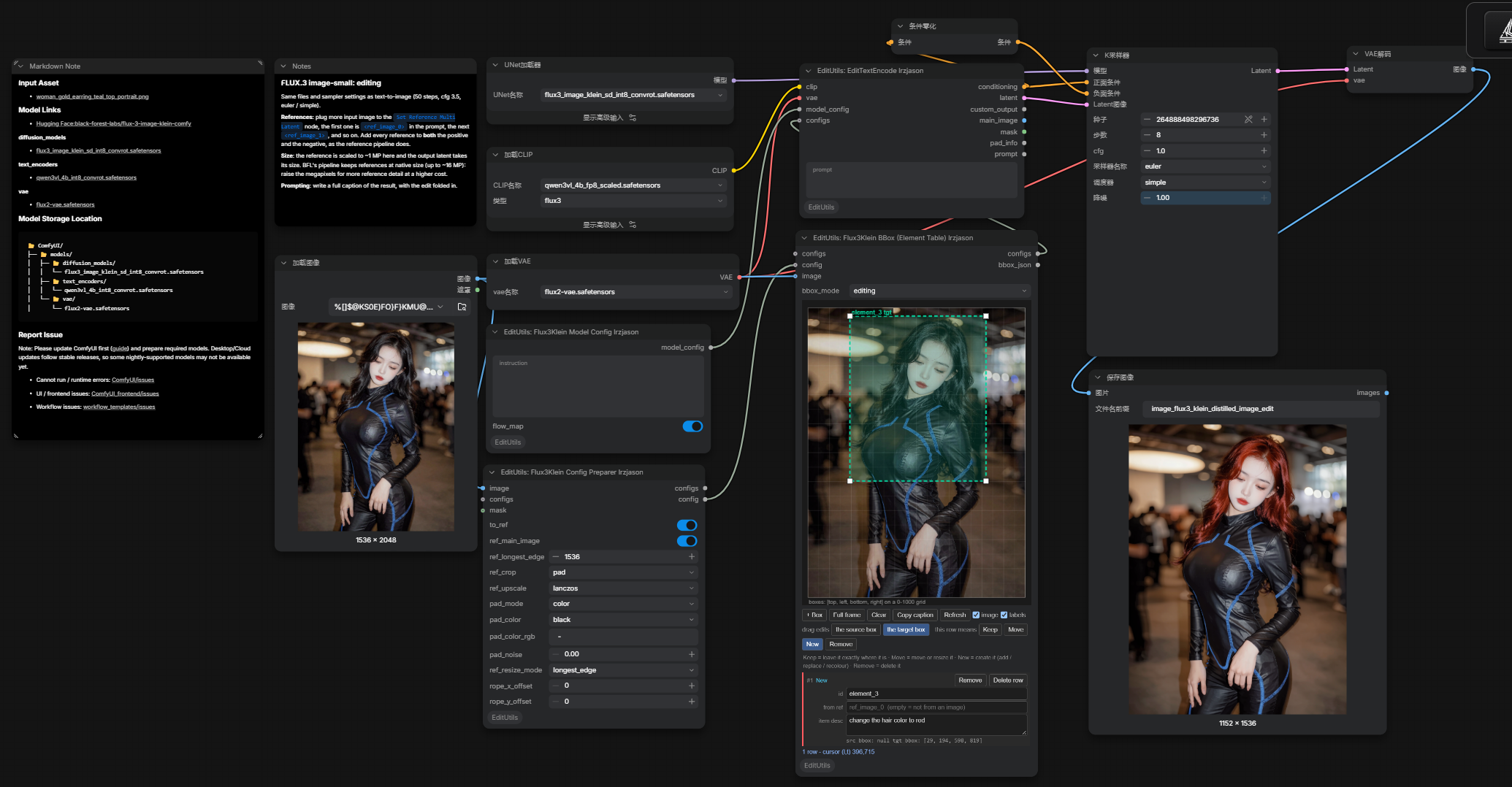
The example graph and its result, produced with flux3 editutils example.json.
Settings in the example:
| | |
|---|---|
| Reference | scaled to ref_longest_edge = 1536, ref_crop = pad, black pad |
| Element table | bbox_mode = editing, one row ("change the hair color to red") |
| Sampler | euler / simple, 8 steps, CFG 1.0, denoise 1.0, fixed seed |
| Negative | ConditioningZeroOut on the positive (the distilled model takes no CFG guidance) |
| Models | flux3_image_klein_sd_int8_convrot.safetensors, qwen3vl_4b_fp8_scaled.safetensors (CLIP type flux3), flux2-vae.safetensors |
Flux3KleinEditApply_EditUtils is not needed here — FLUX.3 consumes reference_latents natively, so the graph leaves the model unpatched. CFG is 1.0 and the negative is a zeroed-out conditioning, which is what the step-distilled checkpoint expects; note id 19 in the graph suggests trying 4–16 steps.
⚠️ Two things in the shipped graph are worth knowing before you run it:
- The graph's own "Notes" box still holds text copied from a BFL template: it says "50 steps, cfg 3.5" and refers to a
Set Reference Multi Latentnode that this graph does not contain. The table above describes what the graph actually does.- The
promptwidget onEditTextEncode_EditUtilsis empty — the edit instruction lives only in the row'sdesc. FLUX.3's guidance (and that same note) says to write a full caption of the result with the edit folded in, with the table appended after it, so type a caption before generating.
The drawing lives on its own node so the config preparer stays short. Flux3KleinBBox_EditUtils takes configs (the chain built by the other config nodes), config (one image's config) and image (only used as the drawing underlay), attaches the element table to that single config, and returns the chain with that entry replaced — so if you wire a preparer's own configs output here the image is never duplicated. Leave configs unconnected and the decorated config is appended instead — which is what the example does. Each image gets its own bbox node; chained bbox nodes merge into one table, exactly as the prompt has it.
The node outputs configs and bbox_json only — there is no separate config output, because configs already carries the decorated config grouped with its table; a second copy would just be a second source of truth for the same data.
Where the boxes go
EditTextEncode_EditUtils builds the element table for you: it collects the bbox_rows from every config in the chain, concatenates them into a single JSON array, and appends it to the prompt — "<prompt> [ {...}, {...} ]" — exactly the format FLUX.3 expects, with no separate parameter.
The result is exposed two ways, so you can always check what the model actually received:
promptoutput (7th socket,STRING) — the literal text handed to the tokenizer, i.e. your prompt with the table appended. Wire it to a text preview or a save-text node.custom_output → composed_prompt— the same string, for graphs already using the extractor.
With no boxes drawn the element table is omitted and prompt is simply your prompt. Note that the prompt output is appended last on purpose: ComfyUI matches saved links by slot index, so existing workflows keep their output connections.
The table as JSON
Flux3KleinBBox_EditUtils also outputs bbox_json (3rd socket, STRING): the whole element table as a JSON array, ready to feed a text preview, a save-text node, or your own node.
[{"id": "wolf_1", "from": null, "src_bbox": null, "tgt_bbox": [817, 120, 950, 167], "desc": "a cyberpunk dog"},
 {"id": "log_1", "from": null, "src_bbox": null, "tgt_bbox": [850, 600, 950, 850], "desc": "a fallen bamboo leaf made out of gold"}]
- An empty table returns an empty string
""— not"[]". That coversbbox_modedisabled, the mode enabled with no boxes drawn, and rows that are unusable (no id, or no valid bbox). - The fields follow the active mode exactly:
generation→{id, bbox, desc};editing→{id, from, src_bbox, tgt_bbox, desc}, wherefrom/src_bbox/tgt_bboxmay benull(that is how New and Remove rows are expressed). The internal_kindbookkeeping never appears in the output. - It is the last socket, so existing
configs/configlinks are untouched. - Chaining merges: with several preparers chained, a downstream node reports the whole chain (upstream rows first, its own last) — the same table that goes into the prompt. With a single preparer it is just that node's rows.
Bounding boxes (the element table)
FLUX.3 takes its layout as a JSON array appended to the prompt — there is no separate box parameter. Every box is [top, left, bottom, right], integers 0–1000 from the top-left corner, so a box is independent of the image's size and aspect ratio.
Draw the boxes on the Flux3KleinBBox_EditUtils canvas; each row has a single-line id and a multi-line desc.
generation vs editing
The mode decides which question each row answers — it is not a quality/strength setting. Pick it by what you are doing to the image:
| | generation | editing |
|---|---|---|
| Use when | making a new image from a layout | changing an existing image |
| Row schema | {"id", "bbox", "desc"} | {"id", "from", "src_bbox", "tgt_bbox", "desc"} |
| Boxes per row | one — where the element should go | two — where it is now (source) and where it should go (target) |
| Names a reference | no | yes, from = ref_image_0… |
| Default | this | |
generation— "draw a box, describe what belongs in it". You give one box per element and FLUX.3 composes the picture so each element lands in its box. The reference image, if you connect one, is only used as a drawing underlay; the table says where things go.editing— you describe the source image element by element, then change only the rows you care about. Because each row has a source box and a target box, the model knows what to keep, what to move, what to add and what to delete. This is also the only mode with the row kind buttons.
There is no disabled: this node exists solely to build the table, so connecting it should produce one rather than silently doing nothing. The default is generation, the simpler of the two. To mute the node temporarily, use ComfyUI's bypass (Ctrl+B) instead.
Generation mode with no image and no config
generation mode is exactly where you may have no reference image and no config at all — FLUX.3 layout prompts are just a caption plus boxes ({"prompt": caption + rows} in the API). So the boxes must still reach the model:
- Boxes drawn → the node appends a table-only entry to
configs(flaggedbbox_table_only, with noimage). The encoder skips its image path but still reads its rows, so the layout goes into the prompt. The latent is then the text-only fallback — for FLUX.3 a1×128×128×128zeros latent (128ch @ 16x = 2048×2048); wire an empty-latent node if you want to choose the size. - No boxes drawn →
configspasses straight through andbbox_jsonis"".
The same entry also works when both are present: an image config and a table-only entry in one chain contribute their rows in order, so you can lay out a new scene and edit a reference in the same prompt.
The four editing row kinds (the canvas's row buttons set them consistently for you; the canvas also shows this list as a legend so you don't have to hover):
| Row | Plain meaning | from | src_bbox vs tgt_bbox |
|---|---|---|---|
| Keep | leave it exactly where it is | the image | equal |
| Move | move or resize it | the image | different |
| New | create it — add, replace or recolour | null | no source; target only |
| Remove | delete it | the image | no target |
About from, ref and src
These three words all name one thing — the input image an element comes from. The schema just spells it three ways, which makes the editing row look like it repeats itself:
fromis the field nameref_image_0is its value (the doc: "source reference, such asref_image_0")srcis shorthand for that same image, used in the sibling fieldsrc_bbox— literally "the box in the source", i.e. the box inside thefromimage
So an editing row carries only three real facts:
| fact | field | meaning |
|---|---|---|
| which image it comes from | from | null = it isn't from an image; it gets created |
| where it is in that image | src_bbox | the box you see now (solid) |
| where it goes in the result | tgt_bbox | the box it should end up in (dashed); null = delete |
And the four row kinds are just those three facts in combination — which is why they read as variations of each other. In the UI the field is labelled from ref to keep both halves visible, and the empty state means "not from an image" (a New row). In generation mode none of this exists: a row has a single bbox.
The JSON keys are fixed by FLUX.3 and are not renamed in the emitted table.
Canvas tools: drag empty space to draw a box; drag the body to move; drag a corner to resize; right click deletes the row; + Box adds a row; Full frame adds a 0,0,1000,1000 background row; Copy caption copies the <id> wording; Refresh re-measures and repaints the canvas and the row table (use it if the bbox area ever looks blank or stale — it is non-destructive and keeps your rows and selection). In editing mode the edit box buttons choose which box you are changing — source is solid (where the element is now), target is dashed (where it should end up), and a Remove row shows a red REMOVE. The image checkbox dims the connected image underneath (guidance only — never part of the output), and labels toggles the ids drawn on the boxes.
Row layout. Each element is a card of full-width labelled fields, so a long id, reference or description is never truncated:
| generation | editing |
|---|---|
| id | id |
| item desc | source_ref |
| bbox readout | item desc (sits below source_ref) |
| | src_bbox / tgt_bbox readout |
The card header shows the row number, the row kind (Keep / Move / New / Remove, colour-coded) and the two actions below. The description is labelled item desc in both modes because desc describes the element and applies to every row kind — in editing mode its meaning becomes "what the element should look like after the edit", which the tooltip and placeholder spell out.
Deleting: two different things
These are deliberately separate, because one changes the image and the other does not.
| Action | Where | What it does |
|---|---|---|
| Remove | per-row button (editing mode) | Deletes the element from the image. Exports {from, src_bbox, tgt_bbox: null}, so the model fills that box with whatever was behind the element. The button turns red and reads Removing; click again to restore the target box you had drawn. |
| Delete row | per-row button | Drops the row from the editor table only — it exports nothing at all. Use it to discard a mistake. |
| Right click | on the canvas | Same as Delete row on the box under the cursor (editor only). |
So: to make an element disappear from the picture, use Remove; to get rid of a row you drew by accident, use Delete row. Removing requires a source, so the row must name a source_ref — if it is empty, ref_image_0 is filled in for you.
Notes:
- Use the element ids in your caption, e.g.
<silhouette_1>, so the text and the table agree. - Boxes guide placement, they do not clip — an element can extend slightly past its box.
- Keep the aspect ratio you designed the boxes for: the 0–1000 grid stretches with the frame.
- Don't make new boxes too small (in BFL's tests, a new element in roughly 40×25 px often did not appear).
- For edits, state additions and removals in the instruction as well as in the rows, and add a Keep row for anything that must not move.
- Text should get its own box per line, with the exact words quoted in
desc. - Suggested sampling: the distilled checkpoint is a flow-map model — about 4–16 steps at CFG 1.0 (no negative prompt); the base model uses CFG.
Krea2 Breast Size Control
A trained control LoRA plus BreastSizeControl_EditUtils makes the breast size a dial you draw: paint one or two markers on the canvas, and the marker's area (its position and angle too) drives the result. The prompt describes only the scene — deliberately no size words — because the geometry is meant to come from the reference image alone.
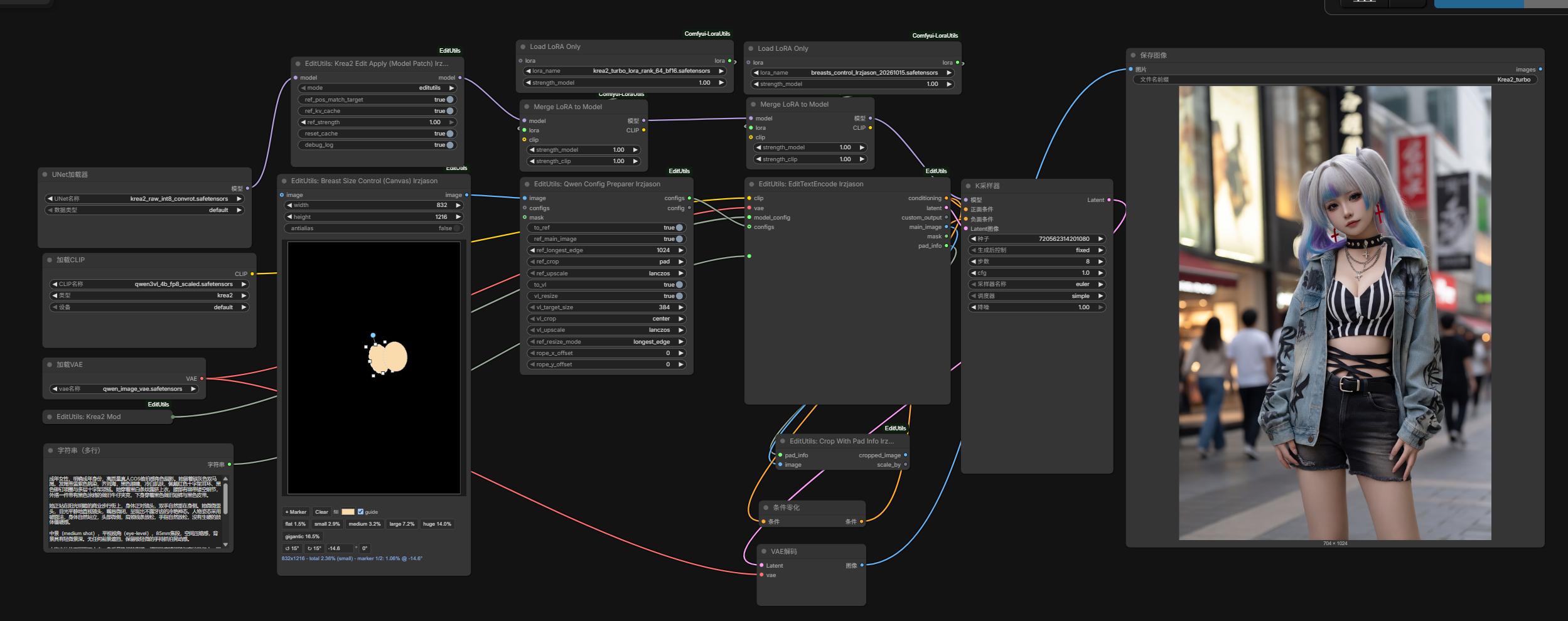
The example graph and its result, produced with k2 breasts size control.json. The canvas in the screenshot reads 832x1216 - total 2.36% (small) - marker 1/2: 1.06% @ -14.6°, i.e. two small, slightly tilted markers.
Nodes:
| Node | Purpose |
|---|---|
| BreastSizeControl_EditUtils | The canvas: draws the _bd condition image (black + #FADBAE markers) that acts as the reference. Marker area = size, position = where, angle = tilt. |
| Krea2ModelConfig_EditUtils | Krea2 model config (model_name="qwen" route, vae_unit=8, built-in instruction). |
| QwenConfigPreparer_EditUtils | Wraps the condition image as the reference: to_ref, ref_main_image, ref_longest_edge=1024, ref_crop=pad, to_vl, vl_target_size=384, ref_resize_mode=longest_edge. |
| EditTextEncode_EditUtils | Encodes prompt + reference into the conditioning, the sampling latent and pad_info. |
| Krea2EditApply_EditUtils | Patches the model so the reference latent is injected (ref_pos_match_target, ref_kv_cache=1, ref_strength=1.0). |
Wiring (see k2 breasts size control.json):
UNETLoader (krea2_raw_int8_convrot) ──► Krea2EditApply ──► [Merge LoRA: krea2_turbo] ──► [Merge LoRA: breasts_control] ──► KSampler ──► VAEDecode ──► SaveImage
CLIPLoader (qwen3vl_4b_fp8_scaled, type krea2) ─┐
VAELoader  (qwen_image_vae) ────────────────────┤
PrimitiveStringMultiline (scene prompt) ────────┼──► EditTextEncode_EditUtils ──► positive + latent ──► KSampler
Krea2ModelConfig ───────────────────────────────┤                                    │
BreastSizeControl ──► QwenConfigPreparer ───────┘                                    └──► ConditioningZeroOut ──► negative
Requirements and settings:
breasts_control_lrzjason_20261015.safetensors— the control LoRA (strength 1.0), merged on top ofkrea2_turbo_lora_rank_64_bf16.- The graph merges both LoRAs with Comfyui-LoraUtils'
LoadLoraOnly → MergeLoraToModel(Comfyui-LoraUtils); any equivalent "load LoRA + patch model" pair works. - Model files:
krea2_raw_int8_convrot.safetensors(UNET),qwen3vl_4b_fp8_scaled.safetensors(CLIP, typekrea2),qwen_image_vae.safetensors(VAE). - Sampler in the example:
euler / simple, 8 steps, CFG 1.0, denoise 1.0, fixed seed (the turbo LoRA allows the short schedule). - The prompt in the example describes only the scene (subject, clothing, framing, light) and contains no size wording — keep it that way, or the text will compete with the reference image for the size. This is the caption rule from the dataset side: scene in the text, geometry in the condition image.
- The workflow graph also carries an unused
CropWithPadInfo_EditUtilsand aGetImageSizenode; neither is required for the save path.
Keeping the marker in-distribution: the LoRA was trained on this exact marker style, so keep the background black, the fill at #FADBAE (or a similar bright colour), and one or two ellipses whose area is the size. The canvas preset buttons set the total marker area to the measured per-class medians — flat 1.49% / small 2.94% / medium 3.22% / large 7.18% / huge 13.95% / gigantic 16.50% of the frame — which is the safest way to land on a class the LoRA has actually seen. The condition image is forced to the target's pixel size when you connect an image.
⚠️ Note: this control LoRA and the Krea2 edit path are still in development — results depend on the LoRA checkpoint and the reference strength.
Qwen-Image 2.1
EditUtils supports Qwen-Image 2.1 editing with up to 3 references in the simple path (unlimited via the config chain). Qwen-Image 2.1 works differently from Qwen-Image 1.0, and the qwen21 nodes handle the differences for you:
- Qwen3-VL text encoder: prompt and reference images are encoded together; each reference latent is spliced into the text sequence at the encoder's vision slots (
image_slots) — noPicture n:prompt prefix needed. - New VAE: 64-channel latents with 16x spatial downscale (RGBA-aware). References are aligned to 16-pixel multiples, matching the VAE downscale.
- Unified reference resize: the vision tower and the VAE consume the same resized image (alpha composited over white for the encoder, full RGBA for the VAE), so there is no separate
vl_target_sizepipeline.
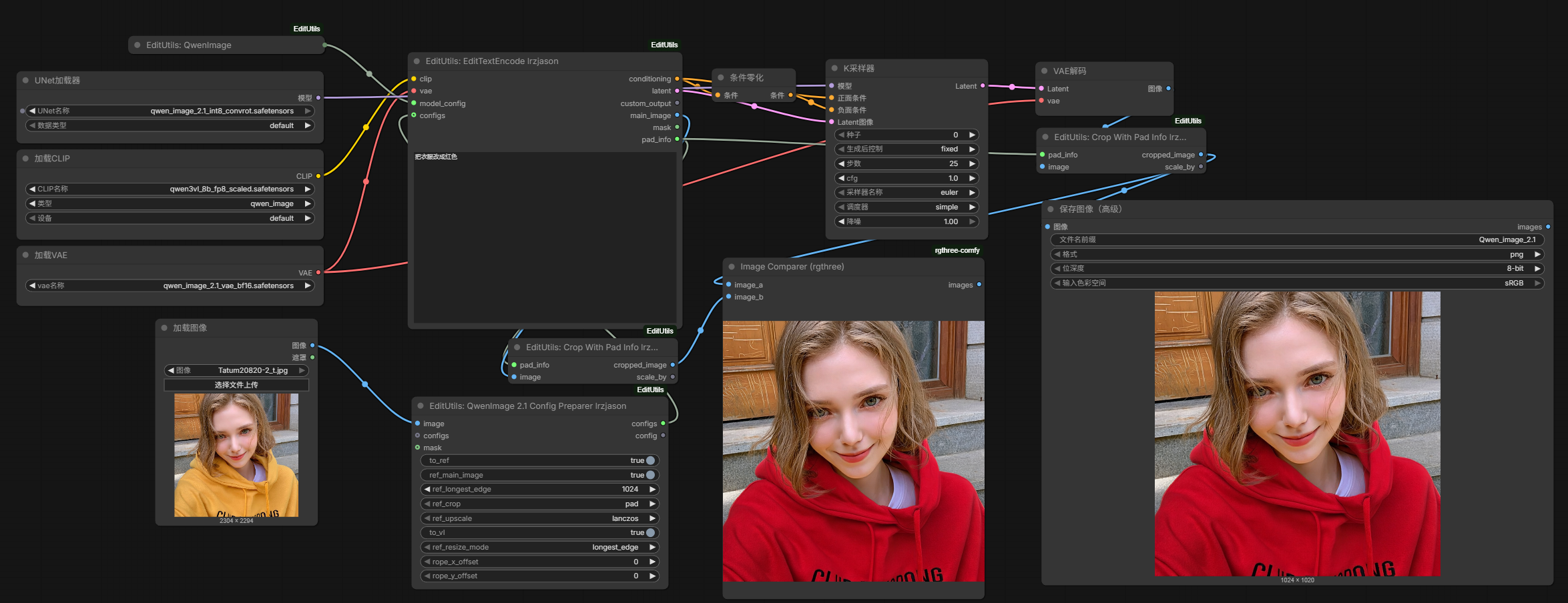
Result produced with edit utils qwen image 2.1 example.json.
Nodes:
| Node | Purpose |
|---|---|
| QwenImage21ModelConfig_EditUtils | Model config (qwen_image21 route, vae_unit=16). Empty instruction = built-in T2I template; custom instruction = custom system prompt. |
| QwenImage21ConfigPreparer_EditUtils | Per-image config: to_ref, ref_main_image, ref_longest_edge (16-aligned), ref_crop, mask, rope_x_offset / rope_y_offset. Chain multiple nodes for multiple references. |
| QwenImage21EditTextEncode_EditUtils | One-node simple path (image1–3), same outputs as EditTextEncode_EditUtils. |
| QwenImage21EditApply_EditUtils | Optional model patch enabling per-reference ROPE offsets (regional editing). Connect only the model wire — offsets flow through the conditioning chain. |
Wiring (see edit utils qwen image 2.1 example.json):
UNETLoader (qwen_image_2.1) ──► [QwenImage21EditApply] ──► KSampler ──► VAEDecode ──► CropWithPadInfo ──► SaveImage
CLIPLoader  (type qwen_image) ─┐
VAELoader   (qwen_image_2.1_vae) ┤
LoadImage ──► QwenImage21ConfigPreparer ─┐
QwenImage21ModelConfig ──────────────────┴──► EditTextEncode_EditUtils ──► KSampler
QwenImage21EditApply_EditUtils is optional — add it between UNETLoader and KSampler only when you want rope_x_offset / rope_y_offset regional control.
Notes:
- Requires a ComfyUI build with upstream Qwen-Image 2.1 support (the
qwen_image21model); on older builds the model won't load and the EditApply node passes the model through unchanged. - The main image's padded latent is the sampling start latent; use
pad_info → CropWithPadInfo_EditUtilsafter decode to get the unpadded result (same flow as the Qwen 1.0 path). - The 2.1 VAE is RGBA-aware, so generations can carry an alpha channel. The raw alpha usually has faint low-value noise scattered over the transparent region — pipe
VAEDecode → AlphaNoiseFilter_EditUtilsto clean it into a proper cutout plus a mask. rope_x_offset / rope_y_offsetonly take effect withQwenImage21EditApply_EditUtilsin the graph; with all offsets at zero the model runs its native path (prefix KV cache unaffected).- Keep
to_vlenabled on the Config Preparer — disabling it splices the reference after the text sequence, which is an untrained path. - Suggested starting point (as in the example workflow): Euler / Simple, 25 steps, CFG 1.0.
Workflows
Example workflows are available in the workflows directory:
- flux3 editutils example.json - FLUX.3 Klein editing workflow using the bounding-box element table.
LoadImage → Flux3KleinConfigPreparer_EditUtils → Flux3KleinBBox_EditUtils → EditTextEncode_EditUtils ← Flux3KleinModelConfig_EditUtils → KSampler → VAEDecode → SaveImage, withConditioningZeroOutfeeding the negative. The BBox node takes the preparer'sconfig(itsconfigsinput is left unconnected), so the decorated config is appended to the chain.- Models:
flux3_image_klein_sd_int8_convrot.safetensors(UNET),qwen3vl_4b_fp8_scaled.safetensors(CLIP, typeflux3),flux2-vae.safetensors(VAE). - Sampler in the example:
euler / simple, 8 steps, CFG 1.0, fixed seed (the distilled flow-map checkpoint samples without guidance; 4–16 steps is the range). NoFlux3KleinEditApply_EditUtils— FLUX.3 consumesreference_latentsnatively. - Requires a ComfyUI build with FLUX.3 support.
- Models:
- edit utils qwen image 2.1 example.json - Qwen-Image 2.1 editing workflow (single reference). Loads the model with
UNETLoader+CLIPLoader(typeqwen_image) +VAELoader, then wiresLoadImage → QwenImage21ConfigPreparer_EditUtils → EditTextEncode_EditUtils ← QwenImage21ModelConfig_EditUtils → KSampler → VAEDecode → CropWithPadInfo_EditUtilsto undo the main-image padding.- The reference latent is spliced into the text sequence at the vision slots (
image_slots); the 2.1 VAE is 64-channel with 16x spatial downscale, so references align to 16-pixel multiples. rope_x_offset / rope_y_offseton the Config Preparer shift a reference's position on the canvas when the model is patched withQwenImage21EditApply_EditUtils(regional editing) — the example workflow does not include that node.- Sampler settings in the example:
euler / simple, 25 steps, CFG 1.0. Requires ComfyUI with upstream Qwen-Image 2.1 support.
- The reference latent is spliced into the text sequence at the vision slots (
- Simple Krea2 Depth.json - Simple Krea2 editing workflow with a depth LoRA. Wires
LoadImage → Krea2ModelConfig_EditUtils → EditTextEncode_EditUtils → Krea2EditApply_EditUtils → KSampler, loading the model viaUNETLoader + LoraLoaderModelOnly— the reference latent flows through the conditioning chain automatically.- Online version on RunningHub: https://www.runninghub.ai/post/2082077636234313729/?inviteCode=rh-v1279
- Depth LoRA download: Krea2 Depth LoRA (Civitai)
- k2 breasts size control.json - Krea2 breast-size control:
BreastSizeControl_EditUtilspaints the_bdreference on its canvas,QwenConfigPreparer_EditUtilswraps it as the reference,Krea2EditApply_EditUtilsinjects it, and two merged LoRAs (krea2_turbo+breasts_control_lrzjason_20261015) drive the sampling.euler / simple, 8 steps, CFG 1.0. Needs Comfyui-LoraUtils for the LoRA merge nodes. This file is an API-format export (the other two are UI graphs) — current ComfyUI frontends load API JSON through the normal Load / drag-and-drop path, and it is the same graph shown in the screenshot above.
⚠️ Note: Krea2 edit support is still in development — node interfaces and behavior may change.
Capabilities
- EditUtils supports direct high-resolution editing without pixel shifts, up to 2xxx ~ 3xxx resolution
- Multiple images input support:
- Simple workflow: up to 3 images
- Single and multiple workflows: unlimited images (connect multiple configs)
Pad Edge Control
When ref_crop is set to pad, the image is padded to a multiple of the VAE unit size. How that padding looks is now configurable per image through pad_mode, pad_color, pad_color_rgb and pad_noise on the config preparer nodes (QwenConfigPreparer_EditUtils / QwenImage21ConfigPreparer_EditUtils / Flux2KleinConfigPreparer_EditUtils / Flux3KleinConfigPreparer_EditUtils), the ConfigJsonParser_EditUtils JSON, or the standalone LongestEdgeImageProcess_EditUtils node:
- pad_mode (default:
color):color: solid fill usingpad_coloredge: replicate the outermost pixel row/columnmirror: reflect the content at the boundaryborder_mean: fill each side with the mean of its nearest 8 pixels
- pad_color (default:
whitefor Qwen and Qwen-Image 2.1,blackfor Flux2Klein / Flux3Klein and standaloneLongestEdgeImageProcess_EditUtils): dropdown withred,green,blue,white,black,custom. - pad_color_rgb (default:
-): optional override, a 6-digit hex color,#optional (e.g.FF0000or#FF0000). When it holds a valid hex it overridespad_color, whatever the dropdown says. Anything else (-, wrong length, non-hex characters, plain numbers,r,g,b) is invalid and has no effect, so the dropdown value applies.customcarries no color of its own, so with an invalid hex it falls back to the model default. - pad_noise (default:
0.0): Gaussian jitter (std) added to the padding area only — the image content is never modified. 0.02-0.05 is recommended with solid colors.
Why this exists: Qwen models (1.0 and Image 2.1) were trained with black pads, so black padding tends to get amplified into large black edges during generation. White is therefore the default for both Qwen paths. If a solid color is still not enough, border_mean or mirror are content-adaptive alternatives, and any mode benefits from a small pad_noise.
The mask/semantics of the padded area are unchanged (it is always masked out), and CropWithPadInfo_EditUtils still crops the padding away correctly.
Node Categories
Documentation:
Key Features
- Multi-Model Support: Works with Qwen, Qwen-Image 2.1, Flux2Klein, Flux3Klein, Boogu and Krea2 models for versatile image editing
- Flexible Configuration: Per-image configuration options for reference and VL processing
- Pad Edge Control: Configurable pad mode/color/noise (white edge default for Qwen 1.0 and Qwen-Image 2.1) to avoid black edge amplification
- Unified Interface: Single node EditTextEncode_EditUtils works with multiple models through configuration nodes
- Advanced Processing: Supports complex image editing workflows with multiple reference images
- Comprehensive Output: Detailed output dictionary with all processing intermediates
- Modular Design: Separated configuration, processing, and extraction nodes for maximum flexibility
New Nodes
LongestEdgeImageProcess_EditUtils
A utility node that resizes and pads an image based on a target longest edge, using the same processing logic as EditTextEncode. Useful when you need the image preprocessing without CLIP/VAE encoding.
Inputs:
image: Input imageref_longest_edge: Target longest edge size (default: 1024)ref_crop: Crop method - "pad", "center", or "disabled" (default: "pad")ref_upscale: Upscale method (default: "lanczos")vae_unit: VAE unit size for padding alignment (default: 8)pad_mode(optional): Padding fill mode - "color", "edge", "mirror", or "border_mean" (default: "color")pad_color(optional): Dropdown - "red", "green", "blue", "white", "black", or "custom" (default: "black"; use "white" for Qwen models)pad_color_rgb(optional): Override as 6-digit hex, "#" optional (e.g. "FF0000" or "#FF0000"); overridespad_colorwhen valid (default: "-" = no effect)pad_noise(optional): Gaussian jitter (std) added to the padding only (default: 0.0, try 0.02-0.05)
Outputs:
processed_image: The resized/padded imagepad_info: Padding information dictionaryscale_by: The scale factor
Use Case: Pre-process images with longest edge scaling before passing to other nodes, or reuse the same image processing pipeline outside of the encoding workflow.
ClearRefLatents_EditUtils
A utility node that strips reference latents from a conditioning, outputting a clean conditioning without any ref latents attached.
Inputs:
conditioning: Conditioning with reference latents
Outputs:
conditioning: The same conditioning with reference latents cleared
Use Case: Remove reference latents from conditioning when you want to use the text encoding without image references.
SaveCondition_EditUtils
Saves a conditioning tensor to a .ckpt file in the models/conditions directory.
Inputs:
condition: The conditioning to savefilename: Output filename (default: "condition_tensor")
Use Case: Persist conditioning tensors for later reuse without re-encoding.
LoadCondition_EditUtils
Loads a conditioning tensor from a .ckpt file in the models/conditions directory.
Inputs:
filename: Select from available.ckptfiles in the conditions directory
Outputs:
conditioning: The loaded conditioning tensor
Use Case: Reuse previously saved conditioning tensors in new workflows.
LoadConditionFromLoras_EditUtils
Lists files from the loras directory and attempts to load matching .ckpt files from the conditions directory.
Inputs:
filename: Select from available lora files
Outputs:
conditioning: The loaded conditioning tensor
DiffMask_EditUtils
A utility node that generates a mask highlighting the differences between two images. Useful for editing tasks where you want to identify changed regions.
Inputs:
image1: First imageimage2: Second imagethreshold: Threshold to ignore minor differences (0.0-1.0, default: 0.05)
Output:
mask: A mask highlighting differences between the two images
Use Case: Compare original and edited images to create a mask for selective editing or inpainting.
AlphaNoiseFilter_EditUtils
Cleans the alpha channel of a Qwen-Image 2.1 alpha generation. Qwen-Image 2.1 can output images with an alpha channel, but the raw result usually carries faint, low-value alpha noise scattered across the transparent region — barely visible on its own, but it breaks compositing, cutouts and mask-driven editing. This node removes that noise and outputs a clean RGBA image together with its mask.
Inputs:
image: Input image (RGBA, e.g. theVAEDecodeoutput of the Qwen-Image 2.1 VAE)mask: (optional) Used as the alpha when the input image has no alpha channel (RGB input)alpha_threshold: Alpha below this is treated as low-value noise and clipped to 0 (0.0-1.0, default: 0.10)min_area: Drop isolated alpha islands smaller than this many pixels (0-65536, default: 100)feather: Width in pixels of the gradient band created inside the edge — fully transparent at the matte boundary, rising smoothly to fully opaquefeatherpx inwards (0-32, default: 2.0)invert_mask: Output1 - alphaas the mask — white = transparent, the ComfyUI inpaint convention (default: False)
Outputs:
image: The cleaned RGBA imagemask: The alpha as a mask (white = opaque by default)
Pipeline: low-value clip → small-island removal → inward feather. Only the alpha channel is modified — the output RGB is byte-identical to the input.
Feathering only works inwards — it never grows the matte. The gradient band lies entirely inside the region the generator already marked as subject, so feathering can never make an originally-transparent pixel visible. Measured on alpha noise.png: at every feather width from 0 to 16 the number of pixels with alpha > 0 outside the matte is 0, and alpha never exceeds the original matte anywhere. The gradient starts fully transparent on the boundary and rises monotonically inwards:
| feather | 0 px | 1 px | 2 px | 3 px | 4 px | 5 px | 6 px | 8 px | |---|---|---|---|---|---|---|---|---| | 0 (raw matte) | 0.449 | 0.877 | 0.957 | 0.977 | 0.986 | 0.992 | 0.995 | 0.998 | | 2 | 0.020 | 0.493 | 0.951 | — | — | — | — | — | | 4 | 0.005 | 0.160 | 0.475 | 0.823 | 0.986 | — | — | — | | 8 | 0.001 | 0.044 | 0.149 | 0.314 | 0.510 | 0.686 | 0.842 | 0.997 |
Why not a symmetric blur? A symmetric Gaussian pushes the gradient band outside the matte, and those pixels still carry the generator's raw background colour (a purple (152,50,196) wash for the Qwen-Image 2.1 VAE). At feather=4 a symmetric blur lights up 13,758 pixels that were alpha=0, whose mean RGB is (92,47,102) — a purple halo on dark backgrounds. Inward feathering keeps the halo at exactly 0.000.
What it costs: alpha inside the band is reduced, so the silhouette contracts (feather=2 → −2.79%, feather=4 → −5.27%, feather=8 → −10.13%), and thin structures such as fur fade once the band is wider than they are — mean alpha in the 2 px band just inside the edge drops from 0.583 (no feather) to 0.152 at feather=2. That is the unavoidable price of not growing the matte.
Use Case: Turn a Qwen-Image 2.1 alpha generation into a clean cutout/mask: feed VAEDecode → AlphaNoiseFilter, then save the image or drive inpainting/editing nodes with the mask.
BreastSizeControl_EditUtils
Draw a breast-size control image (_bd condition image) directly on the node's canvas: black background plus one or two filled ellipses, #FADBAE fill by default, where the marker's area is the size dial and its position is where the breasts sit. The output follows the exact contract of the existing _bd condition images in E:\images\breasts_size_control — measured on 60 of them: every image carries exactly 2 colours (hard edges, no antialiasing), the marker is an ellipse inscribed in box_px (IoU median 0.988), and the file size equals target_size_px in 60/60.
The canvas is WYSIWYG — the black background and the coloured markers you see are the rendered pixels (the browser's ctx.ellipse and the node's rasterizer share the same inside test). Geometry is stored normalised inside a hidden markers widget, so the drawing survives a resolution change.
Inputs:
width/height: canvas size when no image is connected (default 832x1216)markers: the hidden JSON payload the canvas owns — edit it by drawing, not by handantialias:False(default) reproduces the existing two-colour_bdlook exactly;Truesupersamples the edges 4x4 without changing the areaimage(optional): a target image forces the output to that image's exact pixel size (batch: the first frame decides), which is what the_bdcontract requires
Output:
image: the condition image,(1, H, W, 3)
Canvas tools: drag empty space to create a marker (max two); drag the body to move it; drag the N/S/E/W edge handles to change ry/rx independently (this is how a circle becomes an ellipse, matching the real _bd aspect of ~0.91); drag a corner handle or use the wheel to scale uniformly (stays a circle); Shift + edge drag for uniform; drag the rotation handle above the ellipse to rotate it (↺ 15° / ↻ 15° / a degree box / 0° are there for exact angles); right click to delete; the preset buttons set the measured class areas; the colour picker sets the fill (#FADBAE default); the guide checkbox dims the connected image underneath for placement and never touches the output.
Rotating: the angle is in degrees, positive = clockwise on screen (the same convention as krea2_geom_lab), normalised to (-180, 180]. Rotation only changes the orientation — the area is untouched, so it never disturbs the size class or the presets. The edge/corner handles and hit-testing follow the rotation, so a drag always acts along the ellipse's own axes. A malformed angle falls back to 0 instead of discarding the marker.
Size-class presets (measured medians from the dataset analysis, as total marker area):
| flat | small | medium | large | huge | gigantic | |---|---|---|---|---|---| | 1.49% | 2.94% | 3.22% | 7.18% | 13.95% | 16.50% |
A preset rescales the whole drawing to the class area and keeps the two markers' relative sizes — giving each marker the full class area would double the total whenever two markers are present, which is off-distribution. For an asymmetric pair, drag the edge handles instead.
Use Case: author the reference side of a "change the breast size" edit pair. Feed it a target image for an exactly matching size, set the class with one button, and feed the result to the _bd reference input of your edit pipeline. A complete working example (Krea2 + a trained control LoRA) is in k2 breasts size control.json — see Krea2 Breast Size Control.
Verified: six class areas render within 0.12% of their target; two separated markers are exactly 2x one marker; overlapping markers merge (union, not sum); rotation preserves the area across seven angles and a 90° rotation is exactly equivalent to swapping rx/ry (IoU 1.0000); re-rendering 25 existing condition images from their own sidecars reaches IoU median 0.9866 / min 0.9757 against the real _bd.png pixels — the ceiling of the inscribed-ellipse model itself.
Installation
- Clone or download this repository into your ComfyUI's
custom_nodesdirectory. - Restart ComfyUI.
- The nodes will be available in the "advanced/conditioning" category.
Changelog
ComfyUI-EditUtils vs ComfyUI-QwenEditUtils
ComfyUI-EditUtils is the follow-up version of ComfyUI-QwenEditUtils with the following improvements:
- Multi-model support (Qwen, Qwen-Image 2.1, Flux2Klein, Flux3Klein, Boogu and Krea2)
- Unified node architecture with configuration nodes
- Enhanced flexibility and modularity
- Improved code organization and maintainability
Contact
- Twitter: @Lrzjason
- Email: [email protected]
- QQ Group: 866612947
- Wechatid: fkdeai
- Civitai: xiaozhijason